USER MANUAL EW1411 PANASONIC
Operating Instructions
(Household) Oral Irrigator
Model No. EW1411
natural_image
White electric toothbrush with a black control panel (no visible text or symbols)
| English | 3 | Dansk | 95 | Česky | 183 |
| Deutsch | 17 | Português | 109 | Slovensky | 197 |
| Français | 33 | Norsk | 125 | Magyar | 211 |
| Italiano | 49 | Svenska | 139 | Română | 227 |
| Nederlands | 65 | Suomi | 153 | | |
| Español | 81 | Polski | 167 | | |
Panasonic
Operating Instructions
(Household) Oral Irrigator
Model No. EW1411
Contents
Safety precautions......6
Intended use ......9
Parts identification 9
Charging....10
How to use ....10
After use....13
Cleaning 13
Frequently asked questions......14
Troubleshooting ....14
Battery life....15
Removing the built-in rechargeable battery....15
Specifications ...... 16
Changing the nozzle (Sold separately)... 16
Warning
- Do not immerse the charger in water or wash it with water.
Doing so may cause electric shock or fire due to a short circuit.
• Always unplug the power plug from a household outlet when cleaning the charger.
Failure to do so may cause electric shock or injury.
- The supply cord cannot be replaced. If the cord is damaged, the charger should be scrapped.
Failure to do so may cause an accident or injury.
- Oral irrigators can be used by children aged from 8 years and above and persons with reduced physical, sensory or mental capabilities or lack of experience and knowledge under supervision.
- Oral irrigators shall be used only with cold or warm water, or specific solutions as defined in the manufacturer's instructions.
• Children shall not play with the appliance.
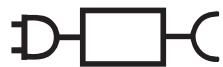
- The following symbol indicates that a specific detachable power supply unit is required for connecting the electrical appliance to the supply mains. The type reference of power supply unit is marked near the symbol.
natural_image
Pure electrical circuit symbol for a D flip-flop without any text or labels
Safety precautions
To reduce the risk of injury, loss of life, electric shock, fire, and damage to property, always observe the following safety precautions.
Explanation of symbols
The following symbols are used to classify and describe the level of hazard, injury, and property damage caused when the denotation is disregarded and improper use is performed.

DANGER
Denotes a potential hazard that will result in serious injury or death.

WARNING
Denotes a potential hazard that could result in serious injury or death.

CAUTION
Denotes a hazard that could result in minor injury or property damage.
The following symbols are used to classify and describe the type of instructions to be observed.

This symbol is used to alert users to a specific operating procedure that must not be performed.

This symbol is used to alert users to a specific operating procedure that must be followed in order to operate the unit safely.

WARNING
▶ Preventing accidents
Do not store within the reach of children or infants. Do not let them use it.

- Doing so may cause an accident or injury due to accidental ingestion of removable parts.
▶ Power supply

Do not connect or disconnect the power plug to a household outlet with a wet hand.
- Doing so may cause electric shock or injury.
Do not immerse the charger in water or wash it with water.
Do not place the charger over or near water filled sink or bathtub.
Do not use when the cord or the power plug is damaged or when the fitting into the household outlet is loose.

Do not damage, modify, forcefully bend, pull, twist, or bundle the cord.
Also, do not place anything heavy on or pinch the cord.
- Doing so may cause electric shock or fire due to a short circuit.

Do not use anything other than the supplied charger. Also, do not charge any other product with the supplied charger.
- Doing so may cause burn or fire due to a short circuit.

WARNING

Do not use in a way exceeding the rating of the household outlet or the wiring.
- Exceeding the rating by connecting too many power plugs to one household outlet may cause fire due to overheating.

Always ensure the appliance is operated on an electric power source matched to the rated voltage indicated on the charger.
Fully insert the power plug.
- Failure to do so may cause fire or electric shock.
▶ In case of an abnormality or malfunction
Immediately stop using and remove the power plug if there is an abnormality or malfunction.
- Failure to do so may cause fire, electric shock, or injury.
- The main unit or charger is deformed or abnormally hot.
• The main unit or charger smells of burning.
- There is abnormal sound during use or charging of the main unit or charger.
- Immediately request inspection or repair at an authorized service centre.

▶ This product

This product has a built-in rechargeable battery. Do not throw into flame or heat.
- Doing so may cause fluid leak, overheating, or explosion.

Do not modify or repair.
- Doing so may cause fire, electric shock, or injury. Contact an authorized service centre for repair (battery change, etc.).

Never disassemble except when disposing of the product.
- Doing so may cause fire, electric shock, or injury.
▶ Cleaning

Always unplug the power plug from a household outlet when cleaning the charger.
- Failure to do so may cause electric shock or injury.

Regularly clean the power plug to prevent dust from accumulating (once every half a year).
- Failure to do so may cause fire due to insulation failure caused by humidity.
Disconnect the power plug and wipe with a dry cloth.

This appliance is not intended for use by persons (including children) with reduced physical, sensory or mental capabilities, or lack of experience and knowledge, unless they have been given supervision or instruction concerning use of the appliance by a person responsible for their safety. Children should be supervised to ensure that they do not play with the appliance.
- Failure to do so may cause an accident or injury.

The supply cord cannot be replaced. If the cord is damaged, the charger should be scrapped.
- Failure to do so may cause an accident or injury.

CAUTION
▶ Preventing damage to teeth and gums
People who are unable to operate should not use this appliance.

People with weak oral senses should not use this appliance.
- Doing so may cause injury or damage to teeth and gums.

People who may have periodontal disease, have teeth being treated, or concerned about symptoms within their mouth should consult a dentist before use.
- Failure to do so may cause injury or damage to teeth and gums.
▶ This product

Never use for a purpose other than oral cleaning.
- Doing so may cause an accident or injury when the stream of water is pointed toward the eyes, nose, ears, or throat.

Do not fill the tank with water warmer than 40 °C.
- Doing so may cause burns.

Do not share nozzle with your family or other people.
- Doing so may cause infection or inflammation.
▶ Note the following precautions

Do not allow metal objects or trash to adhere to the power plug.
- Doing so may cause electric shock or fire due to a short circuit.

Do not drop or subject to shock.
- Doing so may cause injury.

Do not wrap the cord around the charger when storing.
- Doing so may cause the wire in the cord to break with the load, and may cause fire due to a short circuit.

Disconnect the power plug from the household outlet when not using for extended period of time.
- Failure to do so may cause electric shock or fire due to electrical leakage resulting from insulation deterioration.

Disconnect the power plug by holding onto it instead of the cord.
- Failure to do so may cause electric shock or fire due to a short circuit.

After use, always care for and clean the appliance. (See page 13.)
- Failure to do so may cause damage to your health if used without keeping it sanitized due to propagation of mold and bacteria.
▶ Disposal of the rechargeable battery

DANGER
The rechargeable battery is exclusively for use with this appliance. Do not use the battery with other products.
Do not charge the battery after it has been removed from the product.
- Do not throw into fire or apply heat.
- Do not solder, disassemble or modify the battery.
- Do not let the positive and negative terminals of the battery get in contact with each other through metallic objects.
- Do not carry or store the battery together with metallic jewelry such as necklaces and hairpins.
- Never peel off the tube.
- Doing so may cause fluid leak, overheating, or explosion.

WARNING

After removing the rechargeable battery, do not keep it within the reach of children and infants.
- The battery will harm the body if accidentally swallowed. If this happens, consult a physician immediately.
If the battery fluid leaks out, take the following procedures. Do not touch the battery with your bare hands.

- The battery fluid may cause blindness if it comes in contact with your eyes.
Do not rub your eyes. Wash immediately with clean water and consult a physician.
- The battery fluid may cause inflammation or injury if it comes in contact with the skin or clothes.
Wash it off thoroughly with clean water and consult a physician.
Intended use
- Do not put salt, mouthwash or other chemicals into the water tank. Doing so may cause malfunction.
- Do not dry the main unit with a dryer or a fan heater. Doing so may cause malfunction or deformation of the parts.
- Do not wipe with thinners, benzine, alcohol etc. Doing so may cause malfunction, cracking or discoloration of the parts.
- Store the appliance in a place with low humidity after use. Leaving the appliance in a bathroom may cause malfunction.
Parts identification
A
B
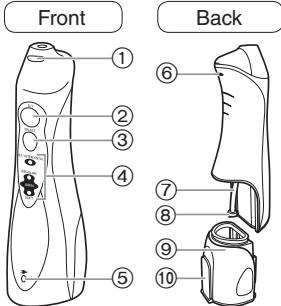
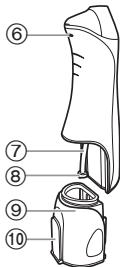
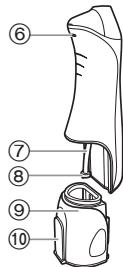
A Main unit
① Nozzle release button
② Power switch [0/1]
③ Mode switch
④ Mode indicator
⑤ Charging indicator
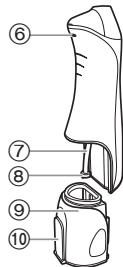
⑥ Ventilation hole
⑦ Suction hose
⑧ Filter
⑨ Water tank
⑩ Water tank cap
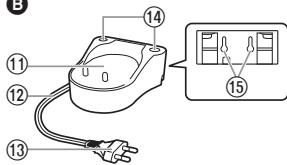
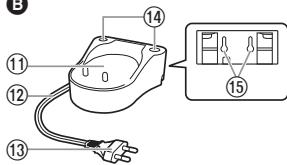
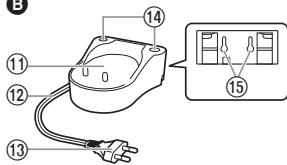
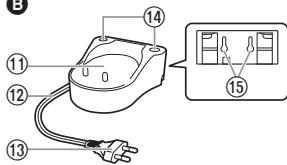
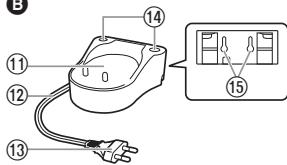
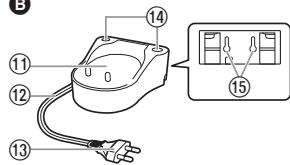
B Charger (RE8-47/RE8-53)
(The shape of the power plug differs depending on the area.)
©
D

⑪ Charging section
⑫ Cord
⑬ Power plug
⑭ Nozzle stands
⑮ Screw holes for wall mounting The charger can be mounted on a wall using two wood screws.
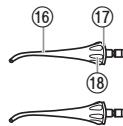
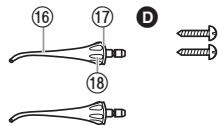
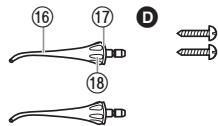
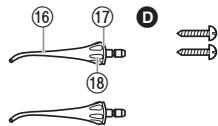
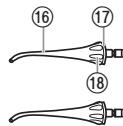
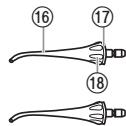
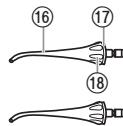
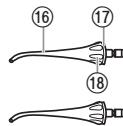
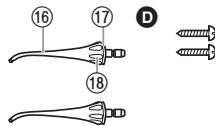
© Nozzle (x2)
⑯ Nozzle
⑰ Identification ring
⑱ Nozzle handle
Accessories
D 2 screws
Note
There may be moisture inside the main unit (water tank and suction hose) left from the distilled water used for product testing.
Charging
▶ On the bathroom countertop or a shelf
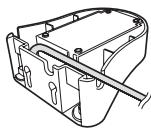
- Place the cord in the right, left or centre cord guide, depending on where the charger will be placed.
- Place the charger on a secure, level surface.
- Plug in the power plug.
natural_image
Technical line drawing of a mechanical housing or enclosure with internal components and mounting holes (no text or symbols)
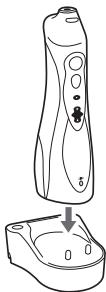
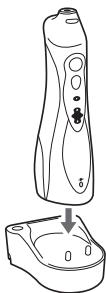
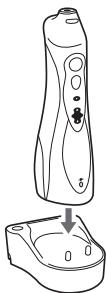
1 Insert main unit so it stands upright in the charging section.
The charging indicator will light up.
- Be sure to place the main unit upright. If the main unit is tilted or not in direct contact with the charger, the main unit may not charge properly.
- Charging is completed in about 15 hours.
- The lamp does not go off even when charging ends.
- The main unit will provide an operation time of approximately 15 minutes of use when the battery is fully charged. (The operating duration will become shorter as the batteries get older.)
natural_image
Line drawing of a handheld device with a downward arrow indicating a drop or change in the interior (no text or symbols present)
2 Disconnect the power plug after charging is completed.
- The battery performance will not be affected even if it is charged for more than 15 hours.
Notes
- When using the appliance for the first time or if it has not been used for more than half a year, the charging indicator may not light up for several minutes after charging starts or the operating time may become shorter. In such cases, charge the battery for 23 hours or more.
- Recommended ambient temperature for charging is 0 – 35 °C. Battery performance may decrease outside of the recommended temperature.
How to use
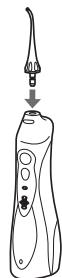
1 Attach the nozzle firmly onto the main unit.
natural_image
Line drawing of a dental instrument with a pointed tip and base, showing a downward arrow indicating motion (no text or symbols)
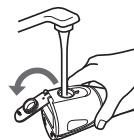
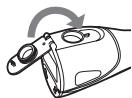
2 Open the water tank cap, hold the main unit so it is level, and fill the tank with water.
natural_image
Illustration of a hand using a tool to lift a mechanical component, showing rotational motion (no text or symbols)
• Always use new tap water or lukewarm water.
- If the water feels cold, use lukewarm water with a temperature of 40^ or less.
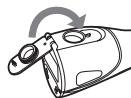
3 Close the water tank cap, making sure it locks in place.
4 Press the mode switch and select the desired water jet mode.
- The mode indicator will glow the previously selected mode. If the appliance is not used for more than 30 days, or after the appliance has been fully charged from its fully discharged state, the mode is initialized to AIR IN (SOFT). (When the battery is drained, the mode will be reset but this is not a fault.)
- If you want to use a different mode, press the mode switch until it changes to the desired setting. Pressing the mode switch will change the mode from AIR IN (SOFT) to AIR IN (REGULAR) to JET to INTERDENTAL.
| Mode | Description |
| JET / INTERDENTALREGULARAIRINSOFT | INTERDENTAL mode (indicator blinks)A fully filled water tank provides approximately 2 minutes of use.This mode is for concentrated care of the zones between the teeth with intermittent water flow. |
| JET / INTERDENTALREGULARAIRINSOFT | JET mode (indicator glows)A fully filled water tank provides approximately 35 seconds of use.This mode is for concentrated care of the zones between the teeth with strong water flow. |
| JET / INTERDENTALREGULARAIRINSOFT | AIR IN (REGULAR) modeThis mode is for periodontal pocket cleaning and gum care. |
| JET / INTERDENTALREGULARAIRINSOFT | AIR IN (SOFT) modeThis mode is for gently massaging the gums. |
Notes
- When you use the appliance for the first time, press the power switch to turn the appliance on and test each of the water jet modes with the tank filled with water.
- The appliance may not operate in an ambient temperature approximately 5 °C or lower.
- Do not hold the tip of the nozzle firmly against the teeth or gums.
- Since plaque adhering to the surface of teeth cannot be removed only with water flow, brushing is always necessary. It is recommended to clean inside your mouth with water flow after brushing your teeth.
- Do not operate the main unit when empty other than when pouring out any remaining water after use. Operating the main unit without water may result in a malfunction.
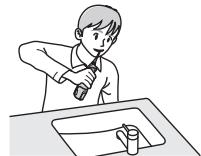
5 Place the nozzle in your mouth and close your mouth gently before pressing the power switch.
- To use, place your face over a washbasin, and with the main unit upright and the nozzle at the top, raise your elbow.
- Pressing the mode switch during use will change the mode.
- If the nozzle is inclined too much, water will come out of the ventilation hole instead of the nozzle. (The ventilation hole in the rear of the main unit allows for easier water suction of the hose.)
natural_image
Illustration of a person using a tool to clean or prepare a surface (no text or symbols)
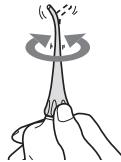
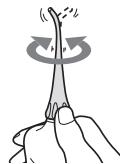
Turn the nozzle handle to adjust the direction of the water flow.
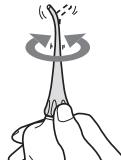
natural_image
Illustration of a hand holding a plant stem with a circular arrow indicating rotation or force (no text or symbols)
6 After use, press the power switch to turn off the main unit.
- Stop operation with the nozzle still in the mouth to prevent water from splashing.
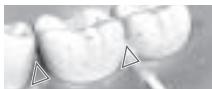
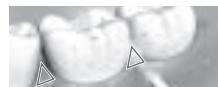
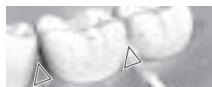
▶ Cleaning the space between the teeth
(To clean with one filling of the water tank)
In the INTERDENTAL mode
- Direct the water flow onto the zone between the teeth.
- Move to the next space between the teeth while the water flow is paused.
- Direct from the front and rear sides of the teeth.
- A fully filled water tank provides approximately 2 minutes of use.
natural_image
Close-up of dental crowns with triangular markers (no text or symbols visible)
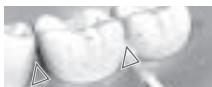
(To clean with plenty of water) In the JET mode
- Direct the water flow onto the zone between the teeth.
- Direct from the front and rear sides of the teeth.
- A fully filled water tank provides approximately 35 seconds of use.
natural_image
Close-up of dental crowns with triangular markers (no text or symbols visible)
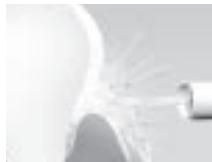
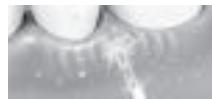
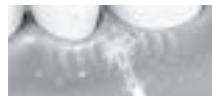
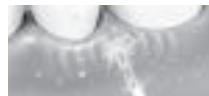
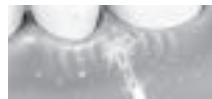
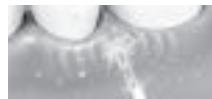
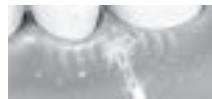
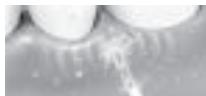
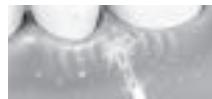
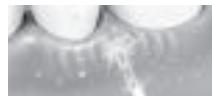
▶ Periodontal pocket cleaning
In the AIR IN (REGULAR) mode
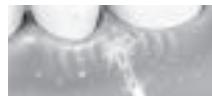
- Aim the water flow at the space between the teeth and gum.
- Slowly shift the water flow along the gum.
- Clean the front and back of the teeth and behind the molars as well.
- Clean the areas of concern in the gum in the AIR IN (SOFT) mode.
* Do not clean the periodontal pocket in JET mode, since the strength of water flow is too strong.
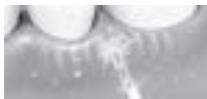
▶ Gum care
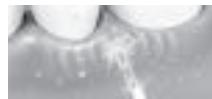
In the AIR IN (REGULAR) mode
- Stimulate the gum.
- Gently stimulate the areas of concern in the gum in the AIR IN (SOFT) mode.
natural_image
Close-up of a white, abstract object with radiating lines, possibly a lens or optical component (no visible text or symbols)
natural_image
Close-up of a tooth with visible teeth and surrounding bone structure (no text or symbols)
After use
- Open the water tank cap and pour out the water.
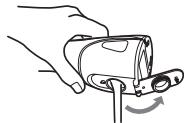
natural_image
Illustration of a hand holding a mechanical component with a curved arrow indicating rotation (no text or symbols)
- Turn on the power switch and drain out the water.
- Operate until no more water appears and then turn off the power switch.
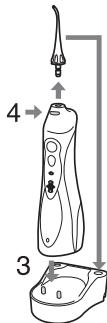
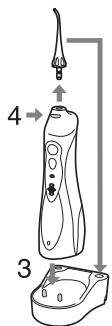
-
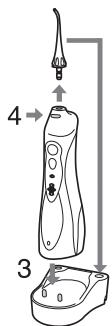
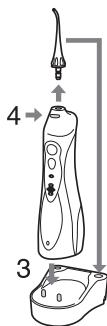
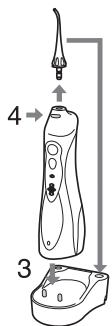
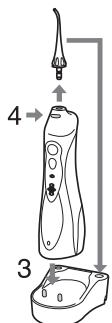
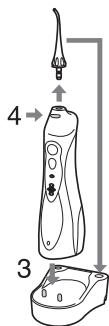
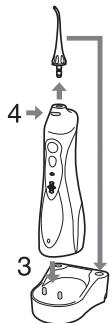
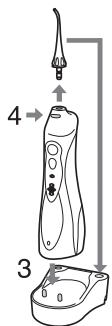
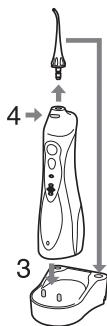
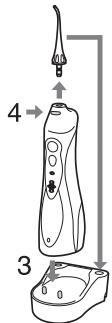
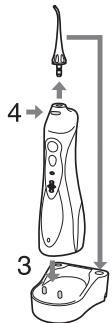
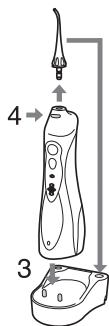
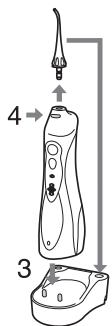
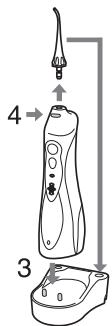
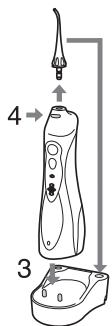
Stand the main unit in the charger.
-
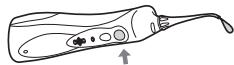
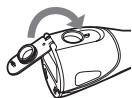
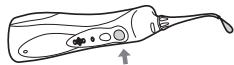
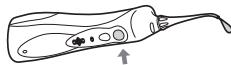
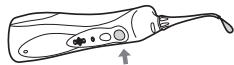
While pressing the nozzle release button, remove the nozzle from the main unit and place it on the nozzle stand.
natural_image
Simple line drawing of a biological structure resembling a larva or larva with internal organs and a tail (no text or symbols)
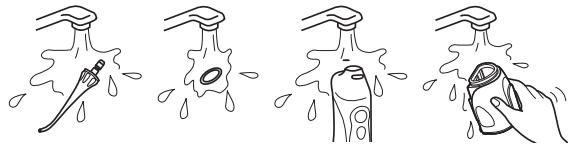
Cleaning
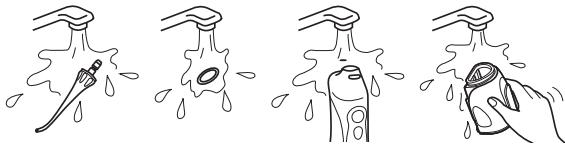
- Pull out the water tank downwards.
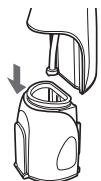
natural_image
Line drawing of a mechanical device with an arrow indicating a downward motion (no text or symbols)
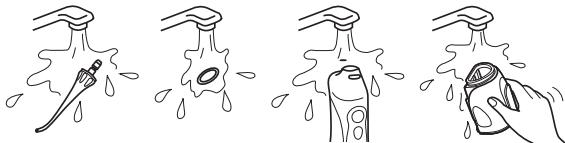
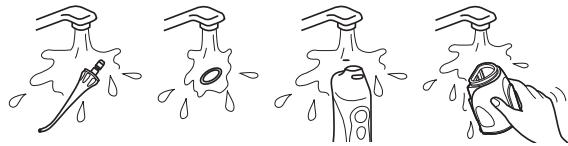
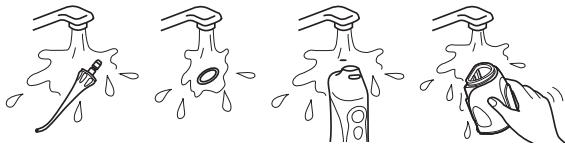
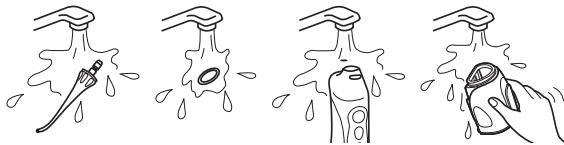
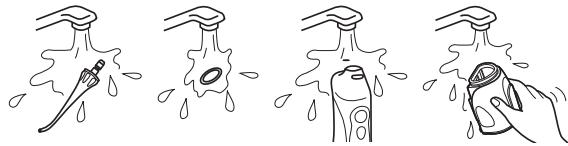
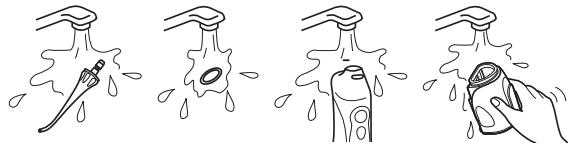
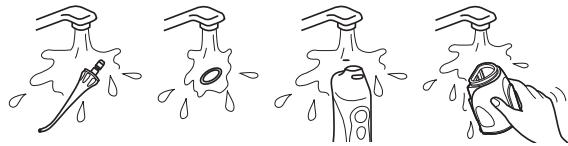
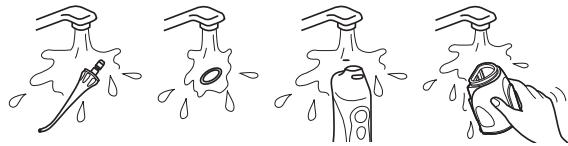
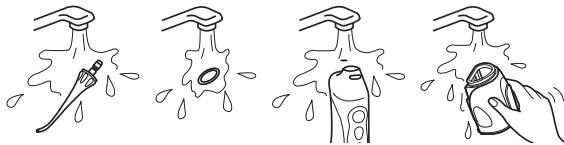
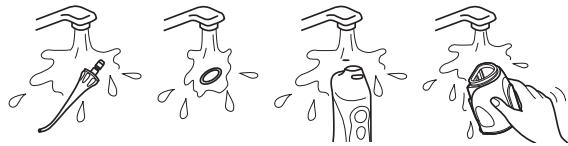
- Clean with water.
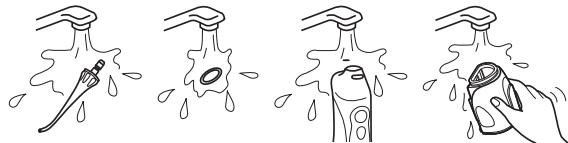
natural_image
Four-step illustration showing a hand holding a water bottle, with droplets indicating liquid or residue (no text or symbols)
- Remove the identification ring and clean with water.
- Do not wash with hot water exceeding 50^ .
- If using a detergent, use one suitable for dishwashing.
Rinse well with water to ensure no detergent remains after cleaning.
- Wipe away moisture with a towel and leave to dry in a well-ventilated area.
Scrub the filter at the tip of the suction hose lightly with a soft brush.
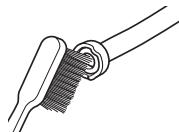
natural_image
Line drawing of a tool interacting with a curved tool (no text or symbols)
- Wipe away the water with a towel etc. and dry.
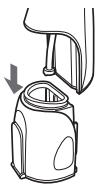
- Align and slide the water tank along the groove and install it securely.
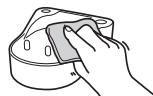
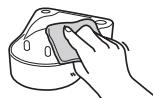
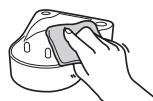
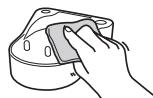
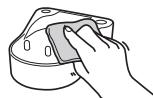
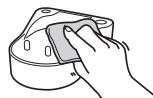
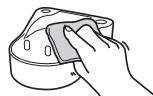
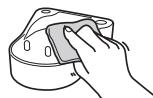
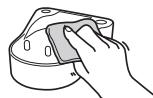
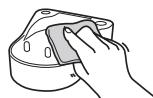
Use a cloth to wipe away the stains on the charger.
- Never use thinners, benzine, or alcohol since it may cause malfunction or cracking/discoloration of the parts.
- Do not clean the charger with water.
- About once every six months wipe the prongs of the power plug with a dry cloth.
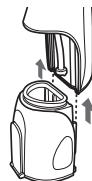
natural_image
Diagram of a device with arrows indicating motion or assembly (no text or symbols)
natural_image
Hand holding a small object over a cylindrical container (no text or symbols visible)
Frequently asked questions
Question
Will the battery be exhausted after a long period of disuse?
Can the battery be charged before every use?
Answer
When the appliance is not used for 6 months or more, the battery will weaken (leak battery fluid, etc.). Fully charge the battery once every 6 months.
▶ Yes, but it is recommended that you charge the battery when it is empty. The life of the battery will vary depending upon usage and storage conditions.
Troubleshooting
Problem
The appliance does not operate.
The appliance can be used only for several minutes, even if it is charged.
Water pressure is low.
Water does not come out.
Possible cause
You have just purchased the product or it has not been used for more than 6 months.
The charging time is short.
The main unit is not standing upright on the charger. (See page 10.)
▶ Battery life is over (approx. 3 years).
The nozzle is clogged.
▶ Mouth of the nozzle is squashed.
▶ Filter is clogged.
The main unit is tilted too much while in use.
Action
Charge the unit for at least 23 hours. (See page 10.)
▶
▶ Stand the main unit upright so that its base contacts the charging section of the charger.
The battery has reached the end of its life. (See page 15.)
▶ Replace the nozzle.
▶ Clean filter. (See page 13.)
▶ Use with the main unit in a vertical state. (See page 11.)
If the problems still cannot be solved, contact the store where you purchased the unit or a service centre authorized by Panasonic for repair.
Battery life
The battery life is about 3 years when charged about once a week (when used by one person).
If the operating time is significantly shorter even after a full charge, the battery has reached the end of its life. (The operating life of the battery may differ depending on usage or storage conditions) Have the battery replaced by an authorized service centre.
Removing the built-in rechargeable battery
Remove the built-in rechargeable battery before disposing the appliance.
Please make sure that the battery is disposed of at an officially designated location if there is one.
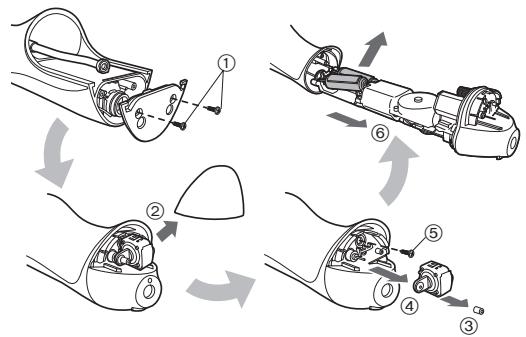
This figure must only be used when disposing the appliance, and must not be used to repair it. If you dismantle the appliance yourself, it will no longer be waterproof, which may cause it to malfunction.
- Remove the appliance from the charger when removing the battery.
- Press the power switch to turn on the power and then keep the power on until the battery is completely discharged.
- Perform steps ① to ⑥ and lift the battery, and then remove it.
- Take care not to short circuit the positive and negative terminals of the removed battery, and insulate the terminals by applying tape to them.
flowchart
graph TD
    A["Component ①"] --> B["Assembly Step ②"]
    B --> C["Assembly Step ③"]
    C --> D["Assembly Step ④"]
    D --> E["Assembly Step ⑤"]
    E --> F["Assembly Step ⑥"]
For environmental protection and recycling of materials
This appliance contains a Nickel-Metal Hydride battery.
Please make sure that the battery is disposed of at an officially assigned location, if there is one in your country.
Specifications
| Power source | See the name plate on the product (Automatic voltage conversion) |
| Charging time | Approx. 15 hours |
| Power consumption | Approx. 1 W |
| Pump frequency | 1 400 pulses/minute* |
| Water pressure | INTERDENTAL: Approx. 590 kPa (approx. 6.0 kgf/cm2) JET: Approx. 590 kPa (approx. 6.0 kgf/cm2) AIR IN (REGULAR): Approx. 390 kPa (approx. 4.0 kgf/cm2) AIR IN (SOFT): Approx. 200 kPa (approx. 2.0 kgf/cm2) |
| Operating time | Approx. 15 minutes*, approx. 60 minutes** (at 20 °C when fully charged) |
| Tank volume | Approx. 130 mL (approx. 35 seconds*, approx. 120 seconds**) |
| Dimensions | Main unit: 197 (H) x 59 (W) x 75 (D) mm (Not including nozzle) Charger: 40 (H) x 93 (W) x 98 (D) mm |
| Mass | Main unit: Approx. 305 g (Including nozzle) Charger: Approx. 180 g |
| Airborne Acoustical Noise | 65 (dB (A) re 1 pW) |
* When using AIR IN (REGULAR) mode
** When using INTERDENTAL mode
This product is intended for household use only.
Changing the nozzle (Sold separately)
- If the tip of nozzle gets deformed, please replace with a new nozzle.
- The nozzle is a consumable. The nozzle should be replaced with a new one every 6 months or so due to hygiene reasons, even if its shape is unchanged.
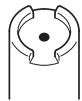
New nozzle (tip)
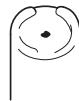
Deformed (worn) nozzle (tip)
| Part number | Replacement Nozzle for EW1411 |
| EW0950 | Nozzle | 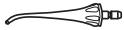 |
Disposal of Old Equipment and Batteries
Only for European Union and countries with recycling systems
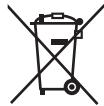
These symbols on the products, packaging, and/or accompanying documents mean that used electrical and electronic products and batteries must not be mixed with general household waste.
For proper treatment, recovery and recycling of old products and batteries, please take them to applicable collection points in accordance with your national legislation.
By disposing of them correctly, you will help to save valuable resources and prevent any potential negative effects on human health and the environment.
For more information about collection and recycling, please contact your local municipality.
Penalties may be applicable for incorrect disposal of this waste, in accordance with national legislation.
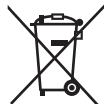
Note for the battery symbol (bottom symbol)
This symbol might be used in combination with a chemical symbol. In this case it complies with the requirement set by the Directive for the chemical involved.
Panasonic
Betriebsanleitung
natural_image
Pure electrical circuit symbol for a D flip-flop without any text or labels
Sicherheitshinweise
natural_image
Technical line drawing of a mechanical housing or enclosure component (no text or symbols)
natural_image
Line drawing of a handheld device with a base and top view, showing internal components (no text or symbols)
natural_image
Line drawing of a dental or oral care device with a pointed tip and a downward arrow indicating process (no text or symbols)
natural_image
Illustration of hands using a tool to lift a cylindrical object, showing motion (no text or symbols)
natural_image
Illustration of a person using a tool on a sink (no text or symbols present)
natural_image
Illustration of a hand holding a thin rod with a circular arrow indicating rotational motion (no text or symbols)
natural_image
Close-up of dental crowns with triangular markers (no text or symbols visible)
natural_image
Close-up of dental crowns with triangular markers (no text or symbols visible)
natural_image
Close-up of a white, abstract object with light streaks and a cylindrical object (no visible text or symbols)
natural_image
Close-up of a tooth with visible teeth and surrounding bone structure (no text or symbols)
Nach dem Gebrauch
natural_image
Illustration of a hand holding a medical device with a curved arrow indicating rotation (no text or symbols)
Reinigung
natural_image
Line drawing of a mechanical device with an arrow indicating a downward motion (no text or symbols)
natural_image
Four-step illustration showing a hand holding a spray bottle, with droplets indicating water droplets (no text or symbols)
natural_image
Simple line drawing of a tool interacting with a textured surface (no text or symbols)
natural_image
Diagram of a device with arrows indicating motion or force direction (no text or symbols)
natural_image
Hand cleaning a mechanical component with a sponge (no text or symbols visible)
flowchart
graph TD
    A["Tool with ①"] --> B["Disassembly Step ②"]
    B --> C["Assembly Step ③"]
    C --> D["Final Assembly Step ④"]
    D --> E["Assembly Step ⑤"]
    E --> F["Final Assembly Step ⑥"]
natural_image
Symbol of a trash bin crossed out by two crossed lines, with no text or labels present.
natural_image
Pure electrical circuit symbol for a logic gate (no text or labels)
▶ Prévention des accidents

©
A Apparel principal
natural_image
Technical line drawing of a mechanical housing or enclosure with internal components and mounting holes (no text or symbols)
natural_image
Line drawing of a handheld device with a downward arrow indicating a drop or change (no text or symbols present)
natural_image
Line drawing of a dental spray gun with a pointed tip and downward arrow indicating motion (no text or symbols)
natural_image
Illustration of a hand using a tool to lift a mechanical component, showing motion arrows (no text or symbols)
natural_image
Illustration of a person using a tool on a sink (no text or symbols present)
natural_image
Illustration of a hand holding a plant stem with a circular arrow indicating rotation or force (no text or symbols)
natural_image
Close-up of dental crowns with triangular markers (no text or symbols visible)
natural_image
Close-up of dental crowns with triangular markers (no text or symbols visible)
natural_image
Close-up of a white, curved object with light rays extending from it, possibly part of a device or tool (no visible text or symbols)
natural_image
Close-up of a tooth with visible teeth and surrounding bone structure (no text or symbols)
Après utilisation
natural_image
Illustration of a hand holding a mechanical component with a curved arrow indicating rotation (no text or symbols)
natural_image
Simple line drawing of a biological structure resembling a larva or larva with internal organs and a tail (no text or symbols)
Nettoyage
natural_image
Line drawing of a mechanical device with an arrow indicating a downward motion (no text or symbols present)
- Nettoyez à l'eau.
natural_image
Four-step illustration showing a hand holding a bottle while spraying water from a faucet, illustrating the process (no text or symbols)
natural_image
Line drawing of a tool interacting with a mechanical component (no text or symbols)
natural_image
Diagram of a device with arrows indicating motion or force direction (no text or symbols)
natural_image
Hand holding a small object over a cylindrical container (no text or symbols visible)
Questions - Réponses
Question
flowchart
graph TD
    A["Component ①"] --> B["Assembly Step ②"]
    B --> C["Assembly Step ③"]
    C --> D["Assembly Step ④"]
    D --> E["Assembly Step ⑤"]
    E --> F["Assembly Step ⑥"]
natural_image
Pure electrical circuit symbol for a logic gate (no text or labels)
©
A Unità principale
natural_image
Technical line drawing of a mechanical housing or enclosure with internal components and mounting holes (no text or symbols)
natural_image
Line drawing of a handheld device with a downward arrow indicating a drop or adjustment (no text or symbols present)
natural_image
Line drawing of a dental or oral care device with a pointed tip and downward arrow indicating process (no text or symbols)
natural_image
Illustration of hands using a tool to lift a mechanical component, showing a curved arrow indicating rotation (no text or symbols present)
natural_image
Line drawing of a person using a tool on a sink (no text or symbols)
natural_image
Illustration of a hand holding a plant stem with a circular arrow indicating rotation or force (no text or symbols)
natural_image
Close-up of dental crowns with triangular markers (no text or symbols visible)
natural_image
Close-up of dental crowns with triangular markers (no text or symbols visible)
natural_image
Close-up of a white, curved object with light rays, possibly a lamp or lens, against a plain background (no text or symbols visible)
natural_image
Close-up of a tooth with visible teeth and surrounding bone structure (no text or symbols)
Dopo l'uso
natural_image
Illustration of a hand holding a mechanical component with a curved arrow indicating rotation (no text or symbols)
natural_image
Simple line drawing of a biological structure resembling a larva or larva with internal organs and a tail (no text or symbols)
Pulizia
natural_image
Line drawing of a mechanical device with an arrow indicating direction (no text or symbols)
- Pulire con acqua.
natural_image
Four-step illustration showing a hand holding a dropper above a bottle, with water droplets falling (no text or symbols)
natural_image
Line drawing of a tool interacting with a textured surface (no text or symbols)
natural_image
Diagram of a device with arrows indicating motion or force direction (no text or symbols)
natural_image
Hand holding a small object over a cylindrical container (no text or symbols visible)
Domande frequenti
Domanda
Specifications....79
natural_image
Technical line drawing of a mechanical housing or enclosure component (no text or symbols)
natural_image
Line drawing of a handheld device with a base and top view, showing internal components (no text or symbols)
natural_image
Line drawing of a dental instrument with a pointed tip and base, showing a downward arrow indicating compression or disassembly (no text or symbols present)
natural_image
Illustration of hands using a mechanical tool to adjust or install a component (no text or symbols visible)
natural_image
Line drawing of a person using a tool on a sink (no text or symbols)
natural_image
Illustration of a hand holding a plant stem with a curved arrow indicating rotation or force (no text or symbols)
natural_image
Close-up of dental crowns with triangular markers (no text or symbols visible)
natural_image
Close-up of dental crowns with triangular markers (no text or symbols visible)
▶ Tandvleespocketreiniging
In de AIR IN (REGULAR) [WATERSTRAALINSTELLING MET LUCHTTOEVOER (NORMAAL)] modus
natural_image
Close-up of a white, curved object with light rays extending from it, possibly part of a device or tool (no visible text or symbols)
![PANASONIC EW1411 - In de AIR IN (REGULAR) [WATERSTRAALINSTELLING MET LUCHTTOEVOER (NORMAAL)] modus - 1](/content/2019/11/105745/images/ca23085a9e5fa4d291d4fb6d905c3079ab0cd8fdbb28618c8532e1a6871e9740.jpg)
natural_image
Close-up of a tooth with visible teeth and surrounding bone structure (no text or symbols)
Na gebruik
natural_image
Illustration of a hand holding a mechanical component with a curved arrow indicating rotation (no text or symbols)
natural_image
Simple line drawing of a biological structure resembling a larva or larva with internal organs and a tail (no text or symbols)
Reinigen
natural_image
Diagram of a mechanical device with a downward arrow indicating motion (no text or symbols)
natural_image
Four-step illustration showing a hand holding a water bottle, with droplets indicating liquid or residue (no text or symbols)
natural_image
Simple line drawing of a tool interacting with a curved tool (no text or symbols)
natural_image
Diagram of a device with arrows indicating motion or force direction (no text or symbols)
natural_image
Hand holding a mechanical component with a circular housing (no text or symbols visible)
Veelgestelde vragen
Vraag
▶ Filter is verstopt.
natural_image
Pure electrical circuit symbol for a logic gate (no text or labels)
©
A Unidad principal
natural_image
Technical line drawing of a mechanical housing or enclosure with internal components and mounting holes (no text or symbols)
natural_image
Line drawing of a handheld device with a downward arrow indicating a drop or adjustment (no text or symbols present)
natural_image
Line drawing of a dental instrument with a pointed tip and base, showing a downward arrow indicating process (no text or symbols)
natural_image
Illustration of hands using a mechanical tool to interact with a device (no text or symbols visible)
natural_image
Line drawing of a person using a tool on a sink (no text or symbols)
natural_image
Illustration of a hand holding a plant stem with a curved arrow indicating rotation or movement (no text or symbols)
natural_image
Close-up of dental crowns with triangular markers (no text or symbols visible)
natural_image
Close-up of dental crowns with triangular markers (no text or symbols visible)
natural_image
Close-up of a white, curved object with radiating lines, possibly a lens or abstract form (no text or symbols visible)
natural_image
Close-up of a tooth with visible dental structure and surrounding bone (no text or symbols)
Tras el uso
natural_image
Illustration of a hand holding a mechanical component with a curved arrow indicating rotation (no text or symbols)
natural_image
Simple line drawing of a biological structure resembling a larva or larva with internal organs and a tail (no text or symbols)
Limpieza
natural_image
Line drawing of a mechanical device with an arrow indicating direction (no text or symbols)
- Limpie con agua.
natural_image
Four-step illustration showing a hand holding a small object to clean water from a showerhead, with droplets indicating water droplets (no text or symbols)
natural_image
Line drawing of a tool interacting with a textured surface (no text or symbols)
natural_image
Diagram of a device with arrows indicating motion or force direction (no text or symbols)
natural_image
Hand holding a small component with a circular housing (no text or symbols visible)
flowchart
graph TD
    A["Tool with ①"] --> B["Assembly Step ②"]
    B --> C["Assembly Step ③"]
    C --> D["Assembly Step ④"]
    D --> E["Assembly Step ⑤"]
    E --> F["Assembly Step ⑥"]
natural_image
Pure electrical circuit symbol for a D flip-flop without any text or labels
A Hoveddel
① Dyseudløserknap
② Afbryderkontakt [0/1]
③ Modusknap
④ Funktionsindikator
⑤ Ladeindikator
⑥ Ventilationsåbning
⑦ Sugeslange
⑧ Filter
⑨ Vandtank
⑩ Vandtankdæksel
B Oplader (RE8-47/RE8-53)
natural_image
Technical line drawing of a mechanical housing or enclosure with internal components and mounting holes (no text or symbols)
natural_image
Line drawing of a handheld device with a downward arrow indicating a drop or change (no text or symbols present)
Noter
natural_image
Line drawing of a dental instrument with a pointed tip and base, showing a downward arrow indicating compression or disassembly (no text or symbols present)
natural_image
Illustration of a hand using a tool to lift a device, showing motion with no text or symbols
natural_image
Illustration of a person using a tool to clean or prepare a surface (no text or symbols)
Drej dysehåndtaget for at justere vandstrålens retning.
natural_image
Illustration of a hand holding a thin plant stem with a curved arrow indicating rotation or force (no text or symbols)
natural_image
Close-up of dental crowns with triangular markers (no text or symbols visible)
(For at rense med masser af vand)
I JET (JET)-modus
natural_image
Close-up of dental crowns with triangular markers (no text or symbols visible)
▶ Rensning af parodontale lommer
I AIR IN (REGULAR) [LUFT IND (NORMAL)]-modus
natural_image
Close-up of a white, curved object with light rays extending from it, possibly part of a device or tool (no visible text or symbols)
![PANASONIC EW1411 - I AIR IN (REGULAR) [LUFT IND (NORMAL)]-modus - 1](/content/2019/11/105745/images/de49d97c3c9deee755c2f27ee3a40adf57be929dfe0e8f38eb92fb239bd73244.jpg)
natural_image
Close-up of a tooth with visible teeth and surrounding bone structure (no text or symbols)
After brug
natural_image
Illustration of a hand holding a mechanical component with a curved arrow indicating rotation (no text or symbols)
natural_image
Simple line drawing of a biological structure resembling a larva or larva with internal organs and a tail (no text or symbols)
Rengøring
natural_image
Line drawing of a mechanical device with a downward arrow indicating motion (no text or symbols)
- Rengør med vand.
natural_image
Four-step illustration showing a hand holding a droplet over a water bottle, with droplets indicating water droplets (no text or symbols)
natural_image
Line drawing of a tool interacting with a textured surface (no text or symbols)
natural_image
Diagram of a device with arrows indicating movement or force, no text or symbols present
natural_image
Line drawing of a hand pressing down on a mechanical component (no text or symbols)
flowchart
graph TD
    A["Tool with ①"] --> B["Assembly Step ②"]
    B --> C["Assembly Step ③"]
    C --> D["Assembly Step ④"]
    D --> E["Assembly Step ⑤"]
    E --> F["Assembly Step ⑥"]
natural_image
Pure electrical circuit symbol for a D flip-flop without any text or labels
(Parte posterior
B
©
D

A Unidade principal
natural_image
Technical line drawing of a mechanical housing or enclosure with internal components and mounting holes (no text or symbols)
natural_image
Line drawing of a handheld device with a downward arrow indicating a drop or change (no text or symbols present)
Notas
natural_image
Line drawing of a dental instrument with a pointed tip and base, showing a downward arrow indicating compression or disassembly (no text or symbols present)
natural_image
Illustration of a hand using a tool to lift a cylindrical device (no text or symbols present)
natural_image
Illustration of a person using a tool on a sink (no text or symbols present)
natural_image
Illustration of a hand holding a thin rod with a circular arrow indicating rotational motion (no text or symbols)
natural_image
Close-up of dental crowns with triangular markers (no text or symbols visible)
natural_image
Close-up of dental crowns with triangular markers (no text or symbols visible)
▶ Limpeza da bolsa periodontal
No modo AIR IN (REGULAR) [ENTRADA DE AR (NORMAL)]
natural_image
Close-up of a white, abstract object with light streaks and a metallic handle (no visible text or symbols)
![PANASONIC EW1411 - No modo AIR IN (REGULAR) [ENTRADA DE AR (NORMAL)] - 1](/content/2019/11/105745/images/36537da8b749ff4574eb1e580ad3b05db2c5ce3fd1a01e66c9bb9567f295cd91.jpg)
natural_image
Close-up of a tooth with visible teeth and surrounding bone structure (no text or symbols)
Após a utilização
natural_image
Illustration of a hand holding a cylindrical object with a curved arrow indicating rotation (no text or symbols)
natural_image
Simple line drawing of a biological structure resembling a larva or larva with internal organs and a labeled arrow (no text or symbols)
Limpeza
natural_image
Line drawing of a mechanical device with an arrow indicating direction (no text or symbols)
- Limpe com água.
natural_image
Four-step illustration showing a hand holding a spray bottle, with droplets indicating water droplets (no text or symbols)
natural_image
Simple line drawing of a tool interacting with a textured surface (no text or symbols)
natural_image
Diagram of a device with arrows indicating motion or force direction (no text or symbols)
natural_image
Hand holding a small object inside a mechanical housing (no text or symbols visible)
flowchart
graph TD
    A["Component ①"] --> B["Assembly Step ②"]
    B --> C["Assembly Step ③"]
    C --> D["Assembly Step ④"]
    D --> E["Assembly Step ⑤"]
    E --> F["Assembly Step ⑥"]

Hoveddel
① Dyseutløserknapp
② Strømbryter [0/1]
③ Modusbryter
④ Modusindikator
⑤ Ladeindikator
⑥ Ventilasjonshull
⑦ Sugeslange
⑧ Filter
⑨ Vannbeholder
⑩ Lokk til vannbeholder

Lader (RE8-47/RE8-53)
natural_image
Technical line drawing of a mechanical housing or enclosure with internal components and mounting holes (no text or symbols)
natural_image
Line drawing of a handheld device with a downward arrow indicating a drop or change (no text or symbols present)
natural_image
Line drawing of a dental spray gun with a pointed tip and downward arrow indicating motion (no text or symbols)
natural_image
Illustration of hands using a mechanical tool to interact with a device (no text or symbols visible)
natural_image
Illustration of a person using a tool to clean or prepare a surface (no text or symbols)
natural_image
Illustration of a hand holding a plant stem with a circular arrow indicating rotation or force (no text or symbols)
natural_image
Close-up of dental crowns with triangular markers (no text or symbols visible)
natural_image
Close-up of dental crowns with triangular markers (no text or symbols visible)
natural_image
Close-up of a white, curved object with light rays, possibly a lamp or optical component (no visible text or symbols)
natural_image
Close-up of a tooth with visible teeth and surrounding bone structure (no text or symbols)
Etter bruk
natural_image
Illustration of a hand holding a mechanical component with a curved arrow indicating rotation (no text or symbols)
natural_image
Simple line drawing of a biological structure resembling a larva or larva with internal organs and a tail (no text or symbols)
Rengjøring
- Trekk vannbeholderen nedover og ut.
natural_image
Line drawing of a mechanical device with a downward arrow indicating motion (no text or symbols)
- Rengjør med vann.
natural_image
Four-step illustration showing a hand holding a dropper above a bottle, with water droplets falling (no text or symbols)
natural_image
Line drawing of a mechanical component with a textured base and threaded end (no text or symbols)
natural_image
Diagram of a device with arrows indicating motion or force direction (no text or symbols)
natural_image
Hand cleaning a mechanical component with a circular housing (no text or symbols visible)
natural_image
Pure electrical circuit symbol for a logic gate (no text or labels)
Säkerhetsföreskrift
B
A Huvudenheten
natural_image
Technical line drawing of a mechanical housing or enclosure with internal components and mounting holes (no text or symbols)
natural_image
Line drawing of a handheld device with a base and top view, showing internal components (no text or symbols)
natural_image
Line drawing of a dental instrument with a pointed tip and base, showing a downward arrow indicating process (no text or symbols)
natural_image
Illustration of hands using a mechanical tool to interact with a device (no text or symbols visible)
natural_image
Illustration of a person using a tool on a sink (no text or symbols present)
natural_image
Illustration of a hand holding a plant stem with a circular arrow indicating rotation or force (no text or symbols)
natural_image
Close-up of dental crowns with triangular markers (no text or symbols visible)
natural_image
Close-up of dental crowns with triangular markers (no text or symbols visible)
natural_image
Close-up of a white, curved object with light rays, possibly a lamp or lens (no visible text or symbols)
natural_image
Close-up of a tooth with visible teeth and surrounding bone structure (no text or symbols)
Efter användning
natural_image
Illustration of a hand holding a mechanical component with a curved arrow indicating rotation (no text or symbols)
natural_image
Simple line drawing of a biological structure resembling a larva or larva with internal organs and a tail (no text or symbols)
Rengöring
natural_image
Line drawing of a mechanical device with a downward arrow indicating motion (no text or symbols)
- Rengör med vatten.
natural_image
Four-step illustration showing a hand holding a dropper above a bottle, with water droplets falling (no text or symbols)
natural_image
Line drawing of a tool interacting with a textured surface (no text or symbols)
natural_image
Diagram of a device with arrows indicating motion or force direction (no text or symbols)
natural_image
Line drawing of a hand holding a small object over a cylindrical container (no text or symbols)
Frågor och svar
Fråga
flowchart
graph TD
    A["Tool with Component ①"] --> B["Assembly Step ②"]
    B --> C["Assembly Step ③"]
    C --> D["Assembly Step ④"]
    D --> E["Assembly Step ⑤"]
    E --> F["Assembly Step ⑥"]
©
D

A Päälaite
natural_image
Technical line drawing of a mechanical housing or enclosure with internal components and mounting holes (no text or symbols)
natural_image
Line drawing of a handheld device with a downward arrow indicating a drop or change (no text or symbols present)
2 Irrota virtapistoke, kun lataus on valmis.
natural_image
Line drawing of a dental instrument with a pointed tip and downward arrow indicating process (no text or symbols)
natural_image
Illustration of a hand holding a mechanical device with a lever and rotating arrow (no text or symbols)
natural_image
Line drawing of a person using a tool on a sink (no text or symbols)
natural_image
Illustration of a hand holding a plant stem with a circular arrow indicating rotation or force (no text or symbols)
natural_image
Close-up of dental crowns with triangular markers (no text or symbols visible)
natural_image
Close-up of dental crowns with triangular markers (no text or symbols visible)
natural_image
Close-up of a white, abstract object with light streaks and a curved surface (no text or symbols visible)
natural_image
Close-up of a tooth with visible teeth and surrounding bone structure (no text or symbols)
Käytön jälkeen
natural_image
Illustration of a hand holding a mechanical component with a curved arrow indicating rotation (no text or symbols)
natural_image
Simple line drawing of a biological structure resembling a larva or larva with internal organs and a tail (no text or symbols)
Puhdistaminen
natural_image
Line drawing of a mechanical device with a downward arrow indicating motion (no text or symbols)
- Puhdista vedellä.
natural_image
Four-step illustration showing a hand holding a dropper above a bottle, with water droplets falling (no text or symbols)
natural_image
Line drawing of a tool interacting with a textured surface (no text or symbols)
natural_image
Diagram of a device with arrows indicating motion or assembly (no text or symbols present)
natural_image
Hand holding a small object over a cylindrical container (no text or symbols visible)
flowchart
graph TD
    A["Tool with Component ①"] --> B["Assembly Step ②"]
    B --> C["Assembly Step ③"]
    C --> D["Assembly Step ④"]
    D --> E["Assembly Step ⑤"]
    E --> F["Assembly Step ⑥"]
natural_image
Pure electrical circuit symbol for a logic gate (no text or labels)
Środki ostrożności
A Jednostka główna
natural_image
Technical line drawing of a mechanical housing or enclosure with internal components and mounting holes (no text or symbols)
natural_image
Line drawing of a handheld device with a downward arrow indicating a drop or change in the bottom portion (no text or symbols present)
natural_image
Line drawing of a dental or oral care device with a pointed tip and a downward arrow indicating process (no text or symbols)
natural_image
Illustration of a hand using a tool to lift a mechanical component, showing motion arrows (no text or symbols)
natural_image
Illustration of a person using a tool on a sink (no text or symbols present)
natural_image
Illustration of a hand holding a plant stem with a circular arrow indicating rotation or force (no text or symbols)
natural_image
Close-up of dental crowns with triangular markers (no text or symbols visible)
natural_image
Close-up of dental crowns with triangular markers (no text or symbols visible)
natural_image
Close-up of a white, curved object with light rays extending from it, possibly part of a device or tool (no visible text or symbols)
natural_image
Close-up of a tooth with visible teeth and surrounding bone structure (no text or symbols)
Po użyciu
natural_image
Illustration of a hand holding a mechanical component with a curved arrow indicating rotation (no text or symbols)
natural_image
Simple line drawing of a biological structure resembling a larva or larva with internal organs and a tail (no text or symbols)
Czyszczenie
natural_image
Line drawing of a mechanical device with a downward arrow indicating motion (no text or symbols)
- Wyczyścić wodą.
natural_image
Four-step illustration showing a hand holding a dropper above a bottle, with water droplets falling (no text or symbols)
natural_image
Line drawing of a tool interacting with a textured surface (no text or symbols)
natural_image
Diagram of a device with arrows indicating motion or force direction (no text or symbols)
flowchart
graph TD
    A["Component ①"] --> B["Assembly Step ②"]
    B --> C["Assembly Step ③"]
    C --> D["Assembly Step ④"]
    D --> E["Assembly Step ⑤"]
    E --> F["Assembly Step ⑥"]
natural_image
Pure electrical circuit symbol for a logic gate (no text or labels)
A Hlavní jednotka
natural_image
Technical line drawing of a mechanical housing or enclosure with internal components and mounting holes (no text or symbols)
natural_image
Line drawing of a handheld device with a downward arrow indicating a drop or change (no text or symbols present)
natural_image
Line drawing of a dental instrument with a pointed tip and downward arrow indicating process (no text or symbols)
natural_image
Illustration of a hand holding a mechanical device with a lever and rotating arrow (no text or symbols)
natural_image
Illustration of a person using a tool on a sink (no text or symbols present)
natural_image
Illustration of a hand holding a thin rod with a circular arrow indicating rotational motion (no text or symbols)
natural_image
Close-up of dental crowns with triangular markers (no text or symbols visible)
natural_image
Close-up of dental crowns with triangular markers (no text or symbols visible)
natural_image
Close-up of a metallic tool tip emitting light, no visible text or symbols
▶ Péče o dásně
V režimu AIR IN (REGULAR) [VZDUCH (PRAVIDELNÝ)]
natural_image
Close-up of human teeth with visible dental alignment (no text or symbols)
Po použití
natural_image
Illustration of a hand holding a cylindrical object with a curved arrow indicating rotation (no text or symbols)
natural_image
Simple line drawing of a biological structure resembling a larva or larva with internal organs and a pointed tip (no text or symbols)
Čištění
natural_image
Line drawing of a mechanical device with an arrow indicating direction (no text or symbols)
- Čistěte vodou.
natural_image
Four-step illustration showing a hand holding a spray bottle, with droplets indicating water droplets (no text or symbols)
natural_image
Simple line drawing of a tool interacting with a textured surface (no text or symbols)
natural_image
Diagram of a device with arrows indicating motion or force direction (no text or symbols)
natural_image
Hand cleaning a mechanical component with a sponge (no text or symbols visible)
flowchart
graph TD
    A["Tool with Component ①"] --> B["Assembly Step ②"]
    B --> C["Assembly Step ③"]
    C --> D["Assembly Step ④"]
    D --> E["Assembly Step ⑤"]
    E --> F["Assembly Step ⑥"]
Zadná strana
B
©
D

A Hlavná jednotka
natural_image
Technical line drawing of a mechanical housing or enclosure with internal components and mounting holes (no text or symbols)
natural_image
Line drawing of a handheld device with a downward arrow indicating a drop or change (no text or symbols present)
natural_image
Line drawing of a dental instrument with a pointed tip and downward arrow indicating process (no text or symbols)
natural_image
Illustration of a hand holding a mechanical device with a lever and rotating arrow (no text or symbols)
natural_image
Illustration of a person using a tool on a sink (no text or symbols present)
natural_image
Illustration of a hand holding a plant stem with a circular arrow indicating rotation or force (no text or symbols)
natural_image
Close-up of dental crowns with triangular markers (no text or symbols visible)
natural_image
Close-up of dental crowns with triangular markers (no text or symbols visible)
natural_image
Close-up of a white, curved object with light rays, possibly a lamp or optical component (no visible text or symbols)
natural_image
Close-up of human teeth with visible dental restorations (no text or symbols)
Po použití
natural_image
Illustration of a hand holding a mechanical component with a curved arrow indicating rotation (no text or symbols)
natural_image
Simple line drawing of a biological structure resembling a larva or larva with internal organs and a tail (no text or symbols)
Čistenie
natural_image
Diagram of a device with a downward arrow indicating a process or transformation (no text or symbols present)
- Vyčistite vodou.
natural_image
Four-step illustration showing a hand holding a droplet over a water bottle, with droplets indicating water droplets (no text or symbols)
natural_image
Line drawing of a tool interacting with a textured surface (no text or symbols)
natural_image
Diagram of a device with arrows indicating motion or assembly (no text or symbols)
natural_image
Hand holding a small object inside a cylindrical container (no text or symbols visible)
Najčastejšie otázky
Otázka
Hátsó oldal
B
©
D

A Főegység
natural_image
Technical line drawing of a mechanical housing or enclosure with internal components and mounting holes (no text or symbols)
natural_image
Line drawing of a handheld device with a base and top view, showing internal components (no text or symbols)
natural_image
Line drawing of a dental spray bottle with a pointed tip and downward arrow indicating process (no text or symbols)
natural_image
Illustration of a hand using a tool to lift a mechanical component, showing rotational motion (no text or symbols)
natural_image
Illustration of a person using a tool on a desk with a cup (no text or symbols)
natural_image
Illustration of a hand holding a plant stem with a curved arrow indicating rotation or movement (no text or symbols)
natural_image
Close-up of dental crowns with triangular markers (no text or symbols visible)
natural_image
Close-up of dental crowns with triangular markers (no text or symbols visible)
natural_image
Close-up of a white, curved object with light rays, possibly a lamp or lens (no visible text or symbols)
natural_image
Close-up of a tooth with visible teeth and surrounding bone structure (no text or symbols)
natural_image
Illustration of a hand holding a mechanical component with a curved arrow indicating rotation (no text or symbols)
natural_image
Simple line drawing of a biological structure resembling a larva or larva with internal organs and a tail (no text or symbols)
Tisztítás
natural_image
Diagram of a mechanical device with a downward arrow indicating motion or force (no text or symbols present)
natural_image
Four-step illustration showing a hand holding a dropper above a bottle, with water droplets falling (no text or symbols)
natural_image
Line drawing of a tool interacting with a textured surface (no text or symbols)
natural_image
Diagram of a device with arrows indicating motion or force direction (no text or symbols)
natural_image
Hand holding a mechanical component, no text or symbols visible
flowchart
graph TD
    A["Tool with ①"] --> B["Assembly Step ②"]
    B --> C["Assembly Step ③"]
    C --> D["Assembly Step ④"]
    D --> E["Assembly Step ⑤"]
    E --> F["Assembly Step ⑥"]
natural_image
Symbol of a trash bin crossed out by two crossed lines, with no text or labels present.
natural_image
Pure electrical circuit symbol for a logic gate (no text or labels)
Măsuri de siguranță
B
©
natural_image
Technical line drawing of a mechanical housing or enclosure with internal components and mounting holes (no text or symbols)
natural_image
Line drawing of a handheld device with a downward arrow indicating a drop or change in the bottom portion (no text or symbols present)
natural_image
Line drawing of a dental or oral care device with a pointed tip and downward arrow indicating process (no text or symbols)
natural_image
Illustration of a hand holding a device with a tool, showing a curved arrow indicating rotation (no text or symbols present)
natural_image
Illustration of a person using a tool to clean or prepare a document (no text or symbols visible)
natural_image
Illustration of a hand holding a thin plant stem with a circular arrow indicating rotation or force (no text or symbols)
natural_image
Close-up of dental crowns with two triangular markers overlaying the teeth (no text or symbols visible)
natural_image
Close-up of dental crowns with triangular markers overlay (no text or symbols)
natural_image
Close-up of a white, curved object with light rays, possibly a lamp or lens, against a plain background (no text or symbols visible)
natural_image
Close-up of a tooth with visible teeth and surrounding bone structure (no text or symbols)
După utilizare
natural_image
Illustration of a hand holding a mechanical component with a curved arrow indicating rotation (no text or symbols)
natural_image
Simple line drawing of a biological structure resembling a larva or larva with internal organs and a tail (no text or symbols)
Curățare
natural_image
Line drawing of a mechanical device with a downward arrow indicating motion (no text or symbols)
- Curățați cu apă.
natural_image
Four-step illustration showing a hand holding a dropper above a bottle, with water droplets falling (no text or symbols)
natural_image
Simple line drawing of a tool interacting with a bracket (no text or symbols)
natural_image
Diagram of a device with arrows indicating motion or force direction (no text or symbols)
natural_image
Hand cleaning a mechanical component with a sponge (no text or symbols visible)
© Panasonic Corporation 2015