316 - Pregnant Sven - Free user manual and instructions
Find the device manual for free 316 Sven in PDF.


| Product Type | Portable Bluetooth Speaker |
| Model | 316 |
| Brand | Sven |
| Dimensions (W x H x D) | Approx. 220 x 100 x 120 mm |
| Weight | Approx. 0.8 kg |
| Power Supply | Built-in rechargeable battery (DC 5V via USB) |
| Battery Life | Up to 8 hours (varies with volume) |
| Bluetooth Version | Bluetooth 5.0 |
| Wireless Range | Up to 10 meters |
| Output Power | 10W (RMS) |
| Frequency Response | 100 Hz - 20 kHz |
| Driver Unit | 2 x 52mm full-range drivers |
| Audio Input | Bluetooth, AUX (3.5mm), MicroSD card, USB flash drive |
| Controls | Power, Volume +/-, Play/Pause, Mode, Previous/Next |
| Hands-free Calling | Built-in microphone, answer/end calls |
| Material | Plastic with metal grille |
| Cleaning | Wipe with a soft, dry cloth. Avoid moisture. |
| Safety | Do not disassemble. Avoid extreme temperatures. |
| Spare Parts / Repairability | Contact Sven service center. Battery replacement possible. |
| General Information | User manual available in PDF on notice-facile.com |
Frequently Asked Questions - 316 Sven
User questions about 316 Sven
0 question about this device. Answer the ones you know or ask your own.
Ask a new question about this device
Download the instructions for your Pregnant in PDF format for free! Find your manual 316 - Sven and take your electronic device back in hand. On this page are published all the documents necessary for the use of your device. 316 by Sven.
USER MANUAL 316 Sven
natural_image
Two black SVEN audio speakers with rounded heads and sound waves, displayed against a white background (no text or symbols on the devices themselves)natural_image
Two black SVEN audio speakers with rounded heads and sound waves, shown against a white background (no text or symbols on the devices themselves)natural_image
Two black SVEN audio speakers with rounded heads and sound waves, shown against a white background (no text or symbols on the devices themselves)Congratulations on your purchase of the Sven speaker system!
COPYRIGHT
© 2014. SVEN PTE. LTD. Version 1.0 (V 1.0).
This Manual and information contained in it are copyrighted. All rights reserved.
TRADEMARKS
All trademarks are the property of their legal holders.
NOTICE OF RESPONSIBILITY RESTRICTION
Despite the exerted efforts to make this Manual more exact, some discrepancies may occur. The information in this Manual is given on “as is” terms. The author and the publisher do not bear any liability to a person or an organization for loss or damage which has arisen from the information contained in this Manual.
CONTENTS
RUS 1
UKR 5
ENG 10
- BUYER RECOMMENDATIONS ...... 11
- PACKAGE CONTENTS.... 12
- SAFETY PRECAUTIONS 12
- TECHNICAL DESCRIPTION 12
- PREPARATION AND OPERATION 13
- TROUBLESHOOTING.... 14
- TECHNICAL SPECIFICATIONS ...... 14
1. BUYER RECOMMENDATIONS
- Unpack the device carefully. Make sure there are no accessories left in the box. Check up the device for damage; if the product was damaged during transportation, address the firm which carried out the delivery; if the product functions incorrectly, address the dealer at once.
- Check up the package contents and availability of the warranty card. Make sure the warranty card has a shop stamp, a legible signature or the seller's stamp and purchase date, and the goods number corresponds to that in the warranty card. Remember: in case of warranty card loss or discrepancy of numbers you forfeit the right for warranty repairs.
- Do not switch on the speaker system immediately after you bring it into a room from environment with negative temperature! After unpacking, the speaker system should be kept in conditions of room temperature for at least 4 hours.
- Before installing and using the speaker system, read this Manual carefully and keep it for future reference.
2. PACKAGE CONTENTS
- Speaker System — 1 pc
• Operation Manual — 1 pc - Warranty card — 1 pc
3. SAFETY PRECAUTIONS
- Do not open the MSS and do not perform repairs by yourself. Service and repairs should be performed only by qualified specialists at authorized service centers. The list of authorized service centers is on www.sven.fi.
- Do not allow the circuit of wires (including the grounded ones) between the speakers, on the power amplifier or the ground, for it causes damage to the power amplifier output stage.
- Make sure that foreign objects do not get inside the holes of the MSS.
- Protect the MSS from high humidity, water and dust.
- Protect the MSS from heating: do not place it closer than 1 m from a heat source. Do not expose it to direct sunlight.
- Do not use any chemical agents for cleaning. Clean it with dry soft cloth only.
- If the MSS does not operate, unplug it and address your dealer.
4. TECHNICAL DESCRIPTION
SVEN 316 2.0 USB Multimedia Speaker System (MSS) is designed to play music and sound games, movies, etc. The MSS has a built-in amplifier, an audio cable and a signal cable enabling to connect it to virtually any audio source (a PC, laptop, MP3 or CD player, etc.). The MSS is powered via a PC or laptop USB port or a 5V DC power supply by means of the integrated USB cable. The speaker with an audio input and a control panel is named “the active speaker”.
MSS special features
- Speaker system is compatible with PCs, DVD/Media-players, mobile devices and other sound sources
- USB-powered (via PC/laptop USB port or 5V DC power supply)
- Compact design
• Volume control - Glossy black surface
- Power LED
- Plastic speaker cabinets
Control panel
① Power LED
② Volume control knob
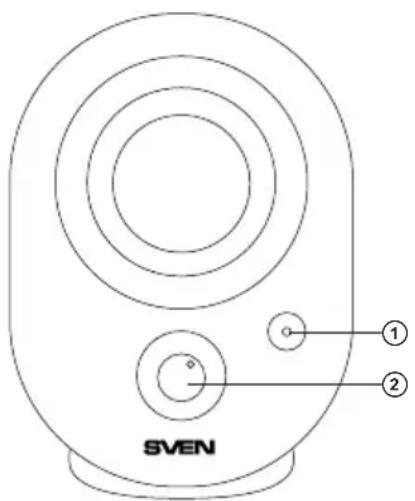
Fig. 1. Control panel
5. PREPARATION AND OPERATION
Speaker placement
- Place the speakers symmetrically to the listener at least one meter away.
- Place MSS far away from monitors and TV sets, as insignificant image distortion in these supersensitive devices is possible.
MSS Connecting
SVEN 316 USB Multimedia Speaker System can be connected to virtually any audio source: DVD/CD, PC sound card, etc. (see connection diagram, Fig. 2).
- Before connecting, make sure that the MSS is unplugged. Insert the 3.5 mini-jack signal cable built into the active speaker into the sound source audio output (see Fig. 2).
- Set the master volume level to its minimum by turning the volume control knob ② counterclockwise until it stops.
- Plug the USB cable to the USB port of your PC or laptop, or your 5V DC power supply. The power LED ① will illuminate. Turn on your audio source.
- Adjust the master volume level with the volume control knob ②. To increase the volume, turn the knob clockwise; to reduce the volume, turn it counterclockwise.
Notes:
• After using the MSS, mind to unplug it.
• To enhance sound quality, use the Line Out port of your soundcard.
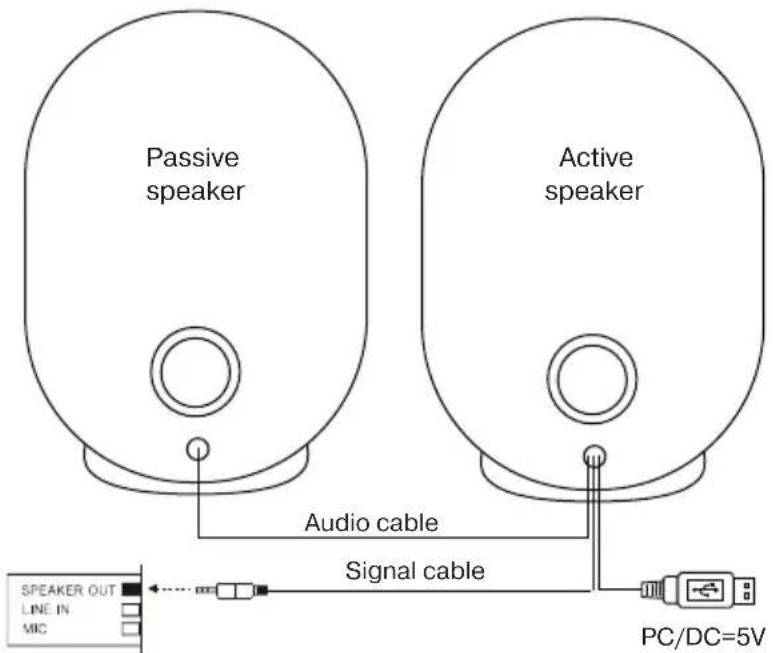
Fig. 2. Connection diagram
- TROUBLESHOOTING
| Problem | Cause | Solution |
| The MSS does not turn on. | The MSS isn’t connected to a mains outlet. | Check the connection. |
| The power switch is off. | Turn on the switch. | |
| No sound or there is too quiet sound of speakers. | Volume level is set at its minimum value. | Adjust the volume control knob. |
| Improperly connected audio source. | Connect audio sources correctly. | |
| Distortion of sound. | Large amplitude of the input signal. | Turn down the source volume and the MSS volume. |
If none of the above methods can solve the problem, please seek professional advice at your nearest service center. Never attempt to repair the product yourself.
- TECHNICAL SPECIFICATIONS
| Parameter, measurement unit | Value |
| Output power (RMS), W | 4 (2 × 2) |
| Frequency range, Hz | 100 – 20,000 |
| Speaker diameter, mm | Full-range ∅ 44 |
| Power supply, V | USB/DC 5 |
| Dimensions (one speaker) (W × H × D), mm | 87 × 125 × 87 |
| Weight, kg | 0.4 |
Notes:
- Technical specifications given in this table are supplemental information and cannot give occasion to claims.
- Technical specifications and package contents are subject to change without notice due to the improvement of SVEN production.
natural_image
Two black audio/video headsets with visible sound waves and speaker labels (no text-heavy elements)Модель: SVEN-316
Manufacturer: SVEN PTE. LTD, 176 Joo Chiat Road, N° 02-02, Singapore, 427447. Produced under the control of Oy Sven Scandinavia Ltd. 15, Kotolahdentie, Kotka, Finland, 48310. Made in China.
® Registered Trademark of Oy SVEN Scandinavia Ltd. Finland.
SVEN 316