PS-175 - Pregnant Sven - Free user manual and instructions
Find the device manual for free PS-175 Sven in PDF.


User questions about PS-175 Sven
0 question about this device. Answer the ones you know or ask your own.
Ask a new question about this device
Download the instructions for your Pregnant in PDF format for free! Find your manual PS-175 - Sven and take your electronic device back in hand. On this page are published all the documents necessary for the use of your device. PS-175 by Sven.
USER MANUAL PS-175 Sven
natural_image
Black rectangular electronic device with a digital display showing '12:00' (no text or symbols on body)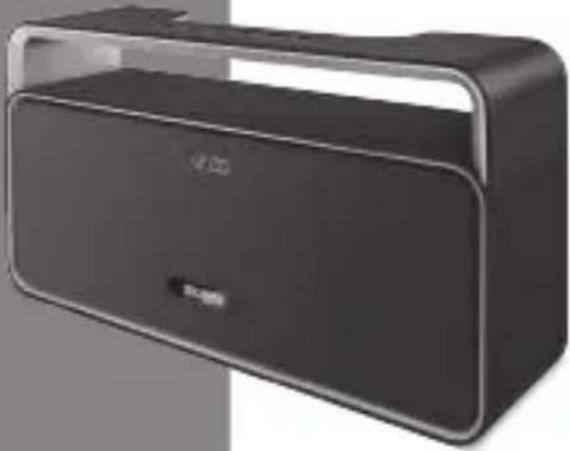
natural_image
Black rectangular electronic device with a transparent lid and logo, shown against a plain background (no visible text or symbols)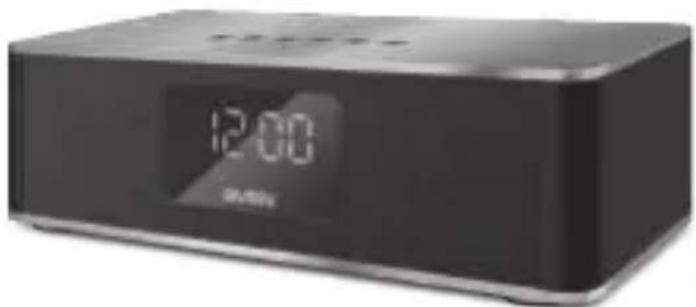
natural_image
Black rectangular electronic device with digital display showing 12:00 (no visible text or symbols on device body)PS-175
PS-185
PS-190
www.sven.fi
Congratulations on your purchase of the SVEN speaker system!
COPYRIGHT
© 2017. SVEN PTE. LTD. Version 1.0 (V 1.0).
This Manual and information contained in it are copyrighted. All rights reserved.
CONTENTS
RUS 2
UKR 8
ENG 14
BUYER RECOMMENDATIONS
- Unpack the device carefully. Make sure there are no accessories left in the box. Check up the device for damage; if the product was damaged during transportation, address the firm which carried out the delivery; if the product functions incorrectly, address the dealer at once.
- Shipping and transportation equipment is permitted only in the original container.
- Does not require special conditions for realization.
- Dispose of in accordance with regulations for the disposal of household and computer equipment.
APPLICATION
SVEN PS-175/PS-185/ PS-190 portable multimedia speaker system with Bluetooth and FM-radio is designed for operation with PC, notebooks and other mobile devices by means of data transfer via Bluetooth protocol. They can be also used in internet telephony, during video conferences, in multimedia applications, in interactive games, for speech recognition and foreign language teaching. There is a built in FM-tuner, and player with USB flash and with micro SD memory card.
PACKAGE CONTENTS
- Speaker system - 1 pc
- 3,5 mm mini-jack to 3,5 mm mini-jack signal cable - 1 pc
- USB to micro USB power cable - 1 pc
- User's Manual - 1 pc
- Warranty card - 1 pc
SPECIAL FEATURES
- Wireless signal transmission via Bluetooth
• Built-in audio files player from USB-flash and microSD card storage devices
• Built-in clock and alarm function
• Build-in FM radio - LED display
- Carrying handle (only model SVEN PS-185)
- Wired connection
Speaker system description
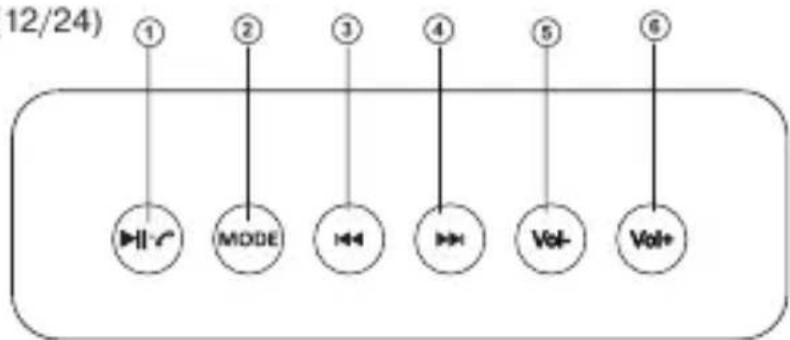
① Play/Pause button (in Bluetooth/Player mode);
Start/Stop auto scan (long pressing in Radio mode);
MUTE mode (short pressing in Radio mode/LINE);
Receive / end a call button;
Clock and alarm clock button (long pressing)
② MODE: Switching modes button (short pressing):
Clock / Date / Alarm clock / Bluetooth / Player / Radio/LINE/Sleep*;
Turning off the display* (long pressing)
③ Previous track (in Bluetooth/player mode);
Previous track (in Radio mode);
Setting the clock / alarm;
Changing the format of the clock (12/24)
flowchart
graph TD
    A["1"] --> B["||r"]
    C["2"] --> D["MODE"]
    E["3"] --> F["◀"]
    G["4"] --> H["◀"]
    I["5"] --> J["Vol-"]
    K["6"] --> L["Vol+"]
    style A fill:#fff,stroke:#000
    style C fill:#fff,stroke:#000
    style E fill:#fff,stroke:#000
    style G fill:#fff,stroke:#000
    style I fill:#fff,stroke:#000
    style K fill:#fff,stroke:#000
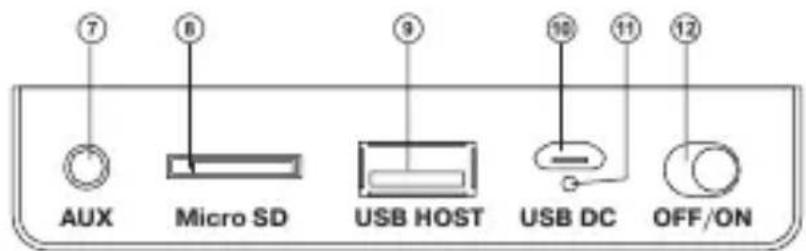
Fig. 1. Speaker system description
④ Next track (in Bluetooth/Player mode);
Go to the next station (in FM radio mode)
Setting the clock / alarm;
Changing the format of the clock (12/24)
⑤ Vol-: Volume decrease
⑥ Vol+: Volume increase
⑦ AUX: 3.5 mm mini-jack for audio signal connecting (phone, MP3 player, etc.)
⑧ Micro SD: micro SD card slot
⑨ USB HOST: USB flash connector
⑩ USB DC: Micro USB jack for connecting speakers to the charger, the USB port of laptop / PC
⑪ Indicator
⑫ ON / OFF button
⑬ Display (on the front panel)
⑭ Microphone (behind the display)
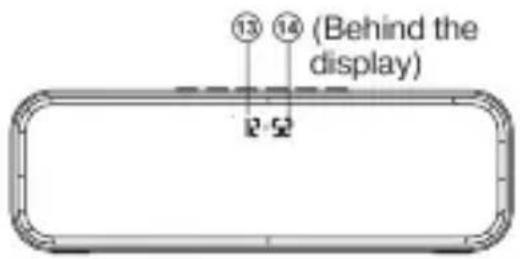
Fig. 2. Front view
Attention! The built-in battery must be charged completely prior to the application.
Speaker system battery charging
- Connect speaker system to a USB port of PC or USB charger using micro USB to USB cable (included). During battery charging the indicator ⑩ is red.
- The battery is used in the speaker system as an integral part of the device, therefore do not try to extract or replace it, because this can result in the warranty cancellation or the device damage.
OPERATION MODES
Bluetooth mode
- Wireless data transfer via the Bluetooth protocol enables to connect speaker system to compatible devices. Maximum radius of action of data transfer is 10 m. Such obstacles as walls or other electronic devices can interfere with the signal transfer.
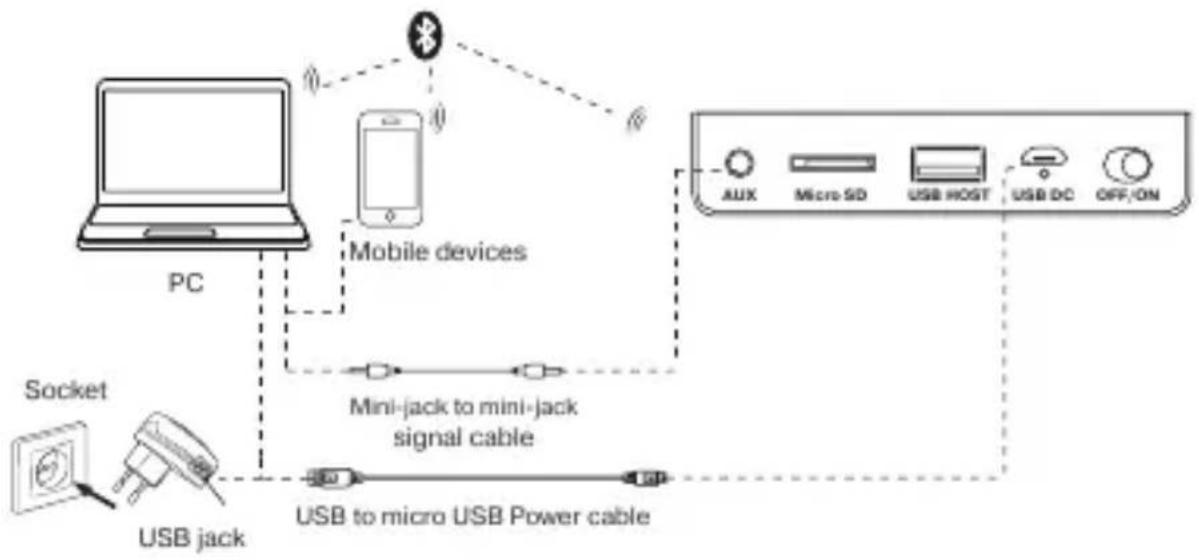
flowchart
graph TD
    A["PC"] -->|Wireless Signal| B["Mobile devices"]
    B --> C["Socket"]
    C --> D["USB jack"]
    D --> E["USB to micro USB Power cable"]
    E --> F["AUX Micro SD USB HOST USB DC OFF/ON"]
Fig. 3. Connection diagram
- Turn on the speaker system Bluetooth mode – press button ② several times until the display will not show "BLUE".
- It is necessary to select the search mode of devices with Bluetooth on a signal source (telephone, notebook, smartphone, etc.). «SVEN PS-175/PS-185/PS-190» massage will be displayed on the screen which is to be connected to*.
- When connection is successful, there will be a short beep and the indication of the search mode on speaker system is over**.
Radio mode
To improve radio reception, connect the cable USB-micro USB cable (included) to the input 10 .
- Turn on the speaker system – press button ② several times until, the radio mode will not turn on. Long press the button ① activates auto search mode. After scanning completion, the first scanned radio station will start to operate automatically. With buttons ③ and ④ select a desired radio station.
MP3 player mode
Attention! The file system of a micro SD or USB flash carrier is FAT32. Maximum volume is 32 GB. It is not recommended to use the micro SD Ultra Speed.
- Insert the USB flash or micro SD carrier into appropriate slot. If the speaker system is in turned on position, the playback will start automatically. Playback/Pause modes are switched over with the help of the button ①. Tracks can be controlled by buttons ③ (previous track) and ④ (next track).
Clock mode
- Turn the speakers on in clock mode – press the button ② repeatedly until the clock mode turns on.
- Enter the setting mode by long pressing the button ①. Set the desired date, hour, minute using the buttons ③ and ④. Between the date / hour / minute setting and exit from the setting mode, press the button ①.
Alarm clock mode
- Turn on the speakers in the alarm mode – press the button ② repeatedly until the alarm mode turns on.
- Enter the time setting mode by long pressing the button ①.
- Set the desired hours and minutes using the ③ and ④ buttons.
Between the hour / minute setting and exit from the setting mode, press the button ①.
Note: It is possible to set your alarm melody:
1) Create the "ALARM" folder on a USB-flash or microSD memory card;
2) Record a music file with the extension .mp3 in the folder ALARM;
3) Insert a USB-flash or microSD card with the recorded file in the AS;
4) At the setted time, the alarm will play the recorded file.
SLEEP mode (only for model SVEN PS-190)
- SLEEP mode allows you to transfer the product to ST-BY mode after the user-selected time has elapsed. To switch to SLEEP mode, press the button ② repeatedly until SOFF appears on the display.
- Set the OFF time (OFF / 15/30/60/120 min) – press the button ① the required number of times. To exit SLEEP mode, press the button ② again.
The use in the wired mode (Line)
- Speaker system can be used as an external device for amplifying any audio source with a 3.5 mm output mini-jack. To do this, connect a cable mini USB, plug 3.5 mini-jack to the audio output AUX ⑦.
TECHNICAL SPECIFICATIONS
| Parameter, measurement unit | Value |
| Frequency range, Hz | speaker: 100 – 22,000microphone: 50 – 16,000 |
| Output power (RMS), W: | 10 (2 × 5) |
| Membrane, mm | ∅ 53 |
| Bluetooth supported profiles | HSP, HFP, A2DP, AVRCP |
| Battery operation time, h | till 10 |
| Battery capacity, mA * h | 2000 |
| Power supply, V | USB/DC5V |
| Weight, g | 0.63 (PS-175), 0.9 (PS-185),0.8 (PS-190) |
| Dimensions, mm | 218 × 70 × 70 (PS-175),240 × 137 × 70 (PS-185),229 × 70 × 95 (PS-190) |
Notes:
- Technical specifications given in this table are supplemental information and cannot give occasion to claims.
- Technical specifications are subject to change without notice due to improvement of SVEN production.
Technical support: www.sven.fi.
natural_image
Three black electronic devices with visible front and back views, one displaying a logo (no text or symbols on the devices themselves)Модели: PS-175, PS-185, PS-190
Manufacturer: SVEN PTE. LTD, 176 Joo Chiat Road,
Nº 02-02, Singapore, 427447. Produced under the
control of Oy Sven Scandinavia Ltd. 15, Kotolahdentie,
Kotka, Finland, 48310. Made in China.
® Registered Trademark of Oy SVEN
Scandinavia Ltd. Finland.
EAC C€
PS-175
PS-185
PS-190