IC-545 - Webcam Sven - Free user manual and instructions
Find the device manual for free IC-545 Sven in PDF.


| Product Type | Webcam |
| Model | IC-545 |
| Brand | Sven |
| Dimensions (approx.) | 8 x 3.5 x 3.5 cm |
| Weight | 100 g |
| Power Supply | USB powered (cable included) |
| Resolution | Full HD 1080p (1920 x 1080) |
| Frame Rate | 30 fps |
| Connection Interface | USB 2.0 |
| Built-in Microphone | Yes |
| Focus Type | Fixed focus |
| Field of View | 70° |
| Compatible Operating Systems | Windows 7/8/10, macOS 10.10+, Linux (UVC driver) |
| Installation | Plug and play, no additional drivers required |
| Maintenance | Clean lens with a soft, dry cloth |
| Safety Precautions | Do not expose to water or extreme temperatures |
| Spare Parts | No user-replaceable parts; contact service center |
| Package Contents | Webcam, user manual |
Frequently Asked Questions - IC-545 Sven
User questions about IC-545 Sven
0 question about this device. Answer the ones you know or ask your own.
Ask a new question about this device
Download the instructions for your Webcam in PDF format for free! Find your manual IC-545 - Sven and take your electronic device back in hand. On this page are published all the documents necessary for the use of your device. IC-545 by Sven.
USER MANUAL IC-545 Sven
natural_image
Black SVEN studio webcam device with adjustable head and cable (no visible text or symbols on body)natural_image
Black SVEN studio webcam device with adjustable head and cable (no visible text or symbols on body)natural_image
Black SVEN studio webcam device with adjustable head and cable (no visible text or symbols on body)Congratulations on your purchase of the Sven web camera!
Please read this Operation Manual before using the unit and retain this Operation Manual in a safe place for future reference.
COPYRIGHT
© 2016. SVEN PTE. LTD. Version 1.0 (V 1.0).
This Manual and information contained in it are copyrighted. All rights reserved.
TRADEMARKS
All trademarks are the property of their legal holders.
NOTICE OF RESPONSIBILITY RESTRICTION
Despite the exerted efforts to make this Manual more exact, some discrepancies may occur. The information of this Manual is given on “as is” terms. The author and the publisher do not bear any liability to a person or an organization for loss or damage which has arisen from the information contained in this Manual.
CONTENTS
RUS 1
UKR 4
ENG 8
- SAFETY PRECAUTIONS .... 10
- PACKAGE CONTENTS ...... 10
- SPECIAL FEATURES ...... 10
- SYSTEM REQUIREMENTS ...... 10
- CONNECTION AND INSTALLATION ...... 11
- DESCRIPTION ...... 11
- TECHNICAL SPECIFICATION ...... 11
Technical support: www.sven.fi
1. SAFETY PRECAUTIONS
- Protect your web camera from high humidity, dust or high temperatures.
- Do not use gasoline, spirit or other dissolvents for cleaning. This may cause damage to the surface. Clean the outside of the camera with soft cloth.
- Do not attempt to disassemble or repair your device.
- Protect the device against powerful shocks and falls – they may damage the internal electronics.
2. PACKAGE CONTENTS
- Web camera — 1 pc
- User's Manual — 1 pc
- Warranty card — 1 pc
3. SPECIAL FEATURES
• High-quality CMOS sensor and 5-lens system
• Built-in microphone
- Manual focus
- Power LED
• 1.3 Mpix sensor resolution
- Comfortable mounting clip for camera fixation
- Hinge for camera rotation
- Plug&Play
4. SYSTEM REQUIREMENTS
- Windows XP/Vista/7/8/10
- Pentium P4 1.4GHz or AMD Athlon 1GHz
- 128 MB RAM
• 24-bit color video adapter
• Available USB port
5. CONNECTION AND INSTALLATION
- Connect the web camera to an available USB port.
- This web camera supports Plug and Play technology. Installation of the device is automatic after its connection to the USB port.
6. DESCRIPTION
① Focus
② Lenses
③ Hinge
④ Built-in microphone
⑤ LED
⑥ Mounting clip
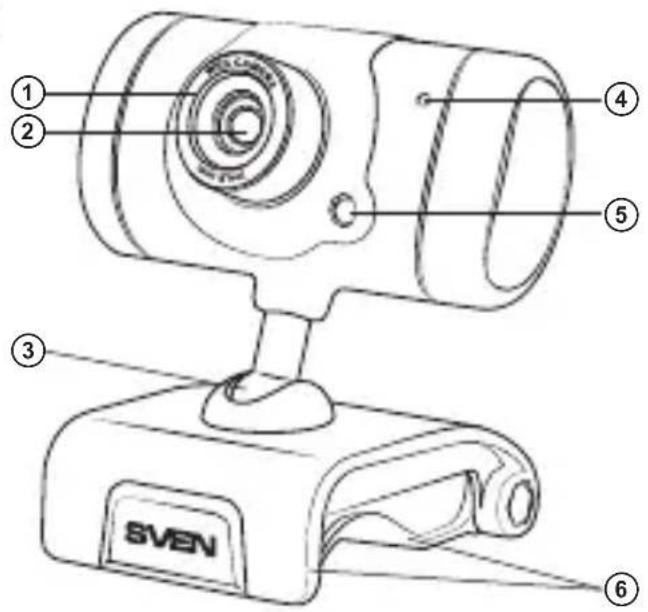
Fig. 1. Web camera description
7. TECHNICAL SPECIFICATIONS
| Parameter, measurement unit | Value |
| Sensor type | CMOS |
| Resolution, pix | 1280 × 1024 |
| Frame rate, frames/sec | 30 fps for 640 × 480 |
| Focus distance, mm | 4.8 to infinity |
| Cable length, m | 1.45 |
Notes:
- Technical specifications given in this table are supplemental information and cannot give occasion to claims.
- Technical specifications are subject to change without notice due to improvement of SVEN production.
Модель: IC-545
Manufacturer: SVEN PTE. LTD, 176 Joo Chiat Road, N° 02-02, Singapore, 427447. Produced under the control of Oy Sven Scandinavia Ltd. 15, Kotolahdentie, Kotka, Finland, 48310. Made in China.
® Registered Trademark of Oy SVEN Scandinavia Ltd. Finland.