BLACK & DECKER ASI500 - Compressor BLACK & DECKER - Free user manual and instructions
Find the device manual for free BLACK & DECKER ASI500 BLACK & DECKER in PDF.

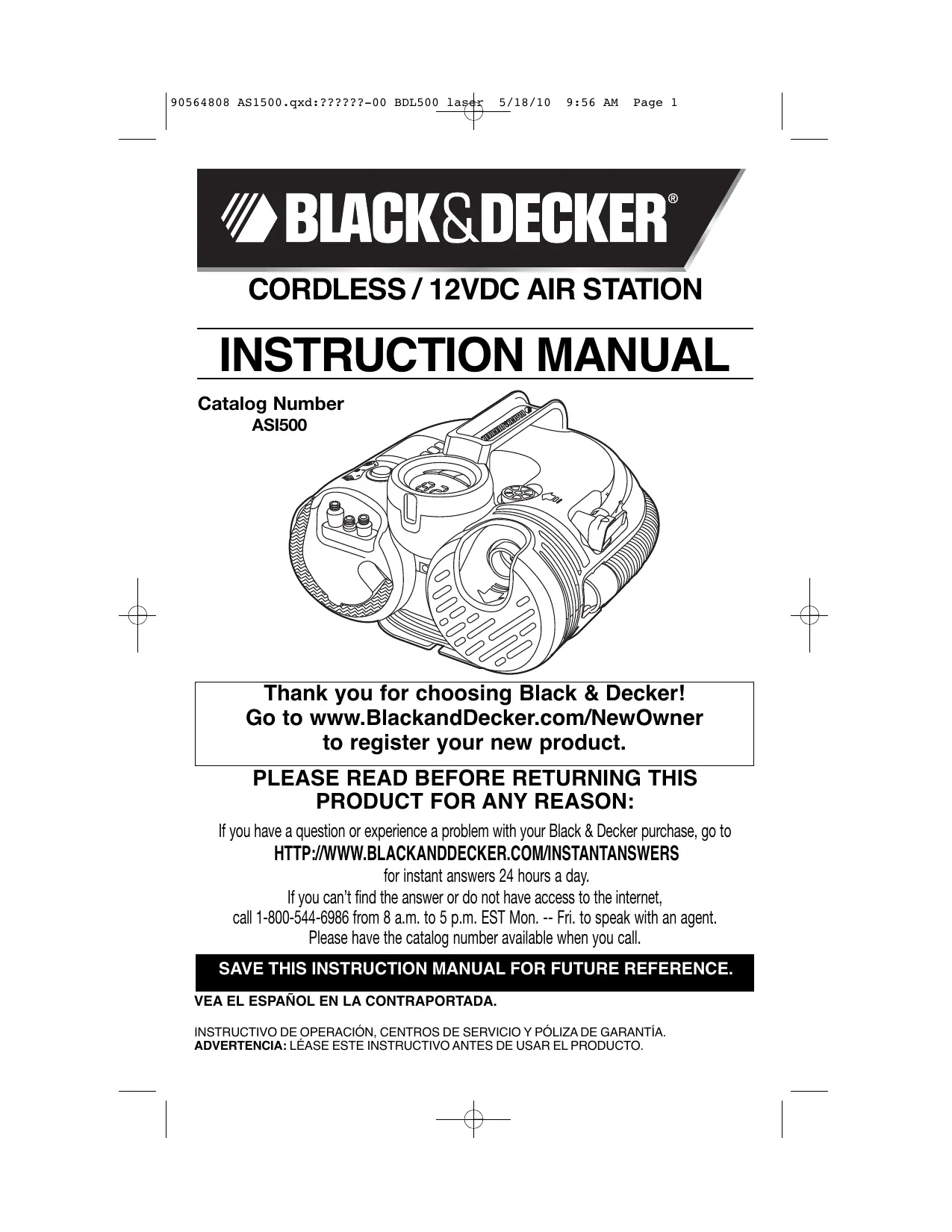


| Product Type | Cordless Inflator with Rechargeable Battery |
| Brand | Black & Decker |
| Model | ASI500 |
| Power Supply | 12V DC (vehicle accessory outlet) or rechargeable internal battery (4-5h charge) |
| Maximum Pressure | 160 psi (11 bar) for accessories; 100 psi for auto-stop |
| Main Functions | Inflating with adjustable auto-stop, high-volume pump (inflate/deflate), digital pressure gauge, built-in LED light |
| Measurement Units | psi, bar, kPa |
| Dimensions (approx.) | 25 x 15 x 15 cm (overall) |
| Weight (approx.) | 1.5 kg (with battery) |
| Included Accessories | Universal valve adapter, cone nozzles, inflation needle, high-volume adapter, air hose, high-volume hose, mains charger, 12V DC adapter |
| Charging Time | 4 to 5 hours |
| Battery Type | Internal rechargeable lead-acid |
| 12V Adapter Fuse | 8A / 250V |
| Standby Mode | Yes, after 2 minutes of inactivity to save battery |
| Safety | Auto-stop to prevent over-inflation; do not use near water or flammable liquids; do not inhale compressed air |
| Maintenance and Cleaning | Clean with a damp cloth and mild soap; do not immerse in water |
| Spare Parts and Repairability | Fuse (8A/250V), internal battery; repairs by Black & Decker authorized service center |
| Warranty | 1 year for household use |
| Intended Use | Inflating tires, balls, mattresses, floats, etc., for household use |
Frequently Asked Questions - BLACK & DECKER ASI500 BLACK & DECKER
User questions about BLACK & DECKER ASI500 BLACK & DECKER
0 question about this device. Answer the ones you know or ask your own.
Ask a new question about this device
Download the instructions for your Compressor in PDF format for free! Find your manual BLACK & DECKER ASI500 - BLACK & DECKER and take your electronic device back in hand. On this page are published all the documents necessary for the use of your device. BLACK & DECKER ASI500 by BLACK & DECKER.
USER MANUAL BLACK & DECKER ASI500 BLACK & DECKER
Thank you for choosing Black & Decker! Go to www.BlackandDecker.com/NewOwner to register your new product.
PLEASE READ BEFORE RETURNING THIS PRODUCT FOR ANY REASON:
If you have a question or experience a problem with your Black & Decker purchase, go to HTTP://WWW.BLACKANDDECKER.COM/INSTANTANSWERS
for instant answers 24 hours a day. If you can't find the answer or do not have access to the internet, call 1-800-544-6986 from 8 a.m. to 5 p.m. EST Mon. -- Fri. to speak with an agent.
Please have the catalog number available when you call.
SAVE THIS INSTRUCTION MANUAL FOR FUTURE REFERENCE.
VEA EL ESPÁÑOL EN LA CONTRAPORTADA.
INSTRUCTIVO DE OPERACION, CENTROS DE SERVICIO Y PÓLIZA DE GARANTÍA. ADVERTENCIA: LÉASE ESTE INSTRUCTIVO ANTES DE USAR EL PRODUCTO.
WARNING! Read all instructions before operating product. Failure to follow all instructions listed below may result in electric shock, fire and/or serious injury.
SAVE THESE INSTRUCTIONS
WARNINGS:
1.) Read these instructions.
2.) Keep these instructions.
3.) Heed all warnings.
4.) Follow all instructions.
5.) Do not use this apparatus near water. Keep the case dry at all times.
6.) Clean only with dry cloth.
7.) Do not block any ventilation openings. Install in accordance with the manuafacturer's instructions.
8.) Do not place near any heat sources such as radiators, heat registers, stoves or other apparatus (including amplifiers) that produce heat.
9.) Do not defeat the safety purpose of the polarized or grounding-type plug. A polarized plug has two blades with one wider than the other. A grounding type plug has two blades and a third grounding prong. The wide blade or the third prong are provided for your safety. If the provided plug does not fit into your outlet, consult an electrician for replacement of the obsolete outlet.
10.) Protect the cord from being walked on or pinched particularly at plugs, convenience receptacles, and the point where they exit from the apparatus.
11.) Only use attachments / accessories specified by the manufacturer.
12.) Unplug unit when lightning is in the area or when unit is not in use.
13.) Refer all servicing to qualified service personnel. Servicing is required when the apparatus has been damaged in any way, such as power-supply cord or plug is damaged, liquid has been spilled or objects have fallen into the apparatus, the apparatus has been exposed to rain or moisture, does not operate normally, or has been dropped.
14.) Do not expose to dripping or splashing. WARNING: To reduce the risk of fire or electric shock, do not expose this apparatus to rain or moisture.
15.) Do not operate near flammable materials, fumes or gases.
16.) Do not disassemble product. Incorrect reassembly may result in a risk of electric shock or fire.
17.) Provide adequate ventilation and refrain from placing items on or around the product during operation.
18.) Do not incinerate the battery even if it is severely damaged or is completely worn out. The battery can explode in a fire. Check with local codes for possible special disposal instructions.
19.) If any leakage of liquid from the battery cells occurs, discontinue use immediately and return the battery to your local Black & Decker Service Center or authorized service facility.
20.) Never attempt to open the battery for any reason. If the plastic housing of the battery breaks or cracks, immediately discontinue use and do not recharge.
21.) Keep this product out of the reach of children.
22.) Since the vibration produced by the inflator may cause it to "walk", do not operate on a high shelf or other surface. Operate at ground or bench level only.
GENERAL SAFETY RULES
- KEEP WORK AREA CLEAN. Cluttered areas and benches invite injuries.
- CONSIDER WORK AREA ENVIRONMENT. Don't expose power tools to rain. Don't use power tools in damp or wet locations. Keep work area well lit. Do not use tool in presence of flammable liquids or gases.
- GUARD AGAINST ELECTRIC SHOCK. Prevent body contact with grounded surfaces. For example; pipes, radiators, ranges, and refrigerator enclosures.
- KEEP CHILDREN AWAY. Do not let visitors contact tool or extension cord. All visitors should be kept away from work area.
- STORE IDLE TOOLS. When not in use, tools should be stored in dry, and high or locked-up place — out of reach of children.
- DON'T FORCE TOOL. It will do the job better and safer at the rate for which it was intended.
-
USE RIGHT TOOL. Don't force small tool or attachment to do the job of a heavy-duty tool. Don't use tool for purpose not intended.
-
DRESS PROPERLY. Do not wear loose clothing or jewelry. They can be caught in moving parts. Rubber gloves and non-skid footwear are recommended when working outdoors. Wear protective hair covering to contain long hair.
- USE SAFETY GLASSES. Also use face or dust mask if operation is dusty.
- DON'T ABUSE CORD. Never carry tool by cord or yank it to disconnect from receptacle. Keep cord from heat, oil, and sharp edges.
SECURE WORK. Use clamps or a vise to hold work. It's safer than using your hand and it frees both hands to operate tool. - DON'T OVERREACH. Keep proper footing and balance at all times.
- MAINTAIN TOOLS WITH CARE. Keep tools sharp and clean for better and safer performance. Follow instructions for lubricating and changing accessories. Inspect tool cords periodically and if damaged, have repaired by authorized service facility. Inspect extension cords periodically and replace if damaged. Keep handles dry, clean, and free from oil and grease.
- DISCONNECT OR LOCK OFF TOOLS when not in use, before servicing, and when changing accessories, such as blades, bits, cutters.
- REMOVE ADJUSTING KEYS AND WRENCHES. Form habit of checking to see that keys and adjusting wrenches are removed from tool before turning it on.
- AVOID UNINTENTIONAL STARTING. Don't carry tool with finger on switch. Be sure switch is off when plugging in.
- EXTENSION CORDS. Make sure your extension cord is in good condition. When using an extension cord, be sure to use one heavy enough to carry the current your product will draw. An undersized cord will cause a drop in line voltage resulting in loss of power and overheating. The following table shows the correct size to use depending on cord length and nameplate ampere rating. If in doubt, use the next heavier gauge. The smaller the gauge number, the heavier the cord.
| Volts | Minimum Gauge for Cord Sets | ||||
| Total Length of Cord in Feet | |||||
| 120V | 0-25 | 26-50 | 51-100 | 101-150 | |
| (0-7,6m) | (7,6-15,2m) | (15,2-30,4m) | (30,4-45,7m) | ||
| 240V | 0-50 | 51-100 | 101-200 | 201-300 | |
| (0-15,2m) | (15,2-30,4m) | (30,4-60,9m) | (60,9-91,4m) | ||
| Ampere Rating | |||||
| More | Not more | American Wire Gauge | |||
| Than | Than | ||||
| 0 | 6 | 18 | 16 | 16 | 14 |
| 6 | 10 | 18 | 16 | 14 | 12 |
| 10 | 12 | 16 | 16 | 14 | 12 |
| 12 | 16 | 14 | 12 | Not Recommended | |
- OUTDOOR USE EXTENSION CORDS. When tool is used outdoors, use only extension cords intended for use outdoors and so marked.
- STAY ALERT. Watch what you are doing. Use common sense. Do not operate tool when you are tired.
- CHECK DAMAGED PARTS. Before further use of the tool, a guard or other part that is damaged should be carefully checked to determine that it will operate properly and perform its intended function. Check for alignment of moving parts, binding of moving parts, breakage of parts, mounting, and any other conditions that may affect its operation. A guard or other part that is damaged should be properly repaired or replaced by an authorized service center unless otherwise indicated elsewhere in this instruction manual. Have defective switches replaced by authorized service center. Do not use tool if switch does not turn it on and off.
- DO NOT OPERATE portable electric tools near flammable liquids or in gaseous or explosive atmospheres. Motors in these tools normally spark, and the sparks might ignite fumes.
ADDITIONAL SAFETY WARNINGS FOR YOUR INFLATOR
WARNING! FOR HOME AND CAR USE ONLY:
- Inflate car and bike tires, balls, rafts, swimming pool floats, air mattresses, and more in and around the home.
WARNING! RISK TO BREATHING:
- The compressed air from your inflator is not safe for breathing. Never inhale air from your inflator or from a breathing device connected to the inflator.
WARNING! RISK OF BURSTING:
-
Inflate items only to their manufacturer's recommendations. Exceeding the pressure rating could cause them to explode resulting in personal injury.
-
Do not leave unit running unattended. Overinflation of tires and other items could result in serious injury and property damage.
WARNING! RISK OF ELECTRICAL SHOCK:
-
Turn off and unplug inflator when not in use, when cleaning, or when changing nozzles.
-
Do not expose inflator to rain or wet conditions. Water entering the inflator will increase the risk of electric shock.
WARNING! RISK OF FALLING:
- Since the vibration produced by the inflator may cause it to "walk", do not operate on a high shelf or other surface. Operate at ground or bench level.
WARNING! RISK OF UNSAFE OPERATION:
-
Do not modify or attempt to repair. Never drill into, weld, or make any modifications to the inflator or its attachments.
-
Do not operate inflator when car engine is running.
-
Operate only with the accessories included or those rated for 160 p.s.i. or higher. The use of any accessory not recommended for use with this tool could be hazardous.
-
Never "horseplay". High pressure air is dangerous. Don't direct air-flow at yourself or others.
WARNING! RISK OF FIRE:
-
Inflator can become hot during use. Allow inflator to cool 30 minutes before storing away.
-
Never carry the inflator by the hose.
IMPORTANT CHARGING NOTES
- Longest life and best performance can be obtained if the battery is charged when the air temperature is between 65^ and 75^ (18^ - 24^) . DO NOT charge the battery in an air temperature below +40^(+4.5^) , or above +105^ (+40.5^) . This is important and will prevent serious damage to the battery.
- The charger and battery may become warm to touch while charging. This is a normal condition, and does not indicate a problem. To facilitate the cooling of the battery after use, avoid placing the charger in a warm environment such as in a metal shed, or an uninsulated trailer.
- If the battery does not charge properly — (1) Check current at receptacle by plugging in a lamp or other appliance, (2) Check to see if receptacle is connected to a light switch which turns power off when you turn out the lights. (3) Move charger and battery to a location where the surrounding air temperature is approximately 65^ - 75^ ( 18^ - 24^ ). (4) If charging problems persist, take or send this product to your local service center.
- Under certain conditions, with the charger plugged into the power supply, the exposed charging contacts inside the charger can be shorted by foreign material. Foreign materials of a conductive nature such as, but not limited to, steel wool, aluminum foil, or any buildup of metallic particles should be kept away from charger cavities. Unplug charger before attempting to clean.
- DO NOT immerse charger in water or any other liquid.
WARNING: Don't allow any liquid to get inside charger. Electric shock may result. - DO NOT attempt to charge the battery with any chargers other than the ones in this manual. The charger and battery are specifically designed to work together.
- The charger is not intended for any use other than charging the battery in the Air Station. Any other uses may result in risk of fire, electric shock or electrocution.
- Pull by plug rather than cord when disconnecting charger. This will reduce risk of damage to electric plug and cord.
- Make sure cord is located so that it will not be stepped on, tripped over, or otherwise subjected to damage or stress.
- Do not operate charger with a damaged cord or plug.
- Do not operate the charger if it has received a sharp blow, been dropped, or otherwise damaged in any way. Take it to an authorized service center.
-
Do not disassemble charger. Incorrect reassembly may result in a risk of electric shock, electrocution or fire.
-
NEVER attempt to connect 2 chargers together.
- Never use another products charger to charge this product. Always use identical replacement parts only.
LIQUID CRYSTAL DISPLAY FLUID (FIRST AID MEASURES)
If liquid crystal comes in contact with your skin:
Wash area off completely with plenty of water. Remove contaminated clothing.
If liquid crystal gets into your eye:
Flush the affected eye with clean water and then seek medical attention.
If liquid crystal is swallowed:
Flush your mouth thoroughly with water. Drink large quantities of water and induce vomiting. Then seek medical attention.
The label on your tool may include the following symbols.
V volts
Hz ....hertz
min............minutes
= = = direct current
Class II Construction
A. …………………………………… safety alert symbol
A........amperes
W . . . . . . . . . . . . . . . . . . . . . . . . . . . . . . . . . . . . . . . . . . . . . . . . . . . . . . . . . . . . . . . . . . . . . . . . . . . . . . . . . . W
...alternating
current
no .no load speed
.earthing terminal
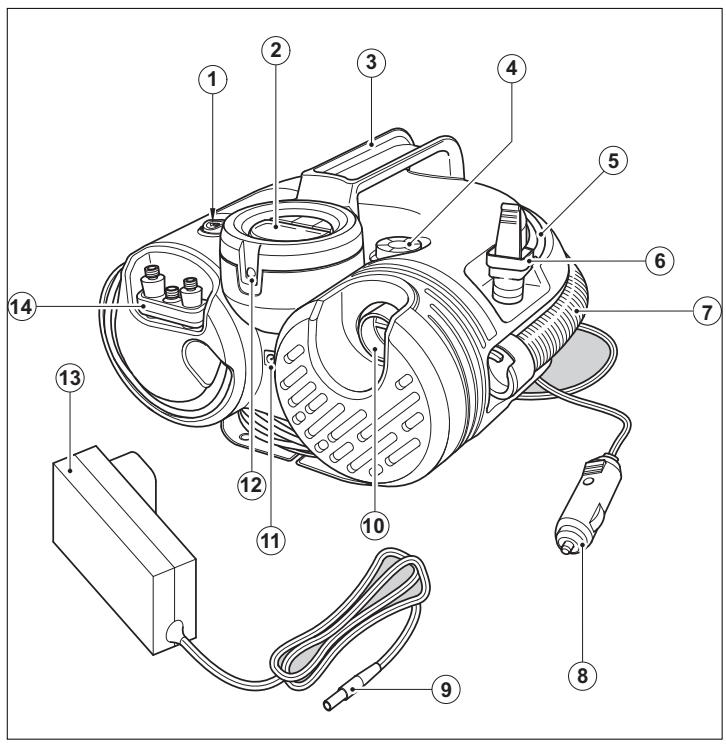
FUNCTIONAL DESCRIPTION
- Main power switch
- LCD
- Handle
- High-volume pump deflate connection
- Air hose with universal valve adaptor
- Universal valve adapter
- High-volume hose (unregulated air pressure hose, no auto shut-off)
8.12 Vdc vehicle connector - Charger jack plug
- High-volume pump inflate connection
- Jack plug socket
- LED light
- Charger
- Accessory storage
INTRODUCTION
INTENDED USE
Your Black & Decker inflation station is designed to be used cordless or in most vehicles from the standard 12 Volt socket to inflate car and bike tires, balls, rafts, air mattresses, swimming pool floats, etc. This product is intended for household, consumer use only.
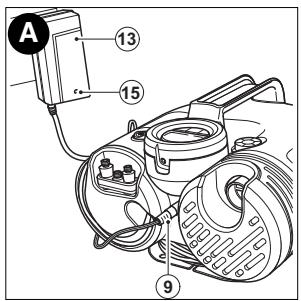
CHARGING THE BATTERY - FIGURE A
The internal battery must be recharged for 4 to 5 hours using the AC charger provided (13).
- Insert the jack plug (9) into the socket on the front of the unit (11).
Plug the AC charger into a 120Vac electrical outlet. - The LED (15) on the AC charger (13) will indicate the level of charging. Red, unit charging, Green, unit charged.
- When fully charged, remove the AC charger from the power source and remove the jack plug from the unit.



Needs charging.
Charging.
Fully charged.
USE
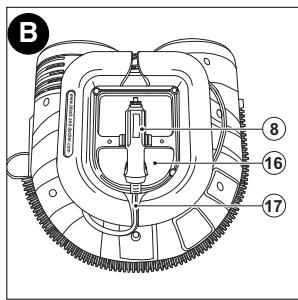
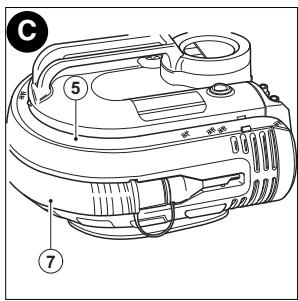
HOSE AND CORD STORAGE - FIGURES B-D
- Wrap the 12v dc cord (17) around the base of the unit and snap the 12 Vdc adapter (8) into its storage location on the base of the unit (16).
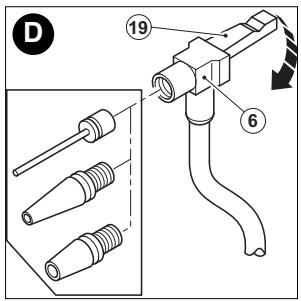
- The air hose (5) is located in a storage channel around the top of the unit (fig. C), make sure the hose is snapped into the retaining clips and the lever is in the up position (fig.D).
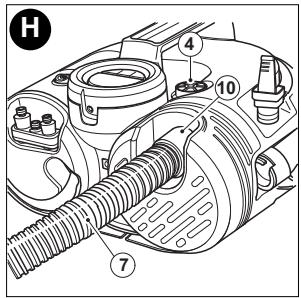
- The pump hose (7) is stored around the center of the unit and snaps into position at both ends. The accessories are also stored on the front of the unit.
FITTING THE ACCESSORIES - FIGURES D,E,F & G
Your inflator is supplied with the standard tapered nozzles and the needle inflator nozzle, these are located on the front of the unit.
- To use the universal valve adaptor, make sure that the lever is in the up position.
- Place the valve adapter over the stem of the inflation needle or tapered nozzle (fig. D).
- Press the lever on the valve adapter down to lock it in place.
- Place the inflation needle or tapered nozzle into the item to be inflated.
Note: Always make sure that the lever is in the up position when not in use. Operate your inflator only with the universal valve adaptor or with the included nozzles.
Note: Make sure that the universal valve adapter is firmly locked in place before turning the inflator on.
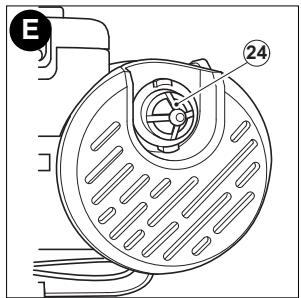
Your inflator is supplied with a high volume adaptor (24).
This is stored on the front of the unit (fig. E).
- To use the high volume adaptor (24), remove it from the high volume inflate connection.
- Remove the high volume hose (7) from the storage location.
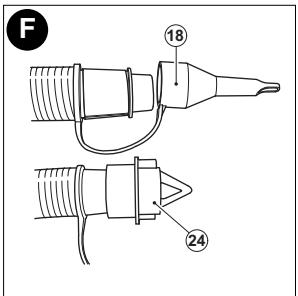
- Remove the tapered nozzle (18) from the end of the high volume hose (7).
- Fit the high volume adaptor (24) to the end of the high volume hose (fig. F).
Many inflatable have an internal flap that prevents air loss during inflation, especially air mattresses. Unless this flap is displaced by the nozzle the inflatable will not inflate. Push the nozzle firmly into the valve to make sure that you push this flap out of the way.
WARNING: Risk of Bursting. Excessive air pressure may cause a hazardous risk of bursting or personal injury. Check the manufacturer's maximum pressure rating for items being inflated.
Note: If the pressure rating for the item being inflated is above 100 psi, note that the maximum run time is 10 minutes, leave to rest for 20 minutes before re-use.
OPERATING THE INFLATOR (FIGURE G)
WARNING: Do not operate the inflator when the car engine is running.
Note: Make sure that your 12 Volt accessory socket is live. On some vehicles the accessory socket may only become live when the ignition key is in the accessory position. To power the display from the 12Vdc adapter:
- Always fully extend the 12 Vdc cord before each use.
- Connect the 12 Vdc adapter (8) into your vehicles 12 V accessory socket.
- Switch the main power switch (1) to the inflate position (c) to power up the LCD.
To power the LCD from the internal battery (cordless operation):
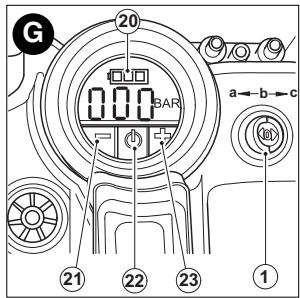
- Switch the main power switch (1) to the inflate position (c) to power up the LCD.
WARNING: Risk of Bursting. Do not leave unit running unattended. Overinflation of tires and other items could result in serious injury and property damage.
QUICK START
WARNING: Never leave inflator running unattended in this mode. In can burst car tires and other items.
To use your inflator immediately you can do so without setting the automatic shut-off feature.
- Switch the main power switch (1) to the inflate position (c fig. G).
- To switch between the different units (PSI, BAR or KPA) press - & + buttons (21,23) together until the required units are displayed.
- Connect the universal valve adaptor (6) and an accessory, if required, to the item to be inflated, making sure that the lever (19) of the valve adaptor is in the down position to lock it in place.
Note: Make sure that the universal valve adaptor is correctly fitted to the item to be inflated.
- To start the inflator press the power button (22) on the LCD.
- When the item is inflated as required or to stop the inflator at any time press the power button (22) on the LCD.
- Remove the hose from the item and store it on the unit.
- Turn the main power switch (1) to the off position (b fig. G).
SETTING THE AUTOMATIC SHUT-OFF PRESSURE - FIGURE G
Note: The LCD will only show inflation pressures when the inflator is being used. In both inflation and pump mode the unit will show battery status.
- To switch between the different units (psi, bar or kPa), press - & + buttons (21, 23) at the same time until the required units are displayed.
- Press and hold either buttons - & + (21, 23) for 3 seconds until the display flashes.
- While the display is flashing press the - or + (21, 23) until the required pressure is displayed.
After 3 seconds the display will flash and return to a reading of "0.0". This is normal. - Connect the universal valve adaptor and accessories, if required, to the item to be inflated, making sure that the lever of the valve adaptor is in the down position to lock it in place.
- To start the inflator press the power button (22) on the LCD.
- When the item to be inflated has reached the preset value the unit will automatically turn off.
Note: You may notice the actual pressure reading may drop after a couple of seconds, this is normal.
- To stop the inflator at any time press the power button (22) on the LCD.
- Remove the valve adaptor or accessory from the inflated item and the 12 Volt adapter (8) from your vehicle's 12 Volt accessory socket.
- Turn the main power switch (1) to the off position (b).
Note: If the main power switch is turned off, all settings will be lost and will need to be re-entered following the instructions under the heading 'Setting the automatic shut-off pressure'. This is a safety feature to prevent the risk of items OVER INFLATING.
USING THE INFLATOR AS A PRESSURE GAUGE
- Switch the main power switch (1) to the inflate position (c fig. G).
- Connect the universal valve adaptor (6) to the item to be checked.
- The LCD will display the items pressure.
- After checking, turn the main power switch (1) off and return the air hose to the storage location.
Note: Do not operate the pump when the vehicle's engine is running.
Note: Make sure that your 12 Vdc accessory socket is live. On some vehicles the accessory socket may only become live when the ignition key is in the accessory position.
To inflate using the high-volume pump (i.e. air mattresses, rafts, swimming pool floats):
Note: The pump mode DOES NOT have an auto shut-off feature.
- Switch the main power switch (1) to the pump position (a, fig. G).
- Remove the high-volume hose (7) from the storage channel around the center of the unit and connect it to the high-volume pump inflate connection (10).
- Insert the hose (with accessories if required) to the item to be inflated.
- To start the pump press the power switch (22) on the LCD.
- When the item is inflated as required or to stop the pump at any time press the power switch (22) on the LCD.
- Remove the hose from the item and store it on the unit.
- Turn the main power switch (1) to the off position (b fig. G).
To deflate using the high-volume pump (i.e air mattresses, rafts, swimming pool floats): Note: The pump mode DOES NOT have an auto shut-off feature.
- Switch the main power switch (1) to the pump position (a fig. G).
- Remove the high-volume hose (7) from the storage channel around the center of the unit and connect it to the high-volume pump deflate connection (4) (fig. H).
- Insert the hose (with accessories if required) into the item to be deflated.
- To start the pump press the power switch (22) on the LCD.
- When the item is deflated or to stop the pump at any time press the power switch (22) on the LCD.
- Remove the high-volume hose (7) from the item and store it in the storage channel around the center of the unit.
- Turn the main power switch (1) to the off position (b fig. G).
To switch on the LED light (12):
- Switch the main power switch (1) to the inflate (c fig. G) or the pump (a fig. G) position.
- Press either of the - or + buttons (21, 23) on the LCD (2) to turn the LED light (12) on.
To switch the LED light (12) off:
- Press either of the - or + buttons (21, 23) again.
- Turn the main power (1) switch to off.
SLEEP MODE TO PRESERVE BATTERY LIFE
- The unit is fitted with a sleep mode function that will help prolong the life of the internal battery.
- If the unit is left on and unused for more than 2 minutes the unit will drop into sleep mode.
- To power the unit again either switch the main power switch (1) on and off or press any button on the LCD (2).
Note: After sleep mode, all settings will be lost and will need to be re-entered following the instructions under the heading 'Setting the automatic shut-off pressure'.
REPLACING THE FUSE IN THE VEHICLE DC ACCESSORY PLUG
- Remove the cap by turning it counterclockwise.
- Remove the center pin.
- Remove the fuse.
- Fit a new fuse of the same type and size (8A/250V).
- Refit the cap and center pin.
- Tighten the cap by turning clockwise onto the plug.
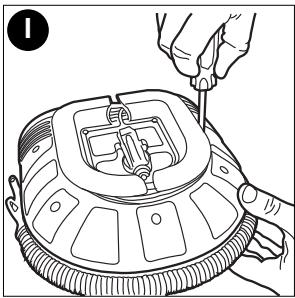
BATTERY REMOVAL (FOR RECYCLING) (FIGURE I)
WARNING: Exercise care when handling batteries in order not to short the battery with conducting materials such as rings, bracelets and keys. The battery or conductor may overheat and cause burns.
Before attempting to disassemble the main body of the product, turn it on and leave it on until the power is depleted to ensure a complete discharge of the battery.
Using a phillips screwdriver, remove the screws from the bottom housing cover shown in figure 1. Lift the battery out and pull off the terminal clips. See "Service Information" for battery replacement.
MAINTENANCE
Use only mild soap and damp cloth to clean the tool. Never let any liquid get inside the tool; never immerse any part of the tool into a liquid.
IMPORTANT: To assure product SAFETY and RELIABILITY, repairs, maintenance and adjustment (other than those listed in this manual) should be performed by authorized service centers or other qualified service personnel, always using identical replacement parts.
THE RBRC™ SEAL
The RBRC™ (Rechargeable Battery Recycling Corporation) Seal on the lead acid battery (or battery pack) indicates that the costs to recycle the battery (or battery pack) at the end of its useful life have already been paid by Black & Decker. In some areas, it is illegal to place spent lead acid batteries in the trash or municipal solid waste stream and the RBRC program provides an environmentally conscious alternative.
RBRC in cooperation with Black & Decker and other battery users, has established programs in the United States and Canada to facilitate the collection of spent lead acid batteries. Help protect our environment and conserve natural resources by returning the spent lead acid battery to an authorized Black & Decker service center or to your local retailer for recycling. You may also contact your local recycling center for information on where to drop off the spent battery, or call 1-800-8-BATTERY.
TROUBLESHOOTING
Problem
- Unit will not start.
Possible Cause
12 Volt adapter not connected.
Accessory socket not live
Main ON/OFF switch not in correct position.
The fuse in the 12 Volt adapter is blown.
Cord or switch is damaged.
Possible Solution
Connect the 12 Volt adapter.
Turn key to accessory position
Turn main switch to required position.
Replace the fuse with one of the same size and type (8A/250V).
Have cord or switch replaced at Black & Decker Service Center or Authorized Servicer.
- Will not inflate.
Incorrect mode selected.
Select correct mode.
- LCD not illuminated.
Unit in sleep mode.
Press any button on LCD.
For assistance with your product, visit our website www.blackanddecker.com for the location of the service center nearest you or call the BLACK & DECKER help line at 1-800-544-6986.
ACCESSORIES
Recommended accessories for use with your tool are available from your local dealer or authorized service center. If you need assistance regarding accessories, please call:
1-800-544-6986.
WARNING: The use of any accessory not recommended for use with this tool could be hazardous.
SERVICE INFORMATION
All Black & Decker Service Centers are staffed with trained personnel to provide customers with efficient and reliable power tool service. Whether you need technical advice, repair, or genuine factory replacement parts, contact the Black & Decker location nearest you. To find your local service location, refer to the yellow page directory under "Tools-Electric" or call: 1-800-544-6986 or visit www.blackanddecker.com
FULL ONE-YEAR HOME USE WARRANTY
Black & Decker (U.S.) Inc. warrants this product for one year against any defects in material or workmanship. The defective product will be replaced or repaired at no charge in either of two ways.
The first, which will result in exchanges only, is to return the product to the retailer from whom it was purchased (provided that the store is a participating retailer). Returns should be made within the time period of the retailer's policy for exchanges (usually 30 to 90 days after the sale). Proof of purchase may be required. Please check with the retailer for their specific return policy regarding returns that are beyond the time set for exchanges.
The second option is to take or send the product (prepaid) to a Black & Decker owned or authorized Service Center for repair or replacement at our option. Proof of purchase may be required. Black & Decker owned and authorized Service Centers are listed under "Tools-Electric" in the yellow pages of the phone directory and on our website www.blackanddecker.com.
This warranty does not apply to accessories. This warranty gives you specific legal rights and you may have other rights which vary from state to state or province to province.
Should you have any questions, contact the manager of your nearest Black & Decker Service Center. This product is not intended for commercial use.
Free warning label replacement: If your warning labels become illegible or are missing, call 1-800-544-6986 for a free replacement.
Imported by
Black & Decker (U.S.) Inc.,
701 E. Joppa Rd.
Towson, MD 21286 U.S.A.

BlackandDecker.com
1-800-544-6986
See 'Tools-Electric'
Yellow Pages –
for Service & Sales


BLACK&DECKER
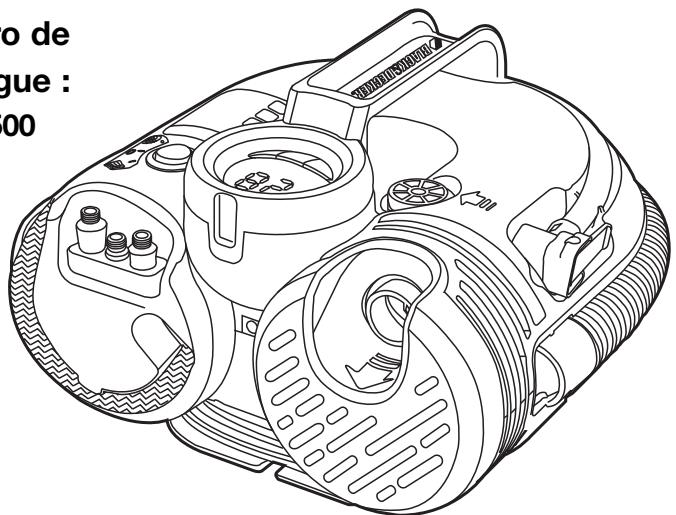
STATION D'AIR SANS FIL/12 V C.C.
MODE D'EMPLOI
Numero de catalogue : ASI500
Black & Decker Canada Inc.
100 Central Ave.
Col. Americana, S. Juarez
Guadalajara, Jalisco
Tel. 01 33 38 25 69 78
Col. Fracc. Universidad
Chihuahua, Chihuahua
Tel. 01 614 413 64 04
Fernando González Armenta
Bolivia No. 605
Col. Felipe Carrillo Puerto
Cd. Madero, Tampico
Tel. 01 833 221 34 50
Copyright © 2010 Black & Decker
May 2010
Printed in China