
DMWMCTZ40E - Photo Accessories PANASONIC - Free user manual and instructions
Find the device manual for free DMWMCTZ40E PANASONIC in PDF.

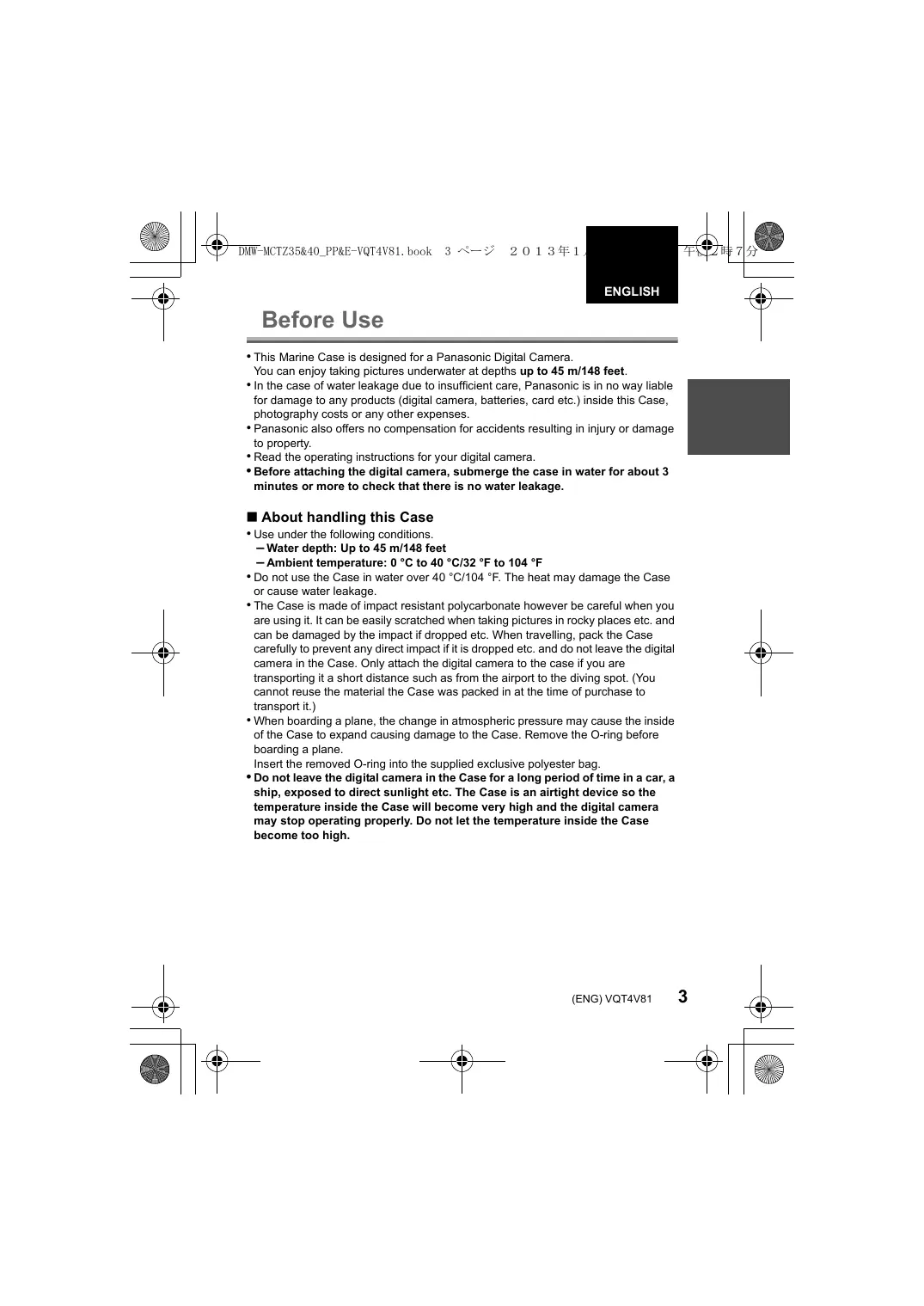


| Product Type | Underwater Housing (Photo Accessory) |
| Brand | Panasonic |
| Model | DMW-MCTZ40E / DMW-MCTZ35 |
| Compatibility | DMC-TZ40, DMC-TZ41, DMC-ZS30, DMC-TZ37, DMC-ZS27 (MCTZ40) ; DMC-TZ35, DMC-TZ36, DMC-ZS25 (MCTZ35) |
| Dimensions (L×H×D) | Approximately 151 mm × 94 mm × 103 mm (without protruding parts) |
| Weight | Approximately 480 g (including diffuser) |
| Material | Polycarbonate |
| Maximum depth | 45 m / 148 feet |
| Sealing type | O-ring |
| Operating temperature | 0 °C to 40 °C |
| Included accessories | Spare O-ring, silica gel (5 pieces), O-ring grease tube, wrist strap, diffuser, weights (2) with screws, storage bag |
| Main functions | Zoom lever, movie button, shutter release, mode dial, external flash shoe, diffuser |
| Recommended use | Underwater photography up to 45 m depth |
| O-ring maintenance | Clean and grease regularly; replace at least once a year |
| Cleaning after use | Rinse with fresh water, air dry, do not expose to sunlight |
| Precautions | Do not use above 40 °C; check seal before each dive; do not use alcohol or solvents |
| Replacement parts | Replacement O-ring (ref. VMG1798), grease (ref. VZG0372), silica gel (ref. VZG0371) |
| Repairability | Have inspected by an authorized dealer every 3 years; do not disassemble yourself |
Frequently Asked Questions - DMWMCTZ40E PANASONIC
User questions about DMWMCTZ40E PANASONIC
0 question about this device. Answer the ones you know or ask your own.
Ask a new question about this device
Download the instructions for your Photo Accessories in PDF format for free! Find your manual DMWMCTZ40E - PANASONIC and take your electronic device back in hand. On this page are published all the documents necessary for the use of your device. DMWMCTZ40E by PANASONIC.
USER MANUAL DMWMCTZ40E PANASONIC
Please read these instructions carefully before using this product, and save this manual for future use.
Operating Instructions
Marine Case
Thank you for purchasing Panasonic product.
Please read these instructions carefully before using this product, and save this manual for future use.
Contents
Getting Started
Before Use 3
Accessories 5
Components 6
Preparation
What is the O-ring? 7
Setting the O-ring 8
Checking the Case is Waterproof 12
Attaching the Digital Camera 13
Operation
Taking Pictures. 16
Tips for Taking Pictures in the Water 17
After Use 18
Others
Cleaning and Storing 20
Handling and Care 20
Caution for Use 21
Specifications 23
Before Use
- This Marine Case is designed for a Panasonic Digital Camera.
You can enjoy taking pictures underwater at depths up to 45 m/148 feet. - In the case of water leakage due to insufficient care, Panasonic is in no way liable for damage to any products (digital camera, batteries, card etc.) inside this Case, photography costs or any other expenses.
- Panasonic also offers no compensation for accidents resulting in injury or damage to property.
- Read the operating instructions for your digital camera.
- Before attaching the digital camera, submerge the case in water for about 3 minutes or more to check that there is no water leakage.
■ About handling this Case
- Use under the following conditions.
Water depth: Up to 45 m/148 feet
Ambient temperature: 0^ to 40^ / 32^ to 104^
- Do not use the Case in water over 40^ / 104^ . The heat may damage the Case or cause water leakage.
- The Case is made of impact resistant polycarbonate however be careful when you are using it. It can be easily scratched when taking pictures in rocky places etc. and can be damaged by the impact if dropped etc. When travelling, pack the Case carefully to prevent any direct impact if it is dropped etc. and do not leave the digital camera in the Case. Only attach the digital camera to the case if you are transporting it a short distance such as from the airport to the diving spot. (You cannot reuse the material the Case was packed in at the time of purchase to transport it.)
- When boarding a plane, the change in atmospheric pressure may cause the inside of the Case to expand causing damage to the Case. Remove the O-ring before boarding a plane.
Insert the removed O-ring into the supplied exclusive polyester bag.
- Do not leave the digital camera in the Case for a long period of time in a car, a ship, exposed to direct sunlight etc. The Case is an airtight device so the temperature inside the Case will become very high and the digital camera may stop operating properly. Do not let the temperature inside the Case become too high.
Using the Case in high or low temperatures
- If you open or close the Case where it is humid or hot and then move to a place that is cold or dive underwater, condensation may appear inside the Case, the glass surface may become cloudy and the digital camera may be damaged.
- If you suddenly move the Case from a cold place or cold water to a warm place, the glass surface may become cloudy. Wait until the Case becomes close to the air temperature before taking pictures.
About preparation
- Do not open or close the Case where it may be splashed by water or sand may get in it. We recommend opening or closing the Case indoors.
- Replace the battery, card etc. and attach the digital camera indoors where there is little moisture.
-
If you must open or close the Case at the diving spot to replace the battery or the card, be sure to follow the steps below.
-
Select a place where the Case will not be splashed by water and sand will not get in it.
- Blow off any drops of water in the gap between the rear case and the front case and on the buckle. Thoroughly wipe off any remaining drops of water with a dry cloth.
Thoroughly wipe off any drops of water on your body or hair. - Be particularly careful about any water coming from the sleeves of your thermal suit.
-
Do not touch the digital camera if your hands are wet from sea water. Wet a towel with fresh water and place it in a polyester bag beforehand. Use this towel to wipe off any drops of water or sand on your hands or body.
-
This Case does not absorb shock. If you place a heavy object on the Case or cause shock to it, the digital camera may be damaged. Be careful when you are using the case.
When you first open the package, check that the Case and all the accessories are included and that there has been no damage to the Case or any of the accessories during distribution or transportation. If you find something unusual, consult your dealer before using the Case. Do not use any accessories except those specified below.
| Replacement O-ring VMG1798 • In exclusive polyester bag • One has been attached to the unit in advance. | Silica Gel (Desiccant) (1 g/5 pieces) VZG0371 | ||
| Grease (for O-ring) VZG0372 | Hand Strap VFC4190 | ||
| Weight (2), Weights attachment screw VXA8847 | |||
| Diffuser/String VYK5S28 • You can remove this diffuser when not using it. Removing | Attaching Align with the mark on the back of the case and attach. | ||
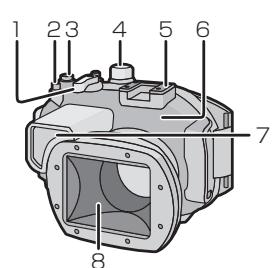
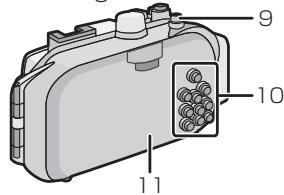
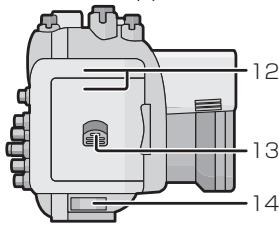
1 Zoom Lever
2 Motion Picture Button
3 Shutter Button
4 Mode dial
5 Mounting shoe for INON Inc., external strobe1
6 Front Case
7 Diffuser (supplied)
8 Front Glass
9 Camera ON/OFF button
10 Button operation section2
(Read the operating instructions of the digital camera for details about each button operation.)
11 Rear Case
12 Buckle
13 Lock Release Lever
14 Strap Eyelet (for attaching the supplied hand strap and diffuser)
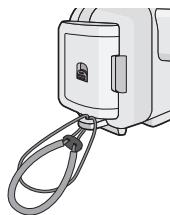
*1 This is a mounting shoe dedicated for an external strobe manufactured by INON Inc.
Please refer to INON Inc. regarding compatible strobe. http://www.inon.jp/
*2 Functions vary depending on the digital camera being used, so follow the indication on the digital camera.
- The O-ring is a waterproofing packing used for underwater cameras, watches and diving equipment.
- The O-ring keeps the Case waterproof by sealing the gap between the rear case and the front case.
How the O-ring keeps the Case waterproof
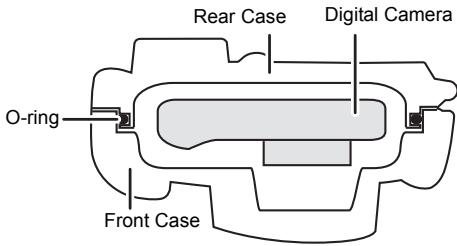
The gum comes into contact with the sides of the Case making the Case waterproof and stopping water from entering from the gap.
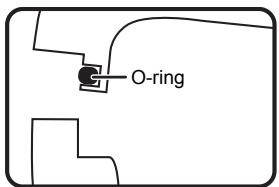
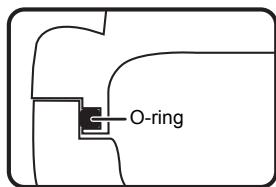
When water pressure acts on the O-ring, the surface of the O-ring expands and the Case is sealed more tightly.
The O-ring prevents water leakage by coming into uniform contact with the sides of the Case. Therefore, good care of the O-ring is very important. Incorrect care of the O-ring may cause water leakage.
Be sure to set the O-ring before attaching a digital camera.
Thoroughly wash and dry your hands before handling the O-ring. Place the O-ring where there is no sand or dust.
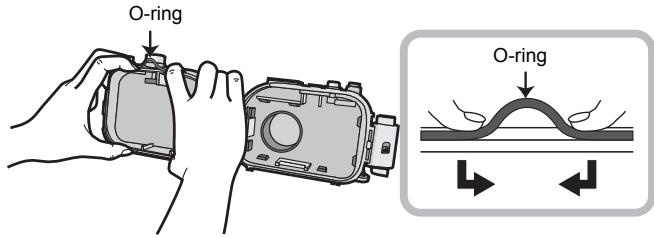
1 Loosen the O-ring with your fingers to remove it.
- Loosen part of the O-ring with the tips of two fingers and then lift the loosened part. Be careful not to scratch the O-ring with your fingernails.

Note
- Do not use a pointed object to remove the O-ring. This may scratch or damage the O-ring.
2 Check the O-ring.
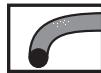
- Check that there is no dirt, sand, hair, dust, salt crystals, lint or grease on the O-ring. If you find any of these, remove them with a soft, dry cloth.

①

②

(3)

(4)
(5)

(6)
① Dirt
② Sand
③ Hair
④ Dust
⑤ Salt crystals
⑥ Lint
- There may be dirt on the O-ring that you cannot see. Check if there is any dirt by rubbing your finger over the O-ring.
- Be careful not to leave any fibers from the dry cloth on the O-ring when wiping it.
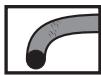
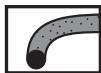
- Check that the O-ring is not ripped, twisted, squashed, frayed or scratched and that there is no sand sticking to it. Replace the O-ring in these cases.
⑦

8

(9)

10

11
⑫
⑦ Ripped
(8) Twisted
Squashed
10 Frayed
⑪ Scratched
⑫ Sand
3 Inspect the O-ring groove.
- Grains of sand or hardened salt crystals may get into the O-ring groove. Remove them carefully with an air spray or a cotton swab. If you use a cotton swab, be careful not to leave any fibers from it in the O-ring groove.
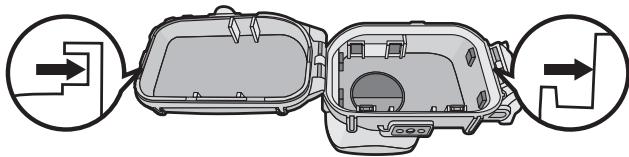
- Inspect the front case groove as well as the rear case (side where O-ring is set) groove.
4 Apply the grease (supplied).
Apply O-ring grease to clean the surface of the O-ring and replenish the oil.
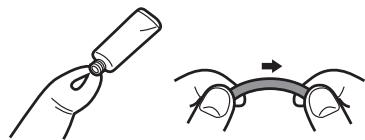
- Apply a rice-grain size of grease (supplied) evenly to the O-ring with the tip of your finger. (Do not apply the grease with paper or a cloth. The fibers from the paper or cloth may stick to the O-ring.)
- If there is too much grease on the O-ring, dirt and dust will stick to it causing water to leak in. Therefore, hold the O-ring between the balls of your finger and thumb and gently remove excess grease.
- By applying the O-ring grease thinly and evenly, the O-ring fits flexibly to the groove of the marine case and keeps it airtight.
- The surface of the O-ring may stretch or rip, causing a water leak, when an O-ring grease other than supplied is used, so always use the specified O-ring grease.
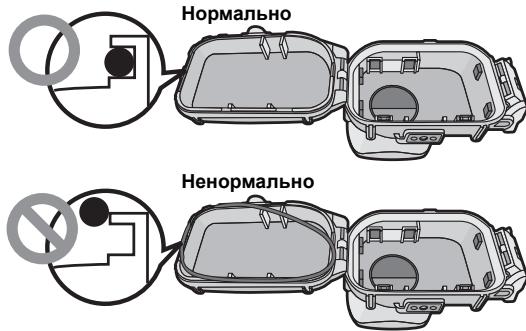
5 Fit the O-ring evenly into the O-ring groove.
Check the following:
- There is no dirt sticking to the O-ring.
The O-ring has not come out. - The O-ring is not twisted.
- The O-ring is not stretched too much.
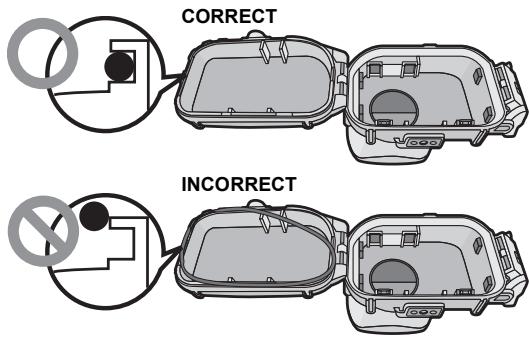
6 Inspect the O-ring one last time.
Check the following one more time:
- There is no dirt sticking to the O-ring.
The O-ring has not come out.
The O-ring is not twisted. - There are no scratches or squashed parts on the O-ring.
Thoroughly wipe any grease off your hands with a dry cloth.
Afterwards wash thoroughly with fresh water.
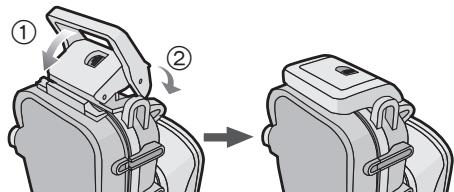
7 Close the buckle.
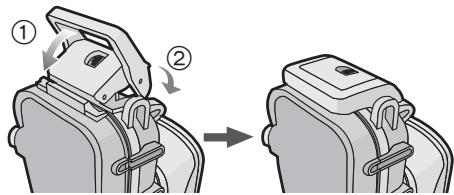
- Check that no foreign materials are sticking to the outer surface of the O-ring or the buckle on the front case and then close the Case.

Notes
- To keep the Case completely airtight, do not scratch the surface of the O-ring that comes into contact with the sides of the Case.
- Never use an O-ring that has been scratched or damaged by dirt etc. This will cause water leakage.
- Each time you use the Case, remove the O-ring and check that there is no dirt, sand, hair or other foreign materials in the O-ring groove and then apply a thin coat of grease (supplied). If you apply too much grease, dirt and the dust may stick to the O-ring causing water leakage.
- Be sure to bring a spare O-ring in case the O-ring that you are using becomes damaged or scratched.
After setting the O-ring, check that no water leaks into the Case by submerging it in a water tank, bath tub etc. for about 3 minutes before attaching a digital camera.
- Do not use the Case in water over 40^ / 104^ . The heat may damage the Case or cause water leakage.
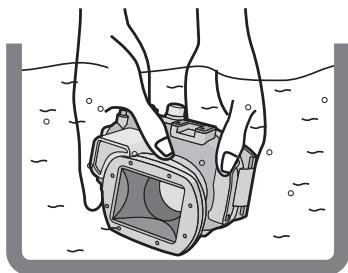
- Carry out the same test after attaching the digital camera to the Case. (P15)

Notes
- If bubbles rise from the Case when it is submerged in water or there is water inside the Case when you take it out of the water, there is water leakage. In these cases, consult your dealer.
- If water leaks into the Case while you are using it and the digital camera is submerged in water, remove the battery immediately. Hydrogen gas can cause burning or explosion if there is a fire nearby.
- If you dive quickly while holding the Case or throw the Case from a ship into the sea, some water leakage may occur because of high pressure. This is not a malfunction of the Case. Always dive slowly into the water.
- The Case is designed to be used at a depth of up to 45m / 148 feet. If you dive deeper than 45m / 148 feet, part of the Case may be damaged beyond repair.
- When closing the Case, be careful that no foreign materials get caught between the O-ring and the O-ring groove. Even one strand of hair or one grain of sand can cause water leakage.
Read the notes on page 15 before attaching the digital camera. Turn off the digital camera and remove the strap from it.
1 Push ② up with your finger while sliding ① to open the buckle.
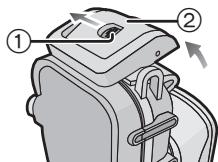
2 Attach the digital camera to the Case.
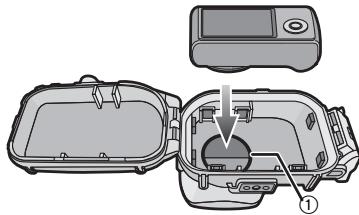
- Be careful not to catch the shading hood ①.
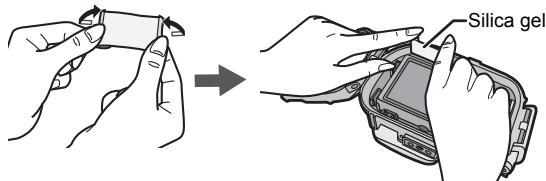
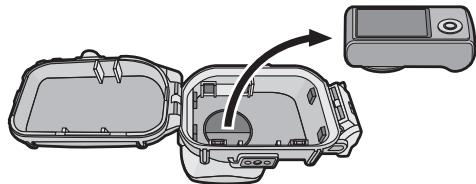
3 Insert the silica gel (supplied).
- If the air temperature is high and the water temperature is low, condensation may appear inside the Case. To prevent condensation, insert silica gel (supplied) inside the Case in advance. To prevent the Case from becoming fogged up, insert the silica gel about 1 to 2 hours before using the Case.
Always use new silica gel.
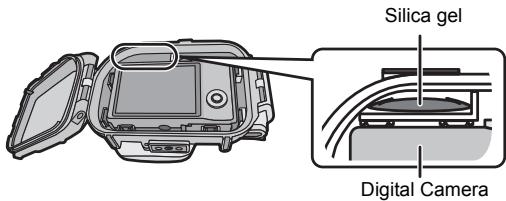
- When inserting the silica gel, bend it as shown in the illustration below and then insert it as far as possible. If you close the Case with the silica gel not fully inserted, the silica gel will get caught in the O-ring causing water leakage.
4 Close the buckle.
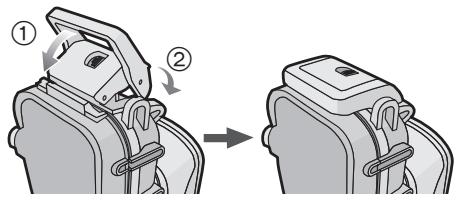
- Check that the buckle is closed firmly.
Do not insert the strap etc. in the buckle.
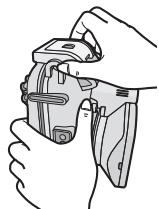
5 After you have attached the digital camera, check one more time that no water leaks into the Case. (P12)

Notes
- Be careful not to get the shading hood dirty with fingerprints etc.
- Check one more time that the O-ring is fitted evenly into the O-ring groove.
- Avoid opening or closing the Case where there is a lot of sand or dust and in humid or wet places.
- If there is a sudden change of humidity caused by moist air entering the Case, condensation may appear inside the Case.
- To prevent condensation, set the digital camera in as dry a place as possible. Also, check that the silica gel (supplied) is sufficiently dry before inserting.
- If sunscreen or suntan oil sticks to the Case, wash it off immediately with lukewarm water to prevent reduced waterproofness or discoloration.
When using a digital camera with GPS/Wi-Fi®/NFC function
| GPS | Wi-Fi | NFC | |
| When the marine case is attached | ○*1 | ○*2 | — |
| Underwater use | — | — | — |
O: Available —: Not available
1 If a digital camera is attached to the marine case, failure of positioning or other major errors may occur due to interference in the reception of radio waves from the GPS satellite.
2 When connecting the digital camera to a smartphone by using the NFC function, do so before attaching it to the marine case.
"Wi-Fi" is a registered mark of the "Wi-Fi Alliance".
■ Attaching the weights
About using the weights
Attach the weights to adjust to the preferred buoyancy when using the marine case. Use them as necessary.
Refer to the following about buoyancy underwater.
If you use the digital camera and the marine case only:
They will float slowly in fresh water or seawater. (Plus buoyancy)
2 If you use the digital camera, the marine case and 1 weight:
They will float even more slowly in fresh water or seawater than ①. (Plus buoyancy)
3 If you use the digital camera, the marine case and 2 weights:
They will sink slowly in fresh water or seawater. (Minus buoyancy)
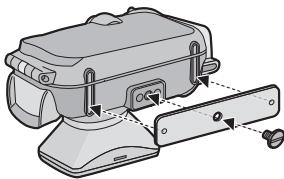
How to attach the weights
If you use 1 weight, align the protruding part of the weight with the tripod receptacle on the marine case and then using a slotted screwdriver or similar, use the supplied weights attachment screw to attach to the tripod receptacle.
If you use 2 weights, align the projecting part of the second weight with the indented part of the first weight so that the weights do not
overlap and then attach them to the tripod receptacle.
Taking Pictures
■ Be sure to check the following before entering the water Check the following before diving.
- Is there sufficient remaining battery power?
- Is there sufficient memory in the card?
- Is the O-ring fitted evenly into the O-ring groove?
- Have you checked that no water leaks into the Case?
Is the buckle closed firmly?
■ Taking pictures
1 Turn the camera on.
2 Display the scene mode menu and then set [Underwater].
3 Aim the AF area on the LCD monitor at the subject you want to focus on.
Fix the focus and take the picture.
For details of [Underwater] setting or fixing the focus, refer to the operating instructions of the digital camera.

Notes
- If there are any particles floating in front of the camera, it may focus on them instead of the subject.
- If there are drops of water or dirt sticking to the front glass, you may not be able to focus properly. Be sure to wipe the front glass before taking pictures.
- Sound cannot be recorded correctly when recording motion pictures.
Tips for Taking Pictures in the Water
It is recommended to use the scene mode (underwater) appropriate for underwater when recording underwater.
It may not be possible to record images with intended brightness or color depending on the recording conditions (depth/weather/subject), so try using following functions together.
| Color is reddish, bluish | → | White balance fine adjustment (Underwater Mode) ·This can adjust the red or blue tone. |
| Too bright/ too dark | → | Exposure compensation (For models with an Exposure Compensation Function) ·This can adjust the brightness. Auto bracket function (For models with an Auto Bracket Function) ·This can record multiple images with different exposure at once. |
It is recommended to use burst function to record subject that is moving fast, etc.

Note
- For details of white balance fine adjustment (underwater mode) or other functions, refer to the operating instructions of the digital camera.
After you have finished taking pictures, follow the steps below.
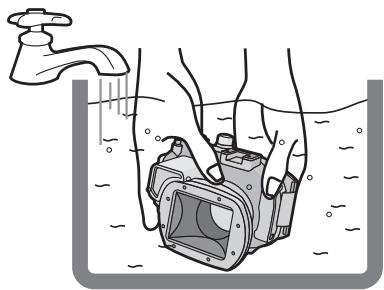
1 Submerge the Case in fresh water for about 30 minutes or more without removing the digital camera to remove any salt crystals etc.
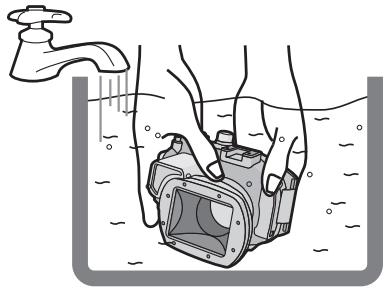
- Press all the operation buttons etc. on the Case to wash away any seawater. If the salt crystals are not removed from the buttons etc., they will harden and the buttons will become inoperable.
- Do not wash the Case with fast-running or pressurized water etc. as it may cause water leakage.
2 Wipe the water with a dry cloth that has no salt crystals sticking to it and then dry the Case completely.
- Do not dry the Case by exposing it to direct sunlight. This may discolor or damage the Case or may hasten deterioration of the O-ring.
3 Open the rear of the case to remove the digital camera.
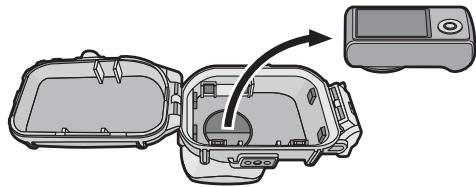
4 Remove the O-ring from the Case and check that there is no dirt etc. in the O-ring groove.
5 Check that there are no scratches etc. on the O-ring while you are applying the grease.
Notes
Be careful when removing the digital camera from the Case so that it does not get wet.
- Remove the camera with clean hands. (Wash your hands with fresh water and then thoroughly dry them.)
- Thoroughly dry any moisture on your body or hair. (Be particularly careful about any water coming from the sleeves of your thermal suit.)
- When the weather or the sea is particularly bad, select a place where the digital camera will not get wet e.g. indoors or where there is a roof overhead.
1 Wash the outside of the Case with water.
- Wash the outside of the Case until it is clean. (P18)
- Confirm that the O-ring is set securely, be sure to close the Case, and then wash only the outside with water.
- Wipe off any dirt inside the Case with a wet, soft cloth.
2 Store the Case after drying it thoroughly at room temperature.

Notes
- Do not wash the Case with high-pressure water as it may cause water leakage. Remove the digital camera before washing the Case with water.
- Do not leave the digital camera inside the Case when storing it.
- Detach the O-ring from the marine case and store so it will not dry. For details, please read page 21.
When storing for a long period of time, insert in the supplied exclusive polyester bag after first removing the O-ring.
- To prevent the weights and weights attachment screw from rusting, detach after use and thoroughly remove any salt or water before storing.
Handling and Care
-
Do not place the Case where it may fall.
-
If the Case falls on your head or foot, it will injure you and cause the Case to malfunction.
-
Never alter the Case.
-
If water leaks into the digital camera because the Case was altered, the digital camera may be damaged beyond repair.
-
If you continue to use the digital camera after water has leaked into it, this may cause a fire.
-
Do not use the Case while scuba diving without proper training.
-
You should only operate the Case while scuba diving if you have been properly trained and certified for this sport.
-
Never place the Case, grease, silica gel or O-ring within the reach of infants.
-
If any part of an infant's body is caught in the Case, it may cause an injury.
-
Infants may accidentally swallow the grease, silica gel or O-ring.
-
Consult a doctor immediately if you think an infant may have swallowed the grease, silica gel or O-ring.
-
Do not hang the strap around your neck underwater.
-
It may become wound around your neck causing suffocation or other serious injuries.
-
Thoroughly wash any grease on your hands.
-
Do not allow the grease on your hands to come into contact with your mouth or eyes.
-
If water leaks into the case, stop using it immediately.
-
This may cause an electric shock, burning or a fire.
-
Consult your dealer.
-
If anything abnormal occurs while using the Case underwater, please follow all necessary procedures and guidelines for decompressing when you ascend.
-
If you ascend too quickly, you may get caisson disease.
-
If smoke or abnormal heat, smells or sounds come from the Case, stop using it immediately.
-
These may cause an electric shock, burning or fire.
-
Remove the digital camera from the Case and then immediately remove the battery from the digital camera.
-
Consult your dealer.
-
Be careful when opening the Case after water leakage.
-
The leaked water may blow out or the rear case may flip.
-
Do not leave the Case where the temperature is high.
-
The temperature inside the Case becomes very high particularly when it is exposed to direct sunlight on a beach, a ship etc. or when it is left in an airtight car in the summer. The heat may damage the Case or its inner parts.
-
If a digital camera is attached to the Case, it may also be damaged.
-
If you use the attached digital camera when the temperature inside the Case is very high, it may cause leakage, short-circuiting or insulation failure resulting in fire or malfunction.
-
Do not handle the digital camera or the battery with wet hands.
-
This may cause an electric shock or malfunction.
When taking pictures with the flash
-
When taking pictures with the flash, the corners of the picture may be vignetted or the picture may not be lit evenly.
-
When taking pictures with the flash, the available flash range is less underwater than on land.
Caution for Use
■ Handling of the O-ring
-
Do not use alcohol, thinner or a chemical cleaning agent for cleaning the O-ring. This will cause damage to, or deterioration of, the O-ring.
-
If you will not be using the Case for a long period of time, remove the O-ring from the O-ring groove, apply a thin coat of grease (supplied), place it in a polyester bag and then store it in a cool, dark place to prevent the surface from being damaged. When you use the O-ring again, thoroughly check that it is not scratched, damaged or split.
-
Do not use the O-ring grease other than the supplied O-ring grease. Surface of the O-ring will deteriorate, causing a water leak.
- The O-ring comes into contact with the sides of the Case making the Case waterproof. Do not knock, insert foreign materials (dirt, sand, hair etc.) or scratch the O-ring or sides of the Case.
- Use the tips of your fingers to remove the O-ring. Do not use a pointed object as it may scratch or damage the O-ring.
- After removing the O-ring from the rear case, wipe off any dirt, sand, hair or other foreign materials on it. Also wipe the O-ring groove and the inner sides of the front case which come into contact with the O-ring.
- Never use an O-ring that has been scratched or damaged by dirt etc. This will cause water leakage. Replace it with a new O-ring.
- After replacing the O-ring, when not in use for a long period of time, after attaching the digital camera or when replacing the battery, if the marine case is opened please thoroughly check the O-ring for damage or any cracks.
After checking, shut the marine case, immerse in water (a water tank or a bath tub) for approximately 3 minutes or more, then check that there are no water leaks. (P12)
- O-rings are consumable products. Although the lifespan of O-rings will depend on how well they are maintained, how often they are used and their storage conditions, we recommend replacing them every year even if you cannot see any scratches.
About maintenance
- Do not use the chemicals shown below for cleaning, rustproofing, defogging or repair. Using them directly or indirectly (with a chemical spray etc.) on the Case may cause it to crack.
| Prohibited chemicals | Cautions |
| Volatile organic solvents/ Chemical cleansers | Do not clean the Case with volatile organic solvents such as alcohol, gasoline or thinner or with chemical cleansers. Clean it with fresh water or lukewarm water. |
| Anti-corrosives | Do not use anti-corrosives as the metal parts of the Case are made from stainless steel or brass. Clean it with fresh water. |
| Anticlouding agents | Do not use commercially available anticlouding agents. Be sure to use the silica gel indicated in these operating instructions. |
| Adhesives | Do not use adhesives for repair. If the Case needs to be repaired, consult your dealer. |
- If grease sticks to the digital camera, wipe it off with a soft, dry cloth.
- When wiping the inside of the Case, only use a soft, dry cloth. Wipe the inside of the front glass with a soft, dry cloth before and after use to keep the glass clear.
■ About storage and inspection after use
- Always take the digital camera out of the Case.
- Make sure that no dirt or dust is stuck to the O-ring.
- When storing, remove the buckle so that the marine case will not be closed airtight.
- We recommend that the Case be inspected about 3 years after purchase. This inspection involves dismantling and cleaning the Case, inspecting all the parts and repairing them if necessary and checking the waterproofness of the Case using the same hydrostatic test equipment that was used to check the waterproofness before purchase. The customer is responsible for all transportation costs.
- Do not dismantle any parts or use any accessories not specified in these operating instructions and do not alter the Case. If the Case does not work properly, consult your dealer.
Specifications
| Compatible model | DMW-MCTZ40: DMC-TZ40/DMC-TZ41/DMC-ZS30/ DMC-TZ37/DMC-ZS27 DMW-MCTZ35: DMC-TZ35/DMC-TZ36/DMC-ZS25 (As of January 2013*) |
| Dimensions | Approx. 151 mm (W)×94 mm (H)×103 mm (D) [5.94" (W)×3.70" (H)×4.06" (D)] (excluding the projecting parts) |
| Mass (Weight) | Approx. 480 g/1.058 lb (including the diffuser) |
| Material | Polycarbonate |
| Waterproof construction | O-ring sealing |
| Water resistant depth | 45 m/148 feet |
- Refer to the operating instructions, catalogue, website etc. of the digital camera for the latest information on models that can be used.
Panasonic Consumer Marketing Company of North America, Division of Panasonic Corporation of North America One Panasonic Way, Secaucus, NJ 07094
Panasonic Canada Inc. 5770 Ambler Drive, Mississauga, Ontario, L4W 2T3
Panasonic Canada Inc.
5770 Ambler Drive
Mississauga, Ontario
L4W 2T3
(905) 624-5010
www.panasonic.ca
© Panasonic Corporation 2013
Bedienungsanleitung
Unterwassergehäuse
2 Controllare l'O-ring.
HnctpyKzno 3KcnpyaTaun
Blaoradapim 3a npno6peTHe npoDyKuN Panasonic.
Ipeed nCnoJb3OBAHnem 3TOro n3dEInra, noKaJyNCTa, BHNMaTeNbHO
IpoHTaTe DaHHbIe IHCTpyKcHn I COxpaHInTe 3TO pyKOBOCTBO dIra
Дальншero ИСпОЛьЗВАнЯ.
CopepkaHne
Ipeep haayalom kcnnyataun
Ipeed nCnoB3OBAHnem 135
PpinaIeJXHocTn 137
CoctabHbIe qactn 138
IoproToBka
TTo TaKoe yIipOTnHTeJIbHoe KOJIbUo? 139
UctahOBka ynnTnHTeNbHoro Koblua 140
IpoBepKa BODOnenpOnHuaemocTn FyTnaPa. 144
UcTaHOBka zIuΦpOBoKaMepbl 145
3Kcnnyataua
CbeMka 148
Cobetbno cbeMke noBdoi 149
Pocne nCnoB3OBAHnA 150
Почee
OuicTka n xpaHene 152
OboaueHne u yxo.. 153
IpeoctopoxkhoT npu nCnoB3ObaHn 155
Texnueckne xapaKTepeNtIKu 157
Peped nCnoJb3ObaHnem
3TOT yIJIAP IJIa NIOBODHO CBEMK INpeHnAHAueH EN IuΦpOBox KaMep Panasonic.
Donyckaetc daenatb CHIMKn noB Odo H a rny6Hne do 45 M.
-ПриnprotekaninФутларВселдстгье Небостаточогу xуда komпаннаня
Panasonic He Hecet OTBETCTBEHONCTs 3a ушрб,pnivmehnbl yctpoiCTbAM
(цифpopов kamepe,батарКamк,Котам namTи T.D.),нaxоДУСМСВБHTPn
Футларa,За STOIMOCtБТОTORpafmИЗЯ NOLOБЕДAPYRNE PACOXы.
Kpome toro, KOMnAHHa Panasonic He BbIbnaHaBcT KOMnEhCaun 3a HeCuaCTHbIe cnuyan, NobnekUne 3a cOob npuHHeHne TpaBM IIN MaTePnAbHbIe y6bItKn.
- ɪəyʌnTe pykoBɔdCTBO NO ᶥκπηγaṭaʊn ΚιφρoBɔ Kʌmepbɪ.
- PeneyucTahOBKOnuΦpOBoKaMepbI norgy3nteФyTnAp B Body npImepHo Ha 3 MmHytbI NnB6oeeN y6eDntecb, YTOФуTnAp He npoteKaet.
O6paueHnecyTnPOM
- IcnoIb3yIte B cIeDyIOx yCNoBnX.
-Γny6nHa:do45M
-temnepaTypaOkpykaIouei cpebl:0 ^ C do 40 C
He nIOnb3yTeФyTnR B OBe C TeMnepaTypoB BbUe 40°C. BbICoKaTeMnepaTypa MoKet npBecTe K NOpeKdEHNIOФyTnRa IIN K NoPaHaHIO BoDblBФyTnR.
ΦyTnIrp n3rTOBnIe H3 ydApONpOuHOro nONIkap6oHaTa, TEm He MeHee, 6bIte octOpOxHb npri Ero hNlOB3OBAHN. ΦyTnIrp MOxHO JneKo NOnapanaTb npri CbeMke BcAaNCTbix nDpyNtNoDobhIx MecTx AINn NOpeBnTb OT ydaP, eCnI erO yponHb. IpeRd NpyTeWSeCTBmE H ABToAMoBnJI, KopaBne INn cAmolote TtuaTeNb HO ynaKyIte ΦyTnIrp BO n36ExaHnE npRbMIX ydpAOB npri NaedHn FyTnIpa. He octabIyIe Kamepy B FyTnIpe. YctahAbNIBaIe Kamepy B FyTnp TOIbKO npri Noe3dkax Ha neBOLIIwne pacCToHnIA, HanpIMep, O tAeONpOTa Do MeCTa ngPryKeHHa. (ДЯТЯнСНОПТЮВКИФуTnIpa He donyckaetcN IcN0JIb3OBAbY bynakOBkY, B kOTOPYΦyTnIP bIi 3anAkOBaH pIn NKynIke.)
PnnpocJaBc B CamoNET m3MENHeNt ATOMCePeHOrO DaBnEHNrMAoT pInBeCTN K paCunepEnIO Bo3DyxA BHTpn CyTJra P nOBpeKdEnIO cyTJra. PepeNOCaIKB B CamoNET CHIMMTYE YIINOTTHEnBHOE KOJIbO.
IOMecTne n3BnueHHe yNtNHTeJIbHoE KOJIbU O CNeuaJIbHbI NaKet n3 NOIN3CTepa, KOTOpB IBXOINT B KOMPNEKT NOCTABKn.
He octabnIte uHpOByu KaMepy B cyTnppe Ha npoDOnKHTbHOe BpEmr NOD pRMBIMC ONHeuHbIMN PUYaMMN BA TOMo6Hne HIN HA KATEpe. CyTnp -3TO repMeTnuHoe pncnOCo6BeHne, PO3tomy TempepaTyBaHytpr CyTnpra NODHMETcdo OueHB bICOKO, IN KaMepa MoXe TpecTaB HOPMaJIbHo yHKUMOnHPOBaTb. He dOnyckaTe 3HaunTe bHoro nOBblSeHHa TEMnepaTpyb BHyTpri CyTnpra.
IcnoIb3ObaHne cyTnaPa npn BblCOKnx nnn Hn3Knx Tempepatypax
- EcnI OTKpbTb INI 3aKpbTb FyTnR B YcNOBEx BByCOKO BbXhOCTN INI TEmpeApTybl, a 3aTeM NOMEcTb Ero B pOxNaHbYe CcNOBEx INI NORpy3ntb IOD BOy, BHyTpN FyTnPa MoKET HaHTbCS KOnDeHcaUINo, NOBepxHOCTb CTeklna MOKET 3aONeTb, A UNIOPOBA KAMepA MoKET NOYUnYtB NOPExDEHnIA.
-ПибьICTPOM nepemeuehennФутлра n3 xOLOHOro MeCTa LIOBO xOLOHOr BOBbl B TENIOE MECTO NOBEPXHOCT b CTekna MOKET 3anOTeTb. Ппжд eчм dematb CHIMKIN, NOdoJNTe, NOKA TempepatyaФутлра He NOBicITcRdo TEmpepatyrb BO3dyxa.
IpoIroTobKa
- He OtkpbIbAIte He 3akpbIbAIte FyTnIep B MecTAX, rIe B FyTnIep MOrYt nonaCt b6pI3n BoDIH NNEcOK. PekomeHdyETcO TkPbIBaTb H 3akpbIbATb FyTnIep B NOMeUHN.
-3aMeHa 6aTapeKn, KapTb I naTm n U yCTaHOBKa LInΦpOBoK KaMepb BФyTJrA DoJIKNH II pOnI3BOIDITbCBy B NOMEUeHN C HN3KM COePkaHNEM BnAIN.
EclnФулг Heo6xOIMO OTKpbIb NII 3akpbIb Ha MecTe nOpyKeHnIЯ 3aMeHbI 6aTaapeKKn NII KapTbI naMByT, CJeDyIte ONHCaHbIM HNKe yka3aHnM.
-BbIepeHTe MeTo, IeB yTnAp He nonaTy6pb3n BObl nncok.
—CdyIe KaIIIN BOIbI CO CTbIka MekDy 3aIeHne I nepeIeHne YactMn FpyTIIpa N C3aIeJIK. TtateJIbHO BbITPte OCTabUWeCe KaIIIN BOIbI CyXO NKahIO.
-TsataJIbHO BbITpIte KaIIIN BOIbHa TeJe N BONocax.
-БудteOCO6eHNO OCTOpOXHbI,чTObI BODa He BblnIacb I3 pyKaBOB KocTOMaДлnoNBoDHorOПлаванИ.
-He npikacaiTeB K KaMepe pykAMn, MOKpbIMN OT MOpckoB BObl. PnpdeBaPrtelbHc CMOHTe NpOToHne IpcCHO BDoN n NpOnOxNte Ero B NaKET nONPi3ctepa. C NpOMIoBbTOrO NpOToHcua BbITPtE KaNNB DoBnNnNEcOK na pykax n Tepe.
13 PbyaKOK OKpbITn 3Amka
14 OTBepCTne dIy KpennenpyeMeuKa
K KOnIbU He npnIInJa rpa3b.
KoIbUO He BbiUNo I3 Na3a.
KoIbO He nepekpyeHo.
KoNbUO He paCTaHyTo 60nbIe, Yem HxKHO.
6 IpoBepbTe ynIOTHnTcJIbHOe KOJIbO eUe pa3.
Eue pa3 npoBepbTe, TTo6bI:
K KOJIbCy He npnJInJna rP3b.
KoIbO He BblIO n3 Na3a.
KoIbUo He 6bIIO nepekpyeHo.
Ha yIINOTHIneJIbHom KOJIbUe Het IaapanHH JIn6o BMrTnH.
TtataTeBHO ydaJIHrE CMA3Kc pyK c NOMOuBHO cyXoI TkaHn, nocne Yero TtataTeBHO BbIMOnTE pyKn BOdoi.
7 3aKoIte 3auIeNk.
- Y6edntteb, yTO ha BHeUHNe NOBExPHOCTN yIINOTHHTeBHO R KOblua N ha 3aueleke nepedneH qTnra pOTCYCTBYOT qAChuBz 3aqrpa3HeHnna, I 3akpoite fTnlaR.
PnIMeuaHna
-Дяобсесчениюлноюгерметуновостифулаяп неапаале поевхoctь улnotнельного кольca,КOTOPАНСТСВ КотаКTe C TopamnЧастей Фултура.
- He noIb3yIteCk KOJIbOM C cIapaIHHAMn IJIIN NOBpeKdEHNMAH. 3TO MOKET npIbCeT N K OIIaDaHNI BOdbI B cyITIarp.
- Ппкждом Иснлбзовани Футлгра симпenteулnotteьо Кольцу и убдіnteь, чТВ в пазе кольда.netrelяп, necka, bonocи Дарухи Нордьх матерпалов, a 3aTeM haHeciteTo ToHkI CNO CMA3KN (BXODIT B KOMПЛКТ NOCTaBKn).Еспн HaHecTи БOLьшоe KOnHuecTBo CMA3KN, K YJNtHNTeNbHOMy KOLьtu MOrTy prnInHHTbpr3b NblN,чTO npINBeTeK NonadAnHIO BObl BФутлг.
- YbEaNTecb, YTO y BaC eCTb 3aNaChHoe yIINOTnHTeNbHoe KOJIbUc Ha cIyaui, ecnn IcNoJIb3yEmoe KOJIbUc ByET nobpeXdEno IIIM nOcapanaHO.
1 Iorpy3nte cyTnpB npechnyo Body He meHee Yem Ha 30 MInHyT, He BbHmMa yuΦpOByo KaMepy. 3To Heo6xOJMo dIy ydaJIeHnKpIcTaIIIOB cOnn I T.D.
- TtO6bI Cmblb MOpCKyIO BODy, HaxMITE BCE KhoNkHa yfTyIpe. Ecnn KpCTaIbI cOnn He 6yDyT ydaIeHbI c KhoNOK uDpyrnx 3JeMeHTOB, KpCTaIbI 3aTbpEIoT, N KhoNKn nepeTaHT pa6oTaTb HOpMaJIbHO.
He npomblaiTe FyTnAp B 6bIcTpo npTOUHO Boe IINB npTOUHO Boe C 60nbSIm HAnOpOM. 3To MOxET npNBeCTK nonadHnO BoBd B FyTnAp.
2 BbITPnTe BODy cyxOu TkaHbU,Ha KOTopo HET KpIcTaNIOB coN, a 3aTeM cpa3y Je BbICyUnTe yTpIep.
He cyuHnte PyTnR npO npraBbIMn COnneHbIMn LyaAMn. 3To MoKet npInBeCTN K oecSeBcueBaHnIO nIO NOBpeXdeHIO pyTnPa r yckOpntb CTapeHNE yIINOTHtENbHOKONbJa.
3 YTObblBHytbcuΦpOByIOKaMepy,OTKpoTe 3aHIOU qactb cyTnpa.
4 CHIMMITE yNIOHTHnIbHOe KOJIbOc C cyTna pa n y6eIntecb, YTO B nase KOJIbCa HET rpa3n I npyrnx INHOPOdHBx qACTnU.
5 HaheCHTe CMa3ky Ha ynIOTHnTeJbHoe KOJIbOu I npOBepbTe, HeT nn Ha KOJIbUe cApaAnH n dpyrnx NOBpeKdEHH.

Ppimechan
Bo n6e8zaiHne 6p3oBaHnpykAubHbI noCne INCNObTobAHnO TcOeDInHTe rpy3a HnHT dIyKpEnIeHHrpy3OB uTtAteBHo ydaJIte OCTaTKn COIN N BoDJI neped xpaHeneM.
He octabJnTe cyTnp B mectax, Ige OH MOxET ynaCTb.
He BHOcHTe N3MeHEnB cyTJIp.
-Пи пonaадани BODы BцфpoByko Kaempу BCNeIeCTBne BHeceHnru 3MeHnru BФулр Камер может пolyntь HeICnPabIMbIe NOBpeJxDeHnru.
-Ecnn Kamepa IcnoIb3yETC NOcNE IonoaAHH A Hee BObl, 3TO MOxET BbI3BAtb noxap.
He nCnoIb3yIte FyTnIrp npri norpnyxHnx c akBaIahrom,ecnBbI He npoJln HndNxzaUy noDrOTOBky.
-Ecnn Bb npednonaeraete McnoIb3ObaT bpyTnAe TOIbKO npn norgyKeHmX C aKBaanAHGM, Bbl DOnIXhbl pnoITn COOTBETCTBYUcE OObYHeN I NOnUYtB cePTnKAT, 043peuHaOUs 3aHNMaTbCRAIOBDoHbIM PInaBAHMe C aKBaanAHGM.
He octabnIte cyTnp, cMa3ky, cnHKarenb HIn yNtHnTeNbHOe KObUO B npedexdoCraemocnt deTe.
-Ecnn KaKaJ-JIb6 Yactb TeNa pe6eHka nonaTeB cyTlAp,pe6eHOK MoKet nOnyUHTb TpaBMY.
-Дети MORYT счуаимо npornotь Смдку, синikarrelь ИлгynlOTHnITelbHOE KONLIO.
- Ecnn Bbl nnonaraete, Tpo pe6eHOK nporIOTn Cm3aKy, cnNkarenb nn ynpnoTHnTeBHOKe KOnbUO, HemeJeHNO oBaPntecb K Bpaay.
He hadeBaIe peMeWOK Ha weo noD BODO.
—PemeWOK MOKET HA MOTAbCra Ha WcEo N Bbl3BaTb yDyuWeHne IIN DpyrVe cepbe3HbI TpaBmbl.
TuaTeIbHO CmbBaIte Cma3Ky c pyK.
-He donyckaIte nonaIaHn CMa3Kn B pot nIIN B rna3a.
PnI nOaAanH B yTnAp BObI HEmeIeHNO pEkpATte ero IcNoJIb3OBaHne.
- Ecπn Bo3HKnI HeNCnpaBHOCTn npn IcNoJIb3ObaHmN ΦyTIIpa nOd BOIO, npn BCnblITm CLEdyTe Bcem IpOceDypam n npaBnIam DeKomnpcecnn.
—CnIshKOM 6bICTpoe BCINbITne MOXKeT cTaB npuHHO KeCCOHHO 6OJe3Hn.
- PnI NOBLEHNI N3 yFyTnPa IbMa, BbIeNEHNI 6oJIbWoR OONHeCTBa TEnJa, BbIeNEHNI HeObCyHORO 3aNaXa IIOBNeHNI HeObCyHORO 3ByKa HEmDEneHNO npEpaNTte IcNOnb3OBaTb FyTnPaR.
He npkacaTecb K uDpOBoK kamepe nI K 6aTapeKe MokpbIM pyKaMn.
-3To MoKTe TnpBecTn K 3JneKtpnueckOMy yApy NIN BbI3BaTb HEnCnpaBHOCTb.
CbeMka CO BCnbIiKoN
- Пи CBeMke CO BCbIbIKoYrIbI CHIMKa MOrY 6bIT 3aTeMHHeHHbIMN,ИЛЯрКOCtB CHIMKa MOJET OKa3aTbCHeOHDopOHOH.
- Ппс CB�КЕ CO BCПИКОй NOД BOДОД ONYCTIMоE paCCTOЯнe 6уDET MeHьшe,ЧЕМ на сушe.
O6paueHne c yIJIOTHTeJIbHbIM KOJIbCtOM
He nnonbnyte cnpt, pactBopntelnnn xmmneCKne MOOJIe cpeCTBA dnoyctkn ynpnotelhoro KOIba.3TN BeceCTBa MoryT haecTeIN NOBpEChENH yNPOHTHEbHO MyCByu NIn yxuydmtB erO CBOYCTBa.
EcInI cyTnIep He 6yedt HcNoJIb3ObaTbCBA TeUeHHe IINTeBHO BpeMeHN, h3BLeKHTe YIpIoTHNtBJHoE KOJIbIO M3 Na3A, HAeNCITE TOHKNI CNOI CMA3KN (BXODHT B KOMJIeKT NOCTABKN), NOMECTNE KOJIbIO B CneUaJIbHBiN PAKET N3 NOIN3CTepa I XpAHTE B TEMHom PoxJaHDM MeCTe. 3TO npEDOTBpaNT NOBpeXepHe NOBepXHOCT KOJIba. IpeE NOBToHPbIM IcNoJIb3OBAHHem YIpIoTHNtBJHO KOJIba NocE XpAHENI TuaTeJbHO npOBepBe, YTO6bl NOBepXHOCTb KOJIba He IMeNA capaAnH INI pa3pbIBOB.
He ncoNob3yIte CMA3ky dIy ynIIOHTHInTeBHorO KOJIbIa,OTIIINHyO TO ToK, KOTOPA NOCTaJIeTcB KOMNIJEKe. IOBepxHOCTb yNIOHTHInTeBHorO KOJIbIa MOxET pACTHyTBcR NIM NOPBaTcB, Bpe3yNbTaTe Yero BHYtpb FyTJraP aMOxET nonACTb BOda.
YIINOTHInTeBHOKJBOU BXoINTB KOHTAKT C TOpcaAMNCACTe FyTTnPa, YEM oBecEnueHbAeTc BOHOENPOnHuaMeoCTb FyTTnPa. He yDaparIte, He IOnyckaIte NopadaHIN HOpOdHbIX MATEpnaOB (rp3n, necka, BONOC n T.D.) n He capanaiTe yIINOTHInBeHbO KJBOU HIn TOpCu JauCTe FyTTnPa.
- CHMMAIte ynloTHHTBHe KOJIbTO KOHUYKAMN naJIbJE. Pn CHTINN yInOTHTHEBOI KOBJUe He nOJIb3yIITcB 3aOCTpeHNbIM npEmdaMn, NOKoJIbky OHN MORY T ONUAPANATy yNLOTHHTBHe KOJIbTO.
- Pocne ChTnry yNtOHTnE horo kONbca c 3aDHeJ qactn FyTnPa ydAnIte C KOBLa rPraB, neCok, BONcBo n Apyrme HOpODoHbe MaTePnAbI. KpOme TOrO, NpOtpIne Na3 KOBLa n BHyTpEHNHe NObepxHOCTn NepeDHe Jactn FyTnPa, KOKTAkTIpyUOIme C yNtOHTnE TbBbHM KOnbIqOM.
He npbaytecb KOBuOM c uapnHAMNI NIOBpeJeHHaM. 3O To MOKET npnbceT K nonadAHIO BObI b FyTnp. 3aMeHIne yIPOTHENTbHOe KObIo HOBJM.
Pocne 3aMeHbI yNlOHTnTeBHO KOnbua, eCNI OHO He NcNoJIb3yETcB TceHe nIeTbeHBO BPEMeHN, POCne HAcTPOIKU cNfPBoo KAmepBo IIN npri 3aMeHE akKymLITOPa I T. n, ECNI FyTnR pI NIOBDoHO CBeMKN OTKpBT, TuaTeBHOe npOBpeBte YNlOTNHtEBo HcNtO Ha npEeMTe OTCYCTBn NOBpeKdEHm IIN kAnx-Pl6o TpeuHN. Pocne IpoBpKn 3aKpOte FyTnR dI NIOBDoHO CBeMKN, nOprpy3nTE erO B Bod (6ak C BoOJ IHn BaHy) np6bln3tEboHO Ha 3 MInyTbI INI b60le, 3atEm y6eJnteCb, Yo B FyTnR he nonaadet BoA. (P144)
- YNLOTNHTENbHbE KOJIbA - 3TO pAcxOdyEmb 3aIeMeENT. HecMOTpr Ha TO, TTO cPOK cnJyKbI yNLOTNHTENbHbIX KOJIeC 3ABiNCIT OT YXoDA 3a HMMI, CACTOTb Ix INCPOB3OBAHNY IYCSOBIN XpAHeHn, YNLOTNHTENbHbE KOJIbApeKOMeHDyETcER MEHrTb KAKdbI rOD, DaJXE ECNI HA KOJIbX ATCYTCBTYIO TcapanHHbI.
yxoI
He nCnoB3yIte nepeuHcJIeHbIe HnIXe XmMnueckne BeuecTb dIy OuyCTKn, npedOTbpaUeHnRA pXaBLeHnI, npedOTbpaUeHnI 3aNToBeaHnI nn peMOHTA. HenocpeDCTBeHHoe Ix HaHeceHne Ha cyTJnp (c noMoOsbIO npIbBepn3aTopa nn dpYrIMMeTOMaM) MoKET npNUBcTeN K NOBEnHIO TpeuIN Ha cyTJnpE.
- Operating Instructions
- Marine Case
- Contents
- Getting Started
- Preparation
- Operation
- Others
- Before Use
- ■ About handling this Case
- Using the Case in high or low temperatures
- About preparation
- How the O-ring keeps the Case waterproof
- Loosen the O-ring with your fingers to remove it.
- Note
- Check the O-ring.
- Inspect the O-ring groove.
- Apply the grease (supplied).
- Fit the O-ring evenly into the O-ring groove.
- Inspect the O-ring one last time.
- Close the buckle.
- Notes
- Insert the silica gel (supplied).
- Close the buckle.
- After you have attached the digital camera, check one more time that no water leaks into the Case. (P12)
- ■ Attaching the weights
- About using the weights
- How to attach the weights
- Taking Pictures
- ■ Be sure to check the following before entering the water Check the following before diving.
- ■ Taking pictures
- Tips for Taking Pictures in the Water
- Wipe the water with a dry cloth that has no salt crystals sticking to it and then dry the Case completely.
- Open the rear of the case to remove the digital camera.
- Wash the outside of the Case with water.
- Store the Case after drying it thoroughly at room temperature.
- Handling and Care
- When taking pictures with the flash
- Caution for Use
- ■ Handling of the O-ring
- About maintenance
- ■ About storage and inspection after use
- Specifications
- Bedienungsanleitung
- Unterwassergehäuse
- Controllare l'O-ring.
- HnctpyKzno 3KcnpyaTaun
- CopepkaHne
- Ipeep haayalom kcnnyataun
- IoproToBka
- 3Kcnnyataua
- Почee
- Peped nCnoJb3ObaHnem
- O6paueHnecyTnPOM
- IcnoIb3ObaHne cyTnaPa npn BblCOKnx nnn Hn3Knx Tempepatypax
- IpoIroTobKa
- IpoBepbTe ynIOTHnTcJIbHOe KOJIbO eUe pa3.
- 3aKoIte 3auIeNk.
- PnIMeuaHna
- Ppimechan
- CbeMka CO BCnbIiKoN
- O6paueHne c yIJIOTHTeJIbHbIM KOJIbCtOM
- yxoI
Brand : PANASONIC
Model : DMWMCTZ40E
Category : Photo Accessories