U3-TCC05-MM-H - Câbles pour ordinateurs et périphériques Alogic - Free user manual and instructions
Find the device manual for free U3-TCC05-MM-H Alogic in PDF.


User questions about U3-TCC05-MM-H Alogic
0 question about this device. Answer the ones you know or ask your own.
Ask a new question about this device
Download the instructions for your Câbles pour ordinateurs et périphériques in PDF format for free! Find your manual U3-TCC05-MM-H - Alogic and take your electronic device back in hand. On this page are published all the documents necessary for the use of your device. U3-TCC05-MM-H by Alogic.
USER MANUAL U3-TCC05-MM-H Alogic
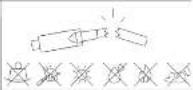
Cables containing fibre optic connections are susceptible to damage through rough handling and improper installation techniques. Please ensure that all instructions below are achieved to avoid irreparable damage to the cable.
This product is manufactured to be as robust as possible while relaxing flexibility and a small outer diameter. The cable is constructed with triple sharding incorporating Kaver fibre to help a withstand the aperture of installation and use.
Even so, the cable must be must be treated with care during installation and use to ensure that it is not damaged, which is no different to traditional copper cables.
The table below provides recommendations for installation and use of this product. In a worst case outcome, failing to follow these recommendations may result in the cable becoming damaged and failing to operate. The warranty provided for this product does not cover damage caused by rough handling, improper installation or mistreatment while in use.
Recommendation
Bending Radius
| The minimum bend radius specified for this cable is 60mm. Do not send the cable to a tighter angle or allow the cable to become forced. |
| If the cable is bent to a tighter angle, the optical fibre in the cable will be irreversible damaged. |
Pulling Tension
| Do not exceed I5CN / T6leg absolute maximum force when pulling on the case including during installation. |
Exceeding the force will cause elements within the cable to snap. Spread the tensile force along the cable – do not apply pulling force to the connector or connector housings.
Installation Location
| This product is intended for indoor use only and should not be used outdoors. |
| The product should not be used in locations where it will come into contact with moisture, such as installation in bathrooms or use in underground burial applications. |
If installing the product in serial applications, ensure that the cable is attached to appropriate dietary supports and properly supported along its length
installation Protection
| The cable must be appropriately protected from mechanical bataum whether it is used in a temporary set up or is installed in a permanent fashion. |
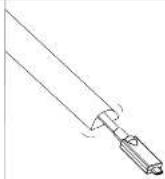
Where possible, installing the cable in conduit is recommended to ensure minimum bend radius is maintained and to prevent the cable being locked, cut or crushed. Bends in the conduit must maintain the minimum bend radius of the cable; sweep bends should be used as opposed to light bends or elbows.
Do not run the cable loose across a floor or in any other location where, it may be bent, spiked, crashed, stepped on or stopped over. If there is a need to run the cable in the open, use rigid dust or floor track to protect the cable from being stopped on or otherwise damaged.
Care should be taken to ensure that the cable does not pose a trip hazard, even when installed in a floor back.
Do not use plastic cable ties to restrain the cable – this type of fixing can crush or otherwise deform the cable and may cause damage or unshlable operation. Hook and loop style fabric cable ties are the recommended method for restraining the cable.


INDOOR
USE ONLY
Latent Conditions
When installed, the product must not be subjected to
- Any sustained mechanical stress - Forceful loss or loss
- Extreme temperature
- High humidity or moisture
- Hammingles gases, vapors and - Attack by rodents or other posts
Installation Direction
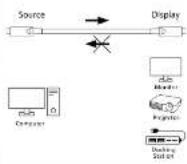
This cable supports transfer of USB data and power in both directions but will only pass DisplayPort Alternate Mode video in one direction.
The connector label and Source must be connected to the computer or other device which is being used to output video, and the connector labeled Display must be connected to the display, docking station or other video sink which is to receive the video.
It is recommended that the cable is tested with the intended equipment prior to installation to verify the correct orientation of the cable.
This will help to avoid situations where the cable is installed in the wrong direction requiring it to be removed and reinstalled.
Presentation to Users
USB-C cables that users interact with to connect their laptops to a dock, display, charger or other equipment are consumable in nature. The connectors and cable wear and become degraded and/or damaged over time through use
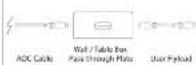
ALOGIC recommend that this cable is not presented directly to users to connect mobile equipment such as laptops as it may be costly and difficult to replace if it becomes damaged.
Where possible it is prudent to terminate this cable at a wall or tab e box plate and to provide a USB-C flyload extension for the users to connect to that can be readily and inexpensively exposed. Such flyload extensions must remain short and be of high bandwidth and quality construction to ensure signal integrity is maintained.
Using the Product
This cable supports the full range of standard USB-C functionality including USB data transfer, video transmission and USB power delivery up to 60W.
The cable is powered by the USB-C ports that it is connected to and can be used in the same way as any standard USB-C cable, however can must be taken to ensure the important notes contained in the preceding installation section of this manual are adhered to even after the cable has been installed.
The following features of the cable should be understood clearly
The cable will only pass video in one direction and must be connected in the correct orientation if video transmission is required. Refer to the installation section of this manual for further details:
The cable is designed to accommodate multi function applications and supports simultaneous transfer of USB data (USB 3.2 Gen 2x1 and earlier standards) and DisplayPort Alternate Mode (version 1.4 and earlier video signals making it suitable for connecting to USB-C docking stations and USB-C monitors with built USB ports and docking functionality). The cable supports up to 2x DisplayPort 1.4 video lanes, with a maximum total bandwidth of 16.25bps.
and maximum total data rate of 12.96 Gbps. This is sufficient for dual 4K video streams at 60Hz when connected to a later model DPU 4 capable host device that supports DSC (Display Stream Compression). Did anaphops that only support DisplayPort Alternate Mode version 1.2 or version 1.4 without DSC will only be able to send 2x Full HD/1080p video signals at 60Hz, or a single 4K video signal at 30Hz or 60Hz respectively, over this cable.
The cable does not support Thunderbolt or USB 4 signals. Thunderbolt and USB 4 communications rely on USB-C alternate mode operation that does not use traditional USB signaling and these protocols do not work over standard USB C cables. This cable will work reliably between Thunderbolt or USB 4 capable host devices and USB devices that support USB 3/USB 2.0 audio DisplayPort Alternate mode video as the host computer will fall back to using these standards instead of Thunderbolt or USB 4. The cable cannot be used to connect Thunderbolt/USB 4 capable host devices and most Thunderbolt or USB 4 chord peripherals. A specific Thunderbolt or USB 4 type USB-C cable is required where Thunderbolt and USB 4 peripherals need to be connected to a host computer.
The table is able to pass up to 60W of power between USB PD power sources (such as a USB-C clocking station) and a USB PD power sink (such as a laptop). 60W is sufficient to power most low and medium powered laptops. Some high powered laptops require more than 60W to charge effectively and may need a separate power adapter to be connected directly to the laptop.
Troubleshooting
| Symptom | Solution |
| USB client device is not detected by the host device | Verify that the cable is connected securely to each device and that the cable has not been damaged during installation. |
| Unable to show video sent across the cable on a connected monitor | Verify that the USB-C port on the host computer supports video output using DisplayPort Alternate Mode and it is configured to show video on an external display.If the AOC cable is connected to the host or client device via a USB-C extension cable or flyhead, try connecting the AOC cable directly to the device to see if the USB-C extension cable is diagnosing the signal to an extent that causes the signal to become unreliable. |
| Video sent across the cable drops out intermittently | Ensure that there are no sharp bands in the cable that approach the minimum bond radius specified in the installation section of this manual.Check that other video cables in the signal chain (such as HOM or DisplayPort cables between a closing station and monitor) are of good quality and work reliability.If the AOC cable is connected to the host or client device via a USB-C extension cable or flyhead, try connecting the AOC cable directly to the device to see if the USB-C extension cable is diagnosing the signal to an extent that causes the signal to become unreliable. |
| Laptop does not change when a USB PD power source is connected to the other end of the cable | Verify that the USB-C port on the laptop supports USB Power Delivery power input.Check that the laptop changes correctly when connected directly to the device at the other end of the cable.If the laptop requires more than 60W of power, connect a power adapter directly to the laptop. |
Specifications
| Part No. | U3-TCC05-MM-H U3-TCC10-MM-H U3-TCC15-MM-H |
| Input | 1x USB Type C Make Connector |
| Output | 1x USB Type C Make Connector |
| Signs Supported | Data: USB 3.2 Sem 2x1.10Gbps + USB 3.0 Video: DisplayPort 1/4 2 Land Power: USB Power Delivery (PO) up to 20V 3A / 60V max |
| Power Supply | Cable power supplied by host Vccents, 110.0mW logical power consumption |
| Video Resolution | Support resolution and refresh rate combinations supported by DisplayPort 1/4 2 lane connections up to 4K(3840x2/80) at 60Hz |
| Physical Characteristics | Cable Length U3-TCC05-MM-H = 5m U3-TCC10-MM-H = 10m U3-TCC15-MM-H = 10m Colour: Space Grey and Black Weight products: Bkg approx Connector Material: Zinc alloy hubings Cable Construction: Copper + multimode optical fibre hybrid construction Cable Shielding: PE + Korean Cotton + Aluminum Mylar style Sheathing Cable Shutoff: TPE |
| Installation Characteristics | Connector D memems: 30x5mm Cable Outer Diameter: 6.5 - 0.3mm Minimum Bond Radius: 60mm Cable Pulling/Tensile Strength: Bag (50N absolute maximum rating) |
| Environmental Characteristics | Directional Installation: This cable can be used for data and power transporter in both directions. The cable is designed to pass voice signals in a single direction; zero should be taken to install the cable in the correct orientation in applications where video transfer is required. |
| Package Includes | Operating and Storage Temperature: 10°C to -50°C Operating and Storage Humidity: 10% to 85% Rm [no condensation] |
| Device Compatibility | Compatible with Windows, MacOS, ChromeOS computers USB-C port on the computer that the device is connected to must support DisplayPort Alternate Mode video output to pass voice over this cable to a connected display USB-C port on the computer that the device is connected to must support USB Power Delivery charging up to 60W minimum for charging to work. |
| Compliance | FCC, CE, UKCA, RoHS |
| Warranty | 2 Years |
| Barcode (EAN) | U3-TCC05-MM-H 9350784100220 U3-TCC10-MM-H 9350784100244 U3-TCC15-MM-H 9350784100251 |
Warnings
This device is designed for indoors use only.
- Do not deliberately damage the device or expose it to damp, direct sunlight, or high temperature conditions.
- Disassembling or failing to properly use and care for your device will void the warranty on the product.
- ALOGIC bears the responsibility for damage to the device or incidental damages arising from improper use or lack of
care and is not liable for repair/replacement of the device or other damages in these circumstances.
Regulatory notices
FCC and ICES Compliance Statement
This device complies with Part 15B of the FCC Rules and industry Canada CANICES-003BS/NMB-003 BS. Operation
is subject to the following two conditions:
If this device may not cause harmful interference, and
(2) this device must accept any interference received, including interference that may cause undeemed operation.
NOTE: Changes or modifications not expressly approved by the party responsible for compliance could void the
(1) Empreension question no cause interference and division
(1) Els. Adesoto: Police no ciasal inductencia poljocicola y (2) Esta dispositiva se ha astra sujana interdensiva ekitida, prede los mafuero para suvea en suv
(3) ENS ADELENTES DE LA
CE EU Declaration of Conformity
UK. Hereby, ALOGIC Corporation declares that this product is in compliance with Directive 2014/30/EU and related UK.
CA statutory instruments. The full seat of the EU declaration of conformity is available at the following internet address
by clicking on the Compliance Documentation Inc. www.algeic.co
The contact for EU regulatory matters is ALOIE Europe S.V. Kraschubarest 1974, 2018% Amsterdam.
Netherlands
The contact for UK regulatory matters is A LOGIC UK Pvt Ltd. Level 3, Belmont, Belmont Road, Liabirdie, United
Kingdom USE THE
Road, Uebringe, Royama-Uni, UB3 1HE
Environmental notices
Disposal of waste electronic equipment
The WEEE symbol denotes that this product must be disposed of separately to household waste according to
local laws and regulations. To protect human health and the environment this product should be recycled through
an appropriate service and should not be disposed of in general waste. Take this equipment to a designated
collection point for the recycling of waste electrical and electronic equipment when disposing of the device.

ALOGIC
USB-C ▷ USB-C
Hybrid Active Optical Cable
WITH DATA, VIDEO AND POWER SUPPORT

▲ Important
The use of fibre optic technology in this cable means that adherence to special handling and installation procedures is necessary in order to ensure reliable operation and to prevent damage.
Please ensure that you need these instructions in their entirety and keep them available for future reference.
If installing this product for other parties, ensure that a copy of these instructions are given to the end user.
Thank you for purchasing this quality ALOGIC product.
ALOGIC hybrid active optical (AOG) cables are intended to allow high reliability and latency free extension of signals beyond the range supported by traditional copper based cables without the need for bulky and costly powered defenders.
These cables combine traditional copper cabling for transfer of power with fibre optic cabling for long distance transmission of high bandwidth signals along a cable that is no more bulky than a traditional copper only cable.
This cable supports all USB-C cable functionality by including transfer of
- US\$ 3.2 Gen 2 10000s data
- USB 2.0 480Mbps data
DisplayPort 1.4 (2 lanes) alternate mode video
USP PD power delivery up to 60W
User manual