
QC10AWNQH - Battery charger Alogic - Free user manual and instructions
Find the device manual for free QC10AWNQH Alogic in PDF.


| Brand | Alogic |
| Model | QC10AWNQH |
| Product Type | Battery Charger |
| Input Voltage | 100-240V AC, 50/60Hz |
| Output Voltage | 1.2V - 4.2V (selectable) |
| Output Current | 500mA - 2000mA (depending on mode) |
| Charging Slots | 4 independent slots |
| Supported Battery Types | NiMH, NiCd, Li-ion (18650, 14500, etc.) |
| Charging Modes | Constant Current (CC), Constant Voltage (CV) |
| LED Indicators | Red (charging), Green (full), Blue (fault) |
| Protection Features | Overcharge, short-circuit, reverse polarity, over-temperature |
| Dimensions (W x D x H) | 10.5 x 6.5 x 3.0 cm |
| Weight | 110 g |
| Power Supply | Built-in AC plug (no external adapter) |
| Cable Length | N/A (direct plug-in) |
| Material | ABS plastic with heat-resistant coating |
| Operating Temperature | 0°C to 40°C |
| Storage Temperature | -20°C to 60°C |
| Certifications | CE, RoHS, FCC |
| Maintenance | Wipe with a dry cloth; keep vents clean; avoid liquids |
| Cleaning | Disconnect from power; use a soft, dry cloth |
| Safety Instructions | Read manual before use; do not charge non-rechargeable batteries; keep away from children |
| Spare Parts Availability | Not available; device is non-serviceable |
| Repairability | Not repairable; dispose of according to local regulations |
| Warranty | 1 year limited warranty |
Frequently Asked Questions - QC10AWNQH Alogic
User questions about QC10AWNQH Alogic
0 question about this device. Answer the ones you know or ask your own.
Ask a new question about this device
Download the instructions for your Battery charger in PDF format for free! Find your manual QC10AWNQH - Alogic and take your electronic device back in hand. On this page are published all the documents necessary for the use of your device. QC10AWNQH by Alogic.
USER MANUAL QC10AWNQH Alogic
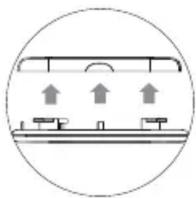
1) Open the magnetic cover at the bottom of the charging station by gently pulling it off.
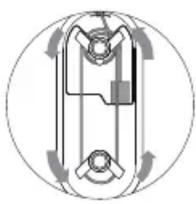
2) Insert the USB connector of the Apple Watch Charging cable to the USB port. Route the cable across the two cable management wings as shown in the image.
3) Bring out the Apple Watch magnetic connector on the top via the cable routing cut out and place the magnetic connector in the slot.
4) Once the connector is in place, put the self-aligning magnetic cover back on the bottom.
5) Connect the USB-C end of the USB-C to USB-A cable included in the box to the USB-C input port of the charging station.
6) The charging station should be powered by a USB charger. Connect the USB-A end of the cable to a USB charger. For the best performance, it is ideal to use a 18W quick charge enabled charger. A minimum of 10W is required for charging station to work. Please ensure your USB charger can provide a minimum of 10W power.
7) When the device has power, the main LED will glow Blue to indicate that.
8) When the device is ready for wireless charging a Red LED will glow at the centre of the wireless charging surface. Centre your phone on the Red LED.
9) Place the Apple Watch on the charging connector, which was placed in position earlier. Once placed and charging, the Apple Watch will display the charging status on the screen.
natural_image
Simple line drawing of a ceiling-mounted device with three upward arrows indicating airflow or movement (no text or symbols)
natural_image
Pure mechanical diagram showing a circular component with internal components and rotational arrows (no text or symbols)
natural_image
Diagram of a mechanical component with a downward arrow indicating motion or force (no text or symbols)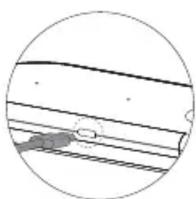
natural_image
Cross-sectional diagram of a pipe with layered structure and no visible text or symbols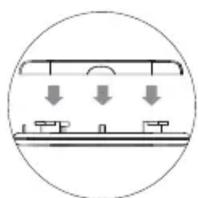
natural_image
Simple line drawing of a mechanical or architectural component with downward arrows indicating force or movement (no text or symbols)Welcome to ALOGIC
The Wireless Duet Charging Station lets you charge an iPhone and an Apple Watch wirelessly at the same time.
The wireless charging station is optimised with a 7.5W power output, which is design specifically for the latest iPhone and Apple Watch. There is an Apple Watch cable slot for the original Apple charging cable to sit perfectly next to the iPhone.
It also has an USB port to connect your existing Apple Watch charging cable and a socket on the top to perfectly place the magnetic charging connector.
Specifications
| Model QC10AWNQH | QC10AWNQH |
| Input USB-C | USB-C |
| Output Qi Wireless Charging, Apple Watch USB-A Output | |
| Power | Wireless Charging (For iPhone): 5W/7.5WUSB-A Output (For Apple Watch Charging Cable): 5W |
| Dimensions 156.5 x 66.6 x 22 mm | 156.5 x 66.6 x 22 mm |
Compatibility For iPhone and Apple Watch and Apple Watch
Features
• Just ONE cable input to charge both iPhone and Apple Watch
• Charge Apple Watch & iPhone Wirelessly at the same time
• Optimised to wireless charge your iPhone at 7.5W
• Compatible socket for Apple Watch magnetic charging cable
• USB-C Input for universal compatibility with most of the USB Chargers
• Perfect for the bedside/study/office table
Package Contents
- Wireless Duet Charger x 1
• USB-C to USB-A Cable x1 - User Manual x 1
Physical Layout
1 Wireless Charging Pad
2 USB-C Power Input
3 Apple Watch Charging Cable Slot
4 Power On LED
5 Wireless Charger LED
6 USB-A Power Output for Apple Watch Charging Cable
7 Cable Management Routers
8 Magnetic Base Cover

Note
- Do not deliberately damage this product and put it in damp, direct sunlight or high temperature environment.
- If improper use, demolition or operation not according to the instructions result in any damage to your device or product, our company will not be liable for any compensation or maintenance responsibility.


Brand : Alogic
Model : QC10AWNQH
Category : Battery charger