
Thunderbolt TB3DTRG2 - Computer accessory Alogic - Free user manual and instructions
Find the device manual for free Thunderbolt TB3DTRG2 Alogic in PDF.


| Product Type | Thunderbolt 3 Docking Station with USB-C support |
| Model | TB3DTRG2 |
| Input | Thunderbolt 3 or USB-C (with DisplayPort Alt Mode) |
| Power Delivery | Up to 60W (laptop charging) |
| Video Output | 2 x DisplayPort (dual 4K@60Hz with Thunderbolt 3 laptop; dual 1080P with USB-C laptop) |
| USB Ports | 1 x USB-C 10G, 2 x USB-A 10G (one Gen 2, two Gen 1) |
| Additional Ports | 1 x Gigabit Ethernet, 1 x 3.5mm Combo Jack (headphone/mic) |
| Warranty | 2 years |
| System Compatibility | macOS Sierra 10.13 or later with Thunderbolt 3; Windows 10 with USB-C or Thunderbolt 3 |
| Housing Material | Metal alloy for durability |
| Package Contents | Dock, Thunderbolt 3 cable, power supply, user manual, power cord (US/UK/AU/EU) |
| Cable Included | Thunderbolt 3 cable (1m power cord provided for AC adapter) |
| Data Transfer Speed | Up to 10Gbps on USB-C and USB-A Gen 2 ports |
| Power Input | AC 100-240V via external adapter (DC jack) |
| Ethernet | Gigabit Ethernet (RJ45) |
| Audio | 3.5mm combo jack for headset or microphone |
| Lock Slot | Kensington security slot |
| Regulatory Compliance | FCC Part 18 |
Frequently Asked Questions - Thunderbolt TB3DTRG2 Alogic
User questions about Thunderbolt TB3DTRG2 Alogic
0 question about this device. Answer the ones you know or ask your own.
Ask a new question about this device
Download the instructions for your Computer accessory in PDF format for free! Find your manual Thunderbolt TB3DTRG2 - Alogic and take your electronic device back in hand. On this page are published all the documents necessary for the use of your device. Thunderbolt TB3DTRG2 by Alogic.
USER MANUAL Thunderbolt TB3DTRG2 Alogic
This device complies with part 18 of the FCC Rules. Operation is subject to the following two conditions:
(1) This device may not cause harmful interference, and
(2) this device must accept any interference received, including interference that may cause undesired operation.
NOTE: Any changes or modifications to this unit not expressly approved by the party responsible for compliance could void the user's authority to operate the equipment
Note
- Do not deliberately damage this product and put it in damp, direct sunlight or high temperature environment.
- If improper use, demolition or operation not according to the instructions result in any damage of your device or product, our company will not be liable for any compensation or maintenance responsibility
Welcome to ALOGIC
ALOGIC Thunderbolt™ 3 TURBO Docking Station with USB-C support is one of its kind next generation Thunderbolt™ 3 dock with cross compatibility across both Thunderbolt™ 3 and USB-C laptops. It uses full 40Gbps bandwidth when connected to a Thunderbolt™ 3 laptop to support dual 4K@60Hz monitors (DisplayPort), 2 x USB-C (10G), 1 x USB-A (10G), 2 x USB-A (5G). Gigabit Ethernet and Combo headphone and mic jack, while charging your laptop with 60W of power. The same dock when connected to a USB-C laptop will also support dual 1080P monitors along with all the other downstream ports and charge the laptop with 60W of power.
Specifications
| Model | TB3DTRG2 |
| Input | ThunderboltTM 3 or USB-C (With DisplayPort Alt Mode) with 60W Power Delivery |
| Output | 1 x USB-A 3.1 (Gen 2) - 10G, 2 x USB-A 3.1 (Gen 1) - 5G, 2 x USB-C 3.1 (Gen 2) - 10G, 2 x DisplayPort, 1 x 3.5mm Combo Jack 1 x Gigabit Ethernet Port |
| Warranty | 2 years |
| System | Mac OS Sierra 10:13 or later with ThunderboltTM 3 port Windows 10 with USB-C or ThunderboltTM 3 port |
Features
- Thunderbolt™ 3 dock with USB-C support for compatibility with most of the laptops
- All essential and advanced connectivity options – 2 x 4K@60Hz DisplayPort, 1 x USB-A (USB 3.1 Gen 2), 2 x USB-A (USB 3.1 Gen 1), 1 x USB-C (USB 3.1 Gen 2), 3.5 Audio Combo Jack, Gigabit Ethernet Port
• Power Delivery of up to 60W for charging the laptop
• Gigabit Ethernet Port for a wired connection - 10G USB-C and USB-A ports for connecting accessories for high speed data transfer
- Metal Alloy housing for added durability against day-to-day wear and tear
Package Contents
1x Thunderbolt™ 3 TURBO Docking Station
1x Thunderbolt 3 Cable
1x Power Supply
1×User Manual
1m power cord (US, UK, AU, EU)
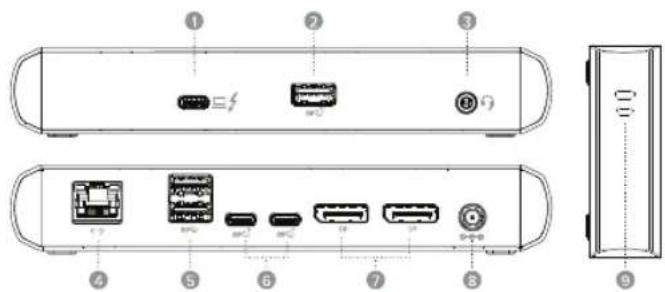
Physical Layout
① Thunderbolt 3/USB-C Upstream Port with 60W Power Delivery
2 USB-A (USB 3.1 Gen 2)
3.5mm Combo Jack
4 Gigabit Ethernet Port
5 USB-A (USB 3.1 Gen 1)
6 USB-C (USB 3.1 Gen 2)
7 DisplayPort 1.2
DC Jack 100V"240V
Lock Slots
Operation Instructions
- Plug the provided power adapter to a wall socket and the dock
- To connect your monitors, connect the dock and the monitors with 2 x DisplayPort cables ^1
- For a wired internet connection, plug an ethernet cable ^1 into the RJ45 jack
- Data transfer is available via any of the USB-A or USB-C ports
- Plug in your speakers or headphones and Mic into 3.5mm combo jack
- Use the provided Thunderbolt 3 cable to connect to the upstream Thunderbolt 3 port on the dock to the laptops Thunderbolt 3 or USB-C port
^1 DisplayPort & Ethernet cables not included.
Multi-monitor Configuration
Use your Windows or Mac operating system to adjust display settings for multiple monitors.
Brand : Alogic
Model : Thunderbolt TB3DTRG2
Category : Computer accessory