Alogic USB-C Dock WAVE 3-in-1 - Docking Station

USB-C Dock WAVE 3-in-1 - Docking Station Alogic - Free user manual and instructions

Find the device manual for free USB-C Dock WAVE 3-in-1 Alogic in PDF.

📄 2 pages English EN Download 💬 AI Question 10 questions ⚙️ Specs
Notice Alogic USB-C Dock WAVE 3-in-1 - page 1
Pick your language and provide your email: we'll send you a specifically translated version.
Product Type USB-C Docking Station
Brand Alogic
Model USB-C Dock WAVE 3-in-1
Number of Ports 3 (USB-C, HDMI, USB-A)
Video Output HDMI with up to 4K @ 30Hz
USB-C Power Delivery Up to 60W pass-through
Data Transfer Speed USB 3.0 (5 Gbps)
Dimensions (Approx.) 100 x 50 x 15 mm
Weight Approx. 80 g
Power Source USB-C bus powered or external power adapter (not included)
Compatible Devices Laptops, tablets, and phones with USB-C
Operating Systems Windows, macOS, Chrome OS
Cable Length Approx. 20 cm integrated cable
Material Aluminum alloy casing
Color Space Gray
Power Delivery Standard USB-C PD 3.0
Overheating Protection Built-in thermal protection
Warranty 2-year limited warranty
Package Contents Dock, user manual
Cleaning Instructions Wipe with dry cloth; avoid liquids
Safety Compliance CE, FCC, RoHS
Repairability Not user-serviceable; contact support

Frequently Asked Questions - USB-C Dock WAVE 3-in-1 Alogic

Which devices are compatible with the Alogic USB-C Dock WAVE 3-in-1?
The dock works with any device that has a USB-C port supporting video output and power delivery. This includes most modern laptops (e.g., MacBook, Dell XPS, HP Spectre, ThinkPad), tablets (iPad Pro, Surface Pro), and even some smartphones (e.g., Samsung Galaxy, Google Pixel). Your device must support DisplayPort Alt Mode for video output.
Does the dock support charging my laptop?
Yes, the dock supports pass-through power delivery up to 60W. Connect your laptop's original charger to the dock's USB-C port, and it will charge your laptop while also providing power to the dock. Note that the dock itself is bus-powered when not using an external charger, but for full functionality, an external power source is recommended.
What video resolutions are supported via HDMI?
The HDMI port supports up to 4K resolution @ 30Hz. For 4K, ensure your source device can output that signal. Lower resolutions like 1080p and 1440p are also supported at higher refresh rates (up to 60Hz depending on device).
Can I connect multiple monitors?
No, this is a 3-in-1 dock with only one HDMI output. It supports a single external monitor. For multi-monitor setups, consider a docking station with multiple video outputs.
Is the dock compatible with Thunderbolt 3/4 ports?
Yes, Thunderbolt 3/4 ports are fully compatible as they support USB-C functionality. However, the dock will operate at USB 3.0 speeds and not at Thunderbolt speeds. Video output and power delivery should work normally.
Does the dock support Ethernet?
No, this model does not include an Ethernet port. It provides USB-C PD, HDMI, and USB-A only. For wired internet, use a separate USB-A to Ethernet adapter or choose a dock with an integrated Ethernet port.
How do I connect the dock?
Simply plug the dock's integrated USB-C cable into your laptop or device's USB-C port. If you need power delivery, connect your laptop's charger to the dock's USB-C power input port. Then connect your peripherals (HDMI monitor, USB-A devices) to the respective ports. No driver installation is required on Windows, macOS, or Chrome OS.
Why is my monitor not showing any display?
First, ensure your device supports DisplayPort Alt Mode via USB-C. Then check that the HDMI cable is securely connected. If using 4K, try a lower resolution or check if your device supports 4K @ 30Hz. Also, try connecting the monitor directly to your laptop to rule out monitor issues. Finally, restart both devices and reconnect.
Can I charge my phone using the dock?
Yes, you can connect your phone to the USB-A port for charging or data sync. The USB-A port outputs up to 5V/1.5A (7.5W). For faster charging, use the USB-C port with power delivery if available.
Is there any maintenance required?
The dock requires minimal maintenance. Regularly clean the ports and casing with a dry, soft cloth. Avoid using liquids or abrasive cleaners. Do not expose the dock to extreme temperatures or moisture. If the dock becomes hot, disconnect it and let it cool down. The dock is not user-serviceable; contact Alogic support for any repairs.

User questions about USB-C Dock WAVE 3-in-1 Alogic

0 question about this device. Answer the ones you know or ask your own.

Ask a new question about this device

The email remains private: it is only used to notify you if someone responds to your question.

No questions yet. Be the first to ask one.

Download the instructions for your Docking Station in PDF format for free! Find your manual USB-C Dock WAVE 3-in-1 - Alogic and take your electronic device back in hand. On this page are published all the documents necessary for the use of your device. USB-C Dock WAVE 3-in-1 by Alogic.

USER MANUAL USB-C Dock WAVE 3-in-1 Alogic

USB-C Dock + Power Bank + Wireless Charger

Part no. ULDWAV-XXX

Alogic USB-C Dock WAVE 3-in-1 - 1

USB-C

Alogic USB-C Dock WAVE 3-in-1 - 2

60W Power Delivery

Alogic USB-C Dock WAVE 3-in-1 - 3

4K Video

Alogic USB-C Dock WAVE 3-in-1 - 4

5W Wireless Qi Charging

Alogic USB-C Dock WAVE 3-in-1 - 5

5000 mAh Battery Capacity

Alogic USB-C Dock WAVE 3-in-1 - 6

Fast Charging

Alogic USB-C Dock WAVE 3-in-1 - 7

USB 3.1 (Gen 1) Hub

Alogic USB-C Dock WAVE 3-in-1 - 8

SD & Micro SD

Part no Color

ULDWAV-SGR Space Grey

ULDWAV-SLV Silver
Alogic USB-C Dock WAVE 3-in-1 - Part no Color - 1

natural_image Two connected electronic devices with USB cable, one showing a charging port and the other displaying ports (no visible text or symbols)

Compatibility
Alogic USB-C Dock WAVE 3-in-1 - Part no Color - 2

Alogic USB-C Dock WAVE 3-in-1 - Part no Color - 3

Alogic USB-C Dock WAVE 3-in-1 - Part no Color - 4

Alogic USB-C Dock WAVE 3-in-1 - Part no Color - 5

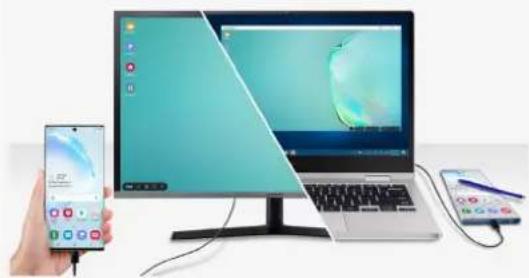
natural_image Illustration of a desktop computer setup with a hand holding a smartphone and a laptop, showing no visible text or symbols.

Alogic USB-C Dock WAVE 3-in-1 - Part no Color - 6

3-in-1

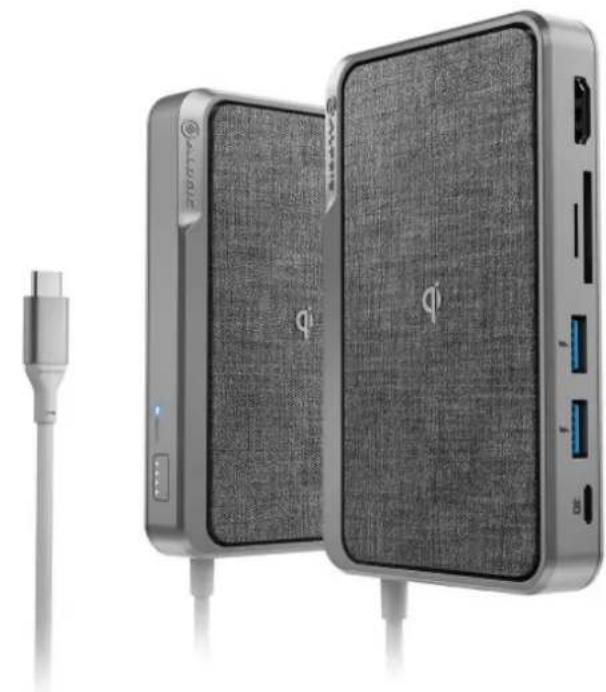
All-in-one device – USB-C Dock/ Hub, Power Bank and Wireless Charger
Alogic USB-C Dock WAVE 3-in-1 - 3-in-1 - 1

USB-C Dock with Power Delivery

Versatile hub with all essential connectivity options – 4K HDMI, two USB-A ports, SD and micro SD card readers and one USB-C with 60W Power Delivery
Alogic USB-C Dock WAVE 3-in-1 - USB-C Dock with Power Delivery - 1

Power bank

Portable power bank (5000mAh) for keeping your devices charged on-the-go
Alogic USB-C Dock WAVE 3-in-1 - Power bank - 1

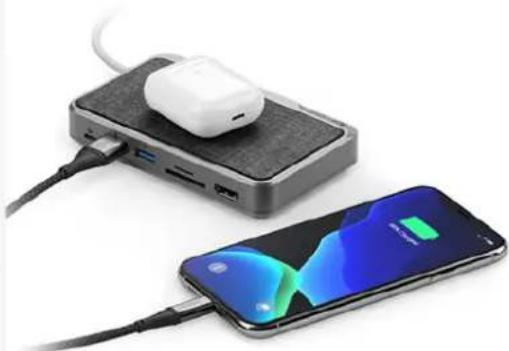
Qi wireless charger

Qi wireless charging (5W) for a reduced cable clutter work environment at the desk or on-the-go
Alogic USB-C Dock WAVE 3-in-1 - Qi wireless charger - 1

natural_image Two devices: a black electronic device with an earbuds connected to a smartphone displaying a battery (no visible text or symbols)

User Interface

Inputa) USB-Cb) 5000mAh battery
Output1 x 4K HDMI, 1 x SD and Micro SD card reader, 2 x USB-A (USB 3.0) – Shared 2.4A Charging Output, 1 x USB-C with Power Delivery, 1 x Qi Wireless Charging (5W) 10/100/1000 BASE-T

Resolution
HDMI

Package Includes

USB-C Ultra Dock WaveUser Manual

Physical Characteristics

Dimensions(mm)125mm (L) x 70mm (W) x 20.5mm (H)
Weight300gms
MaterialsTop Cover: ABSUpper housing & PC lower housing:TPE SR cable

Power

Supports up to 60W Power Delivery via USB-C port4K@30Hz

Data Rate

Supports USB 3.1 Gen 1 Data Rate from USB-C and USB-A Ports

Warranty

2 Year

Manual assistant
Powered by Anthropic
Waiting for your message
Product information

Brand : Alogic

Model : USB-C Dock WAVE 3-in-1

Category : Docking Station