
RP-WF6000H - Headphones PANASONIC - Free user manual and instructions
Find the device manual for free RP-WF6000H PANASONIC in PDF.



| Product Type | Digital wireless surround headphones (additional headphone) |
| Brand | Panasonic |
| Model | RP-WF6000H |
| Frequency Response | 10 Hz - 24,000 Hz |
| Power Supply | Included nickel-metal hydride rechargeable battery (1 pair) or LR6, AA alkaline dry cells (2, not included) |
| Charging Time | Approximately 3 hours |
| Battery Life (rechargeable battery) | Approximately 8 hours (1 kHz, 1 mW + 1 mW) |
| Battery Life (alkaline batteries) | Approximately 6 hours (1 kHz, 1 mW + 1 mW) |
| Weight | Approximately 380 g (with included rechargeable battery) |
| Wireless Range | Approximately 30 meters |
| Frequency Band | 2.4 GHz |
| Transmission | Uncompressed digital |
| Audio Technology | Personal Surround, Ø 50 mm speaker driver |
| Functions | Auto power on/off, auto headband adjustment, MUTING function, single volume control, quick charge |
| Maintenance and Cleaning | Use a soft, dry cloth. Do not use alcohol, thinner, or benzine. |
| Compatibility | Requires transmitter of RP-WF6000 (sold separately) |
| Identification | ID number registration via ID buttons |
| Included Accessories | RP-BP6000 nickel-metal hydride rechargeable battery |
| Charging Temperature | 0 °C to 40 °C |
| Safety | Do not expose to water, avoid shocks, do not use damaged batteries |
Frequently Asked Questions - RP-WF6000H PANASONIC
User questions about RP-WF6000H PANASONIC
0 question about this device. Answer the ones you know or ask your own.
Ask a new question about this device
Download the instructions for your Headphones in PDF format for free! Find your manual RP-WF6000H - PANASONIC and take your electronic device back in hand. On this page are published all the documents necessary for the use of your device. RP-WF6000H by PANASONIC.
USER MANUAL RP-WF6000H PANASONIC
Before connecting, operating or adjusting this product, please read the instructions completely. Please keep this manual for future reference.
Digital Wireless Surround Headphones
(Extra set)
Model No. RP-WF6000H
■ ENGLISH.... See pages 2-9
■ DEUTsCH ....... Siehe Seiten 10-17
FRANÇAIS. Voir pages 18-25
ITALIANO.......Vedere alle pagine 26-33
ESPANOL... Consulte las páginas 34-41
NEDERLANDS. Zie blz. 42-49
DANSK.. Se side 50-57
SVENSKA. Se sidorna 58-65
CESKY. Viz str. 66-73
■ POLSKI...........Patrz strony 74-81
MAGYAR. Lásda 82-89
TÜRKÇE....Bkz. sayfa 90-97
Dear customer
Thank you for purchasing this product.
For optimum performance and safety, please read the instructions carefully.
RP-WF6000H headphones are designed to be used together with the RP-WF6000 digital wireless surround headphones (sold separately). They are used in combination with the transmitter of the RP-WF6000.
Carefully read through the operating instructions of the RP-WF6000 digital wireless surround headphones (sold separately).
Supplied Accessories

Please check and identify the supplied accessories.
For the United Kingdom only:
Use numbers indicated in parentheses when asking for replacement parts. "As of October 2006"
Dedicated nickel-metal hydride
rechargeable battery . 1
(RP-BP6000)

Table of contents
Features 2
Precautions 3
Control reference guide 3
Power supply preparations: Headphones 4
Using the rechargeable battery (supplied). 4
Using alkaline dry cell batteries (not included) 5
Adding an extra set of headphones 6
Placement of headphones 6
Listening to audio. 7
Maintenance 8
Specifications 8
Troubleshooting guide 9
Sales and Support Information
(For United Kingdom and Republic of Ireland)
Customer Care Centre
For customers within the UK: 08705 357357
For customers within the Republic of Ireland: 01 289 8333
- Visit our website for product information
E-mail: customer.care@panasonic.co.uk
Direct Sales at Panasonic UK
- Order accessory and consumable items for your product with ease and confidence by phoning our Customer Care Centre Monday - Thursday 9:00am - 5:30pm, Friday 9:30am - 5:30pm (Excluding public holidays).
- Or go on line through our Internet Accessory ordering application at www.panasonic.co.uk.
- Most major credit and debit cards accepted
- All enquiries transactions and distribution facilities are provided directly by Panasonic UK Ltd.
-
It couldn't be simpler!
-
Also available through our Internet is direct shopping for a wide range of finished products, take a browse on our website for further details.
Interested in purchasing an extended guarantee?
Please call 0870 240 6284 or visit our website
www.panasonic.co.uk/guarantee.
Features
The RP-WF6000H digital wireless surround headphones that enables an extra set of headphones for RP-WF6000 using the 2.4 GHz radio frequency band for digital transmission.
You can enjoy multi-channel surround sound when you listen with the headphones.
- The headphones use non-compressed digital wireless transmission that provides sound quality equal to a CD and is resistant to external noise.
- The "Personal Surround" technology developed by Panasonic and the large diameter, high quality Ø 50 mm driver unit mean you can enjoy the powerful presence of surround audio from these headphones.
- The headphones have a reception range of up to approximately 30 meters.
- The headphones are charged by simply placing them on the transmitter. (3 hours quick charge)
- The headphones can be placed on the transmitter in 2 different ways. (The battery can be charged in both positions).
- The headband has a free adjusting mechanism eliminating the need for headband adjustment.
- The headphones have an AUTO POWER ON/OFF function which automatically turns on the power when the headphones are put on and turns it off when the headphones are removed.
A single volume control adjusts both the right and left volume of the headphones. - The headphones are powered by either the supplied nickel-metal hydride rechargeable battery or "LR6, AA" alkaline dry cell batteries (not included).
- The MUTING function cuts noise if the headphones are used outside their effective range.
The headphones are comfortable to wear as they use a velvety material that is soft and breathes well.
This product may receive radio interference caused by mobile telephones during use. If such interference is apparent, please increase separation between the product and the mobile telephone.
-If you see this symbol
Information on Disposal for Users of Waste Electrical & Electronic Equipment (private households)

This symbol on the products and/or accompanying documents means that used electrical and electronic products should not be mixed with general household waste.
For proper treatment, recovery and recycling, please take these products to designated collection points, where they will be accepted on a free of charge basis. Alternatively, in some countries you may be able to return your products to your local retailer upon the purchase of an equivalent new product.
Disposing of this product correctly will help to save valuable resources and prevent any potential negative effects on human health and the environment which could otherwise arise from inappropriate waste handling. Please contact your local authority for further details of your nearest designated collection point.
Penalties may be applicable for incorrect disposal of this waste, in accordance with national legislation.
For business users in the European Union
If you wish to discard electrical and electronic equipment, please contact your dealer or supplier for further information.
Information on Disposal in other Countries outside the European Union
This symbol is only valid in the European Union.
If you wish to discard this product, please contact your local authorities or dealer and ask for the correct method of disposal.
Precautions
Batteries
- The rechargeable battery can be recharged about 300 times. If it's operating time becomes extremely short, you should replace it.
- Do not mix old and new batteries or different types of batteries.
- Do not heat the batteries or expose them to flames.
- Do not recharge ordinary dry cell batteries.
- Remove the battery if the unit is not to be used for a long time.
- Carry and store the rechargeable batteries in the battery carrying case to prevent contact with metal objects.
- Do not peel off the covering on batteries and do not use if the covering has been peeled off.
Mishandling of batteries can cause electrolyte leakage which can damage items the fluid contacts and may cause a fire.
The unit
This unit uses the 2.4 GHz radio frequency band. However other wireless equipment may use the same frequency. Be sure to take note of the following to prevent radio wave interference from other equipment.
Restriction of use
For use only in your country.
Range of use
The range of use is up to approximately 30m
The range may be less depending on the structure of the building, the environment and any obstacles between the headphones and the transmitter. Such obstacles as reinforced concrete walls and metal doors are particularly to obstruct the transmitter's signals.
Interference from other equipment
Due to radio interference, malfunctions such as sound distortion may occur if the unit is placed too close to other equipment. We recommend keeping the unit as far away as possible from the following devices.
Bluetooth devices, wireless LAN, microwaves, office automation devices, digital cordless telephones and other electronic devices
The unit is designed to automatically avoid radio interference from these household devices. However the sound will be broken when radio interference occurs. In this case reset the most appropriate frequency (page 8 [Setting the most appropriate frequency]).
Using the unit
- Do not drop, hit or otherwise subject the headphones to strong shocks of any kind. This may damage them.
- Do not expose the unit to water or other liquids as it may damage it.
Control reference guide
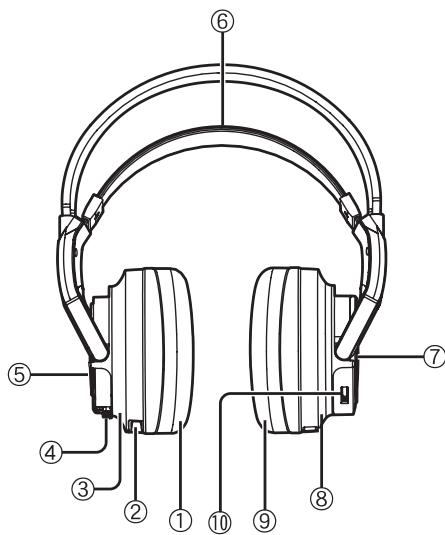
① Ear pad (left)
② Charging terminal
③ Left housing
④ BATT (battery) knob (page 4)
⑤ Battery compartment lid
Press BATT to open the battery compartment lid. Use the supplied rechargeable battery or "LR6, AA" alkaline dry cell batteries (not included).
⑥ Free-adjusting band (page 5)
The power turns on automatically and the OPR lamp lights when you put on the free-adjusting band.
⑦ OPR (operation) lamp
Pull up the free-adjusting band and check that the OPR lamp glows red. You can now use the headphones.
⑧ Right housing
⑨ Ear pad (right)
ID button, VOL control
ID: When using an extra set of headphones (page 6).
VOL: When adjusting the volume ( page 7)
Using the rechargeable battery (supplied)
The supplied rechargeable battery must be charged before using this unit.

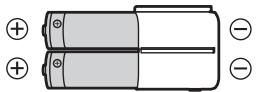
Nickel-metal hydride rechargeable battery
Use the supplied battery or a dedicated replacement battery RP-BP6000 (optional).
Commercially available rechargeable batteries
You cannot charge commercially available rechargeable batteries.
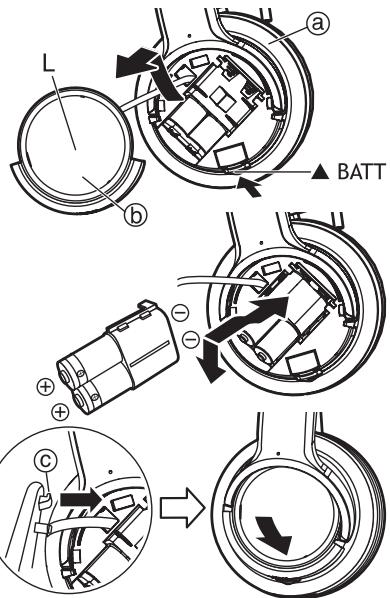
1 Press the [BATT] knob on the left housing ⑧ to open the battery compartment lid 6 and then take it off.
2 Insert the supplied nickel-metal hydride rechargeable battery.
- Align the poles and correctly when inserting.
- Push down on the pole spring when inserting
Remove the poles first when removing.
3 Insert the rib © on the battery compartment lid into the hole on the left housing and then close the battery compartment lid.
Push the battery compartment lid until it locks.
4 Charging
Put the headphones on the transmitter (not included) making sure that the charging terminals ① are in contact with each other.
Left housing
The battery can be charged with the headphones placed vertically or horizontally.
- The OPR/CHARGE lamp on the transmitter glows red.
- The OPR/CHARGE lamp goes out when the battery is fully charged.
- When putting the headphones on the transmitter, hold the left and right housings in each hand and put the headphones straight down onto the transmitter.
Note
The headphones are recharged if they are put back onto the transmitter after being fully charged.
Do not keep recharging the battery if you do not use it between recharges.
The battery will be overcharged causing overheating and electrolyte leakage.
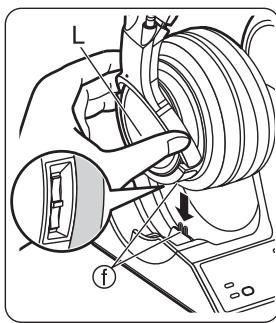
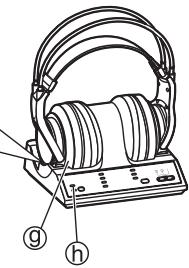
Placing the headphones vertically
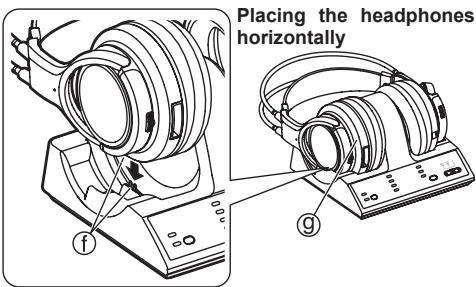
For your reference
- The transmitter will automatically stop emitting radio waves if headphones are left on the transmitter. Be sure to take the headphones off the transmitter when using other headphones at the same time.
- The headphones can be used even if the battery is not fully charged.
- Charge the battery in an environment with an ambient temperature between 0°C and 40°C or it may not be fully charged.
Charging and operating times
| Charging time | Operating time *1 |
| Approx. 3 hours *2 | Approx. 8 hours *3 |
1 At 1 kHz, 1 mW+1 mW output.
2 Time required to fully charge from empty.
*3 Operating times may differ depending on the temperature of the surrounding environment and operating conditions.
■If the OPR/CHARGE lamp does not glow red
Check that the left and right sides of the headphones are correctly placed on the left and right sides of the transmitter.
Check that the charging terminals on the headphones and transmitter are touching each other. Adjust them if they are not touching.
- When there is dirt on the charging terminals of the headphones or the transmitter, remove it gently with a cotton bud, etc.
To charge the battery after using the headphones
Put the headphones back on the transmitter. The OPR/CHARGE lamp glows red and charging begins.
To check the remaining battery power
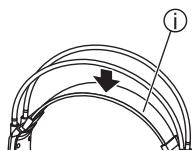
Pull the free-adjusting band ① and check if the OPR lamp ① on the right housing ⑧ is dim or off. This means that the battery has run down and should be charged or replaced.
If the sound is distorted, intermittent or there is excessive background noise while using the headphones, the battery should be charged or replaced.
The service life for the supplied rechargeable battery
The supplied nickel-metal hydride rechargeable battery can be recharged approximately 300 times. If the operation time of the battery becomes extremely short after charging, the battery's service life has reached the end. Be sure to replace it with the dedicated rechargeable battery RP-BP6000 (optional).
The power turns off automatically when you remove the headphones.
(Auto power on/off function)
Do not pull up the free-adjusting band ① when not using the headphones. This may cause the auto power on/off function to switch the headphones back on and battery power to run down
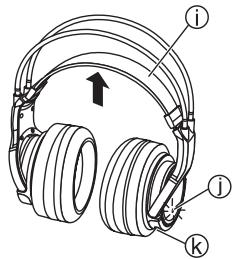
Using alkaline dry cell batteries (not included)
Use "LR6, AA" alkaline dry cell batteries. Put the 2 alkaline dry cell batteries into the headphones in the same way as described in [Using the rechargeable battery (supplied)] (page 4)
You cannot charge dry cell batteries even if you put the headphones on the transmitter.
Operating time for the dry cell battery
| Battery type | Operating time *1 |
| Panasonic Alkaline batteries | Approx. 6 hours *2 |
*At 1 kHz, 1 mW + 1 mW output.
*2 Operating times may differ depending on the temperature of the surrounding environment and operating conditions.
Adding an extra set of headphones
The transmitter, with the RP-WF6000 transmitter/headphones system, has its own ID. When adding a set of the RP-WF6000H headphones, the ID which is set in the transmitter must be registered in the headphones: otherwise, the extra pair of headphones cannot be used.
1 Take the headphones of the transmitter (not included).
The transmitter is ready to transmit.
2 Put the added headphones (RP-WF6000H) down onto your head.
The headphones turn on.
- Be sure to charge the rechargeable battery supplied with the headphones or use alkaline dry cell batteries (not included) before performing the registration.
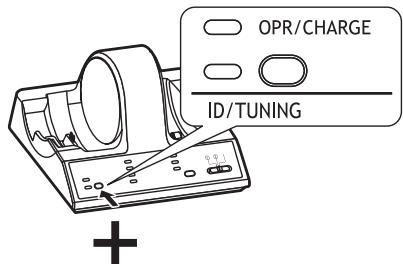
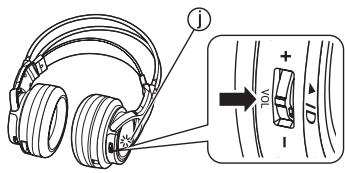
3 Press and hold [ID/TUNING] on the transmitter and [ID] on the headphones (extra set) at the same time until the transmitter's ID/TUNING lamp (green) flashes more than 5 times.
Push [ID] inwards.
After the ID/TUNING lamp (green) on the transmitter and the OPR lamp ① (red) on the headphones flash more than 5 times (while [ID/TUNING] and [ID] are being pressed down), the headphones will have registered the ID.
Placement of headphones
This unit uses radio waves to transmit the signals so use the headphones within the range of the radio waves.
The range of the radio waves
The radio waves have a maximum range of 30m from the transmitter (not included).
The most appropriate frequency is automatically set when the headphones are taken off the transmitter. When the headphones are used outside the range of the radio waves or the radio waves weaken, the sound is broken. Move nearer to the transmitter or reset the frequency ( page 8 [Setting the most appropriate frequency]).
- Since this unit is using the 2.4 GHz radio frequency band, obstacles (such as reinforced concrete walls and metal doors) may cause the sound to be broken. This is a characteristic of radio waves and not a malfunction.
- The sound heard from the headphones will differ depending on where the transmitter is placed and the kind of location in which it is used. We recommend placing the transmitter where the sound is received best.
- The sound may be broken when the unit is used at the same time as other equipment that uses the 2.4 GHz radio frequency band such as wireless equipment or microwaves.
Locations
Avoid placing the unit in the following locations
- Places with high temperatures such as near heating appliances or places directly exposed to sunlight
-Places with a lot of dust - On top of unstable carts or inclined surfaces
-Places with excessive vibration - Bathrooms and other moisture-prone places
Listening to audio
Before using the headphones, be sure to read [Connections] in the operating instructions of the RP-WF6000 digital wireless surround headphones (sold separately) to ensure that the transmitter is connected properly.
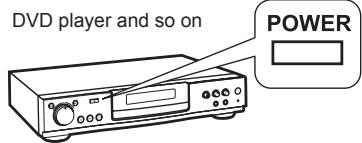
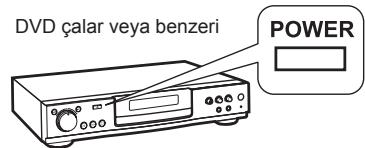
1 Turn on the equipment connected to the transmitter (not included).
2 Select the signal with [INPUT SELECT].
DIGITAL 1: To hear sound from equipment connected to the transmitter's DIGITAL IN 1 terminal.
DIGITAL 2: To hear sound from equipment connected to the transmitter's DIGITAL IN 2 terminal.
ANALOG: To hear sound from equipment connected to the transmitter's LINE IN terminal.
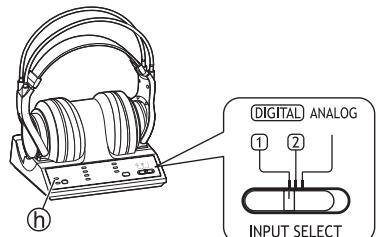
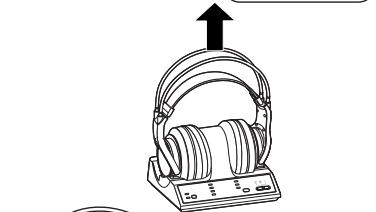
3 Take the headphones off the transmitter.
4 Put the headphones down onto your head.
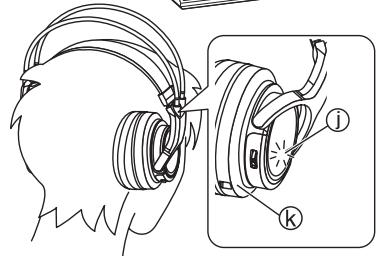
Make sure that the headphones are facing so that the right housing (R) goes over the right ear and the left housing (L) over the left ear. Then put the headphones straight down onto your head. Doing this will ensure that the auto power on/off function (page 5) works correctly.
- The OPR lamp ① on the right housing ⑧ glows red and the power automatically turns on.
5 Start play on the equipment selected in step 2.
- The OPR/CHARGE lamp on the transmitter will light green and radio waves will be emitted. The most appropriate frequency is automatically set.
6 Use [VOL] to adjust the volume.
- The volume is the same as when the headphones were previously used.
- The volume will keep changing while the [VOL] control is pushed to either side.
To increase the volume
To decrease the volume
Note
- When watching movies, be careful not to turn up the volume too high during quiet scenes. The movie may suddenly switch to a very noisy scene and you could damage your ears if the volume is raised too high.
- Avoid listening for prolonged periods of time to prevent hearing damage.
- Be sure to use the headphones within the range of the radio waves.
- Discontinue use if you experience discomfort. Continued use may cause rashes or other allergic reactions.
Listening to audio
■When you are unable to hear any sound from the headphones (MUTING function)
If the headphones are used outside the range of the radio waves or the radio waves weaken, reception will decline and the MUTING function will come on. No sound will then be heard from the headphones. If this happens, move nearer to the transmitter and the MUTING function will automatically switch off. If the sound is still broken, reset the headphones to the most appropriate frequency. (I below [Setting the most appropriate frequency])
If the sound is broken or noisy when the headphones are in use (Setting the most appropriate frequency)
The sound may be broken or noisy if the headphones are used outside the range of the radio waves or if the reception becomes poor due to the interference from other wireless equipment using the 2.4 GHz radio frequency band, a microwave etc.
Perform the following steps to manually reset the appropriate frequency for transmitting.
Press [ID/TUNING] on the transmitter once.
- The ID/TUNING lamp on the transmitter glows green, the transmitter changes the frequency and then radio waves start being transmitted.
- The headphones will automatically detect the emitted frequency and noise and sound distortion will stop.
When the noise or sound distortion does not stop
Repeat the above step until the most appropriate frequency is set.
- This may not solve the problem if the headphones are being affected by a digital cordless telephone or other device. In this case, moving the transmitter and the headphones as far as possible from the digital cordless telephone or other device may stop the noise or sound distortion.
Maintenance
To clean this unit, wipe with a soft, dry cloth.
- Never use alcohol, paint thinner, or benzine to clean this unit.
- Before using chemically treated cloth, read the instructions that came with the cloth carefully.
Specifications
■Headphones (RP-WF6000H)
Frequency response
Power supply
Mass
Note
10 Hz to 24,000 Hz
Supplied rechargeable nickel-metal hydride battery (1 pair) or commercially available "LR6, AA" alkaline dry cell batteries (2) (not included)
Approx. 380g (Including supplied rechargeable nickel-metal hydride battery)
Specifications are subject to change without notice.
Troubleshooting guide
Before requesting service, make the below checks. If you are in doubt about some of the check points, or if the remedies indicated in the chart do not solve the problem, consult your dealer for instructions.
Read [Troubleshooting guide] in the operating instructions of the RP-WF6000 digital wireless surround headphones (sold separately) as well.
Take both the headphones and the transmitter when you visit your dealer.
| Problem | Possible cause and suggested remedy |
| No sound. | → Put the headphones on again. → Turn up the volume on the headphones (孔音 page 7). → The MUTING function is activated (孔音 page 8). ·Move into the range of the radio waves. → The headphones' OPR lamp is not on (孔音 page 5). ·The supplied rechargeable battery has run down. Recharge them or replace the alkaline dry cell batteries with new ones. If the OPR lamp is still off, take the unit to your dealer. → The ID of the transmitter is not registered on the added headphones (孔音 page 6). → The added headphones are being charged. ·Remove the added headphones from the transmitter (孔音 page 5). |
| Sound is low. | → Turn up the volume on the headphones (孔音 page 7). |
| Sound is broken (noise may be heard too). There is excessive background noise. | → Stay within the range of the transmitter (孔音 page 6). → The headphones' OPR lamp dims. Sound is distorted, intermittent or there is excessive background noise during use (孔音 page 5). ·The rechargeable battery has run down. Recharge it or replace the alkaline dry cell batteries with new ones. →Make sure that there is no other equipment that uses the 2.4 GHz radio frequency band such as wireless equipment or microwaves near the transmitter or headphones (孔音 page 3). →Set the most appropriate frequency (孔音 page 8 [Setting the most appropriate frequency]). |
| Cannot charge. | → The OPR/CHARGE lamp on the transmitter does not glow red (孔音 page 4). ·Check that the headphones are put on the transmitter correctly. →A dry cell battery is inserted. ·Be sure to insert the supplied nickel-metal hydride rechargeable battery. →A nickel-metal hydride rechargeable battery other than the supplied one is inserted. ·Insert the supplied nickel-metal hydride rechargeable battery or a dedicated replacement battery RP-BP6000 (optional). (孔音 page 4) →There is dirt on the charging terminals of the headphones or the transmitter (孔音 page 5). ·Remove it gently with a cotton bud etc. |
Sehr geehrter Kunde
- Pile rechargeable au nickel

∴ m = 3/11
Endast for bruk i ditt land.
■ Användningsområde
1 Vericiye (dahil degildir)®,®,®,®,®,®,®,®,®,®,®,®,®,®,®,®,®,®,®,®,®,®,®,®,®,®,®,®,®,®,®,®,®,®,®,®,®,®,®,®,®,®,®,®,®,®,®,®,®,®,®,®,®,®,®,®,®,®,®,®,®,®,®,®,®,®,®,®,®,®,®,®,®,®,®,®,®,®,®,®,®,®,®,®,®,®,®,®,®,®,®,®,®,®,®,®,®,®,®,®,®. *
- DEAR CUSTOMER
- SUPPLIED ACCESSORIES
- TABLE OF CONTENTS
- SALES AND SUPPORT INFORMATION
- FEATURES
- INFORMATION ON DISPOSAL FOR USERS OF WASTE ELECTRICAL & ELECTRONIC EQUIPMENT (PRIVATE HOUSEHOLDS)
- PRECAUTIONS
- BATTERIES
- THE UNIT
- CONTROL REFERENCE GUIDE
- USING THE RECHARGEABLE BATTERY (SUPPLIED)
- NICKEL-METAL HYDRIDE RECHARGEABLE BATTERY
- COMMERCIALLY AVAILABLE RECHARGEABLE BATTERIES
- NOTE
- CHARGING AND OPERATING TIMES
- IF THE OPR/CHARGE LAMP DOES NOT GLOW RED
- TO CHARGE THE BATTERY AFTER USING THE HEADPHONES
- THE POWER TURNS OFF AUTOMATICALLY WHEN YOU REMOVE THE HEADPHONES
- (AUTO POWER ON/OFF FUNCTION)
- USING ALKALINE DRY CELL BATTERIES (NOT INCLUDED)
- OPERATING TIME FOR THE DRY CELL BATTERY
- ADDING AN EXTRA SET OF HEADPHONES
- PLACEMENT OF HEADPHONES
- THE RANGE OF THE RADIO WAVES
- LOCATIONS
- LISTENING TO AUDIO
- WHEN YOU ARE UNABLE TO HEAR ANY SOUND FROM THE HEADPHONES (MUTING FUNCTION)
- IF THE SOUND IS BROKEN OR NOISY WHEN THE HEADPHONES ARE IN USE (SETTING THE MOST APPROPRIATE FREQUENCY)
- PRESS [ID/TUNING] ON THE TRANSMITTER ONCE
- WHEN THE NOISE OR SOUND DISTORTION DOES NOT STOP
- MAINTENANCE
- SPECIFICATIONS
- HEADPHONES (RP-WF6000H)
- TROUBLESHOOTING GUIDE
- SEHR GEEHRTER KUNDE
Brand : PANASONIC
Model : RP-WF6000H
Category : Headphones