GPC2200 - Cooker GEMINI - Free user manual and instructions
Find the device manual for free GPC2200 GEMINI in PDF.


| Product Type | Freestanding Cooker |
| Brand | Gemini |
| Model | GPC2200 |
| Dimensions (H x W x D) | 850 mm x 600 mm x 600 mm |
| Weight | 55 kg |
| Power Source | Gas (Hob) and Electric (Oven) |
| Energy Efficiency Class | A |
| Number of Gas Burners | 4 |
| Oven Type | Electric Conventional |
| Oven Capacity | 65 Liters |
| Grill Function | Yes |
| Control Type | Knobs |
| Color | Stainless Steel / White |
| Door Type | Glass Window |
| Cleaning | Enamel Interior, Easy-clean Hob |
| Safety Features | Flame Failure Device, Child Lock, Auto Ignition |
| Storage Drawer | Yes |
| Spare Parts Availability | Available from Manufacturer or Authorized Service Centers |
| Reparability | Yes, Service Network |
| Warranty | 2 Years |
Frequently Asked Questions - GPC2200 GEMINI
User questions about GPC2200 GEMINI
0 question about this device. Answer the ones you know or ask your own.
Ask a new question about this device
Download the instructions for your Cooker in PDF format for free! Find your manual GPC2200 - GEMINI and take your electronic device back in hand. On this page are published all the documents necessary for the use of your device. GPC2200 by GEMINI.
USER MANUAL GPC2200 GEMINI
2200W Inner/Outer Zone Ceramic Cooker
MODEL NO.: GPC2200
Please read and retain for future reference.
SAFETY INSTRUCTION - GENERAL
- Use this appliance solely in accordance with these instructions.
- This appliance is for household use only, not for commercial purpose.
- Remove all packaging material from the appliance before use.
- This appliance shall not be used by children of 0 to 8-year old.
- This appliance can be used by children older than 8-year old and persons with reduced physical, sensory or mental capabilities or lack of experience and knowledge, but only if they have been given supervision or instruction concerning use of the appliance in safe way and understand the hazards involved.
• Children should be supervised to ensure that they do not play with the appliance. - Cleaning and maintenance must not be done by children.
- Have any repairs carried out solely by a qualified electrician. Never try to repair the appliance yourself.
- Do not handle the plug or appliance with wet hands.
- Do not immerse the main body in water.
• Children shall not play with the appliance. - Do not leave the appliance unattended when connected to the mains supply.
- Only use the attachments/accessories supplied with the product.
SAFETY INSTRUCTION - ELECTRICITY AND HEAT
- Ensure the appliance is in placed on a horizontal, even and stable surface.
- Verify that the mains voltage is the same as that indicated on the rating plate on the appliance before use.
- Make sure that you always use a grounded wall socket to connect the appliance.
• Always remove the plug from the wall socket when the appliance is not in use. - Remove the plug from the wall socket by pulling the plug, not the power cord.
- Make sure that the appliance, the power cord and plug do not make contact with water.
- Make sure that the appliance, the power cord and plug do not make contact with hot surface, such as a hot hob or naked flame.
- Check the appliance's power cord regularly to make sure it is not damaged.
- Do not use the appliance if the power cord is damaged. If the power cord is damaged, it must be replaced by an electrical technician or a person with similar qualification, in order to avoid any hazards.
SAFETY INSTRUCTION - DURING OPERATION
- Please unplug the power cord from the socket after used and let the panel cool down completely..
- The glass panel will become very hot during the cooking. Please use it carefully.
- Please do not use hard object to crash the glass panel.
- When glass panel is broken, please stop using the cooker and send it for repair.
- Please keep the air inlet and air outlet clear, when using the cooker.
- Please do not place inflammable material such as paper, cloth etc. between the cooker and the pots/ pans in order to prevent the risk of fire.
- When use the glass container cooking. Please do not put the cool pot on the panel. Otherwise the hot temperature may break the glass container.
- It is prohibited to put the plastic or paper or metal object such as knife, fork, ladle on the glass panel. They are easy to heat up and burn.
- Do not cook with an empty pot, it will cause malfunction or danger.
- Do not move the appliance while its switched on.
- Never use corrosive or scouring cleaning agents or sharp objects (such as knives or hard brushes) to clean the appliance.
- Clean the appliance thoroughly after use (please refer to “Cleaning and Maintenance” section.
PRODUCT OVERVIEW
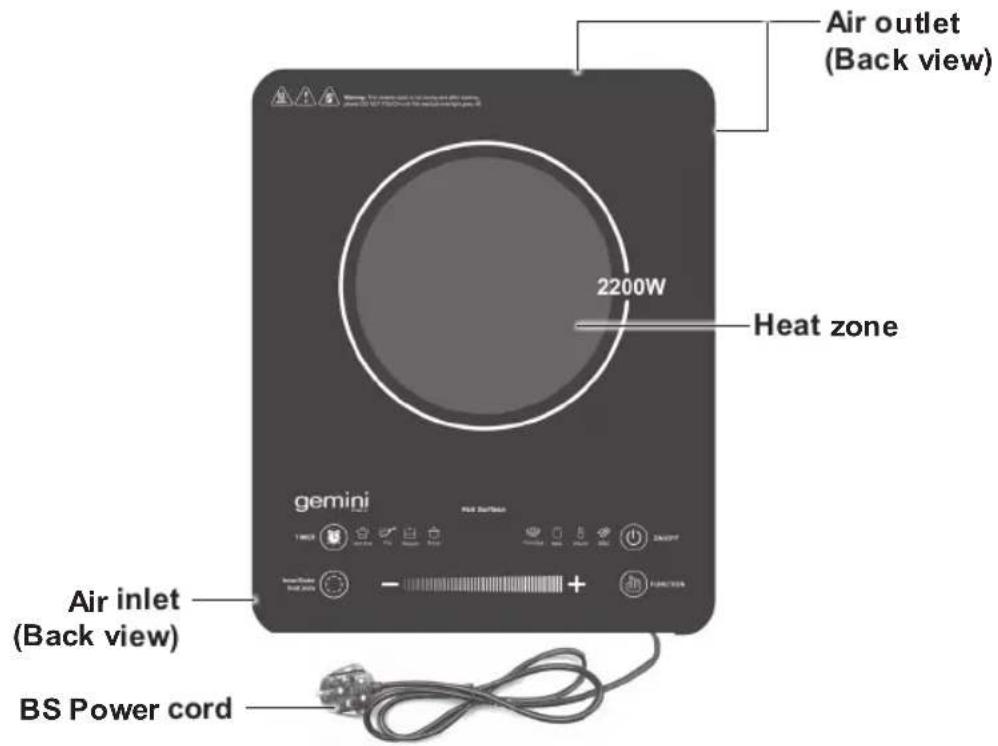
text_image
Air outlet (Back view) 2200W Heat zone gemini Air inlet (Back view) BS Power cordControl Panel
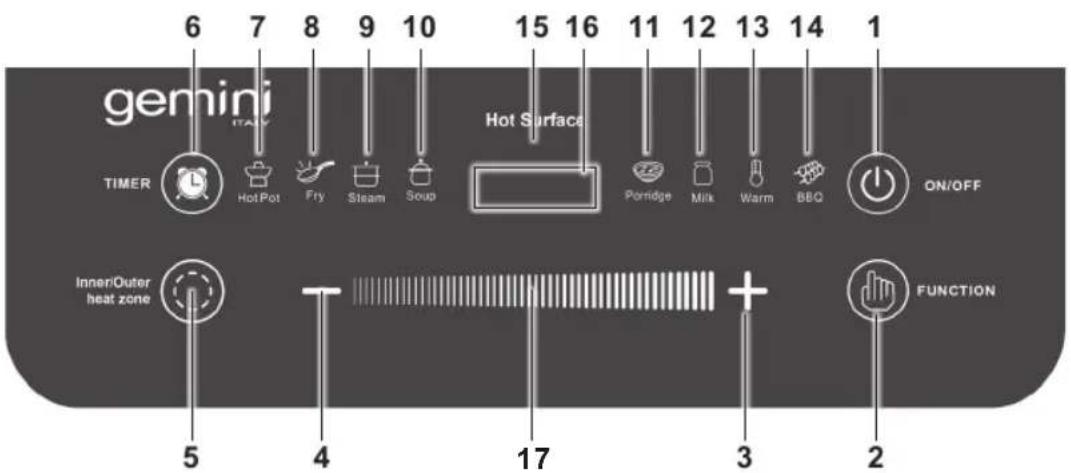
text_image
6 7 8 9 10 15 16 11 12 13 14 1 gemini TIMER Hot Pot Fry Steam Soup Hot Surface Panridge Milk Warm BBQ ON/OFF Inner/Outer heat zone 5 4 17 3 2 FUNCTION- Power on/off touch button
- Function touch button
- Increase touch button
- Decrease touch button
- Inner /outer heat zone touch button
- Timer touch button
- Indicating light for Hot Pot
- Indicating light for Fry
-
Indicating light for Steam
-
Indicating light for Soup
- Indicating light for Porridge
- Indicating light for Milk
- Indicating light for Warm
- Indicating light for BBQ
- Hot surface indicator
- LED display
- Increase/Decrease setting touch bar
SELECTION OF POTS & PANS
Applicable pots and pans with flat base and matt surface.

- Put the cooker on a stable platform and connect the socket to power source, a sound "Bi" is heard. And '----' is shown on display and the ceramic cooker when enters into the standby mode.
- Placement of pots and pans
- Put the pots or pans on the glass panel of the cooker.
- During standby mode, press "On/Off" button to start. The LED display show 'On'.
Hot Pot Function:
- Press the "function" button until the indicator of "Hot Pot" indicator lights up, the default power (W) is "2200" watt. Press "+" or "-" or sweep the bar "III" to adjust the heating power.
- Can adjust the heat zone individually and provide below power heat levels, Inner heat zone: 100, 200, 400, 550, 650, 800, 950, 1100 (watt) Outer heat zone: 200, 400, 800, 1100, 1300, 1600, 1900, 2200 (watt)
• The cooker will shut off automatically if without any operation in 2 hours.
BBQ Function:
- Press the "function" button until the indicator of "BBQ" indicator lights up, the default temperature (°C) is "400". Press "+" or "-" or sweep the bar " " adjust the temperature level. (100, 180, 240, 320, 400, 480, 520, 600)
- Can also adjust the inner/ outer heat zone for the desired cooking, but can not adjust power heat levels.
• The cooker will shut off automatically if without any operation in 2 hours.
Tips: Under the BBQ function, suggest using a grill rack (excluded) for better cooking result.
Fry Function:
- Press the "function" button until the indicator of "Fry" indicator lights up, the default temperature (°C) is "600". Press "+" or "-" or sweep the bar "111 to adjust the temperature level. (100, 180, 240, 320, 400, 480, 520, 600)
- Can also adjust the inner/ outer heat zone for the desired cooking, but can not adjust power heat levels.
• The cooker will shut off automatically if without any operation in 2 hours.
Steam Function:
- Press the “function” button until the indicator of “Steam” indicator lights up, the default power (W) is “1600”. After working for 12 mins, the power (W) and LED display change to “800”.
- The power and the inner/ outer heat zone cannot be adjusted.
- The cooker will shut off automatically if without any operation in 1.5 hours.
Soup Function:
- Press the “function” button until the indicator of “Soup” indicator lights up, the default power (W) is “1900”. After working for 12 mins, the power (W) and LED display change to “800”.
- The power and the inner/ outer heat zone cannot be adjusted.
- The cooker will shut off automatically if without any operation in 2 hours.
Porridge Function:
- Press the “function” button until the indicator of “Porridge” indicator lights up, the default power (W) is “1600”. After working for 12 mins, the power (W) and LED display change to “800”.
- The power and the inner/ outer heat zone cannot be adjusted.
- The cooker will shut off automatically if without any operation in 2 hours.
Milk Function:
- Press the “function” button until the indicator of “Milk” indicator lights up, the default power (W) is “800”.
- The power and the inner/ outer heat zone cannot be adjusted.
- The cooker will shut off automatically if without any operation in 20 mins.
Warm Function:
- Press the "function" button until the indicator of "Warm" indicator lights up, the default temperature (°C) is "100".
- The temperature and the inner/ outer heat zone cannot be adjusted.
- The cooker will shut off automatically if without any operation in 2 hours.
Timer mode:
Timer off function for Hot Pot, BBQ and Fry programs.
- Press the “function” button, select Hot Pot/ BBQ/ Fry program, then press “Timer” button until the indicator of “Timer” lights up.
- Press "+" or "-" button to select the desired time.
- Press and hold the “+” or “-” button for 3 seconds to access quick adjustment the time.
- Timer off setting: max. 4 hours of Hot Pot, BBQ, Fry functions only.
Preset timer on function for Steam, Soup, Porridge, Milk, warm programs.
- Press the “function” button, select Steam/ Soup/ Porridge/ Milk/ warm program, then press “Timer” button until the indicator of “Timer” lights up.
- Press “+” or “-” button to select the desired time.
- Press and hold the “+” or “-” button for 3 seconds to access quick adjustment the time.
- Preset Timer on setting: max. 24 hours of Steam, Soup, Porridge, Milk, Warm functions only.
Warning: The ceramic plate is hot during and after cooking, please DO NOT TOUCH until the surface cools down.
FAULT INTRODUCTIONS
Error code:
- When the voltage is less than 100V, it will stop working and the alarm will be on, the display shows E1.
- When the voltage is greater than 280V, it will stop working and the alarm will be on, the display shows E2.
- If the furnace surface is open or short-circuited, it will stop working and the alarm will be on, the display shows E3.
- If the furnace surface temperature is too high, it will stop working and the alarm will be on, the display shows E4.
- When the inductive sensor over-temperature or the fan does not operate, it will stop working, and the alarm will be on, the display shows E5.
CLEANING AND MAINTENANCE
- Clean the appliance after every usage.
- Switch off the cooker and unplug power cord from the socket before to clean the appliance. DO NOT clean it until the surface cools down.
- Before take out the power cord please turn off the cooker, it is prohibited to wash the cooker with water or put it into water for cleaning.
• Always remove the plug from the wall socket when the appliance is not in use. - Clean the glass panel. Use a piece of soft wet cloth to wipe the surface and dry.
- For greasy, dirt, blot, please wipe it with a piece of wet soft cloth with neutral detergent.
PRODUCT SPECIFICATIONS
Model no.: GPC2200
Voltage: 220-240V\~
Frequency: 50/60Hz
Output power: 2200W
Product dimensions: 320 (W) x 51 (H) x 390 (D) mm
* The final product specification may be varied according to a different lot of material and actual input voltage power of the usage area.
natural_image
Line drawings of various cooking utensils including a pot, lid, kettle, pan, and grater (no text or labels)使用說明
Proudly Serviced by:

Gilman
since 1841

a Gilman Group Company