SPS-750 - Pregnant Sven - Free user manual and instructions
Find the device manual for free SPS-750 Sven in PDF.


User questions about SPS-750 Sven
0 question about this device. Answer the ones you know or ask your own.
Ask a new question about this device
Download the instructions for your Pregnant in PDF format for free! Find your manual SPS-750 - Sven and take your electronic device back in hand. On this page are published all the documents necessary for the use of your device. SPS-750 by Sven.
USER MANUAL SPS-750 Sven
natural_image
Exterior view of two black SVEN audio speakers with a remote control unit (no text or symbols visible)SVEN®
2.0 Multimedia Speaker System with Bluetooth
Congratulations on your purchase of the Sven speaker system!
COPYRIGHT
© 2017. SVEN PTE. LTD. Version 1.0 (V 1.0).
This Manual and information contained in it are copyrighted. All rights reserved.
TRADEMARKS
All trademarks are the property of their legal holders.
NOTICE OF RESPONSIBILITY RESTRICTION
Despite the exerted efforts to make this Manual more exact, some discrepancies may occur. The information in this Manual is given on «as is» terms. The author and the publisher do not bear any liability to a person or an organization for loss or damage which has arisen from the information contained in this Manual.
CONTENTS
RUS 2
UKR 9
ENG 16
- BUYER RECOMMENDATIONS .... 16
- PACKAGE CONTENTS.... 17
- SAFETY PRECAUTIONS 17
- TECHNICAL DESCRIPTION 17
- PREPARATION AND OPERATION 19
- TROUBLESHOOTING.... 22
- TECHNICAL SPECIFICATIONS 22
1. BUYER RECOMMENDATIONS
- Unpack the device carefully. Make sure there are no accessories left in the box. Check up the device for damage; if the product was damaged during transportation, address the delivery agent, if the product carried out the delivery; if the product functions incorrectly, address the dealer at once.
- Check up the package contents and availability of the warranty card. Make sure the warranty card has a shop stamp, a legible signature or the seller's stamp and purchase date, and the goods number corresponds to that in the warranty card.
- Do not switch on the speaker system immediately after you bring it into a room from environment with negative temperature! After unpacking, the speaker system should be kept in conditions of room temperature for at least 4 hours.
- Before installing and using the speaker system, read this Manual carefully and keep it for future reference.
- Shipping and transportation equipment is permitted only in the original container
- Does not require special conditions for realization.
- Dispose of in accordance with regulations for the disposal of household and computer equipment.
Operation Manual
SPS-750
2. PACKAGE CONTENTS
- Speakers - 2 pcs
- 2RCA to mini-jack signal cable – 1 pc
• Audio cable — 1 pc - Remote control - 1 pc
• Operation manual - 1 pc - Warranty card - 1 pc
3. SAFETY PRECAUTIONS
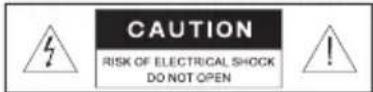
Caution! High voltage inside! To avoid the risk of electric shock do not open or touch elements inside.
- To avoid electric shock, do not open the MSS and do not perform repairs by yourself. Service and repairs should be performed only by qualified specialists in an authorized service center. The list of authorized service centers is available on www.sven.fi.
- Do not allow the circuit of wires (including the grounded ones) between the speakers, on the power amplifier or the ground, for it causes damage to the power amplifier output stage.
- Do not touch the MSS power cord plug pins for 2 seconds after unplugging it from the mains.
- Do not put foreign objects inside the holes of the MSS.
- Protect the MSS from high humidity, water and dust.
- Protect the MSS from heating: do not place it closer than 1 m from a heat source. Do not expose it to direct sunlight.
- Do not place any open flame sources on or close to MSS.
- Do not place the MSS in poorly ventilated areas. Leave an air gap of 10 cm or more. When operating the MSS, do not put any devices on it, do not cover it with cloth or other objects preventing it from cooling.
- Do not use any chemical agents for cleaning. Clean it with dry soft cloth only.
4. TECHNICAL DESCRIPTION
SPS-750 Multimedia Speaker System with Bluetooth (MSS) are designed to play music and sound games, movies, etc. The MSS has a built-in power amplifier allowing to connect it to virtually any audio source (CD/DVD-players, TV set, PC, etc.). MSS has a built Bluetooth wireless signal transmission protocol. Remote control (RC) is included.
Special features
- Bluetooth wireless signal transmission protocol
- Optical input
- Headphone input
- Remote control
• MDF speaker cabinets
SVEN®
2.0 Multimedia Speaker System with Bluetooth
Active speaker panels
① Mode indicator
② Headphone input
③ POWER: on/off button (ST-BY mode)
④ INPUT: audio source selection button: AUX 1 / AUX 2 / BT / OPT
⑤ VOLUME/MODE: volume/ LF / HF control knob (turn the knob to the right / left); switching the volume / bass / treble control mode (pressing the knob)
⑥ AUX 1: line input (2xRCA)
⑦ AUX 2: line input (3.5 mm mini-jack)
⑧ OPTICAL: optical cable input
⑨ OUTPUT: output jack for passive speaker connection
⑩ POWER ON/OFF: power switch
⑪ Power cable

Fig. 1. Control panel
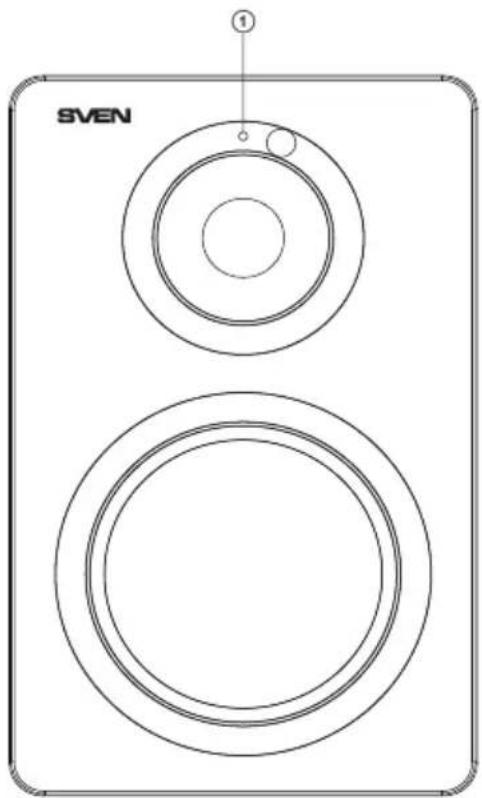
Fig. 2. Active speaker front panel
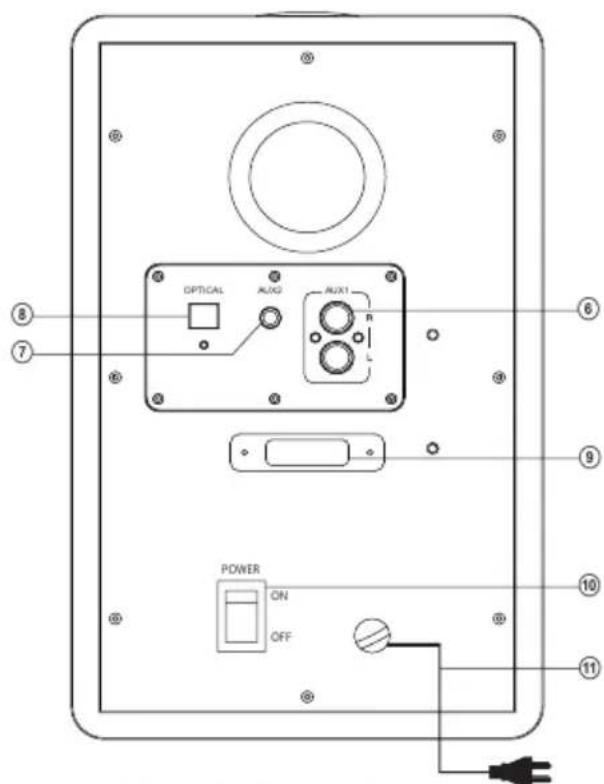
Fig. 3. Active speaker rear panel
Operation Manual
SPS-750
Remote control (Fig. 4)
① ⏻ : power switch button (ST-BY mode)
② BT: Bluetooth mode selection button
③ AUX 1: AUX 1 selection button
④ AUX 2: AUX 2 selection button
⑤ VOL +/-: volume up/down button
⑥ 🐵/▶: previous track/next track (Bluetooth mode)
⑦ BASS : bass control knob
⑧ TREBLE: treble control knob
⑨ : Mute button
⑩ OPTICAL: кнопка выбора оптического входа
⑪ RESET: return to default settings
⑫ Play / Pause (Bluetooth mode)
Notes:
- It is necessary to remove the film-gasket protruding from the remote control battery compartment before the starting operation.
- Use the remote control at an angle no more than 30 degrees, no more than 7 meters away from the IR receiver.
- Direct the RC at the IR receiver display on the control panel.
- If the RC isn't working, check the battery and replace the discharged battery with a new one.
- Remove the battery from the remote control if the device is left unused for a long period of time (more than a week).
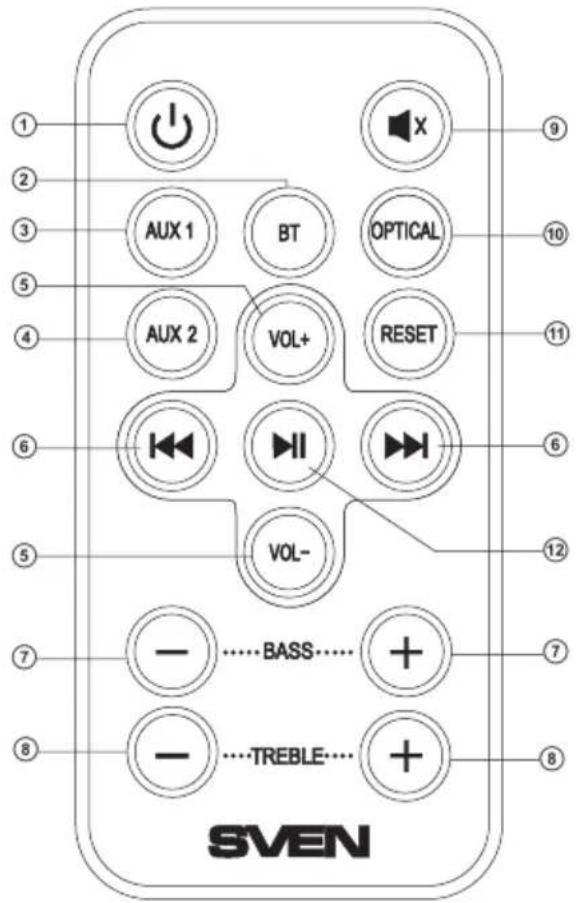
Fig. 4. Remote control
5. PREPARATION AND OPERATION
Speaker placement
- Place the speakers symmetrically to the listener at least one meter away.
- Bass reflex ports are located at the rear panels of speaker cabinets, please locate the speakers about 20–30 cm away from the wall or any other obstacle.
MSS connecting and control
SPS-750 Multimedia Speaker System can be connected to virtually any audio source: DVD/CD, PC sound card, etc. (see connection diagram in Fig. 5).
- Before making any connections, make sure that the MSS is unplugged. Connect the active speaker with the passive one using the audio cable (included). To do this, release connector terminals on the passive speaker, insert the audio cable black and white wire into red jack and the black wire into the black jack of connecting terminals (see connection diagram in Fig. 5), and then connect the cable to the active speaker terminals in the same way.
SVEN®
2.0 Multimedia Speaker System with Bluetooth
- To connect the MSS to a PC, MP3/CD players, first plug the RCA jacks of the 2RCA to mini-jack ∅ 3.5 mm signal cable (included) in the PC audio input ⑥ of the active speaker, then plug the minijack of the signal cable to the LINE OUT port of the computer sound card or to the audio OUTPUT of MP3/CD player terminals (see connection diagram in Fig. 5).
Note. Sound quality is directly affected by correctness and reliability of the connection of cables. It is recommended that cables included into the package contents of the MSS be used.
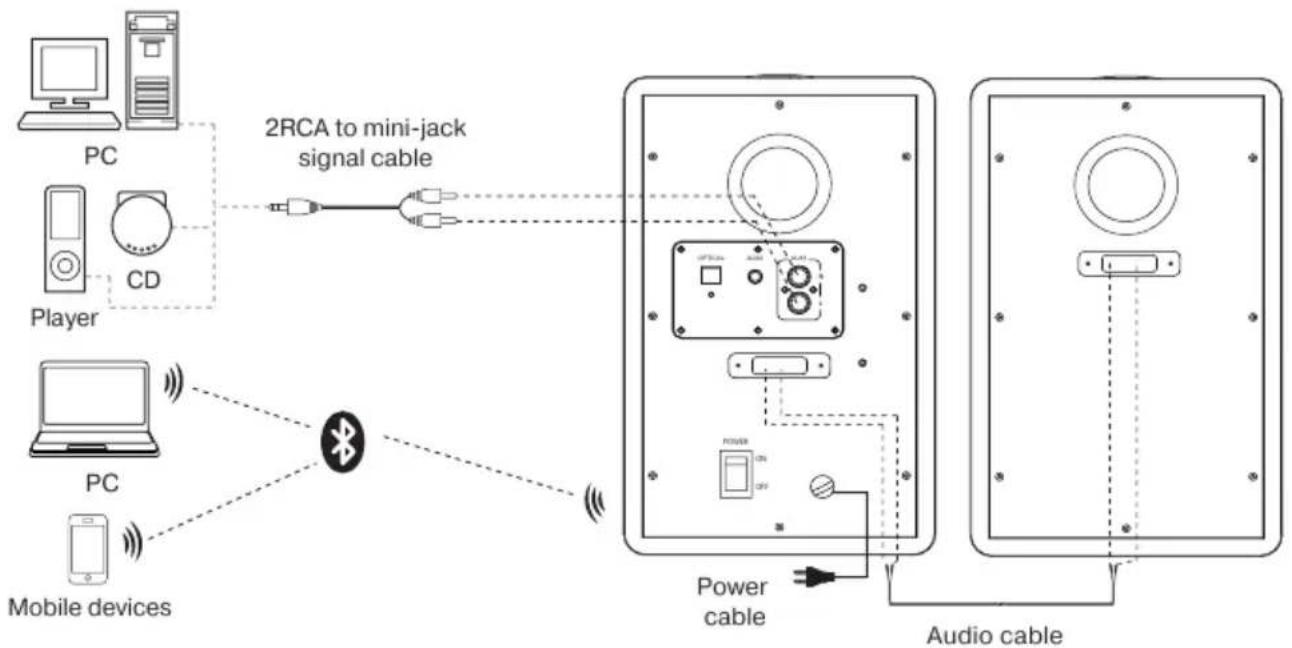
flowchart
graph TD
    A["PC"] -->|2RCA to mini-jack signal cable| B["CD Player"]
    C["Mobile devices"] -->|Wireless| D["Bluetooth"]
    E["Power cable"] --> F["Audio cable"]
    G["PC"] -->|Wireless| D
    H["CD"] -->|Wireless| D
Fig. 5. Audio sources connection diagram
- Plug the MSS in a mains socket.
- Switch on the MSS by shifting the POWER switch ⑩ into the ON position on the active speaker rear panel. Then switch on an audio signal source.
- Select a desired signal source by pressing short the button INPUT ④ on the control panel or buttons BT ③, AUX 1 ③, AUX 2 ④, OPT ⑩ on the remote control (RC), after that the LED of the selected input will illuminate on the control panel.
- Adjust the volume level with button VOL+/- ⑤ on the speaker control panel or with buttons VOL+/- ⑤ on the remote control (see Fig. 4).
- Adjust the treble and bass levels with buttons ⑤ on the speaker control panel or with buttons TREBLE ⑧ and BASS ⑦ on the remote control.
- After using the MSS, mind to switch it off with the ON/OFF switch ⑪ (OFF position) and unplug the
power cable from the mains socket.
Operation Manual
SPS-750
Bluetooth mode
- For the signal transmission in this mode it is necessary first to interconnect the MSS with a signal source. For this press the button INPUT several times, until the indicator glows blue or press the BT button on the remote control. The MSS will go to the search mode. Then on the signal source (telephone, smartphone, etc.) choose the search mode of devices with Bluetooth. The name of the MSS "SVEN SPS-750" will be displayed on the signal source screen, with which you need to intercommunicate*. Select this device and the "connect" command.
- When connecting to the source it is possible to control the player with the remote control using the buttons ⑥, ⑫.
AUX mode
- Press button INPUT ③ several times to turn on AUX mode, until the indicator (AUX1) glows blue or the indicator (AUX2) glows green color or press button AUX1/AUX2 on the RC.
Optical mode
- Press button INPUT ③ several times to turn on Optical mode, until the indicator glows purple or press button OPT on the remote control.
ST-BY mode
- To enter/exit this mode, press button ③ on the control panel or press button ① on the RC.
Mute mode
- To enter the MUTE mode, press button ⑨ on the remote control. To exit the MUTE mode, press the button ⑨ on the remote control again.
Note. The MSS control description can differ from the given one in this Operation Manual due to the constant improvement of the software. The last version of the Operation Manual see on www.sven.fi.
SVEN®
2.0 Multimedia Speaker System with Bluetooth
- TROUBLESHOOTING
| Problem | Cause | Solution |
| The MSS does not turn on. | The MSS isn’t connected to a mains outlet. | Check the connection. |
| The power switch is off. | Turn on the switch. | |
| No sound or the sound is too quiet. | Volume level is set at minimum value. | Adjust the volume level. |
| No connection via Bluetooth / wrong connection or selection of an audio signal source. | Fulfill the interconnection procedure via Bluetooth / connect or select an audio signal source correctly. | |
| Distortion of sound. | Large amplitude of the input signal. | Turn down the source volume and the MSS volume. |
| The remote control is not working. | The battery is discharged. | Replace the battery with a new one. |
If none of the above methods can solve the problem, please seek professional advice at your nearest service center. Never attempt to repair the product yourself.
- TECHNICAL SPECIFICATIONS
| Parameter, measurement unit | Value |
| Output power (RMS), W | 50 (2 × 25) |
| Frequency range, Hz | 40 – 25,000 |
| Speaker diameter (tweeter + woofer), mm | ∅ 25 + ∅ 100 |
| Bluetooth operating range, m | till 10 |
| Power supply, V/Hz | ~230/50 |
| Dimensions (one speaker) (W × H × D), mm | 160 × 260 × 190 |
| Weight, kg | 5.1 |
Notes:
- Technical specifications given in this table are supplemental information and cannot give occasion to claims.
- Technical specifications and package contents are subject to change without notice due to the improvement of SVEN production.
natural_image
Two black audio/video audio speakers with external control buttons (no visible text or symbols)Модель: SPS-750
Manufacturer: SVEN PTE. LTD, 176 Joo Chiat Road, N° 02-02, Singapore, 427447. Produced under the control of Oy Sven Scandinavia Ltd. 15, Kotolahdentie, Kotka, Finland, 48310. Made in China.
® Registered Trademark of Oy SVEN Scandinavia Ltd. Finland.
EAC CE
SPS-750