
GA-05 - Ruler Acme United - Free user manual and instructions
Find the device manual for free GA-05 Acme United in PDF.


| Brand | Acme United |
| Model | GA-05 |
| Product Type | Ruler |
| Length | 30 cm (12 inches) |
| Width | 3 cm |
| Thickness | 2 mm |
| Weight | 20 g |
| Material | Plastic (polystyrene) |
| Graduations | Metric (mm, cm) and Imperial (inches, fractions) |
| Edge Type | Straight, smooth |
| Flexibility | Rigid |
| Color | Clear translucent |
| Packaging | Blister pack |
| Country of Origin | China |
| Warranty | 1 year limited |
| Certifications | CE, RoHS |
| Applicable Standards | ISO 9001 |
| Intended Use | Measuring lengths and drawing straight lines |
| Care Instructions | Wipe with damp cloth; do not bend or expose to excessive heat |
| Safety Information | Keep away from children under 3 years due to small parts; not a toy |
Frequently Asked Questions - GA-05 Acme United
User questions about GA-05 Acme United
0 question about this device. Answer the ones you know or ask your own.
Ask a new question about this device
Download the instructions for your Ruler in PDF format for free! Find your manual GA-05 - Acme United and take your electronic device back in hand. On this page are published all the documents necessary for the use of your device. GA-05 by Acme United.
USER MANUAL GA-05 Acme United
4 GB User's manual 76 Warranty card
10 LT Vartotojo gidas 77 Garantinis lapas
Thank you for choosing the ACME game pad and congratulations on this decision. We are certain that product will provide much playing pleasure for years to come. These instructions contain valuable information on operating and configuring the game pad.
For your convenience record the complete model number and the date you received the product together with your purchase receipt and attach to the warranty and service information. Retain in the event that warranty service is required. Keep these instructions and the software CD in a safe location for future reference.
NOTE: The rating of this product (as marked on the product and product package) is based on specific loading tests. Normal use or the use of other recommended attachments may draw significantly less power.
Product features
• Vibration for better gaming experience
• 6 fire (easy-to-reach) buttons
• 4 shoulder buttons
• Two 360°mini-joysticks with digital buttons underneath
• Eight-way direction pad (D-Pad)
• Analog and digital modes supported
- USB connection
- Compatible with Windows® 98SE / 2000 / ME / XP / VISTA /7™
General description
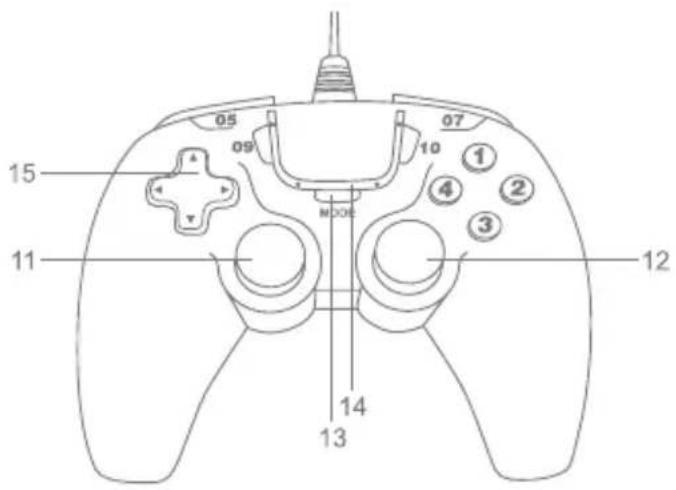
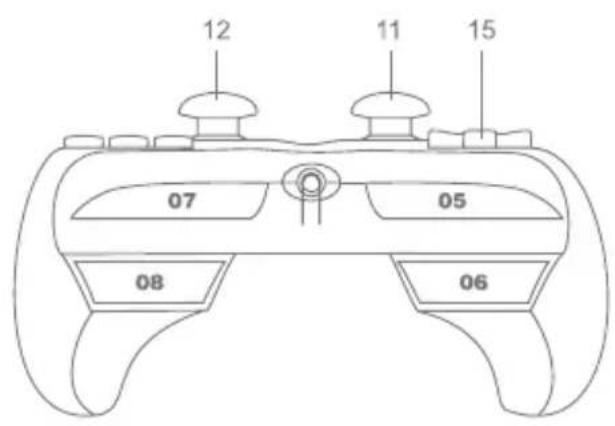
| 1 | 6 easy-to-reach("Fire") buttons |
| 2 | |
| 3 | |
| 4 | |
| 09 | |
| 10 |
| 5/L1 | 4 fast-action shoulder buttons |
| 6/R1 | |
| 7/L2 | |
| 8/R2 |
| 11 L3 button / Mini Left Stick |
| 12 R3 button / Mini Right Stick |
| 13 Analog / Digital mode changing button |
| 14 Analog / digital mode led |
| 15 8-way D-pad |
GB
GB
Important safety instructions
When using electrical appliance, especially when children are present, basic safety precautions should always be followed, including the following:
READ ALL INSTRUCTIONS BEFORE USING.
DANGER – As with most electrical appliances, electrical parts are electrically live even when it is off. To reduce the risk of electrical shock:
- Do not place or store appliance where it can fall.
- Do not place in or drop into water or other liquid.
- If an appliance falls into water, unplug it immediately. Do not reach into the water.
WARNING – To reduce the risk of burns, electrocution, fire, or injury to persons:
- Do not expose the controller to high temperature, high humidity or direct sunlight. (Use in an environment between 5 – 35°C / 41 – 95°F).
- Do not allow liquid or small particles to get into the controller.
- Do not put any heavy objects on the controller.
- Never disassemble or modify the controller.
- Do not twist the cable or pull it forcibly.
- Do not bend, throw or drop the controller or subject it to strong physical shock.
- Do not touch the metal parts or insert foreign objects in the controller.
Using the appliance
INSTALLING AND TESTING
- Connect the USB cable of your game pad to a USB port on your computer.
- Insert the driver CD and double click on the "GA-05 drivers.exe" icon then step by step as screen display. The driver will be automatically setup by program. If you want to cancel this install action, then click the "Cancel" to cancel the installation.
- The game pad is now installed successfully and ready to play. Once everything stated above is normal, you can exit and start playing the games with your game pad.
-
To configure the device, click:
-
Start → Control panel → Game controllers.
-
Please note that the Game controller's application is called Game options in Windows ME.
-
Select the required device.
-
Now click Properties to test and calibrate all functions in the menu. Press the joystick direction keys, action buttons and function buttons. The testing page will have the corresponding reactions which show you if the function keys and action buttons are good or not.
Vibration function
The Gamepad has internal motor which work only in games supporting “Force Feedback” function and when supplied drivers have been installed. See the manual of your game on whether the game supports vibration or not. If problems persist, check whether vibration support was activated in the game options.
Notes:
- Ensure that your game software supports game controllers.
- In order to use the vibration function, your game's software must support Force Vibration/Force Feedback.
GB
GB
- If some buttons do not work, check key settings in the game's options menu.
HOW TO USE DIGITAL MODE
If you want to use Digital mode, you need to press MODE button (13). On digital mode LED (14) will shine. In Digital mode, the left stick supports D-pad function with X, Y axis.
HOW TO USE ANALOG MODE
If you want to use Analog mode, you need to press MODE button (13). In Analog mode, the left stick supports X, Y axis and right stick supports Z, Rz axis. It is 8 way function mode for D-pad. Please note that when you push the center of analog stick, it turns on L3 button function (left stick) and R3 button function (right stick).
Cleaning
• To clean the Game Pad, wipe with a mildly damp cloth.
- Never immerse into water, as the unit contains sensitive electronic components that may be destroyed, voiding your warranty.
- Do not use any harsh cleaners or disinfectants on your Game Pad.
- A damp cloth with a dab of dish-washing detergent or "Computer Case and Monitor" cleaning solution available at any computer store will be sufficient.
Storage
- When not in use, store your Game Pad in a dust-free area, preferably in its original packaging.
- Keep all the Game Pad components away from sources of major heat (baseboard heaters, car dashboard, etc.).
- Keep the Game Pad away from any major magnetic sources.
Troubleshooting
My game pad doesn't work
- Check the USB port to which it is connected. It is possible that USB port is dead. Try to connect another appliance to this port to find out.
- The power cord of the game pad can by damaged. Unplug the USB port from power socket and check it carefully. If it is damaged, you must give it to replace by authorized service.
My game pad drivers can't be installed
- Check if your OS is supported for this device. Supported OS list is on your game pad package.
- Check if your CD-ROM device is working well. You can check it by inserting other CD-ROM. If another CD is readable with your device, maybe your CD was damaged. In this case, you can download our product drivers from our page: http://www.acme.eu.
Waste Electrical and Electronic Equipment (WEEE) Symbol
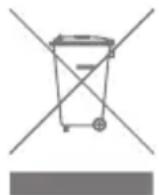
The use of the WEEE symbol indicates that this product may not be treated as household waste. By ensuring this product is disposed of correctly, you will help protect the environment. For more detailed information about the recycling of this product, please contact your local authority, your household waste disposal service provider or the shop where you purchased the product.
GB
LT
lžanga
LIETOŠANA ANALOGAJA REŽIMA
Olulised ohutusjuhised
INSTALACJA I SPRAWDZENIA
WEEE (Waste Electrical and Electronic Equipment)
Warranty card www.acme.eu/warranty
| Product Product model | |
| Product purchase date Seller name, address | |
| Failures (date, description, position of the person who accepts the product, first name, last name and signature) | |
1. Warranty period
Warranty enters into force starting with the day when the buyer acquires the product from the seller. Warranty period is indicated on the package of the product.
2. Warranty conditions
The warranty is valid only by providing an original document of the product acquisition and this warranty sheet, which includes name of the product model, product purchase date, name and address of the seller.
If it is noticed during the warranty period that the product has faults and these faults where not caused by any of the reasons when the warranty is not applied as indicated in the paragraphs below, manufacturer undertakes to replace the product.
The warranty is not applied to regular testing, maintenance and repair or replacement of the parts which are worn out naturally.
The warranty is not applied if damage or failures occurred due to the following reasons:
• Inappropriate installation of the product, inappropriate relation
usage and/or operating the product without following the manual, technical requirements and safety standards as provided by the manufacturer, and additionally, inappropriate warehousing, falling from heights as well as hard strikes.
• Corrosion, mud, water and sand.
• Repair works, modifications or cleaning, which were performed by a service not authorised by the manufacturer.
• Usage of the spare parts, software or consumptive materials which do not apply to the product.
- Accidents or events or any other reasons which depend on the manufacturer, which includes lightning, water, fire, magnetic field and inappropriate ventilation.
- If the product does not meet standards and specifications of a particular country, in which it was not bought. Any attempt to adjust the product in order to meet technical and safety requirements such as those in the other countries withdraws all the rights to the warranty service.
If no failures are detected in the product, all the expenses in relation to the service are covered by the buyer.
Garantinis lapas www.acme.eu/warranty


- PRODUCT FEATURES
- GENERAL DESCRIPTION
- GB
- IMPORTANT SAFETY INSTRUCTIONS
- USING THE APPLIANCE
- INSTALLING AND TESTING
- VIBRATION FUNCTION
- NOTES
- HOW TO USE DIGITAL MODE
- HOW TO USE ANALOG MODE
- CLEANING
- STORAGE
- TROUBLESHOOTING
- MY GAME PAD DOESN'T WORK
- MY GAME PAD DRIVERS CAN'T BE INSTALLED
- WASTE ELECTRICAL AND ELECTRONIC EQUIPMENT (WEEE) SYMBOL
- LT
- LŽANGA
- LIETOŠANA ANALOGAJA REŽIMA
- OLULISED OHUTUSJUHISED
- INSTALACJA I SPRAWDZENIA
- WEEE (WASTE ELECTRICAL AND ELECTRONIC EQUIPMENT)
- WARRANTY CARD WWW.ACME.EU/WARRANTY
- WARRANTY PERIOD
- WARRANTY CONDITIONS
- GARANTINIS LAPAS WWW.ACME.EU/WARRANTY
Brand : Acme United
Model : GA-05
Category : Ruler