
MDR-IF140K - Headphones SONY - Free user manual and instructions
Find the device manual for free MDR-IF140K SONY in PDF.


| Brand | Sony |
| Model | MDR-IF140K |
| Product Type | Wireless infrared stereo headset |
| Transmitter | TMR-IF130 |
| Headset | MDR-IF140 |
| Transmitter Dimensions | Approx. 152 × 38 × 72 mm (w/h/d) |
| Transmitter Weight | Approx. 75 g |
| Headset Weight (with battery) | Approx. 125 g |
| Transmitter Power Supply | Included AC adapter (120 V/230 V AC depending on country) |
| Headset Power Supply | 1 AAA battery (alkaline or manganese) |
| Battery Life (alkaline) | Up to 60 hours |
| Battery Life (manganese) | Up to 28 hours |
| Carrier Frequency | Right: 2.8 MHz, Left: 2.3 MHz |
| Frequency Response | 18 to 22,000 Hz |
| Range | Up to 7 meters |
| Modulation System | Frequency modulation (FM) |
| Main Features | Infrared transmission, self-adjusting headband, single volume control, sound cut-off function, automatic transmitter shut-off |
| Care and Cleaning | Clean with a dry cloth; do not use abrasive products or solvents |
| Safety | Do not expose to rain or moisture; do not open the case; use only the supplied adapter; avoid prolonged high volume |
| Spare Parts and Repairability | Replaceable ear pads (available from Sony); replaceable battery |
| Supplied Accessories | AC adapter, connection cord, Unimatch plug adapter |
Frequently Asked Questions - MDR-IF140K SONY
User questions about MDR-IF140K SONY
0 question about this device. Answer the ones you know or ask your own.
Ask a new question about this device
Download the instructions for your Headphones in PDF format for free! Find your manual MDR-IF140K - SONY and take your electronic device back in hand. On this page are published all the documents necessary for the use of your device. MDR-IF140K by SONY.
USER MANUAL MDR-IF140K SONY
Cordless Stereo Headphone System
Operating Instructions ____ GB
To prevent fire or shock hazard, do not place objects filled with liquids, such as vases, on the apparatus.
To avoid electrical shock, do not open the cabinet. Refer servicing to qualified personnel only.
Do not install the appliance in a confined space, such as a bookcase or built-in cabinet.
Owner's Record
The model number is located on the top of the transmitter and the left inner side of the headband.
The serial number is located at the bottom of the transmitter and the right inner side of headband.
Record these numbers in the spaces provided below. Refer to them whenever you call upon your Sony dealer regarding this product.
Model No. MDR-IF140K
Transmitter TMR-IF130
Headphones MDR-IF140
Serial No.
Transmitter
Headphones ____
You are cautioned that any changes or modifications not expressly approved in this manual could void your authority to operate this equipment.
The validity of the CE marking is restricted to only those countries where it is legally enforced, mainly in the countries EEA (European Economic Area).
natural_image
Symbol of a trash bin crossed out by a diagonal line, with no text or labels present.Disposal of Old Electrical & Electronic Equipment (Applicable in the European Union and other European countries with separate collection systems)
This symbol on the product or on its packaging indicates that this product shall not be treated as household waste. Instead it shall be handed over to the applicable collection point for the recycling of electrical and electronic equipment. By ensuring this product is disposed of correctly, you will help prevent potential negative consequences for the environment and human health, which could otherwise be caused by inappropriate waste handling of this product. The recycling of materials will help to conserve natural resources. For more detailed information about recycling of this product, please contact your local city office, your household waste disposal service or the shop where you purchased the product.
For customers in Australia
The supply cord of AC power adaptor can not be replaced; if cord is damaged, AC power adaptor should be discarded.
Welcome!
Thank you for purchasing the Sony MDR-IF140K Cordless Stereo Headphone System. Before operating the unit, please read this manual thoroughly and retain it for future reference.
The MDR-IF140K is a cordless stereo headphone system using infrared transmission. You can enjoy listening to a program free from the restriction of the headphone cord by simply connecting the transmitter to a TV, or audio components equipped with a headphone jack or a line output jack.
- Cordless, noiseless infrared headphone system resistant to external noise, etc.
- Wide infrared reception range of up to 7m (23 ft.).
- Self-adjusting headband mechanism eliminating the need for headband adjustment.
- Single VOL control adjusts both the right and left volume of the headphones.
Table of contents
Getting started
Unpacking 4
Inserting the battery 5
Setting up the transmitter ...... 6
Operating the system
Listening to a program 8
The effective area of the transmitter .... 10
Replacing the ear pads 10
Additional information
Specifications 11
Precautions 12
Troubleshooting 13
Unpacking
Check that you have the following items before using the headphones:
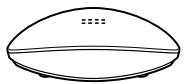
• The transmitter TMR-IF130 (1)
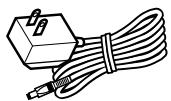
- AC power adaptor (1)
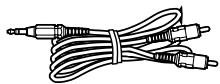
- Connecting cord (1) (phono plugs stereo mini plug)
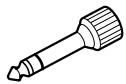
- Unimatch plug adaptor (1) (stereo mini jack stereo phone plug)
• The headphones MDR-IF140 (1)

natural_image
Line drawing of a pair of outdoor headphones (no text or symbols)Inserting the battery
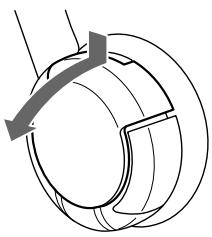
1 Open the battery compartment lid of the left housing.
natural_image
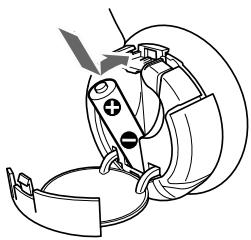
Pure mechanical diagram of a circular component with internal channels and a handle, no text or symbols present2 Insert the size AAA dry battery into the battery compartment matching ⊕ terminal on the battery to ⊕ in the compartment.
natural_image
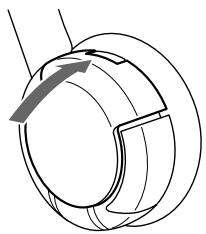
Line drawing of a medical device with surgical tools and a foot (no text or symbols)3 Close the battery compartment lid.
natural_image
Pure mechanical diagram showing a rotating component with no text or symbolsBattery life
| Battery | Approx. hours*1 |
| Sony alkaline battery LR03/AM-4(N) | 60 hours*2 |
| Sony manganese battery R03/UM-4 (NU) | 28 hours*2 |
^*1 at 1 kHz, 1 mW+1 mW output
*2 Time stated above may vary, depending on the temperature or conditions of use.
Notes on Batteries
- Do not charge a dry battery.
- Do not carry a dry battery together with coins or other metallic objects. It can generate heat if the positive and negative terminals of the battery are accidentally come into contact with metallic objects.
- When you are not going to use the unit for a long time, remove the battery to avoid damage from battery leakage or corrosion.
When to replace the battery
When the battery becomes weak, the power indicator light dims, or sound becomes distorted or noisy. Replace the battery with new one as soon as possible.
Setting up the transmitter
The transmitter is equipped with two input jacks, which allows for connection to the specified output jacks: PHONES IN to the headphone jack, and LINE IN to the LINE OUT jacks of your connected equipment.
1 Connect the transmitter to an audio/video component.
Select method A or B, according to the output jack type of the AV component you use.
A When connecting to a headphones jack
Connect to the PNONES IN jack on the transmitter.
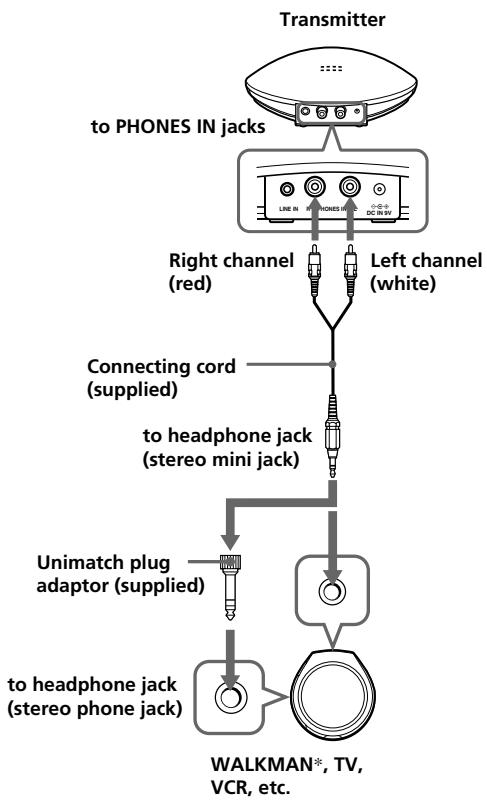
flowchart
graph TD
    A["Transmitter"] --> B["to PHONES IN jacks"]
    B --> C["Right channel (red)"]
    B --> D["Left channel (white)"]
    C --> E["Connecting cord (supplied)"]
    D --> E
    E --> F["to headphone jack (stereo mini jack)"]
    F --> G["Unimatch plug adaptor (supplied)"]
    G --> H["to headphone jack (stereo phone jack)"]
    H --> I["WALKMAN*, TV, VCR, etc."]
* WALKMAN is a registered trademark of Sony Corporation to represent Headphone Stereo products.
B When connecting to any jacks other than the headphones jack
Connect to the LINE IN jacks on the transmitter.
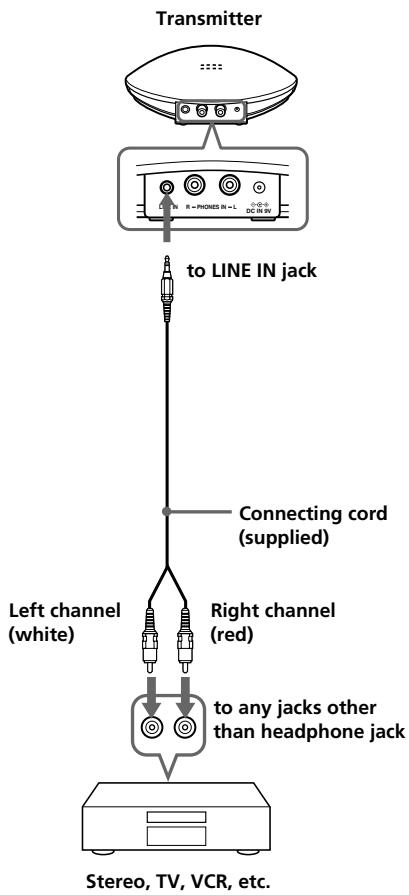
Note
If your AV component has a stereo mini jack (LINE OUT), connect the stereo mini jack to LINE IN jack of the transmitter by using the connecting cord RK-G136 sold separately. If you connect LINE OUT jack of your AV component to PHONES IN jack of the transmitter, volume may be too low.
2 If your AC power adaptor is equipped with a voltage selector, set it to the operating voltage in your area with a screw driver before connecting the AC power adaptor to an AC outlet.
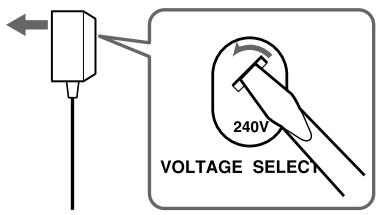
3 Connect the transmitter to the power source.
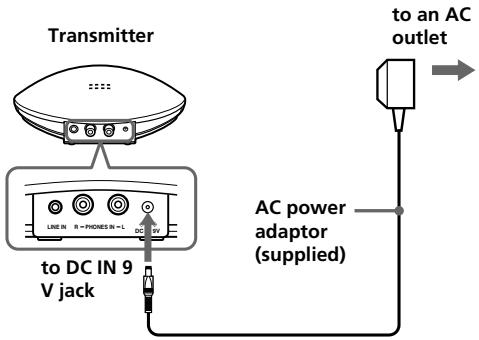
(Continued)
Notes
- Do not connect to the PHONES IN jack and LINE IN jack at the same time. If you connect two audio/visual components to both jacks at the same time, both of the audio signals may result in mixed output.
- Use only the supplied AC power adaptor. Do not use any other AC power adaptor.
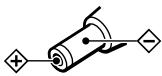
Unified
polarity plug
- When you connect the connecting cord directly to an earphone jack (monaural mini jack), the audio signal may not be output through the right channel. In such a case, use the separately sold PC-236MS plug adaptor (stereo mini jack monaural mini plug) between the connecting cord and the earphone jack.
Listening to a program
Before listening
To prevent your ears from being damaged, first lower the volume.
1 Turn on the audio/video component connected to the transmitter.
When the audio signal is input, the transmitter turns on automatically and the infrared emitters glow. If the transmitter is connected to the headphone jack, set the volume control of the audio source component as high as possible but not so high that the audio signal becomes distorted.
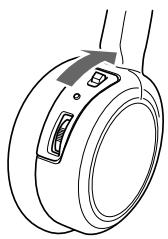
2 Turn on the headphones.
The power indicator on the upper part of the right housing glows red.
natural_image
Line drawing of a mechanical component with two ports and an arrow indicating direction (no text or symbols)3 Put on the headphones.
Be sure to put the right housing (R) on your right ear and the left housing (L) on your left ear.
4 Start playback of the component connected to the transmitter.
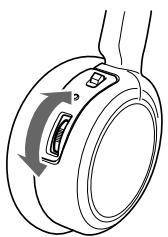
5 Adjust the volume.
natural_image
Diagram of a mechanical component with directional arrows indicating rotation or movement (no text or symbols)If the infrared sensors are covered by your hands when adjusting the volume, the mute function will be activated and volume may not be adjusted. In this case, move nearer toward the transmitter or orient the infrared emitters on the left housing towards the transmitter.
After listening to the programs
Take off the headphones, and then turn off the power.
Note
You may hear some noise when you disconnect the AC power adaptor from the transmitter before taking off the headphones.
Sound is automatically muted if noise increases
— Mute function
If the infrared rays are obstructed, or the headphones are used outside their effective range, noise will increase and sound will become hard to hear. To avoid potential ear damage as a result of noise, this function mute any sound from the headphones. Sound is automatically restored when you move nearer the transmitter or remove the obstruction.
If no audio signal is input for more than approximately 5 minutes
The transmitter turns off automatically.
Note
The brightness of the infrared emitters may not be uniform, however, this is not a malfunction.
The effective area of the transmitter
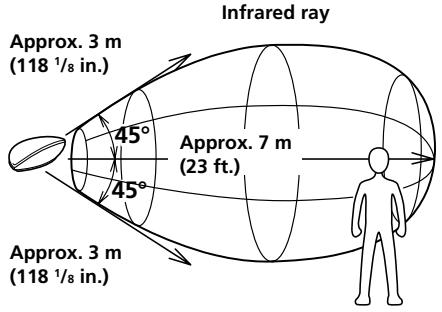
The illustration below shows the approximate area covered by the infrared rays emitted from the transmitter.
Transmitter
Notes
- If you use the headphones at too great a distance from the transmitter, you may hear a hissing noise and if there is an object between the headphones and the transmitter, sound may be interrupted. These phenomena are inherent to infrared ray communication and do not mean that there is a problem with the system itself.
- Do not cover the infrared sensors with your hands or hair.
- When you use the headphones inside the area in the illustration above, the transmitter can be placed in front, behind or by the side of you.
- The noise you may hear through the headphones may vary depending on the transmitter position and room conditions. It is recommended that you place the transmitter in a location that produces the clearest sound.
- Do not use this system in areas exposed to direct sunlight or strong light. The sound may be interrupted.
- Plasma displays may interfere with normal operation of this system.
Replacing the ear pads
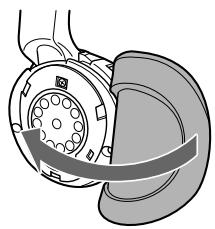
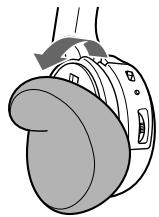
The ear pads are replaceable. If the ear pads become dirty or worn out, replace them as illustrated below.
The ear pad is not commercially available. You can order replacements from the store where you purchased this system, or at your nearest Sony dealer.
1 Remove the old ear pad by pulling it off.
natural_image
Mechanical assembly diagram showing a rotating component with a curved arrow indicating motion (no text or symbols)2 Place the new ear pad around the housing.
natural_image
Diagram of a mechanical device with a curved component and directional arrow (no text or symbols)Specifications
General
Modulation system
Frequency modulation
Carrier frequency
Right 2.8 MHz
Left 2.3 MHz
Frequency response
18 - 22,000 Hz
Transmitter TMR-IF130
Power source
DC IN 9 V jack accepts power supplied from the AC power adaptor for use on the following voltages:
| Where purchased | Operating voltage | |
| U.S.A. | 120 V AC, 60 Hz | |
| U.K. | 230 V AC, 50 Hz | |
| European countries | 230 V AC, 50 Hz | |
| Japan (except for Japanese domestic model) | 110 V/120 V/220 V/240 V AC, 50/60 Hz | |
| Other countries | 220 – 230 V AC, 50/60 Hz or 120 V AC, 60 Hz | |
| Audio input Dimensions | Phono jacks/stereo mini jack Approx. 152 × 38 × 72 mm ( 6 × 1^1/_2 × 2^3/_4 in.) (w/h/d) | |
| Mass | Approx. 75 g (2.7 oz.) | |
Headphone MDR-IF140
Power source
Dry battery (size AAA)
Mass
Approx. 125 g (4.41 oz.)
including battery
Supplied accessories
AC power adaptor (1)
Connecting cord (approx. 1m, stereo mini plug × 1 ↔ phono plug × 2) (1)
Operating instructions (1)
Optional accessories
- If you connect with a stereo mini jack (LINE OUT)
RK-G136
(1.5 m, stereo mini plug × 1 ↔ stereo mini plug × 1) - If sound is not output through the right channel when the supplied connecting cord is connected to the earphone jack.
Plug adaptor PC-236MS
(stereo mini jack monaural mini plug) - If you have lost the supplied plug adaptor.
Plug adaptor PC-234S
(stereo mini jack ↔ stereo phone plug) - If you have lost the supplied connecting cord.
RK-G129
(1.5 m, stereo mini plug phono plug × 2)
Design and specifications are subject to change without notice.
Precautions
- When the transmitter is not to be used for a long period of time, disconnect the AC power adaptor from the AC outlet holding the plug and remove the battery to avoid damage caused by battery leakage and subsequent corrosion.
- Do not leave the cordless stereo headphones system in a location subject to direct sunlight, heat or moisture (It is recommended to use the headphones at a temperature of between 5°C and 35°C (between 41°F and 104°F).)
- Do not drop, hit or otherwise subject the transmitter or headphones to strong shocks of any kind. This could damage the product.
Notes on headphones preventing hearing damage
Avoid using headphones at high volume. Hearing experts advise against continuous, loud and extended play. If you experience a ringing in your ears, lower the volume or discontinue use.
Caring for others
Keep the volume at a moderate level. This will allow you to hear outside sounds and to be considerate to the people around you.
If you have any questions or problems concerning the system that are not covered in this manual, please consult nearest Sony dealer.
Be sure to bring the headphones and the transmitter to Sony dealer when requiring repair work.
Troubleshooting
No sound/Muffled sound
→ Turn on the transmitter first, and then put on the headphones.
→ Check the connection of the audio/video equipment or the AC power adaptor.
→ Check that the audio/video equipment connected to the transmitter is turned on.
→ If the transmitter is connected to the headphones jack, raise the volume of the audio/video equipment connected to the transmitter.
→ The mute function is activated.
- Check if there is any object between the transmitter and the headphones.
- Use the headphones near the transmitter.
- Change the position and angle of the transmitter.
→ The headphones' power indicator light dims, flashes or goes off.
- Replace dry battery with new one. If the power indicator is still off after replacing the battery, take the headphones to a Sony dealer.
→ If you connect the LINE OUT jacks of your connected equipment to the PHONES IN jacks of the transmitter, volume may be too low. Use the LINE IN jacks of the transmitter instead. See "Setting up the transmitter."
Distorted sound
→ If the transmitter is connected to the headphones jack, lower the volume of the audio/video equipment connected to the transmitter.
→ The headphones' power indicator light dims, flashes or goes off.
- Replace dry battery with new one. If the power indicator is still off after replacing the battery, take the headphones to a Sony dealer.
→ If you connect the headphone jacks of your connected equipment to the LINE IN jack of the transmitter, sound may be distorted when raising the volume. Use the PHONES IN jacks of the transmitter instead. See “Setting up the transmitter.”
Loud background noise
→ Move closer to the transmitter. (As you move away from the transmitter, more noise is likely to be heard. This is inherent in infrared ray communication and does not mean that there is a problem with the unit itself.)
→ Check that there is no object between the transmitter and the headphones.
→ Check that the infrared sensors are not covered with your hands or hair.
→ If you use the headphones by a window where the sunlight is too strong, draw the curtains/blinds to shut out the direct sunlight, or use the headphones away from the sunlight.
→ Change the position or angle of the transmitter.
→ If the transmitter is connected to the headphones jack, raise the volume of the audio/video equipment connected to the transmitter.
→ The headphones' power indicator light dims, flashes or goes off.
- Replace dry battery with new one. If the power indicator is still off after replacing the battery, take the headphones to a Sony dealer.
→ When you have another transmitter, check if more than one transmitters are used at the same time.
- Turn off other transmitter or move to a place outside the range of this transmitter.
AVERTISSEMENT
natural_image
Symbol of a trash bin crossed out by a diagonal line, with no text or labels present.natural_image
Line drawing of a pair of outdoor headphones (no text or symbols)natural_image
Pure mechanical diagram of a circular component with internal channels and a handle, no text or symbols presentnatural_image
Line drawing of a medical device with a surgical tool inserted, showing internal components and no text or symbols.natural_image
Pure mechanical diagram showing a circular component with internal channels and arrows indicating motion (no text or symbols)natural_image
Line drawing of a mechanical component with two ports and a central hub (no text or symbols)natural_image
Diagram of a mechanical component with curved arrows indicating rotation or movement (no text or symbols)natural_image
Mechanical assembly diagram showing a rotating component with a curved arrow indicating motion (no text or symbols)natural_image
Illustration of a mechanical device with a curved handle and control buttons (no text or symbols)natural_image
Symbol of a trash bin crossed with no text or labels, accompanied by a solid black rectangle below (no text or symbols present)natural_image
Line drawing of a pair of outdoor headphones (no text or symbols)natural_image
Pure mechanical cross-section diagram without any text, numbers, or symbolsnatural_image
Line drawing of a medical device with surgical tools and a laparoscopic view (no text or symbols)natural_image
Pure mechanical diagram showing a rotating component with no text or symbolsDuración de la pila
| Pila | Horas aprox.*1 |
| Pila alcalina Sony LR03/AM-4(N) | 60 horas*2 |
| Pila de manganeso Sony R03/UM-4 (NU) | 28 horas*2 |