
TMR-BT10A - Headphones SONY - Free user manual and instructions
Find the device manual for free TMR-BT10A SONY in PDF.


| Product Type | Portable Stereo Transmitter |
| Brand | Sony |
| Model | TMR-BT10A |
| Dimensions (W x H x D) | Approx. 25 × 51 × 29 mm (1 × 2 × 1 3/16 in) |
| Weight | Approx. 21 g (0.7 oz) including cord |
| Power Source | DC 3.7 V, built-in rechargeable lithium-ion battery |
| Charging Time | Approx. 3 hours |
| Music Playback Time | Up to 11 hours |
| Bluetooth Version | Bluetooth Specification version 2.0 |
| Frequency Band | 2.4 GHz band (2.4000 GHz – 2.4835 GHz) |
| Maximum Communication Range | Line of sight approx. 10 m (30 ft) |
| Bluetooth Profiles | A2DP (Advanced Audio Distribution Profile) |
| Supported Codec | SBC |
| Audio Input | Gold-plated L-shaped stereo mini plug x 1 |
| Input Impedance | Approx. 32 Ω |
| Supplied Accessories | AC power adaptor, battery charging stand, operating instructions |
| Key Functions | Pairing, Bluetooth connection, music transmission, reset, initialize |
| Safety Features | Overheat protection, battery auto-shutoff when empty |
| Repair / Battery Replacement | Consult nearest Sony dealer; battery can be removed for disposal |
Frequently Asked Questions - TMR-BT10A SONY
User questions about TMR-BT10A SONY
0 question about this device. Answer the ones you know or ask your own.
Ask a new question about this device
Download the instructions for your Headphones in PDF format for free! Find your manual TMR-BT10A - SONY and take your electronic device back in hand. On this page are published all the documents necessary for the use of your device. TMR-BT10A by SONY.
USER MANUAL TMR-BT10A SONY
Portable Stereo Transmitter
Operating Instructions US Manual de instrucciones ____ ES
Bluetooth™
TMR-BT10A
WARNING
To reduce the risk of fire or electric shock, do not expose this apparatus to rain or moisture.
To reduce the risk of electrical shock, do not open the cabinet. Refer servicing to qualified personnel only.
Do not install the appliance in a confined space, such as a bookcase or built-in cabinet.
To reduce the risk of fire, do not cover the ventilation of the apparatus with newspapers, tablecloths, curtains, etc. And do not place lighted candles on the apparatus.
To reduce the risk of fire or electric shock, do not place objects filled with liquids, such as vases, on the apparatus.
Connect the AC power adaptor to an easily accessible AC outlet. Should you notice an abnormality in the AC power adaptor, disconnect it from the AC outlet immediately.
Do not expose the battery to excessive heat such as direct sunlight, fire or the like.
For the customers in the USA Owner's Record
The model number is located at the side of the unit, and the serial number is located inside the holding clip. Record these numbers in the spaces provided below. Refer to them whenever you call upon your Sony dealer regarding this product. Model No. TMR-BT10A Serial No.
Information
This device complies with Part 15 of FCC Rules.
Operation is subject to the following two conditions: (1) this device may not cause interference, and (2) this device must accept any interference, including interference that may cause undesired operation of this device.
You are cautioned that any changes or modifications not expressly approved in this manual could void your authority to operate this equipment.
This equipment must not be co-located or operated in conjunction with any other antenna or transmitter.
This equipment complies with FCC radiation exposure limits set forth for uncontrolled equipment and meets the FCC radio frequency (RF) Exposure Guidelines in Supplement C to OET65. This equipment has very low levels of RF energy that it is deemed to comply without testing of specific absorption ratio (SAR).
The Bluetooth word mark and logos are owned by the Bluetooth SIG, Inc. and any use of such marks by Sony Corporation is under license.
Other trademarks and trade names are those of their respective owners.
RECYCLING LITHIUM-ION BATTERIES
Lithium-Ion batteries are recyclable. You can help preserve our environment by returning your used rechargeable
batteries to the
collection and recycling location nearest you.
For more information regarding recycling of rechargeable batteries, call toll free 1-800-822-
8837, or visit
http://www.rbrc.org/
Caution: Do not handle damaged or leaking Lithium-Ion batteries.

Table of Contents
What is Bluetooth wireless technology? 4
Welcome! 5
3 steps to Bluetooth function .... 6
Location and Function of Parts.... 7
Charging the unit ...... 8
Pairing 10
What is pairing? 10
Procedures of pairing .... 10
Indications of Bluetooth function ..... 12
Listening to music ...... 13
Disposing of the unit ..... 15
Precautions ...... 16
Troubleshooting ...... 18
Initializing the unit ...... 20
Specifications 21
What is Bluetooth wireless technology?
Bluetooth™ wireless technology is a short-range wireless technology that enables wireless data communication between digital devices, such as a computer or digital camera. Bluetooth wireless technology operates within a range of about 10 m (about 30 ft). Connecting two devices as necessary is common, but some devices can be connected to multiple devices at the same time.* You do not need to use a cable for connection, nor is it necessary for the devices to face one another, such is the case with infrared technology. For example, you can use such a device in a bag or pocket. Bluetooth standard is an international standard supported by thousands of companies all over the world, and employed by various companies worldwide.
* This unit cannot be connected to multiple devices at the same time.
Communication System and Compatible Bluetooth Profiles of this unit
Profile is standardization of the function for each Bluetooth device specification. This unit supports the following Bluetooth version and profile:
Communication System: Bluetooth Specification version 2.0
Compatible Bluetooth Profile: - A2DP (Advanced Audio Distribution Profile)
Welcome!
Thank you for purchasing this Sony Portable Stereo Transmitter. This unit uses Bluetooth wireless technology.
- Wireless transmitter for streaming of high-quality stereo music from digital music player.
- Transmits music to other devices using Bluetooth wireless technology.*
- Useful rechargeable function.
* The connected Bluetooth device is required to support A2DP (Advanced Audio Distribution Profile).
3 steps to Bluetooth function
In the example below, we explain how to transmit music played on your audio device connected to this unit and listen to music on a Bluetooth stereo audio receiving device (headphone, stereo audio system, etc.).
Pairing
Enables a Bluetooth stereo audio receiving device and this unit to recognize one another.
![graph LR A["Audio device"] --> B["Portable Stereo Transmitter"] B --> C["Pairing"] C --> D["Bluetooth stereo audio receiving device"]](/content/2026/06/1198826/images/a6775feb473b7981dbfbc57130ca0f7a73de99ff19d71c906e768ed6ef355933.jpg)

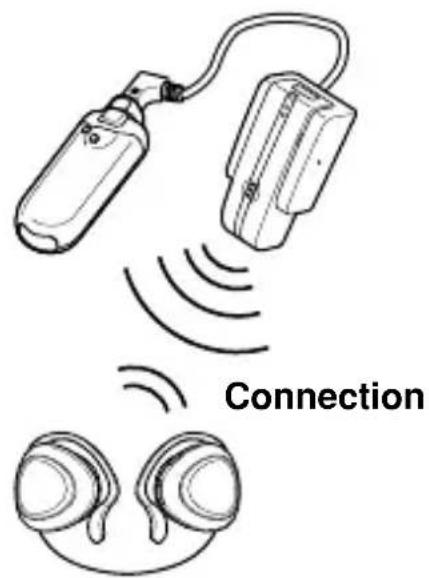
Bluetooth connection
Turning on this unit automatically makes the Bluetooth connection between this unit and the Bluetooth stereo audio receiving device.
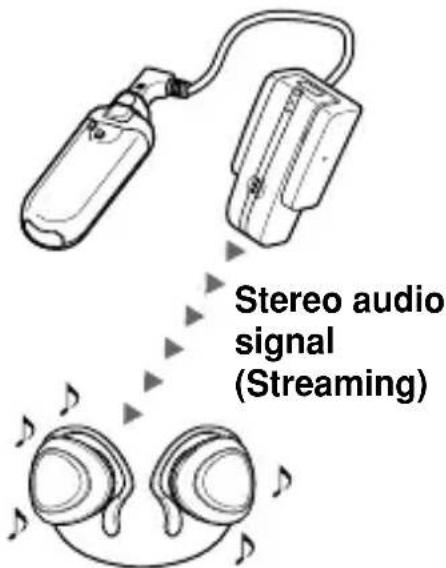
Transmitting music
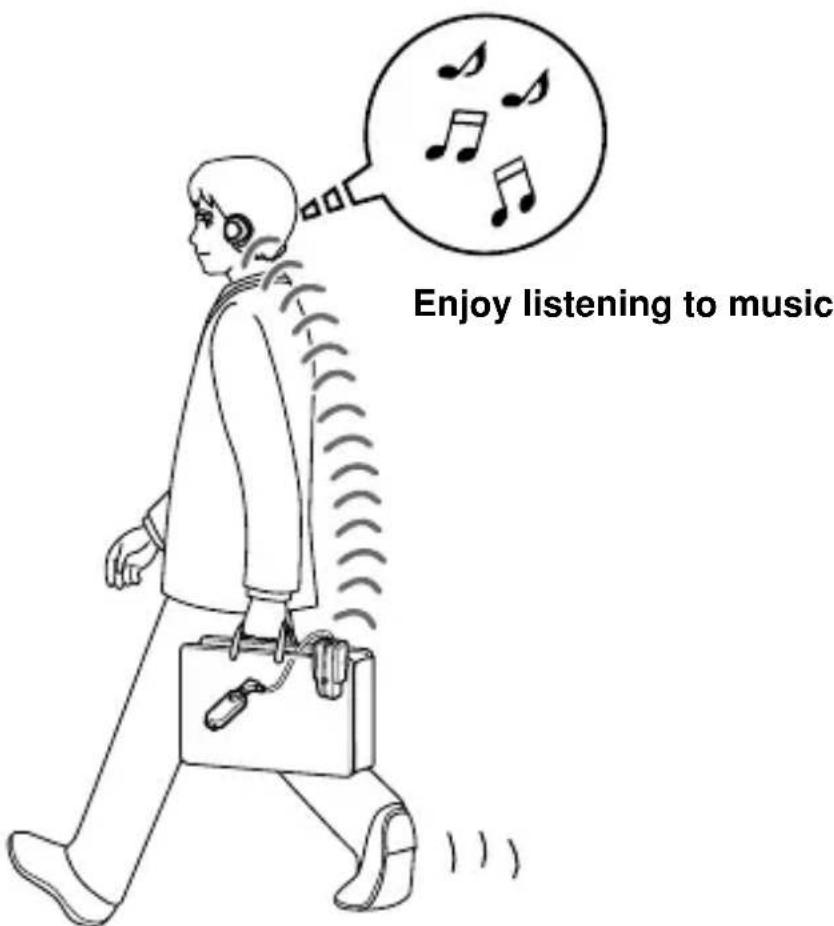
You can enjoy listening to music played on the portable audio player, etc., connected to this unit through the Bluetooth audio receiving system.

For more details, see page 13 - 14.
Location and Function of Parts
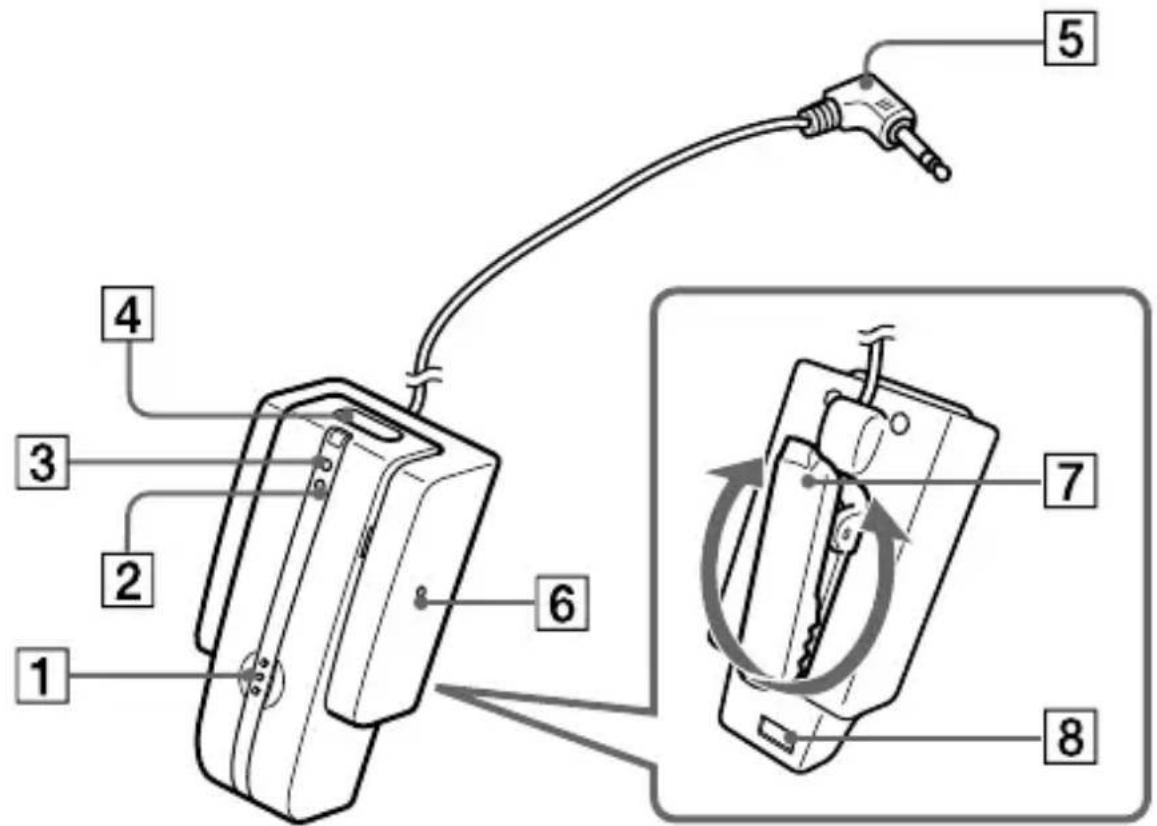
1 Initialize button 2 Indicator (red) Indicates the power status of the unit. 3 Indicator (blue) Indicates the communication status of the unit. 4 POWER button 5 Audio in plug (Gold-plated L-shaped stereo mini plug) Connects to the headphone jack of a portable audio player, etc.
6 RESET button Press when the unit becomes inoperative. Pairing information is not deleted by this operation.
7 Holding clip
Adjust the holding clip to the desired angle and clip to your bag.
8 Terminal for the battery charging stand
Charging the unit
The unit contains a rechargeable Lithium-Ion battery, which should be charged before using for the first time.
1 Connect the supplied AC power adaptor with the battery charging stand.
Battery charging stand (supplied)
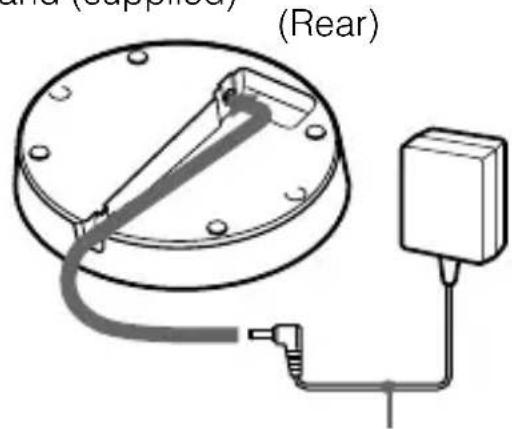
AC power adaptor (supplied)
2 Connect the supplied AC power adaptor to an AC outlet.
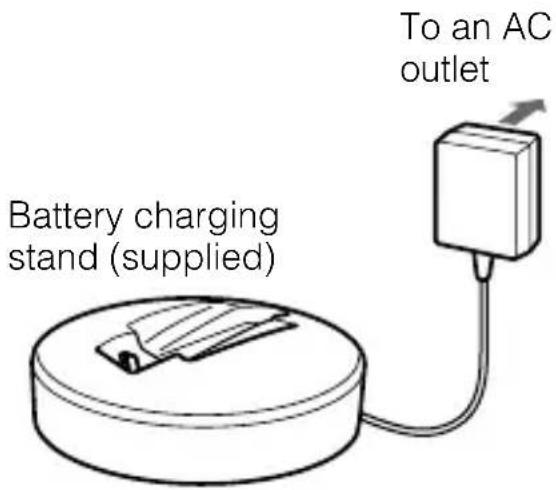
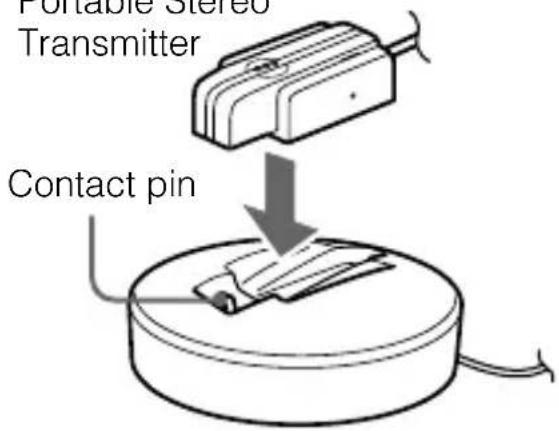
3 Put the unit on the battery charging stand.
Portable Stereo Transmitter
Note
If the holding clip is turned, the unit cannot be set on the battery charging stand and charging does not start. Turn the holding clip back to the original position before charging.
Rest the unit on the battery charging stand so that the unit's terminal for the battery charging stand meets the contact pin on the battery charging stand, and make sure that the indicator (red) lights up.
Charging is completed in about 3 hours* and the indicator (red) goes off automatically.
* Time required for empty battery to recharge.
Tip
When charging the battery, the unit is turned off automatically.
Caution
If this unit detects a problem while charging, the indicator (red) may turn off, although charging is not complete.
Check for the following causes:
- Ambient temperature exceeds the range of 0°C - 40°C (32 °F - 104 °F).
- There is a problem with the battery.
In this case, charge again within the above-mentioned temperature range. If the problem persists, consult your nearest Sony dealer.
Notes
- If the battery is not used for a long time, battery may be quickly depleted, however, after a few recharges, battery life will improve.
- If the life of the built-in rechargeable battery drops to half the normal length, the battery should be replaced. Consult your nearest Sony dealer for replacement of the rechargeable battery.
- Avoid exposure to temperature extremes, direct sunlight, moisture, sand, dust or mechanical shock. Never leave in a car parked in the sun.
- Use only the supplied AC power adaptor. Do not use any other AC power adaptor.
Usage hours*
| Status | Approx. usage hours |
| Music playback time (up to) | 11 hours |
* Time stated above may vary, depending on ambient temperature or conditions of use.
Checking the remaining battery
When pressing the POWER button while the unit is turned on, the indicator (red) flashes. You can check the remaining battery by the number of times the indicator (red) flashes.
| Indicator (red) | Status |
| 3 times | Full |
| 2 times | Mid |
| 1 time | Low (needs to charge) |
Note
You cannot check the remaining battery immediately after the unit is turned on, or during the procedure for pairing.
When the battery is almost empty
The indicator (red) flashes slowly automatically.
When the battery becomes empty, the unit will turn off automatically.
Pairing
What is pairing?
Bluetooth devices need to be “paired” with each other beforehand. Once Bluetooth devices are paired, there is no need for pairing again, except in the following cases:
- When pairing information is deleted after repair, etc.
- When this unit is paired with 9 or more devices. This unit can be paired with 8 Bluetooth devices; if a new device is paired after 8 devices have been paired, the device whose latest connection time is the oldest among the 8 paired devices is replaced by the new one.
- When recognition of the unit by the device to be connected is deleted.
- When this unit is initialized (page 20). All pairing information is deleted.
Note
Passcode* of this unit is fixed at "0000." This unit cannot be paired with a Bluetooth receiving device whose Passcode is not "0000."
* Passcode may be called “Passkey,” “PIN code,” “PIN number,” or “Password.”
Procedures of pairing
1 Place a Bluetooth receiving device within 1 m (3 ft) of this unit.
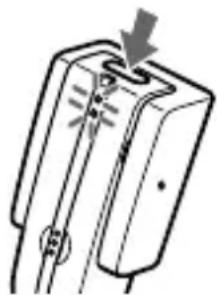
2 Press and hold the POWER button for 7 seconds or more to standby for pairing while the unit is turned off.
The indicator (blue) and the indicator (red) start flashing together and this unit starts searching the Bluetooth receiving device.
Notes
• After about 3 seconds, power is turned on and the indicator (blue) and indicator (red) flash together twice. Keep the button pressed without releasing until both indicators start flashing together, then release the button. This unit enters into pairing mode. - If pairing is not established within about 5 minutes, pairing mode will be canceled and this unit will turn off. In this case, start over from step 1.
3 Set the Bluetooth receiving device to pairing mode.
This unit searches the Bluetooth receiving device automatically, and pairs the device.
The unit tries to connect the Bluetooth receiving device soon after detecting it. When the Bluetooth connection is made properly, the indicator (red) goes off and the indicator (blue) starts flashing more slowly, indicating pairing is complete and pairing information is memorized on this unit.
Notes
- If Passcode input is required on the Bluetooth receiving device, input “0000.”
- The message standing for “Pairing complete” appears on the display of some Bluetooth receiving devices.
- When pairing is complete, some Bluetooth devices may connect with the unit automatically.
Tips
• To pair with other Bluetooth devices, repeat steps 1 to 3 for each device. - To delete all pairing information, see “Initializing the unit” (page 20).
Indications of Bluetooth function
B: Indicator (blue)
R: Indicator (red)
| Status Flashing patterns | ||
| Pairing | B | ● - ● - ● - ● - ● - ● ● ... |
| R | ● - ● - ● - ● - ● - ● ● ... | |
| Connecting | B | ● - ● - ● - ● - ● - ● ● ... |
| R | - | |
| Connected | Listening | B ● ● - - - - ● ● - - ... |
| R - | ||
| With no music | B ● - - - - - ● - - - ... | |
| R - | ||
Listening to music
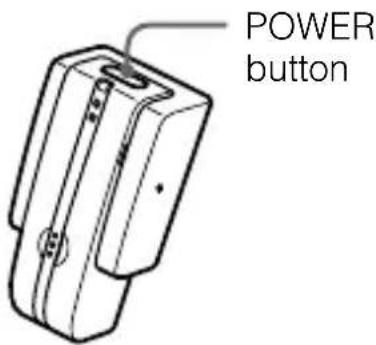
Check the following before operating the unit.
- Pairing of this unit and the Bluetooth receiving device is complete. – The Bluetooth receiving device is on standby for connection.
- The Bluetooth receiving device supports the receiving music function (profile: A2DP*).
1 Connect the stereo mini plug of this unit to the headphone jack of a stereo audio source device.

Note
When connecting to a stereo audio source device, be sure to connect this unit to the headphone jack, not to the LINE OUT jack.
2 Turn on the stereo audio source device.
3 Press and hold the POWER button for about 3 seconds while the unit is turned off.
The indicator (blue) and indicator (red) flash together twice, then the unit is turned on. After the unit is turned on, it connects to the Bluetooth receiving device automatically.
Notes
- Do not press and hold the POWER button for more than 7 seconds, otherwise pairing mode is entered. • Make sure to turn on only the Bluetooth receiving device you want to connect with this unit. If many Bluetooth receiving devices are turned on, the connection may not be done as you desire.
- If this unit cannot make the Bluetooth connection with a paired device, pair the device again, or try making the Bluetooth connection from the Bluetooth receiving device if possible.
Tips
- While searching for a Bluetooth receiving device, the indicator (blue) keeps flashing.
- If two or more devices are paired with this unit, this unit tries to connect with either of the last two devices recognized before.
- Bluetooth connection of this unit is established with A2DP (Advanced Audio Distribution Profile)*.
- For details on how to operate the Bluetooth receiving device, refer to the operating instructions supplied with the device. * For details on profiles, see page 4.
4 Start playing on the stereo audio source device connected to this unit.
Notes
- If sound is distorted, turn down the volume of the connected device.
- If volume is low or noise occurs, turn up the volume of the connected device.
- Turn off the bass boost function or equalizer function. If these functions are on, sound may be distorted.
Tips
- Turn up the volume of the stereo audio source device as high as possible to the extent that sound is not distorted, then adjust the volume on the Bluetooth receiving device to a moderate level.
- If this unit is in your bag, the Bluetooth connection may decline. Clip this unit on the bag.
Notes
- Even if the Bluetooth receiving device supports AVRCP (Audio Video Remote Control Profile), this unit cannot perform playback control functions.
- In the following cases, you need to make the Bluetooth connection again.
- The power of this unit does not turn on.
- The power of the Bluetooth stereo audio receiving device does not turn on, or the Bluetooth function is off.
- The Bluetooth function of this unit or the Bluetooth stereo audio receiving device is in sleep mode. – The Bluetooth connection is not made.
To stop use
1 Turn off the Bluetooth receiving device. 2 Press and hold the POWER button on this unit for about 3 seconds.
The indicator (blue) and indicator (red) light up together, and the unit turns off.
Tip
When you finish playing music, the Bluetooth connection may terminate automatically, depending on the Bluetooth device.
Disposing of the unit
For environmental conservation, be sure to remove the built-in rechargeable battery from the unit before disposing, and dispose of the battery appropriately.
1 Remove 2 screws.
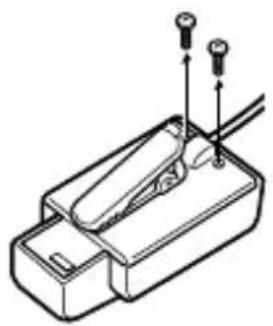
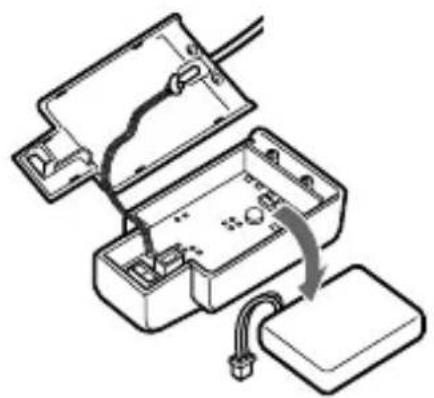
2 Open the case and detach the connector.

Rechargeable battery
3. Remove the rechargeable battery and dispose of it.
Precautions
On Bluetooth communication
- Bluetooth wireless technology operates within a range of about 10 m (about 30 ft). Maximum communication range may vary depending on obstacles (human body, metal, wall, etc.) or electromagnetic environment.
- The aerial is built into the unit as illustrated in the dotted line. The sensitivity of Bluetooth communication will improve by turning the direction of the built-in aerial to the connected Bluetooth device. The communication distance shortens when obstacles are between the aerial of the connected device and this unit.
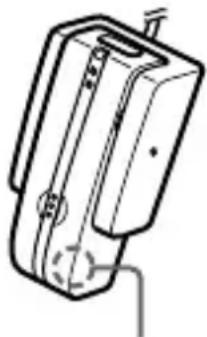
Location of built-in aerial
- The following conditions may affect the sensitivity of Bluetooth communication: – There is an obstacle such as human body, metal, or wall between this unit and the Bluetooth device.
- A device using 2.4 GHz frequency, such as a wireless LAN device, cordless telephone, or microwave oven, is in use near this unit.
- Because Bluetooth devices and wireless LAN (IEEE802.11b/g) use the same frequency, microwave interference may occur and resulting in communication speed deterioration, noise, or invalid connection if this unit is used near a wireless LAN device. In such a case, perform the following.
- Use this unit at least 10 m (about 30 ft) away from the wireless LAN device.
- If this unit is used within 10 m (about 30 ft) of a wireless LAN device, turn off the wireless LAN device.
- Install this unit and Bluetooth device as near to each other as possible.
- Microwaves emitting from a Bluetooth device may affect the operation of electronic medical devices. Turn off this unit and other Bluetooth devices in the following locations, as it may cause an accident.
- where inflammable gas is present, in a hospital, train, airplane, or a gas station
- near automatic doors or a fire alarm
- This unit supports security capabilities that comply with the Bluetooth standard to provide a secure connection when the Bluetooth wireless technology is used, but security may not be enough depending on the setting. Be careful when communicating using Bluetooth wireless technology.
- We do not take any responsibility for the leakage of information during Bluetooth communication.
- Connection with all Bluetooth devices cannot be guaranteed.
- A device featuring Bluetooth function is required to conform to the Bluetooth standard specified by Bluetooth SIG, Inc. and be authenticated.
- Even if the connected device conforms to the above mentioned Bluetooth standard, some devices may not be connected or work correctly, depending on the features or specifications of the device.
- Depending on the device to be connected, it may require some time to start communication.
Notes on using in a car
- Do not attempt to connect this unit, or to operate this unit, an audio output device or a car radio while driving or waiting at a traffic signal.
- Make sure this unit and the device connected to this unit are fixed firmly before driving to avoid an accident or damage.
- Route all the cable connected to this unit properly so that they will not interfere with your driving or become entangled in parts of the car interior (seat, door, etc.).
On the supplied AC power adaptor
- Use the AC power adaptor supplied with this unit. Do not use any other AC power adaptor since it may cause the unit to malfunction.
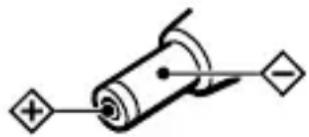
Polarity of the plug
- If you are not going to use this unit for a long time, unplug the AC power adaptor from the AC outlet. To remove the AC power adaptor from the wall outlet, grasp the adaptor plug itself; never pull the cord.
Others
- Do not place the unit in any of the following locations.
– Direct sunlight, near a heater, or other extremely high-temperature location – Dusty location - Location exposed to large amounts of vibration – Bathroom or other high-humidity location – In a car subject to the direct rays of the sun.
- Do not drop, hit, or otherwise expose the unit to strong shock of any kind. This could damage the product.
- If you experience discomfort after using the Bluetooth device, stop using the Bluetooth device immediately. Should any problem persist, consult your nearest Sony dealer.
- Do not allow small children to use this unit.
- If you have any questions or problems concerning this unit that are not covered in this manual, please consult your nearest Sony dealer.
Troubleshooting
If you run into any problems using this unit, use the following checklist and read the product support information on our website. Should any problem persist, consult your nearest Sony dealer.
Common
The unit is not turned on.
→Charge the battery of the unit. →The unit is not turned on while charging. Remove the unit from the battery charging stand and then turn on the unit.
Sound skips or the correspondence distance is short.
If a device that generates electromagnetic radiation, such as a wireless LAN, other Bluetooth device(s), or a microwave oven is nearby, move away from such sources. Remove any obstacle between this unit and other Bluetooth device or move away from the obstacle. Locate this unit and other Bluetooth device(s) as near as possible. Re-position this unit.
Pairing cannot be done.
Bring this unit and the Bluetooth device closer together.
Cannot make the Bluetooth connection.
Check that this unit is turned on. Check that the Bluetooth connecting device is turned on and the Bluetooth function is on. Connection with the Bluetooth device may not be memorized on this unit. Make the Bluetooth connection from the Bluetooth device to this unit soon after pairing is complete. This unit or Bluetooth connecting device is in sleep mode. The Bluetooth connection is terminated. Make the Bluetooth connection again.
Cannot operate the unit. (Connection has hung up.)
Press the RESET button. Pairing information is not deleted by this operation.
When listening to music
No sound
Check the connection between this unit and the stereo audio source device connected to this unit. Check that both this unit and the Bluetooth stereo audio receiving device are turned on. Ensure that this unit is not too far from the Bluetooth stereo audio receiving device, or this unit is not receiving interference from a wireless LAN, other 2.4 GHz wireless device, or microwave oven. Check that Bluetooth connection is made properly between this unit and the Bluetooth stereo audio receiving device. Turn up the volume of the Bluetooth stereo audio receiving device. For details on volume adjustment, refer to the operating instructions supplied with the Bluetooth stereo audio receiving device. Turn up the volume of the stereo audio source device as high as possible to the extent that sound is not distorted. Pair this unit and the Bluetooth stereo audio receiving device again (page 10).
Low sound level
Turn up the volume of the stereo audio source device as high as possible to the extent that sound is not distorted. Turn up the volume of the Bluetooth stereo audio receiving device. For details on volume adjustment, refer to the operating instructions supplied with the Bluetooth stereo audio receiving device.
Connect the audio in plug to the headphone jack instead of the LINE OUT jack.
Distorted sound
Turn down the volume of the stereo audio source device to the point where the sound is no longer distorted. For details on volume adjustment, refer to the operating instructions supplied with the stereo audio source device. Connect the audio in plug to the headphone jack instead of the LINE OUT jack.
Cannot be connected to a device that has been paired and connected before.
This unit tries to connect with either of the last two devices recognized before. If this unit cannot make the Bluetooth connection with a paired device, pair the device again, or try making the Bluetooth connection from the Bluetooth stereo audio receiving device if possible. Pairing information may be deleted. Pair the device again (page 10).
Initializing the unit
You can reset this unit to its default (such as volume setting) and delete all pairing information.
1 If this unit is turned on, press and hold the POWER button for about 3 seconds to turn off this unit. 2 Press and hold the POWER button and the initialize button together for about 7 seconds.
The indicator (blue) and indicator (red) flash together four times, and this unit is reset to the default setting. All pairing information is deleted.
Specifications
General
Communication system
Bluetooth Specification version 2.0
Output
Bluetooth Specification Power Class 2
Frequency band
2.4 GHz band (2.4000 GHz - 2.4835 GHz)
Maximum communication range
Line of sight approx. 10 m (30 ft)*
Modulation method
FHSS
Compatible Bluetooth Profile 2
A2DP (Advanced Audio Distribution
Profile)
Supported codec*3
SBC*4
Audio input
Gold-plated L-shaped stereo mini plug × 1
Input impedance
Approx. 32 Ω
Power source
DC 3.7 V: Built-in lithium-ion
rechargeable battery
Dimensions
Approx. 25 × 51 × 29 mm
(1 × 2 × 1 3/16 in) (w/h/d)
Mass
Approx. 21 g (0.7 oz) (including cord)
*1 The actual range will vary depending on factors such as obstacles between devices, magnetic fields around a microwave oven, static electricity, reception sensitivity, antenna's performance, operating system, software application, etc.
*2 Bluetooth standard profiles indicate the purpose of Bluetooth communication between devices.
*3 Codec: Audio signal compression and conversion format
*4 Subband Codec
Supplied accessories
AC power adaptor (1)
Battery charging stand (1)
Operating instructions (this book) (1)
Design and specifications are subject to change without notice.
Notes
POWER button
Note
Rechargeable battery
Precautions
A2DP (Advanced Audio Distribution Profile)
Supported codec*3
SBC *4
Audio input



- PORTABLE STEREO TRANSMITTER
- WARNING
- FOR THE CUSTOMERS IN THE USA OWNER'S RECORD
- INFORMATION
- RECYCLING LITHIUM-ION BATTERIES
- TABLE OF CONTENTS
- WHAT IS BLUETOOTH WIRELESS TECHNOLOGY
- COMMUNICATION SYSTEM AND COMPATIBLE BLUETOOTH PROFILES OF THIS UNIT
- WELCOME
- 3 STEPS TO BLUETOOTH FUNCTION
- PAIRING
- BLUETOOTH CONNECTION
- TRANSMITTING MUSIC
- LOCATION AND FUNCTION OF PARTS
- CHARGING THE UNIT
- 1 CONNECT THE SUPPLIED AC POWER ADAPTOR WITH THE BATTERY CHARGING STAND
- 2 CONNECT THE SUPPLIED AC POWER ADAPTOR TO AN AC OUTLET
- 3 PUT THE UNIT ON THE BATTERY CHARGING STAND
- NOTE
- TIP
- CAUTION
- NOTES
- CHECKING THE REMAINING BATTERY
- WHEN THE BATTERY IS ALMOST EMPTY
- WHAT IS PAIRING
- PROCEDURES OF PAIRING
- 3 SET THE BLUETOOTH RECEIVING DEVICE TO PAIRING MODE
- TIPS
- INDICATIONS OF BLUETOOTH FUNCTION
- LISTENING TO MUSIC
- 1 CONNECT THE STEREO MINI PLUG OF THIS UNIT TO THE HEADPHONE JACK OF A STEREO AUDIO SOURCE DEVICE
- 4 START PLAYING ON THE STEREO AUDIO SOURCE DEVICE CONNECTED TO THIS UNIT
- TO STOP USE
- DISPOSING OF THE UNIT
- 1 REMOVE 2 SCREWS
- 2 OPEN THE CASE AND DETACH THE CONNECTOR
- REMOVE THE RECHARGEABLE BATTERY AND DISPOSE OF IT
- PRECAUTIONS
- ON BLUETOOTH COMMUNICATION
- NOTES ON USING IN A CAR
- ON THE SUPPLIED AC POWER ADAPTOR
- OTHERS
- TROUBLESHOOTING
- COMMON
- THE UNIT IS NOT TURNED ON
- SOUND SKIPS OR THE CORRESPONDENCE DISTANCE IS SHORT
- PAIRING CANNOT BE DONE
- CANNOT MAKE THE BLUETOOTH CONNECTION
- CANNOT OPERATE THE UNIT. (CONNECTION HAS HUNG UP.)
- WHEN LISTENING TO MUSIC
- NO SOUND
- LOW SOUND LEVEL
- DISTORTED SOUND
- CANNOT BE CONNECTED TO A DEVICE THAT HAS BEEN PAIRED AND CONNECTED BEFORE
- INITIALIZING THE UNIT
- SPECIFICATIONS
- GENERAL
- COMMUNICATION SYSTEM
- OUTPUT
- FREQUENCY BAND
- MAXIMUM COMMUNICATION RANGE
- MODULATION METHOD
- COMPATIBLE BLUETOOTH PROFILE 2
- SUPPORTED CODEC*3
- AUDIO INPUT
- INPUT IMPEDANCE
- POWER SOURCE
- DIMENSIONS
- MASS
- SUPPLIED ACCESSORIES
Brand : SONY
Model : TMR-BT10A
Category : Headphones