
RX-333 - Computer Mouse Sven - Free user manual and instructions
Find the device manual for free RX-333 Sven in PDF.


| Product Type | Computer Mouse |
| Model | RX-333 |
| Brand | Sven |
| Connection Type | Wired (USB) or Wireless (2.4 GHz) |
| Wireless Range | Up to 10 meters (if wireless) |
| Number of Buttons | 6 (including scroll wheel button) |
| Scroll Wheel | Yes, with click function |
| DPI Resolution | Adjustable up to 2400 DPI |
| Sensor Type | Optical |
| Ergonomic Design | Right-handed, contoured grip |
| Cable Length | 1.5 meters (if wired) |
| Power Source | USB bus power (wired) or 1x AA battery (wireless) |
| Battery Life | Approximately 12 months (wireless, typical usage) |
| Compatible Operating Systems | Windows, macOS, Linux |
| Dimensions (L x W x H) | 125 x 70 x 40 mm |
| Weight | 100 g (without battery, if wireless) |
| Surface Compatibility | Most surfaces (except glass or mirror) |
| Maintenance | Clean with soft dry cloth; avoid liquids |
| Safety Precautions | Do not disassemble; keep away from water and heat |
| Included Accessories | Mouse, USB receiver (if wireless), user manual |
Frequently Asked Questions - RX-333 Sven
User questions about RX-333 Sven
0 question about this device. Answer the ones you know or ask your own.
Ask a new question about this device
Download the instructions for your Computer Mouse in PDF format for free! Find your manual RX-333 - Sven and take your electronic device back in hand. On this page are published all the documents necessary for the use of your device. RX-333 by Sven.
USER MANUAL RX-333 Sven
natural_image
Black electronic mouse with 'SVEN' branding and a small USB drive icon beside it (no text or symbols on the device itself)Рис. 2. Вид снизу
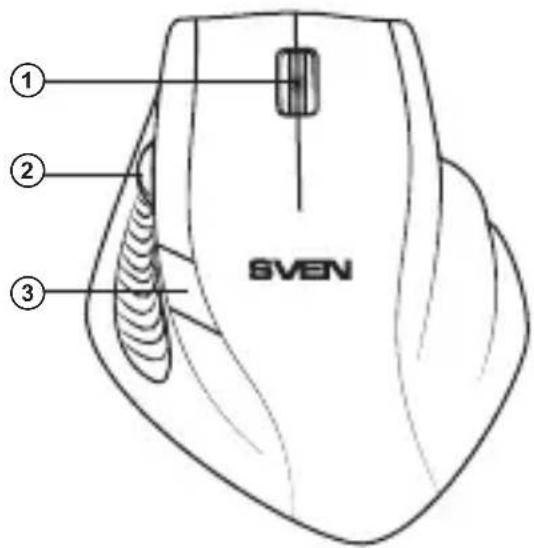
Рис. 1. Вид сверху
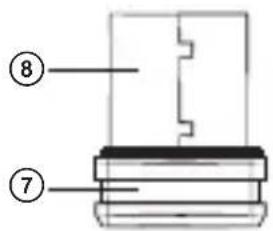
Рис. 3. Ресивер
natural_image
Line drawing of a device casing with buttons and a central display (no text or symbols)natural_image
Line drawing of a computer keyboard with an arrow pointing to the right side (no text or symbols present)natural_image
Line drawing of a device rear panel with a USB drive and a logo on the front panel (no text or symbols)natural_image
Black Siemens 3.0 computer mouse with visible scroll wheel and brand logo (no text or symbols on the mouse itself)natural_image
Line drawing of a device casing with internal components and a control panel (no text or symbols)natural_image
Line drawing of a computer keyboard with an arrow pointing to the right side (no text or symbols present)natural_image
Line drawing of a device casing with internal components and a USB drive (no text or symbols)natural_image
Black Siemens 3.0 computer mouse with visible scroll wheel and brand logo (no text or symbols on the mouse itself)Congratulations on purchasing the SVEN PC mouse!
Please read the following User's Manual carefully before connecting, operating or adjusting this product. Besides, please keep this Manual in a safe place for future reference.
COPYRIGHT
© 2014. SVEN Company Ltd. Version 1.0 (V 1.0). This Manual and information contained in it are copyrighted. All rights reserved.
TRADEMARKS
All trademarks are the property of their legal holders.
NOTICE OF RESPONSIBILITY RESTRICTION
Despite the exerted efforts to make this Manual more exact, some discrepancies may occur. The information of this Manual is given on “as is” terms. The author and the publisher do not bear any liability to a person or an organization for loss or damages which have arisen from the information contained in the given Manual.
СОДЕРЖАНИЕ
RUS 1
UKR 7
ENG 14
- SPECIAL FEATURES ...... 15
- PACKAGE CONTENTS 15
- SYSTEM REQUIREMENTS ...... 15
- DESCRIPTION 16
- INSTALLATION ...... 16
- TROUBLESHOOTING .... 19
- TECHNICAL SPECIFICATIONS ...... 19
Technical support: www.sven.fi
1. SPECIAL FEATURES
• Full-sized mouse
• BlueLED advanced optical technology
• Power saving wireless technology
- Ergonomic mouse shape
- 2.4GHz USB nano receiver included (range – up to 10 m)
• High-precision optical sensor
• Effective on most surfaces
• Additional navigation scroll wheel
• 800/1200/1600 dpi resolution switch
• Power on/off switch
- USB interface
• 2 AA type batteries*
- Soft Touch coating
- No drivers required for Windows XP/Vista/7/8
2. PACKAGE CONTENTS
• Optical mouse — 1 pc
• 2.4 GHz USB nano receiver — 1 pc
• AA type batteries — 2 pcs
- User's Manual — 1 pc
- Warranty card — 1 pc
3. SYSTEM REQUIREMENTS
- Windows XP/Vista/7/8.
- Free USB port.
User's Manual
RX-333W
4. DESCRIPTION
① Scroll wheel
② Additional scroll wheel for navigation
③ Resolution switch
④ on/off: Power on/off switch
⑤ Optical sensor
⑥ Battery compartment
⑦ Nano receiver
⑧ USB connector
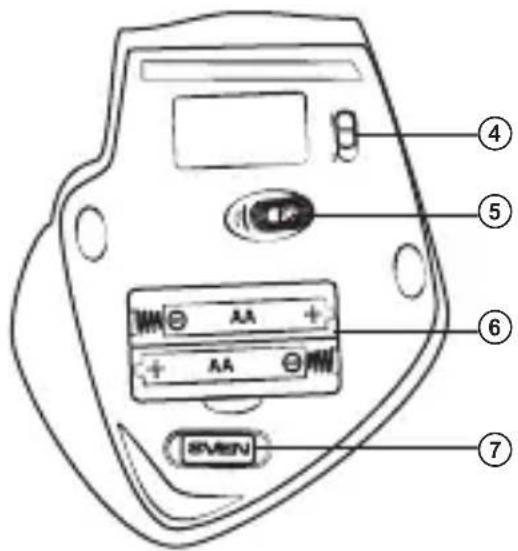
Fig. 2. Bottom view
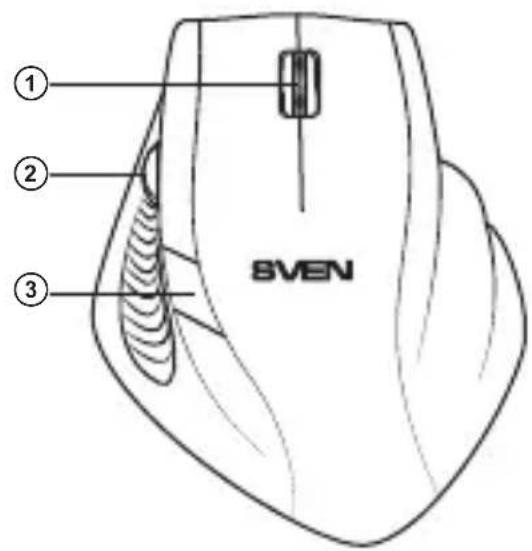
Fig. 1. Top view
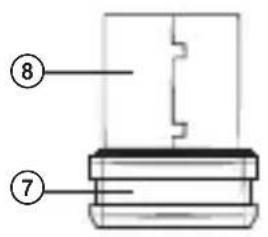
Fig. 3. Nano receiver
5. INSTALLATION
- Open the cover of the mouse battery compartment ⑥, insert two AA type batteries into the battery compartment, matching the polarity, and close the cover of the battery compartment (see Fig. 4).
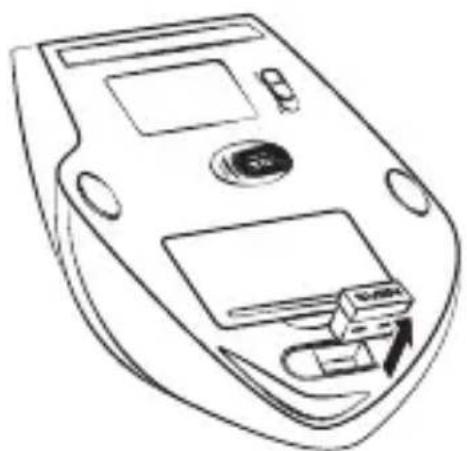
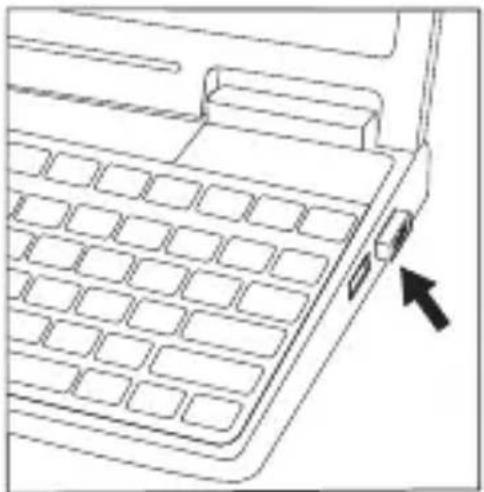
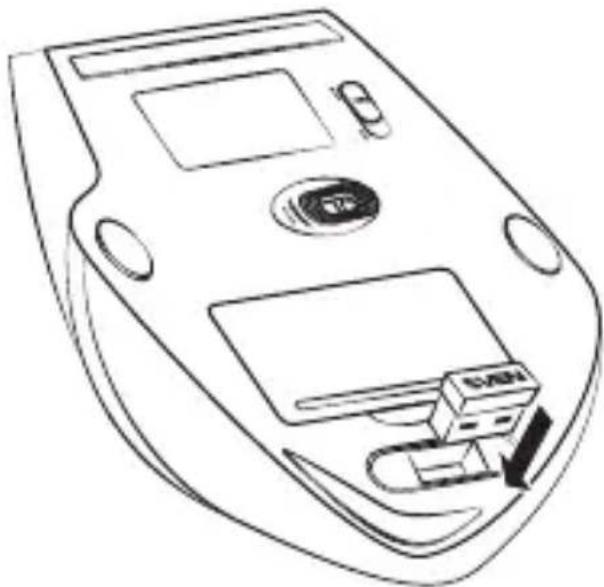
- Pull out the nano receiver ⑦ from the mouse (Fig. 5) and connect it to an available PC USB port without switching off the PC (Fig. 6).
- Turn on the mouse with the on/off switch ④ (the On position). To activate the mouse, press any button of the mouse or turn the scroll wheel. If the mouse is connected correctly, it will turn on automatically.
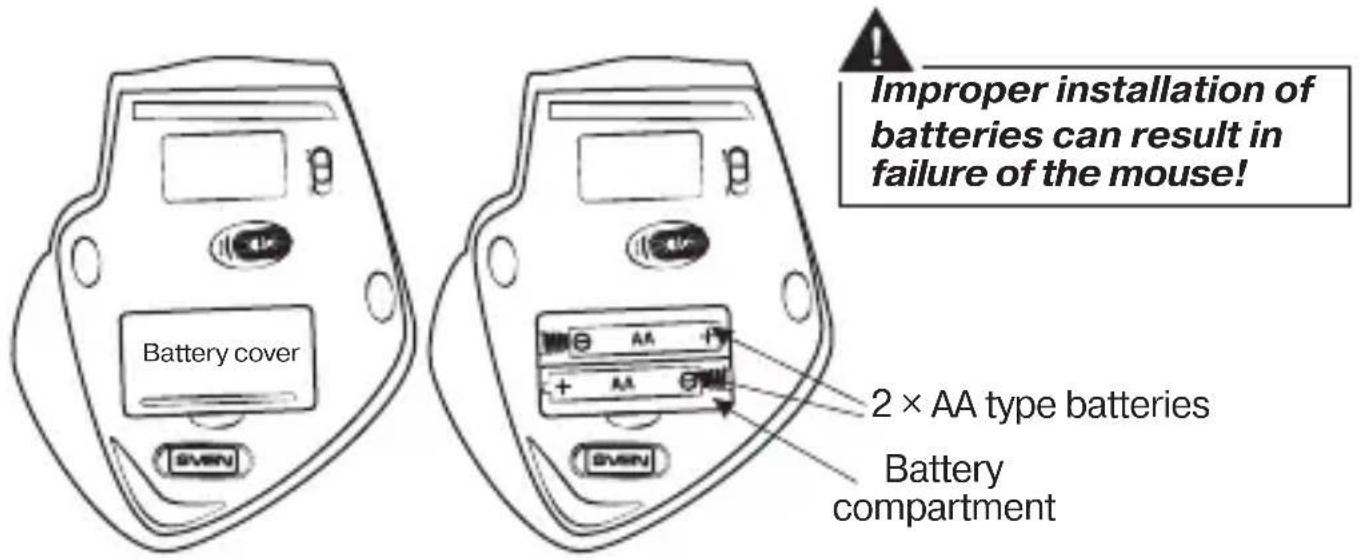
Fig. 4. Batteries installation
natural_image
Line drawing of a device casing with buttons and a central display (no text or symbols)Fig. 5. Extraction of the receiver from the mouse case
natural_image
Line drawing of a keyboard layout with no text or symbolsFig. 6. Receiver connection
User's Manual
RX-333W
- After finishing your work, turn off the mouse with the on/off switch ④ (the Off position). Then take the nano receiver out of the USB port and insert it back into the mouse. (Fig. 7).
- Do not place the receiver in a metal confined space (table drawer, box, safe), as a metal screen does not transmit radio signals.
- If the batteries run down, the mouse works in jerks. It means that the batteries should be replaced with new ones, as it is shown in Fig. 4. Always install only identical new batteries.
natural_image
Line drawing of a CD or DVD drive with an attached USB flash drive (no text or symbols)Fig. 7. Fitting the receiver into the mouse case

Important
This device meets the highest standards of energy conservation. Use the switch ④ on the bottom of the mouse to switch it on/off – it will help you extend the mouse battery life.
- TROUBLESHOOTING
| Problem | Solution |
| The mouse doesn’t work. | 1. Make sure that the nano receiver has been inserted into the USB port and its distance to the mouse is less than 10 m.2. Check if the batteries have been installed correctly.3. Replace the discharged batteries with new ones.4. Check the position of the switch. Shift it to the necessary position if needed. |
| Batteries are in good order, but the mouse still does not work. | Install the software to coordinate the mouse and the receiver. Software can be downloaded from Support on www.sven.fi |
- TECHNICAL SPECIFICATIONS
| Parameter, measurement unit | Value |
| OS compatibility | Windows XP/Vista/7/8 |
| Type of mouse | Wireless 2.4 GHz |
| Resolution, dpi | 800/1200/1600 |
| Q-ty of buttons | 3 + 1 (scroll wheel) |
| Interface | USB |
| Operating range, m | 10 |
| Additional scroll wheel for navigation | yes |
| Dimensions, mm | 95 × 40 × 110 |
| Weight, g | 79 |
Notes:
- Technical specifications given in this table are supplemental information and cannot give occasion to claims.
- Technical specifications are subject to change without notice due to improvement of SVEN production.
Manufacturer: SVEN PTE. LTD, 176 Joo Chiat Road,
Nº 02-02, Singapore, 427447. Produced under the
control of Oy Sven Scandinavia Ltd. 15, Kotolahdentie,
Kotka, Finland, 48310. Made in China.
® Registered Trademark of Oy SVEN
Scandinavia Ltd. Finland.
RX-333W

Brand : Sven
Model : RX-333
Category : Computer Mouse