
GX-970 Gaming - Computer Mouse Sven - Free user manual and instructions
Find the device manual for free GX-970 Gaming Sven in PDF.


| Product Type | Wired Gaming Mouse |
| Model | Sven GX-970 Gaming |
| Dimensions | 128 x 72 x 42 mm |
| Weight | 105 g |
| Connection Type | USB 2.0 |
| Cable Length | 1.8 m braided cable |
| Sensor Type | Optical |
| DPI Range | 800 – 6400 DPI (adjustable) |
| Number of Buttons | 8 programmable buttons |
| Scroll Wheel | Rubber-coated, clickable |
| Lighting | RGB backlight with multiple modes |
| Polling Rate | 1000 Hz |
| Compatible Systems | Windows 7/8/10/11, macOS, Linux |
| Warranty | 2 years |
| Package Contents | Mouse, user manual |
| Maintenance | Clean with dry cloth; avoid liquids |
| Safety | CE, RoHS compliant |
| Repairability | Not user-serviceable; contact support |
Frequently Asked Questions - GX-970 Gaming Sven
User questions about GX-970 Gaming Sven
0 question about this device. Answer the ones you know or ask your own.
Ask a new question about this device
Download the instructions for your Computer Mouse in PDF format for free! Find your manual GX-970 Gaming - Sven and take your electronic device back in hand. On this page are published all the documents necessary for the use of your device. GX-970 Gaming by Sven.
USER MANUAL GX-970 Gaming Sven
natural_image
Black SVEN computer mouse with visible scroll wheel and control buttons (no text or symbols on the device itself)natural_image
Black SVEN computer mouse with visible scroll wheel and control buttons (no text or symbols on the device itself)natural_image
Black SVEN computer mouse with visible scroll wheel and control buttons (no text or symbols on the device itself)Congratulations on your purchase of the Sven mouse!
Please read this Operation Manual before using the unit and retain this Operation Manual in a safe place for future reference.
COPYRIGHT
© 2014. SVEN PTE. LTD. Version 1.0 (V 1.0).
This Manual and information contained in it are copyrighted. All rights reserved.
TRADEMARKS
All trademarks are the property of their legal holders.
NOTICE OF RESPONSIBILITY RESTRICTION
Despite the exerted efforts to make this Manual more exact, some discrepancies may occur. The information of this Manual is given on “as is” terms. The author and the publisher do not bear any liability to a person or an organization for loss or damages which have arisen from the information contained in the given Manual.
SPECIAL FEATURES
• High-precision optical technology
• Effective on most surfaces
- Stylish ergonomic design
- Two modes — gaming and multimedia
- Double click button
- 6 + 1 buttons (scroll wheel)
• 800/1200/1600/2000 dpi switchable
• Gold-plated USB connector
- Soft-touch case
- Weighted construction
- Blue scroll wheel backlight in multimedia mode
- Drivers installation not required for Windows XP/Vista/7/8
SYSTEM REQUIREMENTS
- Windows XP/Vista/7/8 or higher, Mac OS 10.4 or higher, Linux
- Free USB port
DESCRIPTION
Attention! Functions of additional buttons ④ and ⑤ change according to the active mode (gaming or multimedia).
Gaming mode:
① Scroll wheel
② Double click button
③ Dpi switch
④ Move forward
⑤ Move backward
Multimedia mode:
① Scroll wheel
② Double click button
③ Dpi switch
④ Next track
⑤ Previous track
Notes:
- To change resolution, press button ③ and hold it down for less than 5 seconds; to change the mode, hold it down more than 5 seconds.
- In multimedia mode, the scroll wheel adjusts volume level.
• To pause the playing track, just press the scroll wheel.
INSTALLATION
- Connect the mouse to an available USB port of your PC.
- Installation of the mouse is automatic after its connection to a PC USB port.
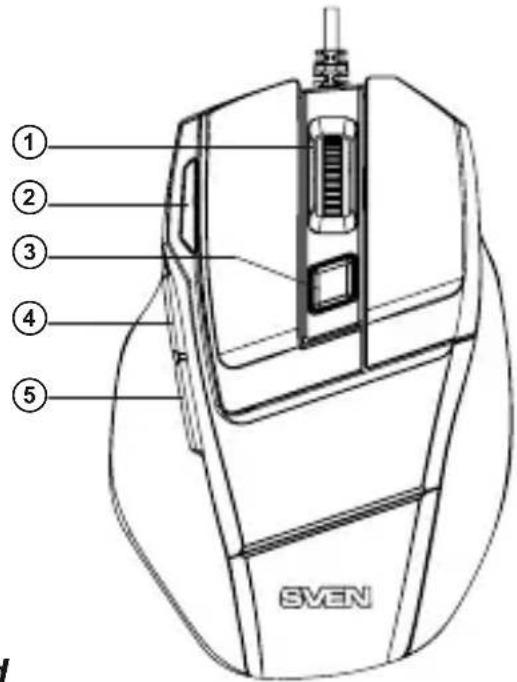
Fig. 1. Top view
TROUBLESHOOTING
| Problem | Solution |
| The mouse is not working. | 1. Disconnect the mouse from the PC and check connector pins for possible damage. If there is no external damage found and connector pins are OK, connect the mouse to the PC.2. Address your nearest authorized service center. |
TECHNICAL SPECIFICATIONS
| Parameter, measurement unit | Value |
| OS required | Windows XP/Vista/7/8 |
| Type of mouse | optical |
| Resolution, dpi | 800/1200/1600/2000 |
| Q-ty of buttons | 6 + 1 (scroll wheel) |
| Interface | USB |
| Conformity with | FCC, CE |
| Cable length, m | 2 |
| Dimensions, mm | 115 × 77 × 39 |
| Weight, g | 140 |
Notes:
- Technical specifications given in this table are supplemental information and cannot give occasion to claims.
- Technical specifications are subject to change without notice due to the improvement of SVEN production.
Manufacturer: SVEN PTE. LTD, 176 Joo Chiat Road, N° 02-02, Singapore, 427447. Produced under the control of Oy Sven Scandinavia Ltd. 15, Kotolahdentie, Kotka, Finland, 48310. Made in China.
® Registered Trademark of Oy SVEN Scandinavia Ltd. Finland.
GX-970
GAMING

Brand : Sven
Model : GX-970 Gaming
Category : Computer Mouse