
ES6850 - Beard trimmer PANASONIC - Free user manual and instructions
Find the device manual for free ES6850 PANASONIC in PDF.


| Brand | Panasonic |
| Model | ES6850 |
| Product Type | Beard Trimmer |
| Power Source | AC Rechargeable Battery |
| Battery Type | Ni-MH |
| Charging Time | 8 hours |
| Operating Time | Approx. 30 minutes |
| Motor Type | Linear Motor |
| Blade Material | Stainless Steel |
| Cutting Length Settings | 0.5 mm - 10 mm, adjustable via dial |
| Number of Length Settings | 9 |
| Waterproof | Yes, washable |
| Wet/Dry Use | Yes |
| Dimensions (approx.) | 4.5 x 1.5 x 1.5 inches |
| Weight (approx.) | 0.5 lbs |
| Accessories Included | Comb attachment, cleaning brush, charging stand |
| Cleaning | Detachable blade for rinsing under water |
| Maintenance | Oil blades periodically |
| Safety Features | Hypoallergenic blades, low noise |
| Repairability | Replaceable blades and battery (service center) |
Frequently Asked Questions - ES6850 PANASONIC
User questions about ES6850 PANASONIC
0 question about this device. Answer the ones you know or ask your own.
Ask a new question about this device
Download the instructions for your Beard trimmer in PDF format for free! Find your manual ES6850 - PANASONIC and take your electronic device back in hand. On this page are published all the documents necessary for the use of your device. ES6850 by PANASONIC.
USER MANUAL ES6850 PANASONIC
Operating Instructions
(Household) Battery Shaver
Model No. ES6850
English 3
Tiếng Việt ....13
natural_image
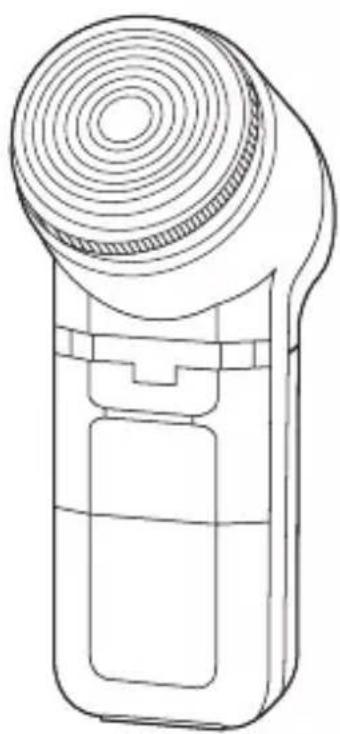
Line drawing of a handheld device with a circular top and rectangular body (no text or symbols)Panasonic
Operating Instructions (Household) Battery Shaver Model No. ES6850
Contents
Safety precautions......4
Notices for use.... 7
Parts identification 8
Replacing batteries 8
Using the shaver.... 9
Cleaning the shaver 10
Specifications 11
Thank you for purchasing this Panasonic product.
Before operating this unit, please read these instructions completely and save them for future use.
Safety precautions
To reduce the risk of injury, loss of life, electric shock, fire, and damage to property, always observe the following safety precautions.
Explanation of symbols
The following symbols are used to classify and describe the level of hazard, injury, and property damage caused when the denotation is disregarded and improper use is performed.

WARNING
Denotes a potential hazard that could result in serious injury or death.

CAUTION
Denotes a hazard that could result in minor injury.
The following symbols are used to classify and describe the type of instructions to be observed.

This symbol is used to alert users to a specific operating procedure that must not be performed.

This symbol is used to alert users to a specific operating procedure that must be followed in order to operate the unit safely.

WARNING

Do not store within the reach of children or infants. Do not let them play with it.
- Doing so may cause an accident or injury.

Immediately stop using the shaver if there is an abnormality or malfunction.
- Using it in such conditions may cause injury or fire.

This appliance is not intended for use by persons (including children) with reduced physical, sensory or mental capabilities, or lack of experience and
knowledge, unless they have been given supervision or instruction concerning use of the appliance by a person responsible for their safety. Children should be supervised to ensure that they do not play with the appliance.
- Failure to do so may cause an accident or injury.

CAUTION

Do not attempt to modify, disassemble or repair the shaver.
- Doing so may cause an accident or injury. Contact an authorized service center for any repair.

Do not use excessive pressure to apply the outer foil to your lip or other parts of your face.
Do not apply the outer foil directly to blemishes or injured skin.
- Doing so may cause injury to the skin.
Do not apply excessive pressure on the outer foil. Also, do not touch the outer foil with fingers or nails when in use.
- Doing so may cause injury to the skin or reduce the life of the outer foil.

Do not touch the blade section (metallic section) of the inner blade.
- Doing so may cause injury.

CAUTION

Do not use this product for hair on head or any other part of the body.
- Doing so may cause injury to the skin or reduce the life of the outer foil.

Do not share your shaver with your family or other people.
- Doing so may result in infection or inflammation.

Do not drop or subject to shock.
- Doing so may cause injury.

Do not throw batteries into a fire, or short-circuit or disassemble it.
- Doing so may cause fire or injury.

Check the outer foil for cracks or deformations before use.
- Cracks or deformations of the outer foil may result in injury to the skin.

Be sure to place the protective cap on the shaver when carrying around or storing.
- Failure to do so may cause deformation of the outer foil, thus resulting in injury to the skin or life reduction of the outer foil.

CAUTION
Be sure to observe the cautions indicated on the battery.
- Do not use rechargeable batteries.
- Do not mix batteries of different models and types or mix new and used batteries.
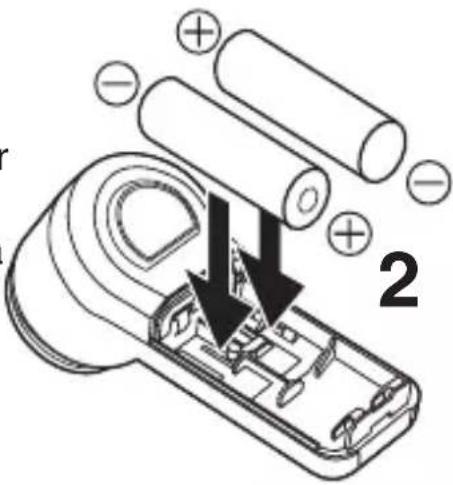
- Check that the positive “+” and negative “-” poles of the battery are correctly positioned.
- When the battery is exhausted, remove it immediately and be sure to dispose of it in accordance with local regulations.
• Power off the shaver before you replace the battery.
- Before replacing the batteries, wipe off water from the shaver to avoid water entering the main body.
- If the shaver is not to be used for a long time, remove the batteries.
• Use dry cell batteries before they expire.
- No short circuit is allowed between the power supply terminals.
- Failure to do so may cause pollution and injury due to battery heat, breakage and leakage.
Notices for use
- Do not immerse appliance in water or wash it with water.
- Clean the housing only with a soft cloth slightly dampened with tap water or soapy tap water. Do not use thinner, benzine, alcohol or other chemicals.
- Do not store the shaver where it will be exposed to direct sunlight or other heat sources.
Parts identification
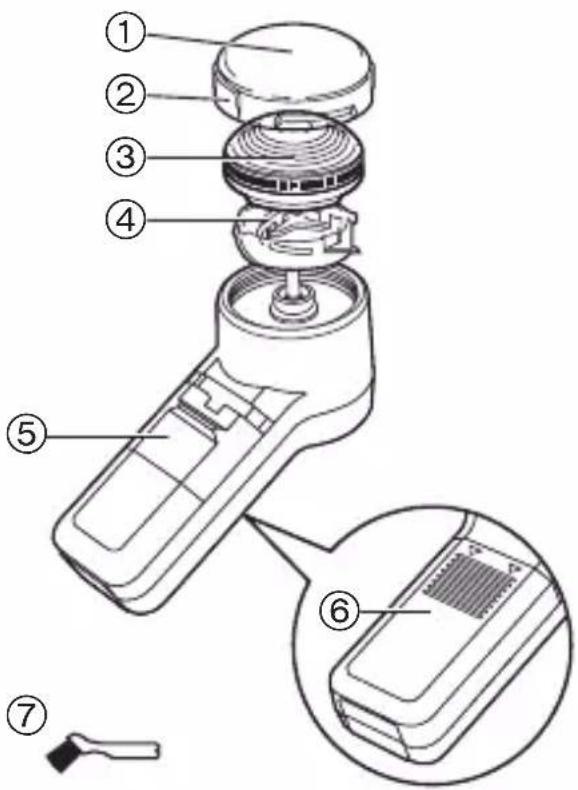
① Protective cap
② Tab
③ Outer foil
④ Inner blade block
⑤ Power switch [0/1]
⑥ Battery cover
Accessories
⑦ Cleaning brush
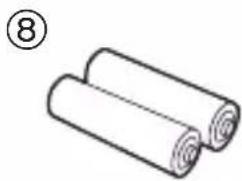
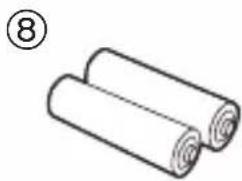
⑧ LR6 (AA alkaline battery) x 2
Although R6P (AA manganese battery) is indicated on the main body, you can use LR6 (AA alkaline battery).
natural_image
Simple line drawing of two rolled-up sheets, no text or symbols presentReplacing batteries
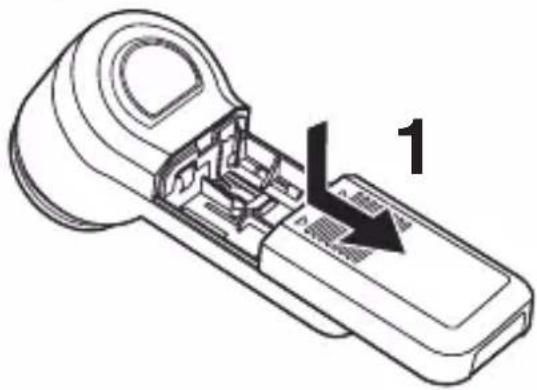
- Make sure the power switch is in the "0" position.
1 Remove the battery cover.
2 Insert two LR6 (AA alkaline batteries).
- Do not use a new battery together with an old one.
• If the shaver will not be used for a long time, please remove the batteries.
• Make sure that the old batteries are disposed of at an officially assigned location.
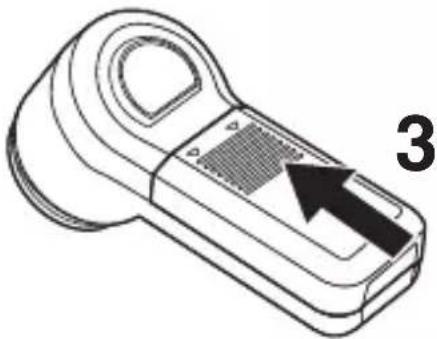
3 Reattach the battery cover.
natural_image
Line drawing of a handheld device with an arrow pointing to a component, labeled '3' (no text or symbols on the device itself)Using the shaver
- Make sure that there is no crack or deformation of the outer foil and that it is securely attached.
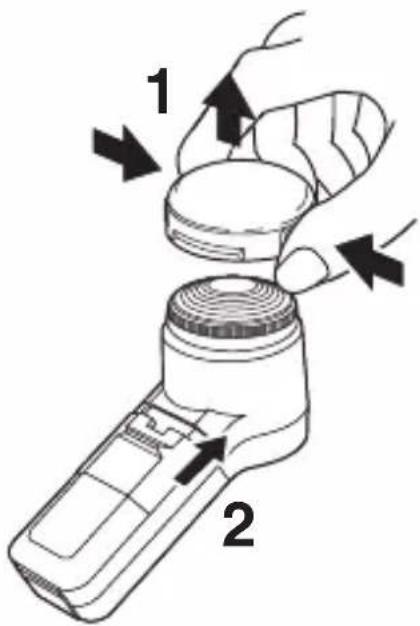
1 Remove the protective cap while pressing the tabs.
2 Slide the power switch to the "1" position.
Stretch your skin with your free hand, apply the blade at a right angle (90°) to your skin gently, and then shave by gliding the shaver slowly in a circular pattern.
Note
Attach the protective cap to prevent the damage of the outer foil after use.
Cleaning the shaver
- Be sure to turn the shaver off before maintenance.
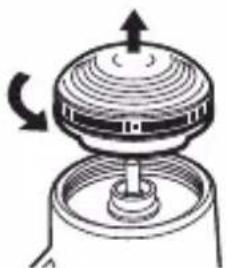
1 Remove the outer foil and the inner blade block from the main body.
- Turn the blade to the left to remove.
2 Remove the inner blade block from the outer foil.
- Grasp the center axis of the inner blade block and pull it straight up.
- Incline the inner blade block to one side when it cannot be removed.
natural_image
Diagram of a mechanical device with rotating top and base, showing internal components (no text or symbols)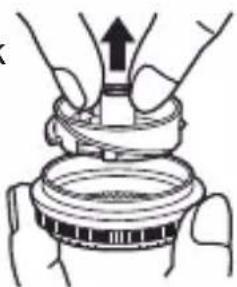
natural_image
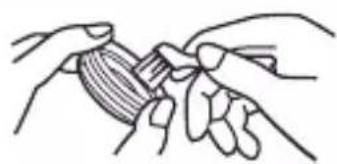
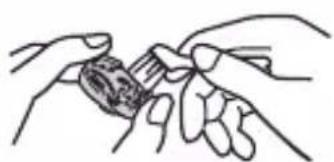
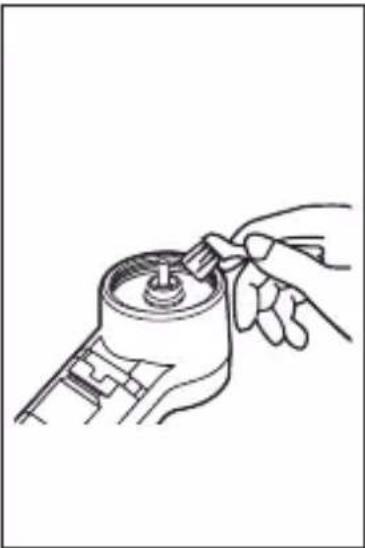
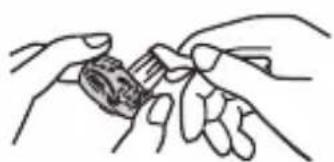
Illustration of hands performing a mechanical assembly with an upward arrow (no text or symbols)3 Clean with the brush as illustrated.
Outer foil Inner
natural_image
Line drawing of two hands holding a small object, possibly a tool or device (no text or symbols present)blade block Main body
natural_image
Line drawing of two hands holding a small object, possibly a tool or device (no text or symbols present)Do not apply excessive pressure when cleaning the inner blade block. The inner blade may be removed from the inner blade block.
natural_image
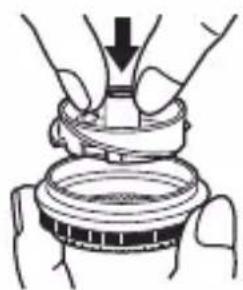
Line drawing of a hand turning a mechanical component into a cylindrical housing (no text or symbols)4 Insert the inner blade block into the outer foil.
natural_image
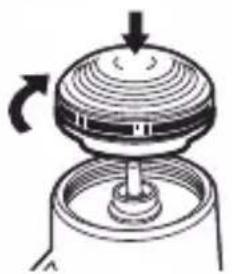
Illustration of hands performing a mechanical assembly or repair operation (no text or symbols visible)5 Attach the blade. Turn the blade to
- Turn the blade to the right until securely attached.
natural_image
Diagram of a mechanical device with rotating components and a central shaft (no text or symbols)Specifications
| Model No. ES6850 |
| Power source LR6 (AA alkaline battery) x 2 |
This product is intended for household use only.
Panasonic
Hướng dẫn sử dụng
natural_image
Two rolled-up paper sheets, one with a number 8 in the top-left corner (no text or symbols on the sheets themselves)Thay pin
natural_image
Line drawing of a handheld device with a black arrow pointing to a textured surface, labeled '3' (no text or symbols on the device itself)Sử dụng máy cạo râu
natural_image
Diagram of a mechanical device with rotating components and a central shaft (no text or symbols)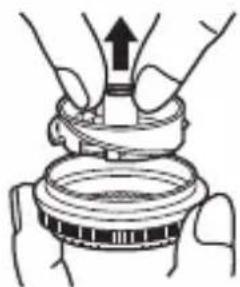
natural_image
Illustration of hands performing a mechanical press or lifting operation on a circular component (no text or symbols visible)natural_image
Line drawing of two hands holding a small object, possibly a tool or device (no text or symbols present)Khóa lưới dao trong
natural_image
Line drawing of two hands holding a small object, possibly a tool or device (no text or symbols present)natural_image
Line drawing of a hand inserting a plug into a cylindrical device (no text or symbols)natural_image
Illustration of hands assembling a mechanical component (no text or symbols visible)5 Gắn lưới dao.
natural_image
Diagram of a mechanical device with rotating components and a central shaft (no text or symbols)© Panasonic Corporation 2014
⑤ EN, VN
Printed in Thailand
0000000000 X0000-0
- Panasonic
- Contents
- Safety precautions......4
- Safety precautions
- Explanation of symbols
- WARNING
- CAUTION
- Notices for use
- Parts identification
- Replacing batteries
- Insert two LR6 (AA alkaline batteries).
- Reattach the battery cover.
- Using the shaver
- Note
- Cleaning the shaver
- Remove the outer foil and the inner blade block from the main body.
- Remove the inner blade block from the outer foil.
- Clean with the brush as illustrated.
- Insert the inner blade block into the outer foil.
- Attach the blade. Turn the blade to
- Specifications
- Thay pin
- Sử dụng máy cạo râu
- Gắn lưới dao.
Brand : PANASONIC
Model : ES6850
Category : Beard trimmer