
SR-TMJ501 - Rice cooker PANASONIC - Free user manual and instructions
Find the device manual for free SR-TMJ501 PANASONIC in PDF.


| Product Type | Rice Cooker |
| Brand | Panasonic |
| Model | SR-TMJ501 |
| Capacity | 1.0 L (approx. 5.5 cups uncooked rice) |
| Power Consumption | 500 W |
| Voltage | 220-240 V, 50/60 Hz |
| Dimensions (W x D x H) | 250 x 300 x 220 mm |
| Weight | 3.0 kg |
| Functions | White Rice, Brown Rice, Porridge, Steam, Keep Warm, Timer |
| Inner Pot Material | Non-stick coated aluminum |
| Accessories Included | Measuring cup, rice paddle, steam basket |
| Keep Warm Time | Up to 12 hours |
| Timer | Up to 24 hours delay start |
| Safety Features | Auto shut-off, overheat protection, lid lock |
| Cleaning | Removable inner lid, washable non-stick pot |
| Repairability | Replaceable inner pot, lid seal, fuse |
| Warranty | 1 year limited |
Frequently Asked Questions - SR-TMJ501 PANASONIC
User questions about SR-TMJ501 PANASONIC
0 question about this device. Answer the ones you know or ask your own.
Ask a new question about this device
Download the instructions for your Rice cooker in PDF format for free! Find your manual SR-TMJ501 - PANASONIC and take your electronic device back in hand. On this page are published all the documents necessary for the use of your device. SR-TMJ501 by PANASONIC.
USER MANUAL SR-TMJ501 PANASONIC
Operating Instructions
Multi Cooker
Household Use
Instrukcje obsługi
Multicooker
Do użytku domowego
natural_image
Line drawing of a rice cooker with control panel and buttons (no text or symbols)EN
PL
LT
LI
EE
HU
CZ
BG
Table of Contents
| Safety Precautions......3~5Parts identification......6• Display......6• Parts Identification......6 | Before use |
| Preparations......7-8Functions......9• / / / ...10• / / / / ...11• / / / / ...12• / / / ...13• / / / ...14Using the Timer......15Cleaning and maintenance......16 | Usage |
| Troubleshooting......17Specifications......18 | In Trouble |
Thank you for purchasing the Panasonic product.
• This product is intended for household use only.
- Please read these instructions carefully and follow safety precautions when using this product.
- Before using this product please give your special attention to “Safety Precautions” (Page 3\~5).
Reserve it for later use
Safety Precautions
Must be followed!
In order to prevent accidents or injuries to the users, other people, and damage to property, please follow the instructions below.
■ The following charts indicate the degree of damage caused by wrong operation.

WARNING:
Indicates serious injury or death.

CAUTION:
Indicates risk of injury or property damage.
■ The symbols are classified and explained as follows.


These symbols indicate prohibition.

This symbol indicates requirement that must be followed.

WARNING
■ Do not use the appliance if the power cord or power plug is damaged or the power plug is loosely connected to the power outlet.

(It may cause an electric shock, short circuit or fire.)
■ Do not insert any objects in the steam cap or gap.

Especially metal objects such as pins or wires. (It may cause an electric shock or malfunction.)
■ Do not damage the power cord or power plug.

Following actions are strictly prohibited.
Modifying, placing near heating elements, bending, twisting, pulling, putting heavy objects on top, and bundling the cord (It may cause an electric shock, short circuit or fire.)
- If the power cord is damaged, it must be replaced by the manufacturer, its service agent or similarly qualified persons in order to avoid a hazard.
■ Do not plug or unplug the power plug with wet hands.

(It may cause an electric shock.)
Do not get your face close to the steam cap or touch it with your hand. Keep the steam cap out of reach of small children.

Steam cap
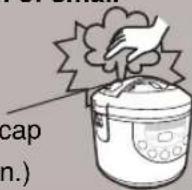
(It may cause a burn.)
This appliance is not intended for use by persons (including children) with reduced physical, sensory or mental capabilities, or lack of experience and knowledge, unless they have been given supervision or instruction concerning use of the appliance by a person responsible for their safety. Children should be supervised to ensure that they do not play with the appliance.

(It may cause burn or injury.)
■ Do not immerse the appliance in water or splash it with water.

(It may cause a short circuit or electric shock.)
- Please enquire with an authorised dealer if water gets inside the appliance.
■ Do not modify, disassemble, or repair this appliance.

(It may cause a fire, electric shock or injury.)
- Please make enquiries at the store or the repair department of an authorised dealer.
■ Use only a power outlet rated at 10 amperes and alternating electric voltage at 230 volts.

(Plugging other devices into the same outlet may cause electric overheating, which may cause a fire.)
- Use only an extended cord rated at 10 amperes minimum.
■ Insert the power plug firmly.

(Otherwise it may cause an electric shock and fire caused by the heat that may generate around the power plug.)
- Do not use a broken power plug or a loose power outlet.

WARNING
■ Clean the power plug regularly.

(A soiled power plug may cause insufficient insulation due to the moisture, and may cause a fire.)
- Unplug the power plug, and wipe with a dry cloth.
■ Discontinue using the appliance immediately and unplug the power cord in cases of abnormal situations and breaking down.

(e.g. for
abnormal
situations or
breaking down)
(It may cause smoking, a fire, or electric shock.)
• The power plug and the power cord become abnormally hot.
• The power cord is damaged or power failure occurs when touched.
• The main body is deformed or abnormally hot.
• The unit gives out smoke or scorching smell.
• There are cracks, looseness or wobbles of the appliance.
• The cast heater is warped or the pan is deformed.
→ Please make enquiries at Panasonic authorized service center for inspection and repair immediately.
This appliance can be used by children aged from 8 years and above and persons with reduced physical, sensory or mental capabilities or lack of experience and knowledge if they have been given super vision or instruction concerning use of the appliance in the safe way and understand the hazards involved. Children shall not play with the appliance.

(It may cause burn or injury.)
■ Cleaning and user maintenance shall not be made by children without supervision.

(It may cause burn or injury.)

CAUTION
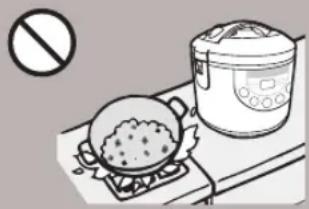
■ Do not use the appliance on following places.
natural_image
Illustration of a cooking setup with a pot on a stove and a rice cooker, no text or symbols present.- The place where it may be splashed with water or near a heat source.
- An unstable surface or carpet, electric carpet, table cloths (ethylene plastic) or other object that cannot resist high temperature.
- Near a wall or furniture. (It may cause a discoloration or deformation.)
■ Do not expose the power plug to steam.

- Do not expose the power plug to steam when it is plugged in. (It may cause a short circuit or fire.) When using a cabinet with sliding table, use the appliance where the power plug cannot be exposed to steam.
■ Do not touch heating elements while the appliance is in use or after cooking.

Especially the cast heater (It may cause a burn.)
■ Do not touch the hook button while moving the appliance.

(It may cause the outer lid to open, resulting in a burn.)
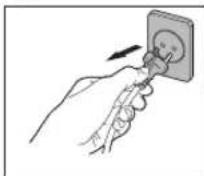
■ Be sure to hold the power plug when unplugging the power plug.

(Otherwise it may cause an electric shock, short circuit, resulting in fire.)
Do not use the power cord (for instrument plug and power plug) that is not specified for use with this appliance. Also do not transfer them.

(It may cause an electric shock, leak, and fire.)
■ Do not open the outer lid while cooking.

(It may cause a burn.)
■ Unplug the power plug from power outlet when the appliance is not in use.

(Otherwise it may cause an electric shock and fire caused by a short circuit due to the insulation deterioration.)
■ Please allow the appliance to cool down before cleaning it.

(Touching hot elements may cause a burn.)
■ Do not use other pans than the one specified.

(It may cause a burn and injury due to overheat or malfunction.)

CAUTION
■ The connector (instrument plug) must be removed before cleaning.

(It may cause electric shock.) (It may cause electric shock.)
■ The appliance inlet must be dried before the appliance is used again.

Precautions for Use
Please put in correct amount of rice and water and select functions correctly according to the operating instructions.
(So as to avoid overflow of rice water half-cooked rice or scorched rice.)
Do not put ingredients to be cooked directly into the appliance in which no inner pan is placed.
(So as to prevent any impurities from causing failure.)
Do not use the appliance on any heat sensitive object such as carpet, electric heating carpet and tablecloth (made of vinyl plastics), etc.
(So as to avoid poor cooking or fire.)
Before using the appliance, the anti-tarnish paper between the inner pan and the cast heater should be removed.
(So as to avoid poor cooking or fire.)
Do not cover the outer lid with cloth or other objects when the appliance is in use.
(So as to avoid deformation, color change of the outer lid or failure.)
Avoid using the appliance under direct sunlight.
(So as to avoid color change.)
Do not serve out rice with any metal object.
(So as to avoid scratching the inner pan coating and causing peeling of the coating.)
Please always clean the foreign objects such as rice on the inner pan, cast heater and temperature sensor.
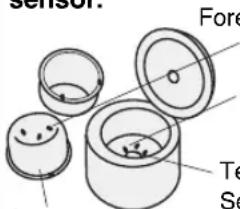
Inner pan
Foreign objects
Cast heater
Temperature Sensor
- Do not tilt or overturn the appliance.
• Before cleaning, turn off the power switch and pull out the power plug.
When there is any overflow of rice water from the steam cap, pull out the power plug immediately to disconnect the power supply. Do not resume the use until the rice water on the power plug and the instrument plug is cleaned with a dry cloth.
The appliance is for household use only. Do not use it for any commercial or industrial purposes or any purposes other than cooking.
When power failure occurs during the operation of the appliance, the cooking result may be affected.
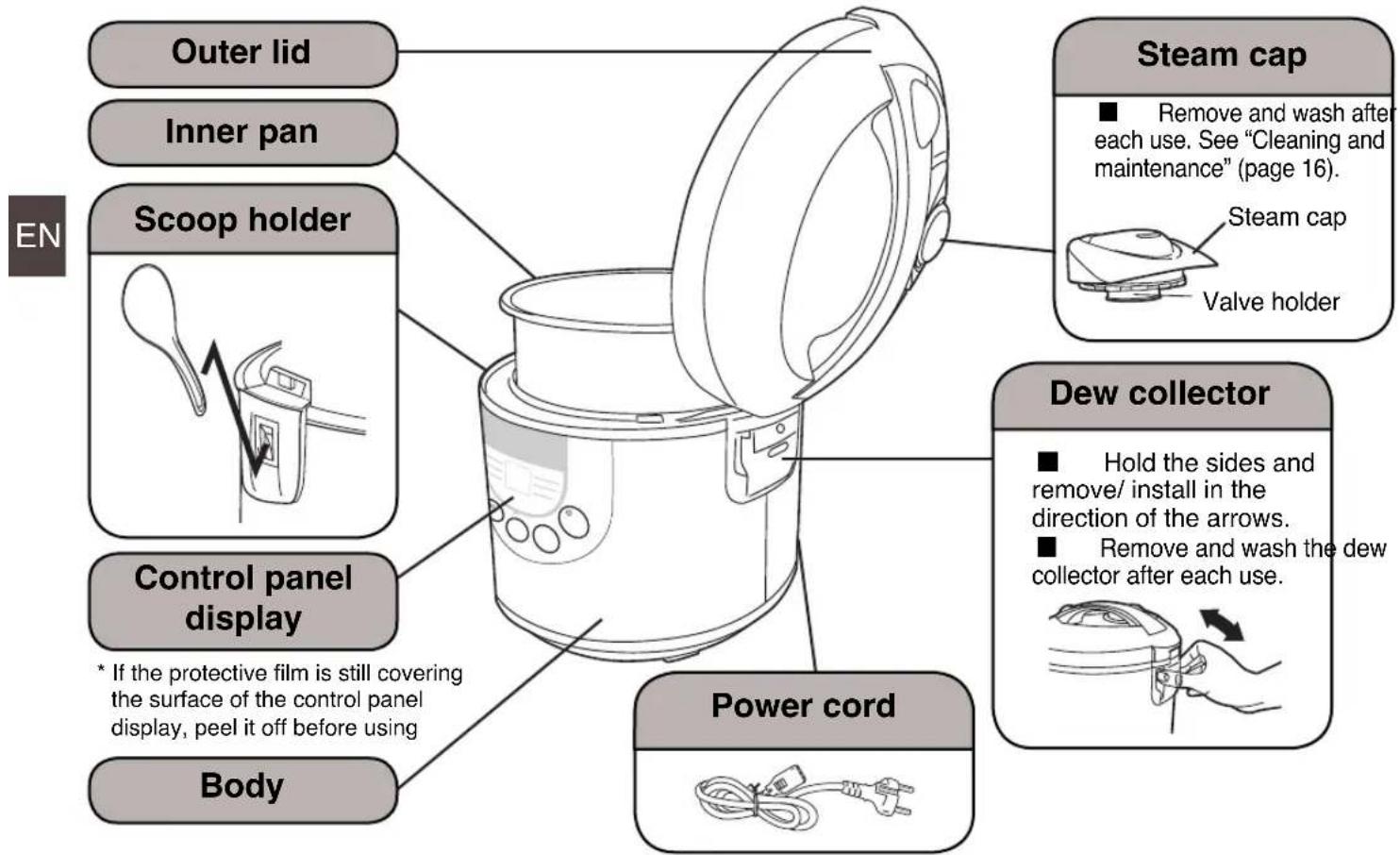
Parts identification
Display
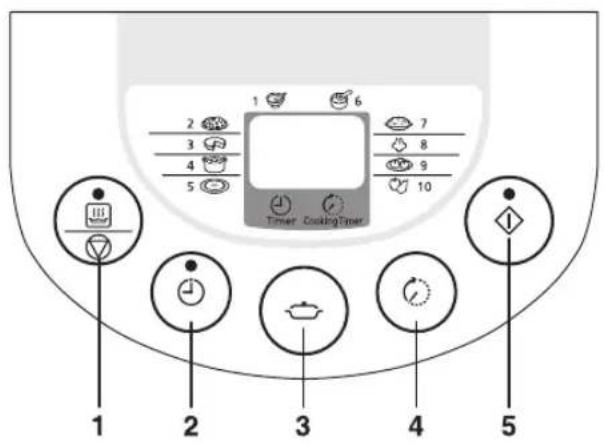
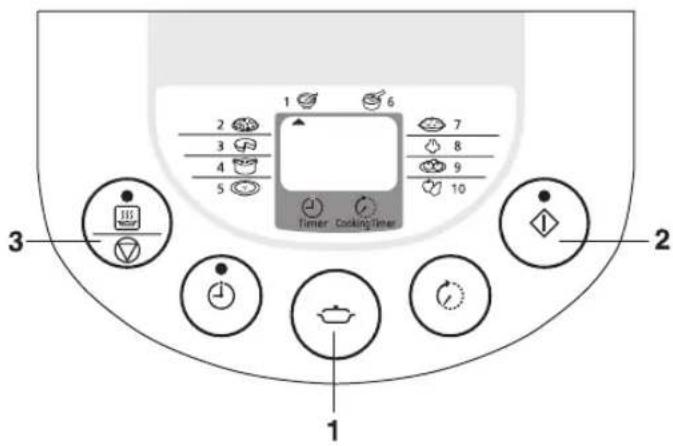
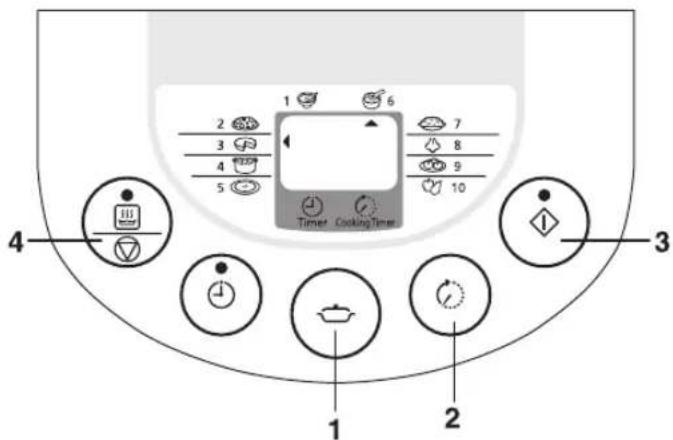
- [Keep Warm/Off] Press this button to cancel the previous operation or enter keep warm function.
- [Timer] Press this button to preset timer.
- [Menu] Press this button to select cooking function.
- [Cooking Timer] Press this button to set cooking time.
- [Start] Press this button to start cooking.
Parts identification
Accessories
※ Please clean the accessories before using.
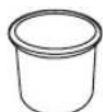
Measuring cup (1) (approx. 180 mL)
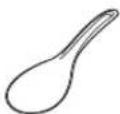
Rice scoop (1)
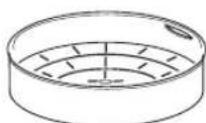
Steaming basket (1)
1 Measure rice with the measuring cup provided.
• The volume of the measuring cup is about 180 mL (148 g).
• Maximum quantity of rice to be cooked at once P18.
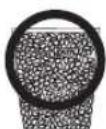
Correct
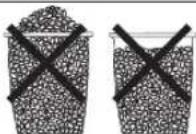
The cooking result may be affected
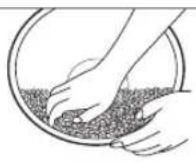
2 Wash the rice till the water turns relatively clear.
① Wash the rice quickly with plenty of water and stirring the rice lightly to wash it while changing water.
② Repeat for several times [wash the rice → pour out water], till the water turns relatively clear.
Attention
- In order to avoid scratching the non-stick coating on the inner pan surface, do not wash rice in the inner pan.
- Wash the rice thoroughly. Otherwise, rice crust may appear and the residual rice bran may affect the taste of the rice.
①
②
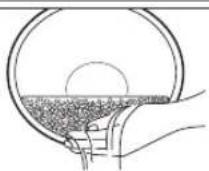
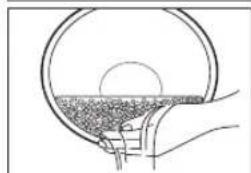
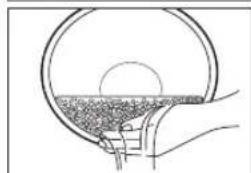
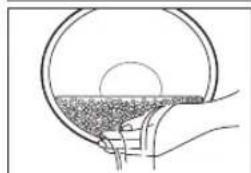
3 Place the washed rice into the inner pan.
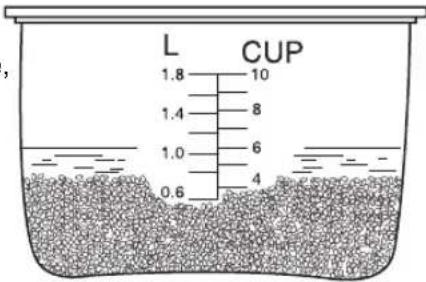
To cook white rice, add water until the corresponding waterline.
- Dry the outside surface of the inner pan. If it is wet, it may cause noise while cooking. Any foreign matters between the inner pan and the cast heater may damage the unit.
- When adding water, pay attention to the scales at both sides and keep them aligned at the same height.
- When cooking stew, soup or using the stew or soup function, the total volume of ingredients and water shall not exceed the maximum waterline.
- When cooking white rice, mixed rice, sticky rice, brown rice or porridge, please add water according to the table on page 8.
※ The amount of water can be increased or decreased according to personal preference.
When the rice quantity is 6 measuring cups, wash the rice and put into the inner pan, then add water till the water surface reaches waterline scale "6" CUP.
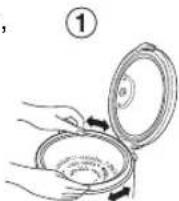
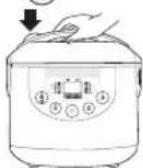
4 Put the inner pan into the body and close the outer lid.
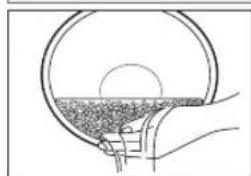
- In order that the bottom of inner pan can be closely attached to the cast heater, please rotate the inner pan along the direction indicated by the arrow for 2 or 3 times.
- Please check whether the steam cap is correctly positioned. (P16)
- When closing the outer lid, please confirm that there is a "click" sound.
②
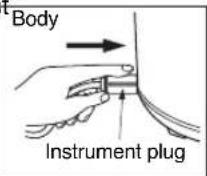
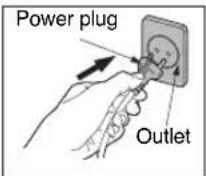
5 Connect the power cord. Please connect the instrument plus
- Please connect the instrument plug to the body first and then connect the power plug. Make sure that both plugs are securely connected.
• Unplug the appliance when it is not in use.
①
②
③
Preparations
When cooking white rice, brown rice, mixed rice and sticky rice
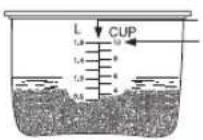
LEVEL INDICATOR
MAXIMUM LEVEL
Do not cook over this water line.
- Amount of water.
| Function W | White Rice Brown Rice Mixed Rice Sticky Rice | ||
| Rice (cup) | Water level (CUP)* Water level (CUP)* Water level (CUP)* Water level (CUP)* | ||
| 1 - - - | - | ||
| 2 - - - | - | ||
| 3 3 3 | 3+ 34 3 | ||
| 4 4 | 4 4+ 34 4 | ||
| 5 5 5 | 5+ 34 5 | ||
| 6 6 | 6 6+ 34 6 | ||
| 7 7 7 | 7+ 34 | - | |
| 8 8 - | 8+ 34 | - | |
| 9 9 - - - | |||
| 10 | 10 | - - - |
- Mixed rice 3 cups:
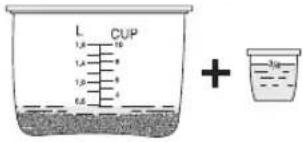
* By following water line mark "CUP" inside the inner pan.
※ The amount of water can be increased or decreased according to personal preference.
EN
When cooking porridge
| Rice (cup) | Water level (L)* |
| 1 | 0.8 |
| 1 1/2 | 1.2 |
| 2 | 1.4 |
* By following water line mark "L" inside the inner pan.
※ he amount of water can be increased or decreased according to personal preference.
Caution
* When using the steaming basket while cooking rice, please refer to the table on the right for the maximum cooking volumes. (maximum cooking volume should not exceed 5 cups.)
Maximum cooking volume (measuring cup provided)
| Maximum cooking volume | 5 |
■ Important Information
- Incorrect water or rice quantity may lead to overflow of rice water from the steam cap.
- If the outer lid is opened during cooking, the amount of moisture condensation may be increased.
- If the porridge is kept in keep warm function for an excessively long time, it will become thicker.
• Each time after use, take off and clean the steam cap so as to prevent any strange small.
Operations
1 Press to select (Porridge) function.
• The Start indicator blinks.
※ Pointer on LCD screen will switch to the next function every time is pressed.
2 Press
• The Start indicator lights up and the cooking starts.
- The remaining time will be displayed on the LCD and start to countdown when the remaining time reaches 5 minutes.
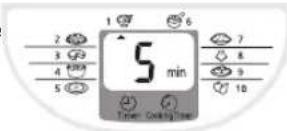
- If you want to preset the timer for Porridge, please refer to "Using the Timer" (on 📋 P15).
The cooking is over
3 Press
- When cooking is over, the rice cooker beeps and automatically switches to the Keep Warm function (The Start indicator turns off and the Keep Warm indicator lights up). However, we do not recommend using the Keep Warm function as it may affect the taste. Press the 33 to exit the Keep Warm function.
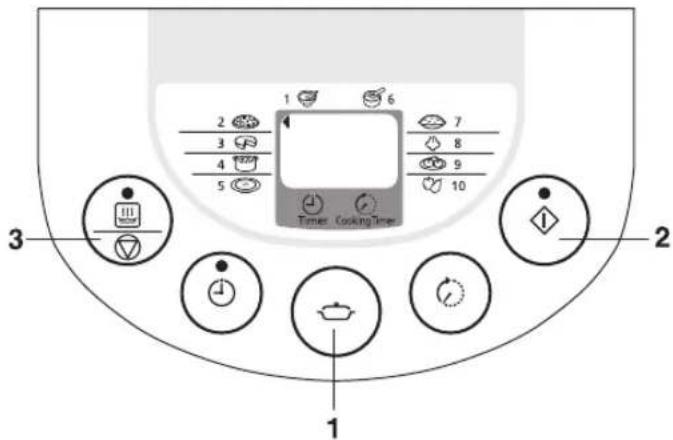
■ Important Information
- Incorrect water or rice quantity may lead to overflow of rice water from the steam cap.
- Do not use Keep Warm function for pilaf, so as not to effect the taste.
• Make sure all ingredients (including water) are below maximum water level. - Frequent opening of the outer lid after cooking may result in excess water and cause the dew collector to overflow. User should always empty it.
Operations
1 Press to select (Pfal) function.
• The Start indicator blinks.
※ Pointer on LCD screen will switch to the next function every time is pressed.
2 Press
• The Start indicator lights up and the cooking starts.
• The remaining time will be displayed on the LCD and start to countdown when the
• remaining time reaches 13 minutes.
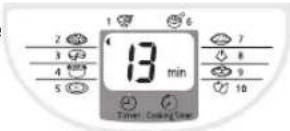
EN
- If you want to preset the timer, please refer to "Using the Timer" (on 📄 P15).
The cooking is over
3 Press and loosen the rice.
- When cooking is over, the rice cooker beeps and automatically switches to the Keep Warm function (The Start indicator turns off and the Keep Warm indicator lights up). However, we do not recommend using the Keep Warm function as it may affect the taste. Press the 📄 button to exit the Keep Warm function.
■ Important Information
- Do not cook more than 1,660 g of cake mixture.
• Cooking time depends on volume and type of cake. - Please wear the kitchen gloves while taking out the inner pan.
• Leaving the cake inside the inner pan will cause the cake to be wet.
• After cooking, some oil stains may remain in the inner pan. This is normal.
Operations
• Prepare the cake mixture by following your recipe.
- Coat the inner pan with butter or margarine to facilitate removing the cake from inner pan.
• Pour the cake mixture into the inner pan and level it.
1 Press to select (Cake) or (Browning) function.
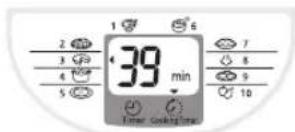
- The Start indicator blinks and LCD will display 40 min (as the default cooking time for Cake and Browning function).
※ Pointer on LCD screen will switch to the next function every time is pressed.
2 Press to set the cooking time as your desire.
• You can select the cooking time.
→ Cake function : from 20 to 65 minutes (5 minutes increment).
→ Browning function : from 1 to 20 minutes (1 minute increment) and from 20 to 65 minutes (5 minutes increment).
- Keeping the button pressed will make setting faster.
3 Press
• The Start indicator lights up and the cooking starts.
• The LCD will show the countdown time with the step of 1 minute.
The cooking is over
4 Press
- When cooking is over, the rice cooker beeps and automatically switches to the Keep Warm function (The Start indicator turns off and the Keep Warm indicator lights up). However, we do not recommend using the Keep Warm function as it may affect the taste. Press the ☐ to exit the Keep Warm function.
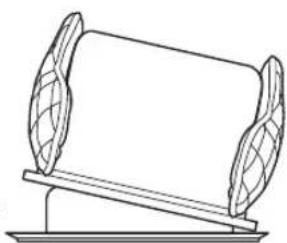
- Bring out the inner pan and leave it cool for 2-3 minutes. Then put the inner pan upside down onto a tray or grill.
• Decorate the cake surface as your desire.
natural_image
Simple line drawing of a balance scale with two leaf-shaped supports (no text or symbols)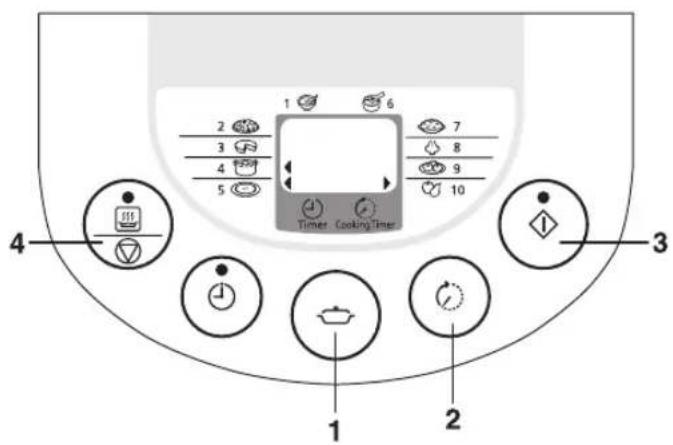
■ Important Information
- Incorrect water or rice quantity may lead to overflow of rice water from the steam cap.
- If the outer lid is opened during cooking, the amount of moisture condensation may be increased.
• Each time after use, take off and clean the steam cap so as to prevent any strange smell.
Operations
• Put all ingredients and seasonings into the inner pan.
※ When the maximum cooking volume exceeds the maximum waterline, overflow or half-cooked may occur (Refer to 📄 P18 for specification).
1 Press , to select (Stew), (Soup) or (Compote) function.
- The Start indicator blinks and LCD will display 1h (as the default cooking time for stew, soup and compute function).
※ Pointer on LCD screen will switch to the next function every time is pressed.
2 Press to set the cooking time as your desire.
• You can select the cooking time from 1 to 12 hours (30 minutes increment)
- Keeping the button pressed will make setting faster.
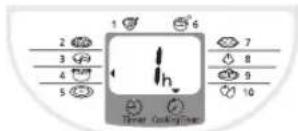
3 Press
• The Start indicator lights up and the cooking starts.
- The LCD will show the countdown time with the step of 30 minutes and will reduce to 1 minute when the remaining time reaches 1 hour.
The cooking is over
4 Press
- When cooking is over, the rice cooker beeps and automatically switches to the Keep Warm function (The Start indicator turns off and the Keep Warm indicator lights up). However, we do not recommend using the Keep Warm function as it may affect the taste. Press the ☐ to exit the Keep Warm function.
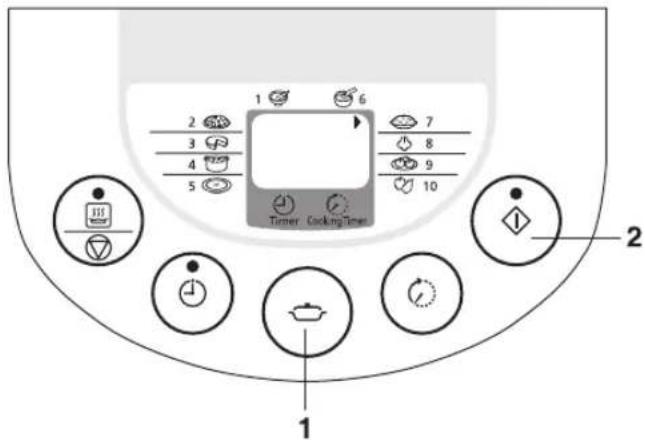
■ Important Information
- Incorrect water or rice quantity may lead to overflow of rice water from the steam cap.
- If the outer lid is not securely closed, cooking may be affected.
- Frequent opening of the outer lid after cooking may result in excess water and cause the dew collector to overflow. User should always empty it.
Operations
1 Press to select (Rice) function.
• The Start indicator blinks.
※ Pointer on LCD screen will switch to the next function every time is pressed.
2 Press The Start
• The Start indicator lights up and the cooking starts.
- The remaining time will be displayed on the LCD and start to countdown when the remaining time reaches 9 minutes.
- If you want to preset the timer for Rice, please refer to "Using the Timer" (on P15).
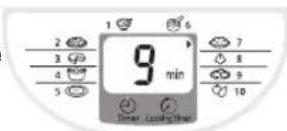
The cooking is over
3 Loosen the rice.
- When cooking is over, the rice cooker beeps and automatically switches to the Keep Warm function (The Start indicator turn off and Keep Warm indicator lights up).
Keep Warm
- When the cooking is over, all functions will turn to keep warm function automatically. But some functions are not recommended to use with keep warm function, Please press 📊 to exit keep warm function.
• You can keep the rice warm for up to 12 hours, so as not to affect the taste or cause a strange smell.
- When in keep warm function, there may be some droplets at the edge of the inner pan.
- The rice taste may be affected if the rice scoop is left in the rice cooker during keep warm function.

| Menu | Keep warm | The result after kept warm |
| Rice | ○ | |
| Pilaf | × | Affects the taste or causes a strange smell |
| Porridge | × | Causes porridge to thicken |
| Cake/Browning | × | |
| Stew/Soup/Compote | × | |
| Steam/Dumpling | × |
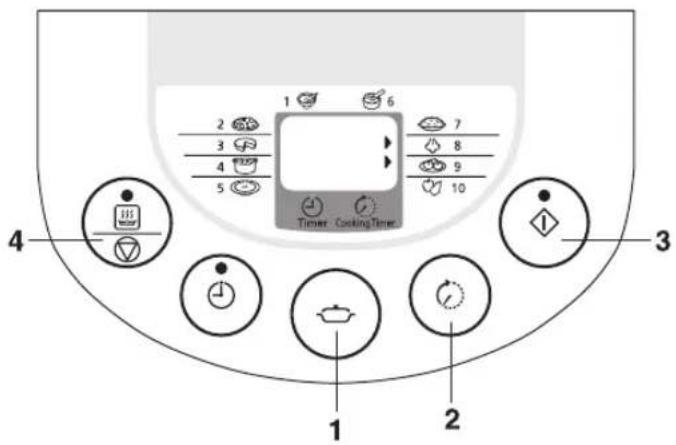
■ Important Information
- When steaming food at the same time as cooking rice, please select 📄 [Rice] function.
- The steaming time shall be determined according to the water quantity in the inner pan. Please adjust the water quantity according to the time required.
• After the water fully has evaporated, the rice cooker will turn to the keep warm function automatically. - If you want to stop steam function during cooking, press 37.
Operations
- Add a proper amount of water (refer to following table).
- Put the steaming basket into the inner pan.
- Put the foods to be steamed into the steaming basket.
- Close the outer lid.
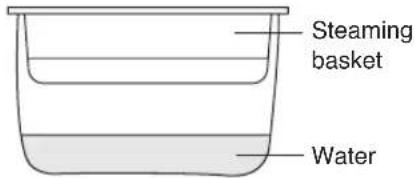
The entire duration from the start to the end refers to the time shown in the following table.
| Water quantity (approx.) 12 Measuring cup 1 Measuring cup 2 Measuring cups 3 Measuring cups | |
| Steaming time (approx.) 15 Minutes 30 Minutes 50 Minutes 60 Minutes |
* The maximum steaming time is about 60 minutes. When the time is up, no matter the water is completely evaporated or not, the rice cooker will turn to keep warm function automatically.
1 Press to select (Steam) or (Dumping) function.
- The Start indicator blinks and LCD will display 10 min (as the default cooking timer for Steam and Dumpling function).
※ Pointer on LCD screen will switch to the next function every time is pressed.
2 Press to set the cooking time as your desire.
• You can select the cooking time from 1 to 60 minutes (1 minute increment).
- Keeping the button pressed will make setting faster.
3 Press The Start
• The Start indicator lights up and the cooking starts.
• The LCD will show the countdown time with the step of 1 minute after water is boiled.
The cooking is over
4 Press
- When cooking is over, the rice cooker beeps and automatically switches to the Keep Warm function (The Start indicator turns off and the Keep Warm indicator lights up). However, we do not recommend using the Keep Warm function as it may affect the taste. Press the ☐ to exit the Keep Warm function.
Using the Timer
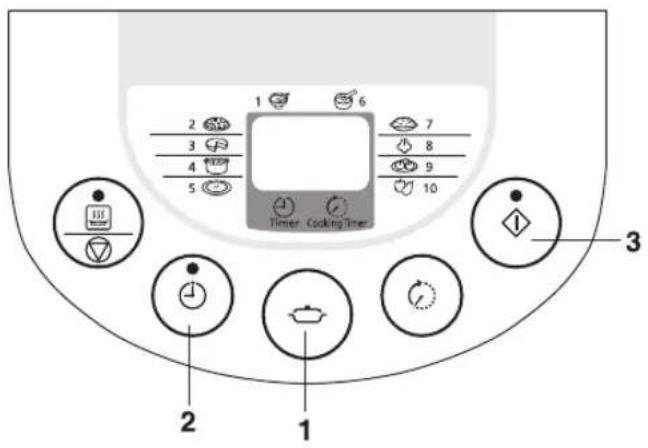
This is a countdown timer, not a clock timer. The rice cooker will complete cooking when the number of hours that was set has elapsed.
Example
If the timer is set for 4 h 30 min, cooking will be completed in 4 hours and 30 minutes after ◆ is pressed.
Operations
1 Press to select Cooking function. ( , , )
2 Press to select the timer setting.
- The first time ⏻ is pressed, the previous timer setting will be displayed. The timer will advance 30 minutes each time ⏻ is pressed. Keeping the button pressed will make setting faster.
• Applicable menus for timer cooking and recommended time setting range.
| Function Timer (hours) | |
| Porridge 1 - 13 | |
| Pilaf 1.5 - 13 | |
| Rice 1 - 13 | |
EN
3 Press ♦ The Start in
- The Start indicator turns off, and the Preset Timer indicator lights up.
- As soon as the cooking starts, the Preset Timer indicator turn off, and the Start indicator lights up.
- If the Preset Timer is set for the interval that matches the default time for the selected function, the Preset Timer indicator will not lights up, but the start indicator will lights up as soon as you press [Start] button.
- This mode can't be used in the following function: , ,, ,,
- When cooking is finished, the rice cooker beeps and automatically switches to Keep Warm function (the Start indicator turns off and the Keep Warm indicator lights up).
The cooking is over
4 Loosen the rice.
- When cooking is over, the rice cooker beeps and automatically switches to the Keep Warm function (The Start indicator turn off and Keep Warm indicator lights up)
• If you want to exit the Keep Warm function, press
Cleaning and maintenance
- Be sure to unplug and carry out these operations when the appliance is cooled down.
- Do not use objects such as benzene, thinners, cleansing powder or metal scrubbers.
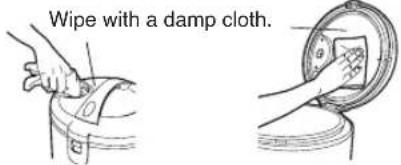
Body / Outer Lid / Upper Frame
Wipe with a damp cloth.
● Do not use a dishwashing detergent.
Inner Pan
Wash with a dishwashing detergent and sponge and wipe off the external surface of the inner pan.
Temperature Sensor / Cast heater
If an object has become stuck to the Temperature Sensor / Cast heater, slightly polish it off using fine sandpaper (of about # 600). Then wipe with a damp cloth.
Dew collector
Remove and clean after each use.
Accessoires

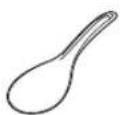
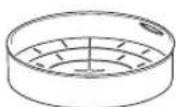
Measuring cup Rice scoop Steaming basket
Wash with a diluted dishwashing detergent and sponge.
Steam cap
■ How to remove and clean
- Pull off the steam cap to remove it as shown in the figure.
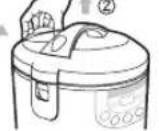
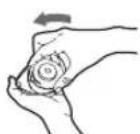
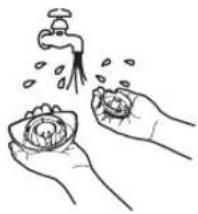
- Remove the valve holder by turning it counterclockwise. Wash and wipe with a damp cloth.
Rubber gasket
DO NOT remove
natural_image
Line drawing of two hands holding a bowl with water droplets, no text or symbols present- Wipe the inside of the hole and heating plate with a damp cloth.
Please do not remove the steam cap when the appliance is in use.
How to assemble the steam cap
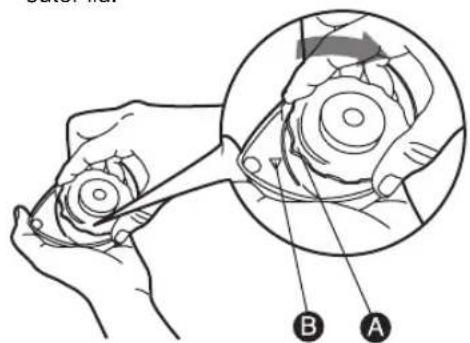
- Insert the valve holder into the steam cap by aligning arrow mark of the holder A with the steam cap B and turn it clockwise until it seats properly.
- Put the steam cap into the hole of the outer lid.
Troubleshooting
Please check the following items
Rice Cooking
| Details | Cooking problems | Keep Warm problems | No power | Strange sounds occurs | ||||||
| Hard cereals | Undercooked | Too soft | Water overflow | Burnt rice at bottom of inner pan | Color change | Bad smell | Too dry | |||
| Wrong rice and water proportion. | ● | ● ● | ● | ● | ● | No power. Pull out plug and check the socket. | Sound occurs because of water that has stuck to inner pan. | |||
| Inadequate rinsing of the rice. | ● | ● ● | ||||||||
| Something between inner pan and cast heater. | ● | ● ● | ● | ● | ● | |||||
| Cooking with a lot of oil. | ● | ● ● | ||||||||
| The amount of water is wrong. | ● | ● | ||||||||
| The dish has been warmed more than 12 hours. | ● | ● ● | ||||||||
| Something is in the inner pan. | ● | ● | ||||||||
| Porridge has been warmed in Keep Warm mode. | ● | ● | ||||||||
| The outer lid is not securely closed. | ● | ● ● | ||||||||
| The inner pan is not adequately washed. | ● | ● | ||||||||
| The power cord is not connected to the socket securely. | ● | |||||||||
Cake Baking
| Details | Baking Cake Problems | No power | Strange sounds occurs | ||||||
| Undone cake | Undercooked cake | Wet cake | The cake sticks to the base of inner pan | The cake sticks to the base of inner pan | Bottom of the cake burnt | Not fluffed | |||
| Too much mix in inner pan before baking. | ● | ● | No power. Pull out plug and check cutout. | Sound occurs because of water that sticks to inner pan. | |||||
| Not enough mix in inner pan before baking. | ● | ● | |||||||
| Used with incompatible cake mix. | ● | ● ● | ● | ||||||
| Used with cake mix that contains too much chocolate, sugar or fruit ingredients. | ● | ● ● | ● | ||||||
| Cake uncovered while baking. | ● | ● ● | |||||||
| Something between inner pan and cast heater. | ● | ● ● | ● | ||||||
| Did not apply butter at the bottom of the inner pan. | ● | ||||||||
| Cake left in the inner pan too long. | ● | ● | |||||||
| Inadequate mixing or mixed too long. | ● | ● | |||||||
| Wrong ingredient quantity. | ● | ● | |||||||

Specifications
| Model No. | SR-TMJ501 | |
| Power Source 230 V~50 Hz | ||
| Power Consumption In | the Cooking function 670 W | |
| In the Keep Warm function 108 W | ||
| Capacity White Rice | 3 - 10 cups | |
| Sticky Rice 3 - 6 cups | ||
| Mixed Rice 3 - 8 cups | ||
| Pilaf 3 - 7 cups | ||
| Porridge 1 - 2 cups | ||
| Stew/Soup/Compote 1.1 - 3.2 L | ||
| Cake/Browning 1,660 g | ||
| Dimensions (Height x Length x Width) (approx.) 276 x 275 x 274 mm | ||
| Weight (approx.) 3.1 kg | ||
| Keep Warm (in Rice mode) 12 hours | ||
- For power cord replacement and product repairing, please contact the authorized service center of Panasonic.
- The design and specifications are subjected to change without prior notice.
Information on Disposal for Users of Waste Electrical & Electronic Equipment (private households)
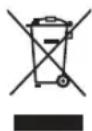
This symbol on the products and/or accompanying documents means that used electrical and electronic products should not be mixed with general household waste.
For proper treatment, recovery and recycling, please take these products to designated collection points, where they will be accepted on a free of charge basis. Alternatively, in some countries you may be able to return your products to your local retailer upon the purchase of an equivalent new product.
Disposing of this product correctly will help to save valuable resources and prevent any potential negative effects on
human health and the environment which could otherwise arise from inappropriate waste handling.
Please contact your local authority for further details of your nearest designated collection point.
Penalties may be applicable for incorrect disposal of this waste, in accordance with national legislation.
Information on Disposal in other Countries outside the European Union
This symbol is only valid in the European Union.
If you wish to discard this product, please contact your local authorities or dealer and ask for the correct method of disposal.
Panasonic Appliances (Thailand) Co., Ltd.
Web site : http://panasonic.net
© Panasonic Appliances (Thailand) Co., Ltd. 2014
natural_image
Simple line drawing of a cooking setup with a pot on a stove and a rice cooker nearby (no text or symbols)natural_image
Illustration of hands mixing granular material in a circular container (no text or symbols)②
natural_image
Diagram of a circular structure with a shaded cross-section, possibly illustrating a mechanical or structural component (no text or symbols present)Uwaga
natural_image
Simple line drawing of a cylindrical object on a stand with two curved blades, no text or symbols present.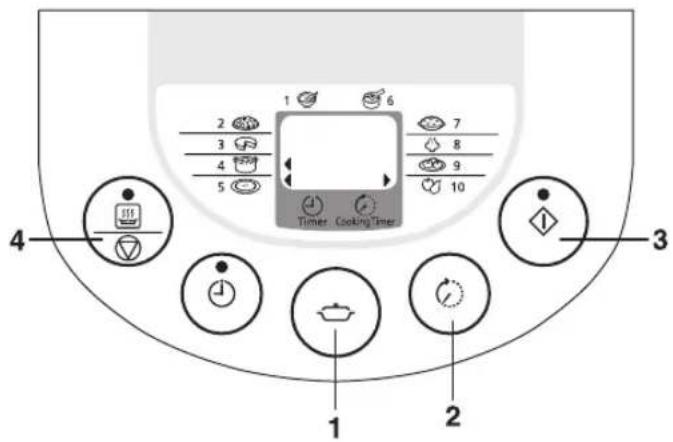
■ Ważne informacje
natural_image
Line drawing of two hands washing a bowl with a faucet above them (no text or symbols)natural_image
Simple line drawing of a cooking setup with a pot on a stove and a rice cooker, no text or symbols present.natural_image
Diagram of three open cylindrical containers with internal components, no text or symbols presentPapildomi priedai
Šildytuvas
Vidinis dubuo
natural_image
Illustration of hands mixing granular material in a bowl (no text or symbols)②
natural_image
Cross-sectional diagram of a circular structure with internal granular texture and a central circular hole (no text or symbols)natural_image
Simple line drawing of a balance scale with two curved blades (no text or symbols)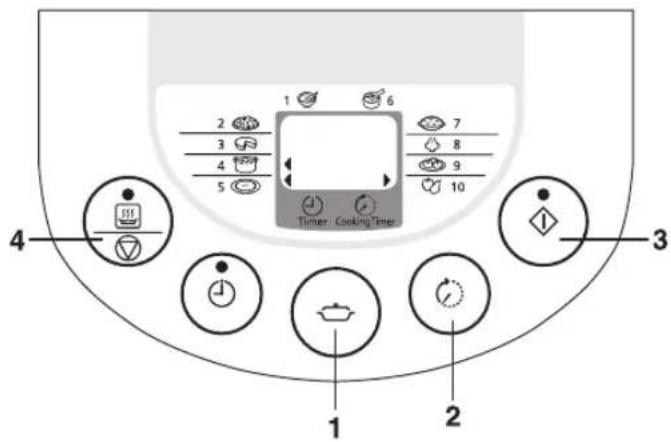
Svarbi informacija
3 Paspauskite
natural_image
Line drawing of two hands holding a bowl with water droplets above (no text or symbols)Galimos problemas
natural_image
Simple line drawing of a cooking pot on a stove next to a rice cooker, with a no-smoking symbol above (no text or labels)lekšējais katls
Sveškermani
Veidnes sildītājs
natural_image
Line drawing of hands mixing granular material in a bowl (no text or symbols)②
natural_image
Cross-sectional diagram of a mechanical or biological structure with layered components (no text or symbols)natural_image
Simple line drawing of a balance scale with two curved blades mounted on a flat base (no text or symbols)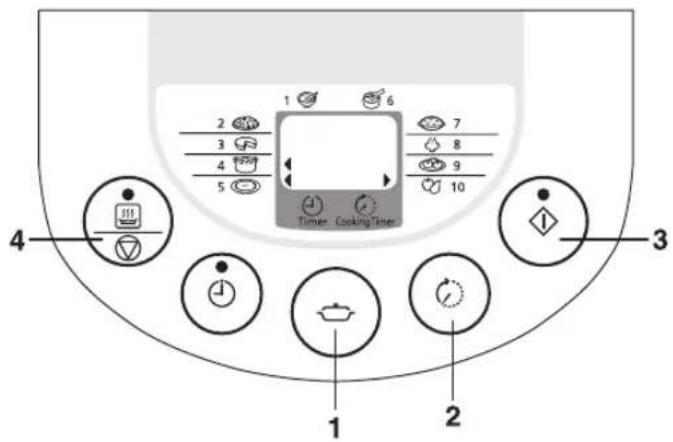
Svarīga informācija
Rīsu gatavošana
natural_image
Simple line drawing of a cooking setup with a pot on a stove and a rice cooker, no text or symbols present.natural_image
Simple line drawing of a balance scale with two curved blades mounted on a flat base (no text or symbols)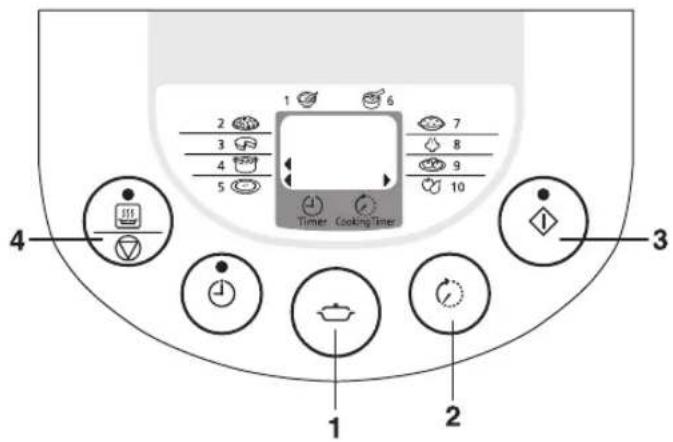

Tähtis info
natural_image
Line drawing of two hands washing a flower with a faucet above (no text or symbols)ÄRGE eemaldage kummitihendit.
Riisi keetmine
natural_image
Simple line drawing of a cooking setup with a pot on a stove and a rice cooker, no text or symbols present.natural_image
Simple line drawing of a balance scale with two curved blades on top (no text or symbols)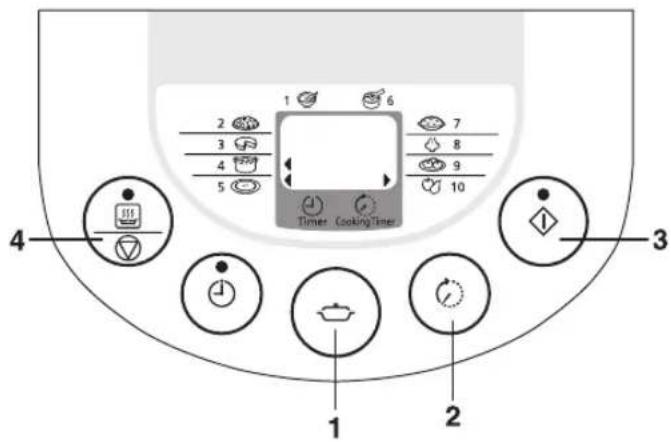
natural_image
Line drawing of two hands holding a bowl with water droplets above (no text or symbols)Rizsfőzés
natural_image
Simple line drawing of a cooking setup with a pot on a stove and a rice cooker, no text or symbols present.natural_image
Illustration of hands mixing granular material in a bowl (no text or symbols)②
natural_image
Cross-sectional diagram of a mechanical or biological structure with layered components and a central circular element (no text or symbols)natural_image
Simple line drawing of a balance scale with two curved blades placed on top (no text or symbols)natural_image
Line drawing of two hands washing a bowl with a faucet above (no text or symbols)Odstraňování potíží
natural_image
Illustration of a cooking setup with a pot on a stove and a rice cooker, no text or symbols presentnatural_image
Simple line drawing of a balance scale with two leaf-shaped supports (no text or symbols)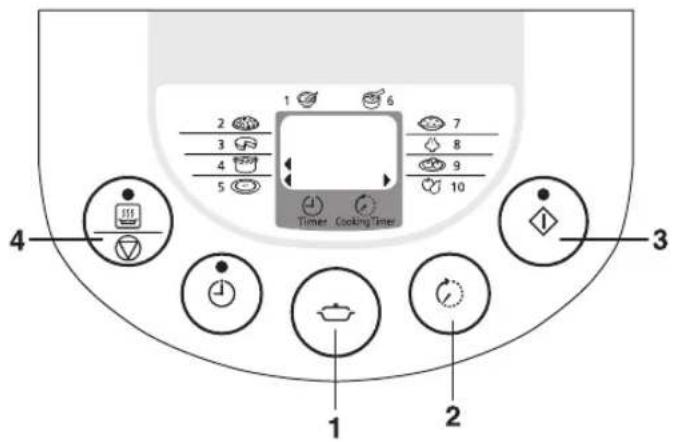
Важна информация
natural_image
Illustration of hands washing a flower with a faucet above (no text or symbols)
- Operating Instructions
- Instrukcje obsługi
- Safety Precautions
- WARNING
- ■ Clean the power plug regularly.
- ■ Discontinue using the appliance immediately and unplug the power cord in cases of abnormal situations and breaking down.
- CAUTION
- ■ Do not use the appliance on following places.
- ■ Do not expose the power plug to steam.
- ■ Be sure to hold the power plug when unplugging the power plug.
- ■ Unplug the power plug from power outlet when the appliance is not in use.
- ■ Please allow the appliance to cool down before cleaning it.
- ■ Do not use other pans than the one specified.
- Precautions for Use
- Parts identification
- Display
- Accessories
- Measure rice with the measuring cup provided.
- Wash the rice till the water turns relatively clear.
- Attention
- Place the washed rice into the inner pan.
- Put the inner pan into the body and close the outer lid.
- Connect the power cord. Please connect the instrument plus
- Preparations
- When cooking white rice, brown rice, mixed rice and sticky rice
- When cooking porridge
- ■ Important Information
- Operations
- Press to select (Porridge) function.
- Press
- The cooking is over
- Press
- Press to select (Pfal) function.
- Press and loosen the rice.
- Press to select (Cake) or (Browning) function.
- Press to set the cooking time as your desire.
- Press
- Press , to select (Stew), (Soup) or (Compote) function.
- Press to select (Rice) function.
- Press The Start
- Loosen the rice.
- Keep Warm
- Press to select (Steam) or (Dumping) function.
- Press The Start
- Using the Timer
- Example
- Press to select Cooking function. ( , , )
- Press to select the timer setting.
- Press ♦ The Start in
- Loosen the rice.
- Cleaning and maintenance
- Body / Outer Lid / Upper Frame
- Inner Pan
- Temperature Sensor / Cast heater
- Dew collector
- Accessoires
- Steam cap
- How to assemble the steam cap
- Troubleshooting
- Please check the following items
- Information on Disposal for Users of Waste Electrical & Electronic Equipment (private households)
- Information on Disposal in other Countries outside the European Union
- Uwaga
- ■ Ważne informacje
- Svarbi informacija
- Paspauskite
- Galimos problemas
- Svarīga informācija
- Tähtis info
- Odstraňování potíží
- Важна информация
Brand : PANASONIC
Model : SR-TMJ501
Category : Rice cooker