
SH2010 - Razor Zelmer - Free user manual and instructions
Find the device manual for free SH2010 Zelmer in PDF.


| Product Type | Electric Shaver |
| Brand | Zelmer |
| Model | SH2010 |
| Power Source | Rechargeable Li-Ion battery |
| Charging Time | Approximately 8 hours |
| Operating Time | Approximately 45 minutes |
| Shaving System | Foil shaver with floating heads |
| Number of Blades | 3 |
| Trimmer | Pop-up precision trimmer |
| Wet/Dry Use | Yes, fully washable |
| Display | LED battery indicator |
| Voltage | 100-240 V automatic |
| Dimensions (H x W x D) | Approx. 6.5 x 2.5 x 2.0 in (165 x 64 x 51 mm) |
| Weight | Approx. 0.4 lb (180 g) |
| Cleaning | Rinse under running water |
| Package Contents | Shaver, protective cap, cleaning brush, charging cable |
| Warranty | 2 years |
| Safety Features | Auto shut-off, waterproof design |
Frequently Asked Questions - SH2010 Zelmer
User questions about SH2010 Zelmer
0 question about this device. Answer the ones you know or ask your own.
Ask a new question about this device
Download the instructions for your Razor in PDF format for free! Find your manual SH2010 - Zelmer and take your electronic device back in hand. On this page are published all the documents necessary for the use of your device. SH2010 by Zelmer.
USER MANUAL SH2010 Zelmer
natural_image
Close-up of a smooth, metallic oval-shaped object with no visible text or symbolsFULL
EMPTY
zelmer
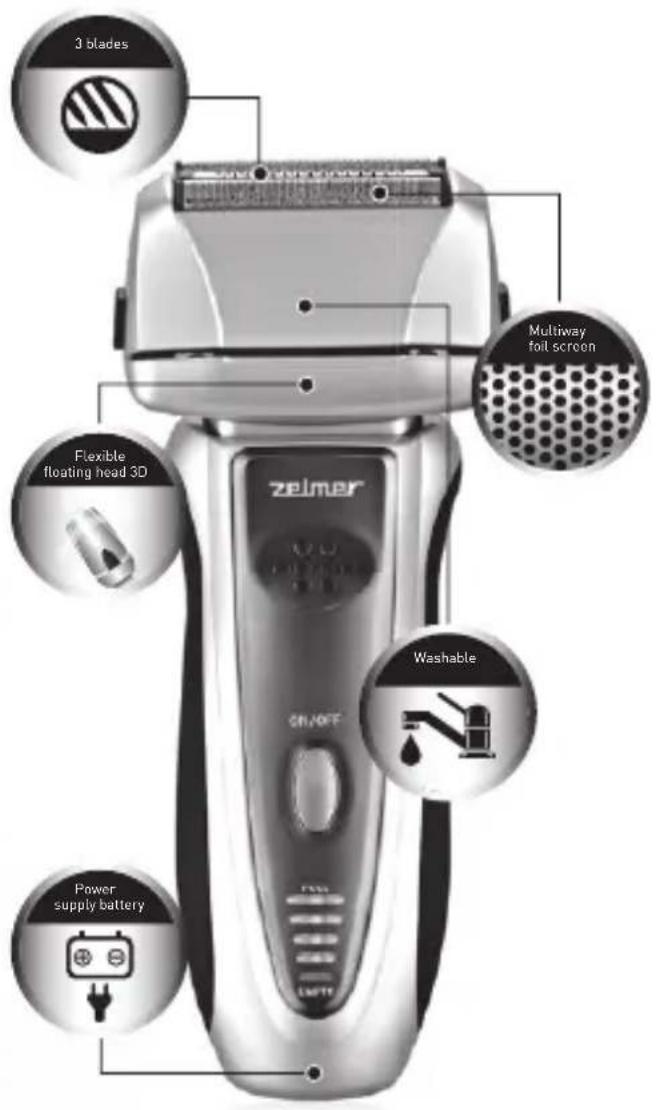

PL OSTRZA "SHARP EDGED BLADES"
CZ ČEPELE „SHARP EDGED BLADES“
SK OSTRÁ „SHARP EDGED BLADES“
HU „SHARP EDGED BLADES“ PENGÉK
RO LAME „SHARP EDGED BLADES“
RU ЛЕЗВИЯ „SHARP EDGED BLADES“
BG HOЖЧЕТА „SHARP EDGED BLADES“
UA HOXI „SHARP EDGED BLADES“
EN "SHARP EDGED BLADES"
PL CORDLESS MODE - 40 MINUTES
cz KRÁTKÁ DOBA NABÍJENÍ - 1 H
SK KRÁTKA DOBA NABÍJANIA - 1 H
HU RÖVID TÖLTÉSI IDŐ - 1 H
RO TIMP SCURT DE ÎNCĂRCARE - 1 H
RU КОРОТКОЕ ВРЕМЯ ЗАРЯДКИ - 1 Ч.
BG КРАТКО ВРЕМЕ НА ЗАРЕЖДАНЕ - 1 Ч.
JA ШВИДКА ЗАРЯДКА - 1 ГОД.
EN SHORT CHARGING TIME - 1 H
PL CZAS PRACY BEZPRZEWODOWEJ - 40 MINUT
CZ BEZŠNÚROVÉ POUŽITÍ - 40 MINUT
SK POUŽITIE BEZ PRÍVODNÉHO KÁBLA - 40 MINÚT
HU CSATLAKOZÁSMENTES KÉSZENLÉT - 40 PERC
RO DURATĂ DE FUNCTIONARE FĂRĂ CABLU - 40 MINUTE
RU ВРЕМЯ БЕСПРОВОДНОЙ РАБОТЫ - 40 МИНУТ
BG ВРЕМЕ НА БЕЗКАБЕЛНА РАБОТА - 40 МИНУТИ
UA ЧАС БЕЗПРОВІДНОЇ РОБОТИ - 40 ХВ.
EN CORDLESS MODE - 40 MINUTES

PL TRYMER
CZ ZASTŘIHOVAČ
SK HOLIACI STROJČEK
HU TRIMMER
RO TRIMMER
RU ТРИММЕР
BG ТРИМЕР
UA ТРИМЕР
EN TRIMMER
PL
Szanowni Klienci!
natural_image
Illustration of a hand holding a handheld electric shaver and a compact device, with no visible text or symbols.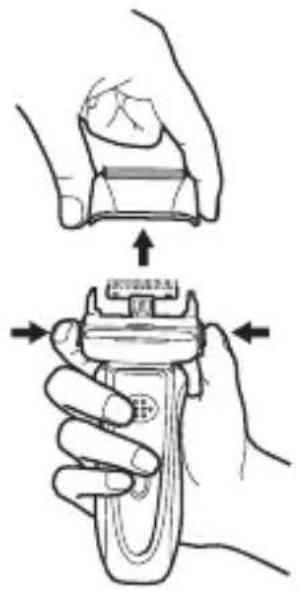
natural_image
Illustration showing a hand holding a device with a spring-like component being processed (no text or symbols)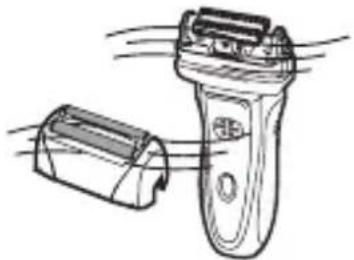
natural_image
Line drawing of a hand holding a handheld device with motion lines indicating airflow or movement (no text or symbols)natural_image
Illustration of hands holding a small electronic device (no text or symbols visible)Folia tnąca
natural_image
Hand holding a tool interacting with a mechanical component labeled 'Korpus' (no other text or symbols visible)natural_image
Diagram showing a hand pressing down on a mechanical component with a valve, no text or symbols present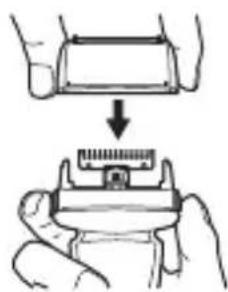
natural_image
Illustration showing a hand holding a small electronic component with a ruler, no text or symbols present
natural_image
Line drawing of a mechanical device with a textured surface and handle (no text or symbols)Zespół folii tnącej
Blok ostrzy
Zespół folii tnącej
Blok ostrzy
natural_image
Illustration of a hand holding a mechanical component with directional arrows indicating movement (no text or symbols)rys. 2

natural_image
Symbol of a trash bin with crossed x- and y-axes, no text or numbers presentnatural_image
Technical line drawing of a mechanical component with no visible text or symbolsnatural_image
Line drawing of a handheld device with a button and handle (no text or symbols)natural_image
Illustration of a hand holding a handheld electric shaver with tip, showing blade and grip details (no text or symbols)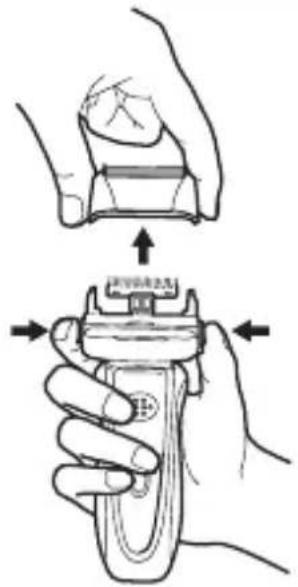
natural_image
Illustration showing a hand holding a mechanical component with a spring-like tool, no text or symbols present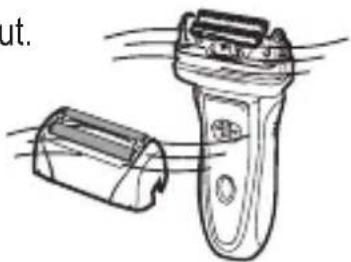
natural_image
Illustration of a hand holding a handheld device with motion lines indicating movement (no text or symbols)natural_image
Diagram showing a mechanical component being processed into a base, with no visible text or symbols.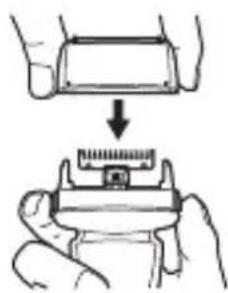
natural_image
Illustration of a hand holding a small electronic component with a ruler, showing a step-down (no text or symbols)
natural_image
Line drawing of a mechanical device with a textured handle and curved base (no text or symbols)Břitový blok
natural_image
Illustration of a hand holding a mechanical component with directional arrows indicating movement (no text or symbols)obr. 2

natural_image
Symbol of a trash bin with crossed x- and y-axes, no text or labels presentnatural_image
Line drawing of a handheld device with a circular button and handle (no text or symbols)natural_image
Illustration of a handheld device with two hands, showing internal components and motion lines (no text or symbols)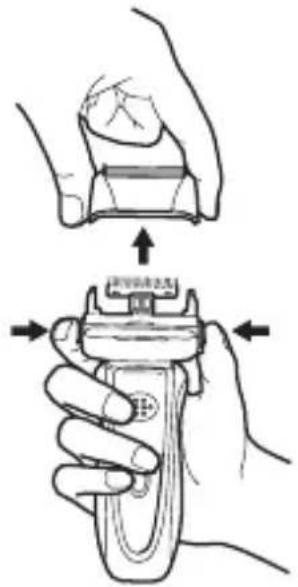
natural_image
Illustration showing a hand holding a mechanical component with a spring-like mechanism (no text or symbols)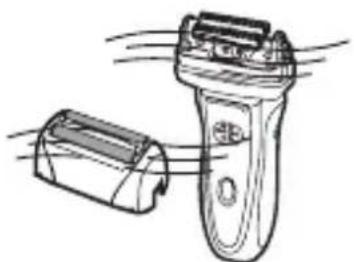
natural_image
Line drawing of a handheld electric shaver with a battery and handle (no text or symbols)④ Sústavu holiacich čepelí nasad'te na predošlé miesto tak, aby ste sa nedotkli holiacej planžety.
⑤ Aplikujte olej na čepele planžety a zastrihávača.

natural_image
Illustration of hands holding a small electronic component (no text or symbols visible)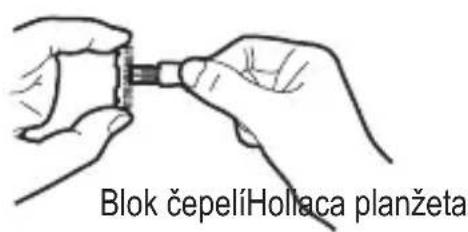
natural_image
Line drawing of a hand using a tool to press or install a component on a mechanical part (no text or symbols)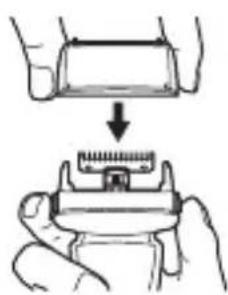
natural_image
Illustration of a hand holding a small electronic device with a grid-like top component, no text or symbols present
natural_image
Line drawing of a mechanical device with a textured surface and handle (no text or symbols)Blok čepelí
① Vyberte sústavu holiacich planžiet (obr. 1).
② Prstami uchopte boky bloku čepelí a vytiahnite ho smerom nahor (obr. 2).
③ Nasadte a zatlačte na vibrujúcu hlavicu nový blok čepelí.
obr. 1 obr. 2

natural_image
Symbol of a trash bin with crossed x- and y-axes, no text or labels presentnatural_image
Line drawing of a handheld device with a circular button and handle (no text or symbols)
natural_image
Illustration of two hands holding a handheld device with motion lines indicating movement (no text or symbols)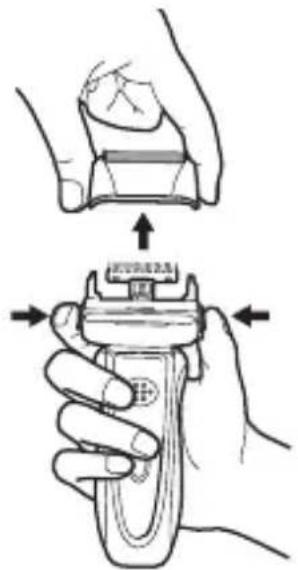
natural_image
Illustration of a hand holding a device with arrows indicating movement or force (no text or symbols present)natural_image
Illustration showing a hand holding a mechanical component with a spring-like base, no text or symbols present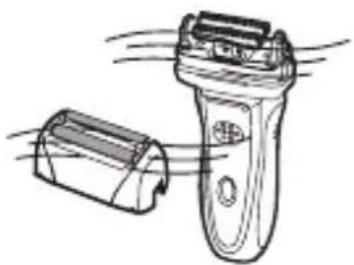
natural_image
Line drawing of a pair of electric shakers with motion lines indicating airflow (no text or symbols)natural_image
Illustration of hands holding a small electronic component (no text or symbols visible)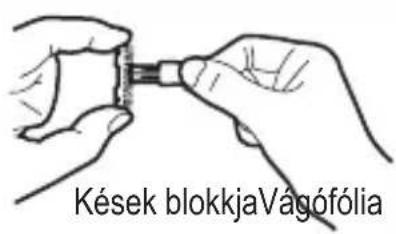
natural_image
Line drawing of a hand holding a tool over a mechanical component (no text or symbols)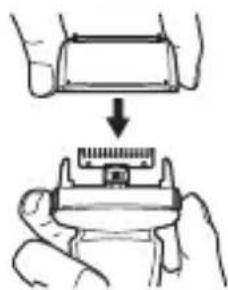
natural_image
Illustration of a hand holding a small electronic component with a ruler, showing a step-down (no text or symbols)
natural_image
Line drawing of a mechanical device with a textured surface and handle (no text or symbols)Kések blokkja

natural_image
Symbol of a trash bin with crossed lines indicating no waste or discharge (no text or labels)natural_image
Line drawing of a handheld device with a circular button on the handle (no text or symbols)↑
Fermoar trymer
natural_image
Illustration of a hand holding a handheld device with two views showing internal components (no text or symbols)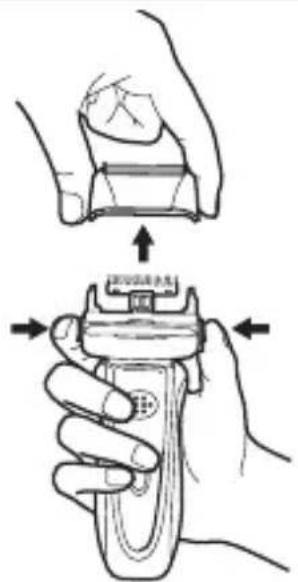
natural_image
Illustration showing a hand holding a device with a spring-like component being processed (no text or symbols)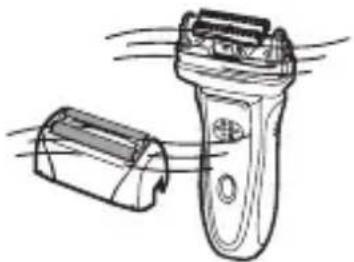
natural_image
Line drawing of a hand holding a handheld device with motion lines indicating movement (no text or symbols)natural_image
Illustration of hands holding a small electronic device (no text or symbols visible)Folia tde tăiere
natural_image
Illustration of hands holding a small electronic component (no text or symbols visible)Bloc de lame
natural_image
Illustration of a hand using a pipette to apply material to a mechanical component labeled 'Corpul' (no other text or symbols)Corpul
natural_image
Illustration of a hand holding a small electronic device with a rectangular component being inserted (no text or symbols)
natural_image
Illustration of a mechanical device with a textured surface and a curved handle (no text or symbols)Blocul de lame

natural_image
Simple line drawing of a mailbox with an upward arrow (no text or symbols)natural_image
Line drawing of a handheld electronic device with a circular button and an arrow pointing to the left side (no text or symbols)natural_image
Line drawing of a handheld device with a circular button and handle (no text or symbols)
Регулятор триммера
natural_image
Illustration of a hand holding a handheld device with two hands, showing internal components and motion lines (no text or symbols)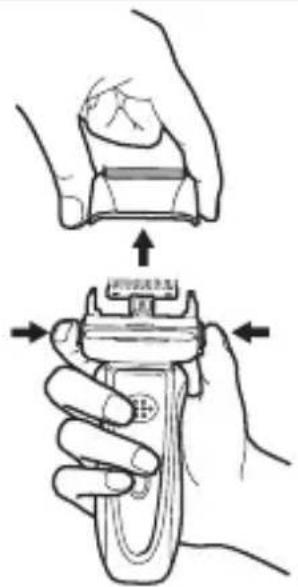
natural_image
Illustration showing a hand holding a small mechanical component with a spring-like base, before and after a downward arrow (no text or symbols)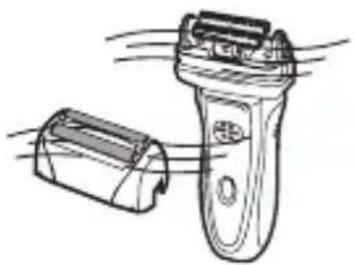
natural_image
Illustration of a hand holding a handheld electric shaver with motion lines indicating airflow (no text or symbols)natural_image
Illustration of hands holding a small electronic component (no text or symbols visible)Режущая сетка
natural_image
Diagram showing a hand pressing down on a mechanical component with a valve, no text or symbols present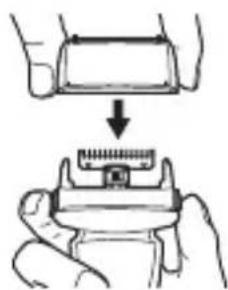
natural_image
Illustration of a hand holding a small electronic component with a magnified view showing internal structure (no text or symbols)
natural_image
Line drawing of a mechanical device with no visible text or symbolsБлок лезвий

natural_image
Symbol of a trash bin with crossed x- and y-axes, no text or labels presentnatural_image
Technical line drawing of a mechanical component with no visible text or symbolsnatural_image
Line drawing of a handheld device with a circular button and handle (no text or symbols)
Превкл. тримера
natural_image
Illustration of a hand holding a handheld device with two views showing internal components (no text or symbols)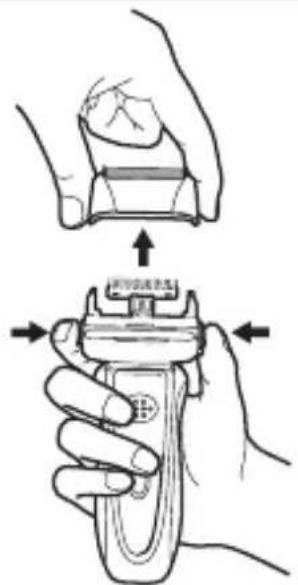
natural_image
Illustration showing a hand holding a device with a handle and a close-up of its top component (no text or symbols)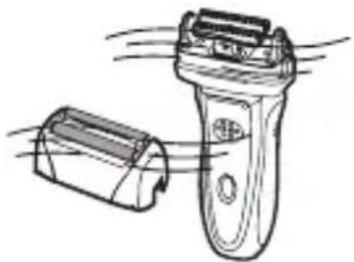
natural_image
Line drawing of a hand holding a handheld device with motion lines indicating airflow or movement (no text or symbols)natural_image
Illustration of a hand pressing down on a mechanical component (no text or symbols)natural_image
Illustration of hands holding a small electronic component (no text or symbols visible)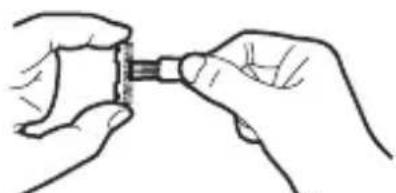
natural_image
Line drawing of two hands holding a small object with a handle (no text or symbols)natural_image
Line drawing of a hand inserting a plug into a mechanical component (no text or symbols)natural_image
Diagram showing a hand pressing down on a mechanical component (no text or symbols present)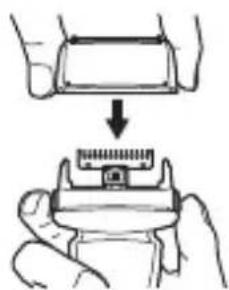
natural_image
Illustration showing a hand holding a small electronic component with a magnified view of its internal structure (no text or symbols)
natural_image
Line drawing of a mechanical device with a textured surface and a curved handle (no text or symbols)Блок остриета

natural_image
Symbol of a trash bin with crossed lines and a solid black rectangle below (no text or labels)natural_image
Line drawing of a handheld device with a button and handle (no text or symbols)↑
Регулятор тримера
natural_image
Illustration of a hand holding a handheld device with two hands, showing internal components and motion lines (no text or symbols)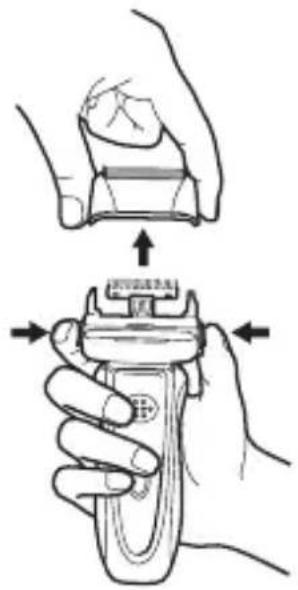
natural_image
Illustration showing a hand holding a device with a handle, and a close-up of the handle being inserted (no text or symbols present)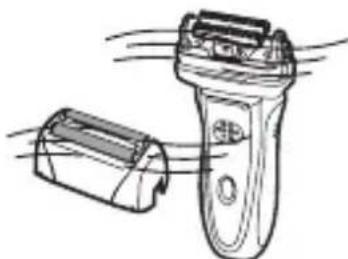
natural_image
Line drawing of a pair of electric shakers with cooling fins, no text or symbols presentnatural_image
Illustration of hands performing a mechanical assembly with a component (no text or symbols visible)natural_image
Diagram showing a hand holding a small object above a container with a base, no text or symbols present.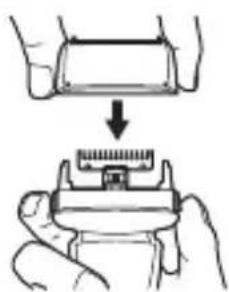
natural_image
Illustration of a hand holding a small electronic device with a grid-like top component, no text or symbols present
natural_image
Line drawing of a mechanical device with a textured surface and handle (no text or symbols)Блок лез

natural_image
Symbol of a trash bin with crossed x- and y-axes, no text or labels presentCongratulations on your choice of our appliance, and welcome among the users of Zelmer products.
In order to achieve best possible results we recommend using exclusively original Zelmer accessories. They have been specially designed for this product.
Please read this instruction manual carefully. Pay special attention to important safety instructions. Keep this instruction manual for future reference.
Operation and safety precautions
This information concerns your health and safety. You must read all the operation and safety precautions before using your shaver for the first time.

DANGER! / WARNING!
Risk of injury
Do not use the appliance if the shaver or AC adaptor is damaged. In such a case take your shaver to a local service centre for repair. Do not attempt to repair the shaver on your own.
If the cord or plug of the AC adaptor is damaged, or if the plug is loose in the outlet, do not recharge the shaver or use it with an AC power supply.
The shaver may be repaired by qualified personnel only. In case of any defects, contact a local ZELMER service centre.
This appliance is not intended for use by persons (including children) with reduced physical, sensory or mental capabilities, or lack of experience and knowledge, unless they have been given supervision or instruction concerning use of the appliance by a person responsible for their safety.
Children should be supervised to ensure that they do not play with the appliance.
Unplug the AC adaptor from the outlet when the shaver is not in use and before cleaning.
Do not pull the cord to unplug the shaver from the outlet.
Do not use the shaver in a bath or under a shower.
Do not immerse the shaver and AC adaptor in water or any other liquid.
Do not plug and unplug the mains cord from the outlet with wet hands.
When using the shaver on an AC power supply, use only the AC adaptor and cord provided with the shaver.
Use the shaver only with a power supply of 100-240 V. Otherwise it may result in a fire or an electric shock.
Do not damage, break, bend, stretch, twist, bundle or tamper with the cord of the AC adaptor. Do not place heavy objects on the cord or put it between them. A broken cord will cause a fire or an electric shock.
Before using the shaver, make sure that the foil or inner blade is not damaged, as such foil or blade may scratch your face.
Do not touch the inner parts of the inner blade as its edges are very sharp.
Do not use the shaver on any other part of your body than your face (such as your head). This may cause an injury to your skin, and will shorten the service life of the outer foil.

WARNING!
Risk of property damage
Do not cover the AC adaptor, as it may cause the temperature inside the adaptor to increase dangerously.
The shaver is intended for shaving and trimming natural hair only. It may be used with human hair only. Do not use the shaver to shave or trim artificial or animal hair.
When finished using or charging the shaver, be sure to remove the AC adaptor from the outlet.
Do not forcibly press against the outer foil, as this may break the foil to cause an injury to your skin.
Do not use the AC adaptor included with the shaver to recharge other electric appliances.
Before washing the shaver under running water, unplug it from the AC adaptor!
Do not recharge the shaver or use it with an AC power supply when the room temperature is below 0^ C or over 40^ C. Never recharge the shaver in direct sunlight or near a heating element such as a heater.
Do not charge and use the shaver with an AC power supply in a humid place or in a place where the AC adaptor is exposed to splashes of water.
Do not store the shaver in a humid place or where it may be exposed to splashes of water, or in high temperatures.
To clean the body case of the shaver, wipe it with a cloth soaked with a diluted water solution of a neutral detergent. Do not use thinners or benzine as they may damage the plastic parts of the body case.
Do not leave the shaver unattended when charging.

Product information user instructions
The shaver is for household use only.
The shaver should be preferably charged at temperature between 15^ C and 35^ C.
Failure to use the shaver in accordance with its purpose will void the guarantee.
The shaver may be operated on AC power or rechargeable battery.
Before shaving, degrease the skin of your face to prevent hair sticking to the outer foil and causing blades to rub against it. If the foil is dirty, clean it before shaving (e.g. using a handkerchief).
When cleaning the shaver make sure that you do not apply too much oil on the blade and foil. Too much oil will soil the outer foil. Before shaving, wipe the residual shaver oil from the foil (e.g. using a handkerchief).

This symbol means that the shaver is washable, however only when unplugged from the outlet.
Make sure that you understand the above tips.
Technical specification
Technical specifications are given on the nameplate.
The charging adaptor is a Class II electrical device and does not require grounding ☐.
The shaver meets the requirements of applicable standards.
This appliance complies with Commission Regulation (EC) no. 1275/2008 on eco-design requirements.
The appliance complies with the following directives:
– Low Voltage Device (LVD) – 2006/95/EC.
– Electro-Magnetic Compatibility (EMC) – 2004/108/EC.
The product is marked with CE symbol on the nameplate.
Battery: 2 x Ni-MH 730 mAh cell. Standard charging time: 60 minutes. Working temperature range: 0-40°C.
Elements and accessories
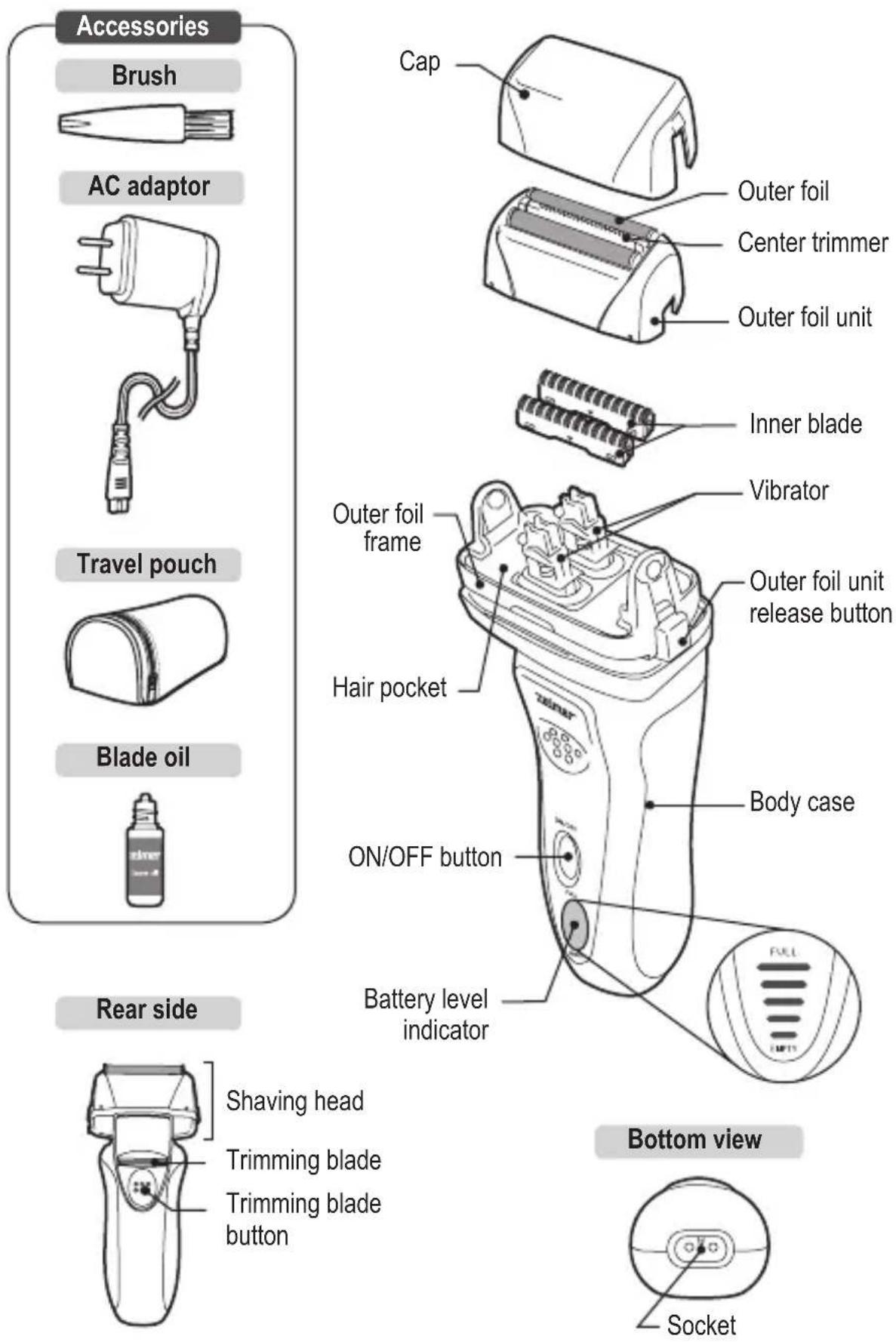
Operation
CHARGING

For recharging the shaver use only the AC adaptor provided with the shaver.
Battery activation
When the shaver is first used after being purchased or being left unused for a long time, be sure to recharge the shaver for 8 hours to the full capacity before use, to activate the rechargeable battery. After that, approximately 60 minutes of recharging will fully recharge the shaver.

Charge the shaver when the battery level indicator lights up in red.
"Battery Memory Effect"
To avoid the “memory effect”, recharge the shaver only after the battery is completely empty.
What is the "memory effect"?
If the Ni-MH battery in your shaver is repeatedly recharged before it runs out of energy, the voltage drops more quickly to decrease the number of times you can use the shaver before the battery runs down.
If you have noticed the "memory effect"
If the full recharge allows less number of shaves before the battery is depleted, consume the recharged energy completely, and then recharge the shaver for approximately 8 hours. Repeating this procedure 2 to 3 times will restore the battery. If the “memory effect” persists, the service life of the battery may have expired. Consult the retailer from whom your shaver was purchased.
Battery life
The life of the battery is approximately 4 years when if it is recharged once a week. However, its life will be shortened if it is recharged more frequently, and it also varies depending on the conditions of use.
If a 1-hour recharging permits only 2 to 3 shaves, the battery life is near its end. In that case, contact the retailer from whom the shaver was purchased. If the shaver is left unused for more than 6 months, the battery's characteristics will deteriorate by self-discharge. It is recommended, therefore, that the shaver be recharged at least once every 6 months even if not in use.
Charging
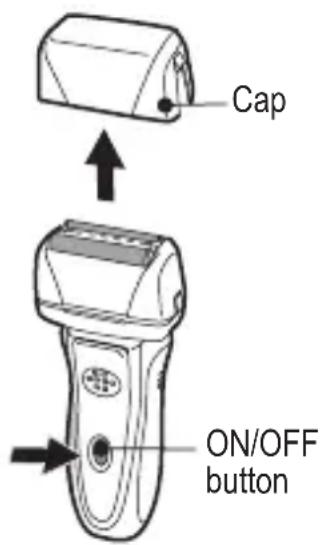
① Make sure that the shaver is off. To turn it off press the ON/OFF button. Put on the head cap.

The battery cannot be charged when the shaver is on.
② Insert the socket plug of the AC adaptor into the socket at the bottom of the shaver.

Before putting the plug of the AC adaptor into the socket of the shaver, make sure that the socket is completely dry to prevent any possible malfunction.
Power supply 100-240 V AC
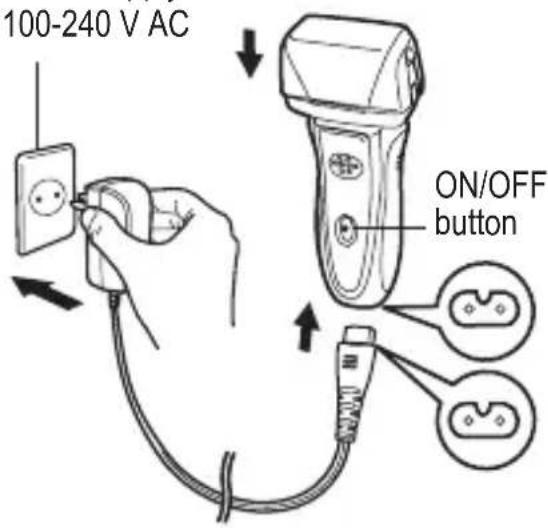
③ Insert the outlet plug of the AC adaptor into an appropriate outlet (see the rating plate on the AC adaptor).
- The shaver is fully charged in approximately 60 minutes. Charging may be completed in less than 60 minutes if the safety function works to prevent overcharge.
④ When charging is completed, unplug the AC adaptor from the outlet.
When unplugging the AC adaptor, do not pull the cord, as this may damage the AC adaptor. Be sure to hold the plug to pull it out.

On a fully charged battery the shaver will operate for approx. 40 minutes.
Battery level indicator
During charging:
The lights flash and then light up one by one from bottom to top indicating the battery level.
After full charge:
All the lights flash.
While shaving:
The lights go out one by one as the battery level decreases. When the battery is empty the "Empty" light comes on.
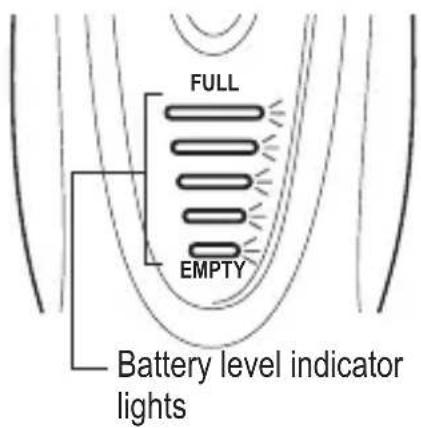

- To prevent possible malfunctions, before charging make sure that the plug and outlet are not damaged.
- While the shaver is charging, the shaver body or AC adaptor may emit a slight noise and/or become slightly warm. This is not a defect.
USING THE SHAVER WITH AC POWER SUPPLY
Check if the shaver is off. Insert the socket plug of the AC adaptor securely into the socket at the bottom of the shaver. Insert the outlet plug of the AC adaptor into the outlet. Turn on the shaver.

If the shaver will not operate by pressing the power switch immediately after the plugs are inserted, the rechargeable battery is completely depleted. In that case, turn off the shaver, put it away for 1 minute to charge the battery and turn it on again.

After use, be sure to turn off the shaver and then unplug the AC adaptor from the outlet and the socket of the shaver.

In a humid place, such as bathroom, do not use the shaver with an AC power supply.

When using the shaver with an AC power supply, do not use soap or shaving foam.

The energy stored in the rechargeable battery decreases even while the shaver is used with an AC power supply. Recharge the shaver once every three weeks.
USE

If the outer foil is deformed or damaged, replace it with a new one (see the "REPLACEMENT OF OUTER FOIL / INNER BLADE" section). Otherwise, it may scratch your face.
① Remove the cap and turn on the shaver by pressing the ON/OFF button.
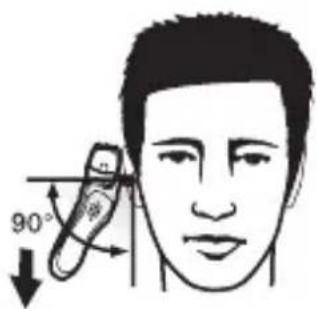
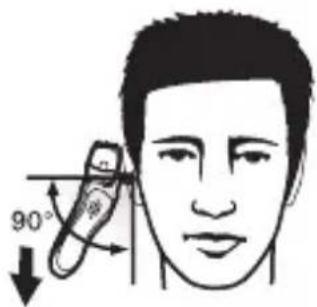
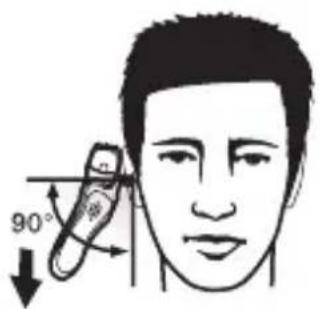
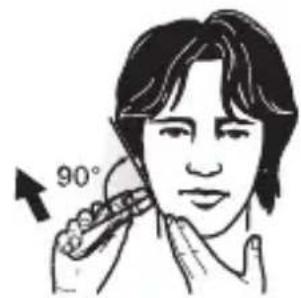
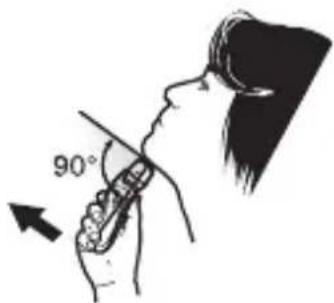
② Bring the outer foil in gentle contact with the skin at the right angle, stretch the skin and move the shaver gently upwards against the grain.
While shaving, take care not to push the outer foil too strongly against the skin. Otherwise, the outer foil will wear at a higher rate and become dull or damaged.
To shave delicate parts like the chin, pull up the slack of the skin by hand, and stroke upwards. When shaving the throat, lift the face upwards to thrust the throat out to pull the slack upwards.
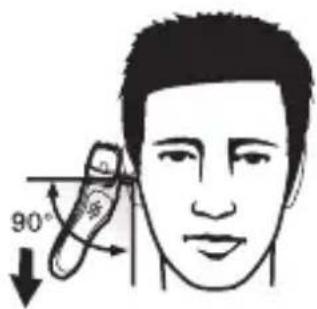
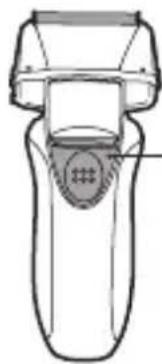
③ To use the trimming blade, slide the trimming blade button upwards. The trimming blade vibrates correspondingly with the inner blade.
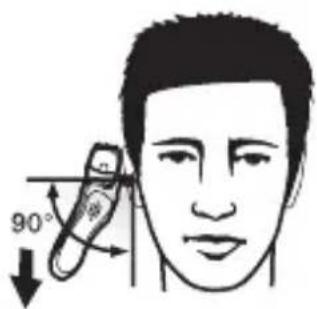
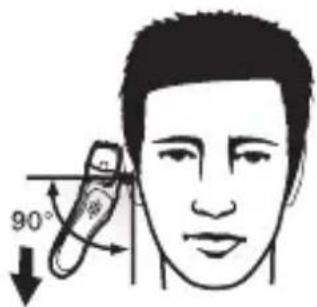
④ To cut sideburns, apply the trimming blade to the skin lightly at a right angle, and move the shaver gently downwards.
⑤ After use, turn off the shaver and clean it with the accessory brush (see the “CLEANING USING BRUSH” section). Be sure to put the cap on after cleaning.

Even if the charging indicator indicates that the shaver is empty and the shaver stops vibrating, never leave it with the power switch turned on.

The shaver can be used to shave with soap or shaving foam only when operated on the rechargeable battery and not on an AC power supply. After every use with soap or shaving foam, be sure to wash the shaver in water (see the “WASHING UNDER RUNNING WATER” section).
natural_image
Line drawing of a handheld device with a circular button on the handle (no text or symbols)
Trimming blade button
Cleaning and maintenance

Before any cleaning and/or maintenance activities, unplug the AC adaptor from the shaver.
WASHING UNDER RUNNING WATER
① Turn off the shaver. Press the outer foil unit release buttons on both sides of the shaver and remove the outer foil unit.
natural_image
Illustration of a hand holding a handheld device with two hands, showing internal components and motion lines (no text or symbols)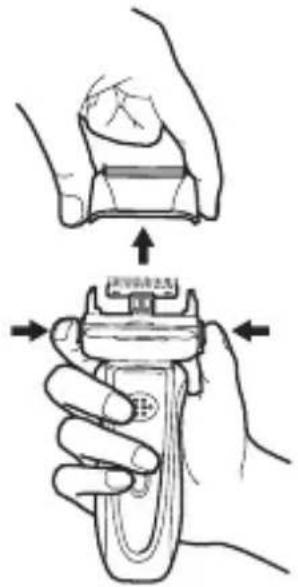
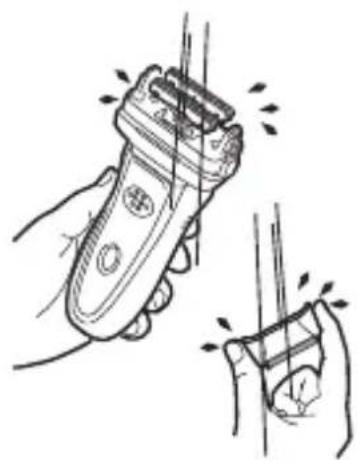
② Turn on the shaver and wash the blades in cold or lukewarm water. After washing, turn off the shaver and dry the blades (e.g. using a towel).
③ Place the shaver in an airy place to dry it.
natural_image
Illustration showing a hand holding a device with a spring-loaded handle, before and after a drop (no text or symbols)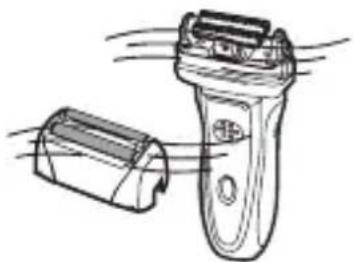
natural_image
Line drawing of a pair of electric shakers with motion lines indicating airflow (no text or symbols)④ Refit the outer foil unit, taking care not to touch the outer foil.
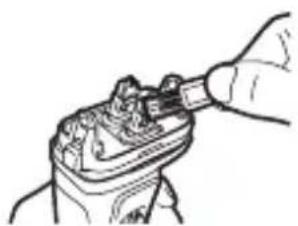
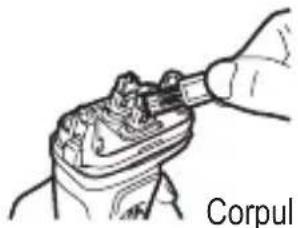
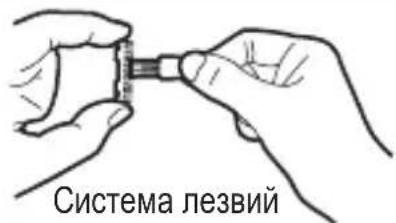
⑤ Apply shaver oil to the outer foil and trimmer.

Use the blade oil provided with the electric shaver.
⑥ Turn on the shaver for approximately 10 seconds and then wipe the residual oil from the outer foil (e.g. using a handkerchief).

Turn off the shaver before wiping the residual oil from the outer foil.
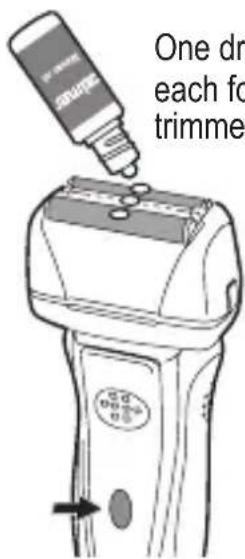
One drop on each foil and trimmer

Only for conservation purposes. Do not drink. Avoid contact with eses and skin. Keep away from children. Keep away from direct sunlight. Keep in dark storage.
CLEANING WITH BRUSH
① Before cleaning make sure that the shaver is off. Press the outer foil unit release buttons on both sides of the shaver and remove the outer foil unit.
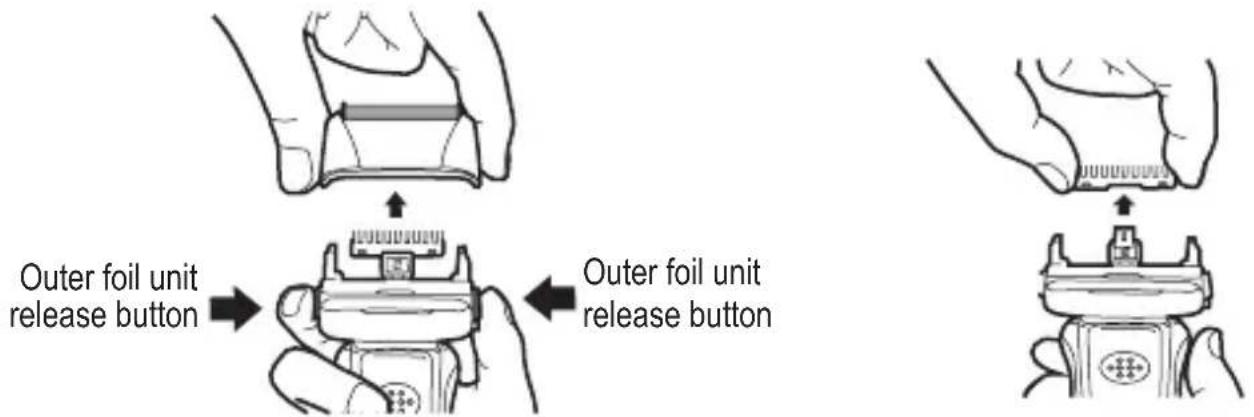
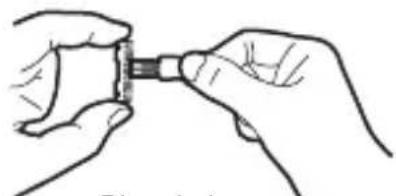
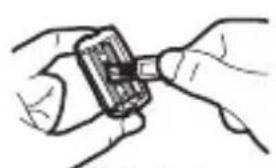
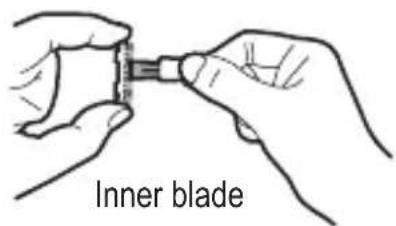
② Using the brush, clean the inside of the outer foil unit, the inner blade and the body case of the shaver.
To remove the inner blade, simply pull it upwards.

The blades are sharp and may cut your fingers. Take special care when removing and inserting the inner blade.
natural_image
Illustration of hands holding a small electronic device (no text or symbols visible)Outer foil
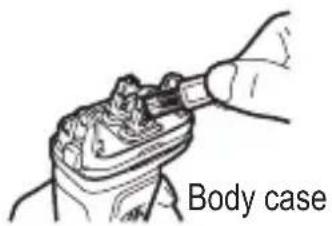
③ After cleaning, fit correctly the inner blade. Next, fit the outer foil unit, taking care not to touch the foil.

Poor shaving quality and abnormal sound may indicate that the outer foil unit is fitted incorrectly.
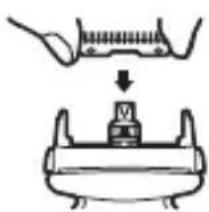
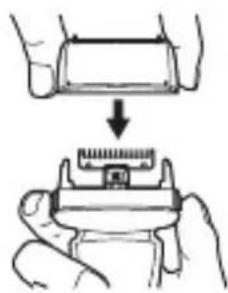
natural_image
Illustration of a hand holding a small electronic component, showing a step-down view from top to bottom (no text or symbols)
Do not remove the outer foil from the outer foil unit.
④ Before cleaning the trimming blade, turn off the shaver.
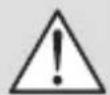
Check that the trimming blade is not moving when cleaning it.
⑤ Oil the outer foil.
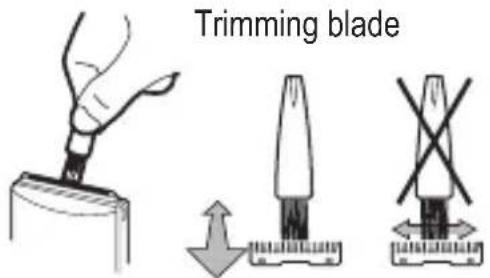
REPLACEMENT OF OUTER FOIL / INNER BLADE
The outer foil and the inner blade are consumables. In order to enjoy a comfortable clean shave, it is recommended that the outer foil and the inner blade be replaced with new ones in a set at least once a year. Use of foil and blade beyond their serviceable life may not only result in poor shaving performance but also damage such foil and blade to scratch your skin.

The above replacement period of the outer foil and the inner blade serves as a guideline only, and their serviceable lives vary greatly depending on the condition of use of each user. If you find them unable to give a good shave, damaged or deformed, replace them with new ones immediately.

Before replacing the outer foil or inner blade, be sure to turn off the shaver.
We recommend using only original ZELMER spare parts. Spare parts set no. SH2010111.
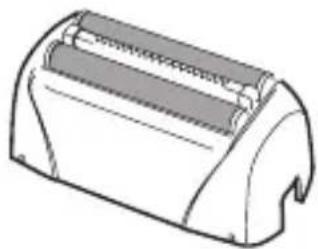
natural_image
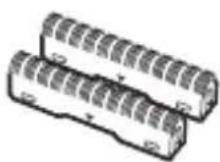
Line drawing of a mechanical device with a textured surface and a handle (no text or symbols)Outer foil unit Inner blade
Outer foil unit
① Press the outer foil unit release buttons on both sides of the shaver and remove the outer foil unit.
② Fit correctly a new outer foil unit (a click sound will indicate correct fitting).
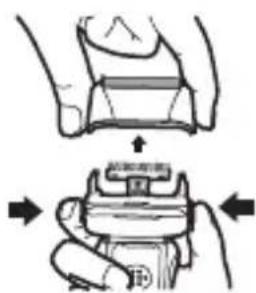
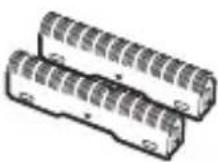
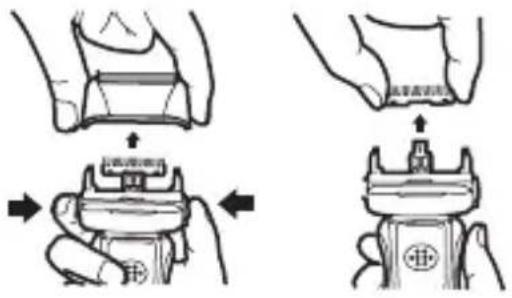
Inner blade
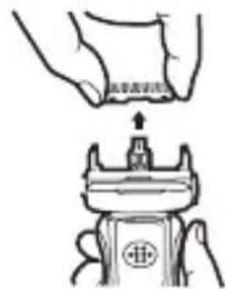
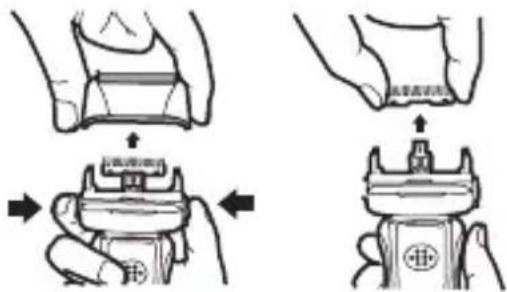
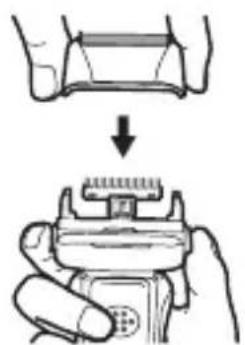
① Remove the outer foil unit (fig. 1).
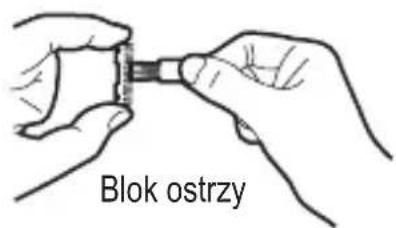
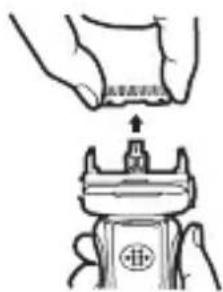
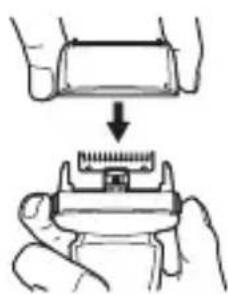
② Hold the sides of the inner blade with your fingers and pull it upwards (fig. 2).
③ Fit the new inner blade on the vibrator by pushing it downwards.
fig. 1 fig. 2

Be sure to set both inner blades. Otherwise, abnormal noise, injury or malfunction may result.
④ Fit the outer foil unit securely.
Ecology – protect the environment
Each user can contribute to protecting the environment. It is not difficult or too expensive. For this purpose, dispose of the carton and plastic packaging materials into appropriate waste paper and plastic (PE) recycling containers.
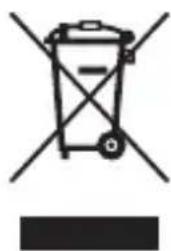
Batteries contain substances harmful to the environment. Do not dispose the appliance in household waste. Bring the battery to an official recycling centre.
At the end of its useful life, bring the appliance to an official waste collection site, as some of its components may be hazardous to the environment.
natural_image
Symbol of a trash bin with crossed x- and y-axes, no text or labels presentDo not dispose of together with domestic waste!
The manufacturer/importer does not accept any liability for any damages resulting from unintended use or improper handling.
The manufacturer/importer reserves his rights to modify the product any time in order to adjust it to law regulations, norms, directives, or due to construction, trade, aesthetic or other reasons, without notifying in advance.
Notes
Notes
Notes

natural_image
Hexagonal grid pattern with no text, numbers, or symbols visible
- PL
- Szanowni Klienci!
- Zespół folii tnącej
- Blok ostrzy
- Břitový blok
- Blok čepelí
- Kések blokkja
- Blocul de lame
- Блок лезвий
- Блок остриета
- Блок лез
- Operation and safety precautions
- DANGER! / WARNING!
- Risk of injury
- WARNING!
- Risk of property damage
- Product information user instructions
- Technical specification
- Elements and accessories
- Operation
- CHARGING
- Battery activation
- "Battery Memory Effect"
- Battery life
- Battery level indicator
- USING THE SHAVER WITH AC POWER SUPPLY
- USE
- Cleaning and maintenance
- WASHING UNDER RUNNING WATER
- CLEANING WITH BRUSH
- REPLACEMENT OF OUTER FOIL / INNER BLADE
- Outer foil unit
- Inner blade
- Ecology – protect the environment
- Notes
Brand : Zelmer
Model : SH2010
Category : Razor