Viva i701G - Tablet Allview - Free user manual and instructions
Find the device manual for free Viva i701G Allview in PDF.


| Product Type | Tablet |
| Brand | Allview |
| Model | Viva i701G |
| Display Size | 7 inches |
| Resolution | 1024 x 600 pixels |
| Operating System | Android |
| Processor | 1.3 GHz quad-core |
| RAM | 1 GB |
| Storage | 8 GB (expandable via microSD) |
| Cameras | Front 0.3 MP, Rear 2 MP |
| Connectivity | Wi-Fi 802.11 b/g/n, Bluetooth, 3G |
| Battery Capacity | 3000 mAh |
| Dimensions | 198 x 122 x 10.5 mm |
| Weight | 320 g |
| Power Supply | 5V 1A via microUSB |
| Main Functions | Web browsing, multimedia playback, app support, GPS, FM radio |
| Care and Cleaning | Wipe with a soft, dry cloth; avoid liquids and abrasives |
| Safety Precautions | Do not expose to water or extreme temperatures; use only approved charger |
| Spare Parts and Repairability | Battery and screen replaceable by authorized service centers |
| General Information | Released in 2015; supports up to 32 GB microSD |
Frequently Asked Questions - Viva i701G Allview
User questions about Viva i701G Allview
0 question about this device. Answer the ones you know or ask your own.
Ask a new question about this device
Download the instructions for your Tablet in PDF format for free! Find your manual Viva i701G - Allview and take your electronic device back in hand. On this page are published all the documents necessary for the use of your device. Viva i701G by Allview.
USER MANUAL Viva i701G Allview
natural_image
Front view of a black smartphone with a blank screen (no text or symbols visible)User manual....3
1 Front camera
2 Power button
3 MicroUSB
plug
4 Microphone
5 Earphone
jack
6 Volume
7 MicroSD slot
8 Speaker
9 Mini SIM slot
10 Main camera
PL
Thank you for purchasing our product.
These operational guidelines for the user, to ensure you a quick and convenient to use, read the instructions carefully before use.
This player is a specialized top quality portable player product with a series of remarkable functions. There will be no separate notice in the case of any change in content of this text.
This company will continue to provide new functions for the development of the product, and there will be no separate change in the case of any change in the product's performance and functions. While this unit is used as a mobile hard disk, this company will not be held liable for the security of files saved in the disk.
If the actual setup and the application methods are not identical to those as set forth in this manual, please access to the latest product information of this company's website.
En
Basic Operations
Power on
In the shutdown state, long press Power button
Power off
In the power on state, long press the Power key 3 seconds then pop-up device options, select "Power off" for shut down.
Sleep
Under normal operating conditions, short press the power button, into hibernation. Now, the screen will close. Short press the power button again to resume the normal mode. You can set the device to enter sleep mode automatically after a desired time of non-operation.
Power reset
If you experience a slow operation of the device in normal use, you cand shutdown and power on again to reset the operating system.
Screen time out
If you do not contact the player within the set time, and do no operate by the button, the screen will be automatically turned off.
In any state, short press Power button and for activation; Then skid the lock upwards to the green of spotted which will accomplish to access to the upper interface.
If it is necessary to deactivate the screen time out function, you can set the [Screen time out] option under [Display] function into "Never".
Using the Micro SD card
After this unit is connected with the computer, you will find two moving disks. The first one is the built-in memory disk for this unit and the other is the disk for the MicroSD card. If no card is inserted, the second disk can not be opened. This unit supports the extension of the MicroSD card from 128MB to 32GB.
Inserting and Pulling out the Micro SD card
Inserting:
Put the Micro SD card face up (side with words), and slightly force the card into the socket of the card, i.e. connecting the unit. Under this state, you can play the content in the Micro SD card.
Pulling:
Slightly push the Micro SD, and it will bounce by a section, and then you can take it out.
Caution:
Please perform inserting and pulling operation when power is off! Otherwise, it will lead to the loss or damage to the files within the unit! If no card is inserted, the computer will be unable to perform read and write operation for the disk notes of the later removable disk (Micro SD card).
Battery:
High capacity Polymer battery is used for this unit.
The duration available of the battery power depends on volume, types of playing files and operation of batteries. The player can be set up by the user as "user define power off time" or "display setup" to save batteries.
Charging:
This unit can be recharged by USB port, you can also use DC Charger:
- take out the DC charger, plug it into the wall outlet with AC 220V, then plug in the charging jack into the device usb plug.
Warnings for charging:
A new battery may be empty and not charged before you get the device.
If the device is not used for long time, it is better to charge it to full capacity every 2 or 3 months during storage.
Power adapter is a key component of the portable player, which play a crucial role in keeping the portable player's normal work and protecting your security when using
the player, a long-term customer surveys and after-sales service Practice shows that the malfunction of the portable player, in many cases were caused by using inappropriate accessories, in particular the power adapter.
Using the substandard power adapter will shorten the life of the portable player by considerably, the voltage instability will seriously affected the normal work of the portable player and bring permanent damage on the player's performance and reliability. Using the substandard power adapter will also reduce the vocal quality of the players, shutdown the player when you use it. In addition, using the substandard power adapter will cause combustion and explosion which will disserve the safety of the consumers.
Return to main interface
In any interface, touch icon " " to access to main interface.
Return to upper interface or menu
In any interface, touch icon "←", click the " : " key to access to upper interface or menu. You can also click short press the " " key to accomplish it.
Points for Attention
-
Do not use the player in exceptionally cold or hot, dusty, damp or dry environments;
-
Do not allow the player to fall down while using it.
-
Please charge your battery when:
A. Battery power icon shows an empty icon;
B. The system automatically shuts down and the power is soon off when you switch on the unit once again;
C. There is no response if you operate on any key;
-
Please do not disconnect power abruptly when the player is being formatted or in the process of uploading or downloading. Otherwise it may lead to the error in the program;
-
When this unit is used as a mobile disk, the user shall store or export files in the proper file management operation method. Any improper operation method may lead
to the loss of files, for which this Company will be held no liable;
- Please do not disassemble this unit by yourself. If there is any issue, please contact the dealer;
- There will be no separate notice in the case of any change in the functions and performance of this product;
To avoid the problems that might occur with the service shops approved by Visual Fan Ltd. (because Visual Fan reserves the right to stop the collaboration with any service shop which was previously approved and mentioned in the warranty card on the date on which the product batch was sold on the market), before taking a product to the service shop, please check the updated list of approved service shops on Allview website at the section: “Support&Service – Approved service”.
We do not assume the responsibility in case the product is used other way than stated in the user guide. Our company reserves the right to bring modifications in the content of the user guide without making this fact public.
All the modifications will be listed on the company website (www.allviewmobile.com) in the section dedicated to the specific product which is subject to modifications. The content of this guide may vary from the one existing in electronic format within the product. In such case the latter one will be taken into consideration.
Do not cover the antenna with your hand or other objects, failure to comply resulting in connectivity issues and rapid discharge of the battery.
All applications provided by third parties and installed in this device, may be modified and/or stopped at any moment. Visual Fan Ltd will not be responsible in any way for modifications of the services or content of these applications. Any request or question regarding third party applications may be addressed to owners of these applications.
For more product details visit www.allviewmobile.com
Settings
In the main menu, select the "Settings" option to be able to access the System Settings folder. Directly click can assess picture set options interface.
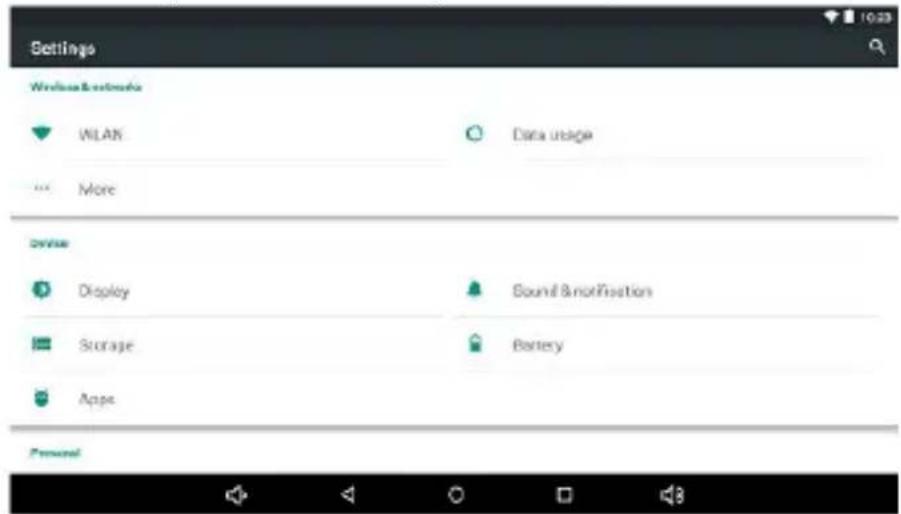
Description of functions:
1. WiFi
Wi-Fi: Open/close the wireless connection
2. Bluetooth
Wi-Fi: Open/close the bluetooth connection
3. Data usage
Display data usage
4. Sound setting
Volumes: set the notification, the media and the alarm clock volume.
Default notification: click to open notifications settings menu.
Touch sounds: if checked, the touch screen pressing will make a sound
5. Display settings
Brightness: adjust brightness of the screen.
Wallpaper: you can choose wallpaper from Gallery and Wallpaper
Sleep: Setting screensaver standby time.
When the device is in stand-by the Wi-Fi function will be deactivated to save
battery.
Font size: set the font size
6. Storage
Check the PMP memory and available storage.
7. Battery
Shows information about battery status and usage
8. Apps
Here you can view and manage the installed applications
9. Accounts and sync
Information and sync settings for your user accounts.
10. Location services
Contains settings for activation or deactivation of the localization options.
11. Security
Screen lock: set screen lock method: slide, pattern, PIN, password and so on many kinds of mechanisms.
Make passwords visible: if marked you may see the letters typed in the password box.
Unknown sources: allows you to install applications that do not come from Google Play ^™ store.
12. Language & input
Set language and area, input method etc.
13. Backup & reset
Can backup, restore the machine settings and data
14. Date & time
Set the date, time, time zone and time display format
15. Accessibility
Options for screen rotation, text magnifier, password spelling etc.
16. Developer options
Settings and options for Android™ developers.
17. About device
Check the machine software version and other information.
Connect the computer
This machine can be connected to a PC through the USB cable, by which the data is copied or deleted. The specific procedure is as follows.
- Connect the machine through the USB cable to the PC's USB port and you will get notification "USB already connected".
- Click "USB already connected" notice options, and choose the "open USB storage devices", and you can manage the files from the memory of your machine.
Factory data reset
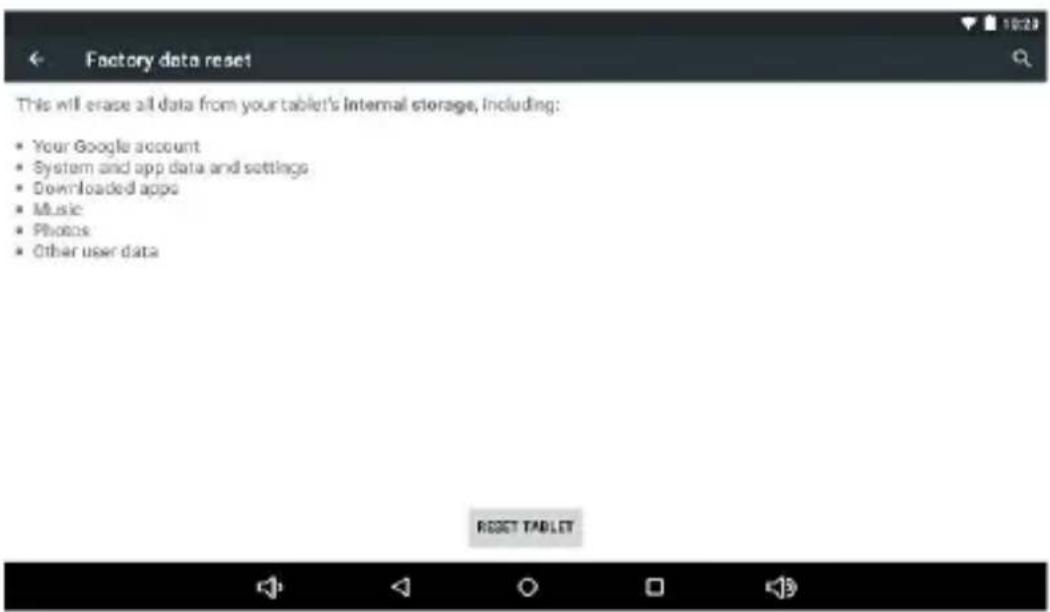
If this machine is infected, or third party software installed to run this machine is unusual, but through the recovery factory Settings, remove the third party software, and restore the state out by default. Into this machine "Settings"-" privacy ", select "Factory data reset" item, confirmed, will remove all of the data
Common troubleshooting
- What is the APK file? It and Android PMP have what relation?
A: APK is the abbreviation of Android Package. APK files can be installed and executed directly to Android system of the machine.
- How to get the APK application
A: You can download via PC-side installation, you can also Google Play store online to download and install.
- Why WIFI connection will interrupt
A: If set "screen time", when the player overtime in standby screen saver, WIFI function will be closed to save electricity purpose; When sensei player, WIFI function will be in about 5 seconds to resume automatic connection.
- Why some download APK program not working properly
A: Download the APK software, mostly by the user to development, without the platform compatibility testing, and part of the hardware and software for Android system version has a special requirements, so there could be downloaded APK documents not compatible, not the normal operation of the phenomenon, the player itself quality problems.
- Why does not the machine show charging state
A: When the battery is extremely low, need to use DC charger charging half an hour or more to show charging status
- Why can't realize the gravity induction function
A: This machine support gravity feeling function, can be through the shaking to switch the screen machine did show, but some of the application does not support the gravity induction function, it can't realize the screen of switching function, this is the software support question, the functionality of the player.
7. Players can't boot
1) Check the battery no electricity
2) Connect the ac adapter after inspection again
3) If after charging still unable to boot, please contact our customer service
8. Can't Hear the voice in the headset
1) Please check the volume is set to 0
2) Please check whether the connection headphones
9. Player charging abnormalities
1) Please confirm that the use of the equipment complies with the charger of the player charger requirements
2) Such as connection USB charging, please do not connect to computers lead USB interface
10. Why some downloaded video cannot be played
This device is compatible with formats of video files from internet but due to the fact that video formats may vary there is a possibility not to be compatible with some of them. In these cases it is recommended to use the PC and some video conversion software to get to a compatible format.
DECLARATION OF CONFORMITY
No 1398
We, S.C. Visual Fan S.R.L, with the social headquarters in Brasov, 61st Brazilor Street, post code 500313 Romania, registered at the Register of Commerce Brasov under nr. J08/818/2002, CUI RO14724950, as importer, ensure, guarantee and declare on own responsibility according to Art. 4 HG nr.1.022/2002 regarding the products and services regime, which could put in danger the life and health, security and labour protection, that the ALLVIEW Viva i701G product does not put in danger the life, safety of labour, does cause adverse environmental impacts and is according to:
-The 2011/65/UE Directive regarding the usage restrictions of some dangerous substances in the electronic and electrical equipments.
-The Directive regarding the radio and telecommunications equipments R&TTE 1999/5/CEE (HG 88/2003)
-The Directive regarding the assurance of low voltage equipment users 73/32/CEE, modified by the 93/68/CEE (HG457/2003) Directive.
-The Directive regarding the electromagnetic compatibility 89/336/CEE, modified by the 92/31/CEE si 93/68/CEE (HG982/2007); RoHS Directive: EN50581:2012
-The safety requirements of the European Directive 2001/95/EC and of the EN 60065:2002/A12:2011 si EN 60950-1:2006/ A1:2010 /A11:2009/A12:2011 standards, regarding the decibel level limit of the commercialized devices.
The product had been evaluated according to the following standards:
-Health: EN 50360:2001, EN 50361; EN 62209-1 : 2006
-Safety: EN 60950-1:2001+A11:2004; EMC EN 301 489-01 V1.6.1 (09-2005)
EN 301 489-07 V1.3.1 (11-2005); EN 301 489-17 V1.2.1 (08-2002)
-Radio spectrum: EN 301 511 V9.0.2 (03-2003); EN 300 328 V1.7.1 (10-2006)
The conformity assessment procedure was done according to the 1999/5/CEE Directive (of the Annex II of HG nr. 88/2003) the documentation being at S.C. Visual Fan S.R.L., Brasov, 61st Brazilor Street, post code 500313, Romania at it will be put at disposal on demand. The products conformity assessment procedure was fulfilled with the participation of the following institutions: Phoenix Test Lab GmbH
The product has the CE mark applied. The conformity declaration is available at www.allviewmobile.com.
CE 0700
SAR: 1,542 W/kg
Brasov
17.12.2015
Director
Cotuna Gheorghe

Allview Viva i701G
12. Schedule power on/off
Funkciók leírása:
1.WiFi

DEKLARACJA ZGODNOŚCI WE
No 1398
De luat in considerare
Rezolvarea problemelor uzuale
Opis funkcija:
1. WiFi
Wi-Fi: Otvaranje/zatvaranje bežične veze.
Wi-Fi podešavanja: dodirom na ikonicu "" možete unositi napredni set WIFI pozicija.
2. Prikazivanje datuma
Najčešća pitanja i utvrđivanje kvarova
- Šta je APK datoteka? Da li su ona i Android PMP povezani i na koji način?
Popisy funkcí:
This will erase all data from your tablet's internal storage, including:
- Your Google account
• System and app data and settings
• Downloaded apps
• Music - Photos
• Other user data
RESET TABLET


Android, Google, Google Play and other marks are trademarks of Google Inc.
Bulgarian (bg)
- PL
- Basic Operations
- Power on
- Power off
- Sleep
- Power reset
- Screen time out
- Using the Micro SD card
- Inserting and Pulling out the Micro SD card
- Inserting:
- Pulling:
- Caution:
- Battery:
- Charging:
- Warnings for charging:
- Return to main interface
- Return to upper interface or menu
- Points for Attention
- Settings
- Description of functions:
- WiFi
- Bluetooth
- Data usage
- Sound setting
- Display settings
- Storage
- Battery
- Apps
- Accounts and sync
- Location services
- Security
- Language & input
- Backup & reset
- Date & time
- Accessibility
- Developer options
- About device
- Connect the computer
- Factory data reset
- Common troubleshooting
- Players can't boot
- Can't Hear the voice in the headset
- Player charging abnormalities
- Why some downloaded video cannot be played
- DECLARATION OF CONFORMITY
- No 1398
- Allview Viva i701G
- Schedule power on/off
- Funkciók leírása:
- 1.WiFi
- DEKLARACJA ZGODNOŚCI WE
- De luat in considerare
- Rezolvarea problemelor uzuale
- Opis funkcija:
- Prikazivanje datuma
- Najčešća pitanja i utvrđivanje kvarova
- Popisy funkcí:
- Bulgarian (bg)
Brand : Allview
Model : Viva i701G
Category : Tablet