
IMAGERUNNER C1225IF - Imprimante multifonction laser CANON - Notice d'utilisation et mode d'emploi gratuit
Retrouvez gratuitement la notice de l'appareil IMAGERUNNER C1225IF CANON au format PDF.


| Type de produit | Imprimante multifonction laser couleur A4 |
| Fonctions principales | Impression, copie, numérisation, envoi, fax |
| Vitesse d'impression (NO/CO) | 25 ppm (A4 recto) / 25 ppm (A4 recto) |
| Résolution d'impression | Jusqu'à 2400 dpi équivalent × 600 dpi |
| Recto verso automatique | Oui, standard |
| Capacité papier maximale | 1200 feuilles (avec option) |
| Chargeur automatique de documents (DADF) | 50 feuilles |
| Écran tactile | Écran LCD couleur 8,9 cm (3,5 pouces) avec tactile et balayage |
| Connectivité réseau | Ethernet 1000Base-T / 100Base-TX / 10Base-T, USB 2.0 Hi-Speed |
| Protocoles réseau | TCP/IP (IPv4/IPv6), IPX/SPX |
| Impression mobile | Apple AirPrint, Mopria, applications mobiles Canon |
| Formats de numérisation | JPEG, TIFF, PDF, PDF compact, PDF consultable |
| Fax | Super G3 33,6 kbps, mémoire jusqu'à 512 pages |
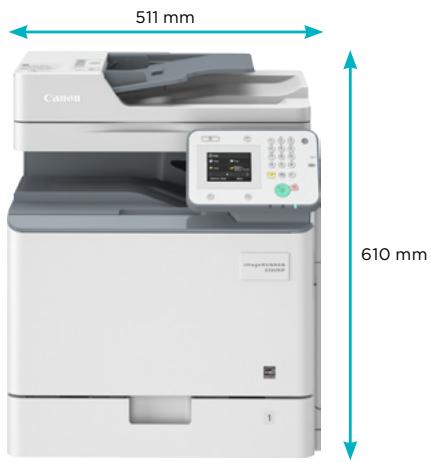
| Dimensions (L × P × H) | 511 mm × 549 mm × 610 mm |
| Poids | Environ 44 kg (avec toners) |
| Alimentation électrique | 220-240 V (±10 %), 50/60 Hz, 3,7 A |
| Consommation électrique (max) | Environ 1,5 kW |
| Consommation en veille | Environ 30 W |
| Consommation en sommeil | 1 W ou moins |
| Niveau sonore (actif) | 50 dB (LpAm) |
| Niveau sonore (veille) | Inférieur à 30 dB (inaudible) |
| Sécurité | Filtrage d'adresses IP/MAC, IPSec, SNMP v3.0, IEEE 802.1X, impression sécurisée |
| Consommables | Toner 34 (noir : 12 000 pages, CMY : 7 300 pages), tambour, bac à déchets |
FOIRE AUX QUESTIONS - IMAGERUNNER C1225IF CANON
Questions des utilisateurs sur IMAGERUNNER C1225IF CANON
0 question sur cet appareil. Repondez a celles que vous connaissez ou posez la votre.
Poser une nouvelle question sur cet appareil
Téléchargez la notice de votre Imprimante multifonction laser au format PDF gratuitement ! Retrouvez votre notice IMAGERUNNER C1225IF - CANON et reprennez votre appareil électronique en main. Sur cette page sont publiés tous les documents nécessaires à l'utilisation de votre appareil IMAGERUNNER C1225IF de la marque CANON.
MODE D'EMPLOI IMAGERUNNER C1225IF CANON

Productive and cost effective A4 colour multifunctional
The imageRUNNER C1225iF is a feature rich A4 colour multifunctional device, providing fast and efficient document handling 'out of the box' so you can focus on your business priorities.
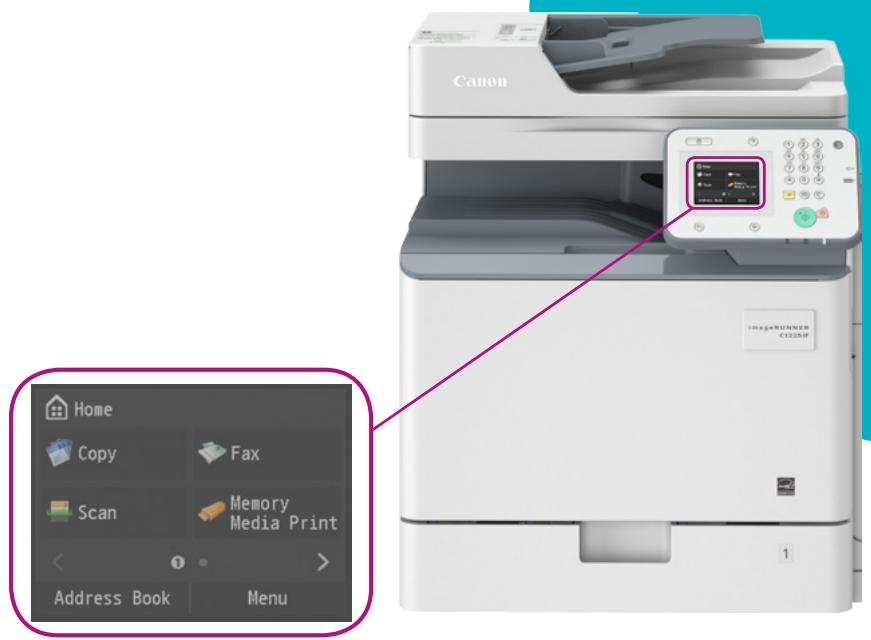
- Powerful A4 colour multifunctional with print, copy, colour scan, send and fax functionality, ideal for demanding small businesses
- Simple and user friendly operation with the 8.9 cm colour touch and swipe LCD display
- Canon's V^2 colour (Vivid and Vibrant) imaging technology ensures documents impress and stand out from the rest
- Seamlessly fits into your office environment with network connectivity and supporting IT standards such as PCL and Genuine Adobe PS
- Increase productivity with up to 1,100 sheet capacity and a Duplex Automatic Document Feeder (DADF)
-
Scan and Send documents directly to a variety of destinations including email and shared folder
-
Flexible mobile printing and scanning capabilities such as Apple AirPrint™, Mopria printing as well as mobile printing and scanning apps, support mobile worker efficiency
- Out of the box easy install; users can access the set-up guide via the user interface
- Consumables can be changed easily reducing down-time
- Standard toner included in the box giving up to 12 months colour printing1
- Giving you peace of mind with Canon's standard warranty
- Energy consumption as little as 1 watt in sleep mode
- Compact and efficient space saving design

PRINT

COPY

FAX

SCAN
Machine type
Available core functions
Printer Specifications
Print speed (BW/Colour)
Printing method
Print resolution
Double sided printing
Direct print
Printing from mobiles or
internet-connected devices
and cloud-based services
Paper input (Standard)
Paper input (Option)
Maximum paper input
capacity
Paper output capacity
Finishing capabilities
Supported media types
Supported media sizes
Supported media weights
Page Description
Language(s)
Fonts
Operating System
compatibility
Copy Specifications
Copy speed (BW/Colour)
First Copy Output Time
(FCOT) (BW/Colour)
Copy resolution
Multiple copy
Reduction/Enlargement
Scan Specifications
Optional/Standard
Supported media size/s
Supported media weight/s
Colour A4 Laser Multifunctional (Reader / Printer standard)
Print, Copy, Scan, Send and Fax standard for C1225iF
25/25ppm (A4 Single-sided), 26/26ppm (A5 Single-sided),
25/25ppm (A4 Double-sided), 26/26ppm (A5 Double-sided)
Colour Laser Beam Printing
2400 dpi equivalent x 600 dpi, 600 dpi x 600 dpi
Automatic (Standard)
Direct printing available from USB memory key
Supported file types: JPEG,TIFF,PDF
A range of software is available to provide printing from mobile
or internet-connected devices. Please contact your sales
representative for further information.
1 x 550-sheet (80 gsm) cassette, 100-sheet (80 gsm)
multi-purpose tray
1 x 550-sheet cassette (80 gsm) (Cassette Feeding Unit-AJ1)
1200 sheets (80 gsm)
250 sheets (80 gsm)
Standard: Collate, Group
Cassette/s:
Thin paper, Plain paper, Recycled paper, Colour paper, Heavy
paper, Pre-punched paper, Envelopes*
*Envelope support via standard cassette 1 only.
Multi-purpose tray:
Thin paper, Plain paper, Recycled paper, Colour paper, Heavy
paper, Pre-punched paper, Transparency, Labels, Envelopes (10-13) (26-18), M-reading (29-35 P/L).
No.10 (COMIO), Monarch, ISO-C5, DL)
Paper cassette 1:
Standard size: A4, A5, B5 Legal, Letter, Executive, Statement, Enlarged (A1, A2, B3, C3, D3)
Envelopes (No.IO (COMIO), Monarch, DL)
Custom size (98.4 mm to 216 mm X 190.5 mm to 355.6 mm)
Paper cassettes 2:
Standard size: A4, A5, B5, Legal, Letter, Executive, Statement
Custom size (98.4 mm to 216 mm X 190.5 mm to 355.6 mm)
Multi-purpose tray:
Standard size: A4, A5, B5, Legal, Letter, Executive, Statement
Custom size (98.4 mm to 216 mm x 148 mm to 355.6 mm),
Envelopes (No.10 (COM10), Monarch, ISO-C5,DL)
Cassette/s:60 to 163 gsm
Multi-purpose tray: 60 to 220 gsm
Duplex: 60 to 163 gsm
UFRII, PCL5c/6, Adobe PostScript Level 3
(Standard for C1225iF)
PCL fonts: 93 Roman, 10 Bitmap, 2 OCR fonts
PS fonts: 136 Roman fonts
UFRII: Windows XP / Server 2003 / Vista / Server 2008 /
Windows 7 / Server 2008R2 / Windows 8 / Windows 8.1 / Server
2012/Server 2012R2, MAC OS X (10.5.8 or later)
PCL: Windows XP / Server 2003 / Vista / Server 2008 /
Windows 7 / Server 2008 R2 / Windows 8 / Windows 8.1/Server 2012 / Server 2012R2
PS: Windows XP / Server 2003 / Vista / Server 2008 / Windows
7 / Server 2008 R2 / Windows8/Windows 8.1 / Server 2012 /
Server 2012R2, MAC OS X (10.5.8 or later)
PPD: MAC OS 9.1 or later, MAC OS X (10.3.9 or later), Windows
XP / Windows Vista / Windows 7 / Windows 8/ Windows 8.1
Please refer to http://software.canon-europe.com/ for
availability of print solutions for other operating systems and
environments including AS/400, UNIX, Linux and Citrix. Some of
these solutions are chargeable. SAP Device Types are available via the SAP Market Place
Please refer to the quoted print speeds.
8.4 sec / 10.5 sec
Reading: 600 dpi x 600 dpi
1 Printing: 600 dpi x 600 dpi
Up to 999 copies
Zoom: 25 - 400 % in 1% increments
Fixed Zoom Ratio: 25%, 50%, 70%, 100%, 141%, 200v%, 400%
Standard on all models (DADF 50 sheets)
A4, A5, B5, Custom sizes: 140mm to 216mm× 128mm to
356 mm (when fed through the DADF)
Single-sided scanning: 50 to 105 gsm (DADF)
Double-sided scanning: 64 to 105 gsm (DADF)
Scan resolution
Double sided scanning
Scan speed
Scan methods
Pull scan specifications
Windows Vista/Windows 7/Windows 8/Window8.1
Mac Scan (TWAIN only)
Mac OS X 10.5.8 or later
*The drivers are available via http://software.canon-europe.com.
Send Specifications
Optional/Standard
Send resolution
Destinations
Address Book/Speed dials
File formats
Optional Universal Send Feature Sets
Fax Specifications
Optional/Standard
Modem speed
Fax resolution
Fax memory
Speed dials
Group dials / destinations
Sequential broadcast
Memory backup
Other features
General Specifications
Warm-up time
Recovery from sleep mode
Interface type
Network protocols
Memory
Control panel
Dimensions (W× D× H)
Installation space (W x D)
Weight
Operating environment
Power source
Power consumption
BW Scan: 100 dpi, 150 dpi, 200 dpi × 100 dpi, 200 dpi, 300 dpi,
200 dpi x 400 dpi, 400 dpi, 600 dpi
CL Scan: 100 dpi, 150 dpi, 200 dpi x 100 dpi, 200 dpi, 300 dpi
2-sided to 2-sided (Automatic)
BW single-sided: 25 ipm (A4, 300 dpi X 300 dpi),
BW double-sided: 9 ipm (A4, 300 dpi X 300 dpi)
CL single-sided: 25 ipm (A4, 300 dpi x 300 dpi)
RL single-sided: 12 dpi (A1, 700 dpi x 700 dpi)
CE double sided: 5 ipm (A4, 306 dpi x 306 dpi)
Push Scan: Colour Send functionality is standard
Pull Scan: I WAIN/WIA Pull scanning available on all models.
Scan to USB Memory Key: Available on all models
scan to mobile , internet-connected devices . A range ofsolutions is available to provide coping to mobile
solutions is available to provide scanning to mobile devices, internet connected devices depending on your requirement
Please contact your sales representative for further information.
TWAIN/WIA Pull scanning
Windows XP
Windows Vista/Windows 7/Windows 8/Window8.1
Mac Scan (TWAIN only)
Mac OS X 10.5.8 or later
*The drivers are available via http://software.canon-europe.com.
Standard on all models
100 dpi, 150 dpi, 200 dpi × 100 dpi, 200 dpi, 300 dpi
200 dpi x 400 dpi, 400 dpi, 600 dpi
E-Mail, Fax (not available for C1225), PC (SMB, FTP)
LDAP (Max. 50 searchable).
Local (Max. 300 including 281 Speed dials)
SMB:JPEG,TIFF,PDF,Compact PDF,Searchable PDF
E-mail : PDF, Compact PDF, Searchable PDF
Send PDF Security Feature Set-E1@E: Send encrypted PDF and add digital device signature to PDF files.
Standard for C1225iF
Super G3 33.6 kbps (Up to 3 seconds per page!)
Standard: 200 x 100 dpi
Fine: 200 x 200 dpi
Super fine: 200 × 400 dpi
Ultra fine: 400 x 400 dpi
Up to 512 pages
Max. 281
Max. 199 dials
Max. 310 addresses
Yes
Fax Forwarding, Dual Access, PC Fax (TX only)
Approx. 34 seconds from power ON
10 seconds or less
USB 2.0 Hi-Speed,1000BaseT / 100Base-TX / 10Base-T, 1x USB
Host (Front), 1 x USB Host (Rear), 1 x USB device
Recommended third party wireless solution is Silex SX-BR-4600
WAN. For more details please refer to www.silex-europe.com
TCP/IP* (LPD / Port 9100 / WSD / IPP / IPPS / SMB / FTP),
IPX/SPX (NDS, Bindery)
*IPv4/IPv6 support
1.0 GB
QVGA Color LCD 8.9 cm (3.5 inch) touch / swipe
supported display
standard: 511 mm x 5
Option:
With Cassette Feeding Unit-A.J1: 511 mm x 549 mm x 1035 mm
852mm×843mm
(Main unit + Multi-purpose tray open + Cassette drawers open)
Approx. 44kg including toner
Temperature: 10 to 30^ (50 to 86^ )
Humidity: 20 to 80% RH (no condensation)
220 - 240 V (±10 %), 50/60 Hz (±2 Hz), 3.7 Amp
Maximum: Approx. 1.5 KW
Standby: Approx. 30 W
Sleep mode: Approx. 1.0 W or less
Time to put the device to sleep mode : 60 sec
Typical Electricity Consumption (TEC) rating ^3 : 0.8 kWh
Only for C1225 (non Fax model)
Plugin-off: 0.5W or less (Normal mode)
Time to put the device to plugin-off: 4 hours
Noise levels
Sound Pressure
(reference data, LpAm,
Bystander's position
Software and printer
management
Security features
Consumables
Toner bottle
Sound Pressure Noise Levels:
Active: 50 dB
Standby: Inaudible (Less than 30dB)
eMaintenance: embedded RDS allows remote eMaintenance
services such as meter capture, automatic consumables
management and remote diagnostics.
Remote Firmware System (GDLS):
Allows the remote distribution of firmware.
Remote User Interface (RUI): Web-based interface to each
device that helps to provide remote device management and control.
Canon Driver Configuration Tool: A utility for changing the
factory default settings of Canon print drivers
Standard:
IP/Mac Address Filtering, IPSEC, SNMP V3.0, IEEE 802.1X
Secured Print, Department ID
Optional: Send PDF Security Feature Set-E1@E
Toner 34 Black / Cyan / Magenta / Yellow Toner
(Yield: BK 12,000 / CMY 7,300 pages)
Specifications for options
Cassette feeding unit
Hardware accessories 1
Print controller accessories
Document security
accessories
Other options
Footnotes
Based on ITU-T Standard Chart No.1
^2 I watt sleep mode may not be possible in all circumstances. Certain network configurations and options may prevent the device from entering deep sleep mode. Please refer to the user guide for more information
3 Typical Electricity Consumption (TEC) rating represents the typical electricity consumed by a product during 1 week, measured in kilowatt-hours (kWh). The test methodology is defined by Energy Star (http://www.eu-energystar.org).
4 Declared noise emission in accordance with ISO 7779
^5 Based on 5% coverage (A4)
All specifications subject to change without notice
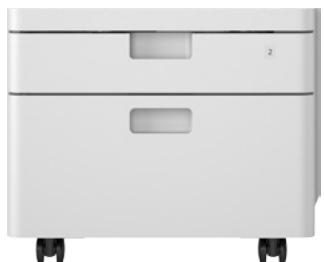
Name: Cassette Feeding Unit-AJ1
Description: Optional cassette feeding unit with 1 x 550 sheets paper capacity. Takes the cassette paper capacity up to 1,200 sheets.
Dimensions (W× D× H) : 511 mm x 508 mm x 425 mm
Weight: Approx. 15 kg
HANDSET-J1 EUR/HANDSET-J1 SA
BARCODE PRINTING KIT-D1@E: Enables barcode printing via jet caps technology.
Send PDF Security Feature Set-E1@E: Send encrypted PDF and add digital device signature to PDF files.
DrumUnit034(BK/C/M/Y)
Waste Toner Box WT-A3:
IRC1225IF
511 mm × 549 mm × 610 mm
Cassette Feeding Unit-AJ1
425mm
ance with ISO 7779.
SUPER
G3


Adobe PostScript 3

SAP
Printer Vendor
Solution

COLORON DEMAND
Canon Inc.
canonical.com
Canon Europe
canonical-europe.com
English edition
© Canon Europa N.V.,2014
Canon (UK) Ltd
Woodhatch
Reigate
Surrey RH2 8BF
Telephone no 01737 220000
Facsimile 01737 220022
canon.co.uk
Canon Ireland
3006 Lake Drive
Citywest, Saggart
Co.Dublin, Ireland
Telephone No: 01 2052400
Facsimile No: 012052525
canon.ie
Marque : CANON
Modèle : IMAGERUNNER C1225IF
Catégorie : Imprimante multifonction laser