
MCD 30 - Enceinte Bluetooth GRUNDIG - Notice d'utilisation et mode d'emploi gratuit
Retrouvez gratuitement la notice de l'appareil MCD 30 GRUNDIG au format PDF.
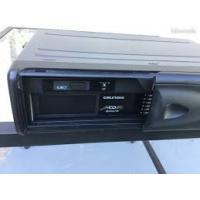


| Type de produit | Changeur CD 6 disques pour autoradio |
| Marque | Grundig |
| Modèle | MCD 30 / MCD 36 |
| Alimentation | 12 V CC, négative à la masse |
| Compatibilité disques | CD 12 cm et CD 8 cm (avec adaptateur) |
| Capacité | 6 disques |
| Processeur audio | 1 bit intégral |
| Positions d'installation | Horizontale, verticale, à 45°, suspendue |
| Plateau anti-vibration | Intégré, réglable selon la position d'installation |
| Connectique | Câble de liaison pour autoradio compatible |
| Protection | Coupe-circuit en cas de température excessive |
| Fusible | Remplacement par fusible de calibre identique |
| Nettoyage des disques | Chiffon doux, du centre vers l'extérieur |
| Produits interdits | Sprays, benzine, diluants |
| Condensation | Retirer le magazine et attendre 1 heure |
| Vis de transport | À retirer avant installation, 3 vis sous l'appareil |
| Magazine | Amovible, éjection par bouton |
| Température de fonctionnement | Éviter températures extrêmes ; protection thermique |
FOIRE AUX QUESTIONS - MCD 30 GRUNDIG
Questions des utilisateurs sur MCD 30 GRUNDIG
0 question sur cet appareil. Repondez a celles que vous connaissez ou posez la votre.
Poser une nouvelle question sur cet appareil
Téléchargez la notice de votre Enceinte Bluetooth au format PDF gratuitement ! Retrouvez votre notice MCD 30 - GRUNDIG et reprennez votre appareil électronique en main. Sur cette page sont publiés tous les documents nécessaires à l'utilisation de votre appareil MCD 30 de la marque GRUNDIG.
MODE D'EMPLOI MCD 30 GRUNDIG
GRUNDIG
MCD 30/MCD 36
MULTI COMPACT DISC CHANGER 6-DISC-1 BIT INTEGRAL PROCESSING
Sommaire
Conseils pour un fonctionnement correct et sûr 2
Utilisation du magasin 3
Chargement d'un disque 3
Installation du magasin 3
Précautions de manipulation des disques 4
Avec les CD de 8 cm 4
Rangement des adaptateurs pour CD de 8 cm 4
Avec les nouveaux disques 4
Pièces d'installation 5
Interrupteur ID (identité) pour le changeur de CD 5
Avant d'installer l'appareil 6
Vis de verrouillage du transport 6
Précautions d'installation et de câblage 6
Position de la plaque antivibratile intégrée 7
Câblage 7
Installation 8
Procédure d'installation sur moquette (position horizontale) 8
Procédure d'installation sur moquette (position verticale) 9
Procédure d'installation sur moquette (à un angle de 45°) 10
Procédure d'installation (position suspendue) 11
Manipulation des disques 12
Dépannage 13
Conseils pour un fonctionnement correct et sûr
Ce changeur de CD est conçu pour fonctionner uniquement sur des systèmes à courant continu de 12 volts avec mise à la masse négative. L'appareil ne peut pas être utilisé sur des systèmes de 24 volts ou à mise à la masse positive.
À des températures très élevées ou très basses, il peut arriver que la radio ne fonctionne pas correctement. Un circuit de protection contre les surcharges réagit si la température atteint une valeur limite spécifiée. L'appareil s'éteint alors automatiquement. Dans ce cas, ouvrez la fenêtre de la voiture ou allumez le chauffage (climatisation) et attendez que la température redevienne conforme aux conditions de fonctionnement admissibles.
Condensation
De l'humidité peut se condenser sur la lentille laser du changeur de CD pendant les jours de pluie ou humides, ou juste après la mise en marche du chauffage dans la voiture. Si cela se produit, l'appareil ne fonctionnera pas correctement. Pour remédier à ce problème, retirez le magasin de l'appareil et attendez environ une heure. Pendant ce temps, l'humidité s'évaporera et l'appareil fonctionnera normalement.
Retirez le magasin de l'appareil lorsqu'il n'est pas utilisé par temps chaud et que le changeur de CD n'est pas utilisé pendant de longues périodes.
Lorsque vous utilisez des CD de 8 cm, utilisez un adaptateur pour CD de 8 cm conforme aux normes CD et assurez-vous de charger les CD dans les plateaux n° 1, 3 et 5 (plateaux gris). Charger des CD dans d'autres plateaux entraînera un dysfonctionnement.
Utilisation du magasin
Chargement d'un disque
Saisissez la languette du plateau à disques du magasin et tirez un seul plateau.
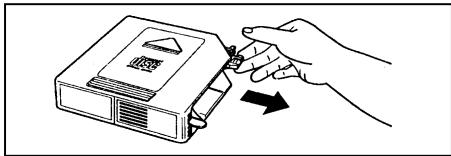
Placez le disque sur le plateau avec sa surface de lecture vers le haut (surface de l'étiquette vers le bas).
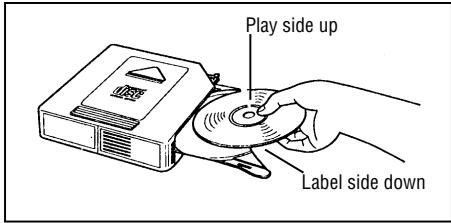
- Chaque plateau ne peut contenir qu'un seul disque. "E-07" apparaît environ 8 secondes si le disque est placé à l'envers.
Appuyez sur la languette du plateau à disques pour ranger le plateau dans le magasin.
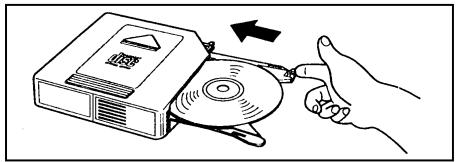
- Jusqu'à six disques peuvent être chargés.
- Utilisez l'adaptateur pour CD de 8 cm pour les disques de 8 cm. (Voir page 4).
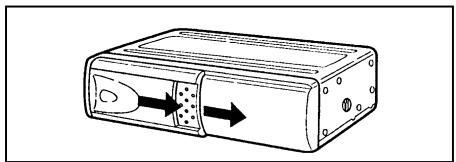
Installation du magasin
Faites glisser la porte vers la droite.
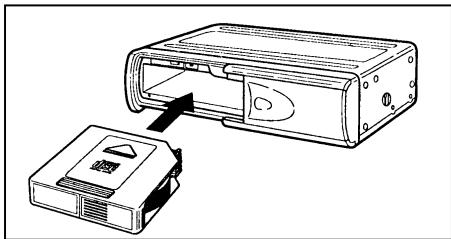
Vérifiez d'abord que le magasin contenant les disques a son côté supérieur orienté vers le haut et qu'il est pointé dans la bonne direction pour l'installation. Poussez-le jusqu'à ce qu'il s'enclenche, indiquant qu'il est maintenant verrouillé.
- Lorsque le magasin est utilisé pour la première fois, il ne se verrouillera pas en place à moins que l'alimentation électrique n'ait été connectée.
Éjection du chargeur
Le chargeur est éjecté en appuyant sur le bouton d'éjection ().
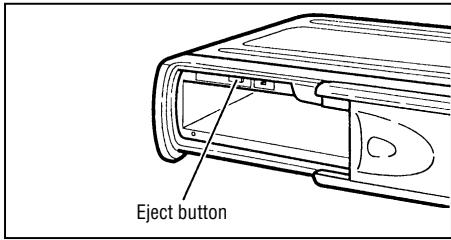
Remarques :
Assurez-vous absolument de fermer le volet après avoir inséré ou éjecté le chargeur. La poussière ou la saleté qui s'introduit à l'intérieur peut provoquer un dysfonctionnement de l'appareil.
Précautions concernant la manipulation des disques
Avec les CD de 8 cm
Lors de l'utilisation de CD de 8 cm, utilisez un adaptateur pour CD de 8 cm conforme aux normes CD et assurez-vous de charger les CD dans les plateaux n° 1, 3 et 5 (plateaux gris). Charger des CD dans d'autres plateaux entraînera un dysfonctionnement.
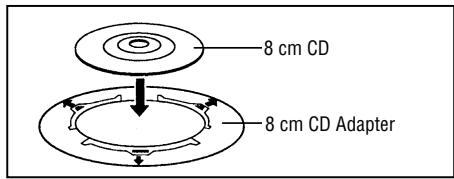
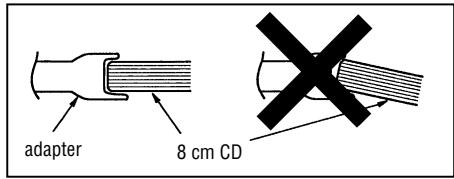
Assurez-vous de fixer correctement le disque sur les ergots prévus sur l'adaptateur.
Si le disque n'est pas fixé correctement, il peut se détacher à l'intérieur du chargeur ou du mécanisme de lecture, rendant l'appareil inutilisable.
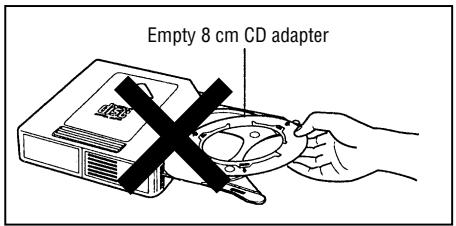
Rangement des adaptateurs pour CD de 8 cm
En aucun cas, un adaptateur pour CD de 8 cm vide ne doit être chargé dans le chargeur.
Si cet avertissement n'est pas respecté, l'adaptateur restera à l'intérieur du mécanisme, rendant l'appareil inutilisable.
AVERTISSEMENT
Bien que des films de protection soient commercialisés comme accessoires pour CD, l'utilisation de ces produits entraînera des dysfonctionnements et doit être absolument évitée.
Avec les nouveaux disques
Les symptômes décrits ci-dessous apparaissent parfois lors de l'utilisation de nouveaux disques.
- Le disque n'est pas lu même lorsqu'il est chargé. L'opération passe au disque suivant avant que le premier disque n'ait eu la chance d'être lu.
- Le même disque est lu encore et encore.
- Le disque désigné n'est pas lu.
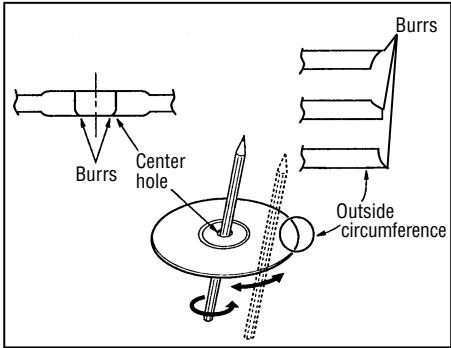
Ces symptômes apparaissent lorsqu'il y a des bavures sur le trou central ou la circonférence extérieure du disque et, par conséquent, le disque n'a pas été chargé correctement ou le disque s'accroche à quelque chose à l'intérieur du magasin.
Dans de tels cas, retirez les bavures à l'aide d'un stylo à bille ou d'un outil similaire, comme indiqué sur la figure ci-dessous.
Installation des pièces
Interrupteur d'identification (ID)
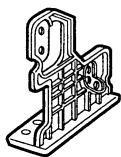
Support (G)
X1
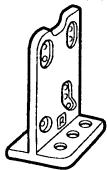
Support (D)
X1
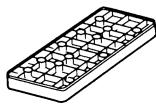
Support (B)
X2
Boulon hexagonal (M6 x 20)
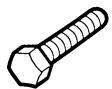
X4
Boulon hexagonal avec rondelle
(M5 x 8)

X4
Écrou (M6)

X4
Vis à tôle (M5 x 12)

X4
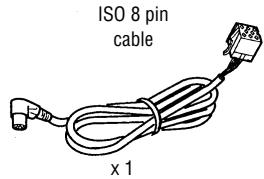
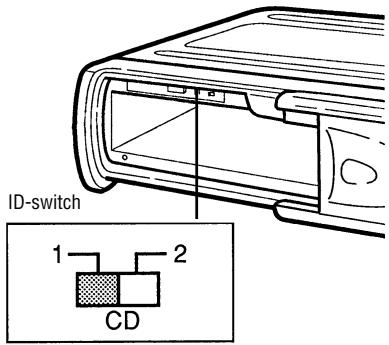
Le commutateur ID doit être réglé sur la position « 1 ».
Avant d'installer l'appareil
Vis de verrouillage de transport
Le mécanisme du changeur de CD est « verrouillé » en place pendant l'expédition par les vis de transport.
Assurez-vous de retirer les vis avant l'installation.
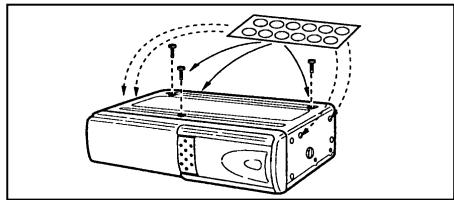
Attention :
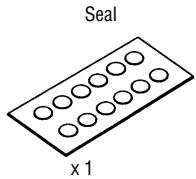
Après avoir retiré les vis de verrouillage de transport, placez les joints fournis sur les trous de vis. Ces joints servent à empêcher la poussière, qui pourrait provoquer un dysfonctionnement, de pénétrer dans l'appareil.
Précautions d'installation et de câblage
Pour éviter un court-circuit :
- Assurez-vous de couper le contact et de débrancher la borne négative (-) de la batterie avant l'installation.
Remarque :
Si le changeur doit être installé dans une voiture équipée d'un ordinateur de bord ou de navigation, ne débranchez pas le câble de la batterie. Si le câble est débranché, la mémoire de l'ordinateur peut être perdue. Dans ces conditions, soyez particulièrement prudent pour éviter tout court-circuit pendant l'installation.
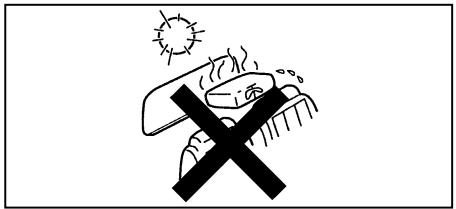
N'installez pas l'appareil aux endroits suivants :
- Endroits exposés à la lumière directe du soleil.
- Endroits où l'air chaud est évacué par le chauffage de la voiture.
- Lorsqu'une installation correcte n'est pas possible et là où de fortes vibrations sont générées.
- Assurez-vous d'utiliser les supports et les vis fournis.
- Lors de l'installation de l'appareil, n'utilisez pas de vis faisant partie du système de freinage ou de direction.
Cet appareil ne peut être installé que de la manière autorisée (sur le côté, sur l'extrémité, à un angle de 45° ou suspendu). L'installer avec le côté vers le bas ou à l'envers peut provoquer un dysfonctionnement.
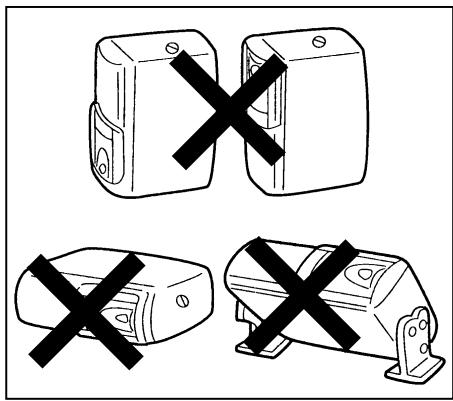
Avant d'installer l'appareil
Câblage
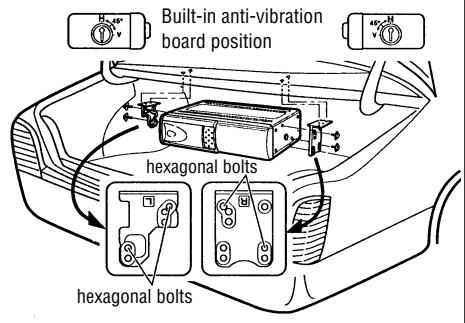
Position de la plaque antivibratoire intégrée
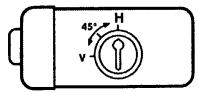
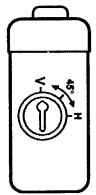
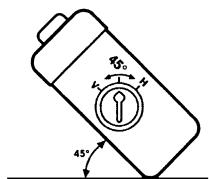
Cette unité peut être installée horizontalement (suspendue), verticalement et à un angle de 45°. Une fois la position d'installation décidée, il est nécessaire de régler la position de la plaque antivibration intégrée à l'intérieur de l'unité. Veuillez effectuer cette opération avant de suivre la procédure ci-dessous. Les vibrations peuvent provoquer des sauts de disque si l'unité est utilisée avant d'avoir correctement réglé la plaque antivibration. - Au moment de l'expédition, la plaque antivibration intégrée est réglée pour une installation horizontale "H". - Les plaques antivibration intégrées se trouvent des deux côtés, gauche et droit. - Réglez la position de la plaque antivibration avec un tournevis avant de fixer les supports.
Pour une installation horizontale ou suspendue :
Vérifiez que la plaque antivibration intégrée est réglée sur la position "H".
Pour une installation verticale :
La plaque antivibration intégrée doit être réglée sur la position "V".
Pour une installation à un angle de 45° :
La plaque antivibration intégrée doit être réglée sur la position "45".
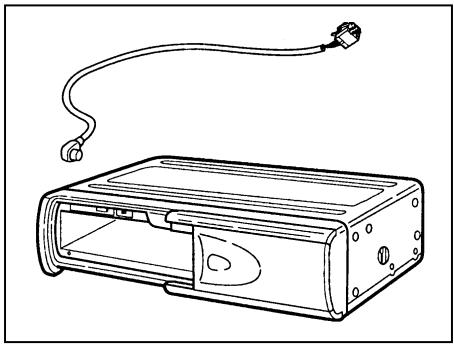
Connectez le changeur de CD au câble fourni à un autoradio équipé en conséquence (voir le manuel d'instructions) :
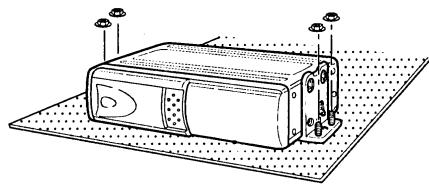
Procédure d'installation sur moquette (position horizontale)
1 - Vérifiez que les plaques antivibration intégrées des côtés gauche et droit sont réglées sur la position d'installation horizontale "H".
- Fixez le support (L) et le support (R) à l'aide des boulons hexagonaux (M5 x 8).
- Fixez les supports (L) et (R) à leurs supports respectifs (B) à l'aide des boulons hexagonaux (M6 x 20) et des écrous hexagonaux (M6).
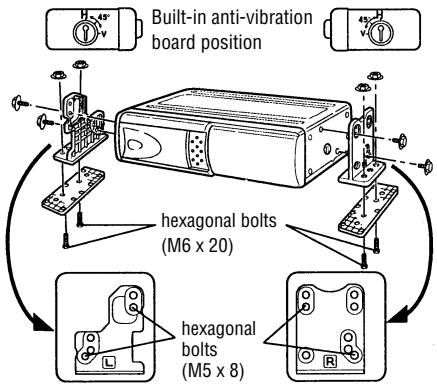
2 - Repliez la moquette et déterminez où fixer l'unité.
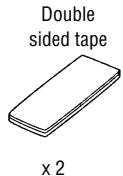
- Collez le ruban adhésif double face fourni sous les supports (B) et retirez le papier protecteur.
- Fixez l'unité au sol en appuyant fermement.
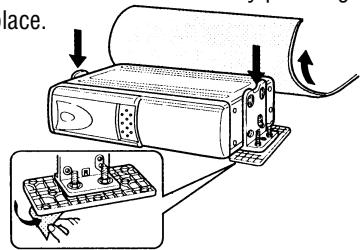
3 - Retirer les écrous hexagonaux et déposer le changeur.
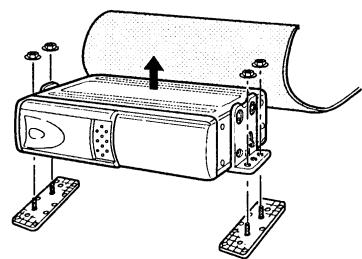
4 - À l'aide d'un couteau, découper des « X » dans la moquette directement au-dessus des boulons des supports (B). - Remettre la moquette en place en laissant les boulons dépasser.
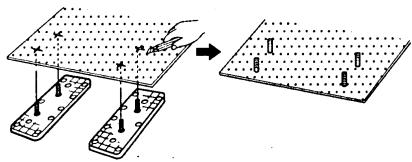
5 - Utiliser à nouveau les écrous hexagonaux pour fixer le changeur sur la moquette.
Procédure d'installation sur moquette (position verticale)
1 - Vérifier que les plaques antivibrations intégrées des côtés gauche et droit sont réglées sur la position d'installation verticale « V ». - Fixer les supports (L) et (R) à l'aide des boulons hexagonaux (M5 × 8). - Fixer les supports (L) et (R) à leurs supports respectifs (B) à l'aide des boulons hexagonaux (M6 × 20) et des écrous hexagonaux (M6).
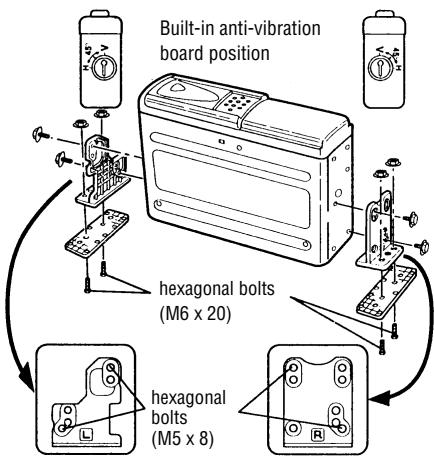
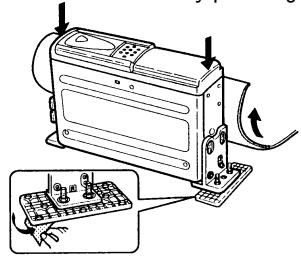
2 - Replier la moquette et déterminer où fixer l'appareil.
- Coller le ruban adhésif double face fourni sous les supports (B) et retirer le film protecteur.
- Fixer l'appareil au sol en appuyant dessus.
3 - Retirer les écrous hexagonaux et déposer le changeur.
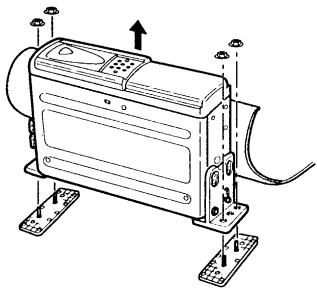
4 - À l'aide d'un couteau, découper des « X » dans la moquette directement au-dessus des boulons des supports (B). - Remettre la moquette en place en laissant les boulons dépasser.
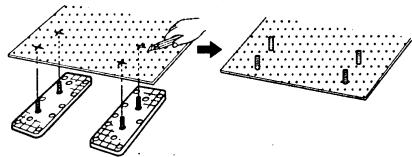
5 - Utiliser à nouveau les écrous hexagonaux pour fixer le changeur sur la moquette.
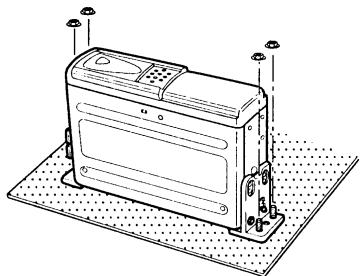
Procédure d'installation sur moquette (à un angle de 45°)
1 - Régler les plaques antivibrations intégrées des côtés gauche et droit sur la position d'installation à 45° « 45 ».
- Fixer les supports (L) et (R) à l'aide des boulons hexagonaux (M5 × 8).
- Fixer les supports (L) et (R) à leurs supports respectifs (B) à l'aide des boulons hexagonaux (M6 × 20) et des écrous hexagonaux (M6).
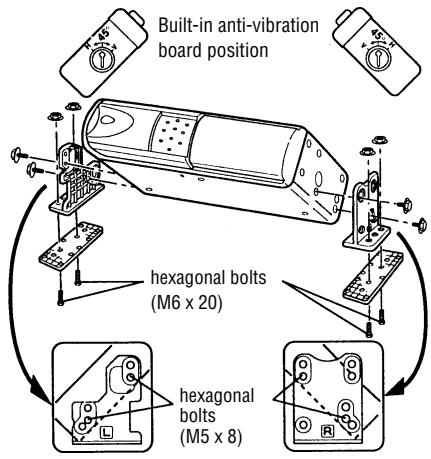
2 - Repliez le tapis et déterminez où fixer l'appareil.
- Collez le ruban adhésif double face fourni sous les supports (B) et retirez le papier protecteur.
- Fixez l'appareil au sol en appuyant fermement.
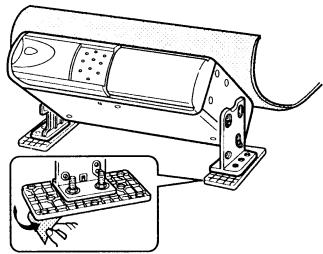
3 - Retirez les écrous hexagonaux et démontez le changeur.
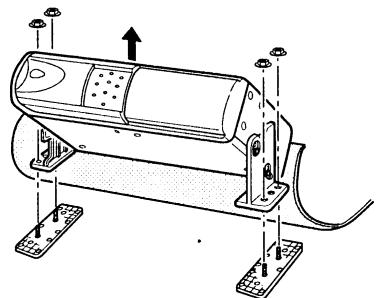
4 - À l'aide d'un couteau, découpez des « X » dans le tapis directement au-dessus des boulons des supports (B). - Remettez le tapis en place en laissant les boulons dépasser.
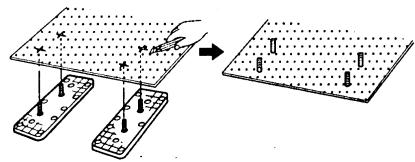
5 - Utilisez à nouveau les écrous hexagonaux pour fixer le changeur sur le tapis.
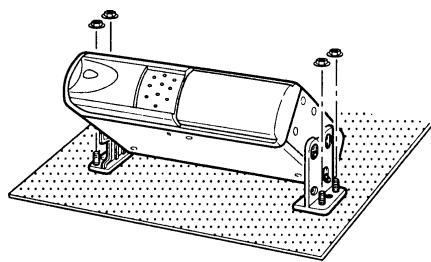
Procédure d'installation (position suspendue)
1 - Vérifiez que les plaques antivibratoires intégrées des côtés gauche et droit sont réglées sur la position d'installation horizontale « H ». - Fixez le support (L) et le support (R) à l'aide des boulons hexagonaux (M5 × 8).
2 - Déterminez l'emplacement de montage et percez quatre trous de fixation.
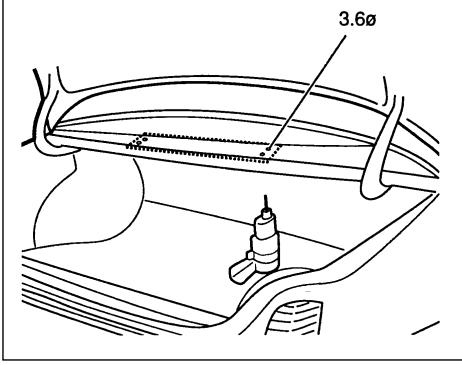
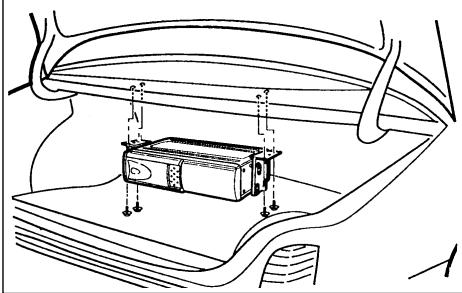
3 - Fixez le changeur CD avec les vis à tôle (M5 x 12).
Manipulation des disques
La saleté, la poussière, les rayures et le gauchissement provoquent des sauts de lecture et une détérioration de la qualité sonore. Comment prendre soin de vos disques :
- Utilisez des disques compacts portant la marque indiquée à droite.

- Les empreintes digitales et la poussière doivent être soigneusement essuyées sur la surface du signal (côté brillant) avec un chiffon doux. Contrairement aux disques vinyles, le disque compact n'a pas de rainures pour retenir la poussière et les débris microscopiques, donc un essuyage doux avec un chiffon doux devrait éliminer la plupart des particules. Essuyez en mouvement droit de l'intérieur vers l'extérieur du disque. Les petites particules de poussière ou les taches légères n'auront aucun effet sur la qualité de reproduction.
- N'utilisez jamais de produits chimiques tels que des sprays pour disques, des sprays antistatiques ou des liquides, de la benzine ou du diluant pour nettoyer les disques compacts. Ces produits chimiques endommageraient irrémédiablement la surface en plastique du disque.
- Les disques doivent être remis dans leurs boîtiers après utilisation pour éviter les rayures graves qui pourraient provoquer des sauts de son.
- N'exposez pas les disques à la lumière directe du soleil, à une humidité élevée ou à des températures élevées pendant de longues périodes. Une exposition prolongée à des températures élevées peut déformer le disque.
- Ne collez pas de papier et n'écrivez rien avec un stylo à bille sur la surface du disque.
Dépannage
Les problèmes qui surviennent en raison d'une mauvaise manipulation de l'appareil ou de connexions incorrectes sont souvent considérés à tort comme une panne de l'appareil. Pour cette raison, le tableau suivant est fourni pour vous aider. Si les mesures indiquées dans le tableau ne sont pas efficaces, veuillez contacter votre revendeur spécialisé.
Notez tout message d'erreur affiché sur l'écran de votre autoradio (voir le manuel d'utilisation).
| Symptom | Cause | Remedy |
| No current | Blown fuse. | Replace the fuse with a fuse having the correct current rating. If the fuse blows again, please contact your spe-cialized dealer. |
| Improper connection. | Check connections. | |
| Magazine cannot be installed. | Direction in which it is inserted is wrong. | Insert it in proper direction. |
| CD is not played. | Disc has been loaded upside down. | Load disc with play side facing up. |
| Noise is heard during playback or sound is intermittent. | Large scratches on disc or warped disc. | Compare sound with another disc. If sound from second disc is acceptable, first disc is defective. |
| Extremely dirty disc. | Clean disc. | |
| Transit screws still in place. | Remove screws (x3) on bottom of unit and then use. | |
| Built-in anti-vibration board is installed in wrong direction. | Install board in proper direction. (Refer to “Installation” in Operating |


- GRUNDIG
- SOMMAIRE
- CONSEILS POUR UN FONCTIONNEMENT CORRECT ET SÛR
- CONDENSATION
- UTILISATION DU MAGASIN
- CHARGEMENT D'UN DISQUE
- INSTALLATION DU MAGASIN
- ÉJECTION DU CHARGEUR
- REMARQUES
- PRÉCAUTIONS CONCERNANT LA MANIPULATION DES DISQUES
- AVEC LES CD DE 8 CM
- RANGEMENT DES ADAPTATEURS POUR CD DE 8 CM
- EN AUCUN CAS, UN ADAPTATEUR POUR CD DE 8 CM VIDE NE DOIT ÊTRE CHARGÉ DANS LE CHARGEUR
- AVERTISSEMENT
- AVEC LES NOUVEAUX DISQUES
- INSTALLATION DES PIÈCES
- INTERRUPTEUR D'IDENTIFICATION (ID)
- AVANT D'INSTALLER L'APPAREIL
- VIS DE VERROUILLAGE DE TRANSPORT
- PRÉCAUTIONS D'INSTALLATION ET DE CÂBLAGE
- CÂBLAGE
- POSITION DE LA PLAQUE ANTIVIBRATOIRE INTÉGRÉE
- POUR UNE INSTALLATION HORIZONTALE OU SUSPENDUE
- POUR UNE INSTALLATION VERTICALE
- POUR UNE INSTALLATION À UN ANGLE DE 45°
- PROCÉDURE D'INSTALLATION SUR MOQUETTE (POSITION HORIZONTALE)
- PROCÉDURE D'INSTALLATION SUR MOQUETTE (POSITION VERTICALE)
- PROCÉDURE D'INSTALLATION SUR MOQUETTE (À UN ANGLE DE 45°)
- PROCÉDURE D'INSTALLATION (POSITION SUSPENDUE)
- MANIPULATION DES DISQUES
- DÉPANNAGE
Marque : GRUNDIG
Modèle : MCD 30
Catégorie : Enceinte Bluetooth