
HS-4W - Écouteurs sans fil NOKIA - Notice d'utilisation et mode d'emploi gratuit
Retrouvez gratuitement la notice de l'appareil HS-4W NOKIA au format PDF.


| Type de produit | Casque sans fil à micro (Boom Headset) |
| Marque | NOKIA |
| Modèle | HS-4W |
| Technologie sans fil | Bluetooth 1.1 |
| Portée maximale | Jusqu'à 10 mètres |
| Autonomie en conversation | Jusqu'à 6 heures |
| Autonomie en veille | Jusqu'à 160 heures |
| Temps de charge | Environ 2 heures 45 minutes |
| Chargeurs compatibles | AC-1, ACP-7, ACP-8, ACP-9, ACP-12, LCH-12 |
| Code de jumelage | 0000 |
| Nombre de téléphones appairables | Jusqu'à 8 |
| Fonctions principales | Répondre/terminer appel, rejet d'appel, rappel du dernier numéro, composition vocale, mise en sourdine, réglage du volume, commutation appel casque/téléphone |
| Entretien et nettoyage | Garder au sec, éviter poussière et températures extrêmes, ne pas utiliser de solvants ni de produits chimiques agressifs |
| Sécurité | Utiliser uniquement des chargeurs approuvés par Nokia, ne pas ouvrir le casque, tenir hors de portée des enfants |
| Conformité | CE, FCC Part 15 |
| Certification Bluetooth | Bluetooth SIG |
FOIRE AUX QUESTIONS - HS-4W NOKIA
Questions des utilisateurs sur HS-4W NOKIA
0 question sur cet appareil. Repondez a celles que vous connaissez ou posez la votre.
Poser une nouvelle question sur cet appareil
Téléchargez la notice de votre Écouteurs sans fil au format PDF gratuitement ! Retrouvez votre notice HS-4W - NOKIA et reprennez votre appareil électronique en main. Sur cette page sont publiés tous les documents nécessaires à l'utilisation de votre appareil HS-4W de la marque NOKIA.
MODE D'EMPLOI HS-4W NOKIA
User Guide for
the Wireless Boom Headset (HS-4W)
9311010
Issue 1
DECLARATION OF CONFORMITY
We, NOKIA CORPORATION declare under our sole responsibility that the product HS-4W is in conformity with the provisions of the following Council Directive: 1999/5/EC. A copy of the Declaration of Conformity can be found at
http://www.nokia.com/phones/declaration_of_conformity/.
CE0682
Copyright © 2004 Nokia. All rights reserved.
Reproduction, transfer, distribution or storage of part or all of the contents in this document in any form without the prior written permission of Nokia is prohibited.
Nokia and Nokia Connecting People are registered trademarks of Nokia Corporation. Other product and company names mentioned herein may be trademarks or tradenames of their respective owners.
Bluetooth is a registered trademark of Bluetooth SIG, Inc.
Nokia operates a policy of continuous development. Nokia reserves the right to make changes and improvements to any of the products described in this document without prior notice.
Under no circumstances shall Nokia be responsible for any loss of data or income or any special, incidental, consequential or indirect damages howsoever caused.
The contents of this document are provided "as is". Except as required by applicable law, no warranties of any kind, either express or implied, including, but not limited to, the implied warranties of merchantability and fitness for a particular purpose, are made in relation to the accuracy, reliability or contents of this document. Nokia reserves the right to revise this document or withdraw it at any time without prior notice.
The availability of particular products may vary by region. Please check with the Nokia dealer nearest to you.
In some countries there may be restrictions in using Bluetooth devices. Check with your local authorities.
9311010 / Issue 1
Contents
1. Introduction......6
Bluetooth wireless technology 6
Bluetooth passcode....7
2. Getting started 8
Overview......8
Chargers and batteries....9
Charging the battery 10
When the battery charge falls low 11
Pairing the headset with a compatible phone....11
Disconnecting the headset from the phone....12
Reconnecting the paired headset to the compatible phone 12
Troubleshooting 13
3. Using the headset....14
Switching the headset on or off 14
Placing the headset over the ear....15
Call functions....15
Answering and ending a call 15
Automatic answer....16
Rejecting a call 16
Redialling the last dialled number....16
Muting an ongoing call....16
Voice dialling....16
Adjusting the earphone volume 17
Switching the call between phone and headset 17
Using the headset with several paired phones....17
Resetting the headset 18
- Battery information....19
Charging and Discharging....19
Care and maintenance 21
FCC Notice - Nokia Wireless Boom Headset HS-4W 22
1. Introduction
The Wireless Boom Headset HS-4W can be connected to a compatible phone that supports Bluetooth technology. This allows you freedom to make and receive calls while on the move or in the office.
Read this user guide carefully before using the headset. In addition to this Wireless Boom Headset HS-4W user guide, read also the phone's user guide, which provides important safety and maintenance information. Keep the headset out of reach of small children.
■ Bluetooth wireless technology
The Wireless Boom Headset HS-4W is specially designed for compatible Nokia phones that support Bluetooth technology. The headset can, however, be used with any compatible Bluetooth devices that support the compatible Handsfree or Headset profiles. (A profile is a set of Bluetooth commands that the phone uses to control the headset).
The Bluetooth technology makes it possible to connect compatible communication devices without using cables. A Bluetooth connection does not require that the phone and the headset be in line of sight, but both devices should be within 10 metres of each other. Connections can be subject to interference from obstructions, such as walls, or other electronic devices.
The Wireless Boom Headset HS-4W is compliant with and adopts the Bluetooth Specification 1.1. However, interoperability between the Wireless Boom Headset
HS-4W and other Bluetooth-enabled products is not guaranteed because it depends on compatibility. For more information on the compatibility between the Wireless Boom Headset HS-4W and other Bluetooth-enabled products, please check with your dealer.
Bluetooth passcode
You need a Bluetooth passcode for pairing the headset with a compatible phone. The passcode is 0000.
2. Getting started

Note: The use of wireless devices may be restricted in some situations. Observe any restrictions and obey all signs and instructions concerning use of wireless devices.
Overview
The headset contains the following parts, as shown in Figure 1.
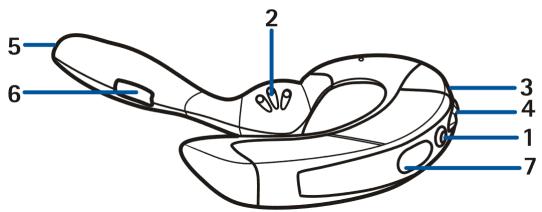
1 - Power key: Switches the headset on and off, or mutes the ongoing call.
2 - Speaker: Relays the caller's voice.
3 – Indicator light: Displays the current status of the headset. The indicator light can be yellow, green or red. If the light is yellow, a Bluetooth connection is active. The green and red lights indicate the status of a call and charging.
4 - Volume control key: Increases/decreases the earphone volume during a call.
5 - Microphone: Picks up your voice.
6 – Answer/end key: Answers or ends the call. This key can also be used for voice dialling, redialling and switching an active call between the headset and the compatible phone.
7 - Charger connector
Before you can start using the headset, you must:
- Charge the battery
- Pair a compatible phone with the headset
■ Chargers and batteries
Check the model number of any charger before using it with this device. The Wireless Boom Headset HS-4W is intended for use with the following chargers: AC-1, ACP-7, ACP-8, ACP-9, ACP-12, and LCH-12.

Warning! Use only batteries and chargers approved by Nokia for use with this particular enhancement. The use of any other types will invalidate any approval or warranty applying to the enhancement, and may be dangerous.
For availability of approved batteries and chargers, please check with your local dealer.
When you disconnect the power cord of any enhancement, grasp and pull the plug, not the cord.
■ Charging the battery
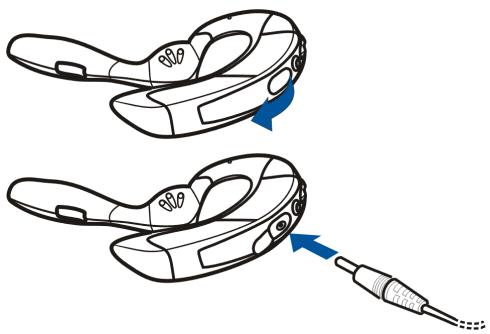
- Connect the charger cable to the headset as shown in Figure 2. Before connecting the charger cable to the headset, open the flap.
natural_image
Diagram showing two views of a device with blue arrows indicating motion, no text or symbols present- Connect the charger to an AC wall outlet. The red indicator light is displayed during charging. Charging the battery fully may take up to 2 hours 45 minutes depending on the charger.
- When the battery is fully charged, the green indicator light is displayed. Disconnect the charger from the AC wall outlet and the headset.
When the battery charge falls low
Fully charged batteries last up to 6 hours of talk-time and up to 160 hours of standby time. (In standby mode the headset is switched on but no call is in progress.)
When the battery is running out of power, the headset beeps. Charge the battery as described above.
■ Pairing the headset with a compatible phone
- Make sure that the compatible phone is switched on.
- Switch on the headset. Make sure that the headset is charged.
- Activate the Bluetooth connection from the phone. For more information, see the user guide of the phone.
- Set the phone to search for Bluetooth devices as instructed in the user guide of the phone.
- Select the Nokia HS-4W from the list.
- Enter the generic passcode 0000 to associate ("pair") and connect the headset to the phone.
Once you have entered the passcode, the phone becomes the default phone for the headset, if the headset has not been previously paired with another phone. See also Using the headset with several paired phones on page 17.
The headset beeps once and an active Bluetooth connection is displayed by a blinking yellow indicator light. The headset should now appear in the phone
menu where you can view the Bluetooth devices that are currently paired with the compatible phone.
- Start using the headset (see page 14).
Disconnecting the headset from the phone
The headset can be disconnected from the phone, if, for example, you want to use another Bluetooth device with it. To disconnect the headset:
- Switch off the headset. OR:
- Disconnect the headset in the phone's Bluetooth menu. OR:
- Move the headset more than 10 metres away from the phone.
The headset is also disconnected if the battery of the headset or the phone becomes flat.
Note that you do not need to delete the pairing with the headset to disconnect it. When you reconnect a paired headset, you are not asked for its passcode.
Reconnecting the paired headset to the compatible phone
To reconnect the headset to the default phone or the last phone used, switch on the headset. Otherwise, make the connection in the phone's Bluetooth menu as instructed in the user guide of the phone.
Note that switching on the headset creates the connection automatically only if you have set the phone to accept Bluetooth connection requests without your permission. In Nokia phones this can be done by changing your paired devices settings in the Bluetooth menu.
Troubleshooting
If you cannot connect the headset to the compatible phone, proceed as follows:
- Make sure that the Bluetooth feature is activated on the compatible phone.
- Make sure that the headset is switched on and paired with the compatible phone.
- Make sure that you have disconnected the previous Bluetooth connection from the phone.
- Check that the headset is within 10 metres of the phone and that there are no obstructions, such as walls, or other electronic devices between the headset and the phone.
- The pairing information list of the headset may be full. The headset can store the information of up to 8 phones at a time. If the list becomes full, reset the headset to the original settings. See Resetting the headset on page 18.
- If the headset does not automatically reconnect to the default or last used phone, press and hold the answer/end key.
3. Using the headset

Note: The use of wireless devices may be restricted in some situations. Observe any restrictions and obey all signs and instructions concerning use of wireless devices.
■ Switching the headset on or off
To switch on the headset, press and hold the power key for 2 seconds. The headset beeps and the green indicator light starts blinking. The indicator light changes to yellow when the headset is connected to a compatible phone.
To switch off the headset, press and hold the power key for 2 seconds when no call is in progress. The headset beeps and the red indicator light is displayed briefly.
Placing the headset over the ear
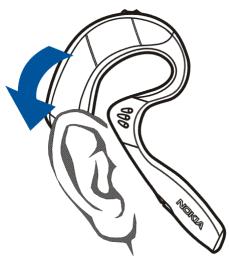
Slide the headset onto your ear as shown in Figure 3.
natural_image
Line drawing of a human ear with a blue arrow indicating clockwise motion (no text or symbols)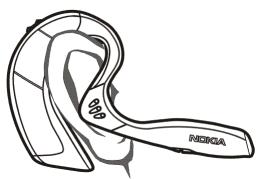
natural_image
Line drawing of a human ear with 'RIOBA' label and 80% mark, no other text or symbols presentCall functions
When the headset is connected to the phone, make a call by using the phone in the normal way. Note that the call functions depend on the phone that you use.
Answering and ending a call
When you receive a call, you hear a ringing tone through the headset.
Press the answer/end key to answer the call or to end the currently active call.
You can also answer or end the call using the phone.
Automatic answer
If, on the phone, the Automatic answer function is set to on, the phone automatically answers the incoming call after one ring and forwards it to the headset.
Rejecting a call
When you receive an incoming call that you do not want to answer, briefly press the answer/end key twice.
Redialling the last dialled number
Press the answer/end key twice briefly when no call is in progress.
Muting an ongoing call
You can mute or unmute the ongoing call by pressing the power key briefly.
Voice dialling
When no call is in progress, press and hold the answer/end key until you hear a tone that indicates that you can say the desired name ("voice tag"). Say the voice tag. The phone plays the voice tag and dials the related phone number.
You can also activate voice dialling with the phone. For details on voice dialling, see the phone's user guide.
Note that this function is only available if the phone supports voice dialling.
■ Adjusting the earphone volume
Press the volume control key to increase or decrease the volume.
■ Switching the call between phone and headset
You can switch an active call between the headset and a compatible device. To switch the call from the headset to a phone and vice versa, press and hold the answer/end key or use the respective function in your phone.
■ Using the headset with several paired phones
Before the headset can be used, the compatible phone has to be paired with the headset. The headset can be paired with up to 8 compatible phones but connected to only one phone at a time.
The phone that was first paired with the headset is called the "default phone". The phone that was last used with the headset is called the "last used phone".
If the headset is switched on within 10 metres of several paired phones, the headset will try to connect to the "default phone" within a few seconds.
If the headset cannot connect to the "default phone" (for example, it is switched off or its user rejects the connection), the headset tries to connect to the "last used phone" within a few seconds. If the headset does not automatically connect to the default or last used phone, press and hold the answer/end key.
If the headset cannot connect to either of these phones, it remains discoverable for other phones, which is displayed by the blinking green indicator light.
If you want to use the headset with a paired phone that is not a "default phone" or "last used phone", make the connection in the phone's Bluetooth menu.
■ Resetting the headset
You can reset the headset to its original settings, for example, to change the default user of the headset. Resetting the headset clears all of its settings, including pairing information. To reset the headset:
Press and hold the power key and the upper end of the volume control key for 10 seconds. After the headset has been reset, it beeps twice and the red and the green indicator lights alternate for several seconds.
4. Battery information
Your headset is powered by a rechargeable battery. Take good care of the battery and follow the guidelines below.
■ Charging and Discharging
The battery can be charged and discharged hundreds of times but it will eventually wear out. When the operating time (talk time and standby time) is noticeably shorter than normal, contact your nearest qualified service facility.
Use only batteries approved by the manufacturer and recharge your battery only with the chargers approved by the manufacturer. Unplug the charger when not in use. Do not leave the battery connected to a charger for longer than a week, since overcharging may shorten its lifetime. If left unused a fully charged battery will discharge itself over time.
Temperature extremes can affect the ability of your battery to charge.
Use the battery only for its intended purpose.
Never use any charger or battery which is damaged.
Do not short-circuit the battery. Accidental short-circuiting can occur when a metallic object (coin, clip or pen) causes direct connection of the + and - terminals of the battery (metal strips on the battery), for example, when you carry a spare battery in your pocket or purse. Short-circuiting the terminals may damage the battery or the connecting object.
Leaving the battery in hot or cold places, such as in a closed car in summer or winter conditions, will reduce the capacity and lifetime of the battery. Always try to keep the battery between 15^ C and 25^ C ( 59^ F and 77^ F). A headset with a hot or cold battery may
temporarily not work, even when the battery is fully charged. Batteries' performance is particularly limited in temperatures well below freezing.
Do not dispose of batteries in a fire!
Discard batteries according to local regulations (e.g. recycling). Do not dispose as household waste.
Care and maintenance
Your headset is a product of superior design and craftsmanship and should be treated with care. The suggestions below will help you to fulfil any warranty obligations and to enjoy this product for many years.
- Keep all accessories out of the reach of small children.
- Keep the headset dry. Precipitation, humidity and all types of liquids or moisture can contain minerals that will corrode electronic circuits.
- Do not use or store the headset in dusty, dirty areas. Its moving parts can be damaged.
- Do not store the headset in hot areas. High temperatures can shorten the life of electronic devices, damage batteries, and warp or melt certain plastics.
- Do not store the headset in cold areas. When it warms up (to its normal temperature), moisture can form inside, which may damage electronic circuit boards.
- Do not attempt to open the headset. Non-expert handling may damage it.
- Do not drop, knock or shake the headset. Rough handling can break internal circuit boards.
- Do not use harsh chemicals, cleaning solvents, or strong detergents to clean the headset.
- Do not paint the headset. Paint can clog the moving parts and prevent proper operation.
If the headset is not working properly, take it to your nearest qualified service facility. The personnel there will assist you and, if necessary, arrange for service.
FCC Notice – Nokia Wireless Boom Headset HS-4W
This device complies with Part 15 of the FCC Rules. Operation is subject to the following two conditions: 1. This device may not cause harmful interference; and 2. This device must accept any interference received, including interference that may cause undesired operation. This equipment has been tested and found to comply with the limits for a Class B digital device, pursuant to Part 15 of the FCC Rules. These limits are designed to provide reasonable protection against harmful interference in a residential installation. This equipment generates, uses and can radiate radio frequency energy and, if not installed and used in accordance with the instructions, may cause harmful interference to radio communications. However, there is no guarantee that interference will not occur in a particular installation. If this equipment does cause harmful interference to radio or television reception, which can be determined by turning the equipment off and on, the user is encouraged to try to correct the interference by one or more of the following measures: Reorient or relocate the receiving antenna. Increase the separation between the equipment and receiver. Connect the equipment into an outlet on a circuit different from that to which the receiver is connected. Consult the dealer or an experienced radio/TV technician for help. NOTE: FCC Radiation Exposure Statement: This equipment complies with FCC radiation exposure limits set forth for an uncontrolled environment. This transmitter must not be
co-located or operating in conjunction with any other antenna or transmitter.
NOTE: Modifications not expressly approved by Nokia could void the user's authority to operate the equipment.
- User Guide for
- the Wireless Boom Headset (HS-4W)
- DECLARATION OF CONFORMITY
- CE0682
- Contents
- Introduction......6
- Getting started 8
- Using the headset....14
- Introduction
- ■ Bluetooth wireless technology
- Bluetooth passcode
- Getting started
- Overview
- - Charger connector
- ■ Chargers and batteries
- ■ Charging the battery
- When the battery charge falls low
- ■ Pairing the headset with a compatible phone
- Disconnecting the headset from the phone
- Reconnecting the paired headset to the compatible phone
- Troubleshooting
- Using the headset
- ■ Switching the headset on or off
- Placing the headset over the ear
- Call functions
- Answering and ending a call
- Automatic answer
- Rejecting a call
- Redialling the last dialled number
- Muting an ongoing call
- Voice dialling
- ■ Adjusting the earphone volume
- ■ Switching the call between phone and headset
- ■ Using the headset with several paired phones
- ■ Resetting the headset
- Battery information
- ■ Charging and Discharging
- Care and maintenance
- FCC Notice – Nokia Wireless Boom Headset HS-4W
Marque : NOKIA
Modèle : HS-4W
Catégorie : Écouteurs sans fil