MODE D'EMPLOI SFP701XI SAUTER
EN GUIDE TO INSTALLATION

We cook so well together
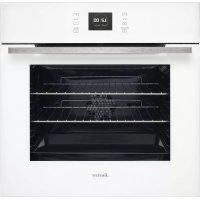
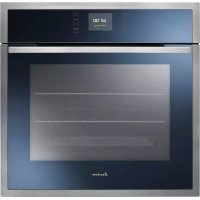
Oven
SFP 701
SFP 710
fauter

02
Dear Customer,
You have just acquired a SAUTER oven and we would like to thank you.
We have invested all our dedication and know-how in this appliance so that it would best meet your needs. With innovation and performance, we designed it to be always easy to use.
In the SAUTER product range, you will also find a wide choice of microwaves, cooking hobs, ventilation hoods, cookers, dishwashers, washing machines, driers, fridges and freezers, that you can coordinate with your new SAUTER oven.
Visit our website www.sauter-electromenager.com where you will find all of our products, as well as useful and complementary information.
SAUTER
We cook so well together
As part of our commitment to constantly improving our products, we reserve the right to make changes to them based on technical advances to their technical and functional features and appearance.

Warning:
Before installing and using your appliance, please carefully read this Guide to Installation and Use, which will allow you to quickly familiarise yourself with its operation.
TABLE OF CONTENTS
EN
1 / NOTICES TO THE USER
- Safety Recommendations 04
·Environment 05
2 / INSTALLING YOUR APPLIANCE
Choice of location 06
Building in 06
- Electrical connection 07
- Changing the power cable 08
3 / DESCRIPTION OF YOUR APPLIANCE
Introduction to your oven 09
Description of the accessories 10
Description of your programmer 11
4 / USING YOUR APPLIANCE
Using the programmer 12
o How to set the time 12
o How to change the time 12
Immediate cooking 13
- Programmed cooking 14
Using the timer function 16
Display brightness 16
5/OVEN COOKING MODES 17
6 / CARING FOR AND CLEANING YOUR APPLIANCE
- Cleaning the outer surfaces 19
- Cleaning the door 19
Pyrolytic oven cleaning 20
- Instructions and security 21
·Begin cleaning 22
·End of cleaning 22
7/TROUBLESHOOTING 23
EN 1 /NOTICES TO THE USER
Warning
Keep this user guide with your appliance. If the appliance is ever sold or transferred to another person, ensure that the new owner receives the user guide. Please become familiar with these recommendations before installing and using your oven. They were written for your safety and the safety of others.
SAFETY RECOMMENDATIONS
-
This oven was designed for use by private persons in their homes. It is intended solely for cooking foodstuffs. This oven does not contain any asbestos-based components.
-
This appliance is to be used by adults. Make sure that children do not touch it and that they do not treat it as a toy. Make sure that they do not touch the appliance's control panel.
-
When you receive the appliance, unpack or have it unpacked immediately. Give it an overall inspection. Make note of any concerns or reservations on the delivery slip and make sure to keep a copy of this form.
-
Your appliance is intended for standard household use. Do not use it for commercial or industrial purposes or for any other purpose than that for which it was designed.
-
Do not modify or attempt to modify any of the characteristics of this appliance. This would be dangerous to your safety.
-
Keep small children away from the appliance while it is in use. Thus you will prevent them from burning themselves by tipping over cookware. Moreover, the front of your appliance is hot during use and during cleaning (pyrolysis).
-
Never pull your appliance by the door handle.
-
Before using your oven for the first time, heat it up while empty for approximately 15 minutes. Ensure that the room is sufficiently ventilated. You may notice a particular odour or a small amount of smoke. All of this is normal.
-
During cooking, ensure that the door of your oven is firmly closed so that the seal can properly fulfil its function.
-
When in use, the appliance becomes hot. Do not touch the heating elements located inside the oven. You are at risk of incurring serious burns.
-
When inserting or removing your dishes from the oven, do not bring your hands near to the upper heating elements; use insulated cooking mitts.
-
After cooking, do not touch the cookware (grid, turnspit, etc.) with bare hands
-
Never place aluminium paper directly in contact with the bottom element (See the "Description of your oven" chapter), the accumulated heat could cause deterioration of the enamel.
-
Do not place heavy items on the open oven door; ensure that children cannot climb or sit on it.
-
To avoid damaging the control panel of your appliance, do not leave the door open when the oven is functioning or still hot.
-
The oven must be turned off for all attempts to clean the cavity.
-
Intensive and prolonged use of the appliance may require additional ventilation achieved by opening the window or increasing the power of the mechanical fan.
-
In addition to the accessories provided with your oven, only use dishes that are resistant to high temperatures (follow manufacturer's instructions).
-
After using your oven, ensure that all the controls are in the off position.
-
Never use steam or high-pressure devices to clean the oven (requirement imposed by electrical safety).
1 /NOTICES TO THE USER
EN
- CARE FOR THE ENVIRONMENT
- This appliance's packing materials are recyclable. Recycle them and play a role in protecting the environment by depositing them in municipal containers provided for this purpose.
-
Your appliance also contains many recyclable materials. It is therefore marked with this logo to indicate that used appliances must not be mixed with other waste. Recycling of the appliances organised by your manufacturer will thus be undertaken in optimum conditions, in accordance with European directive 2002/96/CE relative to electrical and electronic equipment waste. Consult your city hall or your retailer to find the drop-off points for used appliances that is nearest to your home.
-
We thank you for your help in protecting the environment.
Warning Installation
Warning
Installation should only be performed by qualified installers and technicians.
This appliance complies with the following European directives:
- Low Voltage Directive 73/23/CEE modified by directive 93/68/CEE for attribution of CE approval.
- Electromagnetic Compatibility Directive 89/336/CEE modified by directive 93/68/CEE for attribution of CE approval.
- CE Regulation 1935/2004 concerning materials and objects designed to come into contact with foodstuffs.
EN 2 / INSTALLING YOUR APPLIANCE
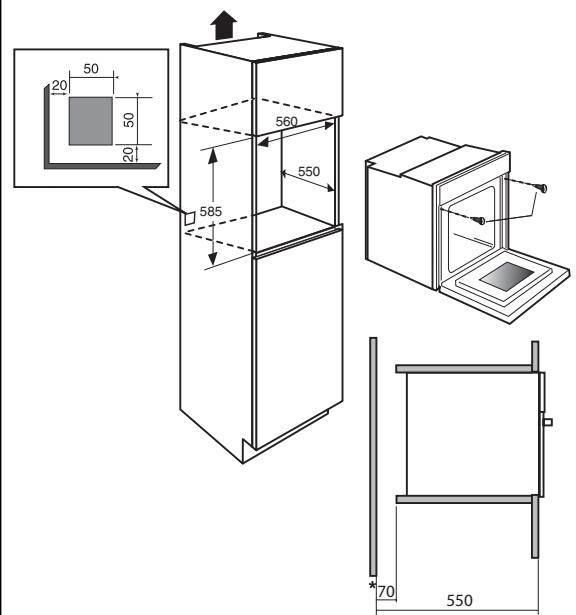
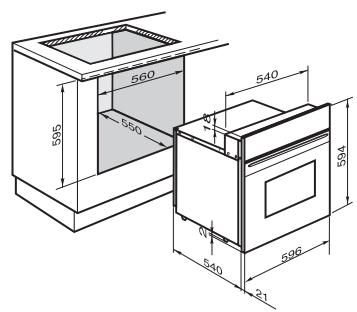
Fig. 01
CHOICE OF LOCATION
The diagrams above indicate the dimensions of a cabinet that would be acceptable for your oven.
The oven can be installed under a work top or in a column of cabinetry (open* or closed) having the appropriate dimensions for built-in installation (see adjacent diagram).
Your oven has optimised air circulation that allows it to achieve remarkable cooking and cleaning results if the following guidelines are respected:
- Centre the oven in the cabinet so as to guarantee a minimum distance of 5mm between the appliance and the neighbouring cabinet.
- The destination cabinet must be made of or coated with a material that is heat resistant.
- For greater stability, attach the oven in the cabinet with two screws through the holes
provided for this purpose on either side of the front side panels (fig.1).
BUILD-IN
To do this:
1) Remove the rubber screw covers to access the mounting holes.
2) Drill a 03mm hole in the cabinet panel to avoid splitting the wood.
3) Attach the oven with the two screws.
4) Replace the rubber screw covers (they also serve to absorb the shock caused by closing the oven door).
(^*) If the cabinet is open, its opening must be 70~mm (maximum).

To be certain that you have properly filled your appliance, do not hesitate to own a household appliance specialist.
2 / INSTALLING YOUR APPLIANCE
EN
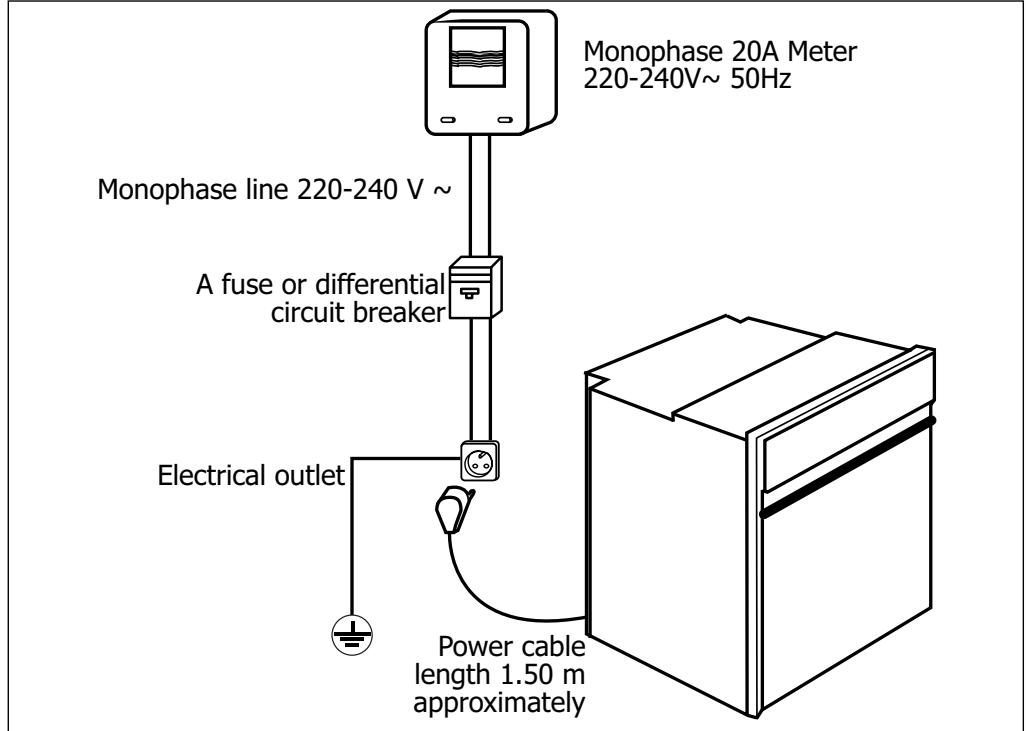
ELECTRICAL CONNECTION
Electrical safety must be provided by a correct build-in. During build-in and maintenance operations, the appliance must be unplugged from the electrical grid; fuses must be cut off or removed.
The electrical connections are made before the appliance is installed in its housing.
Ensure that:
- the electrical installation has sufficient voltage,
-the electrical wires are in good condition
- the diameter of the wires complies with the installation requirements.
Your oven must be connected with a power cord (standardised) with three 1.5mm^2 conductors (1ph + 1N + ground) that must be connected to a monophase 220 - 240V net
work via a CEI 60083 standardised receptacle (1ph + 1N + ground lead) or an all-pole cut-off device, in compliance with installation regulations.

Warning
The safety wire (green-yellow) is connected to the appliance's terminal 1三 and must be connected to the ground lead of the electrical set-up.
In the case of a hook-up with electrical outlet, it must be accessible after installation.
The fuse in your set-up must be 16 amperes. If the power cable is damaged, it must be replaced by a cable or a special kit available from the manufacturer or its After-Sales Service Department.
EN
2 / INSTALLING YOUR APPLIANCE

Warning
We cannot be held responsible for any accident resulting from an inexistent, defective correct ground lead.
If the electrical Installation at your residence requires any changes in order to hook up your Appliance, call upon a professional electrician.
If the oven malfunctions in any way, unplug the appliance or remove the fuse corresponding to the sector there the oven is hooked up.
CHANGING THE POWER CORD
- The power cable (H05 RR-F, H05 RN-F ou H05 VV-F) must be of sufficient length to be connected to the build-in oven while it sits on the floor in front of the cabinet.
To do this the appliance must be disconnected from the electrical network:
- Open the inspection flap located at the lower right of the back cover by unscrewing the two screws, then pivot the inspection flap.
- Strip 12mm along each wire of the new power cable.
- Carefully twist together the strands.
- Loosen the screws from the terminal board and remove the power cord to be replaced.
- Introduce the power cable through the side of the cover in the cable clip located to the right of the terminal board.
- All the strands of the electricity wires must be captured under the screws.
- The phase wire on the L terminal.
- The green-yellow coloured ground wire should be connected to the terminal 12
- The neutral conductor (blue) on the N terminal.
- Screw down tightly the screws on the terminal board and check the connection by pulling on each wire.
- Attach the cable with the cable clip located to the right of the terminal board.
- Close the inspection flap using the two screws.
3 / DESCRIPTION OF YOUR APPLIANCE
EN
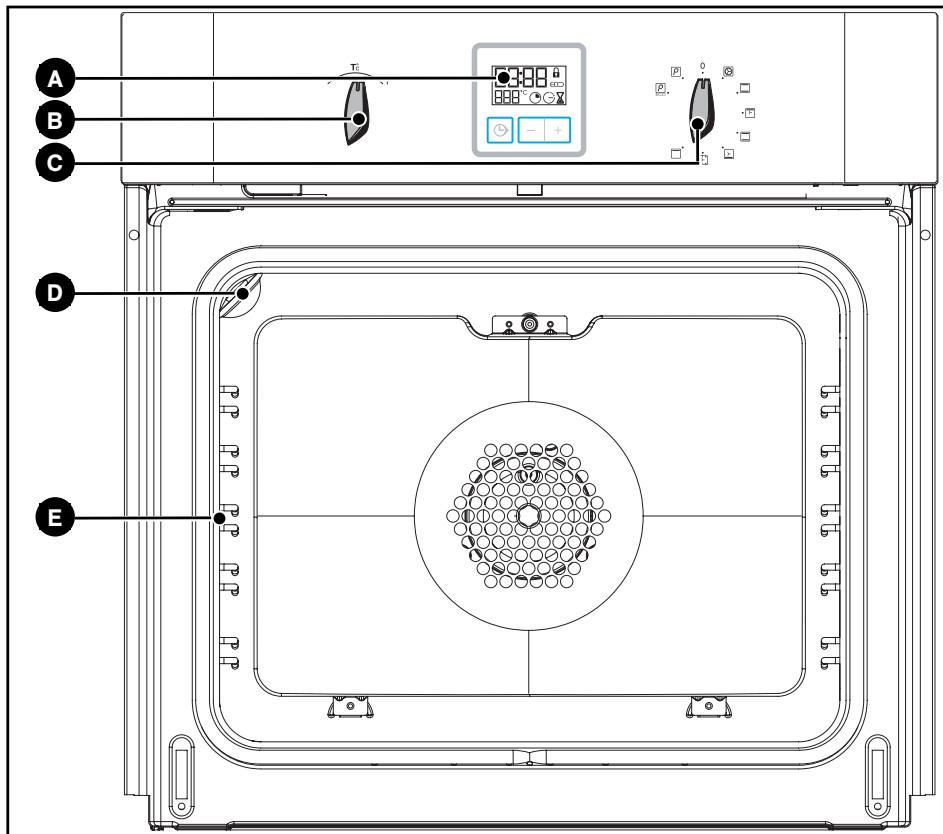
INTRODUCTION TO YOUR OVEN

Programmer

Lamp

Temperature selector

Shelf support indicator

Function selector

Tip
This Guide to Installation and Use is valid for several models. Minor differences in parts and fittings may emerge between your appliance and the descriptions provided.
EN 3 / DESCRIPTION OF YOUR APPLIANCE
- ACCESSORIES
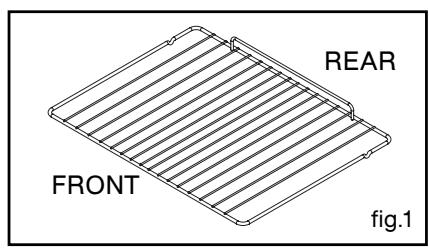
- Anti-tipping safety grid (fig.1)
The grid can be used to hold all dishes and moulds containing foodstuffs to be cooked or browned.
It can be used for barbecues (to be placed directly on the grid).
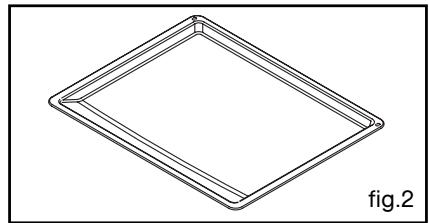
- Multi-purpose dish (fig.2)
Inserted under the grid, it catches barbecue juices and grease. It can also be used half-full of water for double-boiler cooking methods. Avoid placing roasts or meats directly in the dish because you are certain to have major spattering on the oven walls.
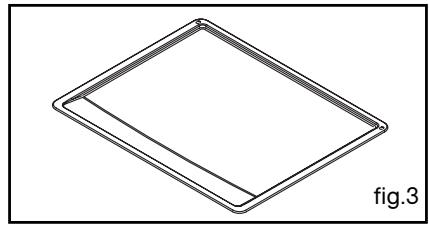
- Cake dish (fig.3)
It serves as a cake dish and has a sloped edge. It is used for cooking pastries such as cream puffs, meringues, madeleines, puff pastry, etc.
3 / DESCRIPTION OF YOUR APPLIANCE
EN
INTRODUCTION TO THE PROGRAMMER
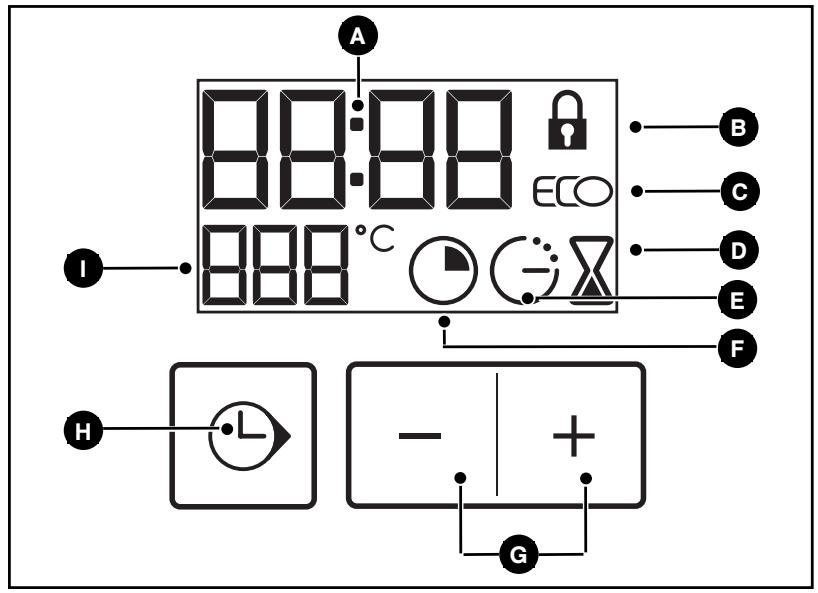
A Time and duration display
F Cooking time indicator
B Locked door indicator
Touch controls for setting time
ECO cooking indicator
Selection touch control (duration and time)
D Timer indicator
Digital temperature display
End of cooking indicator
EN 4 / USING YOUR APPLIANCE
How to set the time
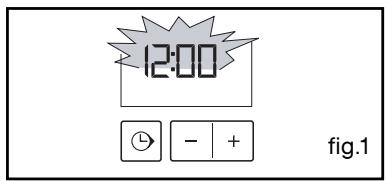
- When supplied with electricity
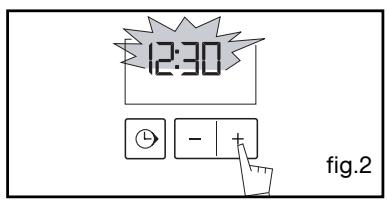
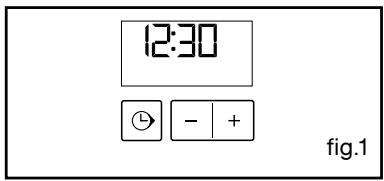
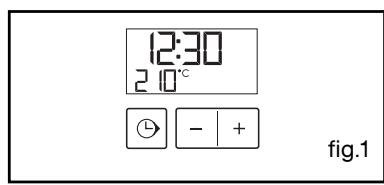
The display flashes 12:00. (fig.1)
Set the time by pressing the + and - touch controls (pressing and holding the touch control makes the numbers advance more quickly) (fig.2).
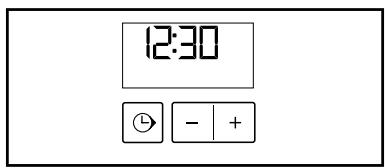
Example: 12:30
Press the "L" touch control to enter. The display stops flashing.
How to change the time
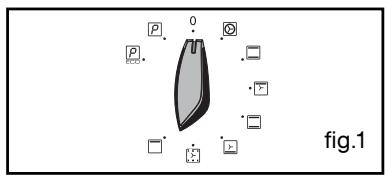
The function selector must be in the 0 position (fig.1).
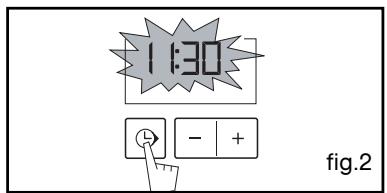
Press and hold the “ ” touch control for a few seconds until the display is flashing (fig.2), then release. Beeps are sounded to indicate that it is now possible to set.
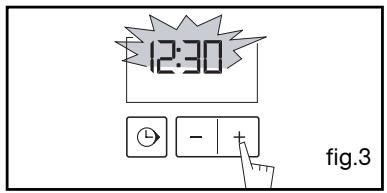
Adjust the clock setting with the + and - touch controls (fig.3).
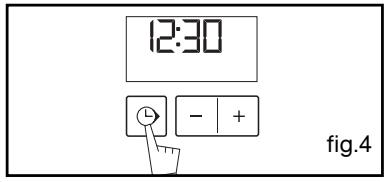
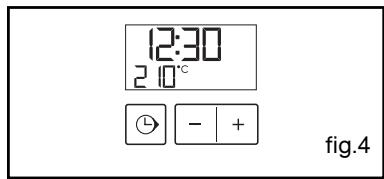
Press the “ ” touch control to confirm (fig.4).

"touch control is not pressed, the setting will
be automatically recorded after a few seconds.
4 / USING YOUR APPLIANCE
EN
- The programmer should display only the time.
It should not be flashing (fig.1).
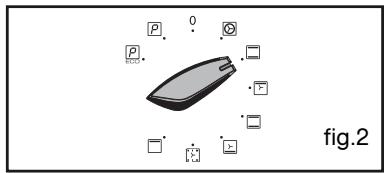
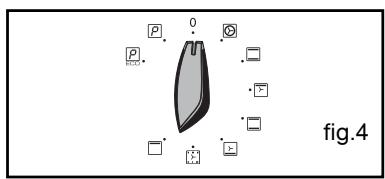
Turn the function selector to the position of your choice.
Example: position

(fig.2).
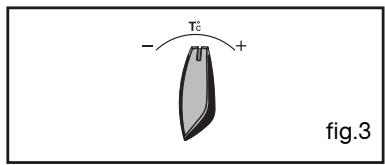
Your oven suggests the optimal temperature for this type of cooking.
It is, however, possible to adjust the temperature by turning the temperature selection knob toward ^+ or-(fig.3)
Example: temperature setting: 210^ (fig. 4).
Place your dish in the oven based on the recommendations provided by the cooking guide.
After these actions, the oven heats up and the temperature indicator flashes.
A series of beeps will be emitted when the oven reaches the selected temperature.
The temperature stops flashing.

Warning
After a cooking cycle, the cooling fan continues to operate for a period of time to guarantee good oven reliability.

Warning
All cooking takes place with the door closed.
EN 4 / USING YOUR APPLIANCE
PROGRAMMED COOKING
- Cooking with immediate start and programmed duration
- Select the desired cooking mode and adjust the temperature (fig.1).
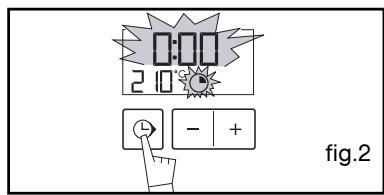
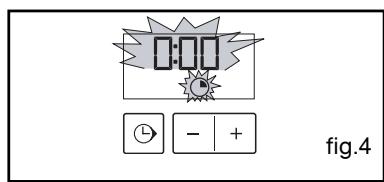
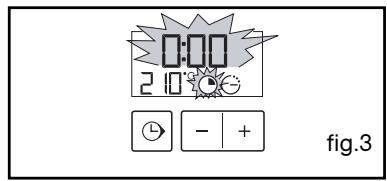
- Press the “L” touch control until the cooking time indicator begins flashing .
The display flashes 0:00 to indicate that you can now adjust the setting (fig.2).
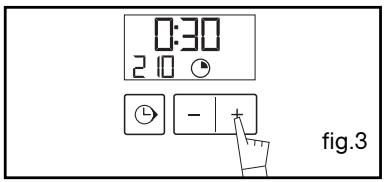
- Press the + or - touch controls to set the desired time.
Example: 30 minutes of cooking (fig.3).
The cooking time is automatically recorded after a few seconds.
The cooking time stops flashing.
The countdown of the duration begins immediately after it has been set.
After these three steps, the oven heats up:
A series of beeps will be emitted when the oven reaches the selected temperature.
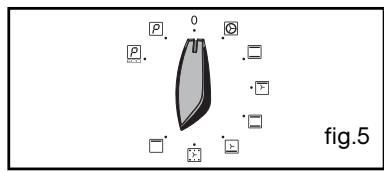
At the end of cooking (end of programmed time),
The displays once again shows the time of day when the function selector is returned to 0 (fig.5).
4 / USING YOUR APPLIANCE
EN
PROGRAMMED COOKING
- Cooking with delayed start and designated cooking end time
Proceed as with standard programmed cooking.
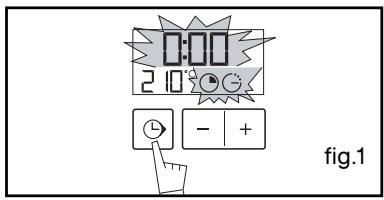
- After setting the cooking time, press the " " touch control until the " " end of cooking indicator flashes
The display flashes 0:00 to indicate that you can now adjust the setting (fig.1).
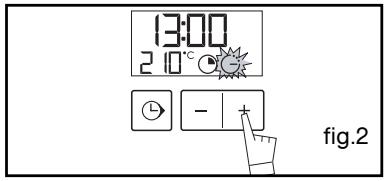
- Press the + or - touch control to set the desired cooking end time. Example: end of cooking at 13:00 (fig.2).
The end of cooking time is automatically recorded after a few seconds or when you press the " " touch control. The end of cooking time display stops flashing.
After these three steps, the oven heating is delayed so that cooking ends at 13:00.
At the end of cooking (end of programmed time),
The displays once again shows the time of day when the function selector is returned to 0 (fig.4).
EN 4 / USING YOUR APPLIANCE
- USING THE TIMER FUNCTION
- Your oven's programmer can be used as an independent timer that allows you to count down a time without operating the oven.
In this case, the timer display has priority over the clock display.
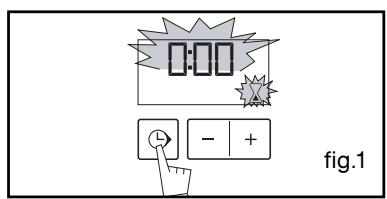
- Press the “ ( ) ” TOUCH CONTROL (fig.1) until the timer symbol flashes
0.00 and a small hourglass flashes.
- Adjust the selected time by pressing the + or - touch controls. (fiq.2).
- Press on the " " touch control to confirm or wait a few seconds.
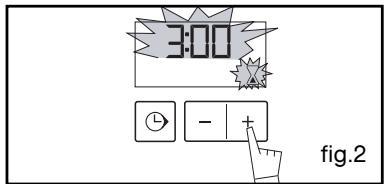
The display stops flashing after a few seconds and the timer starts working, counting down the time in seconds.
Once the time has expired, the timer emits a series of beeps to notify you.
The beeps are stopped by pushing on any touch control.
Warning It is possit
- SETTING THE DISPLAY BRIGHTNESS
You can adjust the brightness of your display. To do this:
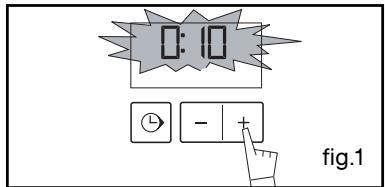
- Set and confirm the time on your programmer as 00:10 (fig.1).
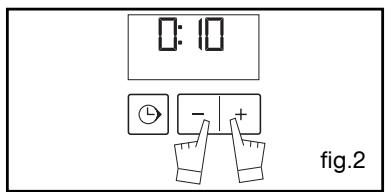
- Press simultaneously on the + and - touch controls for 10 seconds until "CO" is displayed; you are not in configuration mode (fig.2).
- Press the + and - touch controls to obtain the desired brightness.
After having adjusted the brightness to your liking, wait a few seconds and return your programmer to the current time of day.
5 / OVEN COOKING MODES
EN

CIRCULATING HEAT
(recommended temperature 180^ - Min. 35^ - Max. 235^ )
- Cooking is controlled by the heating element located at the back of the oven and by the fan.
- Preheating unnecessary except for cooking programmes requiring very short times (biscuits on several levels).
- Recommended for preserving tenderness in meats, vegetables and fish and for multiple cooking on up to three levels.

TRADITIONAL
(recommended temperature 240^ - Min 35^ Max - 275°C)
- Cooking is controlled by the lower and upper elements and by the fan.
- Quick temperature increase: Some dishes can be placed in the oven while it is still cold.
- Recommended for meats, fish and vegetables—preferably placed in a terra cotta dish.

PULSED GRILL
(recommended temperature 200^ - Min. 180^ - Max. 230^ )
- Cooking is controlled alternately by the upper element and the fan.
- Preheating unnecessary. Roasts and poultry that are juicy crispy and all over.
- Recommended for all poultry or roasts to seal and cook through leg roast, beef ribs
For preserving tenderness in files of fish.

TRADITIONAL ECO
(recommended temperature 200^ - Min 35^ Max - 275.C)
- Cooking controlled by the upper and lower heating elements with no fan.
- This position makes it possible to save approximately 25% while maintaining cooking properties. The ECO position is used for the energy label performance.
- You will save energy throughout the cooking cycle, but the time may be slower.

PULSED BOTTOM ELEMENT
(recommended temperature 205^ -Min 35^ Max-275.C)
- Cooking is controlled by the bottom element combined with a slight dose of the grill and with the fan.
- Cooking heat from the bottom with a small amount of heat from the top. Place the grid on the lowest shelf support.
- Recommended for moist dishes (quiches, juicy fruit tarts, etc.). The crust will be thoroughly cooked on the bottom. Recommended for dishes that rise (cake, brioche, kouglof, etc.) and for soufflés that will not be stuck by a crust formed on the top.
Cooking multiple items on up to three levels.
EN
5 / OVEN COOKING MODES

LOW TEMPERATURE STABILISATION/BREAD DOUGH
(recommended temperature 80^ - Min 35^ Max - 100°C)
- Heat regulated by the upper and lower elements with use of fan.
- Recommended for rising dough for bread, brioche, kouglof, etc. while not exceeding 40^ (plate heating, defrosting).

HIGH GRILL
(recommended temperature 275^ - Min 180^ Max - 275^ )
- Cooking controlled by the upper element without the fan.
- Preheat the oven for five minutes. Slide the drip tray onto the lower shelf support to collect greases.
-
Recommended for grilling chops, sausages, slices of bread, prawns placed on the grid.
-
Programme(s) used to obtain the results indicated on the energy label in compliance with European standard EN 50304 and in accordance with European Directive 2002/40/CE.
6 / CARING FOR AND CLEANING YOUR APPLIANCE
EN
- CLEANING THE OUTER SURFACES (According to model)
To clean the window of the electronic timer, as well as the oven door, use a soft cloth moistened with a glass cleaner.
Do not use abrasive cleaning products or hard, metallic scrubbers to clean the oven's glass door, which could scratch the surface and cause the glass to shatter.
To preserve your appliance, we recommend that you use Clearit cleaning products.

Professional expertise serving individuals
Clearit offers you professional products and solutions designed for the daily care of your household appliances and kitchens.
They are on sale at your regular retailer, along with a complete line of accessories and consumable products.
- CLEANING THE DOOR
Warning Before unclipping the glass, let the appliance cool down.
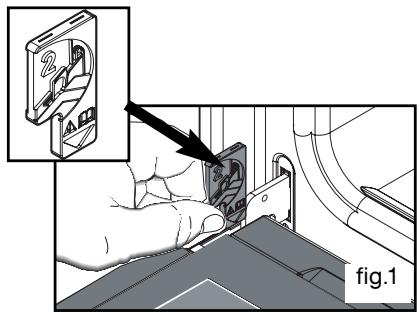
- Open the door all the way and fix it in place using the two red stops (fig.1).
They are supplied in your appliance's plastic pouch.
-
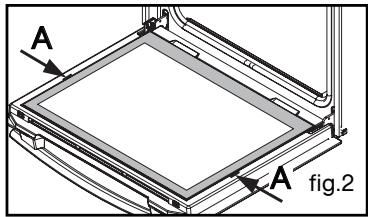
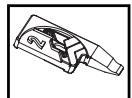
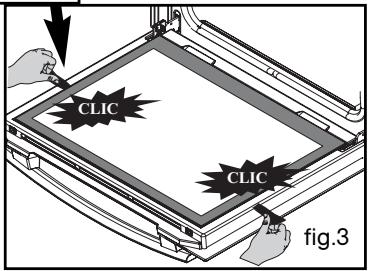
Remove the first clipped in glass as follows: Insert the two metallic "glass removers" in the A locations provided for this purpose (fig.2). Create a lever effect on these parts to unclip the glass (fig.3).
-
Clean the glass using a soft sponge and dish soap.
Do not immerse the glass in water.
Do not use abrasive creams or scrubbing sponges. Rinse with clean water and dry with a lint-free cloth.
EN
6 / CARING FOR AND CLEANING YOUR APPLIANCE
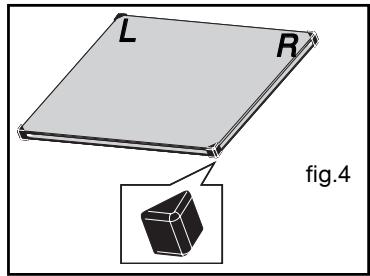
Place your inner glass assembly in the door so that L and R are located on the hinge side.
-
If your oven is equipped with a single inner sheet of glass, it must be located as close as possible to the clipped glass.
-
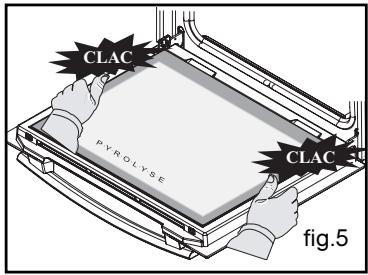
Clip in your last glass sheet by placing the indication "PYROLYSIS" so that it faces you (fig.5).
- Remove the red plastic stops.
Your appliance is again operational.
PYROLYTIC OVEN
You should not wait until the oven is excessively coated in grease to initiate a cleaning cycle.
In what situations should pyrolysis be used?
-
When your oven smokes during preheating or smokes profusely during cooking.
-
When your oven releases an odour even cold after various cooking programmes (lamb, fish, barbecue, etc.).
Pyrolysis is not necessary after each cooking cycle, but simply when the level of dirtiness warrants it.
| Cooking programs that produce little soiling | Biscuits, vegetables, pastry, quiches, soufflés, etc. | Splatter-free cooking: Pyrolysis is not warranted. |
| Cooking programmes that produce soiling | Meats, fish (in a dish), stuffed vegetables | Pyrolysis is warranted after three cooking cycles. |
| Cooking programmes that produce heavy soiling | Large cuts of meat on the spit. | Pyrolysis can be carried out after cooking of this type, if there was extensive spattering. |
6 / CARING FOR AND CLEANING YOUR APPLIANCE
EN
SAFETY RECOMMENDATIONS
Warning
- Before beginning pyrolysis, remove all the accessories inside the oven, including all cookware.
Before beginning pyrolysis, clean any major spill residue that may have occurred to avoid the risk of a fire or the production of excessive smoke.
- During pyrolysis, the surfaces become hotter than during normal use; children must be kept away.
- Do not cover the interior of the oven with aluminium paper to avoid having to clean: by provoking overheating, this would damage the enamel that coats the cavity.
EN
6 / CARING FOR AND CLEANING YOUR APPLIANCE
- STARTING CLEANING
To take advantage of the volume of heat already built up in the oven and thus save energy :
Start a pyrolysis cycle after a cooking programme.
Remove the accessories from the oven and clean any major spill residue.
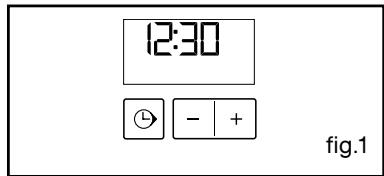
Ensure that the programmer displays the time of day and that it is not flashing (fig.1).
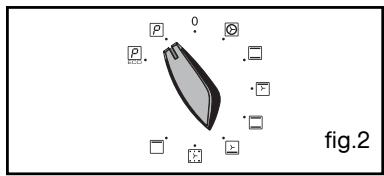
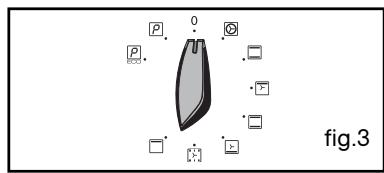
Simply position your cooking selector on the "Pyrolysis" position or on the "ECO Pyrolysis" (fig.1).
The oven is unavailable for 2.5 hours (two hours of pyrolysis and 30 minutes of cooling) during "Pyrolysis" or for two hours (1.5 hours of pyrolysis and 30 minutes of cooling) during "ECO Pyrolysis" (this duration is not modifiable).
This time includes the cooling time until the door can be unlocked.
END OF CLEANING
Pyrolysis stops automatically; it is then possible to open the door.
At the end of the pyrolysis cycle, the display indicates 0:00.
Return the function selector to the 0 position. (fig.3).
When the oven is cool, use a damp cloth to remove the white ashes. The oven is clean and once again ready for the cooking application of your choice.
Warning The door e
The door effectively locks a few minutes after the start of the cycle.
Pyrolysis stops automatically. When the temperature reaches approximately 275^ , it is then possible to open the door.
7 / TROUBLESHOOTING
EN
If you have a doubt about the functioning of your oven, this does not necessarily mean that there is a malfunction. In any event, check the following items:
| YOU OBSERVE THAT... | POSSIBLE CAUSES | WHAT SHOULD YOU DO? |
| The oven is not heating | - The oven is not connected.
- Your fuse is out of order.
- The selected temperature is too low. | Plug in your oven.
Replace the fuse and check its value (16A).
Increase the selected temperature. |
| The padlock is flashing | - Problem with the door's lock- ing mechanism. | Call the After-Sales Service Depart- ment. |
| The light in your oven is no longer working. | - The light is out of order.
- The oven is not connected or the fuse is not working. | Replace the bulb.
Plug in your oven or replace the fuse. |
| The pyrolysis cleaning cycle does not begin. | - The door is not properly closed.
- The locking system is defec- tive. | Make sure the door is closed.
Call the After-Sales Service Department. |
| Your oven starts beeping. | - During cooking.
- At the end of cooking. | The recommended temperature of your choice has been reached.
Your programmed cooking cycle is finished. |

Warning
- Repairs to your appliance must be made only by professionals. Repairs not carried out according to guidelines can be a source of danger to the user.

Tip
In all circumstances, if your efforts are not sufficient, contact the After-Sales Service Department without delay.
EN 7 / TROUBLESHOOTING
Warning
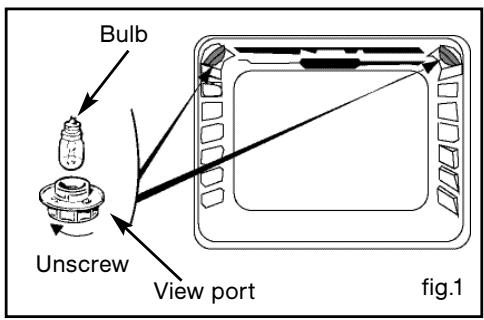
- Disconnect your oven before performing any task on the bulb to avoid the risk of electric shock and, if necessary, let the appliance cool down.

Tip
To unscrew the view port and the light, use a rubber glove, which will make disas-
CHANGING THE BULB
The bulb is located on the ceiling of your oven's cavity.
a) Disconnect the oven.
b) Unscrew the view port (fig.1).
c) Unscrew the bulb in the same direction.
Bulbspecifications:
-15W
- 220-240 V ~
-300°C
-E14cap
d) Replace the bulb then reposition the view port and reconnect your oven.
99641981_A.qxp 27/03/2007 16:09 Page 26
99641981_A.qxp 27/03/2007 16:09 Page 28
Page 28