EASY REFLEXES - Téléphone fixe ALCATEL - Notice d'utilisation et mode d'emploi gratuit
Retrouvez gratuitement la notice de l'appareil EASY REFLEXES ALCATEL au format PDF.


| Type de produit | Téléphone fixe professionnel multifonction |
| Marque | ALCATEL |
| Modèle | EASY REFLEXES |
| Dimensions (approx.) | 220 x 180 x 100 mm |
| Poids (approx.) | 0,8 kg |
| Alimentation | Via ligne téléphonique ou adaptateur secteur (non fourni) |
| Afficheur | Écran rétroéclairé, affichage des informations d'appel |
| Touches programmables | 6 touches avec LEDs pour fonctions et lignes |
| Combiné | Avec haut-parleur pour conversation en mains-libres |
| Répertoire personnel | 10 entrées (touches 0 à 9) |
| Répertoire commun | Numéros de 8000 à 8399 |
| Sonnerie | 8 sonneries, volume réglable (1 à 7) |
| Fonctions principales | Appel, transfert, conférence à 3, renvoi d'appel, messagerie vocale, appel interne, etc. |
| Verrouillage | Code personnel (défaut 1515) |
| Entretien et nettoyage | Nettoyer avec un chiffon doux et sec. Ne pas utiliser de produits abrasifs. |
| Sécurité | Ne pas exposer à l'humidité, aux sources de chaleur ou aux chocs électriques. |
| Pièces détachées et réparabilité | Étiquettes de touches fournies. Pièces de rechange disponibles chez le fabricant. |
| Informations générales | Notice d'utilisation téléchargeable gratuitement au format PDF. |
FOIRE AUX QUESTIONS - EASY REFLEXES ALCATEL
Questions des utilisateurs sur EASY REFLEXES ALCATEL
0 question sur cet appareil. Repondez a celles que vous connaissez ou posez la votre.
Poser une nouvelle question sur cet appareil
Téléchargez la notice de votre Téléphone fixe au format PDF gratuitement ! Retrouvez votre notice EASY REFLEXES - ALCATEL et reprennez votre appareil électronique en main. Sur cette page sont publiés tous les documents nécessaires à l'utilisation de votre appareil EASY REFLEXES de la marque ALCATEL.
MODE D'EMPLOI EASY REFLEXES ALCATEL
ALCATEL
Easy
REFLEXES
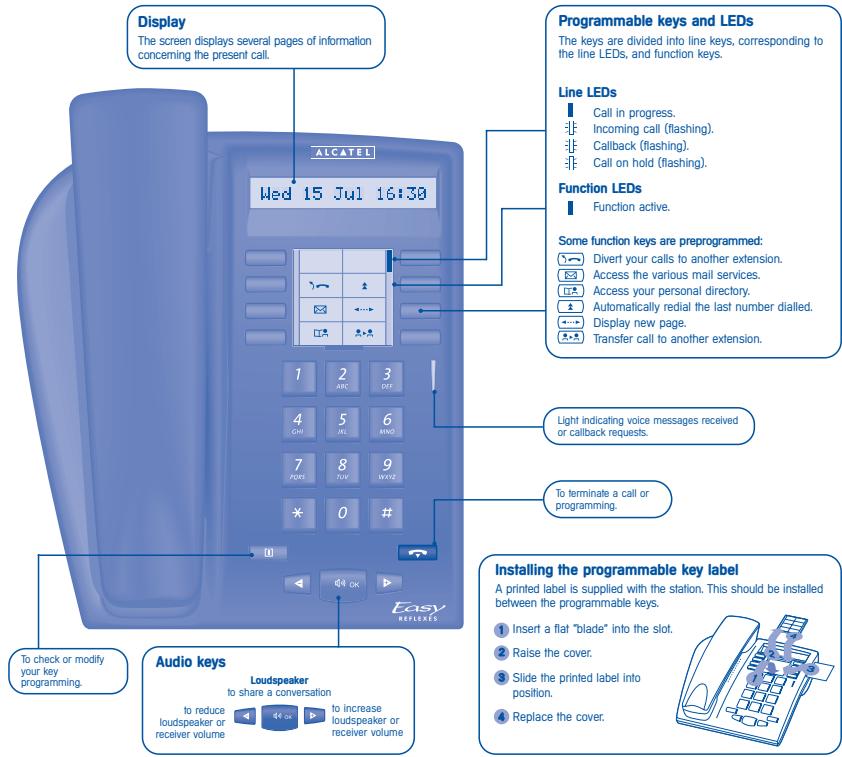
Installing the programmable key label
A printed label is supplied with the station. This should be installed between the programmable keys.
1 Insert a flat "blade" into the slot.
2 Raise the cover.
3 Slide the printed label into position.
Replace the cover.

SETTING UP
Adjusting screen brightness
![[i] 5 JKL 2 ABC → screen brightness icon is displayed 1 consecutive presses (4 to 16) apply exit](/content/2025/01/75547/images/3cf7f829bc307a0d3f7283de50f4dbd1f952a3f7b21b471c657f451dc63c3718.jpg)
Selecting ringer tune and adjusting volume
You can select your ringer tune (choice of 8) and adjust the volume (1 to 7).
![[i] 5 JKL 3 DEF ⇒ tune number and volume are displayed 1 or 2 ABC OK](/content/2025/01/75547/images/b8ec3d6a17f8c7055fd3545c4de73bcd71434469cc7805d4a9a89b6b939946c5.jpg)
consecutive presses to obtain tune (8)
consecutive apply presses to adjust volume (7)
Selecting a language
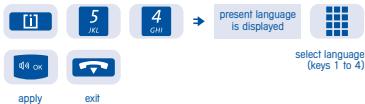
flowchart
graph LR
    A["application"] --> B["exit"]
    C["5 JKL"] --> D["4 GMI"]
    D --> E["present language is displayed"]
    F["4 OK"] --> G["select language (keys 1 to 4)"]
Locking/unlocking your telephone
![[i] 2 ABC personal code (4 digits). Default code 1515 1 or 2 ABC to lock to unlock](/content/2025/01/75547/images/cffcedae8a661747a31d76a9ecde1269546f74f1dc70e57a8475c5c795f3fd1b.jpg)
MAKING A CALL
■ To make a call

or

or

lift the receiver
press
a line
dial the number for your call
■ To answer

lift the receiver
■ To terminate a conversation

or

hang up
Making an outside call
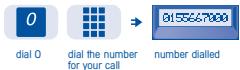
flowchart
graph LR
    A["0 dial 0"] --> B["dial the number for your call"]
    B --> C["number dialled"]
Making an internal call
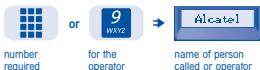
flowchart
graph LR
    A["number required"] --> B["or 9 wxyz"]
    B --> C["Alcatel"]
    D["for the operator"] --> B
    E["name of person called or operator"] --> C
Calling from the directory
■ Personal directory

directory
press one of the keys 0 to 9
■ Common directory

Directory number (8000 to 8399)
Redialling last number dialled

redial
speak
Requesting automatic callback

flowchart
graph LR
    A["internal number busy"] --> B["5"]
    B --> C["or"]
    C --> D[" "]
code for function "Automatic callback if extension busy"

callback programmed key
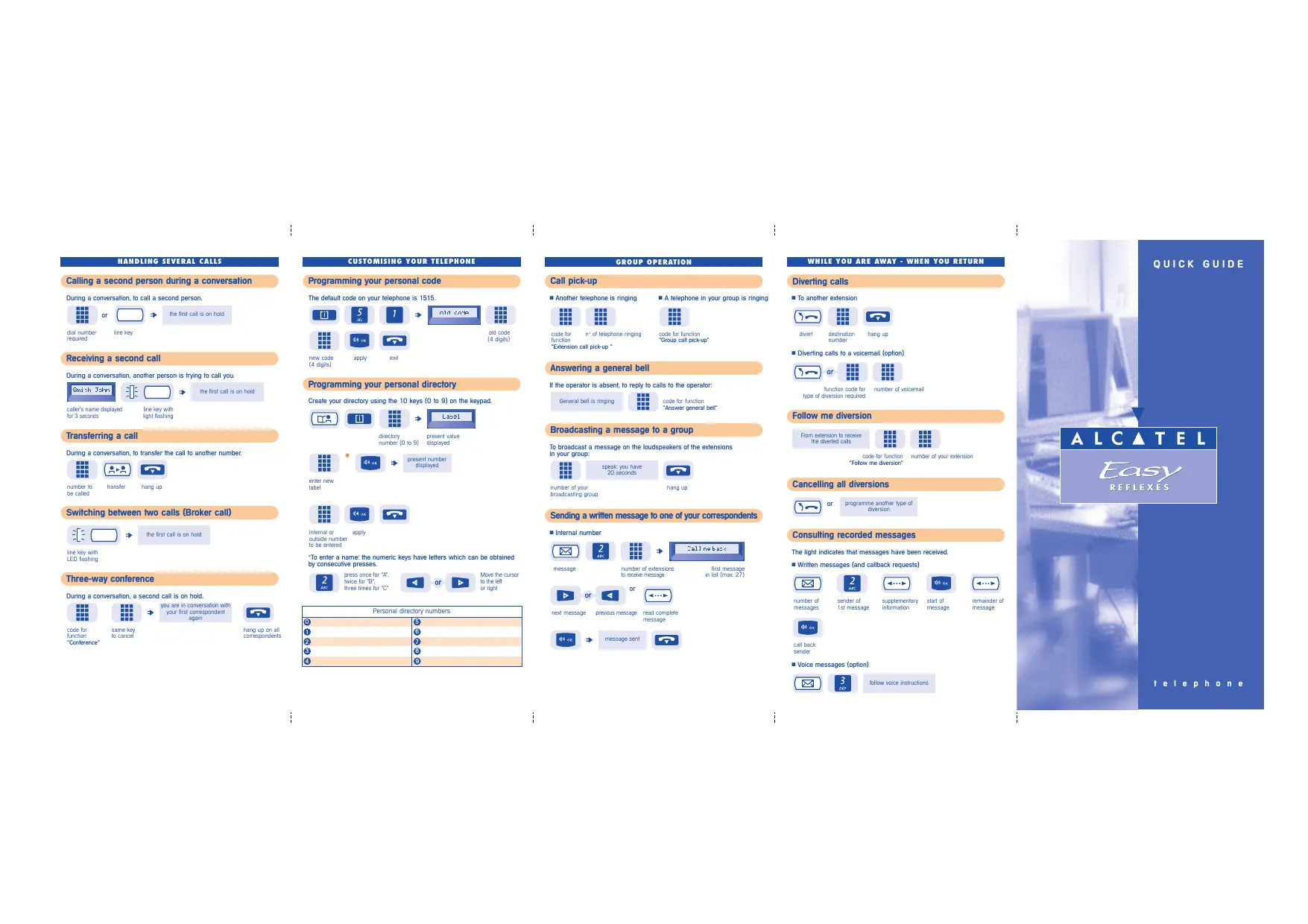
HANDLING SEVERAL CALLS
Calling a second person during a conversation
During a conversation, to call a second person.
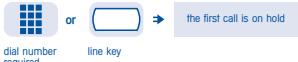
Receiving a second call
During a conversation, another person is trying to call you.
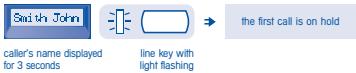
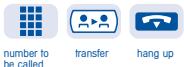
Transferring a call
During a conversation, to transfer the call to another number.
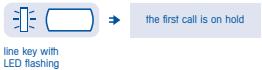
Switching between two calls (Broker call)
Three-way conference
During a conversation, a second call is on hold.
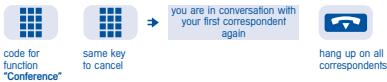
CUSTOMISING YOUR TELEPHONE
Programming your personal code
The default code on your telephone is 1515.
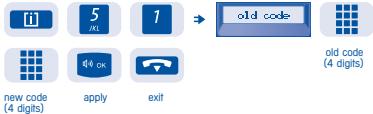
flowchart
graph LR
    A["new code (4 digits)"] --> B["apply"]
    B --> C["exit"]
    D["i"] --> E["5 /KL"]
    E --> F["1"]
    F --> G["old code"]
    G --> H["old code (4 digits)"]
Programming your personal directory
Create your directory using the 10 keys (0 to 9) on the keypad.
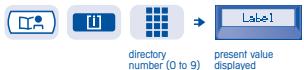
flowchart
graph LR
    A["Input Image"] --> B["Directory"]
    B --> C["Present Value Displayed"]
    D["Label1"] --> E["Output Label"]
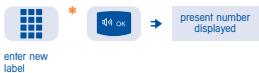
flowchart
graph LR
    A["enter new label"] --> B["OK"]
    B --> C["present number displayed"]

internal or apply outside number to be entered
*To enter a name: the numeric keys have letters which can be obtained by consecutive presses.

Move the cursor to the left or right
| Personal directory numbers | |
| 0 | 5 |
| 1 | 6 |
| 2 | 7 |
| 3 | 8 |
| 4 | 9 |
GROUP OPERATION
Call pick-up
■ Another telephone is ringing


code for function
n° of telephone ringing
"Extension call pick-up "
■ A telephone in your group is ringing

code for function
"Group call pick-up"
Answering a general bell
If the operator is absent, to reply to calls to the operator:
General bell is ringing

code for function
"Answer general bell"
Broadcasting a message to a group
To broadcast a message on the loudspeakers of the extensions in your group:

speak: you have 20 seconds
number of your broadcasting group

hang up
Sending a written message to one of your correspondents
■ Internal number



message
number of extensions to receive message
first message in list (max. 27)


next message
previous message
read complete message


message sent

WHILE YOU ARE AWAY - WHEN YOU RETURN
Diverting calls
■ To another extension

divert

destination number

hang up
■ Diverting calls to a voicemail (option)

or


function code for type of diversion required
number of voicemail
Follow me diversion
From extension to receive the diverted calls


code for function "Follow me diversion"
number of your extension
Cancelling all diversions

or
programme another type of diversion
Consulting recorded messages
The light indicates that messages have been received.
■ Written messages (and callback requests)

number of messages

sender of 1st message

supplementary information

start of message

remainder of message

call back sender
■ Voice messages (option)


follow voice instructions
ALCATEL OFFICE\*
Table of codes
A function is activated by entering the corresponding code on the keypad.
| Function | Default code | Your code | Function | Default code | Your code |
| Answer general bell | 1 | Hunting group out | 4 | ||
| Answer paging by prefix | 95 | Immediate diversion | 01 | ||
| Answer paging by suffix | 95 | Intrude on a call | 4 | ||
| Appointment time(programmed) | Line allocation | ||||
| Automatic callback ifterminal busy | Line allocation +callback with charge info. | ||||
| 5 | Locking/Unlocking | 3 | |||
| Broadcast groups | 6 | Meter Total Recall | |||
| Broker call | 2 | Moving a terminal | 878 | ||
| Business account code | Open door | ||||
| Calibrated break | 65 | Operator call | 9 | ||
| Cancel all diversions | 00 | Paging by prefix | 90 | ||
| Cancel automatic callback | 99 | Paging by suffix | 7 | ||
| Cancel enquiry call | 1 | Park / retrieve parked call | 7 | ||
| Cancel follow me | 07 | Protect a call | 98 | ||
| Common directory numbers | 8000 to 8399 | Redial last number | 1 | ||
| Replacing a terminal | 877 | ||||
| Conference | 3 | Seize main line | 0 | ||
| Consult voice messages | Seize secondary lines | 460 to 494 | |||
| Consultation of call on hold | 8 | ||||
| Divert group calls | 06 | Selective diversion | |||
| Divert if busy | 02 | Substitution(business charge code) | |||
| Divert to paging | 04 | ||||
| Do not disturb | 05 | Switch to programming | 88 | ||
| Do not disturb override | 9 | Terminal call | 100 to 227 | ||
| DTMF End to End | \# | ||||
| Follow me diversion | 06 | Terminal call pick-up | 6 | ||
| Group call | 500 to 525 | Text message(call back later) | 91 | ||
| Group call pick-up | 6 | Voice message(codes reserved) | 66 and 67 | ||
| Hunting group in | 4 |
Your telephone provides access to a number of functions, depending on your system version and configuration.
You can programme keys as required and print new labels.
See the installation guide or contact your distributor.
Name: Telephone No.:
Fax. No.: Mobile No.:
E-mail address:
Alcatel Business Systems, in keeping with its policy of constant product improvement for the customer, reserves the right to modify product specifications without prior notice.
Alcatel Business Systems - 56, avenue Jean-Jaurès - F-92707 Colombes Cedex R.C. Paris 602 033 185