
VERSATIS 155 - Téléphone sans fil ALCATEL - Notice d'utilisation et mode d'emploi gratuit
Retrouvez gratuitement la notice de l'appareil VERSATIS 155 ALCATEL au format PDF.


| Type de produit | Téléphone sans fil DECT |
| Marque | ALCATEL |
| Modèle | VERSATIS 155 |
| Poids du combiné | 105 grammes |
| Alimentation de la base | Adaptateur secteur : entrée 230 V/50 Hz, sorties 6,5 V/150 mA et 9 V/150 mA |
| Batteries du combiné | 2 piles rechargeables Ni-MH AAA 1,2 V / 550 mAh |
| Autonomie en conversation | Jusqu'à 10 heures (selon charge initiale) |
| Autonomie en veille | Jusqu'à 200 heures |
| Portée intérieure | Jusqu'à 50 mètres |
| Portée extérieure | Jusqu'à 300 mètres (selon environnement) |
| Température de fonctionnement | 5 à 40°C |
| Répertoire | 10 numéros (20 chiffres max par numéro) |
| Identification de l'appelant | Oui (nécessite abonnement au service CLI) |
| Liste des appels manqués | 10 derniers appels |
| Fonction de recherche du combiné | Oui (sonnerie de 30 secondes depuis la base) |
| Réglage du volume de la sonnerie | 3 niveaux : faible, fort, arrêt |
| Réglage du volume de l'écouteur | 3 niveaux |
| Fonction muet | Oui (désactive le microphone en cours d'appel) |
| Pré-numérotation | Oui (saisie et correction avant appel) |
| Entretien et nettoyage | Chiffon antistatique légèrement humide |
| Sécurité | Utiliser uniquement les piles fournies ; adaptateur secteur comme dispositif de coupure ; éviter utilisation près d'une fuite de gaz ou pendant un orage |
| Pièces détachées et réparabilité | Batteries de rechange disponibles chez le revendeur ; garantie légale et commerciale de 12 mois |
| Informations générales | Conforme à la directive 1999/5/CE ; connexion à une ligne analogique TRT3 |
FOIRE AUX QUESTIONS - VERSATIS 155 ALCATEL
Questions des utilisateurs sur VERSATIS 155 ALCATEL
0 question sur cet appareil. Repondez a celles que vous connaissez ou posez la votre.
Poser une nouvelle question sur cet appareil
Téléchargez la notice de votre Téléphone sans fil au format PDF gratuitement ! Retrouvez votre notice VERSATIS 155 - ALCATEL et reprennez votre appareil électronique en main. Sur cette page sont publiés tous les documents nécessaires à l'utilisation de votre appareil VERSATIS 155 de la marque ALCATEL.
MODE D'EMPLOI VERSATIS 155 ALCATEL
VERSATIS 155 DIGITAL

- GETTING STARTED 3
1.1 Installing the base 3
1.2 Installing the handset 5 - USING THE TELEPHONE 7
2.1 Making a call 7
2.2 Ending a call 7
2.3 Receiving a call 7
2.4 Redialling the last number called 8
2.5 Inserting a pause 8
2.6 Adjusting the volume during a call 9
2.7 Adjusting the ringer volume 9
2.8 Mute function (turning off the mouthpiece) 10
2.9 Locating the handset (paging function) 10 - YOUR ADDRESS BOOK 11
3.1 Storing a number 11
3.2 Automatically selecting a stored number 12
3.3 Deleting a number from the address book 12 - IDENTIFYING CALLERS 13
4.1 Consulting the misses calls log 13
4.2 Calling a number on the log 13
4.3 Deleting a number from the log 14
Versatis155_uk.qxd 24/01/03 14:21
Page
2
VERSATIS 155 DIGITAL

- TECHNICAL SPECIFICATIONS 15
- TROUBLESHOOTING 16
- WARRANTY 17
- SAFETY 19
- ENVIRONMENT 20
Versatis155_uk.qxd
24/01/03
14:21
Page

VERSATIS 155 DIGITAL

1. GETTING STARTED
1.1 INSTALLING THE BASE
1.1.1 Precautions
As with any radio link, the quality of communication depends on the location and environment of the base and the handset.
The VERSATIS 155 must be kept away from sources of excessive heat (radiators, direct sunlight, etc.) and protected against vibrations and dust. Never allow your telephone to come into contact with water or other liquids or with aerosols.
To reduce the risk of interference and optimise reception, avoid installing the base in the immediate vicinity of windows, large metal objects, reinforced concrete, televisions, music centres, halogen lamps, fluorescent lighting, burglar alarms, microwave ovens, halogen hot-plates, computers, etc.
To clean your VERSATIS, use a lightly moistened antistatic cloth.
Information:
Your VERSATIS telephone is compliant with the DECT ^™* standard. It is designed to transmit and receive telephone calls and be connected to the public telephone network.
Versatis155_uk.qxd 24/01/03 14:21
Page
4
VERSATIS 155 DIGITAL

1.1.2 Connecting the base
- Connect the telephone cable and the power cable to the rear of the base as shown.
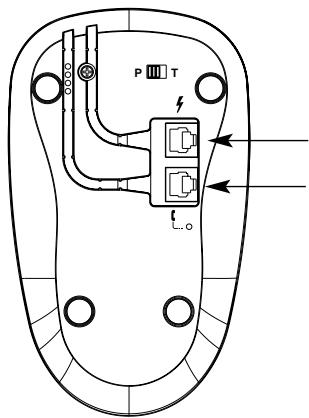
Mains power cable
Telephone cable
- Connect the telephone jack to the wall socket.
- Connect the mains adapter to a 230 V / 50 Hz power outlet.
▶ The green light on the base comes on.
Versatis155_uk.qxd
24/01/03
14:21
Page

VERSATIS 155 DIGITAL

1.1.3 Dialling mode
Select your dialling mode by shifting the switch under the base:
- P for pulse dialling,
- T for tone dialling.
In case of dialling mode modification after first set up:
- Disconnect the power cable.
- Shift the switch.
- Re-connect the power cable.
1.2 INSTALLING THE HANDSET
1.2.1 Fitting the batteries and charging up for the first time
- Once the base is connected insert the batteries into the battery compartment.
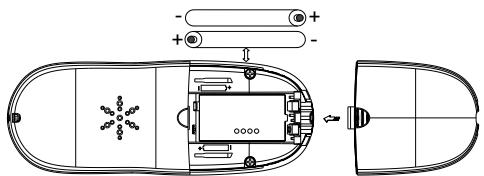
Battery insertion
Closing the compartment
Before using for the first time, we recommend that you leave the handset to charge up on the base for 24 hours in order to optimise battery performance and longevity.
Versatis155_uk.qxd 24/01/03 14:21
Page
VERSATIS 155 DIGITAL

- Place the handset on the base.
▶ The red light on the base comes on.
The icon flashes to indicate that the batteries are charging.
Obtain a line
The tone confirms that the VERSATIS 155 is working. Check that the ⚡ symbol is not flashing.
When the batteries are completely discharged, and once the handset is put back on the base, it may take a few minutes for the screen to light up again.
! Only use rechargeable batteries with exactly the same specifications as those supplied with the product.
Using non-rechargeable or non-conforming batteries can damage the product (refer to the "Technical specifications" chapter).
Failure to comply with this recommendation will invalidate the manufacturer's warranty. The batteries could split or leak if incorrectly inserted, opened or exposed to heat. Never dispose of batteries in a fire: risk of explosion.
Versatis155_uk.qxd
24/01/03
14:21
Page
VERSATIS 155 DIGITAL

2. USING THE TELEPHONE
2.1 MAKING A CALL
Direct dialling
- Press
• Dial the number to be called.

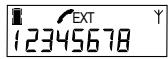
Pre-dialling
With the pre-dialling feature you can enter and modify a number before making the call.
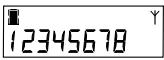
• Dial a number of up to 25 digits.
- Press Ⓧ to correct an input error.
- Press 📞 to initiate the call and hang up at the end the call.
2.2 ENDING A CALL
To hang up at the end of the call, press 📋 or place the handset on the base.
Versatis155_uk.qxd 24/01/03 14:21
Page
VERSATIS 155 DIGITAL

2.3 RECEIVING A CALL
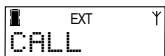
When you receive an outside call, the EXT icon flashes on the screen.
- If you have subscribed to the "Caller Line Identification" (CLI)* service, the caller's number appears.
• If not, the display shows:
To take the call:
- Press
OR
- Lift the handset off its base.
The icon then appears on the screen, you are connected.
2.4 REDIALLING THE LAST NUMBER DIALLED
To automatically redial the last number dialled:
- Press 📞.
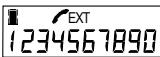
- Press the repeat last number dialled key Ⓐ.
▶ The screen displays the last 10 digits of the last number dialled.
Versatis155_uk.qxd
24/01/03
14:21
Page

VERSATIS 155 DIGITAL

2.5 INSERTING A PAUSE
It is possible to insert a pause between two digits of a number when dialling it.
- Press

▶ The pause is shown on the screen by the letter "P".
2.6 ADJUSTING THE VOLUME DURING A CALL
You can adjust the handset volume (choice of 3 volume levels) during a call by pressing 📄.
2.7 ADJUSTING THE RINGER VOLUME
There are three handset ringer volume levels: low, high, off.
- To adjust it, press 📁 as many times as necessary when the handset is inactive (no incoming call or dialling in progress).
N.B.: The base ringer remains active even if the handset ringer is off.
Versatis155_uk.qxd 24/01/03 14:21
Page
VERSATIS 155 DIGITAL

2.8 MUTE FUNCTION (TURNING OFF THE MOUTHPIECE)
You can put a correspondent on hold so that he/she does not hear a discussion.
- Press Ⓧ during the call; the handset microphone is then deactivated and the Ⓧ icon appears on the screen. Your correspondent can no longer hear you and you can talk to those around you confidentially.
- Press again to reactivate the microphone.
EXT Y 1234567890
You cannot dial while the MUTE function is active.
2.9 LOCATING THE HANDSET (PAGING FUNCTION)
Forgotten where you left your handset?
- Press 📄 on the base. The handset will ring for 30 seconds.
- To stop the ringer, press any key on the handset.
-1-
VERSATIS 155 DIGITAL

3. YOUR ADDRESS BOOK
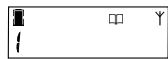
Your VERSATIS 155 telephone has an address book able to store up to 10 numbers of a maximum of 20 digits.
3.1 STORING A NUMBER
- Press 📄. The 📄 icon appears on the screen.
- Press the digit (from 0 to 9) corresponding to the position of the number in the address book.
- Enter the telephone number to be associated with this position in the address book. 0-12345678
- If necessary you can press Ⓧ to cancel incorrect digits.
• To store the number, press
▶ A tone confirms that the number has been stored.
- Press Ⓡ to quit store mode.
Versatis155_uk.qxd 24/01/03 14:22
Page
VERSATIS 155 DIGITAL

3.2 AUTOMATICALLY SELECTING A STORED NUMBER
- Press
- Press
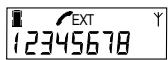
- Press the key corresponding to the number in the address book associated with the telephone number to be called.
- The number appears on the screen and the call is made automatically.
3.3 DELETING A NUMBER FROM THE ADDRESS BOOK
- Press
- Press the key corresponding to the number in the address book associated with the number to be called.
- Delete the number from the address book by pressing 📄.
VERSATIS 155 DIGITAL

4. IDENTIFYING CALLERS
If you subscribe to your network operator's "Caller Line Identification" (CLI) service, you can see your correspondent's number on your VERSATIS 155, before you take the call.
4.1 CONSULTING THE MISSED CALLS LOG
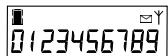
Your VERSATIS 155 automatically memorises the last 10 calls received.
The 📧 icon flashes on the screen, indicating that there are new calls.
• To consult the list of missed calls:
▶ Press ⬆ to display the last call received.
▶ Press 📋 to display the complete list.
▶ Press Ⓗ to quit the missed calls log.
4.2 CALLING A NUMBER IN THE LOG
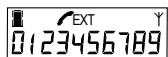
• To call back a number in the log:
▶ Press 📧 until you reach the required number.
▶ Press ☐; the number is dialled automatically.
Versatis155_uk.qxd 24/01/03 14:22
Page
VERSATIS 155 DIGITAL

4.3 DELETING A NUMBER FROM THE LOG
• To delete a number from the log:
▶ Press 📧 until you reach the number you want.
▶ Press Ⓧ to delete it.
VERSATIS 155 DIGITAL

5. TECHNICAL SPECIFICATIONS
| Free field range | Up to 300 meters * |
| Indoor range | Up to 50 meters * |
| Handset battery life(average values) | 10 hours talktime **200 hours standby |
| Weight of handset | 105 grams |
| Electrical connection - Mains adapter | Input: AC 230V/50 Hz / 30 mAOutput 1: DC 6.5 V / 150 mAOutput 2: AC 9 V/ 150 mASingle-phase AC excluding IT installations defined in standard NF EN 60-950. Caution, the network voltage is classified as a hazard by the criteria of the same standard. |
| Telephone connection | Appliance designed for connection to an analogue telephone line class TRT3 (telecommunications network voltage) as defined by standard NF EN 60950. |
| Rechargeable batteries | 1.2 V / 550 mAh/Ni-MH AAA size x 2 |
| Operating temperature | 5 to 40°C |
* Value may vary according to environment.
** Depends on initial battery charge.
Versatis155_uk.qxd 24/01/03 14:22
Page
VERSATIS 155 DIGITAL

6. TROUBLESHOOTING
If a problem arises, try this first: remove the batteries from your handset and disconnect the power supply from the base. Wait about 1 minute then reconnect the power supply to the base; reinstall the batteries in the handset.
| Problems | Causes | Solutions |
| Nothing appears on the handset display. | The appliance is receiving no power. | Check the power supply connection. |
| The batteries are flat. | Put the handset on its base to recharge it. | |
| You have no tone. | The handset is out of range of the base. | Move nearer to the base. |
| Reception quality deteriorates during the call. | You are out of range of the base or in an environment subject to interference. | Move nearer to the base. |
| Your correspondent can't hear you. | The mute function is active. | See the "Mute function" (Turning off the mouthpiece) section. |
| The batteries are still flat after several hours on charge. | The base is not receiving power. | Check the electrical power connection. |
| The handset batteries are defective. | Ask your reseller to supply you with new batteries. |
However, if the problem persists, you can call the hotline on the following number: 02 07 867 00 16 from Monday to Saturday, from 8 a.m. to 7 p.m (call billed at current rates).
The store where you bought your telephone is also able to inform you and provide after-sales service.
VERSATIS 155 DIGITAL

7. WARRANTY
We would remind you that VERSATIS is an appliance approved in compliance with European regulations, as proven by the CE marking.
You thus have a legal warranty covering this product and for all information concerning this warranty, please contact your reseller.
Regardless of the legal warranty covering the product, the reseller guarantees conformity of the products with their technical specifications for a period of twelve (12) months, parts and labour, starting from the date appearing on the proof of purchase of the product. You should therefore retain your invoice or till receipt specifying the date of purchase of the product and the name of the reseller. However, if the legal warranty applicable in your country exceeds twelve (12) months, the legal warranty alone then applies. However, if the legal warranty is less than twelve (12) months, the total period of the warranty (legal and commercial) will be of twelve (12) months. The non-conforming part or product will be repaired or replaced free of charge by an identical part or product or one that is equivalent or superior in terms of functionality and performance. If it proves impossible to repair or replace the item, the product will be reimbursed.
Products and spare parts - which may be either new or refurbished - are guaranteed either for three months from the date of repair or until the end of the initial warranty period, whichever is the longer. Products and parts that have been returned and replaced become the property of the manufacturer.
However, this warranty does not apply in the following cases:
- installation or use in a way which fails to comply with the instructions contained in this guide;
- incorrect connection or non-standard use of the product, notably with accessories not designed for the purpose;
• devices subjected to shocks or falls;
Versatis155_uk.qxd 24/01/03 14:22
Page
VERSATIS 155 DIGITAL

- devices damaged by lightning, voltage surge, heat sources or radiation therefrom, water, exposure to excessive humidity, or any other cause external to the product itself;
- negligence or poor maintenance;
- maintenance or repair of the product by persons not authorised by the manufacturer or reseller.
THE PRESENT TERMS AND CONDITIONS EXPRESSLY EXCLUDE ALL OTHER WARRANTIES. YOUR STATUTORY RIGHTS ARE NOT AFFECTED.


VERSATIS 155 DIGITAL

8. SAFETY
In the event of danger, the mains adapter acts as 230V power isolating device. It should therefore as a precaution be installed close to the appliance and be easily accessible.
To isolate the device from the primary power source, the mains adapter must be removed from the 230 V AC 50 Hz outlet.
If the mains adapter fails, it must be replaced by an identical model.
If not connected to the mains power or if there is a mains power failure, installations with cordless handsets will no longer work. You will then be unable to make or receive calls in the event of an emergency. This is why we recommend that you also have a conventional telephone as a backup.
! Do not use your telephone to notify a gas leak when standing in the vicinity of the leak.
It is recommended that you avoid using this device during electrical storms.
ATLINKS hereby declares that the VERSATIS 155 conforms to the essential requirements and other applicable provisions of European directive 1999/5/CE.
The certificates of conformity can be consulted on our website "www.atlinks.com".
Versatis155_uk.qxd 24/01/03 14:22
Page
VERSATIS 155 DIGITAL

9. ENVIRONMENT

Used handset batteries must be disposed of in compliance with current environmental protection regulations. You should return your batteries to your reseller or dispose of them in an approved recycling centre.
Do not attempt to open the batteries as they contain chemical substances. In the event of leakage, avoid contact with the skin, eyes and mouth. If necessary, rinse the affected part for several minutes in running water. Clean the product with absorbent paper or a dry cloth and contact your reseller for replacement batteries.

- 2
- GETTING STARTED
- INSTALLING THE BASE
- Precautions
- Information:
- Connecting the base
- Dialling mode
- INSTALLING THE HANDSET
- Fitting the batteries and charging up for the first time
- USING THE TELEPHONE
- MAKING A CALL
- Direct dialling
- Pre-dialling
- ENDING A CALL
- RECEIVING A CALL
- REDIALLING THE LAST NUMBER DIALLED
- INSERTING A PAUSE
- ADJUSTING THE VOLUME DURING A CALL
- ADJUSTING THE RINGER VOLUME
- MUTE FUNCTION (TURNING OFF THE MOUTHPIECE)
- LOCATING THE HANDSET (PAGING FUNCTION)
- YOUR ADDRESS BOOK
- STORING A NUMBER
- AUTOMATICALLY SELECTING A STORED NUMBER
- DELETING A NUMBER FROM THE ADDRESS BOOK
- IDENTIFYING CALLERS
- CONSULTING THE MISSED CALLS LOG
- CALLING A NUMBER IN THE LOG
- DELETING A NUMBER FROM THE LOG
- TECHNICAL SPECIFICATIONS
- TROUBLESHOOTING
- WARRANTY
- SAFETY
- ENVIRONMENT
Marque : ALCATEL
Modèle : VERSATIS 155
Catégorie : Téléphone sans fil