LV-HD400 - Projecteur LA VAGUE - Notice d'utilisation et mode d'emploi gratuit
Retrouvez gratuitement la notice de l'appareil LV-HD400 LA VAGUE au format PDF.

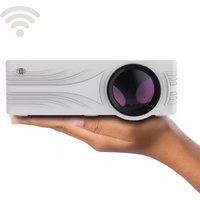
| Type de produit | Projecteur LED |
| Marque | LA VAGUE |
| Modèle | LV-HD400 |
| Résolution native | 1920 x 1080 pixels (Full HD) |
| Luminosité | 3 200 lumens |
| Contraste | 2000:1 |
| Correction trapézoïdale | ±15° manuelle |
| Température de couleur | 7500-8500K |
| Source lumineuse | LED |
| Dimensions (L x l x H) | 305 x 225 x 115 mm |
| Poids | Environ 2,5 kg |
| Alimentation | Secteur AC 100-240 V, 50/60 Hz |
| Interfaces | 2x HDMI, 2x USB, 1x AV, 1x VGA, sortie audio, entrée audio |
| Formats vidéo supportés | AVI, MP4, MKV, FLV, WMV, MOV, RMVB, MPEG1, MPEG2, MPEG-4, H.264, XVID, H.263, JPEG |
| Formats audio supportés | AAC, MP2, MP3, PCM, FLAC, WMA |
| Formats image supportés | BMP, JPEG, PNG |
| Fonctionnalités principales | Lecture USB directe (photos, musique, vidéos, texte), correction trapézoïdale, réglage de l'angle d'inclinaison |
| Entretien et nettoyage | Nettoyer le filtre à poussière toutes les 8 semaines |
| Sécurité | Ne pas regarder dans l'objectif, garder à l'écart des liquides, ne pas ouvrir le boîtier |
| Pièces détachées et réparabilité | Aucune pièce réparable par l'utilisateur ; contacter le fournisseur en cas de problème |
| Informations générales | Fabricant : VEHNS GROUP GmbH, Theatinerstraße 40-42, 80333 Munich, Allemagne ; Fabriqué en Chine |
FOIRE AUX QUESTIONS - LV-HD400 LA VAGUE
Questions des utilisateurs sur LV-HD400 LA VAGUE
0 question sur cet appareil. Repondez a celles que vous connaissez ou posez la votre.
Poser une nouvelle question sur cet appareil
Téléchargez la notice de votre Projecteur au format PDF gratuitement ! Retrouvez votre notice LV-HD400 - LA VAGUE et reprennez votre appareil électronique en main. Sur cette page sont publiés tous les documents nécessaires à l'utilisation de votre appareil LV-HD400 de la marque LA VAGUE.
MODE D'EMPLOI LV-HD400 LA VAGUE

La VAGUE
LED Projector
LV-HD400
Benutzerhandbuch
Instruction Manual
Mode d'emploi
Manuale di istruzioni
Manual de uso
TABLE OF CONTENTS
DEUTSCH 3
ENGLISH 14
FRANÇAIS 25
ITALIANO.... 36
ESPAÑOL 47
DEUTSCH
BITTE BEACHTEN:
- Bitte lesen Sie das gesamte Benutzerhandbuch sorgfältig durch, bevor Sie den Projektor verwenden.
- Um die Stabilität der Stromversorgung zu gewährleisten, verwenden Sie bitte eine Standard-Stromversorgung und geerdete Steckdosen.
- Verwenden Sie nur die auf dem Projektor angegebene Stromquelle.
- Bitte öffnen Sie den Projektor nicht. Es befinden sich keine vom Benutzer zu wartenden Teile im Projektor. Das Öffnen des Projektors führt zum Erlöschen der Garantie. Wenn Sie ein Problem mit Ihrem Projektor haben, wenden Sie sich an Ihren Lieferanten.
- Bitte schauen Sie nicht in die Linse des Projektors. Das helle Licht könnte Ihren Augen schaden.
- Stellen Sie den Projektor nicht auf eine Fläche, die den Luftstrom aus den Lüftungsschlitzen blockieren könnte. Weiches Gewebe könnte den Luftstrom behindern. Auf stabilem, hartem Untergrund aufstellen.
- Halten Sie den Projektor von Flüssigkeiten fern. Der Projektor ist nicht wasserdicht und darf nicht im Freien verwendet werden.
- Um einen elektrischen Schlag zu vermeiden, halten Sie den Projektor von Feuchtigkeit fern.
- Bitte schalten Sie den Projektor aus und trennen Sie ihn vom Stromnetz, wenn er nicht benutzt wird.
- Bitte verwenden Sie für die Aufbewahrung Ihres Projektors Originalverpackungen.
PRODUKTÜBERSICHT
Front

1 Infrarotempfänger
2 Lautsprecher
3 Stellschraube für Neigungswinkel
Oben

1 Objektiv Fokus
2 Keystone-Korrektur
3 Bedienfeld
Rückseite

1 Netzschalter
2 Anschlussfeld
3 Infrarotempfänger
Unterseite

1 Stellschraube für Neigungswinkel
2 Gewinde (M4x8mm) für Projektorhalterungen befinden sich unter den Pads
3 Staubfilter
Dieser sollte bei regelmäßiger Verwendung des Projektors alle 8 Wochen gereinigt werden
Bedienfeld

flowchart
graph TD
    1["1"] --> O(( ))
    2["2"] --> Power["Power"]
    3["3"] --> Menu["Menu"]
    4["4"] --> Return["Return"]
    5["5"] --> Return
    6["6"] --> Source["Source"]
    O --> OK((OK))
    Power --> OK
    Menu --> OK
    Return --> OK
    Source --> OK
1 LED Rot: Projektor befindet sich im Standby-Modus Grün: Der Projektor befindet sich in Betrieb
2 Ein- und Ausschalten des Projektors
3 Menü aufrufen
4 Tasten zur Navigation im Menü
5 Zurück
6 Auswahl der Videoquelle
Anschlussfeld

| HDMI1 | HDMI Eingang 1 |
| HDMI2 | HDMI Eingang 2 |
| Audio-out | Audio Ausgang |
| Audio-in | Audio Eingang |
| Video | AV-Video Eingang |
| PC-RGB | VGA Eingang |
| 1 | USB Eingang 1 |
| 2 | USB Eingang 2 |
Den jeweiligen Eingang können Sie auf dem Bedienfeld über die Taste „Source“ und den Pfeiltasten auswählen. Bitte bestätigen Sie die Auswahl über die „OK“ Taste.
Alternativ kann die Auswahl des Eingangsignals auch über die Fernbedienung erfolgen.
FERNBEDIENUNG

MENÜ
Durch drücken der Taste „Menu“ auf dem Bedienfeld oder durch Drücken der Taste „M“ auf der Fernbedienung wird das Menü eingeblendet.
Über die „Return“ oder „Menu“ Taste auf dem Bedienfeld oder über die Tasten „M“ und „zurück“ auf der Fernbedienung wird das Menü verlassen.
Über die Tasten zur Navigation auf dem Bedienfeld und der Fernbedienung können die entsprechenden Einstellungen im Menü vorgenommen werden.
Menüstruktur

BESONDERHEITEN BEI DER EINGANGSQUELLE „USB“
Es können USB-Sticks als auch externe Festplatten direkt an die USB Ports angeschlossen werden. Bei Auswahl des Eingangsignals „USB1“ oder „USB2“ erscheint folgender Bildschirm:  PHOTO Die Bilder auf der USB Quelle werden als Slideshow angezeigt. MUSIC Audio Dateien auf der USB Quelle werden über den Lautsprecher, als auch über den „Audio-out“ Ausgang auf dem Anschlussfeld ausgegeben MOVIE Video Inhalte auf der USB Quelle werden auf dem Projektor angezeigt. TEXT Anzeige von Textdateien auf der USB Quelle Die Navigation hierbei erfolgt durch die Tasten auf dem Bedienfeld, als auch über die Tasten auf der Fernbedienung natural_image
Circular diagram with concentric rings and directional arrows, no text or symbols present| Abmessungen | 305 x 225 x 115 mm |
| Schnittstellen | 2x HDMI |
| 2x USB | |
| 1x AV | |
| 1x VGA | |
| Native Auflösung | 1920 x 1080 |
| Helligkeit | 3.200 Lumen |
| Farbtemperatur | 7500-8500K |
| Kontrast | 2000:1 |
| Keystone | ±15° Manuell |
| Lichtquelle | LED |
| Video Formate | AVI, MP4, MKV, FLV, WMV, MOV, RMVB, MPEG1, MPEG2, MPEG-4, H.264, XVID, H.263, JPEG |
| Audio Formate | AAC, MP2, MP3, PCM, FLAC, WMA |
| Bild Formate | bmp, jpg, png |
ENTSORGUNG
natural_image
Symbol of a trash bin with crossed lines indicating no waste or discharge (no text or labels)Hersteller:
VEHNSGROUP
VEHNS GROUP GmbH Theatinerstraße 40-42 80333 München Deutschland www.vehnsgroup.com service@vehnsgroup.com www.lavague.deMADE IN CHINA
   Änderungen und Irrtümer vorbehalten Der Hersteller übernimmt keine Haftung für Schäden, die durch fehlerhafte, unsachgemäße oder unvereinbare Verwendung des Produkts entstehen. © VEHNS GROUP GmbH Version 1.0 - Dec 2019ENGLISH
PLEASE NOTE
1. Please read the entire user manual carefully before using the projector. 2. To ensure the stability of the power supply, use standard grounded power sockets. 3. Only use a power source as indicated on the projector. 4. Please do not open projector. There are no user-serviceable parts in the projector. Opening the projector will void warranty. If there is a problem with your projector contact your supplier. 5. Please do not directly look into the projector lens. The bright light could damage your eyes. 6. Please do not place projector on a surface that may block air flow from the vents. A soft fabric could prevent air flow. Place the projector on stable hard surface. 7. Please keep projector away from any liquids. The projector is not water proof or water resistant and is not for use outside. 8. To prevent electrical shock please keep projector away from moisture. 9. Please turn off and unplug projector when not in use. 10. Please use original packaging material when storing your projector.PRODUCT OVERVIEW
Front
 1 Infrared receiver 2 Loudspeakers 3 Adjusting screw for angle of inclinationTop
 1 Lens Focus 2 Keystone correction 3 KeypadBack
 1 Main power switch 2 Connector panel 3 Infrared receiverBottom
 1 Adjusting screw for angle of inclination 2 Threads (M4x8mm) for projector mounts are located under the pads 3 Dust filter Should be cleaned every 8 weeks if the projector is used regularly.Control panel
flowchart
graph TD
    1["1"] --> O(( ))
    2["2"] --> Power["Power"]
    3["3"] --> Menu["Menu"]
    4["4"] --> Return["Return"]
    5["5"] --> Return
    6["6"] --> Source["Source"]
    O --> OK((OK))
    Power --> OK
    Menu --> OK
    Return --> OK
    Source --> OK
Anschlussfeld
 HDMI1 HDMI Eingang 1 HDMI2 HDMI Eingang 2 Audio-out Audio Ausgang Audio-in Audio Eingang Video AV-Video Eingang PC-RGB VGA Eingang 1 USB Eingang 1 2 USB Eingang 2 You can select the respective input on the control panel using the „Source“ key and the arrow keys. Please confirm the selection by pressing the „OK“ key. Alternatively, the input signal can also be selected via the remote control.REMOTE CONTROL
MENU
Pressing the „Menu“ button on the control panel or pressing the „M“ button on the remote control will display the menu. The „Return“ or „Menu“ button on the control panel or the „M“ and „Back“ buttons on the remote control exit the menu. The navigation buttons on the control panel and the remote control can be used to make the corresponding settings in the menu.Structure
    The „OSD Language“ setting is used to select the language of the menu navigation.SPECIAL FEATURES OF THE „USB“ INPUT SOURCE
USB sticks as well as external hard disks can be connected directly to the USB ports. When the input signal „USB1“ or „USB2“ is selected, the following screen appears:  PHOTO The images on the USB source are displayed as slideshows. MUSIC Audio files on the USB source are output via the speaker as well as via the "Audio-out" output on the connector panel. MOVIE Video content on the USB source is displayed on the projector. TEXT Displaying Text Files on the USB Source Navigation is done using the buttons on the control panel as well as the buttons on the remote control. flowchart
graph TD
    A["Start"] --> B{Decision}
    B -->|Yes| C["OK"]
    B -->|No| D["End"]
| Dimensions (mm) | 305 x 225 x 115 mm |
| Interfaces | 2x HDMI |
| 2x USB | |
| 1x AV | |
| 1x VGA | |
| Native resolution | 1920 x 1080 |
| Brightness | 3,200 Lumen |
| Colour temperature | 7500-8500K |
| Contrast | 2000:1 |
| Keystone | ±15° manual |
| Light source | LED |
| Video Formats | AVI, MP4, MKV, FLV, WMV, MOV, RMVB, MPEG1, MPEG2, MPEG-4, H.264, XVID, H.263, JPEG |
| Audio Formats | AAC, MP2, MP3, PCM, FLAC, WMA |
| Image Formats | bmp, jpg, png |
DISPOSAL
natural_image
Symbol of a trash bin with crossed lines indicating no waste or discharge, and a solid black rectangle below (no text or labels)Manufacturer:
VEHNSGROUP
VEHNS GROUP GmbH Theatinerstraße 40-42 80333 Munich Germany www.vehnsgroup.com service@vehnsgroup.com www.lavague.deMADE IN CHINA
    Changes and errors excepted. The manufacturer accepts no liability for damage resulting from incorrect, improper or incompatible use of the product. © VEHNS GROUP GmbH Version 1.0 - Dec 2019FRANÇAIS
ATTENTION
1. Veuillez lire attentivement l'intégralité du manuel d'utilisation avant d'utiliser le projecteur. 2. Pour assurer la stabilité de l'alimentation électrique, utilisez une alimentation électrique standard et des prises de terre. 3. Utilisez uniquement la source d'alimentation indiquée sur le projecteur. 4. N'ouvrez pas le projecteur. Le projecteur ne contient aucune pièce réparable par l'utilisateur. L'ouverture du projecteur annule la garantie. Si vous avez un problème avec votre projecteur, contactez votre fournisseur. 5. Ne regardez pas dans l'objectif du projecteur. La lumière vive pourrait endommager vos yeux. 6. Ne placez pas le projecteur sur une surface qui pourrait bloquer le flux d'air des fentes de ventilation. Les tissus mous peuvent obstruer le flux d'air. Placer sur une surface stable et dure. 7. Tenez le projecteur à l'écart des liquides et de l'humidité. Le projecteur n'est pas étanche et ne doit pas être utilisé à l'extérieur. 8. Pour éviter tout choc électrique, tenez le projecteur à l'écart de l'humidité. 9. Veuillez éteindre le projecteur et le débrancher du secteur lorsqu'il n'est pas utilisé. 10. Veuillez utiliser l'emballage d'origine pour ranger votre projecteur.APERÇU DU PRODUIT
Devant
 1 Récepteur infrarouge 2 Haut-parleurs 3 Vis de réglage de l'angle d'inclinaisonDessus
 1 Mise au point de l'objectif 2 Correction de trapèze 3 Tableau de commandeCôté
 1 Interrupteur secteur 2 Panneau du connecteur 3 Récepteur infrarougeDessous
 1 Vis de réglage de l'angle d'inclinaison 2 Les filetages (M4x8mm) pour les supports de projecteur sont situés sous les patins. 3 Filtre anti-poussière Il doit être nettoyé toutes les 8 semaines si le projecteur est utilisé régulièrement.Tableau de commande
flowchart
graph TD
    1["1"] --> O(( ))
    2["2"] --> Power["Power"]
    3["3"] --> Menu["Menu"]
    4["4"] --> Return["Return"]
    5["5"] --> Return
    6["6"] --> Source["Source"]
    Power --> OK((OK))
    Return --> OK
    Menu --> OK
    Source --> OK
Panneau du connecteur
 HDMI1 Entrée HDMI 1 HDMI2 Entrée HDMI 2 Audio-out Sortie audio Audio-in Entrée audio Video Entrée vidéo AV PC-RGB Entrée VGA 1 Entrée USB 1 2 Entrée USB 2 La touche „Source“ et les touches fléchées permettent de sélectionner l'entrée correspondante sur le panneau de commande. Confirmez la sélection en appuyant sur la touche „OK“. Le signal d'entrée peut également être sélectionné à l'aide de la télécommande.TÉLÉCOMMANDE
MENU
Appuyez sur la touche „Menu“ du panneau de commande ou sur la touche „M“ de la télécommande pour afficher le menu. La touche „Return“ ou „Menu“ du panneau de commande ou les touches „M“ et „Retour“ de la télécommande permettent de quitter le menu. Les touches de navigation du panneau de commande et de la télécommande permettent d'effectuer les réglages correspondants dans le menu.Configuration du menu
    Le réglage „OSD Language“ permet de sélectionner la langue de navigation du menu.PARTICULARITÉS DE LA SOURCE D'ENTRÉE „USB“
Les clés USB ainsi que les disques durs externes peuvent être connectés directement aux ports USB. Lorsque le signal d'entrée „USB1“ ou „USB2“ est sélectionné, l'écran suivant apparaît:  PHOTO Les images de la source USB sont affichées sous forme de diaporamas. MUSIC Les fichiers audio de la source USB sont émis par le haut-parleur ainsi que par la sortie "Audio-out" du panneau de connexion. MOVIE Le contenu vidéo de la source USB est affiché sur le projecteur. TEXT Affichage des fichiers texte sur la source USB La navigation se fait à l'aide des touches du panneau de commande ainsi que des touches de la télécommande. flowchart
graph TD
    A["Start"] --> B{Decision}
    B -->|Yes| C["OK"]
    B -->|No| D["End"]
| Dimensions (mm) | 305 x 225 x 115 mm |
| Interfaces | 2x HDMI |
| 2x USB | |
| 1x AV | |
| 1x VGA | |
| Résolution native | 1920 x 1080 |
| Luminosité | 3.200 Lumen |
| Température de couleur | 7500-8500K |
| Contraste | 2000:1 |
| Correction trapézoïdale | ±15° manuelle |
| Source d'éclairage | LED |
| Formats vidéo | AVI, MP4, MKV, FLV, WMV, MOV, RMVB, MPEG1, MPEG2, MPEG-4, H.264, XVID, H.263, JPEG |
| Formats audio | AAC, MP2, MP3, PCM, FLAC, WMA |
| Formats d'image | bmp, jpg, png |
TRAITEMENT DES APPAREILS USAGÉS
natural_image
Symbol of a trash bin with crossed lines indicating no waste or discharge, and a solid black rectangle below (no text or labels)Fabricant:
VEHNSGROUP
VEHNS GROUP GmbH Theatinerstraße 40-42 80333 Munich Allemagne www.vehnsgroup.com service@vehnsgroup.com www.lavague.deMADE IN CHINA
    Sous réserve de modifications et d'erreurs. Le fabricant décline toute responsabilité pour les dommages résultant d'une utilisation incorrecte, inappropriée ou incompatible de l'appareil. © VEHNS GROUP GmbH Version 1.0 - Dec 2019ITALIANO
SI PREGA DI NOTARE:
1. Si prega di leggere attentamente l'intero manuale utente prima di utilizzare il proiettore. 2. Per garantire la stabilità dell'alimentazione elettrica, utilizzare un alimentatore standard e prese con messa a terra. 3. Utilizzare solo la fonte di alimentazione indicata sul proiettore. 4. Si prega di non aprire il proiettore. Non ci sono parti riparabili dall'utente nel proiettore. L'apertura del proiettore annulla la garanzia. Se avete un problema con il proiettore, contattate il vostro fornitore. 5. Non guardare nell'obiettivo del proiettore. La luce intensa potrebbe danneggiare gli occhi. 6. Non posizionare il proiettore su una superficie che potrebbe bloccare il flusso d'aria dalle fessure di ventilazione. I tessuti molli possono ostruire il flusso d'aria. Collocare su una superficie dura e stabile. 7. Tenere il proiettore lontano da liquidi e umidità. Il proiettore non è impermeabile e non deve essere utilizzato all'esterno. 8. Per evitare scosse elettriche, tenete il proiettore lontano dall'umidità. 9. Spegnere il proiettore e scollegare l'alimentazione CA quando non è in uso. 10. Si prega di utilizzare l'imballaggio originale per la conservazione del proiettore.DESCRIZIONE DEL PRODOTTO
Parte anteriore
 1 Ricevitore a infrarossi 2 Casse 3 Vite di regolazione dell'angolo di inclinazioneTop
 1 Messa a fuoco della lente 2 Correzione della chiave di volta 3 Pannello di controlloDorso
 1 Interruttore di rete 2 Pannello connettori 3 Ricevitore a infrarossiLato basso
 1 Vite di regolazione dell'angolo di inclinazione 2 Le filettature (M4x8mm) per i supporti del proiettore si trovano sotto le pastiglie. 3 filtri antipolvere Questo dovrebbe essere pulito ogni 8 settimane se il proiettore viene utilizzato regolarmente.Pannello di controllo
flowchart
graph TD
    A["1"] --> B(( ))
    C["2"] --> D["Power"]
    E["3"] --> F["Menu"]
    G["OK"] --> H["Return"]
    I["Source"] --> J["4"]
    K["5"] --> L["6"]
Pannello connettori
 HDMI1 Ingresso HDMI 1 HDMI2 Ingresso HDMI 2 Audio-out Uscita audio Audio-in Ingresso audio Video Ingresso video AV PC-RGB Ingresso VGA 1 Ingresso USB 1 2 Ingresso USB 2 Den jeweilgen Eingang können Sie auf dem Bedienfeld über die Taste È possibile selezionare l'ingresso corrispondente sul pannello di controllo utilizzando il tasto „Source“ e i tasti freccia. Confermare la selezione premendo il tasto „OK“. In alternativa, il segnale di ingresso può essere selezionato anche tramite il telecomando. CONTROLLO DI REMOTO MENÜ
Premendo il tasto „Menu“ sul pannello di controllo o premendo il tasto „M“ sul telecomando viene visualizzato il menu. Il tasto „Return“ o „Menu“ sul pannello di controllo o i tasti „M“ e „Back“ sul telecomando escono dal menu. Con i tasti di navigazione del pannello di controllo e del telecomando è possibile effettuare le impostazioni corrispondenti nel menu.Struttura del menu
    L'impostazione „Lingua OSD“ viene utilizzata per selezionare la lingua del menu di navigazione.CARATTERISTICHE SPECIALI DELLA SORGENTE DI INPUT „USB
Le chiavi USB e i dischi rigidi esterni possono essere collegati direttamente alle porte USB. Quando si seleziona il segnale di ingresso „USB1“ o „USB2“, appare la seguente schermata:  PHOTO Le immagini sulla sorgente USB vengono visualizzate come slideshow. MUSIC I file audio sulla sorgente USB vengono emessi sia dall'altoparlante che dall'uscita "Audio-out" sul pannello connettori. MOVIE Il contenuto video sulla sorgente USB viene visualizzato sul proiettore. TEXT Visualizzazione dei file di testo sulla sorgente USB La navigazione viene effettuata utilizzando i tasti del pannello di controllo e i tasti del telecomando. flowchart
graph TD
    A["Start"] --> B{Decision}
    B -->|Yes| C["OK"]
    B -->|No| D["End"]
| Dimensioni (mm) | 305 x 225 x 115 mm |
| interfacce | 2x HDMI |
| 2x USB | |
| 1x AV | |
| 1x VGA | |
| Risoluzione nativa | 1920 x 1080 |
| brillantezza | 3.200 Lumen |
| temperatura di colore | 7500-8500K |
| contrapposizione | 2000:1 |
| cardine | ±15° Manuell |
| sorgente luminosa | LED |
| Formati video | AVI, MP4, MKV, FLV, WMV, MOV, RMVB, MPEG1, MPEG2, MPEG-4, H.264, XVID, H.263, JPEG |
| Formati audio | AAC, MP2, MP3, PCM, FLAC, WMA |
| Formati immagine | bmp, jpg, png |
ESPOSIZIONE
natural_image
Simple line drawing of a trash bin with crossed lines indicating no waste or restriction (no text or symbols)Produttore:
VEHNSGROUP
VEHNS GROUP GmbH Theatinerstraße 40-42 80333 Monaco Germania www.vehnsgroup.com service@vehnsgroup.com www.lavague.deMADE IN CHINA
    Salvo modificaciones y errores. El fabricante no se hace responsable de los daños derivados de un uso incorrecto, inadecuado o incompatible del producto. © VEHNS GROUP GmbH Versión 1.0 - Nov 2019ESPAÑOL
TENGA EN CUENTA:
1. Lea atentamente todo el manual del usuario antes de utilizar el proyector. 2. Para garantizar la estabilidad de la fuente de alimentación, utilice una fuente de alimentación estándar y tomas de corriente con conexión a tierra. 3. Utilice únicamente la fuente de alimentación indicada en el proyector. 4. Por favor, no abra el proyector. No hay piezas que el usuario pueda reparar en el proyector. La apertura del proyector anula la garantía. Si tiene algún problema con el proyector, póngase en contacto con su proveedor. 5. Por favor, no mire a la lente del proyector. La luz brillante podría dañar sus ojos. 6. No coloque el proyector sobre una superficie que pueda bloquear el flujo de aire de las ranuras de ventilación. Los tejidos blandos pueden obstruir el flujo de aire. Colóquelo sobre una superficie estable y dura. 7. Mantenga el proyector alejado de líquidos y humedad. El proyector no es impermeable y no debe utilizarse al aire libre. 8. Para evitar descargas eléctricas, mantenga el proyector alejado de la humedad. 9. Apague el proyector y desenchúfelo de la alimentación de CA cuando no esté en uso. 10. Por favor, utilice el embalaje original cuando guarde el proyector.DESCRIPCIÓN DEL PRODUCTO
Fachada
 1 Receptor de infrarrojos 2 Altoparlantes 3 Tornillo de ajuste del ángulo de inclinaciónArriba
 1 Enfoque del lente 2 Corrección trapezoidal 3 Tablero de mandoReverso
 1 Interruptor de red 2 Panel de conexión 3 Receptor de infrarrojosBase
 1 Tornillo de ajuste del ángulo de inclinación 2 Las roscas (M4x8mm) para los soportes del proyector se encuentran debajo de las almohadillas. 3 Filtros de polvo Esto debe limpiarse cada 8 semanas si el proyector se utiliza regularmente.Tablero de mando
flowchart
graph TD
    1["1"] --> A["Circle"]
    2["2"] --> B["Power"]
    3["3"] --> C["Menu"]
    4["4"] --> D["OK"]
    5["5"] --> E["Return"]
    6["6"] --> F["Source"]
    B --> D
    C --> F
    D --> E
    E --> F
Panel de conexión
 HDMI1 HDMI Eingang 1 HDMI2 HDMI Eingang 2 Audio-out Audio Ausgang Audio-in Audio Eingang Video AV-Video Eingang PC-RGB VGA Eingang 1 USB Eingang 1 2 USB Eingang 2 Con la tecla „Source“ y las teclas de flecha se puede seleccionar la entrada correspondiente en el panel de control. Confirme la selección con la tecla „OK“. Alternativamente, la señal de entrada también puede seleccionarse a través del mando a distancia.FERNBEDIENE
MENÚ
Al pulsar el botón „Menú“ en el panel de control o al pulsar el botón „M“ en el mando a distancia se mostrará el menú. Los botones „Return“ o „Menu“ del panel de control o los botones „M“ y „Back“ del mando a distancia salen del menú. Con los botones de navegación del panel de control y del mando a distancia se pueden realizar los ajustes correspondientes en el menú.Estructura del menú
    El ajuste „Idioma OSD“ se utiliza para seleccionar el idioma de la navegación por los menús.CARACTERÍSTICAS ESPECIALES DE LA FUENTE DE ENTRADA „USB“
Los lápices USB y los discos duros externos se pueden conectar directamente a los puertos USB. Cuando se selecciona la señal de entrada „USB1“ o „USB2“, aparece la siguiente pantalla:  PHOTO Las imágenes de la fuente USB se muestran como presentaciones de diapositivas. MUSIC Los archivos de audio de la fuente USB se emiten a través del altavoz, así como a través de la salida "Audio-out" del panel de conexión. MOVIE El contenido de vídeo de la fuente USB se muestra en el proyector. TEXT Visualización de archivos de texto en la fuente USB La navegación se realiza mediante los botones del panel de control y los del mando a distancia. flowchart
graph TD
    A["Start"] --> B{Decision}
    B -->|Yes| C["OK"]
    B -->|No| D["End"]
| Dimensiones (mm) | 305 x 225 x 115 mm |
| interrelaciones | 2x HDMI |
| 2x USB | |
| 1x AV | |
| 1x VGA | |
| Resolución nativa | 1920 x 1080 |
| Resplandor | 3.200 Lumen |
| Temperatura del color | 7500-8500K |
| Contraposición | 2000:1 |
| Clave | ±15° Manuell |
| Fuente luminosa | LED |
| Formatos de vídeo | AVI, MP4, MKV, FLV, WMV, MOV, RMVB, MPEG1, MPEG2, MPEG-4, H.264, XVID, H.263, JPEG |
| Formatos de audio | AAC, MP2, MP3, PCM, FLAC, WMA |
| Formatos de imagen | bmp, jpg, png |
DESECHOS
natural_image
Symbol of a trash bin with crossed lines indicating no waste or discharge, and a solid black rectangle below (no text or labels)Fabricante:
VEHNSGROUP
VEHNS GROUP GmbH Theatinerstraße 40-42 80333 München Deutschland www.vehnsgroup.com service@vehnsgroup.com www.lavague.deMADE IN CHINA
    Salvo modificaciones y errores. El fabricante no se hace responsable de los daños derivados de un uso incorrecto, inadecuado o incompatible del producto. © VEHNS GROUP GmbH Version 1.0 - Dec 2019 natural_image
Abstract geometric pattern with a central star-like shape and radial lines, no text or symbols present.natural_image
Abstract geometric pattern with overlapping triangles and shapes (no text or symbols)natural_image
Abstract geometric pattern with radial symmetry and a central star-like shape, no text or symbols present
- La VAGUE
- LED Projector
- LV-HD400
- TABLE OF CONTENTS
- DEUTSCH
- BITTE BEACHTEN:
- PRODUKTÜBERSICHT
- Front
- Oben
- Rückseite
- Unterseite
- Bedienfeld
- Anschlussfeld
- FERNBEDIENUNG
- MENÜ
- Menüstruktur
- BESONDERHEITEN BEI DER EINGANGSQUELLE „USB“
- ENTSORGUNG
- Hersteller:
- VEHNSGROUP
- MADE IN CHINA
- ENGLISH
- PLEASE NOTE
- PRODUCT OVERVIEW
- Top
- Back
- Bottom
- Control panel
- REMOTE CONTROL
- MENU
- Structure
- SPECIAL FEATURES OF THE „USB“ INPUT SOURCE
- DISPOSAL
- Manufacturer:
- FRANÇAIS
- ATTENTION
- APERÇU DU PRODUIT
- Devant
- Dessus
- Côté
- Dessous
- Tableau de commande
- Panneau du connecteur
- TÉLÉCOMMANDE
- Configuration du menu
- PARTICULARITÉS DE LA SOURCE D'ENTRÉE „USB“
- TRAITEMENT DES APPAREILS USAGÉS
- Fabricant:
- ITALIANO
- SI PREGA DI NOTARE:
- DESCRIZIONE DEL PRODOTTO
- Parte anteriore
- Dorso
- Lato basso
- Pannello di controllo
- Pannello connettori
- Struttura del menu
- CARATTERISTICHE SPECIALI DELLA SORGENTE DI INPUT „USB
- ESPOSIZIONE
- Produttore:
- ESPAÑOL
- TENGA EN CUENTA:
- DESCRIPCIÓN DEL PRODUCTO
- Fachada
- Arriba
- Reverso
- Base
- Tablero de mando
- Panel de conexión
- FERNBEDIENE
- MENÚ
- Estructura del menú
- CARACTERÍSTICAS ESPECIALES DE LA FUENTE DE ENTRADA „USB“
- DESECHOS
- Fabricante:
Marque : LA VAGUE
Modèle : LV-HD400
Catégorie : Projecteur