
KXMB2010E - Téléphone fixe PANASONIC - Notice d'utilisation et mode d'emploi gratuit
Retrouvez gratuitement la notice de l'appareil KXMB2010E PANASONIC au format PDF.


| Type de produit | Imprimante multifonction (scanner et copieur) |
| Marque | Panasonic |
| Modèle | KX-MB2010E |
| Fonctions principales | Numérisation, copie |
| Format de numérisation | Jusqu'à A4 (via vitre ou chargeur automatique) |
| Chargeur automatique de documents | Jusqu'à 20 pages, recto verso non précisé |
| Alimentation | Secteur 220-240 V CA, 50/60 Hz |
| Consommables | Cartouche toner KX-FAT411X, cartouche tambour KX-FAD412X |
| Nettoyage et entretien | Éteindre l'appareil avant nettoyage, utiliser un chiffon sec, ne pas utiliser de nettoyants liquides ou aérosols |
| Sécurité | Débrancher en cas de fumée ou odeur anormale, ne pas exposer à l'humidité, utiliser une prise avec mise à la terre |
| Réparabilité | Contacter un centre de service agréé Panasonic pour toute réparation |
| Informations générales | Classe laser 1, LED classe 1, conforme aux directives européennes |
FOIRE AUX QUESTIONS - KXMB2010E PANASONIC
Questions des utilisateurs sur KXMB2010E PANASONIC
0 question sur cet appareil. Repondez a celles que vous connaissez ou posez la votre.
Poser une nouvelle question sur cet appareil
Téléchargez la notice de votre Téléphone fixe au format PDF gratuitement ! Retrouvez votre notice KXMB2010E - PANASONIC et reprennez votre appareil électronique en main. Sur cette page sont publiés tous les documents nécessaires à l'utilisation de votre appareil KXMB2010E de la marque PANASONIC.
MODE D'EMPLOI KXMB2010E PANASONIC
Important Information Guide
Multi-Function Printer
Model No. KX-MB2000E
KX-MB2010E
KX-MB2025E
KX-MB2030E
Do NOT connect the unit to a computer with the USB cable until prompted to do so during the setup of Multi-Function Station (CD-ROM).
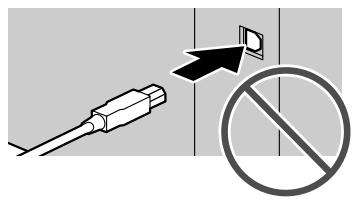
1
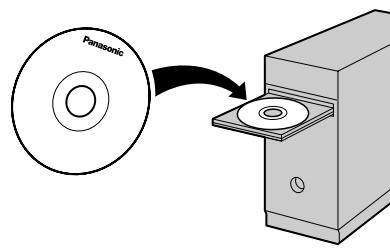
2
Accessory information:
To ensure that the unit operates properly, we recommend the use of Panasonic toner and drum cartridges.
Replacement accessory
- Toner cartridge
Model No. (Part No.): KX-FAT411X - Drum cartridge
Model No. (Part No.): KX-FAD412X
Sales and Support Information
Customer Care Centre
For customers within the UK: 0844 844 3878 (for fax machine) 0844 844 3867 (for MFP)
For customers within the Republic of Ireland: 01 6130082 (for fax machine) 01 2898255 (for MFP)
- Visit our website for product information
E-mail: customer.care@panasonic.co.uk
Direct Sales at Panasonic UK
- Order accessory and consumable items for your product with ease and confidence by phoning our Customer Care Centre Monday - Thursday 9:00am - 5:30pm, Friday 9:30am - 5:30pm (Excluding public holidays).
- Or go on line through our Internet Accessory ordering application at www.panasonic.co.uk.
- Most major credit and debit cards accepted.
- All enquires transactions and distribution facilities are provided directly by Panasonic UK Ltd.
It couldn't be simpler! - Also available through our Internet is direct shopping for a wide range of finished products, take a browse on our website for further details.
The supplied Setup CD-ROM provides the Operating Instructions in PDF format with a detailed description on how to use the unit. Adobe Reader® is required to view them.
Please read before using the unit and save the CD-ROM for future reference.
User record (for your future reference)
Date of purchase
Serial number (found on the rear of the unit)
Dealer's name and address
Dealer's telephone number
Attach your sales receipt here.

Note:
- Save the original carton and packing materials for future shipping and transportation of the unit.
- After unpacking the product, take care of the packing materials and/or power plug cap appropriately.
- The suffix in the model number will be omitted in these instructions.
- Most figures shown in these instructions are based on a KX-MB2030.
Caution:
- When you operate this product, the power outlet should be near the product and easily accessible.
- Be sure to use the telephone line cord supplied with this unit (KX-MB2025/KX-MB2030 only).
- Do not extend the telephone line cord (KX-MB2025/KX-MB2030 only).
- In the event of problems, you should contact your equipment supplier in the first instance (KX-MB2025/KX-MB2030 only).
- This equipment is designed for use on the UK and Republic of Ireland analogue telephone network (KX-MB2025/KX-MB2030 only).
Declaration of Conformity (KX-MB2025/KX-MB2030 only):
- Panasonic System Networks Co., Ltd. declares that this equipment is in compliance with the essential requirements and other relevant provisions of Radio & Telecommunications Terminal Equipment (R&TTE) Directive 1999/5/EC.
Declarations of Conformity for the relevant Panasonic products described in this manual are available for download by visiting:
http://www.doc.panasonic.de
Contact to Authorised Representative:
Panasonic Testing Centre
Panasonic Marketing Europe GmbH
Winsbergring 15, 22525 Hamburg, Germany
Information of Compliance with EU relevant Regulatory Directives (KX-MB2000/KX-MB2010 only):
- Contact to Authorised Representat
Panasonic Testing Centre
Panasonic Marketing Europe GmbH
Winsberging 15, 22525 Hamburg, Germany
ENERGY STAR:
- As an ENERGY STAR® Partner, Panasonic has determined that this product meets the ENERGY STAR guidelines for energy efficiency. ENERGY STAR is a U.S. registered mark.

ENERGY STAR
Trademarks:
- Adobe and Reader are either registered trademarks or trademarks of Adobe Systems Incorporated in the United States and/or other countries.
- All other trademarks identified herein are the property of their respective owners.
Copyright:
- This material is copyrighted by Panasonic System Networks Co., Ltd., and may be reproduced for internal use only. All other reproduction, in whole or in part, is prohibited without the written consent of Panasonic System Networks Co., Ltd.
© Panasonic System Networks Co., Ltd. 2009
Table of Contents
1.1 For your safety 3
1.2 Important safety instructions 5
1.3 Information for Users on Collection and Disposal of Old Equipment and used Batteries
1.4 Illegal copies 6
1.5 Important Information 7
1.6 Extension telephone adaptor for UK 9 (KX-MB2025/KX-MB2030 only)
1.7 Turning the power switch ON 9
1.8 Selecting the operation mode (Scan/ Copy) (Fax: KX-MB2025/KX-MB2030 only) 9
1.9 Setting the original 9
1.10 Display messages 10
1.1 For your safety
To prevent severe injury and loss of life/property, read this section carefully before using the unit to ensure proper and safe operation of your unit.
- The following symbols are used to classify and describe the level of hazard and injury caused when the denotation is disregarded and improper use is performed.

WARNING
Denotes a potential hazard that could result in serious injury or death.

CAUTION
Denotes hazards that could result in minor injury or damage to the unit.
- The following symbols are used to classify and describe the type of instructions to be observed.

This type of symbol is used to alert users to a specific operating procedure that must be performed carefully.

This type of symbol is used to alert users to a specific operating procedure that must not be performed.

This type of symbol is used to alert users to a specific operating procedure that must be emphasized in order to operate the unit safely.

WARNING
Power and ground connection

Unplug this unit from power outlets if it emits smoke, an abnormal smell or makes unusual noise. These conditions can cause fire or electric shock. Confirm that smoke has stopped and contact an authorised service centre.

Use only the power source marked on the unit. If you are not sure of the type of power supplied to your home, consult your dealer or local power company.

For safety purposes this unit is equipped with a grounded plug. If you do not have this type of outlet, please have one installed. Do not ignore this safety feature by tampering with the plug.

Do not place objects on the mains lead. Install the unit where no one can step or trip on the cord.

Do not overload power outlets and extension cords. This can result in the risk of fire or electric shock.

Completely insert the AC adaptor/power plug into the power outlet. Failure to do so may cause electric shock and/or excessive heat resulting in a fire.

Regularly remove any dust, etc. from the AC adaptor/power plug by pulling it from the power outlet, then wiping with a dry cloth. Accumulated dust may cause an insulation defect from moisture, etc. resulting in a fire.

Never touch the plug with wet hands. There is a danger of electric shock.
Installation

Place the unit securely on a stable, level surface. Serious damage and/or injury may result if the unit falls.

To prevent the risk of fire or electrical shock, do not expose this product to rain or any type of moisture.

Make sure that the unit is installed in a well ventilated room so as not to increase density of ozone in the air. Since ozone is heavier than air, it is recommended that air at floor level be ventilated.
Operating safeguards

Turn the power switch OFF before cleaning. Do not use liquid or aerosol cleaners.

Do not cover slots and openings on the unit. They are provided for ventilation and protection against overheating. Never place the unit near radiators, or in a place where proper ventilation is not provided.

Never push any objects through slots in this unit. This may result in the risk of fire or electric shock. Never spill any liquid on the unit.

To reduce the risk of electric shock, do not disassemble this unit. Take the unit to an authorised service centre when service is required. Opening or removing covers may expose you to dangerous voltage or other risks. Incorrect reassembly can cause electric shock when the unit is subsequently used.

Follow all warnings and instructions marked on this unit.

Do not spill liquids (detergents, cleansers, etc.) onto the telephone line cord plug, or allow it to become wet at all. This may cause a fire. If the telephone line cord plug becomes wet, immediately pull it from the telephone wall socket, and do not use (KX-MB2025/KX-MB2030 only).

Unplug this unit from power outlets and refer servicing to an authorised service centre when any of the following conditions occur:
- If the mains lead is damaged or frayed.
- If the unit has been exposed to rain or water, or liquid has been spilled into the unit. Do not use a microwave oven to speed up the drying process of any parts of the unit to avoid permanent damage.
- If the unit does not work normally by following the operating instructions. Adjust only controls covered by the operating instructions. Improper adjustment may require extensive work by an authorised service centre.
- If the unit has been dropped or physically damaged.
- If the unit exhibits a distinct change in performance.
USB cable/LAN cable

To assure continued emission limit compliance;
- use only shielded USB cable (Example: Hi-Speed USB 2.0 certified cable).
- use only shielded LAN cable (category 5 straight cable) (KX-MB2000/KX-MB2010/KX-MB2030 only).

CAUTION
Installation and relocation

After moving the unit from cold areas to warmer areas, wait approximately 30 minutes before turning on the power switch to allow the unit to adjust to the ambient temperature. If the power switch is turned on too soon after a sudden climate change, condensation may form inside the unit, causing malfunction.

Never turn the unit upside down or sideways when moving it.

Never install telephone wiring during a lightning storm (KX-MB2025/ KX-MB2030 only).

Never install telephone sockets in wet locations unless the socket is specifically designed for wet locations (KX-MB2025/KX-MB2030 only).

Never touch uninsulated telephone wires or terminals unless the telephone line has been disconnected at the network interface (KX-MB2025/KX-MB2030 only).

Use caution when installing or modifying telephone lines (KX-MB2025/ KX-MB2030 only).

Do not position the unit in a location where it is unstable or subject to vibrations.
Operating safeguards

When opening/closing the top cover, hold the indentations on both sides of the unit (①).
- To prevent injuries, be careful not to put your hands under the top cover.
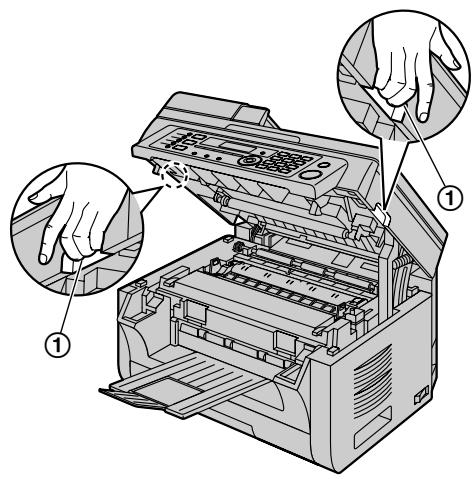
Laser radiation
CLASS 1 LASER PRODUCT

The printer of this unit utilises a laser. Use of controls or adjustments or performance of procedures other than those specified herein may result in hazardous radiation exposure.
See the operating instructions for the Laser diodes properties.
LED light
CLASS 1 LED PRODUCT

Do not view directly with optical instruments.
See the operating instructions for the LED light of CIS properties.
Fuser unit

During or immediately after printing, the fuser unit gets hot. This is normal. Do not touch the fuser unit.
Note:
- The area near the output tray may also get warm. This is normal.
Toner cartridge
Avoid ingestion, inhalation, eye or skin contact.
- If ingestion occurs, drink several glasses of water to dilute stomach contents.
- If inhalation occurs, exit the area immediately into the fresh air.
- If skin contact occurs, wash thoroughly with soap and cold water, then air dry. Do not use hot water or hair dryer.
- If eye contact occurs, flush thoroughly with water.
- In all cases, seek medical treatment if adverse symptoms occur.
1.2 Important safety instructions
When using this unit, basic safety precautions should always be followed to reduce the risk of fire, electric shock, or personal injury.
- Do not use this unit near water, for example near a bathtub, wash bowl, kitchen sink, etc.
- During thunderstorms, avoid using telephones except cordless types. There may be a remote risk of an electric shock from lightning (KX-MB2025/ KX-MB2030 only).
- Do not use the telephone of this unit (if so equipped) to report a gas leak, when in the vicinity of the leak (KX-MB2025/KX-MB2030 only).
SAVE THESE INSTRUCTIONS
1.3 Information for Users on Collection and Disposal of Old Equipment and used Batteries
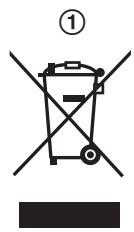
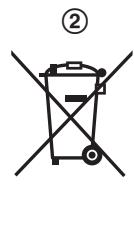
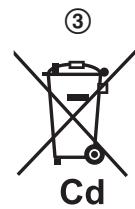
These symbols (①, ②, ③) on the products, packaging, and/or accompanying documents mean that used electrical and electronic products and batteries should not be mixed with general household waste.
For proper treatment, recovery and recycling of old products and used batteries, please take them to applicable collection points, in accordance with your
national legislation and the Directives 2002/96/EC and 2006/66/EC.
By disposing of these products and batteries correctly, you will help to save valuable resources and prevent any potential negative effects on human health and the environment which could otherwise arise from inappropriate waste handling.
For more information about collection and recycling of old products and batteries, please contact your local municipality, your waste disposal service or the point of sale where you purchased the items.
Penalties may be applicable for incorrect disposal of this waste, in accordance with national legislation.
For business users in the European Union
If you wish to discard electrical and electronic equipment, please contact your dealer or supplier for further information.
Information on Disposal in other Countries outside the European Union
These symbols (①, ②, ③) are only valid in the European Union. If you wish to discard these items, please contact your local authorities or dealer and ask for the correct method of disposal.
Note for the battery symbol
This symbol (②) might be used in combination with a chemical symbol (③). In this case it complies with the requirement set by the Directive for the chemical involved.
1.4 Illegal copies
It is unlawful to make copies of certain documents.
Copying certain documents may be illegal in your country. Penalties of fines and/or imprisonment may be imposed on those found guilty. The following are examples of items that may be illegal to copy in your country.
- Currency
Bank notes and cheques
Bank and government bonds and securities
Passports and identification cards
Copyright material or trademarks without the consent of the owner
Postage stamps and other negotiable instruments
This list is not inclusive and no liability is assumed for either its completeness or accuracy. In case of doubt, contact your legal counsel.
Notice:
Install your machine near a supervised area to prevent illegal copies from being made.
1.5 Important Information
The connection to the telecommunication systems must not be hard wired and must be unplugged before the earth is disconnected.
Method of connection
This apparatus is connected to the exchange line or PABX/PMBX extension by the new standard British Telecom plug and socket. Arrangements for provision of this type of termination can be made through the nearest British Telecom Sales Office.
This apparatus may be connected to the following types of installation.
a) For connection to the public switched telephone network (PSTN) and compatible PBX (Private Branch Exchange), which use DTMF signalling. (Please consult your supplier for an up to date list of compatible PBX's.)
b) The apparatus can be used on extension sockets connected to a direct exchange line (D.E.L.).
c) This apparatus is suitable for connection to the telecommunication system directly or via compatible private branch exchange as an extension. The supplier of the apparatus should be consulted for an up to date list of PBX's with which the apparatus is compatible.
It cannot be guaranteed that the apparatus will operate under all possible conditions of connection to compatible PBX's.
- This apparatus is suitable for connection to a PBX with or without initial proceed indication.
- This apparatus is suitable for connection to a PBX with or without secondary proceed indication.
Any cases of difficulty should be referred in the first instance to the supplier of the apparatus.
d) The apparatus must not be connected in the following manner:
- As an extension to a pay phone
- As a party line with shared service
NOTES:
- If you experience any problems with the normal use of your apparatus, you should unplug it from the telephone outlet and connect a known working telephone in its place. If the known working telephone still gives problems, then please contact the customer service department of your PSTN operator (e.g. BT etc.). If it operates properly, then the problems are likely to be a fault in your apparatus. In this case, consult your supplier for advice.
- Your PSTN operator may charge you if they attend a service call that is not due to apparatus supplied by them.
For your safety
This appliance is supplied with a moulded three pin mains plug for your safety and convenience.
Should the fuse need to be replaced please ensure that the replacement fuse is of the same rating and that it is approved by ASTA or BSI to BS1362.
Check for ASTA mark

or the BSI
mark on the body of the fuse.
If the plug contains a removable fuse cover you must ensure that it is refitted when the fuse is replaced.
If you lose the fuse cover the plug must not be used until a replacement cover is obtained.
A replacement fuse cover can be purchased from your local Panasonic dealer.
IF THE FITTED MOULDED PLUG IS UNSUITABLE FOR THE SOCKET OUTLET IN YOUR HOME THEN THE FUSE SHOULD BE REMOVED AND THE PLUG CUT OFF AND DISPOSED OF SAFELY. THERE IS A DANGER OF SEVERE ELECTRICAL SHOCK IF THE CUT OFF PLUG IS INSERTED INTO ANY 13 AMP SOCKET.
If a new plug is to be fitted please observe the wiring code as shown below. If in any doubt please consult a qualified electrician.
WARNING: THIS APPLIANCE MUST BE EARTHED.
IMPORTANT:
The wires in this mains lead are coloured in accordance with the following code:
Green-and-Yellow: Earth
Blue: Neutral
Brown: Live
As the colours of the wire in the mains lead of this appliance may not correspond with the coloured markings identifying the terminals in your plug, proceed as follows.
The wire which is coloured GREEN-AND-YELLOW must be connected to the terminal in the plug which is marked with the letter E or by the Earth symbol ± or coloured GREEN or GREEN-AND-YELLOW.
The wire which is coloured BLUE must be connected to the terminal in the plug which is marked with the letter N or coloured BLACK.
The wire which is coloured BROWN must be connected to the terminal in the plug which is marked with letter L or coloured RED.
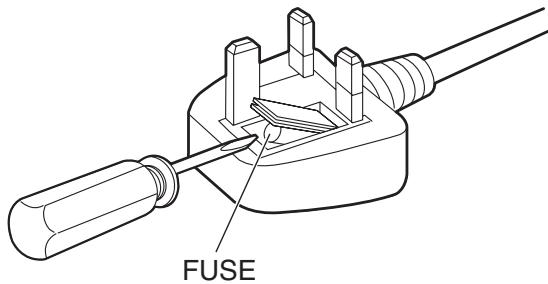
How to replace the fuse: Open the fuse compartment with a screwdriver and replace the fuse (and fuse cover).
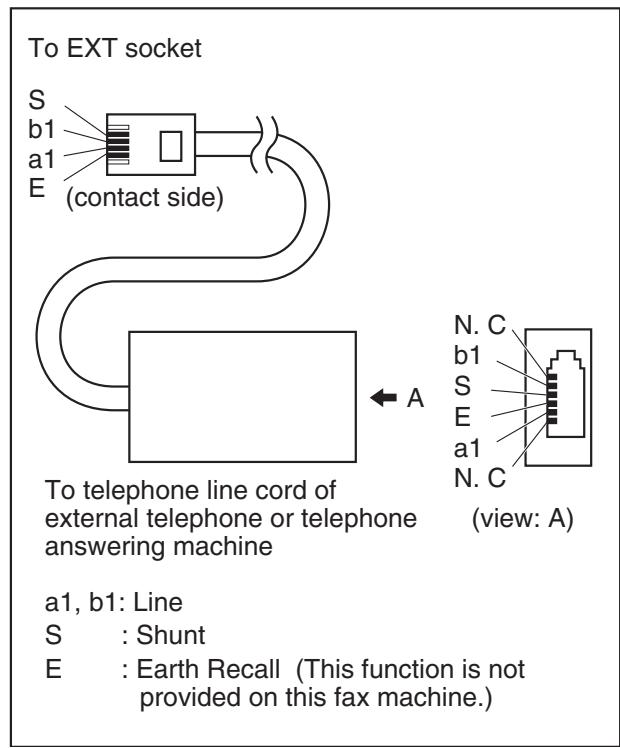
1.6 Extension telephone adaptor for UK (KX-MB2025/KX-MB2030 only)
When using the unit with an external answering machine, please purchase an extension telephone adaptor.
1.7 Turning the power switch ON
Turn the power switch to the ON position (①).
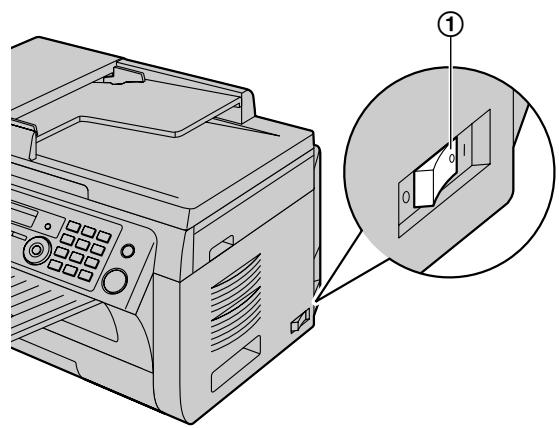
1.8 Selecting the operation mode (Scan/Copy) (Fax: KX-MB2025/KX-MB2030 only)
You can select the desired mode by pressing one of the following buttons.
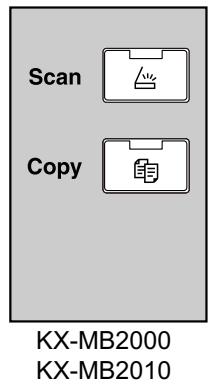
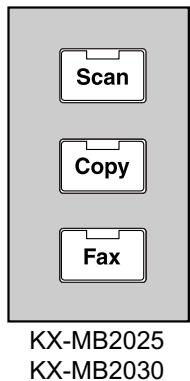
- [Scan]: Select this mode when using the unit as a scanner.
- [Copy]: Select this mode when using the unit as a copier.
- [Fax] (KX-MB2025/KX-MB2030 only): Select this mode when using the unit as a fax machine.
1.9 Setting the original
1.9.1 Using the scanner glass
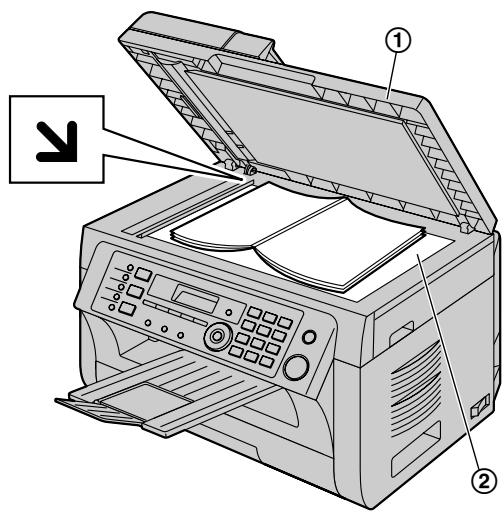
1 Open the document cover (①).
2 Place the document FACE DOWN on the scanner glass (②), aligning the top left of the document with the corner where the mark is positioned.
3 Close the document cover.
1.9.2 Using the automatic document feeder (KX-MB2010/KX-MB2025/KX-MB2030 only)
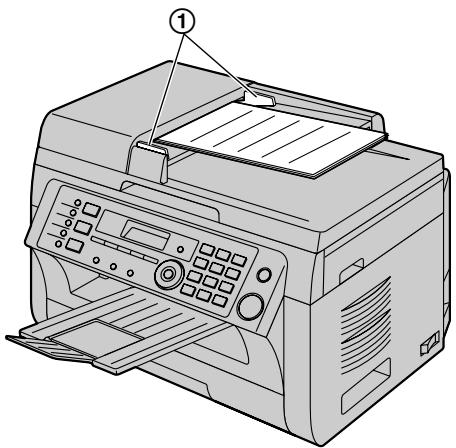
1 Insert the document (up to 20 pages) FACE UP into the feeder until a single beep is heard.
2 Adjust the width of the document guides (①) to fit the actual size of the document.
1.10 Display messages
To indicate the unit's status, one or more of the following messages will appear on the display. See the operating instructions for details.
- "CALL SERVICE"
- "CHANGE DRUM"
- "CHECK DOCUMENT"
- "CHECK DRUM"
- "CHECK PAPER #1"
- “CHECK PAPER TRAY #1”
- "CHECK PICK UP INPUT TRAY #2"
- "CHECK REAR COVER"
- "COOL DOWN FUSER"
- "DRUM LIFE LOW REPLACE SOON"
- "EMAIL SIZE OVER"
-FAX IN MEMORY - "FILE SIZE OVER"
- "KEEP COPYING"
- "LOW TEMP."
- "MEMORY FULL"
- "MODEM ERROR"
- "NO FAX REPLY"
- "OUT OF PAPER INPUT TRAY #2"
- "PAPER IN TRAY #2"
- "PAPER JAMMED"
"OPEN TOP COVER"
- "PC FAIL OR BUSY"
-
"PHONEBOOK FULL"
-
"PLEASE WAIT"
- "POLLING ERROR"
- "REDIAL TIME OUT"
- "REMOVE DOCUMENT"
- "REMOVE PAPER IN INPUT TRAY #2"
- "REPLACE DRUM CHANGE SUPPLIES"
RX MEMORY FULL - "SCANNER POSITION ERROR"
- "TONER EMPTY"
"CHANGE SUPPLIES"
-TONER LOW
"CHANGE SUPPLIES"
- "TOP COVER OPEN"
- "TRANSMIT ERROR"

: KX-MB2000/KX-MB2010
C€ 0682
: KX-MB2025/KX-MB2030
with Fax function
Sales Department:
Panasonic Business Systems U.K.
Panasonic House, Willoughby Road, Bracknell, Berkshire, RG12 8FP
Manufacturer:
Panasonic System Networks Co., Ltd.
1-62, 4-chome, Minoshima, Hakata-ku, Fukuoka 812-8531, Japan
Global web site:
http://www.panasonic.net/

MB2000E
- Important Information Guide
- Accessory information:
- Replacement accessory
- Sales and Support Information
- Customer Care Centre
- Direct Sales at Panasonic UK
- User record (for your future reference)
- Attach your sales receipt here.
- Note:
- Caution:
- Declaration of Conformity (KX-MB2025/KX-MB2030 only):
- Information of Compliance with EU relevant Regulatory Directives (KX-MB2000/KX-MB2010 only):
- ENERGY STAR:
- Trademarks:
- Copyright:
- Table of Contents
- For your safety
- WARNING
- CAUTION
- Power and ground connection
- Installation
- Operating safeguards
- USB cable/LAN cable
- Installation and relocation
- Laser radiation
- CLASS 1 LASER PRODUCT
- LED light
- CLASS 1 LED PRODUCT
- Fuser unit
- Toner cartridge
- Important safety instructions
- SAVE THESE INSTRUCTIONS
- Information for Users on Collection and Disposal of Old Equipment and used Batteries
- For business users in the European Union
- Information on Disposal in other Countries outside the European Union
- Note for the battery symbol
- Illegal copies
- It is unlawful to make copies of certain documents.
- Notice:
- Important Information
- Method of connection
- NOTES:
- For your safety
- IMPORTANT:
- Extension telephone adaptor for UK (KX-MB2025/KX-MB2030 only)
- Turning the power switch ON
- Selecting the operation mode (Scan/Copy) (Fax: KX-MB2025/KX-MB2030 only)
- Setting the original
- Using the scanner glass
- Using the automatic document feeder (KX-MB2010/KX-MB2025/KX-MB2030 only)
- Display messages
- C€ 0682
- Sales Department:
- Manufacturer:
Marque : PANASONIC
Modèle : KXMB2010E
Catégorie : Téléphone fixe