WM-FX890 - Lecteur de cassette portable SONY - Notice d'utilisation et mode d'emploi gratuit
Retrouvez gratuitement la notice de l'appareil WM-FX890 SONY au format PDF.


| Type de produit | Lecteur de cassette portable avec radio AM/FM |
| Marque | Sony |
| Modèle | WM-FX890 |
| Dimensions (L × H × P) | 77,1 × 108,0 × 30 mm (approx.) |
| Poids (unité principale) | 153 g |
| Alimentation | Pile sèche AAA (R6) ou batterie rechargeable NH-14WM (fournie) |
| Adaptateur secteur | Fourni, 1,5 V CC |
| Bandes radio | FM 76-108 MHz (selon région), AM 530-1710 kHz |
| Réponse en fréquence (lecture cassette) | 40 - 15 000 Hz |
| Impédance de sortie casque | 8 - 300 Ω |
| Fonctions principales | Lecture cassette, radio AM/FM, répétition de plage, recherche automatique de plages (AMS), AVLS, contrôle de vitesse de lecture, présélection radio (30 stations) |
| Autonomie (pile alcaline LR6) | Environ 50 h (cassette) / 56 h (radio) |
| Accessoires fournis | Écouteurs stéréo avec télécommande, adaptateur secteur, socle de charge, batterie rechargeable, étui de transport |
| Entretien des têtes | Nettoyer toutes les 10 heures avec un coton-tige et un solvant de nettoyage pour cassettes |
| Nettoyage extérieur | Chiffon doux légèrement humide, ne pas utiliser d'alcool, benzène ou diluant |
| Sécurité | Ne pas exposer à l'humidité, ne pas couvrir les évents, ne pas placer d'objets liquides sur l'appareil |
| Réparabilité | Pièces détachées disponibles auprès du service après-vente Sony |
| Indice de protection | Non spécifié |
| Garantie | 1 an (standard Sony) |
FOIRE AUX QUESTIONS - WM-FX890 SONY
Questions des utilisateurs sur WM-FX890 SONY
0 question sur cet appareil. Repondez a celles que vous connaissez ou posez la votre.
Poser une nouvelle question sur cet appareil
Téléchargez la notice de votre Lecteur de cassette portable au format PDF gratuitement ! Retrouvez votre notice WM-FX890 - SONY et reprennez votre appareil électronique en main. Sur cette page sont publiés tous les documents nécessaires à l'utilisation de votre appareil WM-FX890 de la marque SONY.
MODE D'EMPLOI WM-FX890 SONY
Radio Cassette Player
Operating Instructions
使用說明書

NALKTAY
©2003 Sony Corporation
http://www.sony.net/
"WALKMAN" is a registered trademark of Sony Corporation to represent Headphone Stereo products.

VAA is a trademark of Sony Corporation.
The validity of the CE marking is restricted to only those countries where it is legally enforced, mainly in the countries EEA (European Economic Area).
CE 極址的有效性,僅限於那些有法律限制的國家,主要在 EEA(歐洲經濟區)國家。
WARNING
To prevent fire or shock hazard, do not expose the unit to rain or moisture.
Do not install the appliance in a confined space, such as a bookcase or built-in cabinet.

為防火災或觸電危險,切勿讓機器暴露於雨中或潮湿處
別把機器安裝在例如書橱或壁櫃等密不通風的地方。










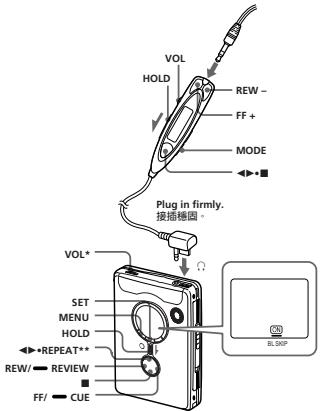
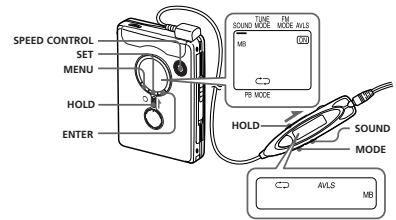
There is a tactile dot beside VOL on the main unit to show the direction to turn up the volume.
** The button has a tactile dot.
在主機上VOL旁邊有一個觸感圓點,表示轉大音量的方向
** 按號帶有突起期圓點:

To prevent fire, do not cover the ventilation of the apparatus with newspapers, table-cloths, curtains, etc. And don't place lighted candles on the windows.
- To prevent fire or shock hazard, do not place objects filled with liquids, such as vases, on the apparatus.
Certain countries may regulate disposal of the battery used to power this product. Please consult with your local authority.
Preparations
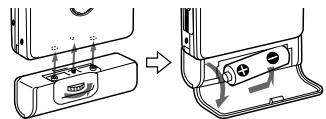
Prepare a dry battery (not supplied) or the rechargeable battery (supplied).
Dry Battery A
Attach the supplied battery case, and attach the AAA battery with correct polarity.
Not
For maximum performance we used a 1000 psi you use a Sonar alkaline battery.
Rechargeable
B
Charge the rechargeable battery before using it for the first time.
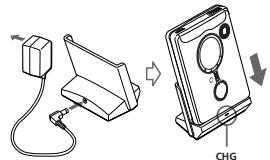
1 Insert the supplied rechargeable battery NH-14WM (A) into the rechargeable battery compartment with correct polarity.
2 Connect the supplied AC power adaptor to the charging stand, plug in the AC power adaptor to the house current (mains).
3 Place the main unit on the charging stand. The CHG lamp will light up during charging. Full charging takes about 6 hours regardless the battery power remaining. The CHG lamp will go off when the battery is fully charged.
Notes
- This charging stand charges the rechargeable battery based on a timer. If you remove the unit from the charging stand while it is charging, the timer will be reset and full charging will take about 6 hours when you place the unit on the charging stand again.
- You can use the unit before the CHG lamp goes off, but in that case, battery life will be shorter depending on the charging time
1 Insert the supplied rechargeable battery NH-14WM (A) into the rechargeable battery compartment with correct polarity.
2 Connect the supplied AC power adaptor to the charging stand, plug in the AC power adaptor to the house current (mains).
3 Place the main unit on the charging stand. The CHG lamp will light up during charging. Full charging takes about 6 hours regardless the battery power remaining. The CHG lamp will go off when the battery is fully charged.
Notes
- This charging stand charges the rechargeable battery based on a timer. If you remove the unit from the charging stand while it is charging, the timer will be reset and full charging will take about 6 hours when you place the unit on the charging stand again.
- You can use the unit before the CHG lamp goes off, but in that case, battery life will be shorter depending on the charging time.
- Do not use the unit while it is charging. Remove the unit from the charging stand when using it.
- If you operate the unit while it is charging, the battery will not be charged.
- If you operate the unit while it is charging, this may cause a malfunction.
- Do not place the unit on the charging stand without the device in the center of the device; this may cause malfunction.
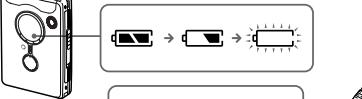
When to replace/ charge the battery 8
Replace or charge the battery when "C" flashes in the displa
Battery life* (Approx. hours) Sony alkaline LR6 (SG)**
Tape playback 50
Radio reception 56
Rechargeable battery
NH-14wM/A) Tape playback 30
Radio reception 34
Sony alkaline LR6 (SG)^** and Rechargeable NH-14WM (A)
Tape playback 80
Radio reception 99
Measured value by the standard of JETTA (Japan Electronics and Information Technology Industries Association). (Using the following formula:
When using a Sony L86(GC) alkaline dry battery (produced in
Notes
- The battery life may be shorter depending on the operating condition, the surrounding temperature and battery type.
- The AVL setting (see "Using the AVL setting to select when you replace the battery."
Playing a Tape
| To | Press |
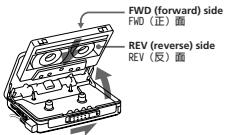
| Switch playback to the other side | ▲→REPEAT during playback |
| Stop playback | ■ (stop) |
| Repeat the current track (Repeat Single) | ▲→REPEAT for 2 seconds or more during |
2 Press REPEAT on the main unit and adjust the volume with VOL. (On the remote control, press
(play) · (stop).
When adjusting the volume on
When adjusting the volume on the remote control
Set the VOL control on the main unit to around 6.
When adjusting the volume on
the main unit
Set the VOL control on the remote control at maximum.
Operation on the remote control
To Press
10 Press
Switch ▲■ for 2
playback to seconds or more
the other side during playback
Stop playback ▲■ once
during playback
Repeat the current track (Repeat Single Track function)
- once.
Past forward FP+ during stop
Rewind REV-during stop
Search Press and hold forward during FF + and release 1000000000000000
playback (CUE) at the point you want
Search backward Press and hold REW - and
Stop playback (stop)
Repeat the REPEAT
current track for 2 seconds or (Repeat Single Track function) to stop a single
REPEAT once.
Fast forward FF/CUE during stop
Rowind REW/REVIEW
Reynolds REW/REVIEW during stop
Search Press and hold forward during FF/CUE and
playback (CUE) release it at the point you want
Search Press and hold
backward REV/REVIEW
during and release it at
laying (REVIEW) want
Play the next FF/CUE once or track/ repeatedly succeeding 9 during playback tracks from the
beginning (AMs)
Play the current track/ once or
previous 8 repeatedly tracks from during playback
the beginning (AMs**4)
Play the other FF/CUE for 2 side from the seconds or more
Beginning during stop (Skip Reverse function)
Play the same REW/REVIEW side from the for 2 seconds or more.
Operation on the main unit
(Rewind Auto stop) (Play function)
* Press REPEAT (on the remote control, press )
during last forward or rewind to start playback.
**Automatic Music Sensor
To skip a long blank space (BL SKIP* function)
On the remote control:
1 Press MODE repeatedly to show "BL SKIP".
On the main unit:
1 Press MENU repeatedly to set the cursor (or) in the display to BL SKIP.
2 Press SET to show "ON".
* When the BL Skype function is on, the tape is fast-forwarded to the next track if there is a blank space longer than 12 seconds.

- 為防止火災,請勿讓紙板、桌布、窗帘等蓋住裝置的通風孔。也不可把點燃的蠔爐放在裝置上。
- 為防止火災或重壓的危險,請勿將含液體的藥物(例如花瓶等)與火災及重壓相連。
·一部份國家對本產品的電源用電池的處置,可能有所規定。此請問當地有關当局
準備工作
準備乾電池(無附帶)或充電式電池(附帶)。
乾電池A
安装附带的蓄电池,然后按正常碱性装入一箱R6(AA)蓄电池。
鞋
為獲得最佳效果,建議您使用Sony牌軸性電池。
安装附带的蓄电池,然后按正常碱性装入一箱R6(AA)蓄电池。
爲獲得最佳效果,建議您使用Sony
牌磁性電池。
安装附带的蓄电池,然后按正常碱性装入一箱R6(AA)蓄电池。
充電式電池 E
充電式電池在第一次使用前,必須加以充電。
1 以正磁棒将附带的充電式電池NH-14WM(A)裝入充電式電池
2.将附带的AC电源转换器连接到充电座:按AC电源转换器接线
到家庭用電插座(主電源)。2.整部播放的影片
3將主機放在充電座上
CHRG總將在充電時點亮。
無論原有電力多少,完全充電需時大約6小時。
當電池完全充滿電時,CHG燈將熄滅。
充電式電池在第一次使用前,必須加以充電。
1 以正磁栅性将附带的充电式电池 NH - 14W (A)装入充电式电池
2. 将附带的 AC 電源转换器接插到充电座,将 AC 電源转换器接插
到家庭用電源插座(主電源)。3 將主機放在充電座上。
CHG燈將在充电時點亮:無論原來有電力多少,完全需電時長約6小時。
當電池完全充滿電時,CHG燈將熄滅。
- 充電座以同時方式為電芯電池進行充電。如果您在充電時將機器由充電上斷下,計時器可能會重新計時;當您將機器重新放回充電後,將需要約6小時才能完全充電。
·在CRG短號號前,您可以使用時機來控制電動機的壽命等會變短、寬視光時間而定。 - 充電中,識別使用機器。要使用機器時,須把機器旋充電上即下。
- 充電中,您如果操作機器,電池便不能進行充電了。
一。充電中,您如果操作機器,便可能引起故障。 - 别把没有安装充電式電池的機器裝在充電線上。否則可能引起事故。
- 充電模式:此方式為充電和爬坡通行,將需要時間長時間內使用。由充電器加上,計時器才能會計時;當空將機器重新放回充電後,將需要時間6小時才能完全充
·在CIC熔熔减油:您可以使用橙
器,但是在此情況下,電池壽命將會變短,視光電時間而定。 - 充電中,識別使用機器。要使用機器時,須把機器旋充電上即下。
- 充電中,您如果操作機器,電池便不能進行充電了。
一。充電中,您如果操作機器,便可能引起故障。

何時更換電池/給電池充電
“在”在顯示窗口閃瞬間,即請更換電浪或鉛筆電充當。
電池壽命*(大約時數)
充電式電池 NH-14WM (A)
乾電池A
充電式電池 E
在
“在”在顯示窗口閃瞬間,即請更換電浪或鉛筆電充當。
電池壽命*(大約時數)
| Sony 酷電池 LR6 (SG) ** | |
| 鍵音帶放音 | 50 |
| 聽收音機 | 56 |
充電式電池 NH-14WM (A)
乾電池A
電池充電 播放錄
爛時,即當。
*
50
56
)
)
30
12x - 1 > 0
34
#
R6 (SG)
(A)
80
90
tronics
nology
(20 (2n)標選測
HF系列磁
- 实验原理
ny 載電池
件、环境调
十、环境温
√是□否如否,请详细说明:
定(参见冲
洞。
在主機上的操作
要
换播放另一面。
播放中按
REPEAT
停止播放
按(停止)
從頭播放當前。
REPEAT保持2
一曲子功能)
要停止重複留一。
曲子:请按
REPEAT一
次。
快達籍*
特此公告。
停止中按REW/
按住FF/CUE然後
在想要的位置
在播放中向後
然後在想要的位。
從頭播放下一
重複按FF/CUE
首曲子
從頭播放當前
重拍按REW/
首曲子
K.L.V.H.
(1)
停止中按FF/CUE
面(跳躍倒绕
或更久
徙陋播故同一。
停止中按REW/PILOT关保持C
面(里税日动)播放功能)
秒以上或更大
時按 REPEAT
(在遥控器上,按
**自動樂曲探測
跳過長時間的空戶
(B)SKIP*功能
在遥控器上:
1.重複按MODE
“RISK”
· = 0
在主機上
1.重複按下MENI
“游標”
“PISKIP”
2.按下SHT.题
2 按下 SE1 顯示 ON
*常BLSKIP功能
超過12秒的空
转到下一首曲子
#
中按
REPEAT
m - 1 0 ;
(停止)
故内容。
17、增持:3
EAI保持2.0%的增速,维持买入。
二、俟或更久
停止重複單一。
,請按
REPEAT 一
中核:FF/CUE
1.中按 H7/C03
中按REW/
EW
1.000000000000
FF/CUE 然後
重要的位置频繁
:REW/REVIEW
存在想要的位。
在必要时位。
1703
(中按一次或)
按FF/CUE
中捷一为式
中按一次或三次。
按REW/
EW
中核:E(G)
(三)按3种以上
持2秒以上。
次
中按REW/
EW,并保持2
上或更久。
上缴更人
REPEAT
以開始
示。
小
顯示窗中的
为
一
N
等時,如果有:
錄音帶會快速


-


Terminals
English
Listening to the Radio E
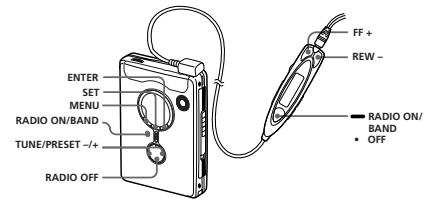
1 Press RADIO ON/BAND to turn on the radio.
2 Press RADIO ON/BAND repeatedly to select AM or FM.
3 Press MENU on the main unit repeatedly and set the cursor in the display to TUNE MODE.
4 For manual tuning ① Press SET to choo MANUAL.
② Press TUNE/PRESET + or - repeatedly to tune in to the desired station. Hold down TUNE/ PRESET ^+ or- for a few seconds to scan for stations.
For preset tuning ① Press SET to choose PRESET.
② Press TUNE/PRESET ^+ or -repeatedly to recall the desired preset station. To use preset tuning, preset stations first (see "Presetting Radio Stations").
To turn off the radio Press RADIO OFF.
To improve the broadcast reception
- For AM: Reorient the unit itself.
- For FM: Extend the remote control cord (antenna). If the reception is still not good, press MENU repeatedly to set the cursor in the display to FM. MODE: SET to choose from "MONO" (monaural), "LOCAL" or none (stereo) for best reception.
To operate from the remote control
To turn on the radio, press RADIO ON/BAND · OFF for more than 1 second (while the tape is in stop mode only). To select the band, press RADIO ON/BAND · OFF for more than 1 second while the tape is on. To turn off radio or a preset station, press FF + or REW - To turn off the radio, press RADIO ON/BAND · OFF.
Preseting Radio Stations E
You can preset up to 30 stations—20 for FM and 10 for AM (for the JPN area, up to 16 stations—8 for FM and 8 for AM).
Only if available. See "Receiving Stations Outside Your Country/Region".
Presetting Automatically Scanned Stations
1 Press RADIO ON/BAND to turn on the radio.
2 Press RADIO ON/BAND repeatedly to select AM or FM.
3 Press and hold ENTER for more than 3 seconds.
Preset number 1 will flash in the display and the main unit starts scanning the stations from the lower frequencies and stops for about 5 seconds when a station is received.
4 If you wish to preset the currently received station, press ENTER while the preset number is flashing. The received station is
preset on preset number 1 and the unit starts scanning for the next receivable station.
5 Repeat step 4 until all receivable stations are preset.
To stop scanning
- Radio OFF: The radio is turned off at the same time. - Scanning the Preset Radio Stations — DAPS Notes: - If stations are already stored, the newly preset stations replace the (Digital Auto Preset) (Scanning)
procedure is completed. Press RADIO ON/BAND If stations cannot be preset to turn on the radio.
automatically, preset them manually. 2 Press RADIO ON/BAND repeatedly to select AM or FM. Preseting Stations
3 Press and hold RADIO 1 Press RADIO ON/BAND ON/BAND for 2 seconds to turn on the radio. or more.
The preset stations of the 2 Press RADIO ON/BAND repeatedly to select AM or FM. played for about 5 seconds
3 Press ENTER.
1 Press RADIO ON/BAND to turn on the radio.
2 Press RADIO ON/BAND repeatedly to select AM or FM.
3 Press and hold RADIO ON/BAND for 2 seconds or more.
The preset stations of the selected band will be played for about 5 seconds each. During DAPS the
The frequency digits will flash in the display.
4 While the frequency digits are flashing, tune in to a station you wish to store using TUNE/PRESET + or - and press ENTER.
The preset number will flash in the display.
5 While the preset number is flashing, select the preset number you want using TUNE/RESET + or - and press ENTER.
- If you cannot complete step 4 or 5 while the indicators are flashing, then use the "Stop" button.
- If a station is already stored, the new station replaces the old one.
Playing the Presen Radio Stations
1 Press RADIO ON/BAND to turn on the radio.
2 Press RADIO ON/BAND repeatedly to select AM or FM.
3 Press MENU repeatedly to set the cursor in the
display to TUNE MODE. Then press SET to display "PRESET".
4 Press TUNE/PRESET + or -.
To cancel a stored station 1 Follow the procedure above and in step 4, select the preset
number you want to cancel and then press ENTER. The frequency digits will flash in the display.
2 Press and hold TUNE/PRESET + or - . The frequency digit starts running up or down. The frequency digit is turned on until "..." or "-" is displayed.
3 Press ENTER while "--" is flashing. A preset number will be used to enter the text.
4 Press ENTER to cancel the stored station.
Scanning the Preset Radio Stations DAPS (Digital Auto Preset Scanning)
indicators in the dis- flash.)
4 Press RADIO ON/BAND again to select the station while the desired preset station is being played.
Notes
- If there are no stations stored, the DAPS function does not work.
- Until a station is selected in step 4, the DAPS function is computed on in step 3 we continue.
Receiving Stations Outside Your Country/
Region (Excluding
European, Saudi Arabia
and Chinese models) 1 Press RADIO ON/BAN
2 Press ENTER. The frequency digits will flash in the display.
3 Press and hold RADIO ON/BAND until "Eur" "USA" or "Jpn" flashes.
4 Press RADIO ON/BAN repeatedly to select "Eu
'USA" or JPn" and preENTER.
5 Tune in to and store stations as necessary following the procedure
Listening to the Radio and Hearing Radio Stations".
Area indication and frequency range
Area* Frequency range FM (MHz) AM(kHz
Eur 87.5-108 531-166
USA 87.5-108 530-17
JPh 76.0-90.0 531-17 * Eur : European and other countries/regions
USA, Canada, H&I Cent. Health & Life, South America
JPn: Japan
Using the Menu
AdjustingPlayback Modes
On the remote control: Press MODE repeatedly. With press, the indications change.
On the main unit:
Press MENU repeatedly to set the cursor in the display to PB. The mouse is then pressed
To play Select
both sides repeatedly both sides once from the FWD side
Emphasizing Sound
On the remote control:
1 Press SOUND repeatedly. V each press, the indications change.
The indications change as follows:
RV:Sound Revitalize Emphasizes treble sound MEGA Bass Emphasizes bass sound (moderate effect).
GRV:Groove Emphasizes bass sound (strong effect). no message : normal (no effect) in the main unit:
Press MENU repeatedly to the cursor in the display.
Press SET repeatedly to select the sound emphasis of your choice. Note the sound is distorted with the
node "GVR", turn down the node from the main unit or select them modes.
Protecting Your Hearing - AVLS
Automatic Volume imiter System)
he maximum volume is kept own to protect your ears.
On the remote control
fold down MODE for more than 100 times until "AVLS" appears at the display.
In the main unit:
* dress MENU repeatedly in the callback, stop or radio mode to set the cursor in the display to AVLS.
* select the cursor from the menu.
o cancel the AVLS function
On the remote control:
Hold down MODE again for more than 3 seconds until AVLS" disappears.
On the main unit: "C" disappears from the display.
Using Other
Functions
Adjusting the Tape
Playback Speed
You can adjust the playback
speed using SPEED CONTROL.
Turn SPEED CONTROL to:
(slow) to play back at a slower
speed.
Center position to play back at
(fast) to play back at a faster speed.
Locking the Controls -HOLD Function
hide the HOLD switch in the direction of the arrow to lock the controls of the main unit (except PEED CONTROL) or the remote
Precautions
On charging
The supplied charging stand can be used only with this unit. No other equipment is required. Remove the AC power adaptor from the wall outlet as soon as possible after the rechargeable battery has been replaced. Recharge by any damage to the rechargeable battery.
- The charging stand and the rechargeable battery may become warm during charging, but this is not a problem.
- Do not tear off the film on the rechargeable battery.
- Use only the supplied charging stand if
charge the supplied rechargeable battery. - be sure not to short-circuit the battery.
- check if the battery is charged and supplied carrying case. If you are not using the case, do not carry the battery with the device. This object has such key rings in your pocket.
- If the rechargeable battery is new or he/she has been replaced, it cannot be charged completely until you have replaced it.
On batteries
- Do not charge a dry battery.
- Do not carry the dry or rechargeable batteries with coins or other metallic objects. It can generate heat if the positive and negative terminals of the batteries are accidentally contacted by metallic object.
- When you are not going to use the battery, it is important to be able to prevent any damage from the battery.
On AC power adaptor
- Use only the supplied AC power adaptor.
- Use only the supplied DC power adaptor.
- Use any other AC power adaptor.

Polarity of
- Connect the AC power adaptor to an easily accessible AC outlet. Should you notice an abnormality in the AC power adaptor, disconnect it from the AC outlet immediately.
- Do not touch the AC power adaptor during operation.
On handling
- Do not leave the unit in a location near heat sources, or in a place subject to direct sunlight, excessive dust or sand, making it difficult to use for cooking, or in a car with its windows closed.
- We do not recommend the use of tape longer than 90 minutes. They are very thin and tend to be stretched easily.
- Do not allow the use of the unit or sound deterioration.
- The LCD display may become hard to see or slow down when using the unit at temperatures of 105K (at 104^ ) or at low temperatures (below 10^ / 32^ ). At room temperature, the LCD displays will be turned off and its normal operating condition.
- If the unit has been used for long, set it in the playback mode to warm up for 10 minutes before you start using again.
On the remote control
Use the supplied remote control only with this unit.
On headphones, earphones
Road safety
Do not use headphones/earphones while driving, cycling, or operating any motorized vehicle. It may create a traffic jam and make it difficult to get the car also be potentially dangerous to play your headphones/earphones at high volume while walking, especially at night.
You should exercise extreme caution or use a value use in potentially hazardous situations.
Preventing hearing
damage Do not use headphones/earphones at home. Hearing experts advise against continuous, loud and extended play. If you experience a ringing in your ears, it is likely that the sound is
Caring for others
Keep the volume to a moderate level. This will allow you to hear outside sounds and to be considerate to the people around you.
On maintenance
- Clean the tape head and tape path, using a cotton swab and commercially available herbicide to solvent after every 10 hours of use.
- To clean the exterior, use a soft cloth or sandpaper to remove the residue.
alcohol, benzine or thinner. - Clean the headphones or earphones and the cables of the headphones.
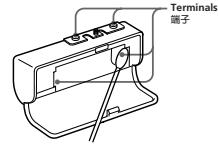
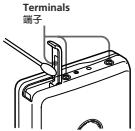
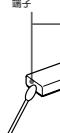
- Clean the battery case terminals (both inside and outside) and the terminals per port.
- Remove the headphone swab or soft cloth as illustrated.
Clean the tape head and tape path.
using a cotton swab and commercially
available cleaning solvent after every 10 min.
10 hours of use. - To clean the exterior, use a soft cloth slightly moistened in water. Do not use
alcohol, benzine or thinner.
Clean the headphones/earphones and - Use the load-producers, dampers and remote control plugs periodically.
Clean the battery case terminals (both
inside and outside) and the terminals
periodically with a cotton swab or soft cloth as illustrated.
Troubleshooting
The sound drops out or comes
with excessive noise
- Clean the headphones/earphones and remote control plugs.
The unit does not operate at all.
- Charge the battery or replace the
HOLD is activated. Deactivate HOLD.
The sound drops out of comes with a sharp echo.
with excessive noise:
Clean the headphones/earphones
and remote control plugs.
The unit does not operate at all.
The unit does not operate at all.
- Charge the battery or replace the
dry battery with a new one.
HOLD is activated. Deactivate
HOLD.
Tape operation is not possible
- Insert a cassette tape
The volume cannot be turned up.
If AVLS is on, turn it off.
The volume cannot be turned up.
- If AVLS is on, turn it off.
The display and the operation are not normal.
- Remove the power sources for 15 seconds alone, and then set them again.
Specifications - Remove the power sources for 15
seconds or more, and then set
them again.
当 m = 32 且 m 1 时方程有两个实数根;
Specifications
Specifications
Radio Section
Frequency Range
FM: 760 - 90.0 MHz (Japan) 875 - 108 MHz (other countries/regions)
AM: 531 - 1.70 kHz (Japan) 530 - 1.70 kHz (North, Central and South America) 531 - 1.62 kHz (other countries/regions)
Tape section
Frequency response
Playback: 40 - 15000 Hz
Output
Headphones (7) jack
Load impedance 8 - 300 Ω
FM: 76.0 - 90.0 MHz (Japan)
87.5 - 108 MHz (other
AM 521-1710 kHz (lan)
AM: 531-1710 kHz (Japan) 530-1710 kHz (North Central)
590-1710 kHZ (Norit, Central and South America)
531-1.602 kHz (other)
countries/regions)
Frequency response
Playback:40-15.00
Output
Headphones (↑, ↓)
Gene
Power requirements
Rechargeable battery Over 1000 cycles. Dimensions (w / h / d) Approx. 77.1× 108.0× (125× 125) (30 parts and controls
Power requirements
1.5V
Rechargeablebatter
One R6 (size AA) bar
Dimensions (w/b/d)
Apr
11 3
P
Approx. 153g 5.4 oz) (main unit only) Supplied accessories
AC power adaptor (1), battery case (1) Stereo headphones or earphones with remote control (1). Charging stand (1) Rechargeable battery case (NF-HWM/6, 1.2 V, 1.350 mAh (min), NF-MH) (1) Rechargeable battery carrying case (1) Carrying pouch (1)
Design and specifications are subject to change without notice.
Suppl. AC1
Step
rem
Recd
1.2V
P
Con
can
Design and specifications are subject to
change without notice.
攻預設電臺
On maintenance
#
Troubleshooting
攻預設電臺
On maintenance
#
Troubleshooting
The word is written as
Tape operation is not possible.
Insert a cassette tape.
T
The display and the operations are not normal.
Radio section
Frequency range
Tape section
Load impedance 8 -
Gene
M
攻預設電臺
m - 1 0 ;
打開收
打開收
AND 溪摆
AND选择
711
ENU,府
為TUNE
#
INUAL
ESET + 或
喜。
1. 基础工程
1 + 或 -
。
RESET.
1
ESET+或
設電臺。
時,請
项目“预
无
m - 1 0 ;
理略方
m : x = 1 或 3x + 4y + 1 = 0
品品
位长通控 2、其他事项
果接收效
MENU 將
段为FM
“MONO”
”或无
长澜澜以
#
12 = a · b · 2 + a · b · 2
#
按RADIO
(限富錄音
在打開著收
/BAND·OFFE
#
恒臺時,按
责编:RADIO
ENU,將為TUNE UNAL。SET+或座臺。+或-。 RESET。SET+或股電臺。時,請見“預 移機器方 立長遙控接收效MENU 將爲FM"MONO”或無選擇以 按RADIO(限當錄音 打開著收VBAND-OFF 這臺時,按按RADIO
m = 311 ;
FNU·将
2.10-1
為TUNE
#
INUAL 0
ESET + 或
喜。
1
E+或-
。
RESET。
SET+或
□适用√不适用
設電臺。
時,請
项目“预
无
__________
傳機器方
位長滙控
具接收效
MENUE 将
MENO府
段為PM
MONO
”或無
行選擇以
( x - 2x) t - xy^2 = ( x - 2x) f^ t
责编:RADIO
(限竞锋音
(限留踪目)
(一)股票简称:
上打開者收
/VAND●OFF
重臺時,按
请按RADIO
1. 2016年1月1日
攻預設電臺
打新股
打開收
(ANT)源摆
AND选择
711
ENU,府
打開收
打開收
AND 溪摆
AND选择
711
ENU,府
為TUNE
#
INUAL
ESET + 或
喜。
1. 基础工程
1 + 或 -
。
RESET.
1
ESET+或
設電臺。
時,請
项目“预
无
m - 1 0 ;
理略方
m : x = 1 或 3x + 4y + 1 = 0
品品
位长通控 2、其他事项
果接收效
MENU 將
段为FM
“MONO”
”或无
长澜澜以
#
12 = a · b · 2 + a · b · 2
#
按RADIO
(限富錄音
在打開著收
/BAND·OFFE
#
恒臺時,按
责编:RADIO
ENU,將為TUNE UNAL。SET+或座臺。+或-。 RESET。SET+或股電臺。時,請見“預 移機器方 立長遙控接收效MENU 將爲FM"MONO”或無選擇以 按RADIO(限當錄音 打開著收VBAND-OFF 這臺時,按按RADIO
m = 311 ;
FNU·将
2.10-1
為TUNE
#
INUAL 0
ESET + 或
喜。
1
E+或-
。
RESET。
SET+或
□适用√不适用
設電臺。
時,請
项目“预
无
__________
傳機器方
位長滙控
具接收效
MENUE 将
MENO府
段為PM
MONO
”或無
行選擇以
( x - 2x) t - xy^2 = ( x - 2x) f^ t
责编:RADIO
(限竞锋音
(限留踪目)
(一)股票简称:
上打開者收
/VAND●OFF
重臺時,按
请按RADIO
1. 2016年1月1日
攻預設電臺
打新股
打開收
(ANT)源摆
AND选择
711
ENU,府
AND 溪摆
AND选择
711
ENU,府
為TUNE
#
INUAL
ESET + 或
喜。
1. 基础工程
1 + 或 -
。
RESET.
1
ESET+或
設電臺。
時,請
项目“预
无
m - 1 0 ;
理略方
m : x = 1 或 3x + 4y + 1 = 0
品品
位长通控 2、其他事项
果接收效
MENU 將
段为FM
“MONO”
”或无
长澜澜以
#
12 = a · b · 2 + a · b · 2
#
按RADIO
(限富錄音
在打開著收
/BAND·OFFE
#
恒臺時,按
责编:RADIO
ENU,將為TUNE UNAL。SET+或座臺。+或-。 RESET。SET+或股電臺。時,請見“預 移機器方 立長遙控接收效MENU 將爲FM"MONO”或無選擇以 按RADIO(限當錄音 打開著收VBAND-OFF 這臺時,按按RADIO
m = 311 ;
FNU·将
2.10-1
為TUNE
#
INUAL 0
ESET + 或
喜。
1
E+或-
。
RESET。
SET+或
□适用√不适用
設電臺。
時,請
项目“预
无
__________
傳機器方
位長滙控
具接收效
MENUE 将
MENO府
段為PM
MONO
”或無
行選擇以
( x - 2x) t - xy^2 = ( x - 2x) f^ t
责编:RADIO
(限竞锋音
(限留踪目)
(一)股票简称:
上打開者收
/VAND●OFF
重臺時,按
请按RADIO
1. 2016年1月1日
攻預設電臺
打新股
打開收
(ANT)源摆
AND选择
711
ENU,府
#
INUAL
ESET + 或
喜。
1. 基础工程
1 + 或 -
。
RESET.
1
ESET+或
設電臺。
時,請
项目“预
无
m - 1 0 ;
理略方
m : x = 1 或 3x + 4y + 1 = 0
品品
位长通控 2、其他事项
果接收效
MENU 將
段为FM
“MONO”
”或无
长澜澜以
#
12 = a · b · 2 + a · b · 2
#
按RADIO
(限富錄音
在打開著收
/BAND·OFFE
#
恒臺時,按
责编:RADIO
ENU,將為TUNE UNAL。SET+或座臺。+或-。 RESET。SET+或股電臺。時,請見“預 移機器方 立長遙控接收效MENU 將爲FM"MONO”或無選擇以 按RADIO(限當錄音 打開著收VBAND-OFF 這臺時,按按RADIO
m = 311 ;
FNU·将
2.10-1
為TUNE
#
INUAL 0
ESET + 或
喜。
1
E+或-
。
RESET。
SET+或
□适用√不适用
設電臺。
時,請
项目“预
无
__________
傳機器方
位長滙控
具接收效
MENUE 将
MENO府
段為PM
MONO
”或無
行選擇以
( x - 2x) t - xy^2 = ( x - 2x) f^ t
责编:RADIO
(限竞锋音
(限留踪目)
(一)股票简称:
上打開者收
/VAND●OFF
重臺時,按
请按RADIO
1. 2016年1月1日
攻預設電臺
打新股
打開收
(ANT)源摆
AND选择
711
ENU,府
RESET.
1
ESET+或
設電臺。
時,請
项目“预
无
m - 1 0 ;
理略方
m : x = 1 或 3x + 4y + 1 = 0
品品
位长通控 2、其他事项
果接收效
MENU 將
段为FM
“MONO”
”或无
长澜澜以
#
12 = a · b · 2 + a · b · 2
#
按RADIO
(限富錄音
在打開著收
/BAND·OFFE
#
恒臺時,按
责编:RADIO
ENU,將為TUNE UNAL。SET+或座臺。+或-。 RESET。SET+或股電臺。時,請見“預 移機器方 立長遙控接收效MENU 將爲FM"MONO”或無選擇以 按RADIO(限當錄音 打開著收VBAND-OFF 這臺時,按按RADIO
m = 311 ;
FNU·将
2.10-1
為TUNE
#
INUAL 0
ESET + 或
喜。
1
E+或-
。
RESET。
SET+或
□适用√不适用
設電臺。
時,請
项目“预
无
__________
傳機器方
位長滙控
具接收效
MENUE 将
MENO府
段為PM
MONO
”或無
行選擇以
( x - 2x) t - xy^2 = ( x - 2x) f^ t
责编:RADIO
(限竞锋音
(限留踪目)
(一)股票简称:
上打開者收
/VAND●OFF
重臺時,按
请按RADIO
1. 2016年1月1日
攻預設電臺
打新股
打開收
(ANT)源摆
AND选择
711
ENU,府
m - 1 0 ;
理略方
m : x = 1 或 3x + 4y + 1 = 0
品品
位长通控 2、其他事项
果接收效
MENU 將
段为FM
“MONO”
”或无
长澜澜以
#
12 = a · b · 2 + a · b · 2
#
按RADIO
(限富錄音
在打開著收
/BAND·OFFE
#
恒臺時,按
责编:RADIO
ENU,將為TUNE UNAL。SET+或座臺。+或-。 RESET。SET+或股電臺。時,請見“預 移機器方 立長遙控接收效MENU 將爲FM"MONO”或無選擇以 按RADIO(限當錄音 打開著收VBAND-OFF 這臺時,按按RADIO
m = 311 ;
FNU·将
2.10-1
為TUNE
#
INUAL 0
ESET + 或
喜。
1
E+或-
。
RESET。
SET+或
□适用√不适用
設電臺。
時,請
项目“预
无
__________
傳機器方
位長滙控
具接收效
MENUE 将
MENO府
段為PM
MONO
”或無
行選擇以
( x - 2x) t - xy^2 = ( x - 2x) f^ t
责编:RADIO
(限竞锋音
(限留踪目)
(一)股票简称:
上打開者收
/VAND●OFF
重臺時,按
请按RADIO
1. 2016年1月1日
攻預設電臺
打新股
打開收
(ANT)源摆
AND选择
711
ENU,府
m - 1 0 ;
理略方
m : x = 1 或 3x + 4y + 1 = 0
品品
位长通控 2、其他事项
果接收效
MENU 將
段为FM
“MONO”
”或无
长澜澜以
#
12 = a · b · 2 + a · b · 2
#
按RADIO
(限富錄音
在打開著收
/BAND·OFFE
#
恒臺時,按
责编:RADIO
ENU,將為TUNE UNAL。SET+或座臺。+或-。 RESET。SET+或股電臺。時,請見“預 移機器方 立長遙控接收效MENU 將爲FM"MONO”或無選擇以 按RADIO(限當錄音 打開著收VBAND-OFF 這臺時,按按RADIO
m = 311 ;
FNU·将
2.10-1
為TUNE
#
INUAL 0
ESET + 或
喜。
1
E+或-
。
RESET。
SET+或
□适用√不适用
設電臺。
時,請
项目“预
无
__________
傳機器方
位長滙控
具接收效
MENUE 将
MENO府
段為PM
MONO
”或無
行選擇以
( x - 2x) t - xy^2 = ( x - 2x) f^ t
责编:RADIO
(限竞锋音
(限留踪目)
(一)股票简称:
上打開者收
/VAND●OFF
重臺時,按
请按RADIO
1. 2016年1月1日
攻預設電臺
打新股
打開收
(ANT)源摆
AND选择
711
ENU,府
在打開著收
/BAND·OFFE
#
恒臺時,按
责编:RADIO
ENU,將為TUNE UNAL。SET+或座臺。+或-。 RESET。SET+或股電臺。時,請見“預 移機器方 立長遙控接收效MENU 將爲FM"MONO”或無選擇以 按RADIO(限當錄音 打開著收VBAND-OFF 這臺時,按按RADIO
m = 311 ;
FNU·将
2.10-1
為TUNE
#
INUAL 0
ESET + 或
喜。
1
E+或-
。
RESET。
SET+或
□适用√不适用
設電臺。
時,請
项目“预
无
__________
傳機器方
位長滙控
具接收效
MENUE 将
MENO府
段為PM
MONO
”或無
行選擇以
( x - 2x) t - xy^2 = ( x - 2x) f^ t
责编:RADIO
(限竞锋音
(限留踪目)
(一)股票简称:
上打開者收
/VAND●OFF
重臺時,按
请按RADIO
1. 2016年1月1日
攻預設電臺
打新股
打開收
(ANT)源摆
AND选择
711
ENU,府
责编:RADIO
ENU,將為TUNE UNAL。SET+或座臺。+或-。 RESET。SET+或股電臺。時,請見“預 移機器方 立長遙控接收效MENU 將爲FM"MONO”或無選擇以 按RADIO(限當錄音 打開著收VBAND-OFF 這臺時,按按RADIO
m = 311 ;
FNU·将
2.10-1
為TUNE
#
INUAL 0
ESET + 或
喜。
1
E+或-
。
RESET。
SET+或
□适用√不适用
設電臺。
時,請
项目“预
无
__________
傳機器方
位長滙控
具接收效
MENUE 将
MENO府
段為PM
MONO
”或無
行選擇以
( x - 2x) t - xy^2 = ( x - 2x) f^ t
责编:RADIO
(限竞锋音
(限留踪目)
(一)股票简称:
上打開者收
/VAND●OFF
重臺時,按
请按RADIO
1. 2016年1月1日
攻預設電臺
打新股
打開收
(ANT)源摆
AND选择
711
ENU,府
ENU,將為TUNE UNAL。SET+或座臺。+或-。 RESET。SET+或股電臺。時,請見“預 移機器方 立長遙控接收效MENU 將爲FM"MONO”或無選擇以 按RADIO(限當錄音 打開著收VBAND-OFF 這臺時,按按RADIO
m = 311 ;
FNU·将
2.10-1
為TUNE
#
INUAL 0
ESET + 或
喜。
1
E+或-
。
RESET。
SET+或
□适用√不适用
設電臺。
時,請
项目“预
无
__________
傳機器方
位長滙控
具接收效
MENUE 将
MENO府
段為PM
MONO
”或無
行選擇以
( x - 2x) t - xy^2 = ( x - 2x) f^ t
责编:RADIO
(限竞锋音
(限留踪目)
(一)股票简称:
上打開者收
/VAND●OFF
重臺時,按
请按RADIO
1. 2016年1月1日
攻預設電臺
打新股
打開收
(ANT)源摆
AND选择
711
ENU,府
ENU,將為TUNE UNAL。SET+或座臺。+或-。 RESET。SET+或股電臺。時,請見“預 移機器方 立長遙控接收效MENU 將爲FM"MONO”或無選擇以 按RADIO(限當錄音 打開著收VBAND-OFF 這臺時,按按RADIO
m = 311 ;
FNU·将
2.10-1
為TUNE
#
INUAL 0
ESET + 或
喜。
1
E+或-
。
RESET。
SET+或
□适用√不适用
設電臺。
時,請
项目“预
无
__________
傳機器方
位長滙控
具接收效
MENUE 将
MENO府
段為PM
MONO
”或無
行選擇以
( x - 2x) t - xy^2 = ( x - 2x) f^ t
责编:RADIO
(限竞锋音
(限留踪目)
(一)股票简称:
上打開者收
/VAND●OFF
重臺時,按
请按RADIO
1. 2016年1月1日
攻預設電臺
打新股
打開收
(ANT)源摆
AND选择
711
ENU,府
ENU,將為TUNE UNAL。SET+或座臺。+或-。 RESET。SET+或股電臺。時,請見“預 移機器方 立長遙控接收效MENU 將爲FM"MONO”或無選擇以 按RADIO(限當錄音 打開著收VBAND-OFF 這臺時,按按RADIO
m = 311 ;
FNU·将
2.10-1
為TUNE
#
INUAL 0
ESET + 或
喜。
1
E+或-
。
RESET。
SET+或
□适用√不适用
設電臺。
時,請
项目“预
无
__________
傳機器方
位長滙控
具接收效
MENUE 将
MENO府
段為PM
MONO
”或無
行選擇以
( x - 2x) t - xy^2 = ( x - 2x) f^ t
责编:RADIO
(限竞锋音
(限留踪目)
(一)股票简称:
上打開者收
/VAND●OFF
重臺時,按
请按RADIO
1. 2016年1月1日
攻預設電臺
打新股
打開收
(ANT)源摆
AND选择
711
ENU,府
ENU,將為TUNE UNAL。SET+或座臺。+或-。 RESET。SET+或股電臺。時,請見“預 移機器方 立長遙控接收效MENU 將爲FM"MONO”或無選擇以 按RADIO(限當錄音 打開著收VBAND-OFF 這臺時,按按RADIO
m = 311 ;
FNU·将
2.10-1
為TUNE
#
INUAL 0
ESET + 或
喜。
1
E+或-
。
RESET。
SET+或
□适用√不适用
設電臺。
時,請
项目“预
无
__________
傳機器方
位長滙控
具接收效
MENUE 将
MENO府
段為PM
MONO
”或無
行選擇以
( x - 2x) t - xy^2 = ( x - 2x) f^ t
责编:RADIO
(限竞锋音
(限留踪目)
(一)股票简称:
上打開者收
/VAND●OFF
重臺時,按
请按RADIO
1. 2016年1月1日
攻預設電臺
打新股
打開收
(ANT)源摆
AND选择
711
ENU,府
ENU,將為TUNE UNAL。SET+或座臺。+或-。 RESET。SET+或股電臺。時,請見“預 移機器方 立長遙控接收效MENU 將爲FM"MONO”或無選擇以 按RADIO(限當錄音 打開著收VBAND-OFF 這臺時,按按RADIO
m = 311 ;
FNU·将
2.10-1
為TUNE
#
INUAL 0
ESET + 或
喜。
1
E+或-
。
RESET。
SET+或
□适用√不适用
設電臺。
時,請
项目“预
无
__________
傳機器方
位長滙控
具接收效
MENUE 将
MENO府
段為PM
MONO
”或無
行選擇以
( x - 2x) t - xy^2 = ( x - 2x) f^ t
责编:RADIO
(限竞锋音
(限留踪目)
(一)股票简称:
上打開者收
/VAND●OFF
重臺時,按
请按RADIO
1. 2016年1月1日
攻預設電臺
打新股
打開收
(ANT)源摆
AND选择
711
ENU,府
ENU,將為TUNE UNAL。SET+或座臺。+或-。 RESET。SET+或股電臺。時,請見“預 移機器方 立長遙控接收效MENU 將爲FM"MONO”或無選擇以 按RADIO(限當錄音 打開著收VBAND-OFF 這臺時,按按RADIO
m = 311 ;
FNU·将
2.10-1
為TUNE
#
INUAL 0
ESET + 或
喜。
1
E+或-
。
RESET。
SET+或
□适用√不适用
設電臺。
時,請
项目“预
无
__________
傳機器方
位長滙控
具接收效
MENUE 将
MENO府
段為PM
MONO
”或無
行選擇以
( x - 2x) t - xy^2 = ( x - 2x) f^ t
责编:RADIO
(限竞锋音
(限留踪目)
(一)股票简称:
上打開者收
/VAND●OFF
重臺時,按
请按RADIO
1. 2016年1月1日
攻預設電臺
打新股
打開收
(ANT)源摆
AND选择
711
ENU,府
ENU,將為TUNE UNAL。SET+或座臺。+或-。 RESET。SET+或股電臺。時,請見“預 移機器方 立長遙控接收效MENU 將爲FM"MONO”或無選擇以 按RADIO(限當錄音 打開著收VBAND-OFF 這臺時,按按RADIO
m = 311 ;
FNU·将
2.10-1
為TUNE
#
INUAL 0
ESET + 或
喜。
1
E+或-
。
RESET。
SET+或
□适用√不适用
設電臺。
時,請
项目“预
无
__________
傳機器方
位長滙控
具接收效
MENUE 将
MENO府
段為PM
MONO
”或無
行選擇以
( x - 2x) t - xy^2 = ( x - 2x) f^ t
责编:RADIO
(限竞锋音
(限留踪目)
(一)股票简称:
上打開者收
/VAND●OFF
重臺時,按
请按RADIO
1. 2016年1月1日
攻預設電臺
打新股
打開收
(ANT)源摆
AND选择
711
ENU,府
ENU,將為TUNE UNAL。SET+或座臺。+或-。 RESET。SET+或股電臺。時,請見“預 移機器方 立長遙控接收效MENU 將爲FM"MONO”或無選擇以 按RADIO(限當錄音 打開著收VBAND-OFF 這臺時,按按RADIO
m = 311 ;
FNU·将
2.10-1
為TUNE
#
INUAL 0
ESET + 或
喜。
1
E+或-
。
RESET。
SET+或
□适用√不适用
設電臺。
時,請
项目“预
无
__________
傳機器方
位長滙控
具接收效
MENUE 将
MENO府
段為PM
MONO
”或無
行選擇以
( x - 2x) t - xy^2 = ( x - 2x) f^ t
责编:RADIO
(限竞锋音
(限留踪目)
(一)股票简称:
上打開者收
/VAND●OFF
重臺時,按
请按RADIO
1. 2016年1月1日
攻預設電臺
打新股
打開收
(ANT)源摆
AND选择
711
ENU,府
ENU,將為TUNE UNAL。SET+或座臺。+或-。 RESET。SET+或股電臺。時,請見“預 移機器方 立長遙控接收效MENU 將爲FM"MONO”或無選擇以 按RADIO(限當錄音 打開著收VBAND-OFF 這臺時,按按RADIO
m = 311 ;
FNU·将
2.10-1
為TUNE
#
INUAL 0
ESET + 或
喜。
1
E+或-
。
RESET。
SET+或
□适用√不适用
設電臺。
時,請
项目“预
无
__________
傳機器方
位長滙控
具接收效
MENUE 将
MENO府
段為PM
MONO
”或無
行選擇以
( x - 2x) t - xy^2 = ( x - 2x) f^ t
责编:RADIO
(限竞锋音
(限留踪目)
(一)股票简称:
上打開者收
/VAND●OFF
重臺時,按
请按RADIO
1. 2016年1月1日
攻預設電臺
打新股
打開收
(ANT)源摆
AND选择
711
ENU,府
ENU,將為TUNE UNAL。SET+或座臺。+或-。 RESET。SET+或股電臺。時,請見“預 移機器方 立長遙控接收效MENU 將爲FM"MONO”或無選擇以 按RADIO(限當錄音 打開著收VBAND-OFF 這臺時,按按RADIO
m = 311 ;
FNU·将
2.10-1
為TUNE
#
INUAL 0
ESET + 或
喜。
1
E+或-
。
RESET。
SET+或
□适用√不适用
設電臺。
時,請
项目“预
无
__________
傳機器方
位長滙控
具接收效
MENUE 将
MENO府
段為PM
MONO
”或無
行選擇以
( x - 2x) t - xy^2 = ( x - 2x) f^ t
责编:RADIO
(限竞锋音
(限留踪目)
(一)股票简称:
上打開者收
/VAND●OFF
重臺時,按
请按RADIO
1. 2016年1月1日
攻預設電臺
打新股
打開收
(ANT)源摆
AND选择
711
ENU,府
ENU,將為TUNE UNAL。SET+或座臺。+或-。 RESET。SET+或股電臺。時,請見“預 移機器方 立長遙控接收效MENU 將爲FM"MONO”或無選擇以 按RADIO(限當錄音 打開著收VBAND-OFF 這臺時,按按RADIO
m = 311 ;
FNU·将
2.10-1
為TUNE
#
INUAL 0
ESET + 或
喜。
1
E+或-
。
RESET。
SET+或
□适用√不适用
設電臺。
時,請
项目“预
无
__________
傳機器方
位長滙控
具接收效
MENUE 将
MENO府
段為PM
MONO
”或無
行選擇以
( x - 2x) t - xy^2 = ( x - 2x) f^ t
责编:RADIO
(限竞锋音
(限留踪目)
(一)股票简称:
上打開者收
/VAND●OFF
重臺時,按
请按RADIO
1. 2016年1月1日
攻預設電臺
打新股
打開收
(ANT)源摆
AND选择
711
ENU,府
ENU,將為TUNE UNAL。SET+或座臺。+或-。 RESET。SET+或股電臺。時,請見“預 移機器方 立長遙控接收效MENU 將爲FM"MONO”或無選擇以 按RADIO(限當錄音 打開著收VBAND-OFF 這臺時,按按RADIO
m = 311 ;
FNU·将
2.10-1
為TUNE
#
INUAL 0
ESET + 或
喜。
1
E+或-
。
RESET。
SET+或
□适用√不适用
設電臺。
時,請
项目“预
无
__________
傳機器方
位長滙控
具接收效
MENUE 将
MENO府
段為PM
MONO
”或無
行選擇以
( x - 2x) t - xy^2 = ( x - 2x) f^ t
责编:RADIO
(限竞锋音
(限留踪目)
(一)股票简称:
上打開者收
/VAND●OFF
重臺時,按
请按RADIO
1. 2016年1月1日
攻預設電臺
打新股
打開收
(ANT)源摆
AND选择
711
ENU,府
ENU,將為TUNE UNAL。SET+或座臺。+或-。 RESET。SET+或股電臺。時,請見“預 移機器方 立長遙控接收效MENU 將爲FM"MONO”或無選擇以 按RADIO(限當錄音 打開著收VBAND-OFF 這臺時,按按RADIO
m = 311 ;
FNU·将
2.10-1
為TUNE
#
INUAL 0
ESET + 或
喜。
1
E+或-
。
RESET。
SET+或
□适用√不适用
設電臺。
時,請
项目“预
无
__________
傳機器方
位長滙控
具接收效
MENUE 将
MENO府
段為PM
MONO
”或無
行選擇以
( x - 2x) t - xy^2 = ( x - 2x) f^ t
责编:RADIO
(限竞锋音
(限留踪目)
(一)股票简称:
上打開者收
/VAND●OFF
重臺時,按
请按RADIO
1. 2016年1月1日
攻預設電臺
打新股
打開收
(ANT)源摆
AND选择
711
ENU,府
ENU,將為TUNE UNAL。SET+或座臺。+或-。 RESET。SET+或股電臺。時,請見“預 移機器方 立長遙控接收效MENU 將爲FM"MONO”或無選擇以 按RADIO(限當錄音 打開著收VBAND-OFF 這臺時,按按RADIO
m = 311 ;
FNU·将
2.10-1
為TUNE
#
INUAL 0
ESET + 或
喜。
1
E+或-
。
RESET。
SET+或
□适用√不适用
設電臺。
時,請
项目“预
无
__________
傳機器方
位長滙控
具接收效
MENUE 将
MENO府
段為PM
MONO
”或無
行選擇以
( x - 2x) t - xy^2 = ( x - 2x) f^ t
责编:RADIO
(限竞锋音
(限留踪目)
(一)股票简称:
上打開者收
/VAND●OFF
重臺時,按
请按RADIO
1. 2016年1月1日
攻預設電臺
打新股
打開收
(ANT)源摆
AND选择
711
ENU,府
ENU,將為TUNE UNAL。SET+或座臺。+或-。 RESET。SET+或股電臺。時,請見“預 移機器方 立長遙控接收效MENU 將爲FM"MONO”或無選擇以 按RADIO(限當錄音 打開著收VBAND-OFF 這臺時,按按RADIO
m = 311 ;
FNU·将
2.10-1
為TUNE
#
INUAL 0
ESET + 或
喜。
1
E+或-
。
RESET。
SET+或
□适用√不适用
設電臺。
時,請
项目“预
无
__________
傳機器方
位長滙控
具接收效
MENUE 将
MENO府
段為PM
MONO
”或無
行選擇以
( x - 2x) t - xy^2 = ( x - 2x) f^ t
责编:RADIO
(限竞锋音
(限留踪目)
(一)股票简称:
上打開者收
/VAND●OFF
重臺時,按
请按RADIO
1. 2016年1月1日
攻預設電臺
打新股
打開收
(ANT)源摆
AND选择
711
ENU,府
ENU,將為TUNE UNAL。SET+或座臺。+或-。 RESET。SET+或股電臺。時,請見“預 移機器方 立長遙控接收效MENU 將爲FM"MONO”或無選擇以 按RADIO(限當錄音 打開著收VBAND-OFF 這臺時,按按RADIO
m = 311 ;
FNU·将
2.10-1
為TUNE
#
INUAL 0
ESET + 或
喜。
1
E+或-
。
RESET。
SET+或
□适用√不适用
設電臺。
時,請
项目“预
无
__________
傳機器方
位長滙控
具接收效
MENUE 将
MENO府
段為PM
MONO
”或無
行選擇以
( x - 2x) t - xy^2 = ( x - 2x) f^ t
责编:RADIO
(限竞锋音
(限留踪目)
(一)股票简称:
上打開者收
/VAND●OFF
重臺時,按
请按RADIO
1. 2016年1月1日
攻預設電臺
打新股
打開收
(ANT)源摆
AND选择
711
ENU,府
ENU,將為TUNE UNAL。SET+或座臺。+或-。 RESET。SET+或股電臺。時,請見“預 移機器方 立長遙控接收效MENU 將爲FM"MONO”或無選擇以 按RADIO(限當錄音 打開著收VBAND-OFF 這臺時,按按RADIO
m = 311 ;
FNU·将
2.10-1
為TUNE
#
INUAL 0
ESET + 或
喜。
1
E+或-
。
RESET。
SET+或
□适用√不适用
設電臺。
時,請
项目“预
无
__________
傳機器方
位長滙控
具接收效
MENUE 将
MENO府
段為PM
MONO
”或無
行選擇以
( x - 2x) t - xy^2 = ( x - 2x) f^ t
责编:RADIO
(限竞锋音
(限留踪目)
(一)股票简称:
上打開者收
/VAND●OFF
重臺時,按
请按RADIO
1. 2016年1月1日
攻預設電臺
打新股
打開收
(ANT)源摆
AND选择
711
ENU,府
ENU,將為TUNE UNAL。SET+或座臺。+或-。 RESET。SET+或股電臺。時,請見“預 移機器方 立長遙控接收效MENU 將爲FM"MONO”或無選擇以 按RADIO(限當錄音 打開著收VBAND-OFF 這臺時,按按RADIO
m = 311 ;
FNU·将
2.10-1
為TUNE
#
INUAL 0
ESET + 或
喜。
1
E+或-
。
RESET。
SET+或
□适用√不适用
設電臺。
時,請
项目“预
无
__________
傳機器方
位長滙控
具接收效
MENUE 将
MENO府
段為PM
MONO
”或無
行選擇以
( x - 2x) t - xy^2 = ( x - 2x) f^ t
责编:RADIO
(限竞锋音
(限留踪目)
(一)股票简称:
上打開者收
/VAND●OFF
重臺時,按
请按RADIO
1. 2016年1月1日
攻預設電臺
打新股
打開收
(ANT)源摆
AND选择
711
ENU,府
ENU,將為TUNE UNAL。SET+或座臺。+或-。 RESET。SET+或股電臺。時,請見“預 移機器方 立長遙控接收效MENU 將爲FM"MONO”或無選擇以 按RADIO(限當錄音 打開著收VBAND-OFF 這臺時,按按RADIO
m = 311 ;
FNU·将
2.10-1
為TUNE
#
INUAL 0
ESET + 或
喜。
1
E+或-
。
RESET。
SET+或
□适用√不适用
設電臺。
時,請
项目“预
无
__________
傳機器方
位長滙控
具接收效
MENUE 将
MENO府
段為PM
MONO
”或無
行選擇以
( x - 2x) t - xy^2 = ( x - 2x) f^ t
责编:RADIO
(限竞锋音
(限留踪目)
(一)股票简称:
上打開者收
/VAND●OFF
重臺時,按
请按RADIO
1. 2016年1月1日
攻預設電臺
打新股
打開收
(ANT)源摆
AND选择
711
ENU,府
ENU,將為TUNE UNAL。SET+或座臺。+或-。 RESET。SET+或股電臺。時,請見“預 移機器方 立長遙控接收效MENU 將爲FM"MONO”或無選擇以 按RADIO(限當錄音 打開著收VBAND-OFF 這臺時,按按RADIO
m = 311 ;
FNU·将
2.10-1
為TUNE
#
INUAL 0
ESET + 或
喜。
1
E+或-
。
RESET。
SET+或
□适用√不适用
設電臺。
時,請
项目“预
无
__________
傳機器方
位長滙控
具接收效
MENUE 将
MENO府
段為PM
MONO
”或無
行選擇以
( x - 2x) t - xy^2 = ( x - 2x) f^ t
责编:RADIO
(限竞锋音
(限留踪目)
(一)股票简称:
上打開者收
/VAND●OFF
重臺時,按
请按RADIO
1. 2016年1月1日
攻預設電臺
打新股
打開收
(ANT)源摆
AND选择
711
ENU,府
ENU,將為TUNE UNAL。SET+或座臺。+或-。 RESET。SET+或股電臺。時,請見“預 移機器方 立長遙控接收效MENU 將爲FM"MONO”或無選擇以 按RADIO(限當錄音 打開著收VBAND-OFF 這臺時,按按RADIO
m = 311 ;
FNU·将
2.10-1
為TUNE
#
INUAL 0
ESET + 或
喜。
1
E+或-
。
RESET。
SET+或
□适用√不适用
設電臺。
時,請
项目“预
无
__________
傳機器方
位長滙控
具接收效
MENUE 将
MENO府
段為PM
MONO
”或無
行選擇以
( x - 2x) t - xy^2 = ( x - 2x) f^ t
责编:RADIO
(限竞锋音
(限留踪目)
(一)股票简称:
上打開者收
/VAND●OFF
重臺時,按
请按RADIO
1. 2016年1月1日
攻預設電臺
打新股
打開收
(ANT)源摆
AND选择
711
ENU,府
ENU,將為TUNE UNAL。SET+或座臺。+或-。 RESET。SET+或股電臺。時,請見“預 移機器方 立長遙控接收效MENU 將爲FM"MONO”或無選擇以 按RADIO(限當錄音 打開著收VBAND-OFF 這臺時,按按RADIO
m = 311 ;
FNU·将
2.10-1
為TUNE
#
INUAL 0
ESET + 或
喜。
1
E+或-
。
RESET。
SET+或
□适用√不适用
設電臺。
時,請
项目“预
无
__________
傳機器方
位長滙控
具接收效
MENUE 将
MENO府
段為PM
MONO
”或無
行選擇以
( x - 2x) t - xy^2 = ( x - 2x) f^ t
责编:RADIO
(限竞锋音
(限留踪目)
(一)股票简称:
上打開者收
/VAND●OFF
重臺時,按
请按RADIO
1. 2016年1月1日
攻預設電臺
打新股
打開收
(ANT)源摆
AND选择
711
ENU,府
#
INUAL 0
ESET + 或
喜。
1
E+或-
。
RESET。
SET+或
□适用√不适用
設電臺。
時,請
项目“预
无
__________
傳機器方
位長滙控
具接收效
MENUE 将
MENO府
段為PM
MONO
”或無
行選擇以
( x - 2x) t - xy^2 = ( x - 2x) f^ t
责编:RADIO
(限竞锋音
(限留踪目)
(一)股票简称:
上打開者收
/VAND●OFF
重臺時,按
请按RADIO
1. 2016年1月1日
攻預設電臺
打新股
打開收
(ANT)源摆
AND选择
711
ENU,府
RESET。
SET+或
□适用√不适用
設電臺。
時,請
项目“预
无
__________
傳機器方
位長滙控
具接收效
MENUE 将
MENO府
段為PM
MONO
”或無
行選擇以
( x - 2x) t - xy^2 = ( x - 2x) f^ t
责编:RADIO
(限竞锋音
(限留踪目)
(一)股票简称:
上打開者收
/VAND●OFF
重臺時,按
请按RADIO
1. 2016年1月1日
攻預設電臺
打新股
打開收
(ANT)源摆
AND选择
711
ENU,府
__________
傳機器方
位長滙控
具接收效
MENUE 将
MENO府
段為PM
MONO
”或無
行選擇以
( x - 2x) t - xy^2 = ( x - 2x) f^ t
责编:RADIO
(限竞锋音
(限留踪目)
(一)股票简称:
上打開者收
/VAND●OFF
重臺時,按
请按RADIO
1. 2016年1月1日
攻預設電臺
打新股
打開收
(ANT)源摆
AND选择
711
ENU,府
__________
傳機器方
位長滙控
具接收效
MENUE 将
MENO府
段為PM
MONO
”或無
行選擇以
( x - 2x) t - xy^2 = ( x - 2x) f^ t
责编:RADIO
(限竞锋音
(限留踪目)
(一)股票简称:
上打開者收
/VAND●OFF
重臺時,按
请按RADIO
1. 2016年1月1日
攻預設電臺
打新股
打開收
(ANT)源摆
AND选择
711
ENU,府
( x - 2x) t - xy^2 = ( x - 2x) f^ t
责编:RADIO
(限竞锋音
(限留踪目)
(一)股票简称:
上打開者收
/VAND●OFF
重臺時,按
请按RADIO
1. 2016年1月1日
攻預設電臺
打新股
打開收
(ANT)源摆
AND选择
711
ENU,府
重臺時,按
请按RADIO
1. 2016年1月1日
攻預設電臺
打新股
打開收
(ANT)源摆
AND选择
711
ENU,府
攻預設電臺
打新股
打開收
(ANT)源摆
AND选择
711
ENU,府
攻預設電臺
打新股
打開收
(ANT)源摆
AND选择
711
ENU,府
攻預設電臺
打新股
打開收
(ANT)源摆
AND选择
711
ENU,府
攻預設電臺
打新股
打開收
(ANT)源摆
AND选择
711
ENU,府
攻預設電臺
打新股
打開收
(ANT)源摆
AND选择
711
ENU,府
攻預設電臺
打新股
打開收
(ANT)源摆
AND选择
711
ENU,府
攻預設電臺
打新股
打開收
(ANT)源摆
AND选择
711
ENU,府
攻預設電臺
打新股
打開收
(ANT)源摆
AND选择
711
ENU,府
攻預設電臺
打新股
打開收
(ANT)源摆
AND选择
711
ENU,府
攻預設電臺
打新股
打開收
(ANT)源摆
AND选择
711
ENU,府
攻預設電臺
打新股
打開收
(ANT)源摆
AND选择
711
ENU,府
攻預設電臺
打新股
打開收
(ANT)源摆
AND选择
711
ENU,府
攻預設電臺
打新股
打開收
(ANT)源摆
AND选择
711
ENU,府
攻預設電臺
打新股
打開收
(ANT)源摆
AND选择
711
ENU,府
攻預設電臺
打新股
打開收
(ANT)源摆
AND选择
711
ENU,府
攻預設電臺
打新股
打開收
(ANT)源摆
AND选择
711
ENU,府
攻預設電臺
打新股
打開收
(ANT)源摆
AND选择
711
ENU,府
攻預設電臺
打新股
打開收
(ANT)源摆
AND选择
711
ENU,府
攻預設電臺
打新股
打開收
(ANT)源摆
AND选择
711
ENU,府
攻預設電臺
打新股
打開收
(ANT)源摆
AND选择
711
ENU,府
打新股
打開收
(ANT)源摆
AND选择
711
ENU,府
711
ENU,府
具接收效
MENUE 将
MENO府
段為PM
MONO
”或無
行選擇以
( x - 2x) t - xy^2 = ( x - 2x) f^ t
责编:RADIO
(限竞锋音
(限留踪目)
(一)股票简称:
上打開者收
/VAND●OFF
重臺時,按
请按RADIO
- 2016年1月1日