WM-FX521 - Lecteur de cassette portable SONY - Notice d'utilisation et mode d'emploi gratuit
Retrouvez gratuitement la notice de l'appareil WM-FX521 SONY au format PDF.


| Type de produit | Lecteur de cassette portable avec radio AM/FM |
| Marque | Sony |
| Modèle | WM-FX521 |
| Dimensions (L x H x P) | 77,0 x 108,4 x 28,7 mm (sans parties saillantes) |
| Poids (unité principale) | 165 g |
| Alimentation | 1 pile R6 (AA) 1,5 V |
| Type de pile recommandée | Pile alcaline Sony LR6 (SG) pour performance maximale |
| Autonomie (lecture cassette) | Environ 35 heures avec pile alcaline Sony LR6 (SG) |
| Autonomie (radio) | Environ 65 heures avec pile alcaline Sony LR6 (SG) |
| Plages de fréquences radio | AM : 530 - 1710 kHz (Amériques) / 531 - 1602 kHz (autres pays) ; FM : 87,5 - 108 MHz |
| Réponse en fréquence (lecture cassette) | 40 - 15 000 Hz |
| Sortie casque | Prise jack stéréo (mini), impédance de charge 8 - 300 Ω |
| Fonctions principales | Lecture cassette, radio AM/FM, répétition de piste, AMS (recherche musicale automatique), Skip Reverse, Rewind Auto Play, Mega Bass, AVLS, fonction HOLD |
| Affichage | Écran LCD avec indicateurs de mode, niveau de pile, etc. |
| Entretien | Nettoyer la tête de lecture et le chemin de bande toutes les 10 heures d'utilisation avec un coton-tige et un solvant de nettoyage disponible dans le commerce. |
| Sécurité | Ne pas utiliser les écouteurs en conduisant ou en cyclant pour éviter les accidents. Respecter les précautions d'usage des piles. |
| Accessoires fournis | Écouteurs stéréo avec télécommande ou écouteurs stéréo seuls (selon modèle) |
| Garantie | Garantie limitée Sony, valable uniquement aux États-Unis. Voir notice pour détails. |
| Fabriqué en | Malaisie |
FOIRE AUX QUESTIONS - WM-FX521 SONY
Questions des utilisateurs sur WM-FX521 SONY
0 question sur cet appareil. Repondez a celles que vous connaissez ou posez la votre.
Poser une nouvelle question sur cet appareil
Téléchargez la notice de votre Lecteur de cassette portable au format PDF gratuitement ! Retrouvez votre notice WM-FX521 - SONY et reprennez votre appareil électronique en main. Sur cette page sont publiés tous les documents nécessaires à l'utilisation de votre appareil WM-FX521 de la marque SONY.
MODE D'EMPLOI WM-FX521 SONY
Radio Cassette Player
Operating Instructions
使用说明书

Printed using VOC (Volatile Organic Compound)-free vegetable oil based ink.
http://www.sony.net/
"WALKMAN" is a trademark of Sony Corporation.
The validity of the CE marking is restricted to only those countries where it is legally enforced, mainly in the countries EEA (European Economic Area).
CE EEA

WALKMAN
WM-FX522/FX521
Sony Corporation ©2001 Printed in Malaysia
For customers in the United States Product registration
Please register this product on line at www.sony.com/ productregistration.
http://www.sony.com/productregistration
Proper registration will enable us to send you periodic mailings about new products, services, and other important announcements. Registering your product will also allow us to contact you in the unlikely event that the product needs adjustment or modification. Thank you.
Owner's Record
The model number is located at the rear and the serial number is located inside the cassette holder. Record these numbers in the space provided below. Refer to them whenever you call upon your Sony dealer regarding this product.
Model No. Serial No.
For customers in the United States INFORMATION
This equipment has been tested and found to comply with the limits for a Class B digital device, pursuant to Part 15 of the FCC Rules. These limits are designed to provide reasonable protection against harmful interference in a residential installation. This equipment generates, uses, and can radiate radio frequency energy and, if not installed and used in accordance with the instructions, may cause harmful interference to radio communications. However, there is no guarantee that interference will not occur in a particular installation. If this equipment does cause harmful interference to radio or television reception, which can be determined by turning the equipment off and on, the user is encouraged to try to correct the interference by one or more of the following measures:
- Reorient or relocate the receiving antenna.
- Increase the separation between the equipment and receiver.
- Connect the equipment into an outlet on a circuit different from that to which the receiver is connected.
- Consult the dealer or an experienced radio/TV technician for help.
This device complies with Part 15 of the FCC Rules. Operation is subject to the following two conditions: (1) This device may not cause harmful interference, and (2) this device must accept any interference received, including interference that may cause undesired operation.
You are cautioned that any changes or modifications not expressly approved in this manual could void your authority to operate this equipment.
This warranty is valid only in the United States.
SONY
LIMITED WARRANTY
Portable Audio
Sony Electronics Inc. ("Sony") warrants this Product (including any accessories) against defects in material or workmanship as follows:
-
LABOR: For a period of 90 days from the date of purchase, if this Product is determined to be defective or damaged, you will receive an additional 500 for the product and200 for the repair charge to any Sony authorized service facility. After the Warranty Period, you must pay for all labor charges,
-
PARTS: In addition, Sony will supply, at no charge, new or rebuilt replacements in exchange for defective or damaged items. The Service Center will also be responsible for the repair of any defects and installation is available from Sony authorized service facilities or a Sony Service Center at your expense.
To obtain warranty service, you must take the Product, or deliver the Product freight prepaid, in either its original value or a combination of the following:
This warranty does not cover customer instruction, installation, set up adjustments or signal reception problems.
This warranty does not cover cosmetic damage or damage due to acts of God, accident, misuse, abuse, negligence, commercial use, or modification of, or to any part of the Product, including the antenna. This warranty does not apply to products that are intended for use in a residential setting. The manufacturer may attempt repair by anyone other than a facility authorized by Sony to service the Product. This warranty does not apply to products with a MITT ALL FAULTS, or consumables (such as fuses or batteries). This warranty is valid only in the United States.
Proof of purchase in the form of a bill of sale or receipted invoice which is evidence that the unit is within the Warranty period must be presented to obtain warranty service.
This warranty is invalid if the factory applied serial number has been altered or removed from the Product.
REPAIR OR REPLACEMENT AS PROVIDED UNDER THIS WARRANTY IS THE EXCLUSIVE REMOXY OF THE CONSUMER, SONY SHALL NOT BE LIABLE FOR ANY INDICENTAL OR CONSEQUENTIAL DAMAGE OF THE PRODUCT. THE IMPLIED WARRANTY AND/OR THE FACTORY OF THE DAMAGE AND/OR RESTRAINT BY APPLICABLE LAW, ANY IMplied WARRANTY OF MERCHANTIBILITY OR FITNESS FOR A PARTICULAR PURPOSE ON THIS PRODUCT IS LIMITED IN DURATION TO THE DURATION OF THIS WARRANTY.
Some states do not allow the exclusion or limitation of incidental or consequential damages, or allow limitations on how long an implied warranty lasts, so the above limitations or exclusions may not apply to you. In addition, some states require that the warranty be a written and unmodified warranty, within 90 days of the date of sale, the limitation or how long an implied warranty lasts does not apply to you. This warranty gives you specific legal rights, and yes, you may have other rights which vary from state to state.
For your convenience, Sory Electronics Inc., has established telephone numbers for frequently asked questions. To locate the servicer or dealer nearest you, or for service assistance or resolution of a service problem, or for information on the status of your account, call: 1-800-234-5699.
Sony Direct Response Center
or write to:
Sony Direct Response Center
12451 Gateway Blvd.
Fort Myers, FL 33913
For an accessory or part not available from your authorized dealer, call:
1-800)488-SONY(7669)
W455714701(T1)
B
C
Model supplied with headphones/earphones only
-
There is a tactile dot beside VOL on the main unit to show the direction to turn up the
volume.
** The button has a tactile dot. -
VOL
D
Model supplied with remote control
Model supplied with headphones/earphones only
English
Preparations
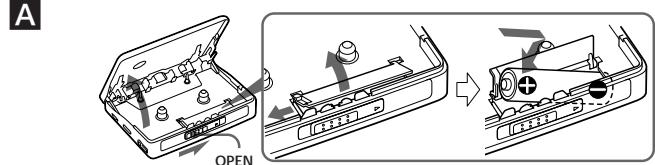
To Insert battery A
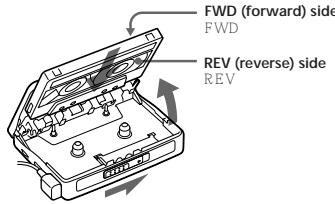
1 Slide the OPEN switch to open the cassette holder.
2 Release the catch to open the battery compartment lid, and insert one R6 (size AA) dry battery with correct polarity.
Notes
- For maximum performance we recommend that you use a Sony alkaline battery.
- Battery level indication is different for tape and radio due to different power consumption.
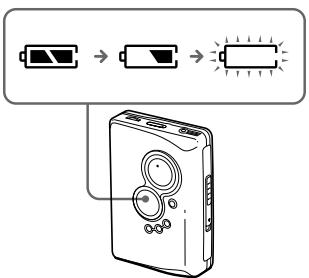
When to replace the battery B
Replace or charge the battery when "□" flashes in the display.
Playing a Tape
1 Insert a cassette and if the HOLD function is on, slide the HOLD switch in the opposite direction of the arrow to unlock the controls.
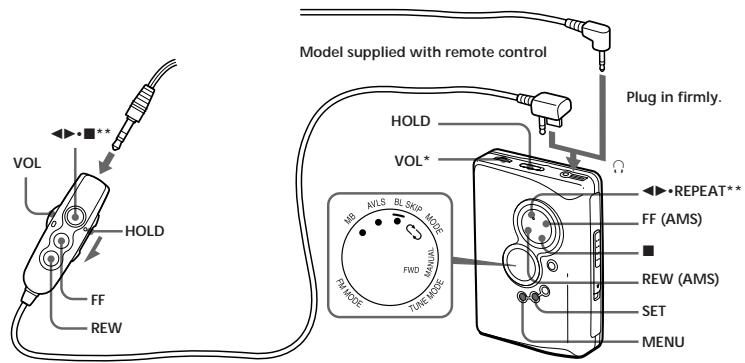
2 Press REPEAT on the main unit and adjust the volume with VOL. (Only for models supplied with remote control: On the remote control, press (play)
■(stop).)
When adjusting the volume on the main unit (only for models supplied with remote control)
Set the VOL control on the remote control at maximum.
When adjusting the volume on the remote control (only for models supplied with remote control) Set the VOL control on the main unit to slightly above the medium level.
Operation on the main unit
To
Pres
Switch playback to REPEAT during playback the other side
Stop playback
stop)
1 Repeat the current REPEAT for 2 seconds on
track (Repeat Single more during playback Track function) To stop a single repeat, press it again.
Operation on the remote control (only for models supplied with remote control)
To
Pres
Switch playback to for 2 seconds or more
the other side during playback
Stop playback once during playback
Repeat the current twice during playback
track (Repeat Single To stop a single repeat, press
Track function)
Other tape operations
To Press
East f
FF
Rewir
RE
Play the next track/ FF once/repeatedly during
succeeding 9 tracks playback
from the beginning
(AMS**)
Play the current REW once/repeatedly
track/previous8 during playback
tracks from
the beginning
(AMS**)
Play the other side FF for 2 seconds or more
from the beginning
(Skip Reverse
function)
Play the same side REW for 2 seconds or more
from the beginning
(Rewind Auto Play
function
- If on the remote control is pressed during fast forward or rewind, the Walkman switches to playback **Automatic Music Sensor
Adjusting playback modes
To select playback direction mode
Press MENU repeatedly to set the cursor in the
display to MODE. Then press SET to select the
desired mode
| To play | Select |
| both sides repeatedly | → |
| both sides once from the FWD side | → |
To skip a long space between tracks (BL, SKIP* function)
Press MENU repeatedly to set the cursor in the display to BL.SKIP. Then press SET to show
- The tape is fast-forwarded to the next track if there is a blank space longer than 12 seconds.
Listening to the Radio D
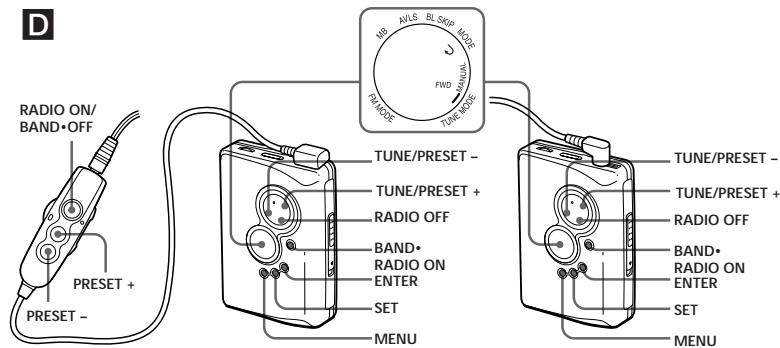
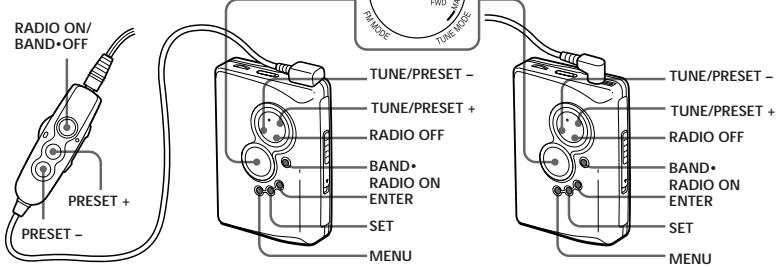
1 Press BAND*RADIO ON to turn on the radio.
2 Press BAND*RADIO ON repeatedly to select AM or FM.
3 Press MENU on the main unit repeatedly and set " _ " (the cursor) in the display to TUNE MODE.
4 For manual tuning
① Press SET to choose MANUAL.
(2) Press TUNE/PRESET + or - repeatedly
to tune in to the desired station
Hold down TUNE/PRESET+or for a
fow seconds to see for stations
Few seconds to scan for stations. For present tuning
For preset tuning
① Press SET to choose PRESET
② Press TUNE/PRESET + or - repeatedly
to recall the desired preset station. To use preset tuning, preset stations first (see "Presetting Radio Stations").
To turn off the radio
Press RADIO OFF.
To improve the broadcast reception
For AM: Reorient the unit itself.
- For FM: Extend the remote control cord or headphones/earphones cord (antenna). If the reception is still not good, press MENU repeatedly to set the cursor in the display to FM MODE. Then press SET to choose "LOCAL" (or "MONO" (monaural)) or none (stereo) for best reception.
To operate from the remote control (only for models supplied with remote control) To turn on the radio, press RADIO ON/BAND-OFF for more than one second (while the tape is in stop mode only).
To select the band, press RADIO ON/BAND·OFF
for more than two seconds while the radio is on.
To tune in or recall a preset station, press PRESET+ or -.
To turn off the radio, press RADIO ON/BAND·OFF.
(turn over)
| A | ||
| 1 | OPEN | |
| 2 | (AA) | R 6 |
| : | Sony | |
| B | -□- | |
| C | ||
| 1 | HOLD | |
| 2 | HOLD | |
| 2 | ▲●REPEAT | VOL |
| ▲● | ■ | |
| VOL | ||
| VOL | ||
| ▲●REPEAT | ||
| ■ | ||
| ▲●REPEAT 2 | ||
over)
| * | FF | |
| * | REW | |
| 9 (AMS**) | FF | |
| 8 (AMS**) | REW | |
| FF 2 | ||
| REW 2 | ||
| * Walkman | ▲▶■ | |
| MODE | MENU SET | |
| FWD | → | |
| → | ||
| BL SKIP* | ||
| SKIP | MENUSET | ● |
| * | 12 | |
BL

E
Model supplied with remote control
Model supplied with headphones/earphones only
F
Model supplied with remote control
Model supplied with headphones/earphones only
Specifications
AM: 530 - 1710 kHz (North, Central, and South America)
Radio section
Frequency range
FM:87.5-108MHz
531-1602kHz(other countries)
Tape section
Frequency response
Playback: 40 - 15 000 Hz
Output
Headphones (O) jack
Load impedance 8 - 300 Ω
General
Power requirements
1.5V
One R6 (size AA) battery
Dimensions (W/H/D)
Approx. 17.0 × 108.4 × 28.7 mm ( 5%8 × 4%8 × 17% ) inches), excl. projecting parts and controls
Mass
Approx. 165g (5.9 oz) (main unit only)
Supplied accessories
- Stereo headphones/earphones with remote control or stereo
headphones/earphones (1
Design and specifications are subject to change without notice.
Battery life* (Approx. hours)
ape playback Radio reception
Sony alkaline LR6 (SG)** 35 65
- Measured value by the standard of JEITA (Japan Electronics
and Information Technology Industries Association). (Using
***Wheroy 16 Sam LP6 (SC) "STAMNA" alkaline, dry
When using a Sony Echo (SG) 31A minNA alkaline dry battery (produced in Japan)
No
- The battery life may be shorter depending on the
operating condition, the surrounding temperature
and battery type.
FM:87.5 108MHz
AM:530 1710kHz
531 1602 kHz
40 15000Hz
(Ω)
8 300Ω
1.5V
R6(AA)
77.0 × 108.4 × 28.7 mm
1.0%
Son
L.R
SG)
5
5
- JEITA (Japan Electronics and Information Technology)
Industries Association)
** Sony LR6(SG) STAMINA
1.5V
R6 (AA)
77.0 × 108.4 × 28.7 mm
1.0%
1
F
(ML)
-
E=97.5-109 591-1608
VGA 275-100 500-1710
USA 67.5 100 800 1710
Eur . European and other countries
USA. USA, Canada, and China and South America
Using Other Functions F
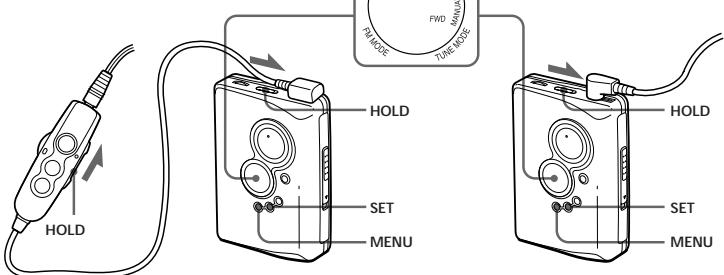
Locking the Controls - HOLD Function
Slide the HOLD switch in the direction of the arrow.
to lock the controls of the Walkman or the remote.
control
Emphasizing Bass
Press MENU repeatedly to set the cursor in the
display to MB (Mega Bass). Then press SET to show
“●”
Protecting Your Hearing — AVLS
(Automatic Volume Limiter System)
Press MENU repeatedly to set the cursor to AVLS in
the display. Then press SET to show "●".
To cancel the AVLS function
Press SET so that “●” disappears.
Note
The AVLS setting will be canceled when you replace
the battery.
Precautions
On batteries
- Do not carry the dry or rechargeable batteries with coins or coins.
other metallic objects. It can generate heat if the positive and negative terminals of the batteries are accidentally contacted by
negative terminals of the batteries are accidentally contacted by a metallic object.
- When you do not use the Walkman for a long time, remove the
battery to avoid any damage caused by battery leakage and
On handling
- Do not drop the unit or give a shock to the unit, or it may cause
a malfunction. - Do not leave the unit in a location near heat sources, or in a location that is outside of the unit.
place subject to direct sunlight, excessive dust or sand,
moisture, rain, mechanical shock, or in a car with its windows closed.
The LCD display may become hard to see or slow down when
using the unit at high temperatures (above 40^ / 104^ ) or at
low temperatures (below 0^ / 32^ ). At room temperature, the dialysis will return to its normal operating condition.
display will return to its normal operating condition. Do not use cassettes longer than 90 minutes except for long
continuous playback. - If the unit has not been used for long period of time, set it in the
playback mode and vostart using again
m = 311 ;
On the
model
#
Off headphones/eair phones
Road safety
Do not use headphones/earphones while driving, cycling, or
operating any motorized vehicle. It may create a traffic hazard
and is illegal in some areas . It can also be potentially dangerousto play your head角色 (or hones at high volume , while
to play your headphones? carphones at nightwalking , especially at pedestrian crossings
You should exercise extreme caution or discontinue use in
potentially hazardous situations
Preventing hearing damage
Do not use headphones/earphones at high volume. Hearing
experts advise against continuous, loud and extended play. If you
experience a ringing in your ears, reduce volume or discontinue
Caring for others
Keep the volume to a moderate level. This will allow you to hear outside sounds and to be considerate to the people around you.
On maintenance
- Clean the tape head and tape path, using a cotton swab and
commercially available cleaning solvent after every 10 hours of
use. - To clean the exterior, use a soft cloth slightly moistened in water. Do not use alcohol, bongins or thinner.
Water: Do not use alcohol, benzine or thinner. Clean the headphones/earphones and remote control plugs
periodically.