WM-EX651 - Lecteur de cassette portable SONY - Notice d'utilisation et mode d'emploi gratuit
Retrouvez gratuitement la notice de l'appareil WM-EX651 SONY au format PDF.


| Type de produit | Lecteur de cassette portable |
| Marque | Sony |
| Modèle | WM-EX651 |
| Dimensions (L x H x P) | Environ 76,4 x 108,9 x 21,8 mm (hors parties saillantes et commandes) |
| Poids | Environ 140 g (unité principale uniquement) |
| Alimentation | Pile rechargeable NH-10WM (1,2 V) ou pile sèche R6 (AA) 1,5 V |
| Adaptateur secteur | Fourni, 220 V, 50 Hz (selon modèle) |
| Autonomie (lecture) | Pile rechargeable NH-10WM complètement chargée : environ 22 h ; pile alcaline Sony LR6 : environ 46 h ; les deux ensemble : environ 68 h |
| Réponse en fréquence (lecture) | 30 - 18 000 Hz |
| Sortie casque | Prise jack (Ω), impédance de charge 8 - 300 Ω |
| Fonctions de lecture | Lecture, avance rapide, rembobinage, AMS (capteur de musique automatique), lecture répétée, lecture des deux faces |
| Réglage de vitesse | SPEED CONTROL : ralenti, normal, accéléré |
| Modes sonores | RV (aigus renforcés), MB (basses modérées), GRV (basses fortes), normal |
| Protection auditive | AVLS (limiteur automatique de volume) |
| Verrouillage des commandes | Fonction HOLD (télécommande et unité principale) |
| Entretien | Nettoyage des têtes et du chemin de bande tous les 10 heures d'utilisation |
| Accessoires fournis | Boîtier de piles, adaptateur secteur, station de charge, écouteurs stéréo avec télécommande, pile rechargeable NH-10WM, pochette de transport, étui pour pile rechargeable |
| Précautions importantes | Ne pas utiliser en charge ; ne pas exposer à l'humidité ; utiliser uniquement l'adaptateur fourni |
FOIRE AUX QUESTIONS - WM-EX651 SONY
Questions des utilisateurs sur WM-EX651 SONY
0 question sur cet appareil. Repondez a celles que vous connaissez ou posez la votre.
Poser une nouvelle question sur cet appareil
Téléchargez la notice de votre Lecteur de cassette portable au format PDF gratuitement ! Retrouvez votre notice WM-EX651 - SONY et reprennez votre appareil électronique en main. Sur cette page sont publiés tous les documents nécessaires à l'utilisation de votre appareil WM-EX651 de la marque SONY.
MODE D'EMPLOI WM-EX651 SONY
Cassette Player
Operating Instructions
使用说明书
WM-EX651

VAL KATOO
随身听
©2004 Sony Corporation Printed in China
A
B
C
D
natural_image
Three-step diagram showing a mechanical assembly with arrows indicating rotation or adjustment (no text or symbols present)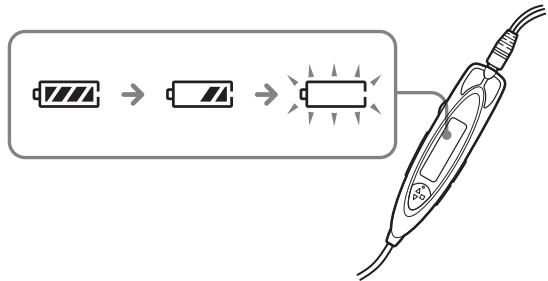
"WALKMAN" is a registered trademark of Sony Corporation to represent Headphone Stereo products.
WALKMAN is a trademark of Sony Corporation.
English
WARNING
To prevent fire or shock hazard, do not expose
he unit to rain or moisture.
Do not install the appliance in a confined space, such as a bookcase or built-in cabinet.
- To prevent fire or shock hazard, do not place objects filled with liquids, such as vases, on the apparatus.
Preparations
Prepare a dry battery (not supplied) or the rechargeable battery (supplied).
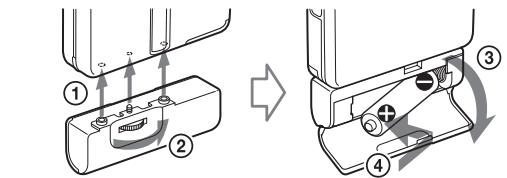
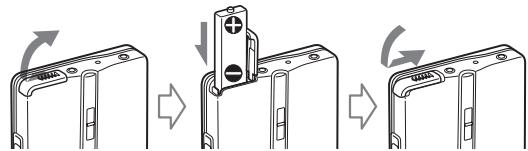
Dry Battery A
Attach the supplied battery case, and then insert one R6 (size AA) battery with correct polarity.
Rechargeable Battery B
Charge the rechargeable battery before using it for the first time.
1 Insert the supplied rechargeable battery NH-10WM into the rechargeable battery compartment with correct polarity.
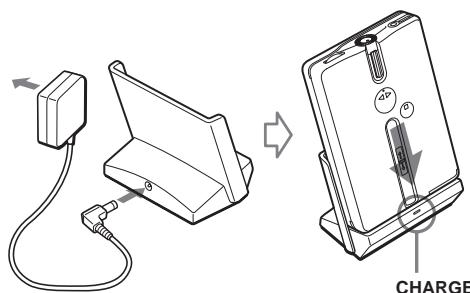
2 Connect the supplied AC power adaptor to the charging stand, plug in the AC power adaptor to the house current (mains).
3 Place the main unit on the charging stand. The CHARGE lamp will light up. Full charging takes about 6 hours.
Note
- Do not use the unit while charging. Remove the unit from the charging stand when using it.
- If you operate the unit while charging, the battery will not be charged.
- If you operate the unit while charging, it may cause malfunction.
- Do not place the unit on the charging stand without the rechargeable battery. Otherwise, it may cause malfunction.
Notes on the AC power adaptor
- Use only the supplied AC power adaptor. Do not use any other AC power adaptor.
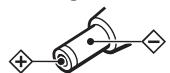
Polarity of the plug
- Connect the AC power adaptor to an easily accessible AC outlet. Should you notice an abnormality in the AC power adaptor, disconnect it from the AC outlet immediately.
- Do not touch the AC power adaptor with wet hands.
Replace or charge the battery when “☐” flashes.
Note
- After the battery is replaced, the setting of the SOUND and MODE buttons will be erased.
Precautions
On charging
- The supplied charging stand can be used only with this unit. No other model can be charged using this stand.
- Remove the AC power adaptor from the wall outlet as soon as possible after the rechargeable battery has been charged. Overcharging may damage the rechargeable battery.
- The charging stand and the rechargeable battery may become warm during charging, but this is not a problem.
- Do not tear off the film on the rechargeable battery.
- Use only the supplied charging stand to charge the supplied rechargeable battery.
- Be sure not to short-circuit the battery. When you carry it with you, use the supplied carrying case. If you are not using the case, do not carry the battery with other metallic objects such as keys, rings in your pocket.
- If the rechargeable battery is new or has not been used for a long time, it may not be charged completely until you use it several times.
On batteries
- Do not charge a dry battery.
- Do not carry the dry or rechargeable batteries with coins or other metallic objects. It can generate heat if the positive and negative terminals of the batteries are accidentally contacted by a metallic object.
- When you do not use the Walkman for a long time, remove the battery to avoid any damage caused by battery leakage and subsequent corrosion.
On handling
- Do not leave the unit in a location near heat sources, or in a place subject to direct sunlight, excessive dust or sand, moisture, rain, mechanical shock, or in a car with its windows closed.
- The LCD display may become hard to see or slow down when using the unit at high temperatures (above 40^ / 104^ ) or at low temperatures (below 0^/32^ ). At room temperature, the display will return to its normal operating condition.
- We do not recommend the use of tape longer than 90 minutes. They are very thin and tend to be stretched easily. This may cause malfunction of the unit or sound deterioration.
- If the unit has not been used for long, set it in the playback mode to warm up for a few minutes before you start using again.
On the remote control
Use the supplied remote control only with this unit.
On headphones/earphones
Road safety
Do not use headphones/earphones while driving, cycling, or operating any motorized vehicle. It may create a traffic hazard and is illegal in some areas. It can also be potentially dangerous to play your headphones/earphones at high volume while walking, especially at pedestrian crossings.
You should exercise extreme caution or discontinue use in potentially hazardous situations.
Preventing hearing damage
Do not use headphones/earphones at high volume. Hearing experts advise against continuous, loud and extended play. If you experience a ringing in your ears, reduce volume or discontinue use.
Caring for others
Keep the volume to a moderate level. This will allow you to hear outside sounds and to be considerate to the people around you.
On maintenance
- Clean the tape head and tape path, using a cotton swab and commercially available cleaning solvent after every 10 hours of use.
- To clean the exterior, use a soft cloth slightly moistened in water. Do not use alcohol, benzine or thinner.
- Clean the headphones/earphones and remote control plugs periodically.
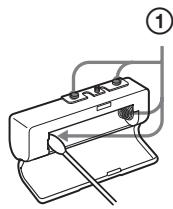
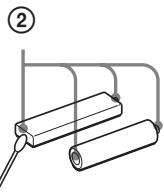
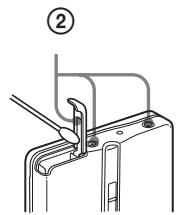
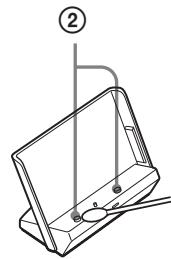
- Clean the battery case terminals D-① (both inside and outside) and the terminals D-② periodically with a
cotton swab or soft cloth as illustrated.
Specifications
Frequency response
Playback: 30 - 18 000 Hz
Output
Headphones (Ω jack)
Load impedance 8 - 300 Ω
Power requirements
• One rechargeable battery: 1.2V DC × 1
• One R6 (size AA) battery: 1.5 V DC × 1
For charging stand (DC IN 3 V jack)
• AC power adaptor
Dimensions (w/h/d)
Approx. 76.4 × 108.9 × 21.8 mm (excl.
projecting parts and controls)
Mass
Approx. 140 g (main unit only)
Supplied accessories
- Battery case (1)
• AC power adaptor (1) - Charging stand (1)
- Stereo headphones or earphones with remote control (1)
• Rechargeable battery (NH-10WM, 1.2 V,
900 mAh (MIN), Ni-MH) (1) - Carrying pouch (1)
• Rechargeable battery carrying case (1)
Design and specifications are subject to change without notice.
Battery life\* (Approx. hours) (in playback)
Rechargeable NH-10 WM 22 fully charged**
Sony alkaline LR6 (SG)*** 46
Rechargeable NH-10 WM 68
Sony alkaline LR6 (SG) used together**
* Measured value by the standard of JEITA (Japan Electronics and Information Technology Industries Association). (Using a Sony HF series cassette tape)
** The charging time varies depending on the operating condition of the rechargeable battery.
*** When using a Sony LR6(SG) alkaline dry battery (produced in Japan)
Note
- The battery life may be shorter depending on the operating condition, the surrounding temperature and battery type.
中文
警告
为防火灾或触电危险,切勿让机器暴露于雨中或潮湿处。
别把机器安装在例如书橱或壁柜等密不通风的地方。
- 为防止火灾或触电的危险,请勿将装满液体的物体,例如花瓶等放在装置上。
准备工作
准备干电池(未附带)或充电式电池(附带)。
干电池 A
安装附带的电池盒,然后以正确极性装入一节 R6(AA) 电池。
充电式电池 B
充电式电池在第一次使用前,必须加以充电。
1 以正确极性将附带的充电式电池 NH-10WM 装入充电式电池室。
2 将附带的 AC 电源转接器连接到充电座,将 AC 电源转接器接插到家庭用电源插座(主电源)。
3 把主机放在充电架上。
CHARGE 灯将点亮。
完全充电需时大约 6 小时。
i
- 充电时,请勿使用机器,要使用机器时,须把机器从充电座上卸下来。
- 充电中,您如果操作机器,电池便不能进行充电了。
- 充电中,您如果操作机器,便可能引起故障。
- 请勿将没安装充电式电池的机器放在充电座上。否则可能引起故障。
AC 电源转接器须知
- 请仅使用附带的 AC 电源转接器。请勿使用任何其它 AC 电源转接器。
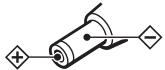
插头的电极
- 将 AC 电源转接器连接至易接近的 AC 插座。您如果发现 AC 电源转接器有异常现象,请立即自 AC 插座拔下它。
- 您的手潮湿时,切勿去碰 AC 电源转接器。
当 “☐” 闪烁时,即请更换电池或给电池充电。C
注
- 更换电池后,SOUND 和 MODE 的按钮设定都将被抹除。
使用前须注意
充电须知
- 附带的充电座只能用于本装置。其它型号不能用此充电座充电。
- 充电式电池充满电时,请尽快从墙上电源插座卸下 AC 电源转接器。因为过度的充电可能会损坏充电式电池。
- 进行充电中,充电座和充电式电池都可能变热。这是正常现象不成问题。
- 请勿撕下充电式电池上的薄膜。
- 请仅使用附带的充电座给附带的充电式电池充电。
- 切勿使电池发生短路。要携带电池时,请用附带的携带盒。如果没装在盒里,则请不要和其他金属小件,诸如钥匙,金属件等混合在一起携带。
- 全新的,或长期没用的充电式电池,可能要经充电使用数次以后才能完全充满电。
电池须知
- 请勿向干电池充电
- 请勿将干电池与硬币或其他金属小件混在一起携带。如果电池的正极和负极通过金属小件意外接触,将会发热。
- 长期不使用 Walkman 时,请取出电池以避免因电池漏液而腐蚀受损。
本机须知
- 请勿将本机置于热源附近,或受阳光直射、极多尘沙、潮湿、会淋到雨、有机械冲击的地方,或紧闭的汽车里。
- 在高温(40℃以上)或低温(0℃以下)环境使用机器时,液晶显示器可能变得不易看清或转变变慢。但拿到室温处,即将恢复正常的操作条件。
- 我们不推荐使用长度超过 90 分钟的磁带,因为它们都很薄,很容易被拉长,可能导致机器故障或造成音质下降。
- 如果长时间未使用本机,在重新开始使用之前,请先将其置于播放模式预热几分钟。
遥控器须知
本机限使用附带的遥控器。
头戴耳机/耳机须知
交通安全
请勿在驾车、骑车或操纵任何机动车辆时使用头戴耳机/耳机,否则可能导致交通事故,并且在有些地区是违法的。即使在步行时,特别是在过马路时,高音量地使用头戴耳机/耳机也会有潜在的危险。
在可能发生危险的情况下,需要非常小心或停止使用。
防止损伤听力
请勿高音量地使用头戴耳机/耳机。耳科专家告诫不要连续、高音量和长时间使用耳机。如果出现耳鸣,请降低音量或停止使用。
为他人着想
请保持适当的音量,使您能听到外界的声音,而且不骚扰周围的人。
维修须知
- 每使用了10个小时,即请用棉棒和市售清洁液清洁一下磁头和磁带通道。
- 请用软布轻蘸湿清水擦拭机器外壳。切勿使用酒精,汽油或稀释剂。
- 请定期地清洁头戴耳机/耳机和遥控器的插头。
- 如图所示,用棉棒或软布定期地清洁电池盒的端子 D-①(内,外面)和机器边的端子 D-②。
规格
频率响应
播放:30-18 000 Hz
输出
头戴耳机(Ω插孔)
负载阻抗 8 - 300 Ω
电源要求
- 一个充电式电池:1.2 V DC×1
- 一个 R6 (AA) 干电池:1.5 V DC×1
用于充电座(DC IN 3 V 插孔)
- AC 电源转接器:220 V,50 Hz(中国型号)
额定电流:1000 mA
尺寸(宽/高/纵深) 约 76.4 × 108.9 × 21.8 mm (不含突起部分和控制器)
质量
约 140 g(仅含主机)
随机附件
- 电池盒 (1
- AC 电源转接器 AC-ES3010K 或 AC-
ES3010K2 (1)
- 充电座 (1)
- 带遥控器的立体声头戴耳机或耳机 (1)
- 充电式电池 (NH-10WM, 12V)
900 mAh (MIN) Ni MH (1)
- 携带软袋
- 充电式电池携带盒 (1)
设计和规格有所变更时,恕不另行通知。
电池使用时间\*(大约小时数)(播放时)
完全充电的充电式电池 NH-10WM** 22
Sony 碱性电池 LR6 (SG)*** 46
同时使用充电式电池 NH-10WM 和 68
Sony 碱性电池 LR6 (SG)***
* 按 JEITA (Japan Electronics and Information Technology Industries Association) 标准测定的值。(使用 Sony HF 系列磁带)
** 充电时间因充电式电池的操作条件而异。
*** 使用 LR6 (SG) 型 Sony 碱性干电池(日本制造)时。
。
电池使用时间,可能因操作条件,环境温度和电池型式而缩短些。
(接反面)
(turn over)
[Non-Text]
[Non-Text]
[Non-Text]
[Non-Text]
[Non-Text]
[Non-Text]
[Non-Text]
[Non-Text]
[Non-Text]
[Non-Text]
[Non-Text]
[Non-Text]
[Non-Text]
[Non-Text]
[Non-Text]
[Non-Text]
[Non-Text]
[Non-Text]
[Non-Text]
[Non-Text]
[Non-Text]
[Non-Text]
[Non-Text]
[Non-Text]
[Non-Text]
[Non-Text]
[Non-Text]
[Non-Text]
[Non-Text]
[Non-Text]
[Non-Text]
[Non-Text]
[Non-Text]
[Non-Text]
[Non-Text]
[Non-Text]
[Non-Text]
[Non-Text]
[Non-Text]
[Non-Text]
[Non-Text]
[Non-Text]
[Non-Text]
[Non-Text]
[Non-Text]
[Non-Text]
[Non-Text]
[Non-Text]
[Non-Text]
[Non-Text]
[Non-Text]
[Non-Text]
[Non-Text]
[Non-Text]
[Non-Text]
[Non-Text]
[Non-Text]
[Non-Text]
[Non-Text]
[Non-Text]
[Non-Text]
[Non-Text]
[Non-Text]
[Non-Text]
[Non-Text]
[Non-Text]
[Non-Text]
[Non-Text]
[Non-Text]
[Non-Text]
[Non-Text]
[Non-Text]
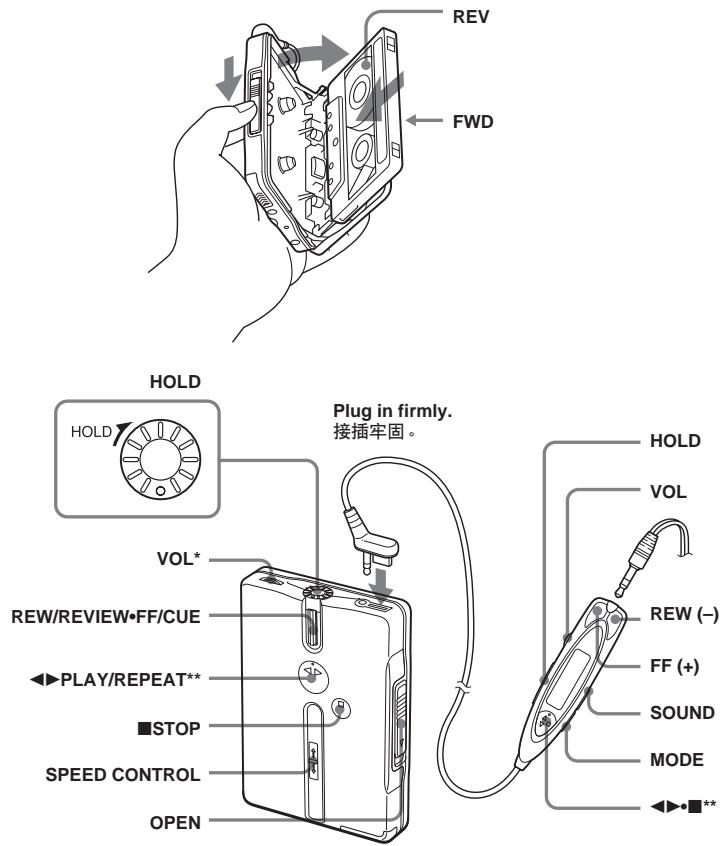
* There is a tactile dot beside VOL on the main unit to show the direction to turn up the volume.
** The button has a tactile dot.
* 在主机上 VOL 旁边有一个触感圆点,表示转大音量的方向。
** 按钮有触感圆点。
English
Playing a Tape
1 Insert a cassette and if the HOLD function is on, unlock the controls.
2 Press ◀▶(play)•■(stop) on the remote control and adjust the volume with VOL. (On the main unit, press ◀▶PLAY/REPEAT.)
When adjusting the volume on the remote control
Set the VOL control on the main unit to around 6.
When adjusting the volume on the main unit
Set the VOL control on the remote control at maximum.
Operation on the remote control
| To | Press |
| Switch playback to the other side | ◀▶•■ for more than a second during playback |
| Stop playback | ◀▶•■ once during playback |
| Fast forward* | FF during stop |
| Rewind* | REW during stop |
| Play the other side from the beginning (Skip Reverse function) | FF for 2 seconds or more during stop |
| Play the same side from the beginning (Rewind Auto Play function) | REW for 2 seconds or more during stop |
| Repeat the current track (Repeat Single Track function) | ◀▶•■ twice during playback To stop a single repeat, press ◀▶•■ once. |
| Play the next track/succeeding 9 tracks from the beginning (AMS**) | FF once/repeatedly during playback |
| Play the current track/previous 8 tracks from the beginning (AMS**) | REW once/repeatedly during playback |
| Fast forward/rewind while listening to the sound (CUE/REVIEW) | Press and hold FF or REW during playback and release it at the point you want. |
Operation on the main unit
| To | Do this |
| Switch playback to the other side | Press ◀▶PLAY/ REPEAT during playback. |
| Stop playback | Press ■STOP. |
| Fast forward* | Move REW/ REVIEW•FF/ CUE toward FF/ CUE once during stop. |
| Rewind* | Move REW/ REVIEW•FF/ CUE toward REW/REVIEW once during stop. |
| Play the other side from the beginning (Skip Reverse function) | Move and hold REW/REVIEW• FF/CUE toward FF/CUE for 2 seconds or more during stop. |
| To | Do this |
| Play the same side from the beginning (Rewind Auto Play function) | Move and hold REW/REVIEW•FF/CUE toward REW/REVIEW for 2 seconds or more during stop. |
| Repeat the current track (Repeat Single Track function) | Press and hold ◀▶PLAY/REPEAT for 2 seconds or more during playback.To stop a single repeat, press it again. |
| Play the next track/succeeding 9 tracks from the beginning (AMS**) | Move REW/REVIEW•FF/CUE toward FF/CUE once/repeatedly during playback. |
| Play the current track/previous 8 tracks from the beginning (AMS**) | Move REW/REVIEW•FF/CUE toward REW/REVIEW once/repeatedly during playback. |
| Fast forward/rewind while listening to the sound (CUE/REVIEW) | Move and hold REW/REVIEW•FF/CUE toward FF/CUE or REW/REVIEW during playback and release it at the point you want. |
| * If ◀▶▪ on the remote control is pressed during fast forward or rewind, the Walkman switches to playback.** Automatic Music Sensor | |
Using Other Functions
Note
- You cannot use these functions (except HOLD function) during fast-forward or rewind.
Adjusting the Tape Playback Speed
Slide SPEED CONTROL to: SLOW (slow) to play back at a slower speed. Center position to play back at normal speed. FAST (fast) to play back at a faster speed.
Adjusting Playback Mode
You can adjust the playback direction mode (← or ←) as well as the BL SKIP mode (on or off).
Press MODE repeatedly. With each press the indications change as follows:
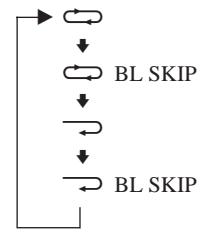
BL SKIP: The tape is fast-forwarded to the next track if there is a blank space of longer than 12 seconds. You will hear repeated sets of three short beeps when skipping a blank. ↔: Both sides of the tape is played repeatedly. ↔: Both sides of the tape is played once (if you start from R (REV) side, only REV side will be played).
Emphasizing Sound
Press SOUND repeatedly. With each press, the indications change as follows: RV (Sound Revitalizer): emphasizes treble sound MB (Mega Bass): emphasizes bass sound (moderate effect) GRV (Groove): emphasizes bass sound (strong effect) none: normal (no effect)
Note
- If the sound is distorted with the mode “GRV”, turn down the volume of the main unit or select other modes.
Protecting Your Hearing — AVLS (Automatic Volume Limiter System)
Hold down MODE until “AVLS” appears in the display (about 10 seconds). To cancel the AVLS function, hold down MODE again until “AVLS” disappears from the display.
Locking the Controls — HOLD Function
Turn/slide the HOLD control/switch in the direction of the arrow to lock the controls of the Walkman (except SPEED CONTROL) or the remote control. The center of the HOLD control on the main unit turns to yellow.
中文
播放录音带
1 装入磁带,如果 HOLD 功能仍打开着,即请释放控制器。
2 按遥控器上的 ◀▶(播放)·■(停止)并用 VOL 旋钮调节音量。(主机上,则请按 ◀▶ PLAY/REPEAT。)
在遥控器上调节音量时
请把主机上的 VOL 控制设定于 6 左右。
在主机上调节音量时
请把遥控器上的 VOL 控制设定于最大。
在遥控器上的操作
| 要 | 请按 |
| 换播放另一面 | 播放中按 ◀▶•■1秒钟以上 |
| 停止播放 | 播放中按一次 ◀▶•■ |
| 快进绕* | 停止中按 FF |
| 绕回* | 停止中按 REW |
| 从头播放另外一面(跳越倒绕功能) | 停止中按 FF 2秒钟或以上 |
| 从头播放同一面(绕回自动播放功能) | 停止中按 REW 2秒钟或以上 |
| 重复当前曲子(反复单曲功能) | 播放中按两次 ◀▶•■要停止单曲反复播放,请按 ◀▶•■一次。 |
| 要从开头播放下一曲/接下9首曲子时(AMS**) | 播放中按一次FF/反复按 FF |
| 要从开头播放当前曲子/前面8首曲子时(AMS**) | 播放中按一次REW/反复按REW |
| 听着声音快进绕/绕回(CUE/REVIEW) | 播放中按住 FF或 REW,并在所要播放的点释放它。 |
在主机上的操作
| 要 | 请执行 |
| 换播放另一面 | 播放中按 ◀▶ PLAY/ REPEAT。 |
| 停止播放 | 按 ■ STOP。 |
| 快进绕* | 停止中向 FF/CUE 方向移动一次REW/ REVIEW•FF/CUE。 |
| 绕回* | 停止中向REW/ REVIEW 方向移动一次REW/ REVIEW•FF/CUE。 |
| 从开头播放另一面(跳越倒绕功能) | 停止中向 FF/CUE 方向移动REW/REVIEW•FF/CUE并按住2秒钟或以上。 |
| 从开头播放同一面(绕回自动播放功能) | 停止中向REW/ REVIEW 方向移动REW/ REVIEW•FF/CUE并按住2秒钟或以上。 |
| 重复当前曲子(反复单曲功能) | 播放中按住 ◀▶ PLAY/ REPEAT 2 秒钟或以上。要停止单曲反复播放,请再按一次 ◀▶ PLAY/ REPEAT。 |
| 要 | 请执行 |
| 要从开头播放下一曲/接下9首曲子时(AMS**) | 播放中向FF/CUE方向移动一次REW/REVIEW•FF/CUE/反复移动REW/REVIEW•FF/CUE。 |
要从开头播放当前播放中向 REW/曲子/前面 8 首曲 REVIEW 方向子时 (AMS**) 移动一次 REW/
REVIEW•FF/ CUE/反复移动 REW/ REVIEW•FF/ CUE。
| 听着声音快进绕/绕回(CUE/REVIEW) | 播放中向FF/CUE或REW/REVIEW方向移动并按住REW/REVIEW•FF/CUE,并在所要播放的点释放它。 |
* 如果在快进绕或绕回过程中按了遥控器上的 ◀▶•■,Walkman 将转换为播放。
**自动音乐感应器
使用其他功能
注
- 在快进绕或绕回中,您不能使用这些功能(HOLD 功能除外)。
调整磁带播放速度
滑动 SPEED CONTROL 为: SLOW(慢),以便用较慢速度播放。 中央位置,以便用正常速度播放。 FAST(快),以便用较快速度播放。
调节播放模式
您可以调节播放方向模式(或)以及 BL SKIP 模式(开或关)。
反复按 MODE,每按一下指示灯即作如下变化:
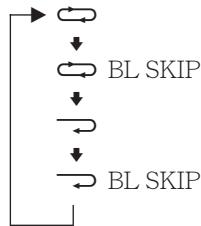
BL SKIP:如果有 12 秒种以上的空白,则录音带将快进绕到下一曲。跳过一段空白时,您将听到反复发出的三声短嘟声。
→:将反复播放录音带的双面。 →:录音带双面各播放一次(但如果是从 R(REV)(倒绕)面开始,则只播放 REV(倒绕)面而已)。
增强声音
反复按 SOUND,每按一下,指示灯呈如下显示: RV(Sound Revitalizer 声音再生器):增强高音 MB(Mega Bass 强低音):增强低音(中等效果) GRV(Groove 最佳状态):增强低音(强烈效果) 无:普通(无效果)
注
- “GRV”模式时,如果声音失真了即请转小主机音量或选其他模式。
保护您的听力-AVLS
(自动音量限制系统)
按下 MODE 至显示器中出现 “AVLS”(大约 10 秒)。
要取消 AVLS 功能时,重新按住 MODE 至显示器中 “AVLS” 显示消失。
锁定控制器-HOLD 功能
沿箭头所指方向旋转/滑动HOLD控制器/开关以锁定Walkman(SPEED CONTROL除外)或遥控器上的控制器。此时,主机上HOLD控制器的中心变成黄色。
[Non-Text]
[Non-Text]
[Non-Text]