WM-GX320 - Lecteur de cassette portable SONY - Notice d'utilisation et mode d'emploi gratuit
Retrouvez gratuitement la notice de l'appareil WM-GX320 SONY au format PDF.


| Type de produit | Lecteur de cassette portable avec radio AM/FM |
| Marque | Sony |
| Modèle | WM-GX320 |
| Dimensions (L x H x P) | 116 × 89 × 39,5 mm |
| Poids (sans piles ni cassette) | 175 g |
| Poids (avec piles et cassette) | 250 g |
| Alimentation | 2 piles R6 (AA) 1,5 V ou adaptateur secteur AC-E30HG (non fourni) |
| Tension d'entrée | 3 V CC |
| Puissance de sortie (écouteurs) | 5 mW + 5 mW (à 10% de distorsion harmonique) |
| Plages de fréquences radio | FM : 87,6-108 MHz (selon région) ; AM : 530-1710 kHz (selon région) |
| Fonctions principales | Lecture de cassettes, enregistrement (microphone intégré ou externe), radio AM/FM, contrôle de vitesse de lecture (de -20% à +25%), égaliseur de lecture (PB EQ), MEGA BASS, AVLS (limiteur de volume automatique) |
| Types de cassettes compatibles | Type I (normale) pour enregistrement et lecture ; Types II et IV pour lecture uniquement |
| Connectique | Prise écouteurs (mini-jack 3,5 mm), prise micro (PLUG IN POWER), prise DC IN 3 V |
| Accessoires fournis | Casque stéréo, étui de transport, micro stéréo, pied de micro |
| Autonomie des piles (alkalines LR6) | Lecture cassette : env. 22 h ; Radio : env. 48 h ; Enregistrement micro : env. 11 h ; Enregistrement radio : env. 10 h |
| Entretien et nettoyage | Nettoyer le boîtier avec un chiffon doux légèrement imbibé de détergent doux. Ne pas utiliser d'alcool, benzène ou diluant. Nettoyer les têtes et le chemin de bande avec un coton-tige imbibé d'alcool ou de liquide de nettoyage. |
| Sécurité | Ne pas exposer à la pluie ou à l'humidité. Ne pas utiliser d'écouteurs en conduisant. Garder le volume à un niveau modéré pour éviter les dommages auditifs. Retirer les piles en cas d'inutilisation prolongée. |
| Réparabilité | Consultez un revendeur Sony agréé pour toute réparation. Pièces détachées non spécifiées dans la notice. |
FOIRE AUX QUESTIONS - WM-GX320 SONY
Questions des utilisateurs sur WM-GX320 SONY
0 question sur cet appareil. Repondez a celles que vous connaissez ou posez la votre.
Poser une nouvelle question sur cet appareil
Téléchargez la notice de votre Lecteur de cassette portable au format PDF gratuitement ! Retrouvez votre notice WM-GX320 - SONY et reprennez votre appareil électronique en main. Sur cette page sont publiés tous les documents nécessaires à l'utilisation de votre appareil WM-GX320 de la marque SONY.
MODE D'EMPLOI WM-GX320 SONY
Operating Instructions (reverse side)
WALKMAN H
WALKMAN O Sony q U - WALKMAN is a registered trademark of Sony Corporation.
WM-GX322/GX320
©1998 by Sony Corporation
W TM N
1 F o a q M B O B
b r p N M a L Y TM Mo i P q G M B b a OH k -B MS O O b L Ma Y TM ] b MI-
bi MIPUM SO·N -b qq 1 MH q- N
Mai n s N q M p G o {H M C q - O A q M z n M v T P H-
K-B MSOObL M
q a Y TM ] b M I b i M I p U M S O N
b q q } MH q - N
Mai n s N q M p G o {H M C q - O A q M z n M v T P H-
WM-GX322 ©MWM-GX320-
X-WM-GX322 O
M @ W t M a b X M p M GX322° -
e`N
N m TM M g N h FN NBON BM T
N Y TM u b WM
H U M P n q
W L 90 a M D n s
M U A MB Y S n a @ M a K f-
q G N N l a M z M u H U
MI N q Pw b@-q N t p Q s q o i
Sony AC-E30HG y q TM a-
y q M Y M n qu
• q R q
• d q ⊕ M ⊕ M
• ⊕ M ⊙ V J q -
N M Xq HK q G G k y la
pG Mb J a eM 念 N
m A w X -
nM M F n
M i s N T o M} -
p G z b Walkman D M M Sony g P p t-
Wyd FM: 87.6-108 MHz ] W
M
W M H W15.100M141N1OMEES
.3-108 M12 J N Q M F S B 7
0.0- 107.9 MHz ] P
7.6- 107.9 MHz ] Lä ^
30-1710 kHz ] wN wM n wA
26.5-1606.5kHz Nj QME S
26.5-1006.3 KHZ J N J Q 1992
31- 1602 KHZ ] – L – a “ ”
q
3V yq R6(AA)2TM y3V q
X
n : 110mW + 110mW ] GX322°Y : 5mW + 5mW°] b10% i i u p U ^
0
WM-GX322:116×89×39mm(eTM TM)
]AX M
WM-GX320:116×89×39.5 mm (eTM TM)
]AX M
.
WM-GX322
265g·]Aq M@ a
WM-GX320:175g
250 g •] A q M @ a
TM nY 1A TM aM 1
TM n J ]1 ^ TM J y]1
J p MW Y M t q -
G
n W L n
T J 'R6JAa o^q
pG q qO zM q -
a q t-
M
Y F- y M s
u @
n Jq
n aM
DC IN 3V
q R] p (EIAJ*
Sony P q Sony LR6(SG) R6P (SR)
| 22 | 7 | ||
| q | J 48 | 16 | |
| q | © | 11 | 3.5 |
| Y | TM10 | 3 | |
- EIAJ Electronic Industries Association of Japan
A q - 1 Sony HF t C a A - q q O z MBATTERY Of H
s q - - @ p PM q R i Y u
o Mn q-
pGq }FM i w -
n
a q J N AC-E30HG yq ] TM a
s DC IN 3V ¥
• AC-E30HG W U a M b R e
d z b a q M Y -
S
S
m
GX322
a
1 N FUNCTION} ]w TAPE°]RADIO OFF ^ m
2 aTM ] wPB EQ]
3 J @ a PLAY
n ]w RADIO MODE }] w m NMODE}N MODE}]w m a Y M PLAY u_1
** i a d a a V 一 _ 一 Ybia a i@B @ Mq N t -
n n ] GX322 ^ N / SPEAKER} ] w SPEAKER m n N q n X M q Y TM
n - b n MAVLS M MEGABASS \ _ @ -
n j q NAVLS] q t ^} ]w LIMIT mY z qM j q]Q bA d HO@z O-
n AVLS \ M NAVLS} ]w NORM m
• n
• n
• m H
·nWjI C T M NMEGBASS} 1 w MAX MID m
- NAVLS} ]w LIMIT m J -MEGA BASS G C-
- pG C n u w M C q
b a a } a -
z i H b + 25 % - 20 % ^T M d
V SPEED CONTROL s] C t ^ V k SPEED CONTROL s] t ^- n q t M N SPEED CONTROL s m
t s C t V t V a t
]Y TM
uFM u @MY b n M] s nY TM JGX322°
1 NFUNCTION} ]w AM© FM m
2
JQ qx
n N FUNCTION} ]w TAPE°] RADIO OFF ^ m
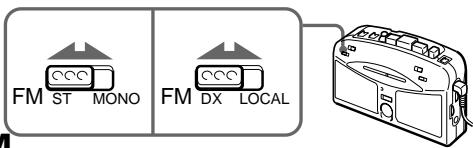
n s G FM M Y TM u FM ST/MONO FM DX/LOCAL} AM M V-
FM
pGbJa a s nM Xa
C
1
。
1
2
2
[
REC
n
STOP
1
b a
b @ -
TM a
3
N FUNCTION } ] w AM © FM
FUNCTION (RADIO OFF) TAPE FM AM n q J © N FUNCTION } ] w TAP OFF ^ m
4
nq
JzQn qx-
nq J ©
N ™ a J S
POWER ^ -
5
PEC
AEO

n
b © N PAUSE } l w b Y V M ©
N - n © M N PAUSE} ] w b Y V-
- n b © AM
pn MNISS}] w Npm- •q] w MEGA BASSM AVLS} T ©q - os @ Nz` qF
G JTYPE II ^ JTYPE IV ^ a
J M N Ja qu O MH K z Z n
pGosM C q
J G M q n 0n -] GX322
SAFETY NOTES ON THE UNIT
WARNING
- To prevent fire or shock hazard, do not expose the unit to rain or moisture.
- Do not use headphones/earphones while driving, cycling, or operating a motorized vehicle. It may create a traffic hazard and is illegal in some areas. It can also be potentially dangerous to play your headphones/earphones at high volume while walking, especially at pedestrian crossings. You should exercise extreme caution or discontinue use in potentially hazardous situations.
- To prevent shock hazards, never open the unit while it is connected to the power source.
CAUTION
- Do not use headphones/earphones at high volume. Hearing experts advise against continuous, loud and extended play. If you experience a ringing in your ears, reduce volume or discontinue use.
- Keep the volume at a moderate level. This will allow you to hear outside sounds and to be considerate to the people around you.
SAFETY NOTES ON POWER SOURCES
To avoid battery leakage, fire, damage, explosion, etc., follow the descriptions below.
DANGER
- Do not carry dry batteries with coins or other metallic objects. It can generate heat if the positive and negative terminals of the batteries are accidentally contacted by a metallic object.
WARNING
- Use only the Sony AC-E30HG AC power adaptor (not supplied).
- To disconnect the AC power adaptor, only use the plug and not the cable.
-
Do not charge a dry battery.
-
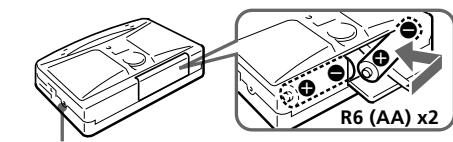
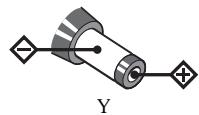
Check the and on the batteries, and be sure to insert them by matching the and on the battery to the diagram inside the battery compartment.
CAUTION
- When you are not going to use your Walkman for a long time, remove the batteries to prevent damage from battery leakage and corrosion.
About This Manual
The instructions in this manual are for WM-GX322 and WM-GX320. Before you start reading, check your model number. WM-GX322 is the model used for illustration purposes. Any differences in operation are clearly indicated in the text, for example, "GX322 only".
Specifications
Frequency range
FM: 87.6-108 MHz (North, Central and South America)
87.5-108 MHz (Italy and Saudi Arabia)
65.0-107.9 MHz (Eastern Europe)
87.6-107.9 MHz (Other countries)
AM: 530-1,710 kHz (North, Central and South America)
526.5-1,606.5 kHz (Italy and Saudi Arabia)
531-1,602 kHz (Other countries)
Power requirements
3V DC batteries R6 (AA) x 2/External DC 3V power sources
Power output
Speaker: 110mW + 110mW (GX322 only)
Headphones: 5mW + 5mW (at 10% harmonic distortion)
- Dimensions
WM-GX322: 116 × 89 × 39 ~mm ( 4% × 3% × 1% inches)
(w/h/d) incl. projecting parts and controls
WM-GX320: 116 × 89 × 39.5 ~mm ( 4% × 3% × 1% inches)
(w/h/d) incl. projecting parts and controls
Mass
WM-GX322: Approx. 190 g (6.8 oz)
Approx. 265g (9.4 oz) incl. batteries and a cassette
WM-GX320: Approx. 175 g (6.2 oz)
Approx. 250g (8.9 oz) incl. batteries and a cassette
- Supplied accessories
Stereo headphones or earphones (1)/Carrying case (1)/Stereo microphone (1)/Microphone stand (1)
Design and specifications are subject to change without notice.
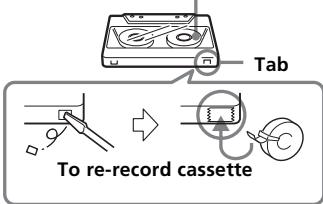
Recorded side
- If the unit has not been used for a long time, set it in the playback mode to warm it up for a few minutes before inserting a cassette.
- For cleaning the case, use a soft cloth slightly moistened with mild detergent solution. Do not use alcohol, benzine or thinner.
If you have any questions or problem concerning your Walkman, please consult your nearest Sony dealer.
Troubleshooting
The sound is unstable or no audio.
- Insert two R6 (size AA) batteries properly.
- Replace all batteries if they are weak.
Poor tape playback
- Clean the headphones/earphones plug
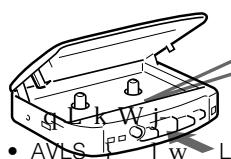
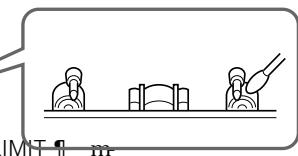
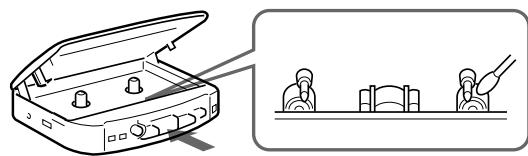
- Dirty heads. Clean the heads and tape path with a cotton swab slightly moistened with cleaning fluid or alcohol.
The volume is not turned up.
- AVLS is set to LIMIT.
Preparations
To Insert batteries
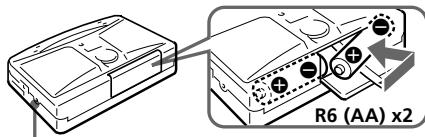
DC IN 3V
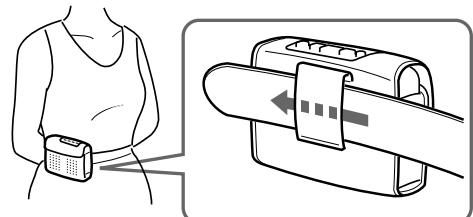
To use the carrying case
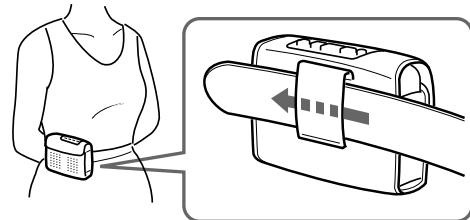
Battery life (approximate hours) (EIAJ*)
| Sony alkaline LR6 ( SG ) | Sony R6P ( SR ) | |
| playback | 22 | 7 |
| radio | 48 | 16 |
| mic recording | 11 | 3.5 |
| radio recording | 10 | 3 |
Using headphones/earphones
- Measured value by the standard of EIAJ (Electronic Industries Association of Japan). (Using a Sony HF series cassette tape)
Notes
- The BATTERY indicator dims when the batteries become weak or exhausted. Replace them with new ones.
- The battery life may shorten depending on the operation of the unit.
- For maximum performance we recommend that you use alkaline batteries.
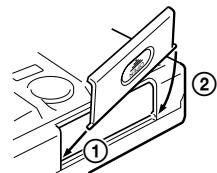
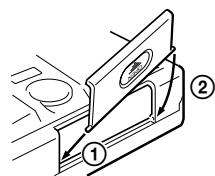
- If the battery compartment lid comes off, attach it as shown.
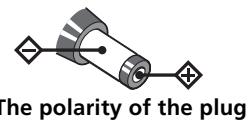
To use external power
- For house current: Connect AC-E30HG AC power adaptor (not supplied) to the DC IN 3V jack.
- Specifications for AC-E30HG varies for each area. Check your local voltage and the shape of plug before purchasing.
Recording
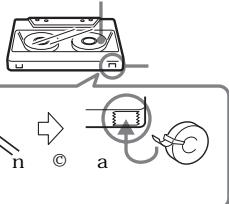
1 Insert a TYPE I (normal) tape with the side you want to record facing forward.
2 Set DIR to. When DIR is set to ,you cannot press REC.
To stop recording
Press STOP
To record on the reverse side
Turn over the tape after recording stops on the forward side. The recording function works only the forward side.
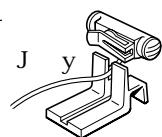
When using the supplied microphone stand
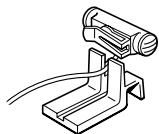
Tips
- To reduce noise while recording AM programs, set ISS to the position that most decreases the noise.
- Adjusting the volume or setting MEGA BASS and AVLS will not affect the recording level. These controls will change the sound level you hear.
Notes
- Do not use a CrO_2 (TYPE II) or metal (TYPE IV) tape for recording.
- When recording with the microphone, do not place it near a lamp cord or a fluorescent lamp to avoid interference noise.
- If a howling occurs, turn down the volume.
- When recording with the microphone, the sound to be recorded cannot be heard through the speakers. (GX322)
- Do not use a CrO_2 (TYPE II) or metal (TYPE IV) tape for recording.
- When recording with the microphone, do not place it near a lamp cord or a fluorescent lamp to avoid interference noise.
- If a howling occurs, turn down the volume.
- When recording with the microphone, the sound to be recorded cannot be heard through the speakers. (GX322)
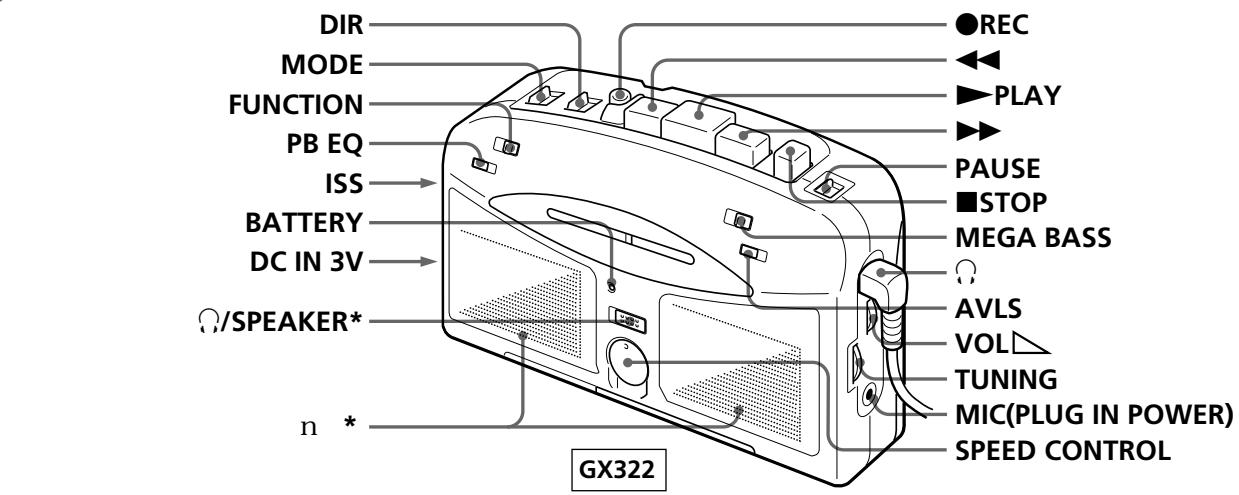
Location of parts and controls
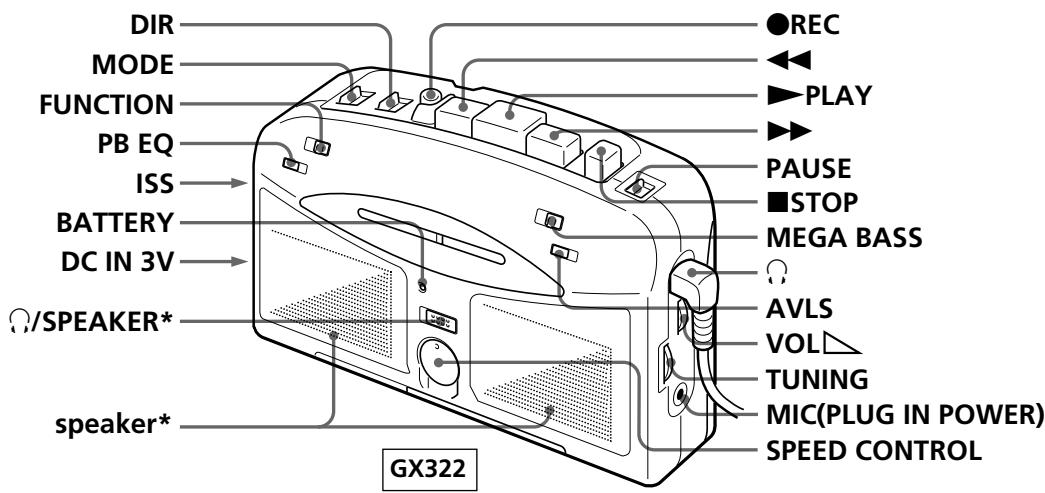
*GX322 only
Playing a tape
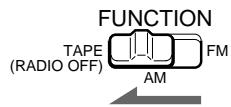
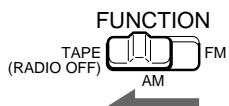
1 Set the FUNCTION to TAPE(RADIO OFF).
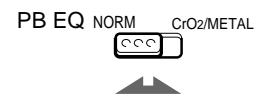
2 Set PB EQ (playback equalizer) to match the tape type.
PB EQ NORM CIO2/METAL
C
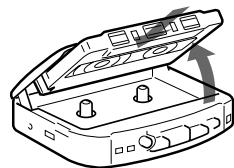
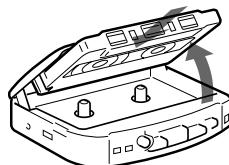
3 Insert a cassette and press PLAY.

| To | Press or set |
| Stop playback* | ■ STOP |
| Fast-forward or rewind the tape** | ▶ or ← |
| Change sides | DIR |
| Play both sides once | MODE to → |
| Play both sides repeatedly | MODE to ← |
| * When the tape ends, the depressed button▶ PLAY is released automatically (Auto shut-off function). | |
**Notes on fast-forward and rowind
- Check tape direction and choose or accordingly.
- If you leave the unit after the tape has been wound or rewound, the batteries will be consumed rapidly. Be sure to press.
To use the speakers (GX322 only)
Set / SPEAKER to SPEAKER. The sound will play from the speakers and no sound from the headphones/earphones. When the speakers are in use, the AVLS and MEGA BASS function will not operate.
To limit the maximum volume automatically
Set AVLS (Automatic Volume Limiter System) to LIMIT. The maximum volume is kept down to protect your ears, even if you turn the volume up. To cancel the AVLS function, set AVLS to NORM.
Tips
- To switch the playback side, set DIR to or .
To select the direction of the tape, set MODE to to play both sides of the tape once, or to play both sides repeatedly.
To emphasize deep bass sound, set MEGA BASS to MAX or MID.
Notes
the MEGA PASS effect is mod
- turn down the volume, if the bass-boosted sound becomes distorted or unstable.
- Do not open the cassette holder while the tape is running.
Adjusting the Playback speed
You can choose from approximately +25% to -20% playback speed.
Turn SPEED CONTROL to the left (slows down) or to the right (speeds up). To put back to the normal speed turn SPEED CONTROL to the middle.
| Playback Speed | Turn the knob |
| Slow speed | to the – direction |
| Fast speed | to the + direction |
| Normal speed | to the middle |
Listening to the radio
Since the headphone cord serves as an FM antenna, connect the headphones/earphones even when using the speakers. (GX322)
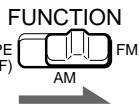
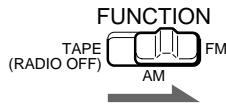
1 Set FUNCTION to AM or FM.
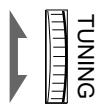
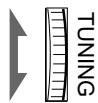
2 Tune to the station you want.
To turn off the radio
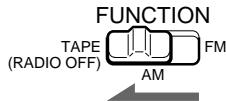
Set FUNCTION to TAPE(RADIO OFF).
To improve broadcast reception
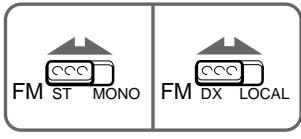
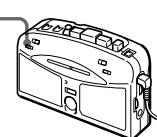
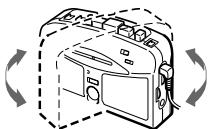
For FM, extend the headphones/earphones cord or adjust FM ST/MONO or FM DX/LOCAL. For AM, reorient the unit itself.
FM
AM
3 To record from the radio
Set FUNCTION to AM or FM.
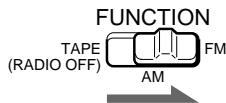
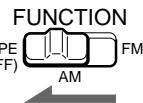
To record from the microphone
Set FUNCTION to TAPE (RADIO OFF).
4 To record from the radio
Tune to the station you want
To record from the microphone
Connect the supplied microphone to MIC(PLUG IN POWER) jack.
5 Press REC.
The recording level is automatically adjusted.

To pause a recording
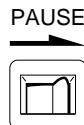
Set PAUSE to the direction of the arrow during recording, the recording will pause. To record, set PAUSE to the opposite direction of the arrow.