
WM-FX373 - Radio cassette portable SONY - Notice d'utilisation et mode d'emploi gratuit
Retrouvez gratuitement la notice de l'appareil WM-FX373 SONY au format PDF.


| Type de produit | Radio cassette portable (baladeur) |
| Marque | SONY |
| Modèle | WM-FX373 |
| Dimensions (L x H x P) | 88,5 x 118,6 x 38,2 mm |
| Poids | Environ 170 g (sans piles), environ 250 g (avec piles et cassette) |
| Alimentation | 2 piles R06 (AA) de 1,5 V ou adaptateur secteur DC 3 V (non fourni) |
| Autonomie des piles (alkalines) | Environ 24 h en lecture cassette, 55 h en radio |
| Gamme de fréquences radio FM | 87,6 - 108 MHz |
| Gamme de fréquences radio AM | 530 - 1710 kHz |
| Fonctions de lecture cassette | Lecture, arrêt, avance rapide, rembobinage, changement de sens (DIR), lecture des deux faces une fois ou en continu (MODE) |
| Fonctions audio | MEGA BASS (amplification des graves), AVLS (limiteur de volume automatique), réglages Aigus/Graves (HIGH/LOW) |
| Type de cassette compatible | Normale (NORM), CrO2, Métal (sélecteur) |
| Sécurité | AVLS pour limiter le volume maximal, avertissement sur le volume élevé, arrêt automatique en fin de bande (modèle FX375/FX373) |
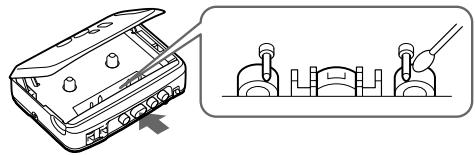
| Entretien et nettoyage | Nettoyer le boîtier avec un chiffon doux légèrement humide et un détergent doux. Ne pas utiliser d'alcool, benzine ou diluant. Nettoyer les têtes avec un coton-tige imbibé d'alcool ou de liquide de nettoyage. |
| Accessoires fournis | Casque ou écouteurs stéréo, clip ceinture |
| Informations générales | Marque déposée WALKMAN de Sony Corporation. Fabriqué en Malaisie. Garantie limitée valable aux États-Unis. |
FOIRE AUX QUESTIONS - WM-FX373 SONY
Questions des utilisateurs sur WM-FX373 SONY
0 question sur cet appareil. Repondez a celles que vous connaissez ou posez la votre.
Poser une nouvelle question sur cet appareil
Téléchargez la notice de votre Radio cassette portable au format PDF gratuitement ! Retrouvez votre notice WM-FX373 - SONY et reprennez votre appareil électronique en main. Sur cette page sont publiés tous les documents nécessaires à l'utilisation de votre appareil WM-FX373 de la marque SONY.
MODE D'EMPLOI WM-FX373 SONY
Radio Cassette Player
Operating Instructions
WALKMAN
WALKMAN is a registered trademark of Sony Corporation.
WM-FX375/FX373/
FX177/FX173/FX171
©1997 by Sony Corporation Printed in Malaysia
Listening for many hours at maximum volume may damage your hearing.
For the customers in the U.S.A.
OWNER'S RECORD
The model number is located at the front and the serial number is located inside the cassette holder. Record the serial number in the space provided below. Refer to them whenever you call upon your Sony dealer regarding this product. Model No.
Serial No.
INFORMATION
This equipment has been tested and found to comply with the limits for a Class B digital device, pursuant to Part 15 of the FCC Rules. These limits are designed to provide reasonable protection against harmful interference in a residential installation. This equipment generates, uses, and can radiate radio frequency energy and, if not installed and used in accordance with the instructions, may cause harmful interference to radio communications. However, there is no guarantee that interference will not occur in a particular installation. If this equipment does cause harmful interference to radio or television reception, which can be determined by turning the equipment off and on, the user is encouraged to try to correct the interference by one or more of the following measures:
- Reorient or relocate the receiving antenna.
- Increase the separation between the equipment and receiver.
- Connect the equipment into an outlet on a circuit different from that to which the receiver is connected.
- Consult the dealer or an experienced radio/TV technician for help.
This device complies with Part 15 of the FCC Rules. Operation is subject to the following two conditions: (1) This device may not cause harmful interference, and (2) this device must accept any interference received, including interference that may cause undesired operation.
You are cautioned that any changes or modifications not expressly approved in this manual could void your authority to operate this equipment.
SAFETY NOTES ON THE UNIT
WARNING
- To prevent fire or shock hazard, do not expose the unit to rain or moisture.
- Do not use headphones/earphones while driving, cycling, or operating a motorized vehicle. It may create a traffic hazard and is illegal in some areas. It can also be potentially dangerous to play your headphones/earphones at high volume while walking, especially at pedestrian crossings. You should exercise extreme caution or discontinue use in potentially hazardous situations.
- To prevent shock hazards, never open the unit while it is connected to the power source.
CAUTION
- Do not use headphones/earphones at high volume. Hearing experts advise against continuous, loud and extended play. If you experience a ringing in your ears, reduce volume or discontinue use.
- Keep the volume at a moderate level. This will allow you to hear outside sounds and to be considerate to the people around you.
SAFETY NOTES ON POWER SOURCES
To avoid battery leakage, fire, damage, explosion, etc., follow the descriptions below.
DANGER
- Do not carry the dry batteries with coins or other metallic objects. It can generate heat if the positive and negative terminals of the batteries are accidentally contacted by a metallic object.
WARNING
- Excluding FX177/FX173/FX171 for U.S.A., Canada and Europe: Use only the recommended AC power adaptor (not supplied). Check also the local voltage to avoid a short circuit to the AC power adaptor.
- Excluding FX177/FX173/FX171 for U.S.A., Canada and Europe: To disconnect the AC power adaptor, only use the plug and not the cable.
- Do not charge a dry battery.
- Check the and on the batteries, and be sure to insert them like the illustration in this manual.
CAUTION
- When you are not going to use your Walkman for a long time, remove the batteries to prevent damage from battery leakage and corrosion.
About This Manual
The instructions in this manual are for WM-FX375, WM-FX373, WM-FX177, WM-FX173 and WM-FX171. Before you start reading, check your model number. WM-FX375 is the model used for illustration purposes. Any differences in operation are clearly indicated in the text, for example, "FX375 only".
Precautions
- Do not leave the unit in a location near heat sources, or in a place subject to direct sunlight, excessive dust or sand, moisture, rain, mechanical shock, or in a car with its windows closed.
- Do not wind the headphones/earphones cord around the unit. The buttons may be kept pressed, causing unnecessary battery usage.
- Do not use cassettes longer than 90 minutes except for long continuous playback.
- If the unit has not been used for a long time, set it in the playback mode to warm it up for a few minutes before inserting a cassette.
- For cleaning the case, use a soft cloth slightly moistened with mild detergent solution. Do not use alcohol, benzine or thinner.
If you have any questions or problem concerning your Walkman, please consult your nearest Sony dealer.
Preparations
To insert batteries
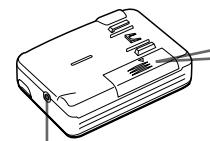
DC IN 3V
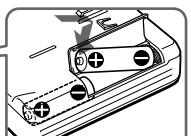
R6 (AA) X2
To use with a rechargeable battery (FX177 only)
Before using, charge the rechargeable battery with the supplied charger.
Charging time is about 4 hours. After 4 hours, remove the batteries.
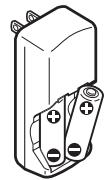
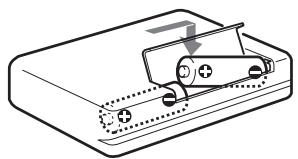
Open the battery compartment lid and insert the rechargeable battery after charging.
Notes
- The name plate indicating operating voltage, power consumption, etc. is located on the bottom exterior of the charger.
- The battery may become warm during charging.
- Use only the rechargeable battery NC-AA (WM) with the supplied battery charger.
- If the rechargeable battery is new or it has not been used for a long time, it may not be charged completely. (The playing time is shorter.)
- The rechargeable batteries can be charged about 300 times.
- Be sure not to short-circuit the battery. When you carry it with you, never carry it with other metallic objects such as keys in your pocket.
Battery life (approximate hours)
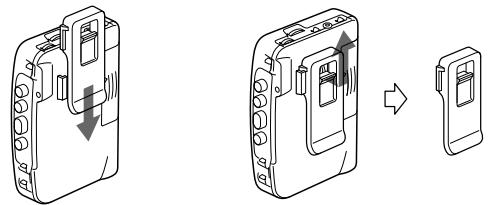
(EIAJ*) To use the belt clip
| Playback | Radio | |
| Sony Alkaline LR6 (SG) | 24 hous | 55 hous |
| Sony R6P (SR) | 7.5 hours | 18 hours |
| Rechargeable battery NC-AA (WM) (Full charge) | 3.5 hours | 12 hours |
*Measured value by the standard of EIAJ (Electric Industries Association of Japan). (Using a Sony HF series cassette tape)
Notes
- The BATT indicator dims when the batteries become weak or exhausted. Replace them with new ones.
- The battery life may shorten depending on the operation of the unit.
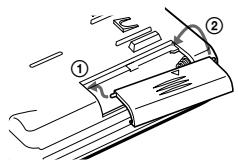
- If the battery compartment lid comes off, attach it as shown.
To use external power (excluding FX177/
FX173/FX171 for U.S.A., Canada and Europe)
- For house current: Connect AC-E30HG AC power adaptor (not supplied) to the DC IN 3V jack. The polarity of the plug is as shown.
- Specifications for AC-E30HG varies for each area. Check your local voltage and the shape of plug before purchasing.
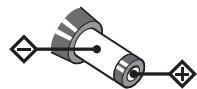
polarity of the plug
When Using Headphones/Earphones
Wear the "L" marked side to the left ear and the "R" marked side to the right ear.
This warranty is valid only in the United States.
SONY
LIMITED WARRANTY
Location of parts and controls
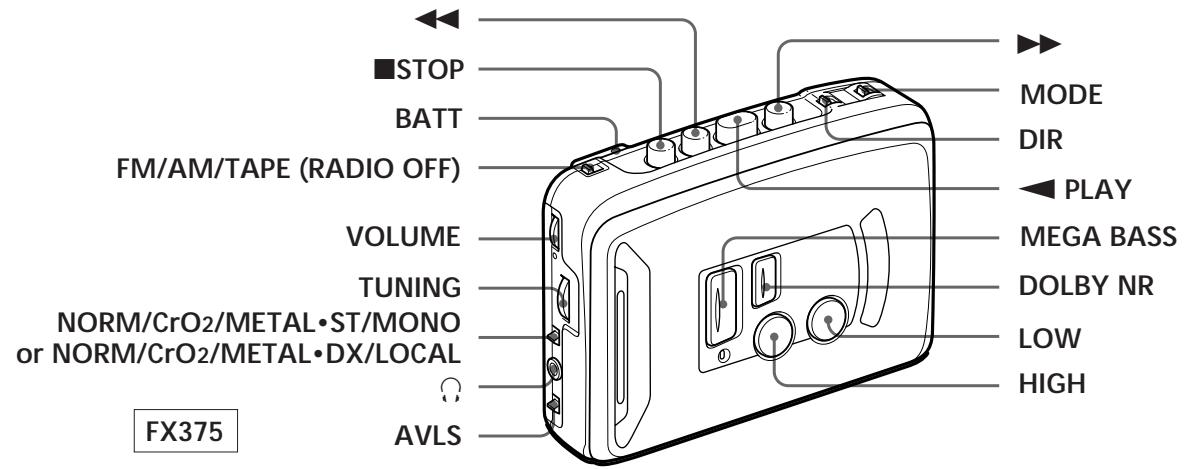
Playing a tape
1 Set FM/AM/TAPE (RADIO OFF) to TAPE (RADIO OFF).
FM AM TAPE (RADIO OFF)
2 Set NORM · CrO _2 /METAL to match the tape type.
NORM CrO2/METAL
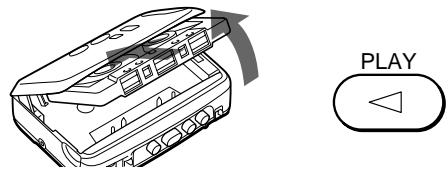
3 Insert a cassette and press PLAY.
| To | Press or Switch |
| Stop playback* | ■ STOP |
| Fast-forward or rewind the tape | ▶or← |
| Cange sides | DIR (FX375/FX373 only) |
| Play both sides once | MODE to (FX375/FX373 only) |
| Play both sides repeatedly | MODE to (FX375/FX373 only) |
- When the tape direction is set to Å mode, the depressed button PLAY is released automatically at the end of the reverse side (Auto shut-off function) (FX375/FX373 only).
To limit the maximum volume automatically
- Set AVLS (Automatic Volume Limiter System) to LIMIT. The maximum volume is kept down to protect your ears, even if you turn the volume up.
- To cancel the AVLS function, set AVLS to NORM.
To emphasize sound
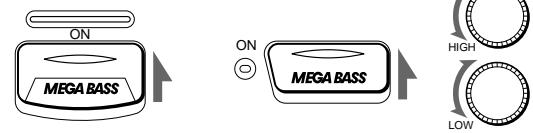
Set the MEGA BASS switch to ON to produce deep and powerful sound.
Turn the HIGH and LOW controls to get the desired tone (FX375/FX373/FX173 only).
FX177/FX171 FX375/FX373/FX173
To play a tape recorded with Dolby*NR system (FX375 only)
Set DOLBY NR to ON.
- Dolby noise reduction manufactured under license from Dolby Laboratories Licensing Corporation. "DOLBY" and the double-D symbol □□ are trademarks of Dolby Laboratories Licensing Corporation.
Notes
- When you set AVLS to LIMIT:
- the MEGA BASS effect is reduced.
- turn down the volume, if the bass-boosted sound becomes distorted or unstable.
- Do not open the cassette holder while the tape is running.
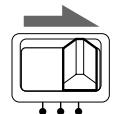
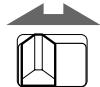
- To select the direction of the tape, set MODE to for both sides repeatedly or for both sides once (from the front side to the reverse side only). If play begins from the reverse side, the tape stops at the end or that side (FX375/FX373 only).
Listening to the radio
1 Set FM/AM/TAPE (RADIO OFF) to AM or FM.
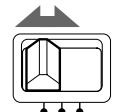
FM AM TAPE (RADIO OFF)
2 Tune to the station you want.
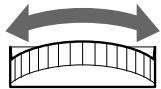
TUNING
To turn off the radio
Set FM/AM/TAPE (RADIO OFF) to TAPE (RADIO OFF).
To improve broadcast reception
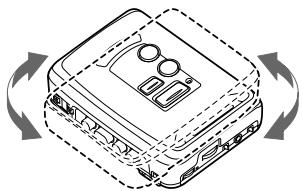
For FM, extend the headphones/earphones cord or adjust ST/MONO or DX/LOCAL. For AM, reorient the unit itself.
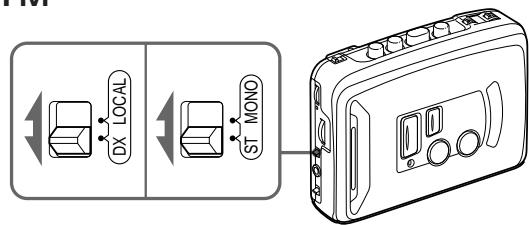
FM
AM
Specifications
Frequency range
FM: 87.6-108 MHz (North, Central and South America)
87.5-108 MHz (Saudi Arabia)
AM: 530-1710 kHz (North, Central and South America)
526.5-1606.5 kHz (Saudi Arabia)
- Power requirements
3V DC batteries R6 (AA) x 2/External DC 3V power sources
Dimensions
FX375/FX373/FX177/FX173: 88.5x118.6x38.2mm (3^1 / 2× 4^3 / 4× 1^9 / _16 inches) (w/h/d) incl. projecting parts and controls
FX171: 88.5 × 118.6 × 37.6 mm ( 3^1 / 2 × 4^3 / 4 × 1^1 / _2 inches) (w/h/d) incl. projecting parts and controls
Mass
FX375/FX373
Approx. 170g (6.0 oz)
Approx. 250g (8.9 oz) incl. batteries and a cassette
FX177:
Approx. 165g (5.9 oz)
Approx. 250g (8.9 oz) incl. batteries and a cassette
FX173:
Approx. 165g (5.9 oz)
Approx. 245g (8.7 oz) incl. batteries and a cassette
FX171:
Approx. 160g (5.7 oz)
Approx. 240g (8.5 oz) incl. batteries and a cassette
- Supplied accessories
Stereo headphones or Stereo earphones (1)/Belt clip (1)
Design and specifications are subject to change without notice.
Troubleshooting
The volume is not turned up.
- AVLS is set to LIMIT.
The sound is unstable or no audio.
-
Insert two R6 (size AA) batteries properly.
-
Replace all batteries if they are weak.
Poor tape playback quality.
Clean the headphones/earphones plug
- Dirty heads. Clean the unit with a cotton swab slightly moistened with cleaning fluid or alcohol.
FX375/FX373
Note
If the broadcast becomes noisy when a cassette with a metallic shell or label is inserted, remove the cassette.