
WM-FX251 - Radio cassette portable SONY - Notice d'utilisation et mode d'emploi gratuit
Retrouvez gratuitement la notice de l'appareil WM-FX251 SONY au format PDF.


| Type de produit | Radio cassette portable |
| Marque | Sony |
| Modèle | WM-FX251 |
| Dimensions (L x H x P) | 115 x 90,5 x 34,4 mm |
| Poids (sans piles et cassette) | Environ 150 g |
| Poids (avec piles et cassette) | Environ 230 g |
| Alimentation | 2 piles AA (R6) 3 V CC ou adaptateur secteur Sony AC-E30HG (non fourni) |
| Autonomie des piles (lecture cassette) | 22 h (LR6), 7 h (R6P) |
| Autonomie des piles (radio) | 33 h (LR6), 13 h (R6P) |
| Types de piles recommandés | Alcaline LR6 ou standard R6P |
| Bandes radio | FM (87,5–108 MHz) et AM (530–1710 kHz / 531–1602 kHz selon zone) |
| Nombre de présélections radio | Jusqu'à 20 stations (5 par bande) |
| Fonctions de lecture cassette | Play, stop, avance rapide, rembobinage |
| Fonction supplémentaire | AVLS (limiteur de volume automatique) |
| Compatibilité cassette | NORM, CrO2, METAL |
| Accessoires fournis | Casque stéréo, étui de transport |
| Type d'écouteurs | Casque stéréo (fourni) |
| Entretien | Chiffon doux légèrement humide (détergent doux) ; éviter alcool, benzine, diluant |
| Précautions d'usage | Ne pas exposer à l'humidité, à la chaleur excessive ; ne pas utiliser en conduisant |
| Sécurité auditive | Régler le volume modérément ; utiliser AVLS pour protéger l'audition |
| Puissance externe | 3 V CC via adaptateur (polarité spécifique) |
| Pays de fabrication | Malaisie |
| Garantie | Garantie limitée Sony |
| Service client | Consulter un revendeur Sony agréé |
| Caractéristique radio | Commutateur DX/LOCAL pour améliorer la réception FM |
FOIRE AUX QUESTIONS - WM-FX251 SONY
Questions des utilisateurs sur WM-FX251 SONY
0 question sur cet appareil. Repondez a celles que vous connaissez ou posez la votre.
Poser une nouvelle question sur cet appareil
Téléchargez la notice de votre Radio cassette portable au format PDF gratuitement ! Retrouvez votre notice WM-FX251 - SONY et reprennez votre appareil électronique en main. Sur cette page sont publiés tous les documents nécessaires à l'utilisation de votre appareil WM-FX251 de la marque SONY.
MODE D'EMPLOI WM-FX251 SONY
Radio Cassette Player
Operating Instructions
WALKMAN
WALKMAN is a registered trademark of Sony Corporation.
WM-FX251
©1997 by Sony Corporation
Printed in Malaysia
OWNER'S RECORD
The model number is located at the front and the serial number is located inside the cassette holder. Record the serial number in the space provided below. Refer to them whenever you call upon your Sony dealer regarding this product.
Model No. WM-FX251
Serial No..
INFORMATION
This equipment has been tested and found to comply with the limits for a Class B digital device, pursuant to Part 15 of the FCC Rules. These limits are designed to provide reasonable protection against harmful interference in a residential installation. This equipment generates, uses, and can radiate radio frequency energy and, if not installed and used in accordance with the instructions, may cause harmful interference to radio communications. However, there is no guarantee that interference will not occur in a particular installation. If this equipment does cause harmful interference to radio or television reception, which can be determined by turning the equipment off and on, the user is encouraged to try to correct the interference by one or more of the following measures:
- Reorient or relocate the receiving antenna.
- Increase the separation between the equipment and receiver.
- Connect the equipment into an outlet on a circuit different from that to which the receiver is connected.
- Consult the dealer or an experienced radio/TV technician for help.
This device complies with Part 15 of the FCC Rules. Operation is subject to the following two conditions: (1) This device may not cause harmful interference, and (2) this device must accept any interference received, including interference that may cause undesired operation.
You are cautioned that any changes or modifications not expressly approved in this manual could void your authority to operate this equipment.
SAFETY NOTES ON THE UNIT
WARNING
- To prevent fire or shock hazard, do not expose the unit to rain or moisture.
- Do not use headphones/earphones while driving, cycling, or operating a motorized vehicle. It may create a traffic hazard and is illegal in some areas. It can also be potentially dangerous to play your headphones/earphones at high volume while walking, especially at pedestrian crossings. You should exercise extreme caution or discontinue use in potentially hazardous situations.
- To prevent shock hazards, never open the unit while it is connected to the power source.
CAUTION
- Do not use headphones/earphones at high volume. Hearing experts advise against continuous, loud and extended play. If you experience a ringing in your ears, reduce volume or discontinue use.
- Keep the volume at a moderate level. This will allow you to hear outside sounds and to be considerate to the people around you.
SAFETY NOTES ON POWER SOURCES
To avoid battery leakage, fire, damage, explosion, etc., follow the descriptions below.
DANGER
- Do not carry dry batteries with coins or other metallic objects. It can generate heat if the positive and negative terminals of the batteries are accidentally contacted by a metallic object.
WARNING
- Use only the Sony AC-E30HG AC power adaptor (not supplied).
- To disconnect the AC power adaptor, only use the plug and not the cable.
- Do not charge a dry battery.
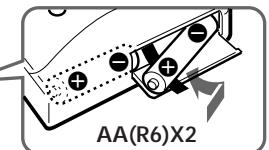
- Check the and on the batteries, and be sure to insert them like the illustration in this manual.
CAUTION
- When you are not going to use your Walkman for a long time, remove the batteries to prevent damage from battery leakage and corrosion.
Precautions
- Do not leave the unit in a location near heat sources, or in a place subject to direct sunlight, excessive dust or sand, moisture, rain, mechanical shock, or in a car with its windows closed.
- Do not wind the headphones/earphones cord around the unit. The buttons may be kept pressed, causing unnecessary battery usage.
- Do not use cassettes longer than 90 minutes except for long continuous playback.
- If the unit has not been used for a long time, set it in the playback mode to warm it up for a few minutes before inserting a cassette.
- For cleaning the case, use a soft cloth slightly moistened with mild detergent solution. Do not use alcohol, benzine or thinner.
If you have any questions or problem concerning your Walkman, please consult your nearest Sony dealer.
Specifications
Frequency range
For U area indication:
FM: 87.5-108MHz (0.1MHz step)
AM: 530-1710kHz (10kHz step)
For E area indication:
FM: 87.5-108MHz (0.05MHz step)
AM: 531-1602kHz (9kHz step)
- Power requirements
3V DC batteries AA (R6) x 2/External DC 3V
power sources
- Dimensions
115 x 90.5 x 34.4 mm (4 1/8 x 3 5/8 x 1 3/8 inches)
(w/h/d) incl. projecting parts and controls
Mass
Approx. 150g (5.3 oz)
Approx. 230g (8.2 oz) incl. batteries and a tape
- Supplied accessories
Stereo headphones (1)/Carrying case (1)
Design and specifications are subject to change without notice.
Troubleshooting
The volume is not turned up.
AVLS is set to LIMIT.
The sound is unstable or no audio.
- Insert two size AA (R6) batteries properly.
- Replace all batteries if they are weak.
The display shows incorrect information
- The display may show incorrect information or the preset stations may not be recalled correctly when you use the unit for the first time, or when you have left the unit without batteries for a long time. In these cases, turn the tape and radio off and then press BAND for about 10 seconds, you will hear a beep sound through the headphones and the memories of all the preset stations will be canceled. Reset these functions again.
Poor tape playback quality.
- Clean the headphones plug.
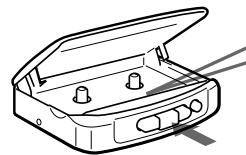
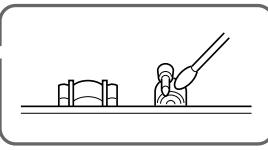
- Dirty heads. Clean them with a cotton swab slightly moistened with cleaning fluid or alcohol.
Preparations
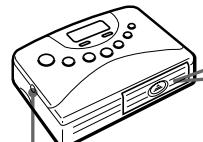
To Insert batteries
DC IN 3V
Battery life (approximate hours)
| Sony alkaline LR6 ( SG ) | Sony R6P ( SR ) | |
| playback | 22 | 7 |
| radio | 33 | 13 |
Notes
- When the batteries become weak, the sound will be unstable or cannot be heard. In such case, replace both batteries.
- When replacing batteries, replace both batteries within 30 minutes; otherwise all the memories will be canceled.
- The battery life may shorten depending on the operation of the unit.
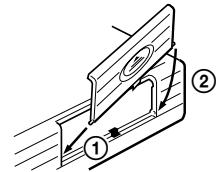
- If the battery compartment lid comes off, attach it as shown.
To use external power
- For house current: Connect AC-E30HG AC power adaptor (not supplied) to the DC IN 3V jack.
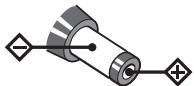
The polarity of the plug
SONY
LIMITED WARRANTY
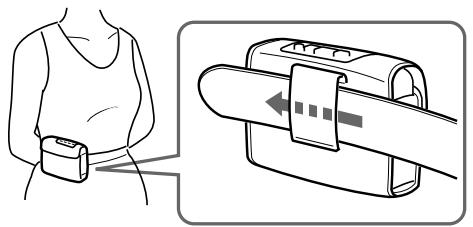
To use the carrying case
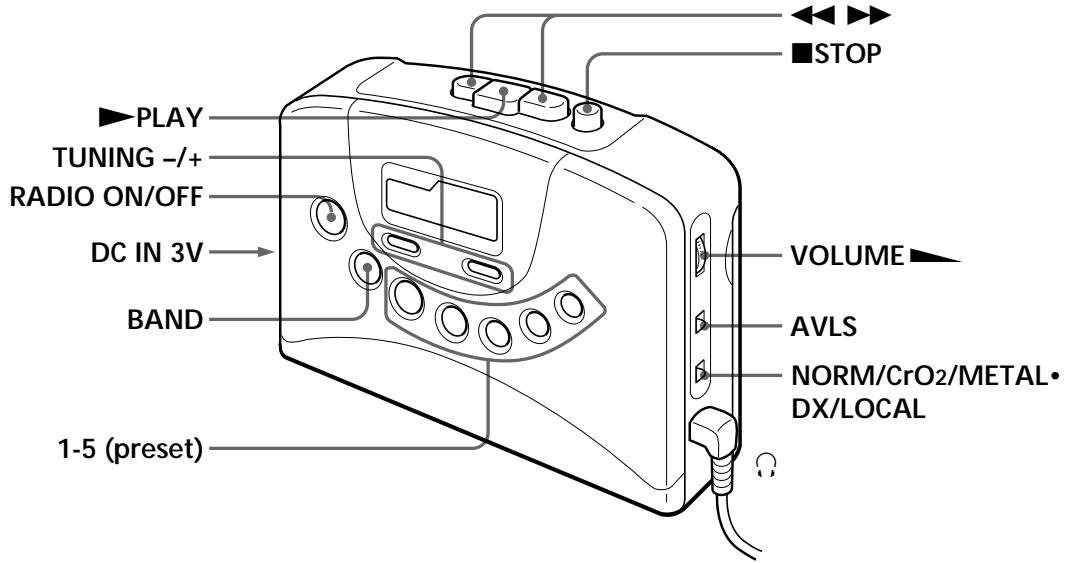
Location of parts and controls
Playing a tape
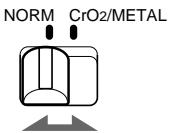
1 Set NORM·CrO2/METAL to match the tape type.
To limit the maximum volume automatically
Set AVLS (Automatic Volume Limiter System) to LIMIT. The maximum volume is kept down to protect your ears, even if you turn the volume up. To cancel the AVLS function, set AVLS to NORM.
Note
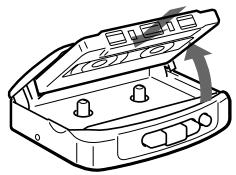
- Do not open the cassette holder while the tape is running.
2 Insert a cassette and press PLAY.
| To | Press |
| Stop playback | ■ |
| Fast-forward or rewind the tape | ► or < (For the side facing forward) |
Listening to the radio
1 Press RADIO ON/OFF.

RADIO ON/OFF
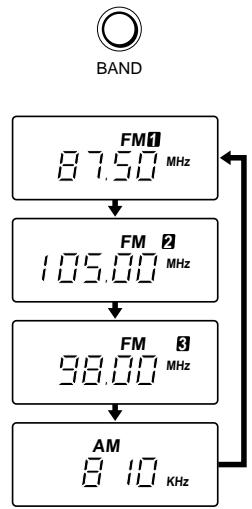
2 Press BAND to select the band (FM1, FM2, FM3 or AM). Each time you press the button, the display changes.
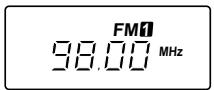
3 Press TUNING - / + to tune the station you want.

TUNING

To turn off the radio
Press RADIO ON/OFF.
To tune the station quickly
Hold down TUNING - / + in step 3. The frequency digits change quickly. When you release the button, the frequency digits change slowly. When the desired frequency digits appear, press TUNING - / + again.
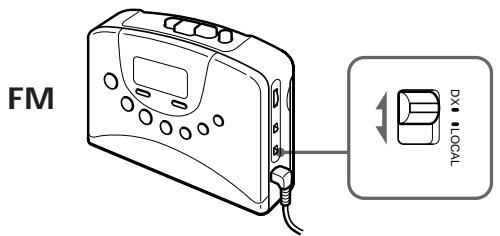
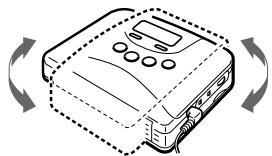
To improve broadcast reception For FM, extend the headphones/earphone adjust the DX/LOCAL.
For AM, reorient the unit itself.
AM
Note
If the broadcast becomes noisy when a cassette with a metallic shell or label is inserted, remove the cassette.
To listen to the radio abroad
The frequency range differs depending on the area. If you listen to the radio in an area of different frequency range, change the area indication in the display.
1 Press BAND for about 10 seconds while the radio is turned on.
2 Press TUNING - or + to change the area indication.
("U": U.S.A., Canada and Central and South America, "E": European and other countries).
3 Press BAND to set the frequency range
Notes
- If you change the frequency range, all the preset stations will be canceled.
- When you want to cancel during a change of the area indication.
Press BAND after pressing TUNING - or +, all the preset stations will be canceled.
To preset radio stations
You can store radio stations into the unit's memory. You can preset up to 20 radio stations, 5 for each FM1, FM2, FM3 or AM bands.
1 Press RADIO ON/OFF.

RADIO ON/OFF
2 Tune in the desired station by using the BAND and TUNING - or +.
3 Press a preset number (1-5) for 2 seconds, the displayed frequency will flash with a beep sound and the station is stored. If a station is already stored, the new station replaces the old one.
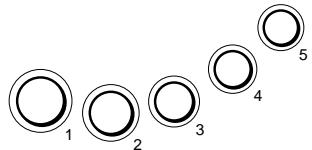
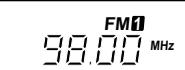
To play the preset radio stations
Press BAND to select the band, and then press the corresponding preset button.