
WM-FX242ST - Radio cassette portable SONY - Notice d'utilisation et mode d'emploi gratuit
Retrouvez gratuitement la notice de l'appareil WM-FX242ST SONY au format PDF.


| Type de produit | Lecteur cassette portable AM/FM |
| Caractéristiques techniques principales | Lecture de cassettes audio, radio AM/FM, fonction enregistrement |
| Alimentation électrique | Fonctionne avec des piles AA ou adaptateur secteur |
| Dimensions approximatives | Environ 10,5 x 3,5 x 25 cm |
| Poids | Environ 1 kg |
| Compatibilités | Compatible avec les cassettes audio standard |
| Type de batterie | Piles AA (6 pièces) |
| Tension | 6 V |
| Puissance | Non spécifié |
| Fonctions principales | Lecture, enregistrement, recherche de stations radio |
| Entretien et nettoyage | Nettoyer les têtes de lecture avec un chiffon doux, éviter l'humidité |
| Pièces détachées et réparabilité | Réparabilité limitée, pièces disponibles selon les distributeurs |
| Sécurité | Ne pas exposer à l'eau, éviter les températures extrêmes |
| Informations générales utiles | Idéal pour les amateurs de cassettes, léger et portable |
FOIRE AUX QUESTIONS - WM-FX242ST SONY
Questions des utilisateurs sur WM-FX242ST SONY
0 question sur cet appareil. Repondez a celles que vous connaissez ou posez la votre.
Poser une nouvelle question sur cet appareil
Téléchargez la notice de votre Radio cassette portable au format PDF gratuitement ! Retrouvez votre notice WM-FX242ST - SONY et reprennez votre appareil électronique en main. Sur cette page sont publiés tous les documents nécessaires à l'utilisation de votre appareil WM-FX242ST de la marque SONY.
MODE D'EMPLOI WM-FX242ST SONY
Radio Cassette Player
Operating instructions
Manual de instrucciones
Manual de instruções

WALKMAN
WM-FX242ST/FX241
Sony Corporation © 2001 Printed in China
http://www.world.sony.com/
WALKMAN is a registered trademark of Sony Corporation.
WALKMAN esmarca registrada de Sony Corporation.
WALKMAN é uma marca comercial registada de Sony Corporation.
This warranty is valid only in the United States.
Esta garantía es valida solamente en los EE. UU
Esta garantiasolevaidaos EstadosUnidos.
SONY
LIMITED WARRANTY
Portable Audio
Sony Electronics Inc. ("Sony") warrants this Product (including any accessories) against defects in material or workmanship as follows:
-
LABOR: For a period of 90 days from the date of purchase, if this Product is determined to be defective, Sony will repair or replace the Product, at its option, at no charge, or pay the labor charges to any Sony authorized service facility. After the Warranty Period, you must pay for all labor charges.
-
PARTS: In addition, Sony will supply, at no charge, new or rebuilt replacements in exchange for defective parts for a period of one (1) year. After 90 days from the date of purchase, labor for removal and installation is available from Sony authorized service facilities or a Sony Service Center at your expense.
To obtain warranty service, you must take the Product, or deliver the Product freight prepaid, in either its original packaging or packaging affording an equal degree of protection, to any authorized Sony service facility.
This warranty does not cover customer instruction, installation, set up adjustments or signal reception problems.
This warranty does not cover cosmetic damage or damage due to acts of God, accident, misuse, abuse, negligence, commercial use, or modification of, or to any part of the Product, including the antenna. This warranty does not cover damage due to improper operation or maintenance, connection to improper voltage supply, or attempted repair by anyone other than a facility authorized by Sony to service the Product. This warranty does not cover Products sold AS IS or WITH ALL FAULTS, or consumables (such as fuses or batteries). This warranty is valid only in the United States.
Proof of purchase in the form of a bill of sale or receipted invoice which is evidence that the unit is within the Warranty period must be presented to obtain warranty service.
This warranty is invalid if the factory applied serial number has been altered or removed from the Product.
REPAIR OR REPLACEMENT AS PROVIDED UNDER THIS WARRANTY IS THE EXCLUSIVE REMEY OF THE CONSUMER, SONY SHALL NOT BE LIABLE FOR ANY INCIDENTAL OR CONSEQUENTIAL DAMAGES FOR BREACH OF ANY EXPRESS OR IMPLIED WARRANTY ON THIS PRODUCT, EXCEPT TO THE EXTENT PROHIBITED BY APPLICABLE LAW, ANY IMPLIED WARRANTY OF MERCHANTABILITY OR FITNESS FOR A PARTICULAR PURPOSE ON THIS PRODUCT IS LIMITED IN DURATION TO THE DURATION OF THIS WARRANTY.
Some states do not allow the exclusion or limitation of incidental or consequential damages, or allow limitations on how long an implied warranty lasts, so the above limitations or exclusions may not apply to you. In addition, if you enter into a service contract with the Sony Partnership within 90 days of the date of sale, the limitation on how long an implied warranty lasts does not apply to you. This warranty gives you specific legal rights, and you may have other rights which vary from state to state.
For your convenience, Sony Electronics Inc. has established telephone numbers for frequently asked questions:
To locate the servicer or dealer nearest you, or for service assistance or resolution of a service problem, or for product information or operation, call:

For an accessory or part not available from your authorized dealer, call:
1-(800)-488-SONY(7669)
English
For customers in the United States Owner's Record
The model number is located at the bottom and the serial number is located inside the cassette holder. Record these numbers in the space provided below. Refer to them whenever you call upon your Sony dealer regarding this product.
Model No.
Serial No.
INFORMATION
This equipment has been tested and found to comply with the limits for a Class B digital device, pursuant to Part 15 of the FCC Rules. These limits are designed to provide reasonable protection against harmful interference in a residential installation. This equipment generates, uses, and can radiate radio frequency energy and, if not installed and used in accordance with the instructions, may cause harmful interference to radio communications. However, there is no guarantee that interference will not occur in a particular installation. If this equipment does cause harmful interference to radio or television reception, which can be determined by turning the equipment off and on, the user is encouraged to try to correct the interference by one or more of the following measures:
- Reorient or relocate the receiving antenna.
- Increase the separation between the equipment and receiver.
- Connect the equipment into an outlet on a circuit
different from that to which the receiver is connected. Consult the dealer or an experienced radio/TV.
Consult the dealer of an expert technician for help.
This device complies with Part 15 of the FCC Rules. Operation is subject to the following two conditions: (1) This device may not cause harmful interference, and (2) this device must accept any interference received, including interference that may cause undesired operation.
You are cautioned that any changes or modifications not expressly approved in this manual could void your authority to operate this equipment.
Precautions
On batteries
- Do not carry dry batteries with coins or other metallic objects. It can generate heat if the positive and negative terminals of the batteries are accidentally contacted by a metallic object.
- When you are not going to use your Walkman for a long time, remove the batteries to prevent damage from battery leakage and corrosion.
On handling
- Do not leave the unit in a location near heat sources, or in a place subject to direct sunlight, excessive dust or sand, moisture, rain, mechanical shock, or in a car with its windows closed.
- Do not use cassettes longer than 90 minutes except for long continuous playback.
- The LCD display may become hard to see or slow down when using the unit at high temperatures (above 40^ / 104^ ) or at low temperatures (below 0^ / 32^ ). At room temperature, the display will return to its normal operating condition.
- If the unit has not been used for a long time, set it in the playback mode to warm it up for a few minutes before you start using again.
On headphones/earphones
Road safety
Do not use headphones/earphones while driving, cycling, or operating any motorized vehicle. It may create a traffic hazard and is illegal in some areas. It can also be potentially dangerous to play your headphones/earphones at high volume while walking, especially at pedestrian crossings. You should exercise extreme caution or discontinue use in potentially hazardous situations.
Preventing hearing damage
Do not use headphones/earphones at high volume. Hearing experts advise against continuous, loud and extended play. If you experience a ringing in your ears, reduce volume or discontinue use.
Caring for others
Keep the volume at a moderate level. This will allow you to hear outside sounds and to be considerate to the people around you.
On maintenance
- To clean the tape head and path, use the cleaning cassette CHK-1W/C-1KW (not supplied) every 10 hours of use. Use only the recommended cleaning cassette.
-
To clean the exterior, use a soft cloth slightly moistened in
water. Do not use alcohol, benzine or thinner. Clearly the above are all correct. -
Clean the headphones/earphones plugs periodically.
Troubleshooting
The volume cannot be turned up
- Set AVLS to NORM.
The display shows incorrect information
- The batteries are weak. Replace the batteries with new ones.
The display and the operation are not normal. Remove the batteries for 30 seconds or more, and then insert them again. If this does not solve the problem, remove the batteries and leave the unit without batteries for 30 minutes or more, and then insert them again. In this case, preset the stations again, since the preset stations are erased from the memory.
Specifications
Frequency range
PM:87.3-106 MHz AM:530-1710 kHz (North, Central and South America) 531-1602 kHz (Other countries)
- Power requirements
3V DC batteries R6 (AA) × 2
Dimensions (w/h/d)
Approx. 31.4 × 119.5 × 35.0 ~mm (3 / 8 × 4 / 7 × 1 / 16 inches) incl. projecting parts and controls
Mass
Approx. 148 g (5.3 oz) (main unit only)
- Supplied accessories
Stereo headphones or Stereo earphones (1) Carrying case with belt clip (1)
Design and specifications are subject to change without notice.
Espanol
Precauidaciones
Pilas
- No lleve las pilas con monedes nithers objetivos metálicos. Si los polospositivo y negativo de las pilas se conectasn accidentalmente, podria generate calor.
- Cuando no vaya aemploi el Walkman durante muito tempo, extraiga las pilas paraogradar el dano que podria causar el electrólico de las mismas.
Manejo
- No deja launidad cerca de fuentesTERMicas, ni en un lugar sometido a la luz solar directa, a polvo excessivo, a arena, a la humedad, a la lluvia, ni a golpes, ni en el interior de un automóvil con las ventanillas cerradas.
- No utilise cassettes de moins de 90 minutes, excepto para
reproduccion larga y continua. - Es possible que el visor de cristal liquido sea dificil de ver, o que la velocidad de visualizacion se reduza, cuando utilise la unidad a temperatas altas (más de 40^ ) o bajas (menos de 0^ ). A la temperatura normal, la visualizacion volvera a las conditiones normales de configuracion.
- Cuando no haya utilisé la unidad durante mucho tiempo,pongala en el modo de reproduccion ycede que se caliente durante algunos,minutos antes de empezar a usar de nuevo.
Sobre los auriculas con casco/ auriculas
Seguidad en la carretera
No utilise los auriculares con casco/auriculares cuando conducza, vaya en bicyclete, o manejerialquier vehiculo motorizzato. Nombreould supponer un peligro para el tráfico, y es ilegal en ciertas zonas. Másión pode resultar potencialmente peligrosso escuchar através de los auriculares a gran volumen¿mrientas camine, especiallyn en pasos cebra.En situaciones potencialmente peligrosas,debár tenermuchocuidadoodefer deutilizarlos auriculares.
Cuidado de sus oídos
Evite utilizar los auriculares con casco/auriculares a gran volumen. Los expertos en oidos desaconsejan la escucha prolongada a gran nivel. Si experimenta un silbido en sus oidos, reduzca el volumen o deje de escuchar a工程技术 de los auriculares
Respeto a los demás
Mantenga el volumen a un nivel moderado. Esto le permitirá escharar los sonidos del exterior y respetar a quienes se encontrar a su alrededor.
Mantenimiento
- Para limpiar elCabazy recorrodo de cinta,utilice el casete de limpieza CHK-1W/C-1KW (no suministrado) cada 10 horas de uso. Utilice uniquamente el casete de limpieza recomendado.
- Para limpiar el exterior, utilise un paño suave ligeramente
humedecido con agua. No utilise alcohol, bencina ni diluyente - Limpie periodicamente los enchufes de los auriculares.
Solución de problemas
El volumen no aumenta.
- Ajuste AVLS en NORM.
El visor muestra informacion incorrecta.
- Las pilas estan debiles. Reemplace las pilas pororas nuevas.
La indicacion y el functionamento no son normales. Extraiga las pilas durante 30 segundos o mayor, a continuacion, insertelas. Si el problema persiste,whelminga extraer las pilas ydea la unidad sin pilas durante 30 instanto ormay, ydesquese insertelas.En ambos casos,puesto que las emisoras memorizadas se han borrado de la memoria,almacenelas de nuevo.
Especificaciones
Gama de Frequencias
FM: 87,5 - 108 MHz
AM: 530 - 1 710 kHz (Norte, Centro y Sudamerica) 531 - 1 602 kHz (Otros páises)
- Alimentación
3 V CC, dos pilas R6 (tamanio AA)
- Dimensiones (an/al/prf)
Aprox. 91,4 x 115,5 x 35,6 mm, incluyendo partes y 控roles calientes.
Sanch
Aprox. 148g (sólo unidad principal)
- Accesorios suministrados
Auriculares con casco o auriculares estereo (1)
Estuche de transporte con clip de cinturon (1)
El Diseño y las specifications están suspectos a cambio sin previo aviso.
Duración de las pilas (Horasapproximadas)
Pilas alcalinas Sony R6P (SR) Sony LR6 (SG)**
Reproducción de cintas 25 7,5 Radiorecepación 40 14
- Valor medido de acuerdo con las normas de EIAJ (Asociación de Industrias Electrónicas de Japón). (Utilizando un casete de la series HF Sony.)
**Cuando se utilizes pilas secas alcalinas LR6 (SG) "STAMINA" Sony (fabricadas en Japón).
Nota
- La duración de la pila pueda ser inferior en función de la condición de uso, la temperature ambiente y el tipo de pila.
Preparativos
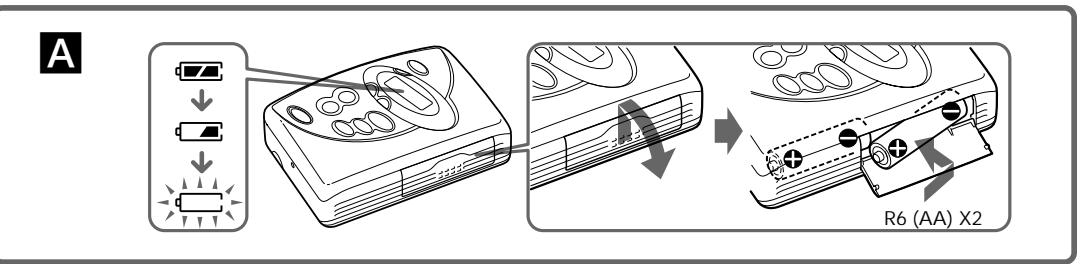
Para insertar pilas A
1 Deslice y abre la tapa del compartmento de las pilas, e inserte dos pilas secas R6 (tamo AA) con la polaridad correcta.
Sustituya las pilas porunas新品cuando "一 " parpadee en el visualizador.
Portugués
Precauções
Pilhas
- Não transporte as pilhas secas juntamente com moedas e outros objectos metalicos. Se os pôlos positivo e negativo das pilhasentrarem acidentalmente emcontacto um com o除外, pode gerar-se calor.
- Se não tencionar utiliser o Walkman durante muito tempo, retire as pilhas para fazer os danos provocados pelo derramamento do liquido das pilhas e correço respectively.
Manuseamento das pilhas
- Não deixe o aparecido perto de fontes de calor, num local exposto à luz solar directa, po excessively, areia,你怎么 mecanicos ou num automóvel com as janelas fechadas.
- Não utilize cassettes com uma duração superior a 90 min, excepto se quiser ouvir música continually durante um tempo.
- Se utilizes o aparelho com temperativas altas (acima de 40^/104^ ) ou baixas (abaixo de 0^ / 32^ ), o visor LCD pode ficar mais lento ou dificil de ver. A uma temperatura ambiente normal, o visor volta às condições deestruturao usuals.
- Se nao tiverutilizado o aparelho durante muito tempo, antes de voltar autilizar-lo, colque-o no modo de reproducao, durante algumas minutos, para que aqueca.
Auscultadores/auriculas
Segança rodoviária
Não utilize auscultadores/auriculas quando conducir, andar de biciclta ou utilizes qualer或其他 voceulo motorizzato. Pode augmentar os accidentes de transito e é probido nalguns locais.
Tambem pode ser potencialmente perigoso ouvir os auscultadores/auriculas com um volume muito alto, quando andar a pé e, sobretudo, nas passagens de peões.
Em situacoes potencialmente perigosas, tenha o maior cuidado ao'utilizar o leitor ou desigues-o.
Evitar lesoes auditivas
Não utilize os auscultadores/auricULEs com o volume muito alto. Os otorrinolaringologists desaconsehlam autilização continua e prolongada de auscultadores com som alto. Se ouvir campainhas, diminua o volume de som ou deslgue o leitor.
Ter consideraçãoços outros
Mantenha o volume a um;nivel moderado. Isto permitir-lhe-à ouvir os sons exteriores e ter consideração pesos que o rodeiam.
Manutenção
- Para limpar as cabças e o caminho da cassette, utilize a cassette de limpeza CHK-1W/C-1KW (não fornecida) depois de cada 10 horas de'utilisation. Utilize apenas a cassette de limpeza recomendada.
- Para limpar o exterior,utilize um pano maco,legreamente humedecido em agua. Não utilize alcopal, benzina ou diluente.
- Limpe as fichas dos auscultadores/auriculas periodicamente.
Resolução de problemas
Não consegueacularo volume.
Regule AVLS para NORM
O visor minha informações Incorrectas.
- As pilhas está fracas. Substitua-as por pilhas novas.
O visor e o funcionaamento não está normals. Retire as pilhas durante 30 segundos ou mais e voltá a las. Se isso não resolver o problema, retire as pilhas e d aparelho sem as mesmas durante 30 minutos ou mais e colocar as pilhas. Neste caso, tem de voltar a programa estações quando estas são apagadas da memória.
\section*{Characteristicas先进技术}
- Intervalo de frequencies
FM: 87,5 - 108 MHz
AM: 530 - 1 710 kHz (Americas do Norte, Central e do Sul) 531. 1 608 kHz (Outros peças)
351 1602 KHZ (Outros paises)
Recuperés de alimentación.
3 V CC, Pilhas R6 (AA) × 2
Dimenções (l/a/p)
Aprox. 91,4× 115,5× 35,6mm incl. pecas salientes e controlos
Peso
Aprox. 148g (apenas aparelho principal)
Acessórios fornecidos
Auscultadores ou auriculares estereo (1)
Caixa de transporte com gancho para
Design e caracteristicas痫icas sujeitos a alteracao sem aviso precedio.
Duração dailha (n.° aproximado de horas)
| Pilhas alcalinas LR6 (SG)** da Sony | R6P (SR) da Sony | |
| Reprodução de cassettes | 25 | 7,5 |
| Recepção de rádio | 40 | 14 |
- Valor镝ido segundo a norma da EIAJ (Electronic Industries Association of Japan) (Utilizando uma cassette Sony da série HF)
**Quando utilizes as pilhas secas alcalinas LR6 (SG) “STAMINA” da Sony (produzidas no Japão).
Nota
- A duração da pilha pode ser mais curta dependendo das condições de funciona, da temperatura ambiente ou do tipo de pilha.
Preparativos
Para introduzir as pilhas A
1 Faça deslizar e abra a tampa do compartmento das pilhas; introduza das pilhas secas R6 (tamanho AA) respeitando a polaridade.
Quando a indentacao " = " ) piscar no visor, substitua as pilhas por pilhas novas.
3
1
B
C
AM
English
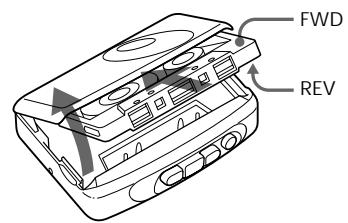
Playing a Tape B
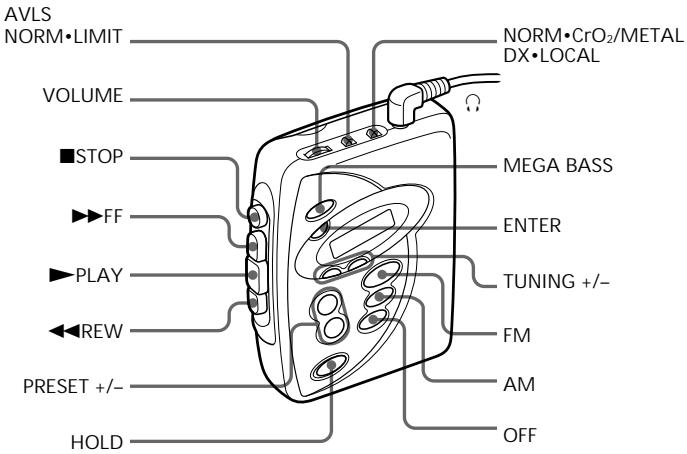
1 Insert a cassette and set NORM· CrO_2/ METAL to match the tape type.
2 Press PLAY.
Adjust the volume with VOLUME.
| To | Press |
Stop playback
STOP
Fast-forward or
FFor REW
*Note on fast-forward and rewind
If you leave the unit after the tape has been wound or rewound, the batteries will be consumed rapidly. Be sure to press STOP.
Note
- Do not open the cassette holder while the tape is running.
Listening to the Radio
1 If the HOLD function is turned on, set the HOLD switch in the opposite direction of the mark to unlock the controls. Make sure that the tape has stopped completely.
2 Press FM or AM to select the desired band and to turn on the radio.
3 Press TUNING + / - to tune in to the desired station.
If you hold down TUNING + / - for a few seconds, the Walkman starts scanning for stations and stops for 3 seconds each time a station is tuned. When the desired frequency digits appear, press TUNING + / - to stop scanning.
To turn off the radio
Press OFF.
To improve broadcast reception
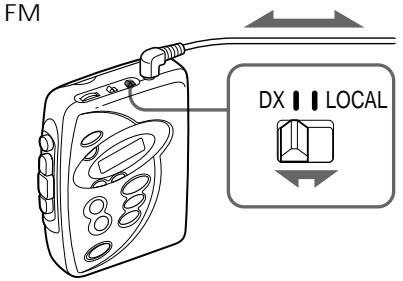
- For FM: Extend the headphones/earphones cord (antenna) or adjust DX·LOCAL.
- For AM: Reorient the unit itself.
Presetting Radio Stations
You can preset up to 40 stations (30 for FM and 10 for AM).
Presetting Automatically Scanned Stations
1 Press FM or AM.
2 Press ENTER for more than 3 seconds. Preset number 1 will flash in the display and the Walkman starts scanning the stations from the lower frequencies and stops for about 3 seconds when a station is received.
3 If you wish to preset the received station, press ENTER while the preset number is flashing.
The received station is preset on preset number 1 and the unit starts scanning for the next receivable station.
4 Repeat Step 3 until all receivable stations are preset.
To stop scanning
Press OFF. The radio is turned off at the same time.
Note
- If stations are already stored, the newly preset stations replace the old ones when the above procedure is completed.
Presetting Stations Manually
1 Press FM or AM.
2 Press ENTER.
The frequency digits and a preset number flash in the display.
3 While the frequency digits and the preset number are flashing, tune in a station you wish to store using TUNING + / - , and select a preset number using PRESET + / -
4 While the frequency digits and the preset number are flashing, press ENTER.
Notes
- If you cannot complete step 3 or 4 while the
indications are flashing, repeat from step 2. If a station is already stored, the new station replaces the old one.
To cancel the stored station
Follow the procedure above and in step 3, press and
hold TUNING + / - until “- - - - ” is displayed and, at the end of the program, it is
select the preset number you want to cancel using PRESET + / - . Press ENTER while - - - - - is flashing.
Playing the preset radio stations
1 Press FM or AM.
2 Press PRESET + / -
Using Other Functions
Locking the controls
Set the HOLD switch in the direction of the mark
to lock the controls. The hold function only looks like the radio operation
The hold function only locks the radio operation buttons and MEGA BASS.
Emphasizing bass sound
Press MEGA BASS
"MEGA BASS" appears in the display.
Notes
- If the sound is distorted when MEGA BASS is
activated, turn down the volume or select normal
Bass emphasis may not show great effect if the volume is turned up too high.
Protecting your hearing — AVLS
(Automatic Volume Limiter System)
Set AVLS to LIMIT. The maximum volume is kept to down to protect your ears.
Espanol
Reproducción de una cinta B
1 Inserte un cassette y ajuste NORM · CrO2/METAL segun el tipo de cinta.
2 Pulse PLAY
Ajuste el volumen con VOLUME.
| Para | Pulse |
Parar la reproduccion STOP
Hacer que la cinta avance FF o REW
rápidamente o rebobinar
la cinta
*Nota sobre el avance rápido y el rebobinado Sidra le unidad accidura una var y hobinado a.
S de la和个人idad activada una vez bobinada o rebobinada a cinta, las pilas se consumirán
rapidamente. Asegürese de pulsar STOP.
Nota
- No abra el portacassettes cuando la cinta se
encuentra en funciona.
Para escuchar la radio
1 Si la funciona HOLD está activada, ajuste el interruptor HOLD en la direction contraria a lamarca para desbloquear los 控ules. Asegürese de que la cinta está parada completeness.
2 Pulse FM o AM para selectionar la banda que deseey para activar la radio.
3 Pulse TUNING + / - para sintonizar la emisora deseada.
Si mantiene TUNING + / - pulsado durante unos segundos, el Walkman comenza a explorar emisoras y se detendra durante 3segundos cada vez que sintonice una emisora. Cuando aparezcan los digitos de la Frequencia que deseee, pulse TUNING + / - para detener la exploracion.
Para desconectar la radio
Pulse OFF
auriculares, o ajuste DX-LOCAL. El visor m
Para melhorar la recepción de la emisión C
- Para FM: Extienda el cable (antena) de los
- Para AM: Oriente la propiaiedad.
Memoración de emisoras de radio
Puede memorizar hasta 40 emisoras (30 para FM y 10 para AM).
Memorización de las emisoras exploradas automatistically
1 Pulse FM o AM
2 Pulse ENTER durante más de 3segundos. El número de memorización 1 parpadeará en el visor y el Walkman comenza a explorar las emisoras desdelasfrecuencias másbajas,parandounos3segundalsRecibirunaemisora.
3 Si desea memorizar la emisora recibida, pulse ENTER cuando parpadae el número de memorización.
La emisora recibida se memorizará con el número de memorización 1 y launidad comenzará aUGCAR la?sigaive emisora.
4 Repita el paso 3 hasta que se memoricen todas las emisoras que pueda recibirse.
Para detener la exploración
Pulse OFF. La radio se desactivar al mesmo tiempo.
Nota
- Si ya hay emisoras almacenadas, las emisoras recién memorizadas sustituirán a las anteriores al realizar el procedimiento anterior.
Memoración manual de emisoras
1 Pulse FM o AM.
2 Pulse ENTER
Parpadearán en el visor los digitos de Frequencia y un número de memorización.
3 Mientras parpadean los digitos de fecuencia y el número de memorizacion, sintonice una emisora que deseee almacenar con TUNING + / - y seleccione un numero de memorizacion con PRESET + / -
4 Mientras parpadean los digitos de fecuencia y el número de memorización, pulse ENTER.
Notas
- Si no pueda completar los pasos 3 o 4 cuando lasindicaciones estén parpadeando, repita la operationdeselayo2.
- Si la emisora ya está almacenada, la nuevo
reemplazará a la antigua.
Para cancelar una emisióna memorizada Realice el procedimiento anterior y en el paso 3, mantenga presionado TUNING + / - hasta que se visualice - - - - ^ " y seleccione un numero de memorizacion que deseee cancelar con PRESET + / - Pulse ENTER cuando espeado parpadeando - - - - ^ " .
Sintonización de emisoras
memorizadas
1 Pulse FM o AM.
2 Pulse PRESET + / -
Utilización de otherasfunciones
Bloqueo de los controlles
Para bloquear los controles, ajuste el interruptor HOLD en la direccion de lamarca
La funciona HOLD sólo bloquea los botones deempleo de la radio y MEGA BASS.
Acentuarción del sonido de graves
Pulse MEGA BASS.
El visormostatá“MEGA BASS”
Notas
- Si el sonido se distorsiona con MEGA BASS activado, disminuya el volumen de la unidad principal o seleccione el modo normal.
- La asignación de los gravesSEO no hayos.
- La asignación de los gravesSEO no hayos.
- La asignación de los gravesSEO no hayos.
- La asignación de los gravesSEO no hayos.
- La asignación de los gravesSEO no hayos.
- La asignación de los gravesSEO no hayos.
- La asignación de los gravesSEO no hayos.
- La asignación de los gravesSEO no hayos.
- El fragmento del fragmento no se ha sido detectado.
Protección de sus oídos — AVLS (Sistema de limitación automatística del volumen)
Ajuste AVLS en LIMIT. El volumen máximo se技术支持á un niveau determinado con el fin de proteger sus oídos.
Portugues
Ouvir uma cassete B
1 Introduza una cassete e regule NORM · CrO2/METAL para o tipo de cassette adequado.
2 Carregue em PLAY.
Regule o volume com VOLUME.
| Para | Carreque en |
Parar a reproducao
Eazer o avanco rápido ou
REBOBINAR a cassette?
*Nota sobre o avanco rápido e a rebobinagem Se deixar o aparelho ligado antes de ter feito o avanco rápido ou a rebobinagem, as pilhas gastam-se rapidamente. Para que isso não aconteça corregue em STOP.
Nota
- Se estiver a ouvir uma cassette não abra o
compartmento respectivo.
Ouvir rádio
1 Se a funcao HOLD estiver activada, empurre o selector HOLD na direccao oposta a da marca , para desbloquear os controlos.
Verifique se a cassete está Completely parada.
2 Carregue em FM ou AM para seleccionar a banda desejada e para ligar o rádio.
3 Carregue em TUNING + / - para sintonizar a estação desejada.
Se carregar sem soltar TUNING + / - durante algunos segundos, o Walkman começa a varrer as estações e para durante 3segundos sempre que sintonizar uma estação. quando aparecerem os digitos da frequência desejada, corregue em TUNING + / - paraRAR o varramento.
Para desligar o rádio
Carregue em OFF.
Para obter uma melhorreichao
- Para FM: Estique o cabo dos auscultadores.
auriculares (antenna) ou regule DX · LOCAL. - Para AM: Reoriente o propre间隙.
Memorizar estações de radio
Pode memorizar um maior de 40 estanções (30 para FM e 10 para AM).
Memorizar as estações sintonizadas automaticamente
1 Carregue em FM ou AM.
2 Carregue em ENTER durante mais de 3 segundos.
O número de的记忆 1 aparece a piscar no visor e o Walkman começa a percorrer as estações a partir das frequências mais baixas e para duranteperia de 3segundos quando sintonizaruma estação.
3 Se quiser memorizar a这种方式, corregue em ENTER quando o número de memória estiver a piscar.
A estação sintonizada fica memorizada no número 1 e o aparecido começa a procurar aproxima estação sintonizável.
4 Repita o passo 3 até terminar a memorização de todas as estações sintonizáveis.
Para interromper o varrimento
Carregue em OFF. O rádio deslga-se
simultanamente.
Nota
- Se ja existirem theseos memorizadas, quando terminar as operacoes acima, as novas theseos substituem as anteriores.
Memorizar estasõesmanualmente
1 Carregue em FM ou AM
2 Carregue em ENTER.
Os digitos da frequência e um número de memória piscam no visor.
3 Com os digitos da frequência e o número de memória a piscar, sintonize a entrega que quer memorizar utilizes TUNING + / - e seleciona um número de memória com PRESET + / - .
4 Com os digitos da frequência e o número de memória a piscar, corregue em ENTER.
Notas
- Se não consiguiar completeness 3 ou 4 quando as indicações estiverem a piscar, repita a partir do passo 2.
- Se ja existir uma estação memorizada, a nova estação substiui a antiga.
Para cancelar a estação memorizada Siga o procedimento descripto acima e no passo 3, carregue sem soltar TUNING + / - até aparecer a indicação - - - - e selecione o número programado que quer cancelar utilizesando PRESET + / - .Carregue em ENTER quando a indicação - - - - estiver a piscar.
Ouvir as estações memorizadas
1 Carregue em FM ou AM.
2 Carregue em PRESET + / -
Utilizar as outras funções
Bloqueio dos comandos
Empurre o selector HOLD na direcção da marca para bloquear os controlos.
A funcão HOLDsolebloqueia os botões de
função do rado e da função MEGA BASS.
Intensificar os sons graves
Carregue em MEGA BASS.
"MEGA BASS" aparece no visor.
Notas
- Se o som sair distorcido quando activar MEGA BASS,
diminua o volume ou selezione o modo normal. - A intensificacao dos graves pode nao ter grande efeito se o volume estiver demasido alto.
Proteger os ouvidos — AVLS
(Sistema automatico de limitação de volume)
Regule AVLS para LIMIT. Como que aprimeve o volume para o maior para protecao dos ouvidos.