
SAVVY - Téléphone mobile PHILIPS - Notice d'utilisation et mode d'emploi gratuit
Retrouvez gratuitement la notice de l'appareil SAVVY PHILIPS au format PDF.



| Type de produit | Téléphone mobile |
| Marque | Philips |
| Modèle | SAVVY |
| Alimentation | Batterie rechargeable NiMH, chargeur secteur inclus |
| Autonomie en communication | Jusqu'à 4 heures |
| Autonomie en veille | Jusqu'à 5 jours (120 heures) |
| Fonctions principales | Appels, messagerie texte et image, répondeur Orange, répertoire (100 noms), 20 sonneries, vibreur, horoscope, calculatrice, chronomètre, numérotation vocale (10 voix), composition rapide (8 touches), conférence, double appel |
| Écran | Affichage graphique avec icônes, rétroéclairage |
| Clavier | Numérique avec lettres, touches de navigation compas |
| Connectivité | Réseau GSM 900/1800 (Orange), pas de Bluetooth, pas d'infrarouge |
| SIM | Carte SIM standard (1,8V/3V) |
| Entretien et nettoyage | Nettoyer avec un chiffon doux légèrement humide (eau savonneuse). Ne pas utiliser de produits chimiques abrasifs. |
| Sécurité | Code PIN (modifiable), code PIN2, code PUK, verrouillage du clavier, limitation d'appels fixes |
| Pièces détachées et réparabilité | Garantie fabricant 1 an (Philips), extension possible via Orange Care. Batterie et chargeur remplaçables. Assistance Orange. |
| Informations générales | Notice d'utilisation gratuite au format PDF. Manuels multilingues disponibles. |
FOIRE AUX QUESTIONS - SAVVY PHILIPS
Questions des utilisateurs sur SAVVY PHILIPS
0 question sur cet appareil. Repondez a celles que vous connaissez ou posez la votre.
Poser une nouvelle question sur cet appareil
Téléchargez la notice de votre Téléphone mobile au format PDF gratuitement ! Retrouvez votre notice SAVVY - PHILIPS et reprennez votre appareil électronique en main. Sur cette page sont publiés tous les documents nécessaires à l'utilisation de votre appareil SAVVY de la marque PHILIPS.
MODE D'EMPLOI SAVVY PHILIPS
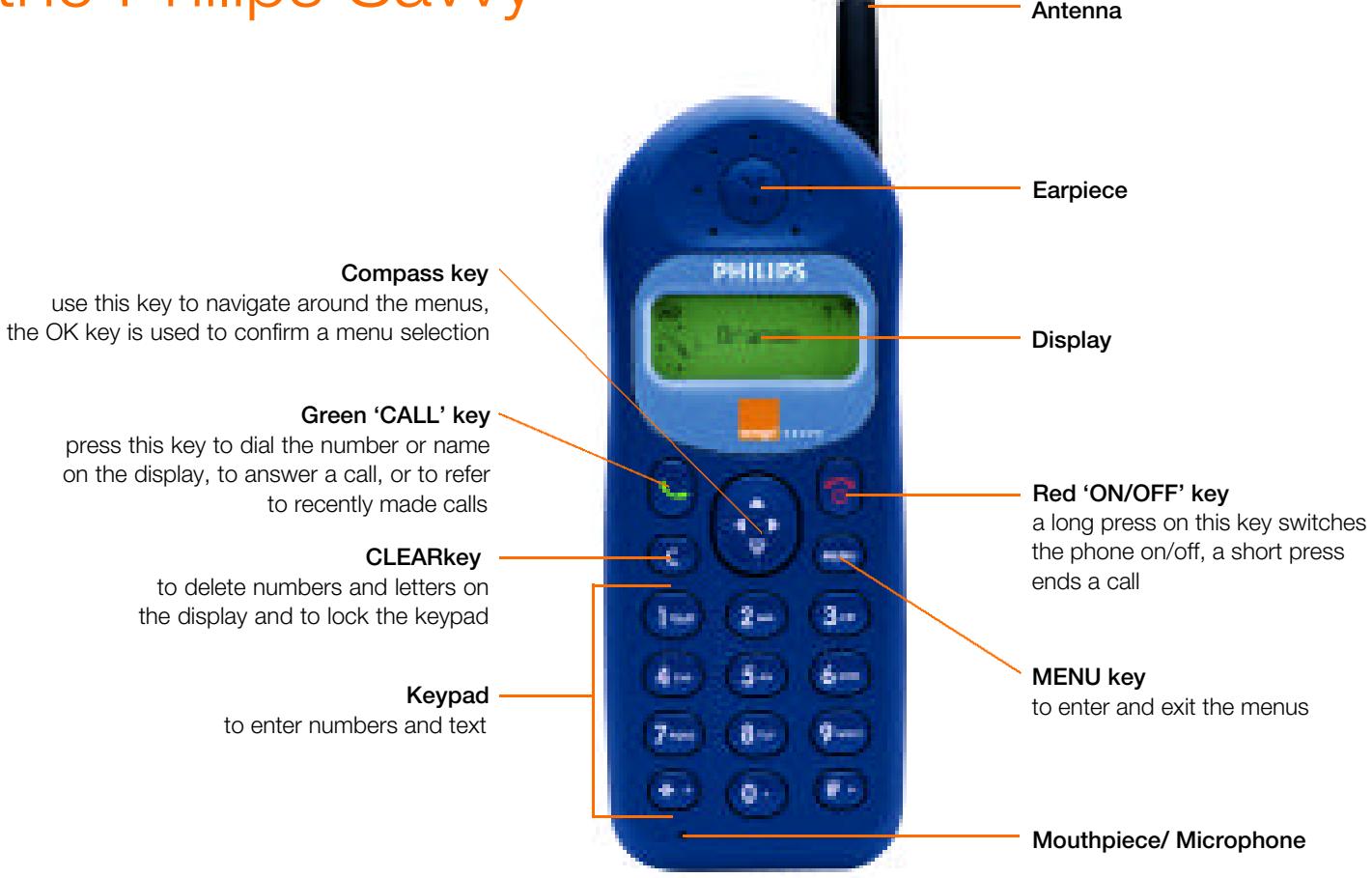
le Philips Savvy
bienvenue
Félicitations pour l'achat de votre nouveau téléphone... et bienvenue chez Orange.
Quel que soit le forfait que vous avez choisi, toutes les informations dont vous avez besoin sont ici.
De votre premier appel à l'envoi de messages texte, avec Orange c'est facile.
Avant de passer votre premier appel, prenez quelques minutes pour lire la section 1, qui vous dira tout ce que vous devez savoir pour commencer.
l'avenir est radieux, l'avenir est Orange

le Philips Savvy
- choix de 25 messages image à envoyer à d'autres utilisateurs de Savvy
- nouveau jeu de biorythme et horoscope pour s'amuser à tout moment, n'importe où, choisissez parmi 20 sonneries, l'alerte par vibration vous permet d'être contacté discrètement
- messages texte préprogrammés pour vous faire gagner du temps
le Philips Savvy. Que demander de plus ?
à l'intérieur
1 avant de commencer
Insérez votre carte SIM, installez la batterie et chargez le téléphone. Enregistrez-vous auprès d'Orange.
2 Pour commencer
L'écran du téléphone, passer et recevoir des appels, comprendre les menus, explorer le plan des menus, enregistrer un nom et un numéro, utiliser votre répondeur, la numérotation vocale, autres fonctions essentielles.
3 Plus de fonctions
Configurer les codes de sécurité, numérotation abrégée, envoyer et lire des messages texte ou image, utiliser votre répertoire, options en cours d'appel, personnaliser votre téléphone, organiser vos appels, noms fixes, plus de fonctions.
4 Services supplémentaires Orange
Every Phone, Messenger, Assistant, Answer Fax, appels à l'étranger depuis le Royaume-Uni, accessoires, services d'information.
5 Utiliser votre téléphone à l'étranger
Activation de l'itinérance, liste de contrôle avant de voyager, sélection du réseau, paiement de vos appels et messages texte.
6 Référence
Sécurité, documents, Care - assurance et garantie du téléphone, conditions de Care, conditions de Just Talk, conditions d'Orange.
7 Dépannage et index
Remarque : certaines de ces fonctions et services peuvent ne pas être disponibles avec votre forfait. Veuillez vous référer à la section correspondante. Pour plus de détails sur la gamme de services Orange disponibles, veuillez appeler la ligne de demande de documentation Orange et demander une copie du guide des prix. Vous pouvez également consulter le site Web d'Orange à l'adresse www.orange.co.uk.
Avant de commencer
Avant de commencer
- Insérez votre carte SIM - installez et chargez la batterie du téléphone - enregistrez-vous auprès d'Orange

1.1 Insérez votre carte SIM
Votre carte SIM est une puce informatique contenant des informations sur votre téléphone et votre abonnement Orange. Vous devez l'installer avant que votre téléphone ne fonctionne.
À propos de la carte SIM
La carte SIM conserve vos numéros de téléphone dans sa mémoire. Votre téléphone ne fonctionnera pas sans elle et si vous n'en avez pas reçu lors de l'achat de votre téléphone, contactez votre revendeur ou appelez le service client Orange.
Notez le numéro de la carte SIM
Vous verrez un très petit numéro inscrit sur la carte SIM, à côté des contacts dorés. Notez ce numéro dans l'encadré de la page 1.3. Les 6 premiers chiffres sont déjà remplis. Ces numéros seront nécessaires lorsque vous appellerez Orange pour vous enregistrer.
Retirez la carte SIM de son support
La carte SIM est le petit rectangle de plastique avec les contacts dorés et le coin coupé.
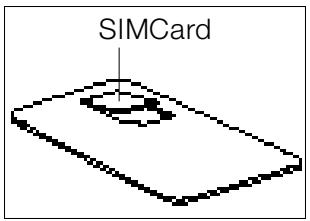
Retirez-la de son support en la poussant délicatement. Les contacts de la carte SIM sont facilement endommageables ; manipulez-la avec précaution et évitez de toucher les contacts dorés.
Insertion de la carte SIM
La carte SIM s'insère dans la fente indiquée. Un schéma sur le téléphone montre dans quel sens elle doit être insérée. Le coin coupé s'insère en dernier, comme illustré ci-dessous. Les contacts dorés sont orientés vers le bas.

Installez et chargez la batterie du téléphone
Avant de commencer
Pour commencer à profiter de la liberté qu'un téléphone Orange peut vous apporter, vous devez installer et charger la batterie.
installation de la batterie
- Placez la batterie avec les bornes + et - vers le haut, en face des bornes + et - du téléphone. 2 Faites glisser la batterie sur les points de contact et appuyez dessus jusqu'à ce qu'elle s'enclenche.

installation du cache de la batterie
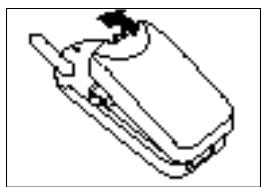
Faites glisser le cache de la batterie en commençant par le bas. Appuyez sur l'extrémité du loquet jusqu'à ce qu'il s'enclenche.
chargement de la batterie
La première charge doit durer au moins 10 heures pour obtenir des performances optimales. Une batterie n'atteint sa capacité maximale qu'après avoir été chargée et déchargée (pendant que vous utilisez votre téléphone), 2 ou 3 fois. Vous pouvez passer des appels pendant le chargement de votre téléphone, à condition d'avoir enregistré votre téléphone (voir la page suivante).
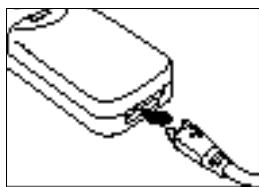
1 Branchez votre chargeur sur une prise secteur. 2 Insérez l'autre extrémité du câble dans la base de votre
téléphone. L'indicateur de batterie en haut à gauche de l'écran affichera jusqu'à 4 barres pendant le chargement. La première fois que vous branchez le chargeur et que vous allumez le téléphone, l'indicateur de batterie peut mettre quelques secondes à s'afficher.
Les batteries rechargeables ont une durée de vie limitée et Orange recommande d'en acheter une nouvelle chaque année. Appelez la ligne Orange Accessory au 0500 178 178 pour connaître les prix à jour ou pour commander des accessoires pour votre téléphone.
■ retrait de la batterie
1 Appuyez sur le loquet à l'arrière du téléphone et soulevez le cache de la batterie. 2 Soulevez le bas de la batterie et retirez-la du téléphone.
Remarque : Si vous devez retirer votre carte SIM ou la batterie, éteignez toujours votre téléphone d'abord.
1.3 enregistrement auprès d'Orange
Si votre téléphone n'a pas été enregistré auprès d'Orange lors de l'achat, suivez les instructions de votre forfait ci-dessous. Allumez votre téléphone avant de commencer.
Lorsque vous demandez à être enregistré sur notre réseau, vous et Orange acceptez d'être liés par les conditions générales d'Orange décrites dans ce guide de l'utilisateur. Veuillez prendre le temps de les lire et de les considérer avant de vous enregistrer.
Lors de votre premier appel aux Services Clients Orange, il vous sera demandé de « créer » un mot de passe et un code de référence à 4 chiffres qui vous sont personnels. On vous les demandera à chaque appel. Ayez également votre adresse, votre carte SIM et vos numéros IMEI/série lorsque vous appelez pour enregistrer votre téléphone Orange. Ces numéros se trouvent sur l'extérieur de votre boîte.
Numéro de carte SIM
| 8 | 9 | 4 | 4 | 1 | 2 |
Numéro IMEI / numéro de série
Clients Just Talk
Appelez le 0800 0790006 depuis un autre téléphone pour créditer votre téléphone Orange de temps de parole gratuit.
■ Clients Talk Plan, Boxed & Ready, Everyday 50
Appelez les Services Clients Orange au 150 depuis votre téléphone Orange ou au 07973 100150 depuis tout autre téléphone avant de passer tout autre appel. Cela ne s'applique que si votre téléphone n'a pas été enregistré au moment de l'achat.
votre numéro de téléphone Orange

Ce numéro vous est donné soit lors de l'achat de votre téléphone, soit lors de votre appel pour vous enregistrer.
Mise à jour SIM
Un symbole d'enveloppe sur l'écran du téléphone vous alertera de la réception d'un message texte. Ce message est une mise à jour SIM et indique que vous êtes maintenant enregistré. Lisez-le simplement, puis supprimez-le, et éteignez puis rallumez votre téléphone (voir « lire un message texte » dans la section 3 pour plus de détails). Votre téléphone est maintenant prêt à être utilisé.
pour commencer
pour commencer
- l'écran du téléphone - passer et recevoir des appels - comprendre les menus - explorer le plan des menus
- enregistrer un nom et un numéro - utiliser votre répondeur - numérotation vocale - autres essentiels

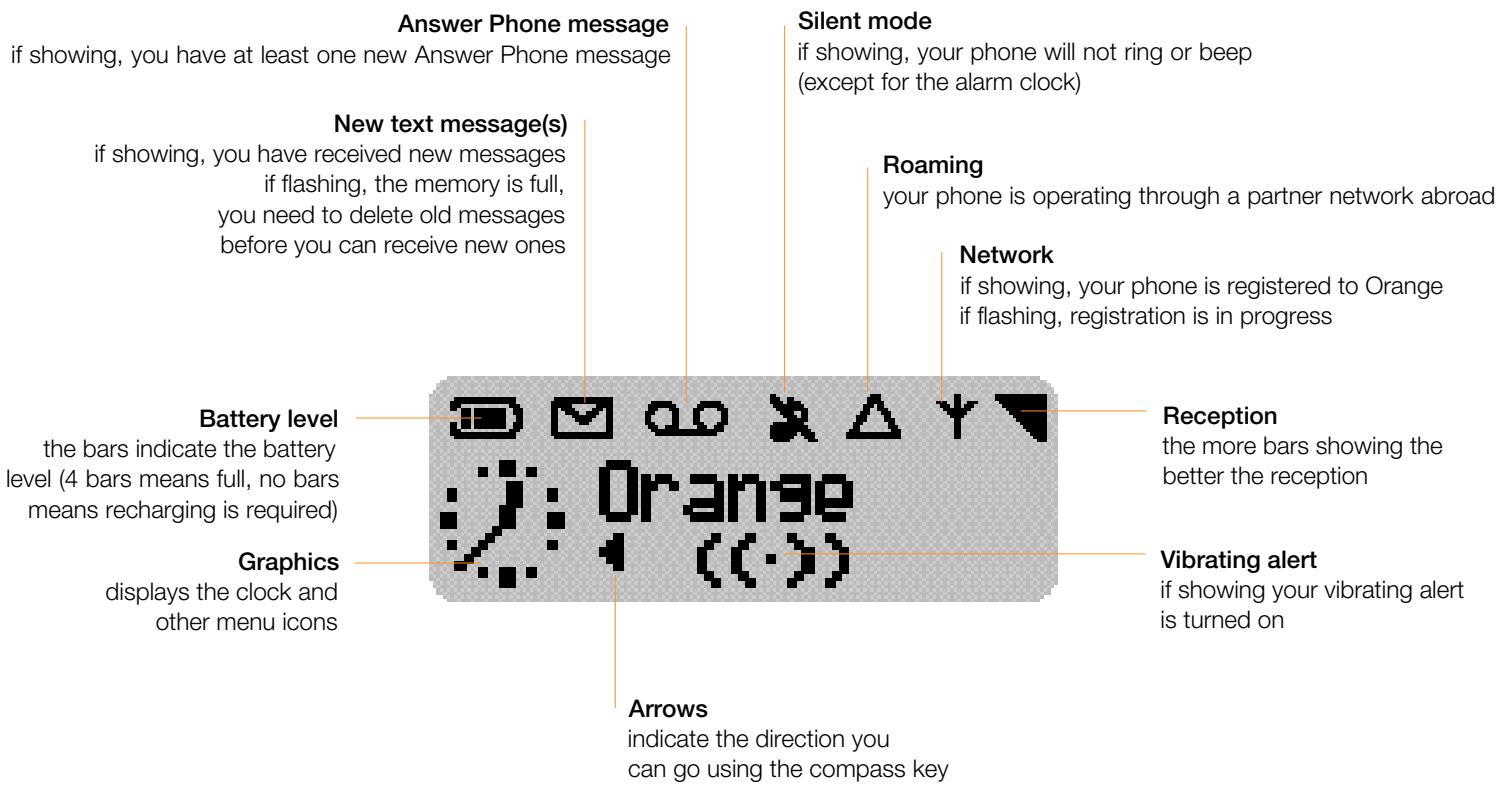
l'écran du téléphone
Informations sur l'écran du téléphone en un coup d'œil
passer et recevoir des appels
pour commencer
Une fois que vous vous êtes enregistré auprès d'Orange, vous êtes prêt à passer et recevoir des appels et à profiter des avantages d'Orange. Vous pouvez commencer à utiliser votre nouveau téléphone pendant qu'il est encore en charge.
allumer
1 Allumez votre téléphone en appuyant sur la touche 'ON/OFF' pendant 3 secondes. L'écran s'allume et vous demande de régler l'horloge (voir ci-dessous), puis affiche 'Bienvenue chez Orange', puis 'Enregistrement', puis 'Orange'.
régler l'horloge
Si vous utilisez votre téléphone pour la première fois ou si la batterie a été retirée, vous verrez '00:00'.
1 Utilisez les touches pour entrer l'heure, en n'oubliant pas de saisir les chiffres selon un format 24 heures. 2 Appuyez sur la touche 'C' pour effacer un chiffre si vous faites une erreur. L'horloge affichera l'heure que vous avez réglée. L'écran affichera 'Régler'. 3 Appuyez sur 'OK' et vous êtes maintenant prêt à passer votre premier appel.
passer un appel
1 Composez le numéro souhaité, en utilisant toujours l'indicatif complet, même si le numéro est dans votre zone. 2 Appuyez sur la touche 'C' pour effacer un chiffre. 3 Appuyez sur la touche 'APPEL' pour appeler le numéro.

Vous verrez le mot 'Appel' et le numéro que vous avez composé. Écoutez la tonalité d'appel habituelle dans l'écouteur.
terminer un appel
Maintenez enfoncée la touche 'ON/OFF'.
répondre à un appel
Lorsque votre téléphone sonne, appuyez sur la touche 'APPEL'.
occuper un appel
Si pour une raison quelconque vous ne pouvez pas prendre un appel, vous pouvez appuyer sur la touche 'MARCHE/ARRÊT'. Votre appel sera transféré vers votre répondeur Orange (voir page 2.7 pour savoir comment récupérer le message).
augmenter/diminuer le volume de l'écouteur
1 Pendant un appel, appuyez sur la flèche supérieure de la touche 'compass'. Le volume augmentera. 2 Pour diminuer le volume, appuyez sur la flèche inférieure 'OK' de la touche 'compass' pendant que vous êtes en communication.


2.3
Identification de l'appelant
Lorsque votre téléphone sonne, le numéro de votre correspondant s'affiche - s'il est disponible sur son réseau. S'il est enregistré dans votre répertoire, son nom s'affiche à la place. De même, votre numéro de téléphone sera envoyé par le réseau aux personnes que vous appelez.
Si vous ne souhaitez pas que votre numéro soit affiché, composez 141 avant chaque numéro que vous appelez. Pour que votre numéro soit masqué en permanence et pour empêcher la réception de l'identification des appels d'autres personnes, écrivez au service client Orange.
comprendre les menus
pour commencer
Découvrez comment accéder à la plupart des fonctions de votre téléphone et choisir en même temps votre propre sonnerie individuelle.
explorer le niveau supérieur des menus
Vous pouvez accéder aux fonctions du téléphone en parcourant et en choisissant des éléments dans les menus. Pour tirer le meilleur parti de votre Savvy, vous devez vous familiariser avec les menus. Voici un guide rapide qui vous montre également comment sélectionner votre sonnerie individuelle.
1 Appuyez pour accéder au premier ensemble de menus (le niveau supérieur). Vous entrerez dans la carte des menus environ à mi-chemin, à .
■Maaes> <Sécurité
Les éléments du menu de niveau supérieur sont tous liés au deuxième niveau de menu.
2 La touche illustrée à droite est la touche « compas ». Elle vous aide à naviguer dans les menus.

3 Appuyez sur la touche « compas » pour vous déplacer vers la gauche le long du menu de niveau supérieur jusqu'à . 4 Appuyez deux fois sur la touche « compas » pour vous déplacer vers la droite le long du menu de niveau supérieur jusqu'à . 5 Explorez le niveau supérieur des menus. Si vous dépassez une extrémité, vous revenez à l'autre extrémité, car c'est un circuit. 6 Quittez les menus en appuyant une fois.
- explorer les deuxième et troisième niveaux de menus
1 Appuyez pour entrer dans les menus. 2 Appuyez trois fois sur la touche « compas » pour vous déplacer vers la droite le long du menu jusqu'à . 3 Appuyez sur la touche « compas » pour descendre d'un niveau de menu jusqu'à ( et ne s'afficheront pas si le téléphone est en mode silencieux ou vibreur). Reportez-vous au schéma ci-dessous pour voir où vous allez.
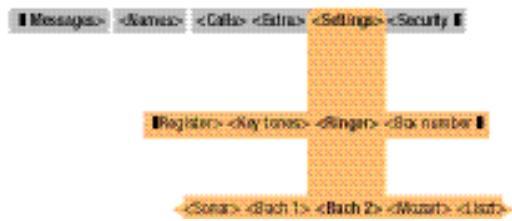
4 Appuyez sur la touche « compas » pour descendre au troisième niveau de menu jusqu'à . 5 Appuyez sur ou pour écouter les options, puis pour sélectionner votre choix et « MENU » pour revenir à l'écran principal. Il y a 20 sonneries parmi lesquelles choisir. La prochaine fois que vous sélectionnerez le menu des choix de sonnerie, vous verrez votre nouvelle sélection en premier, pas Bach 2.
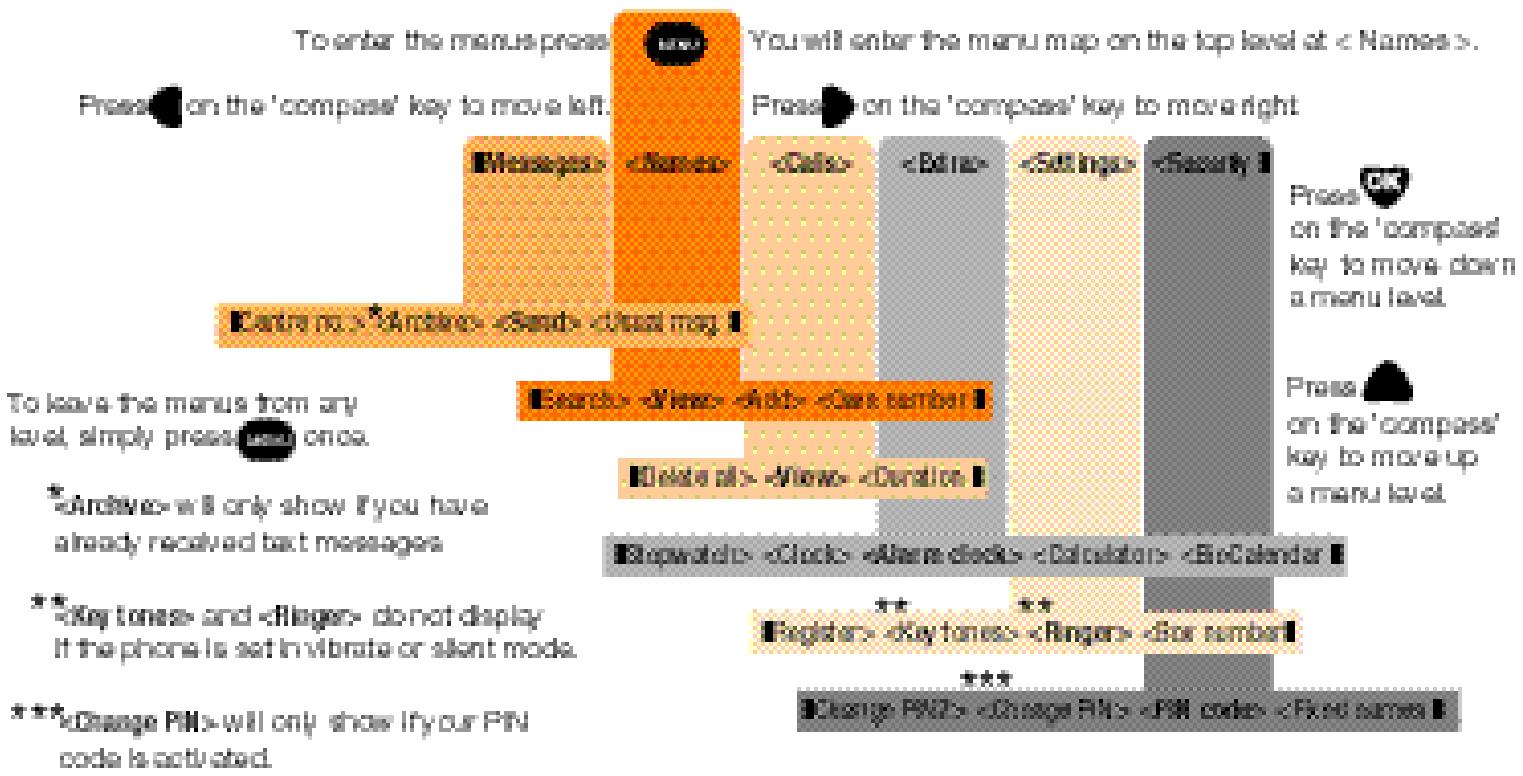
explorer la carte des menus
La plupart des fonctions du téléphone se trouvent en naviguant dans la carte des menus.
les deux premiers niveaux de la carte des menus
enregistrer un nom et un numéro
pour commencer
Votre téléphone Orange peut stocker les noms et numéros de vos amis, de votre famille et de vos collègues dans son répertoire. Ainsi, où que vous alliez, vous pouvez les appeler plus facilement quand vous le souhaitez.
enregistrer un nom et un numéro
1 Appuyez sur « MENU » pour accéder au menu à . 2 Appuyez sur « OK » pour descendre dans le menu de à . 3 Appuyez sur > sur la touche de navigation pour aller à droite vers . 4 Appuyez sur « OK ». Vous verrez « Nom » et un curseur clignotant. 5 Les touches comportent toutes des lettres et des chiffres. Saisissez le nom de la personne dont vous voulez enregistrer le numéro. Pour placer la première lettre de la touche dans votre nouveau nom, appuyez une fois. Pour placer la deuxième lettre de la touche dans votre nom, appuyez deux fois, etc. Votre téléphone créera automatiquement une majuscule au début du nom et après un espace. Pour créer un espace, appuyez sur la touche « 1 ». Pour corriger une erreur, appuyez sur la touche « C ». Voir page 3.4 pour plus d'informations sur la saisie des lettres et des caractères spéciaux. Vous ne pouvez saisir que 11 caractères, espaces compris, dans une entrée du répertoire. 6 Appuyez sur « OK », vous verrez « Numéro : » et un curseur clignotant. 7 Saisissez le numéro de la personne, avec l'indicatif complet. 8 Appuyez sur « OK ». 9 Il vous sera demandé si vous souhaitez utiliser la « numérotation vocale ». La « numérotation vocale » vous permet d'enregistrer une « étiquette vocale » (généralement le nom de quelqu'un) et de la lier à un nom et à un
numéro dans votre répertoire. Vous pourrez alors appeler cette personne en appuyant simplement sur « ^ » sur la touche de navigation et en prononçant le nom de votre « étiquette vocale » dans votre téléphone (voir page 2.9).
10 Appuyez sur < sur la touche de navigation pour aller à gauche vers Non>. 11 Appuyez sur « OK ». Votre premier numéro est enregistré.
Pourquoi ne pas enregistrer un autre numéro maintenant. Cela vous aidera à comprendre plus clairement le fonctionnement de la fonction Répertoire, expliquée ci-dessous.
Accéder à votre répertoire
Vous pouvez accéder rapidement aux numéros de téléphone que vous avez enregistrés.
1 À partir du menu principal, lorsque « Orange » s'affiche à l'écran, appuyez sur « OK ». Cela vous amène directement dans votre répertoire. 2 Appuyez sur « > » sur la touche de navigation pour aller à droite, ou appuyez sur la touche qui contient la première lettre du nom que vous recherchez. Sélectionnez le numéro que vous souhaitez appeler. 3 Appuyez sur la touche pour composer le numéro sélectionné.
Utiliser votre répondeur
Votre répondeur Orange est toujours là pour prendre des messages lorsque vous ne répondez pas à un appel entrant, lorsque votre téléphone est éteint ou si vous êtes hors de la zone de service Orange.
■ Écoute de vos messages du répondeur
Lorsque vous recevez un message du répondeur, vous entendrez un « bip », verrez le symbole de la bobine à l'écran et les mots « Orange » et « Consulter » :
1 Appuyez sur « OK » et vous verrez les mots « Rép. télé ». 2 Appuyez et maintenez la touche enfoncée un instant. 3 Vous verrez « Appel du rép. télé » à l'écran. 4 Suivez les étapes simples pour écouter vos messages. Vous aurez la possibilité de les enregistrer, de les supprimer ou de les réécouter.
Remarque : Vous pouvez également appeler votre répondeur en composant le 123 depuis votre téléphone Orange.
Pendant que vous écoutez un message du répondeur, en appuyant sur les touches suivantes, vous pouvez :
7 - revenir en arrière de 10 secondes. 8 - mettre le message en pause. 9 - avancer de 10 secondes.
Personnalisez le message d'accueil de votre répondeur
Votre répondeur est déjà équipé d'un message d'accueil standard, mais si vous préférez, vous pouvez enregistrer votre propre message pour rassurer vos correspondants qu'ils ont bien composé le bon numéro.
- Appelez votre répondeur au 123, sélectionnez l'option 3,1, puis suivez les étapes simples. La touche dièse est « # = ».
Appeler le répondeur depuis un autre téléphone
Pour écouter vos messages depuis un autre téléphone, vous devez d'abord configurer un code PIN depuis votre téléphone Orange (voir au verso). C'est idéal si vous avez laissé votre téléphone Orange à la maison ou si la batterie est déchargée. Composez simplement le 07973 100123 et suivez les étapes faciles.
Pour commencer
Configurer le code PIN du répondeur
1 Appuyez longuement sur la touche « 1 oo ». 2 Vous verrez « Appel répondeur » à l'écran. 3 Sélectionnez l'option 3, 2 et suivez les étapes simples pour configurer un code PIN. La touche dièse est « # = ».
Remarque : Les appels sans réponse seront automatiquement transférés vers votre répondeur personnel. Si vous ne souhaitez pas que vos appels soient transférés, contactez le service client Orange pour supprimer le transfert automatique.
2.9 Numérotation vocale
Vous pouvez ajouter une « étiquette vocale » à un nom et un numéro dans votre répertoire. Cela vous permet d'appeler jusqu'à 10 numéros en appuyant sur une touche et en « parlant » dans votre téléphone.
Enregistrer un nom et un numéro avec une étiquette vocale
1 Appuyez sur « MENU ». 2 Appuyez sur « OK » pour passer de à . 3 Appuyez sur > sur la touche directionnelle pour vous déplacer vers la droite vers . 4 Appuyez sur « OK », vous verrez « Nom : » et un curseur clignotant. 5 Saisissez le nom de la personne dont vous voulez enregistrer le numéro. Voir page 3.4 « envoyer un message texte ou photo » pour les détails sur la saisie de texte. 6 Appuyez sur « OK ». Vous verrez « Numéro : » et un curseur clignotant. 7 Saisissez le numéro de la personne, y compris l'indicatif régional. 8 Appuyez sur « OK ». 9 On vous demandera si vous voulez utiliser la numérotation vocale. 10 Appuyez sur « OK » pour oui. 11 L'invite à l'écran vous demandera d'« appuyer sur OK et parler ». 12 Prononcez clairement le nom de la personne dans le téléphone. 13 Vous serez invité à répéter le nom. 14 Prononcez à nouveau le nom. 15 Écoutez votre téléphone pour entendre votre enregistrement.
16 Vous verrez le mot « Enregistré » à l'écran. L'« étiquette vocale » est enregistrée. Lorsque vous appelez le nom dans votre répertoire, vous verrez cette icône. Vous pouvez avoir jusqu'à 10 « étiquettes vocales ». Si vous n'êtes pas satisfait de votre « étiquette vocale », utilisez > pour faire défiler jusqu'à « modifier », appuyez sur OK et vous reviendrez à l'étape 11 ci-dessus. L'option « numérotation vocale » disparaît après 10 étiquettes.

- ajouter une étiquette vocale à une entrée existante
1 Appuyez sur « OK » pour accéder à votre répertoire. 2 Sélectionnez l'entrée à laquelle vous souhaitez attribuer une « étiquette vocale ». Appuyez deux fois sur « OK » pour passer à 3 Appuyez deux fois sur « > » pour vous déplacer vers la droite, puis appuyez deux fois sur « OK ». Vous arriverez alors à l'étape 11 ci-dessus.
pour commencer
numérotation vocale
Une fois que vous avez créé une entrée dans votre répertoire avec sa propre « étiquette vocale », vous pouvez utiliser la numérotation vocale.
1 Appuyez sur « ^ » sur la touche directionnelle et maintenez-la enfoncée pendant 3 secondes. 2 Vous verrez « Parlez maintenant » à l'écran. Prononcez l'une des « étiquettes vocales » que vous avez enregistrées précédemment.
Essayez toujours de répéter l'« étiquette vocale » comme vous l'avez enregistrée.
pour supprimer une étiquette vocale
1 Sélectionnez le nom que vous souhaitez supprimer. 2 Appuyez deux fois sur « OK » pour accéder à , puis deux fois sur « > » pour vous déplacer vers la droite. 3 Appuyez sur « OK » pour accéder à , puis une fois sur « < » pour vous déplacer vers la gauche jusqu'à « Supprimer ». 4 Appuyez sur « OK », puis sur « C », puis sur « MENU » pour revenir à l'écran principal.
2.11 autres fonctions essentielles
- rappel - numéro personnel - verrouillage du clavier
rappel
1 Appuyez sur la touche pour voir les 10 derniers appels que vous avez passés, reçus ou manqués. Différentes icônes indiquent si l'appel a été passé, reçu ou manqué. Reportez-vous à la page 3.13. 2 Appuyez sur ou sur « > » sur la touche directionnelle pour sélectionner le numéro que vous souhaitez appeler. 3 Appuyez sur la touche pour composer.
numéro personnel
Pour vous rappeler votre propre numéro de téléphone Orange.
1 Appuyez sur « MENU ». 2 Appuyez sur « OK » pour descendre de à . 3 Appuyez deux fois sur « > » pour vous déplacer vers . 4 Appuyez sur « OK » pour voir votre numéro à l'écran.
verrouillage du clavier
Pour éviter de faire des appels accidentellement lorsque votre téléphone est dans votre poche ou votre sac.
1 Appuyez sur la touche « C » et maintenez-la enfoncée un moment. 2 Pour déverrouiller le clavier, appuyez de nouveau sur la touche « C » et maintenez-la enfoncée.
pour aller plus loin
pour aller plus loin
- configurer les codes de sécurité
- numérotation abrégée
- envoyer et lire des messages texte ou image
- utiliser votre répertoire ■ options en cours d'appel ■ personnaliser votre téléphone ■ organiser vos appels ■ noms fixes ■ plus de fonctions

configurer les codes de sécurité
Vous pouvez utiliser des codes de sécurité pour empêcher d'autres personnes de passer des appels depuis votre téléphone.
Nous vous recommandons de noter les codes et de les conserver en lieu sûr.
PIN (numéro d'identification personnel)
Votre carte SIM est livrée avec un code PIN par défaut de 1111. Le téléphone est configuré pour que vous n'ayez pas besoin de saisir ce numéro pour utiliser le téléphone.
Cependant, pour empêcher toute utilisation non autorisée de votre téléphone (par exemple en cas de vol), nous vous recommandons de faire ce qui suit :
Changez le code PIN (afin que vous seul le connaissiez). - Configurez votre téléphone pour que le code PIN soit demandé à chaque fois que vous allumez le téléphone.
pour changer le code PIN
1 Appuyez sur 'MENU'. 2 Appuyez quatre fois sur '>' sur la touche de navigation pour vous déplacer vers la droite jusqu'à <Sécurité|. 3 Appuyez sur 'OK', vous verrez . 4 Appuyez sur 'OK', vous verrez <Activer|. 5 Appuyez sur 'OK', vous verrez Saisir PIN:. 6 Saisissez votre code PIN actuel (qui est 1111 si vous n'avez pas encore changé votre code PIN). Appuyez sur 'OK'. Vous verrez le mot 'Activé', puis
7 Appuyez sur < sur la touche de navigation pour passer de à ■Changer PIN>. 8 Appuyez sur 'OK', vous verrez Ancien PIN:. 9 Saisissez votre code PIN actuel (qui est 1111 si vous n'avez pas encore changé votre code PIN). Appuyez sur 'OK'. 10 Vous verrez Nouveau PIN:. 11 Saisissez votre choix d'un minimum de 4 et d'un maximum de 8 chiffres. Appuyez sur 'OK'. 12 Vous verrez Répéter PIN:. 13 Saisissez à nouveau votre nouveau code, appuyez sur 'OK'. 14 Vous verrez PIN correct. 15 Appuyez sur 'MENU' pour revenir à l'écran principal. Vous avez maintenant changé votre code PIN. Veuillez noter le code et le conserver en lieu sûr.
pour configurer votre téléphone afin que le code PIN soit demandé à chaque fois que vous l'utilisez.
1 Appuyez sur 'MENU'. 2 Appuyez quatre fois sur '>' sur la touche de navigation pour passer de à 3 Appuyez sur 'OK', vous verrez \ . 4 Appuyez sur 'OK', vous verrez Désactiver>. 5 Appuyez sur > , vous verrez <ActiverI. (Vous serez invité à saisir votre code PIN si le code PIN est actuellement désactivé). 6 Appuyez sur 'OK', vous verrez Activé. 7 Appuyez sur 'MENU' pour revenir à l'écran principal.
PIN2
Votre carte SIM est également fournie avec un code PIN2 qui est également défini sur 1111. Le code PIN2 vous donne accès à la fonction Numéros fixes de votre téléphone. L'utilisation des numéros fixes est expliquée à la page 3.15.
pour changer le code PIN2
1 Appuyez sur 'MENU'. 2 Appuyez quatre fois sur '>' sur la touche de navigation pour vous déplacer vers la droite jusqu'à <Sécurité|. 3 Appuyez sur 'OK' et vous verrez . 4 Appuyez sur < pour vous déplacer vers . 5 Appuyez sur 'OK' et vous verrez Ancien PIN2: 6 Saisissez votre code PIN2 actuel (qui est 1111 si vous n'avez pas encore changé votre code PIN2). Appuyez sur 'OK'.
7 Vous verrez Nouveau PIN2:. 8 Saisissez votre choix d'un minimum de 4 et d'un maximum de 8 chiffres. Appuyez sur 'OK'. 9 Vous verrez Répéter PIN2:
10 Vous verrez Code correct.
11 Appuyez sur 'MENU' pour revenir à l'écran principal. Vous avez maintenant changé votre code PIN2.
Codes PUK (8 chiffres)
Si vous faites une erreur en saisissant votre code PIN plus de 3 fois de suite, votre téléphone sera temporairement inutilisable, jusqu'à ce que vous obteniez un code PUK (Personal Unblocking Code) auprès du service client Orange. Si le code PUK est saisi incorrectement 10 fois de suite, le téléphone deviendra inutilisable et des frais seront facturés pour le réinitialiser.
3.3
numérotation abrégée
Vous pouvez appeler vos 8 numéros favoris en appuyant simplement sur une touche.
configurer une numérotation abrégée
Vous pouvez associer jusqu'à 8 noms de votre répertoire aux touches 2 à 9 du clavier. Un appui long sur l'une de ces touches composera automatiquement le numéro.
1 À partir de l'écran principal, appuyez sur 'OK' pour afficher votre répertoire. 2 Sélectionnez le nom que vous souhaitez associer à une touche pour la numérotation abrégée.
REMARQUE : Vous ne pouvez pas sélectionner le même nom pour la numérotation par 'commande vocale' et la 'numérotation abrégée'. Si un nom possède déjà l'icône 'commande vocale', il ne peut pas être associé à une touche, sauf si vous supprimez d'abord sa 'commande vocale'.
3 Appuyez longuement sur l'une des touches entre 2 et 9 pour associer le nom à cette touche. La touche à laquelle ce numéro est associé apparaîtra dans l'icône du répertoire.


supprimer une numérotation abrégée
1 Sélectionnez le nom que vous souhaitez dissocier. 2 Appuyez longuement sur la touche correspondante (qui apparaît dans l'icône du répertoire). Le numéro dans l'icône du répertoire disparaîtra.
envoyer un message texte ou une image
plus de fonctions
La messagerie texte est un moyen simple et amusant de rester en contact lorsqu'un appel téléphonique est inapproprié – peut-être tard le soir, dans le train ou en réunion. Le coût d'envoi des messages dépend de votre forfait.
envoyer un message texte
1. Appuyez sur « MENU ». 2. Appuyez sur < pour vous déplacer vers . 3. Appuyez sur « OK » pour accéder à . 4. Appuyez sur « OK ». 5. Saisissez le numéro auquel vous souhaitez envoyer le message, puis appuyez sur « OK ». Appuyez sur « C » pour effacer les chiffres en cas d'erreur.
Vous pouvez également appuyer sur « OK » pour accéder directement à votre répertoire et sélectionner un nom.
6. Appuyez sur « OK ». 7. Saisissez le texte que vous souhaitez envoyer, jusqu'à 160 caractères. Les touches comportent à la fois des lettres et des chiffres. Pour insérer la première lettre de la touche dans votre message, appuyez une fois. Pour insérer la deuxième lettre, appuyez deux fois, etc. Votre téléphone mettra automatiquement une majuscule en début de phrase. Pour créer un espace, appuyez sur la touche « 1 ». Voir le tableau en page 3.5 pour plus d'informations sur la saisie des lettres et des caractères spéciaux. 8. Appuyez sur « OK » une fois la saisie du message terminée.
9. Il vous sera demandé si vous souhaitez envoyer une « icône ». Profitez de votre Savvy et envoyez une icône ! Si une icône est envoyée avec un message image, elle utilise 3 des 160 caractères disponibles. 10. Appuyez sur « > » pour choisir un « message image (icône) ». Pour voir les messages image disponibles, reportez-vous à la page 3.7. 11. Appuyez sur « OK » pour sélectionner l'icône. 12. Il vous sera demandé si vous souhaitez envoyer le message. Sélectionnez pour envoyer le message. 13. Appuyez sur « OK » pour envoyer. Vous verrez « Demande » puis « Envoyé » clignoter à l'écran. 14. Il vous sera demandé si vous souhaitez enregistrer le message. Sélectionnez pour enregistrer le message, ou faites défiler jusqu'à « Non » pour le supprimer. 15. Appuyez sur « MENU » pour revenir à l'écran principal.
| key | Characters | Each key allows you to obtain several characters. You have to quickly press the same key several times to reach the desired character. |
| 1 | space 1 @ # = <> ( ) & £ $ ¥ | |
| 2 | a b c 2 à à à āç | |
| 3 | d e f 3 é è Φ | |
| 4 | g h i 4 Γì | |
| 5 | j k l 5 ∧ | |
| 6 | m n o 6 û û û | |
| 7 | p q r s 7 β Π Θ Σ | ‘AB’ |
| 8 | t u v 8 üù | shows that you are in upper-case mode. |
| 9 | w x y z 9 Ω ≈ ψ | |
| 0 | .0 ” ? ! , : i ; | ‘ab’ |
| * | * + - / % | shows you are in the lower-case mode. |
| # | Switches upper-case/lower-case mode |
confirmer la réception d'un message texte envoyé
Lorsque vous envoyez un message texte important à un autre téléphone mobile, ajoutez « RCT » au début du message. Cela demande l'envoi d'un message de confirmation à votre téléphone pour confirmer que le message texte a été délivré.
envoyer, supprimer ou modifier un message enregistré
1. Appuyez sur « MENU », puis sur < pour vous déplacer vers . 2. Appuyez sur « OK » pour accéder à , puis sur < pour vous déplacer vers . 3. Appuyez sur « OK » pour accéder à vos messages enregistrés, puis sur < ou > pour vous déplacer jusqu'au message souhaité. 4. Appuyez sur « OK » pour vérifier le contenu du message. Vous devrez peut-être appuyer à nouveau sur « OK » pour voir la fin du message.
5. Appuyez à nouveau sur « OK » pour accéder aux options du message. ■Supprimer> pour supprimer le message, pour répondre au message, pour transférer le message à un autre numéro, pour ajouter un message préprogrammé ou , pour enregistrer le numéro du message. 6. Si vous avez sélectionné , appuyez sur « OK » pour saisir le numéro, ou appuyez à nouveau sur « OK » pour sélectionner un numéro dans votre répertoire. Appuyez sur « OK » pour vérifier le numéro et le modifier si nécessaire. Appuyez sur « OK ». À ce stade, vous pouvez modifier le message si vous le souhaitez, ajouter un message image et envoyer.
envoyer un message préprogrammé
Il y a 13 messages préprogrammés disponibles pour vous faire gagner du temps lors de l'envoi de messages texte. Certains incluent des icônes.
1. Appuyez sur 'MENU'. 2. Appuyez sur < pour vous déplacer vers . 3. Appuyez sur 'OK' pour accéder à . 4. Appuyez sur > pour vous déplacer vers <Usual msg. 5. Appuyez sur 'OK' pour accéder aux messages préprogrammés, listés à droite de cette page. 6. Appuyez sur 'OK' pour saisir le numéro, ou appuyez à nouveau sur 'OK' pour sélectionner un numéro depuis votre répertoire. Appuyez sur 'OK' pour vérifier le numéro et le modifier si nécessaire. Appuyez sur 'OK'. À ce stade, vous pouvez modifier le message si vous le souhaitez, ajouter un message image et envoyer.
plus vous pouvez faire
messages texte préprogrammés (Usual msg.)
Merci de me rappeler
Je serai en retard
Je vous rappellerai
Je vous attends.
Ne m'attendez pas
Où êtes-vous ?
D'accord pour le déjeuner ?

Je t'aime

Bonne chance !

Joyeux anniversaire !

Va-t'en !

Tu me manques

Comment vas-tu ?
3.7
■ messages avec images - les utilisateurs non Savvy peuvent les recevoir sous forme de caractères texte
| icon | icon name | characters sent to non Savvy phone | Picture messages are included in the cost of sending a normal text message. | |||||
| Smile | :-) | Magic | =:1 | Drink | >-1 | |||
| Wink | ;-) | Love | (O) | Coffee | ID | |||
| Cool | B-) | Broken | (X) | Cloudy | ;; | |||
| Pfrrt... | :-P | Yo! | Yo! | Sunny | >0< | |||
| Sad | :-( | Well done | ==b | Holidays | -Y- | |||
| Grrr... | :-/ | Party | o<1 | Ball | (I) | |||
| Meow! | :<* | Hooray! | iii | BOOM! | >*$< | |||
| Woof! | :># | Flowers | @>- | Deadly | %-I | |||
| Teddy | 8<) | |||||||
lire un message texte ou avec image
plus de choses à faire
Lorsque quelqu'un vous envoie un message texte, vous pouvez le supprimer, le stocker, y répondre ou le transférer à quelqu'un d'autre.
lire un nouveau message texte
Lorsque vous avez reçu un message texte, votre téléphone émet un bip et vous voyez une icône d'enveloppe et les mots 'Orange 1 (ou plus) msg.' sur l'écran.
1 Appuyez sur 'OK' pour lire le message. Selon la longueur du message, vous devrez peut-être appuyer à nouveau sur la touche 'OK' pour lire le message complet et le numéro de téléphone de l'expéditeur. Si vous n'appuyez pas sur 'OK' à l'arrivée du message, il sera stocké pour que vous puissiez le lire plus tard. 2 Appuyez sur 'OK' à la fin du message. Lorsque vous avez lu le message, vous pouvez choisir parmi les options suivantes [Supprimer] Supprimer> supprime le message. - vous donne la possibilité d'envoyer le message à une autre personne. - affiche le numéro de téléphone de l'expéditeur du message. Pour répondre, appuyez sur 'OK', saisissez votre réponse et suivez les invites à l'écran. va à la liste des messages préprogrammés. - <Enregistrer n°■ Vous permet de stocker le numéro du
expéditeur du message dans votre répertoire, mais uniquement si vous avez enregistré son message.
lire les messages stockés (archive)
Les messages que vous avez reçus sont automatiquement enregistrés jusqu'à ce que vous choisissiez de les supprimer.
1 Appuyez sur 'MENU', puis appuyez sur < pour passer à . 2 Appuyez sur 'OK' pour passer à . 3 Appuyez sur < pour passer à . 4 Appuyez sur 'OK' pour descendre de à <1 de ?>. Le ? sera remplacé par le nombre de messages que vous avez enregistrés. 5 Appuyez sur < ou > pour sélectionner un message. 6 Appuyez sur 'OK' pour lire le message. 7 Continuez à appuyer sur OK pour aller à la fin du message et choisir l'une des options suivantes Supprimer> <Enregistrer n°. Voir 'lire un nouveau message texte' sur cette page pour une explication de ces options.
Si l'enveloppe clignote sur votre écran, la mémoire est pleine. Vous devez supprimer certains messages pour faire de la place pour de nouveaux. Une icône d'enveloppe timbrée indique un message envoyé, une icône d'enveloppe ouverte indique un message reçu et lu.
3.9 Utiliser votre répertoire
La procédure pour enregistrer un nom et un numéro dans votre répertoire est expliquée en détail dans la section 2.6. Vous trouverez ci-dessous des informations sur la façon d'utiliser le répertoire facilement et efficacement.
Consulter votre répertoire
1 Appuyez sur 'OK' pour accéder au répertoire. Vous pouvez utiliser les touches pour accéder directement aux noms de votre répertoire qui commencent par la même lettre que la première lettre de la touche. Par exemple, pour accéder à 'Jean' (ou tout autre nom commençant par J), appuyez sur la touche 5. 2 Appuyez sur < ou > pour vous déplacer à gauche ou à droite. 3 Appuyez sur 'OK' pour voir le numéro. Appuyez à nouveau sur 'OK' pour d'autres options. 4 Choisissez parmi les options suivantes :
Supprimer> pour supprimer l'entrée. pour envoyer un message à l'entrée sélectionnée. pour envoyer un message préprogrammé à l'entrée sélectionnée. pour enregistrer une étiquette vocale ou lire une 'étiquette vocale' enregistrée. <Modifier pour modifier l'entrée.
Rechercher un nom spécifique
1 Appuyez sur 'MENU', puis sur 'OK' pour accéder à . 2 Appuyez sur < sur la touche directionnelle pour vous déplacer à gauche de à Rechercher>.
3 Appuyez sur 'OK'. Vous verrez 'Rechercher' sur l'écran. 4 Saisissez les premières lettres du nom que vous recherchez. 5 Appuyez sur 'OK', puis appuyez sur pour appeler le numéro, ou sur 'OK' pour d'autres options affichées à l'écran.
Modifier ou supprimer un nom ou un numéro
1 Appuyez sur 'OK' depuis l'écran principal et sélectionnez le nom dans l'entrée du répertoire que vous souhaitez modifier ou supprimer. 2 Appuyez deux fois sur 'OK', puis appuyez sur < ou > pour choisir soit Supprimer> ou . 3 Appuyez sur 'OK', puis suivez les instructions à l'écran.
Options en cours d'appel
Plus de fonctions
Lorsque vous êtes en communication, un certain nombre de fonctions sont disponibles sur votre téléphone pour vous aider à l'utiliser encore plus efficacement.
recomposition automatique
Lorsque vous composez un numéro et qu'il est occupé, vous pouvez recomposer automatiquement le numéro.
Vous verrez 'Utilisateur occupé' sur l'écran, suivi de 'Recomposer ?'.
1 Appuyez sur 'OK' pour recomposer automatiquement. Un 'bip' ou une courte vibration se répétera toutes les 30 secondes pour vous rappeler que votre téléphone est toujours en train de recomposer. 2 Appuyez sur n'importe quelle touche pour annuler la recomposition à tout moment. Tout appel entrant ou toute utilisation du téléphone annulera automatiquement la recomposition. L'icône du 'sablier rotatif' et les mots 'Utilisateur occupé' sur l'écran indiquent que votre téléphone continue d'essayer l'appel.
enregistrer un numéro dans le bloc-notes

Vous pouvez noter un numéro (par exemple un numéro de téléphone qu'on vous donne pendant une conversation) pendant que vous êtes en communication. Terminez votre appel de la manière habituelle. Vous verrez alors l'icône indiquée
ici (et le numéro que vous avez saisi) sur l'écran à la fin de votre appel.
Appuyez sur 'OK' pour afficher le numéro à l'écran. Pour appeler ce numéro, appuyez sur . Vous pouvez envoyer un message au numéro enregistré ou le stocker. Suivez les invites à l'écran.
appel en attente
Ce service n'est pas disponible pour les clients Just Talk. Avec l'appel en attente, vous pouvez répondre à un autre appel pendant que vous êtes en communication.
1 Vous entendrez un 'bip'. Si vous voulez prendre l'appel, appuyez sur . Le premier appel est mis en attente. 2 Si vous ne voulez pas prendre l'appel, vous pouvez le transférer vers votre répondeur en appuyant sur 3 Utilisez < et > sur la touche directionnelle pour basculer entre le premier et le deuxième appel. Le numéro de téléphone de l'appel en cours s'affiche à l'écran. Si vous voulez mettre fin à cet appel, appuyez sur . Vous serez alors sur un seul appel.
3.11
personnaliser votre téléphone
horloge réveil volume de la sonnerie / alerte vibrante tonalités des touches
Réglage de l'horloge
1 Appuyez sur « MENU ». 2 Appuyez deux fois sur « > » pour vous déplacer vers . 3 Appuyez sur « OK » pour passer de à . 4 Appuyez sur < sur la touche de navigation pour vous déplacer vers la gauche jusqu'à . 5 Appuyez sur « OK ».
Vous verrez....00:00 (ou une autre heure si vous avez déjà réglé l'horloge).
6 Utilisez les touches pour saisir l'heure, en vous rappelant que vous devez saisir les chiffres selon un format d'horloge de 24 heures. 7 Appuyez sur « OK » sur la touche de navigation. L'horloge affichera l'heure correcte, vous verrez « Réglé ». 8 Appuyez sur « MENU » pour revenir à l'affichage principal.
Vous pouvez utiliser votre téléphone comme réveil.
1 Appuyez sur « MENU ». 2 Appuyez deux fois sur « > » pour vous déplacer vers la droite jusqu'à . 3 Appuyez sur « OK » pour passer à . 4 Appuyez sur « OK », vous verrez <Réglé sur|. 5 Appuyez sur « OK », vous verrez <00:00> . 6 Utilisez les touches pour saisir l'heure, en vous rappelant que vous devez saisir les chiffres selon un format d'horloge de 24 heures. Vous pouvez
changer l'heure une minute à la fois en utilisant les options < et > sur la touche de navigation.
7 Appuyez sur « OK », puis sur « MENU » pour revenir à l'affichage principal. Le symbole de la cloche d'alarme s'affichera à l'écran.
Désactivation de l'alarme
L'alarme sonnera même si votre téléphone est éteint. Pour désactiver l'alarme, appuyez sur n'importe quelle touche.
Réglage de l'alarme sur arrêt
1 Appuyez sur « MENU ». 2 Appuyez deux fois sur > pour vous déplacer vers la droite jusqu'à . 3 Appuyez sur « OK » pour passer à . 4 Appuyez sur « OK », puis sélectionnez Réglé sur arrêt>. 5 Appuyez sur « OK » et vous verrez Désactivé.
■ Réglage du volume de la sonnerie / alerte vibrante
Le volume de la sonnerie a 3 niveaux. Il y a aussi un réglage de vibration, idéal pour le cinéma ou lorsqu'une sonnerie serait inappropriée.
1 Appuyez sur « > » pour vous déplacer vers la droite jusqu'à la commande « Volume ».
Choisissez entre Silencieux> <Élevé|.
2 Appuyez sur '<' ou '>' sur la touche de navigation pour vous déplacer à gauche ou à droite et sélectionnez l'une des combinaisons volume/vibreur mentionnées ci-dessus. 3 Appuyez sur 'OK' et vous verrez 'Régler'.
vous pouvez régler le téléphone pour qu'il émette un son à chaque pression sur une touche
1 Appuyez sur 'MENU'. 2 Appuyez sur > sur la touche de navigation pour vous déplacer à droite de à . 3 Appuyez sur 'OK', vous verrez . (Ce menu n'est pas disponible si 'vibreur' ou 'silencieux' est activé sur votre téléphone). 4 Appuyez sur < sur la touche de navigation pour vous déplacer à gauche de à . 5 Appuyez sur 'OK', pour faire défiler entre Désactiver> 6 Sélectionnez Désactiver> et 'OK', pour couper les sonneries. 7 Sélectionnez Activer> et 'OK', pour activer les sonneries.
3.13
organisez vos appels
Découvrez qui vous a appelé récemment et vérifiez combien de temps vous avez passé sur votre téléphone.
consultez les appels récents
Vous pouvez consulter les 20 appels les plus récents. La mémoire de votre téléphone ne rappellera que les 10 derniers appels que vous avez passés.
Les 10 autres seront des appels reçus ou manqués.
1 Appuyez sur la touche. 2 Appuyez sur les touches < et > pour faire défiler et sélectionner un numéro.
Les icônes indiquent le type d'appels.

Numéro de téléphone que vous avez composé

Numéro de téléphone d'un appel reçu

Numéro de téléphone d'un appel manqué

Numéro de téléphone extrait d'un message texte
3 Appuyez pour rappeler un numéro, ou appuyez deux fois sur « OK » pour d'autres options. 4 Choisissez parmi les options suivantes : Modifier> pour supprimer l'entrée, pour stocker le numéro entrant dans votre répertoire, pour renvoyer votre propre message texte à l'expéditeur <Msg. usuel], pour renvoyer un message texte préprogrammé à l'expéditeur
supprimer la « liste des appels récents »
Vous pouvez supprimer tous les appels que vous avez émis, reçus ou manqués.
1 Appuyez sur « MENU ». 2 Appuyez sur « > » sur la touche directionnelle pour vous déplacer de à . 3 Appuyez sur « OK », vous verrez . 4 Appuyez sur < pour vous déplacer de à . 5 Appuyez sur « OK » pour supprimer, puis sur « C » pour confirmer.
vérifier la durée de vos appels
1 Appuyez sur « MENU », puis sur > pour vous déplacer vers . 2 Appuyez sur « OK », vous verrez . 3 Appuyez sur « > » sur la touche directionnelle pour vous déplacer de à . 4 Appuyez sur « OK », vous verrez . 5 Appuyez sur « OK », vous verrez Durée et un temps en minutes et secondes depuis la dernière réinitialisation du compteur de durée d'appel.
Pour remettre le compteur de durée à 0, appuyez sur « » pour revenir à , puis sur « < » pour revenir à Réinitialiser>, puis sur « OK ». En remettant le compteur de durée à 0 après un appel, vous pouvez déterminer la durée du prochain appel ou d'un groupe d'appels.
renvoi d'appel
Le renvoi d'appel n'est pas disponible avec Just Talk. Avec Just Talk, vous êtes automatiquement renvoyé vers votre répondeur personnel. Si vous ne souhaitez pas que vos appels soient renvoyés, contactez le service client Orange pour supprimer la fonction de renvoi automatique.
Le renvoi d'appel est une bonne option si vous êtes dans une situation où un téléphone qui sonne ne serait pas approprié, mais où vous voulez quand même garder votre téléphone allumé pour envoyer et recevoir des messages texte. Vous pouvez transférer tous vos appels vers le répondeur Orange.
1 Pour renvoyer vos appels, appuyez sur « MENU ». 2 Appuyez sur < pour vous déplacer vers .
3 Appuyez sur « OK », vous pouvez alors choisir quand vous voulez que les appels soient renvoyés :
S'il n'y a pas de réponse lorsque quelqu'un vous appelle. Toujours> Si vous prévoyez d'être indisponible pendant un certain temps. Si vous prévoyez d'être en réunion pendant un court moment. Si vous prévoyez d'être hors de portée du réseau.
Annuler tous les renvois et recevoir les appels
1 Appuyez sur 'MENU'. 2 Appuyez sur < pour vous déplacer vers , puis appuyez sur 'OK', puis appuyez sur > 3 fois pour sélectionner <Annuler tout, puis appuyez sur 'OK'. Vous verrez 'demande' puis 'désactivé'. Appuyez ensuite sur 'MENU' pour revenir à l'affichage principal.
3.15
répertoire fixe
Vous pouvez définir des restrictions sur les personnes qui peuvent être appelées si vous devez prêter votre téléphone à un ami ou à un membre de votre famille.
pour fixer les noms qui peuvent être appelés
Si vous devez prêter votre téléphone à un ami ou à un membre de votre famille, vous pouvez restreindre les personnes qu'ils peuvent appeler. Il existe une fonction pour créer un 'répertoire de noms fixes'. La personne à qui vous prêtez votre téléphone ne peut appeler que les personnes du répertoire.
1 Appuyez sur 'MENU', puis sur > quatre fois pour 2 Appuyez sur 'OK', vous verrez \ , puis appuyez sur '>' vous verrez 3 Appuyez sur 'OK', vous verrez \ . 4 Appuyez sur '>', vous verrez , appuyez sur 'OK'. 5 Saisissez votre numéro PIN2 existant (qui est 1111 si vous n'avez pas encore changé votre numéro PIN2). Appuyez sur 'OK'. Suivez les invites à l'écran pour saisir les noms et numéros de téléphone des personnes que vous souhaitez mettre dans le répertoire. Après avoir 'enregistré' votre dernière entrée. 6 Appuyez sur 'MENU' pour revenir à l'affichage principal. Toute personne utilisant votre téléphone pendant que le 'répertoire de noms fixes' est activé verra le mot 'échec' à l'écran lorsqu'elle saisira un numéro qui n'est pas dans le 'répertoire de noms fixes'.
pour activer le 'répertoire de noms fixes'
1 Appuyez sur 'MENU'. 2 Appuyez sur '>' quatre fois pour vous déplacer vers 3 Appuyez sur 'OK', vous verrez \ 4 Appuyez sur '>' ,vous verrez 5 Appuyez sur 'OK', vous verrez \ . 6 Appuyez sur > deux fois, vous verrez 7 Appuyez sur 'OK', vous verrez Activer>, appuyez sur 'OK'. 8 Saisissez votre numéro PIN2 existant, appuyez sur 'MENU' pour revenir à l'affichage principal.
pour désactiver le 'répertoire de noms fixes'
1 Appuyez sur 'MENU'. 2 Appuyez sur '>' quatre fois pour vous déplacer vers 3 Appuyez sur 'OK', vous verrez \ . 4 Appuyez sur > ,vous verrez Noms fixes. 5 Appuyez sur 'OK', vous verrez . 6 Appuyez sur > ,vous verrez RestrictionI. 7 Appuyez sur 'OK', vous verrez Désactiver>, appuyez sur 'OK'. 8 Saisissez votre numéro PIN2 existant, suivez les invites à l'écran, appuyez sur 'MENU' pour revenir à l'affichage principal.
plus de fonctions
plus vous pouvez faire
- calculatrice - chronomètre - horoscope - tonalités (DTMF)
Utilisation de la calculatrice
1. Appuyez longuement sur # = pour afficher Calculatrice. 2. Saisissez un nombre.
Appuyez sur « C » pour effacer un nombre.
Pour additionner, appuyez une fois sur la touche * +. Pour soustraire, appuyez deux fois sur la touche * +. Pour multiplier, appuyez trois fois sur la touche * +. Pour diviser, appuyez quatre fois sur la touche * +. Pour la virgule décimale, appuyez longuement sur la touche 0.
3. Saisissez le deuxième nombre. 4. Appuyez sur # = pour obtenir le résultat.
Utilisation du chronomètre
1. Appuyez sur « MENU ». 2. Appuyez deux fois sur > pour accéder à . 3. Appuyez sur « OK » pour accéder à . 4. Appuyez deux fois sur <, vous verrez ■Chronomètre>. 5. Appuyez sur « OK », vous verrez 00:00:00.00. 6. Appuyez sur « OK » pour démarrer le chronomètre. 7. Appuyez sur « OK » pour arrêter le chronomètre. 8. Appuyez sur « C » pour remettre le chronomètre à zéro.
9. Appuyez sur « MENU » pour revenir à l'écran principal.
Utilisation du jeu d'horoscope
L'horoscope est un moyen amusant de voir quel genre de journée vous êtes susceptible d'avoir - ou vous pouvez aider un ami en lui disant ce que sa journée lui réserve ! Pour le plaisir, consultez l'horoscope pour voir si :
vous aurez un jour de chance « Chance » une romance est probable « Amour » vous vous sentirez énergique « Énergie » le succès est probable « Succès »
1. Appuyez sur « MENU ». 2. Appuyez deux fois sur « > » sur la touche de navigation pour accéder à . 3. Appuyez sur « OK », vous verrez . 4. Appuyez deux fois sur « > », vous verrez . 5. Appuyez sur « OK », saisissez votre date de naissance, puis appuyez sur « OK ». 6. Saisissez la date pour laquelle vous souhaitez consulter votre horoscope (probablement la date du jour), puis appuyez sur « OK ». 7. Chaque caractéristique apparaîtra à l'écran avec des barres en dessous. Plus il y a de barres, plus votre prospérité sera grande. 8. Appuyez sur « MENU » pour revenir à l'écran principal.
3.17
Tonalités (DTMF - Dual Tone Multi Frequency)
Avec le Philips Savvy, vous pouvez accéder à votre répondeur de domicile :
1 Composez votre numéro de téléphone de la manière habituelle, ou rappelez-le depuis votre répertoire. 2 Appuyez sur la touche # =. Cela ajoutera la lettre 'w' après le numéro composé. C'est le signal d'attente, qui laisse le temps au numéro appelé de se connecter avant l'envoi des signaux de mot de passe. 3 Saisissez le code PIN spécifique à votre répondeur de domicile. 4 Appuyez pour accéder à votre répondeur.
Remarque : selon le type de répondeur dont vous disposez, une séquence différente peut être requise.
Services supplémentaires Orange
Services supplémentaires Orange
■ Every Phone ■ Messenger ■ Assistant ■ Answer Fax ■ appels depuis le Royaume-Uni vers l'étranger - Accessoires - Services d'information

4.1 Tirer le meilleur parti d'Orange
Ces services supplémentaires sont conçus pour vous aider à tirer encore plus d'Orange, en vous aidant à gérer votre vie plus facilement. Certains services ne sont pas disponibles avec Just Talk, mais vous pouvez les utiliser si vous passez à un forfait de service.
Orange Every Phone (non disponible avec Just Talk) Si vous oubliez votre téléphone Orange, ou si sa batterie est déchargée, vous pouvez transférer tous vos appels entrants vers n'importe quel numéro de téléphone standard au Royaume-Uni ou un numéro Orange en un seul appel. Cependant, des frais seront facturés pour les appels transférés vers un numéro non standard ou un réseau autre qu'Orange. - Appelez le 330 depuis votre téléphone Orange ou le 07973 100330 depuis tout autre téléphone et suivez les instructions enregistrées pour activer et annuler Orange Every Phone. Orange Messenger (non disponible avec Just Talk) C'est une alternative au répondeur lorsque vous ne pouvez pas prendre vos appels. Transférez vos appels vers Orange Messenger au 07973100124 où un opérateur prendra vos messages puis les transmettra à votre téléphone sous forme de messages texte. Pour plus d'informations sur Orange Messenger, veuillez appeler la ligne de demande de documentation Orange et demander une copie de 'Answering Services Explained'. Cela utilise le menu de transfert d'appel de votre téléphone.
Orange Assistant (non disponible avec Just Talk) Lorsque vous ne pouvez pas prendre d'appels, transférez-les vers Orange Assistant, un service de réponse personnel où tous les appelants sont accueillis en votre nom. Un opérateur prendra les messages puis les transmettra à votre téléphone sous forme de messages texte. Pour plus d'informations sur Orange Assistant, veuillez appeler la ligne de demande de documentation Orange et demander une copie de 'Answering Services Explained'.
Le nombre de messages qu'Orange Assistant peut recevoir et vous transmettre est illimité. Cela utilise le menu de transfert d'appel de votre téléphone.
Orange Answer Fax (non disponible avec Just Talk) Comme un répondeur pour vos télécopies, vous permettant de recevoir des télécopies lorsque vous êtes en déplacement. Lorsque vous recevez une télécopie, vous êtes averti par message texte. Appelez simplement le répondeur au 123 depuis votre téléphone Orange ou le 07973 100123 depuis tout autre téléphone et suivez les étapes simples pour envoyer votre télécopie vers n'importe quelle télécopieur pratique de votre choix.
Pour plus d'informations sur Orange Answer Fax, veuillez appeler la ligne de demande de documentation Orange. Vous pouvez également appeler le service clientèle Orange pour obtenir votre propre numéro Answer Fax et commencer à l'utiliser immédiatement.
Appeler à l'étranger depuis le Royaume-Uni
En utilisant votre téléphone Orange pour appeler à l'étranger, vous en avez plus pour votre argent. Vous pouvez économiser au moins 20 % par rapport aux tarifs standard de BT. De plus, vous n'êtes pas obligé d'être connecté à une ligne fixe pour passer un appel. Et, lorsque vous comparez nos prix avec ceux d'autres réseaux mobiles britanniques – tels que les tarifs standard de Vodafone ou CellNet – les économies réalisées avec Orange sont encore plus importantes.
Pour passer un appel international
Maintenez enfoncée la touche * +. Cela fera précéder le numéro que vous composez du préfixe +. Composez ensuite normalement, en commençant par l'indicatif du pays. Omettez les zéros au début de l'indicatif local.
Accessoires Orange
Un chargeur de téléphone est fourni en standard avec votre téléphone Orange. Veuillez consulter votre revendeur Orange local ou appeler la ligne directe des accessoires Orange au 0500 178178 (appel gratuit) pour obtenir des informations sur la gamme d'accessoires disponibles pour votre téléphone Orange.
Services d'information Orange
(actuellement non disponible avec Just Talk. Veuillez appeler le service clientèle pour vérifier si ce service est disponible sur votre téléphone).
Vous pouvez accéder à une multitude d'informations, notamment les actualités financières, les cours des actions, les informations routières et les titres sportifs, les bulletins météo, le Loto national, les horoscopes et un guide touristique de Londres.
Il existe trois manières différentes d'accéder à ces informations.
Par messages texte
Vous pouvez demander des informations en envoyant un code à Orange Text Information au 177 depuis votre téléphone Orange. Veuillez appeler la ligne de demande de documentation Orange au 07973 973970 pour obtenir une copie de « accès instantané à une gamme de services multimédia » contenant les codes, ou visitez le site Web Orange pour plus d'informations à
www.orange.co.uk/multimedia.
Par messages vocaux
Composez le 177 depuis votre téléphone Orange et sélectionnez l'information de votre choix dans les invites vocales.
Par SMS via un menu mis à jour
Vous pouvez obtenir une nouvelle carte SIM qui vous donne accès à un second menu. Appelez le service client Orange au 150 depuis votre téléphone Orange ou au 07973 100150 depuis une ligne fixe. Demandez une carte SIM avec accès aux services d'information.
4.3
Pour accéder au menu d'information sur votre Orange Savvy, maintenez enfoncée la touche 'MENU' pendant quelques secondes.
Sport
1 Appuyez sur 'OK' pour sélectionner. Choisissez parmi 'Football', 'Rugby', 'Cricket', 'Courses', 'Sport automobile', 'Tennis', 'Golf' et 'Tous les sports'. 2 Suivez les invites à l'écran pour demander des informations, en pensant à faire défiler toutes les options et à saisir les codes lorsque cela vous est demandé. Par exemple, le code pour le Fulham Football Club est FFC. Si vous ne saisissez pas de code d'équipe ou de parcours et laissez l'écran vide avant d'appuyer sur 'OK', vous recevrez les actualités générales du menu sportif que vous avez sélectionné (par exemple, le football).
Mode de vie
1 Choisissez parmi 'Actualités', 'Affaires', 'Loterie', 'Numéro chance', 'Horoscopes', 'Météo' et 'Blague'. 2 Suivez les invites à l'écran comme précédemment. Par exemple, le code pour le Verseau est AQUAR.
Finance
1 Choisissez parmi 'Actions', 'Contrats à terme', 'Indices' et 'Forex', puis appuyez pour sélectionner celui que vous voulez. 2 Suivez les invites, par exemple le code pour les actions Orange est ORA.
Les options disponibles pour la plupart des menus comprennent :
- Dernières. Envoie les informations les plus récentes sous forme d'un seul SMS. Tous les futurs. Demande que vous soyez automatiquement mis à jour par des SMS réguliers plutôt que d'utiliser en continu les menus de votre téléphone. Pas plus. Annule l'option 'Tous les futurs'.
- Ajouter au menu. Vous permet de personnaliser la liste en nommant et en ajoutant votre sélection actuelle. Obtenir des infos. Demande que les informations soient envoyées immédiatement.
Remarque : lorsque vous êtes invité à saisir un 'Titre', vous devrez entrer un code. Une liste des codes est disponible en appelant la ligne de demande de documentation Orange et en demandant la brochure 'Explorez le menu d'information avec les services Multi-Médias'. Vous pouvez également consulter le site Web d'Orange à l'adresse www.orange.co.uk/information.
Utiliser votre téléphone à l'étranger
Utiliser votre
téléphone à l'étranger
- Activation de l'itinérance - liste de contrôle avant de voyager - sélection du réseau - paiement de vos appels et SMS
L'itinérance internationale n'est pas disponible avec Just Talk.

5.1
Utiliser votre téléphone à l'étranger
Orange ne vous offre pas seulement le plus grand réseau numérique du Royaume-Uni, il vous permet aussi de parler dans le monde entier. Alors, quand vous voulez rester en contact à l'étranger – utilisez Orange. Les appels depuis l'étranger ne sont pas disponibles avec Just Talk.
Avec Orange, vous pouvez continuer à parler lorsque vous voyagez à l'étranger. Orange a désormais des accords d'itinérance avec des réseaux du monde entier, y compris tous les réseaux numériques d'itinérance dans l'UE. La liste ne cesse de s'allonger, vous pouvez donc utiliser votre téléphone dans plus d'endroits que vous ne le pensez.

Activation de l'itinérance
Pour activer l'itinérance internationale Orange sur votre téléphone, appelez le service clientèle Orange. Il n'y a pas de frais d'abonnement, mais un dépôt peut être exigé après une vérification de crédit. Veuillez appeler le service clientèle ou consulter le site Web d'Orange pour obtenir les dernières informations sur les endroits où vous pouvez utiliser votre téléphone à l'étranger et sur les tarifs des appels.

Liste de contrôle avant de voyager
1 Appelez le service clientèle au 150 depuis votre téléphone Orange ou au 07973 100150 depuis tout autre téléphone. 2 Configurez votre code PIN de messagerie vocale au moins 24 heures avant de partir à l'étranger, afin de pouvoir écouter vos messages comme d'habitude lorsque vous êtes à l'étranger. 3 Assurez-vous que les numéros fréquemment utilisés dans votre
mémoire du téléphone sont enregistrés avec les indicatifs d'appel internationaux nécessaires, par exemple +44, sans le zéro initial de l'indicatif régional, pour les appels vers le Royaume-Uni.
4 Envisagez de vous abonner à Orange Assistant. Il s'agit d'un service réseau supplémentaire qui permet à un opérateur Orange de répondre à tous vos appels en personne et de vous faire économiser de l'argent en envoyant un message texte à votre téléphone Orange. Veuillez appeler le service clientèle pour plus de détails. 5 Envisagez de demander une carte d'appel mondiale Orange. Cela peut être vital si votre téléphone est perdu, volé, endommagé ou si votre batterie tombe en panne. Appelez nos partenaires World Telecom au numéro vert 0800 2792939 pour plus de détails. 6 Configurez tous les renvois d'appels avant de quitter le Royaume-Uni, car vous ne pourrez pas le faire lorsque vous serez à l'étranger. 7 Si vous souhaitez utiliser Answer Fax à l'étranger, vous devez l'avoir activé sur votre compte au moins 24 heures avant de quitter le Royaume-Uni. Veuillez appeler le 156 depuis votre téléphone Orange ou le 07973 100156 depuis tout autre téléphone pour plus de détails.
8 Si vous souhaitez utiliser Every Phone à l'étranger, vous devez configurer votre code PIN Every Phone avant de quitter le Royaume-Uni. Appelez simplement le 330 depuis votre téléphone Orange et suivez les étapes simples. 9 N'oubliez pas votre chargeur et emportez un adaptateur à 3 broches si nécessaire. Pensez à acheter une batterie supplémentaire auprès de votre revendeur Orange local ou via la ligne d'accessoires Orange au 0500 178178. 10 Mettez toujours votre téléphone dans votre bagage à main – pas dans votre bagage principal – pour une sécurité maximale. 11 Éteignez votre téléphone avant de monter à bord d'un avion. 12 Vous pouvez informer vos appelants potentiels que lorsque vous êtes à l'étranger, ils peuvent entendre une sonnerie différente ou être connectés à un message enregistré dans une langue étrangère si vous êtes hors de couverture.
sélection du réseau
Votre téléphone change automatiquement de réseau lorsque vous êtes à l'étranger. Cependant, si vous souhaitez changer de réseau manuellement :
1 Appuyez sur 'MENU'. 2 Appuyez sur '>' sur la touche directionnelle trois fois pour passer de à . 3 Appuyez sur 'OK', vous verrez . 4 Appuyez sur '<' sur la touche directionnelle deux fois pour passer de à Enregistrer>. 5 Appuyez sur 'OK', vous verrez Demande. 6 Appuyez sur '<' ou '>' pour faire défiler jusqu'au réseau souhaité.
7 Appuyez sur 'OK' pour sélectionner.
paiement de vos appels et messages texte
Vos frais d'appel à l'étranger sont basés sur les frais d'appel normaux et la structure de facturation de notre réseau partenaire. Les prix sont sujets à des changements réguliers et sont convertis en livres sterling au taux de change en vigueur pour ce mois. Orange facture les appels à la seconde, mais nos réseaux partenaires peuvent ne pas le faire.
réception d'un appel
Lorsque vous recevez un appel à l'étranger, votre appelant paiera les frais normaux pour un appel vers Orange. Vous serez ensuite facturé pour la partie internationale de l'appel. Cela inclut les appels vers votre répondeur.
C'est désormais plus abordable grâce à nos tarifs d'appels internationaux réduits - au moins 20 % de moins que BT.
Remarque : Les appels passés et reçus à l'étranger n'utiliseront pas vos minutes incluses. Certains réseaux peuvent vous facturer la réception d'un appel ou d'un message texte.
votre facture
Tous les appels passés à l'étranger apparaîtront en livres sterling, comme d'habitude, sur votre facture mensuelle. Cependant, si vous passez des appels près de votre date de facturation, la partie Orange de l'appel apparaîtra sur une facture, et vos frais d'appels internationaux apparaîtront sur votre prochaine facture.
Cela est dû au fait que les détails de vos appels à l'étranger peuvent prendre plus de temps pour atteindre le système de facturation Orange depuis nos réseaux partenaires à l'étranger. Pour plus d'informations sur les frais d'appel, veuillez visiter notre site Web à www.orange.co.uk ou appeler le service client Orange.
réduction des coûts d'appel
En redirigeant tous vos appels vers Orange Assistant ou Orange Messenger, vous pouvez peut-être réduire vos coûts d'appels lorsque vous êtes à l'étranger. Vos appels peuvent être pris en charge par un opérateur Orange, et les messages vous sont rapidement transmis par SMS. Si vous redirigez tous vos appels, vous n'aurez pas à payer la partie internationale de tout appel vous concernant (comme vous le feriez normalement à l'étranger), car aucune tentative n'est faite pour joindre votre téléphone Orange. L'utilisation de l'un ou l'autre de ces services vous permet également de sélectionner les messages auxquels vous souhaitez répondre immédiatement et de laisser ceux qui peuvent attendre pour plus tard.
Vous pouvez également utiliser votre répondeur Orange. Vous serez facturé pour la partie internationale de l'appel lorsque des messages sont laissés sur votre répondeur. Pour récupérer vos messages du répondeur à l'étranger, vous paierez le coût d'un appel international vers le Royaume-Uni. Cependant, vous pouvez les récupérer au tarif habituel lorsque vous revenez au Royaume-Uni.
Remarque : Tous les réseaux d'itinérance ne prennent pas en charge la messagerie texte.
■ Sécurité ▼ Papiers ▼ Assistance - Assurance et garantie du téléphone ▼ Conditions d'assistance et de garantie - Conditions générales Orange Just Talk - Conditions générales Orange

6.1
Utilisez votre téléphone en toute sécurité
Orange estime que votre téléphone doit vous offrir la liberté et la flexibilité de communiquer, quand et comme vous le souhaitez. Veuillez lire cette section pour vous assurer de toujours l'utiliser en toute sécurité.
Utilisation quotidienne de votre téléphone
Tenez votre téléphone comme tout autre téléphone, avec l'antenne pointée vers le haut et par-dessus votre épaule.
Ne touchez pas l'antenne inutilement lorsque le téléphone est allumé, car cela affecterait la qualité des appels et pourrait faire fonctionner le téléphone à un niveau de puissance plus élevé que nécessaire.
Comme pour tout autre équipement de transmission radio, il est recommandé, pour un fonctionnement satisfaisant de votre téléphone et pour votre propre sécurité, d'utiliser votre téléphone uniquement en position d'utilisation normale.
Utilisation de votre téléphone Orange dans un véhicule
La sécurité passe avant tout et est la responsabilité ultime du conducteur. Par conséquent :
1. N'utilisez pas votre téléphone en conduisant, sauf si vous utilisez un kit mains libres ou un kit voiture. 2. Si vous devez passer ou recevoir un appel et que vous disposez d'un kit mains libres ou d'un kit voiture, faites-le de manière raisonnable en utilisant si possible la numérotation abrégée ou la commande vocale, et en gardant les appels brefs et limités au strict nécessaire. 3. Si vous n'avez pas de kit mains libres ou de kit voiture,
arrêtez-vous et garez votre véhicule en toute sécurité avant d'utiliser votre téléphone, mais jamais sur une bretelle d'autoroute, même en cas d'urgence.
4. Ne stockez pas et ne transportez pas de liquides inflammables, de gaz ou de matières explosives dans le même compartiment que votre téléphone, ses pièces ou accessoires, et rangez toujours votre téléphone en toute sécurité.
Rappel : Accordez toujours toute votre attention à la conduite. Un kit mains libres et un kit voiture sont disponibles pour la plupart des téléphones Orange, que vous pouvez acheter en appelant la ligne d'accessoires Orange ou en vous rendant chez votre revendeur local.
Installation du kit voiture
Seul un personnel qualifié doit installer ou entretenir le kit voiture dans un véhicule.
1. Pour les véhicules équipés d'un airbag, rappelez-vous que l'airbag se déploie avec une grande force. N'installez pas de kit voiture et ne placez pas d'autres objets dans la zone située au-dessus de l'airbag ou dans sa zone de déploiement.
2. Une installation ou un entretien défectueux peut être dangereux et peut annuler toute garantie applicable à l'appareil. 3. Remplacez toujours un fusible grillé par un fusible de même type et de même calibre. N'utilisez jamais un fusible de calibre supérieur. 4. Vérifiez régulièrement que tout l'équipement de téléphone mobile de votre véhicule est monté et fonctionne correctement.
Rayonnement non ionisant
Votre téléphone mobile est un émetteur-récepteur radio de faible puissance. Lorsqu'il est allumé, il reçoit et émet des signaux de radiofréquence (RF). La plupart des équipements électroniques modernes sont protégés contre les signaux RF. Cependant, les signaux RF peuvent affecter les systèmes électroniques mal installés ou insuffisamment blindés des véhicules à moteur (par exemple, l'injection électronique, l'antiblocage électronique des freins, le régulateur de vitesse électronique ou les systèmes d'airbag, etc.). Consultez toujours le fabricant de votre véhicule et le fabricant de tout équipement ajouté au véhicule.
Appels d'urgence
Les appels d'urgence sont effectués au Royaume-Uni en composant le 999 ou le 112. Certaines fonctions qui restreignent ou bloquent les appels sortants peuvent affecter les appels d'urgence, soit en les autorisant pendant leur utilisation, soit en les interdisant jusqu'à ce que la fonction soit désactivée. Veuillez vous référer aux fonctions spécifiques.
Numérotation d'urgence à une touche
Si votre téléphone prend en charge la numérotation d'urgence à une touche préprogrammée, l'utilisation de la touche 9 pour appeler le numéro d'urgence peut ne pas être possible lorsque vous avez restreint ou bloqué les appels sortants de votre téléphone - selon le type de restriction que vous avez choisi et le type d'option de blocage que vous avez sélectionné.
Remarque : La numérotation d'urgence à une touche ne fonctionne pas lorsque certaines autres fonctions sont en cours d'utilisation (telles que le verrouillage du clavier, le verrouillage, etc.).
Votre téléphone Orange, comme tout téléphone mobile, fonctionne à l'aide de signaux radio, de réseaux mobiles et fixes ainsi que de fonctions programmées par l'utilisateur qui ne peuvent pas toujours garantir la connexion dans toutes les conditions. Par conséquent, vous ne devez jamais vous fier uniquement à un téléphone mobile pour des communications essentielles telles que les urgences médicales. Ne raccrochez pas lors d'un appel d'urgence tant que l'opérateur ne vous l'a pas demandé.
Rappel : une carte SIM valide doit être insérée dans votre téléphone pour passer des appels d'urgence. Les clients Just Talk n'ont pas besoin de crédit de communication disponible.
environnement d'utilisation
Respectez les réglementations spéciales en vigueur dans toute zone, et éteignez toujours votre téléphone là où son utilisation est interdite, ou lorsqu'il peut provoquer des interférences ou un danger.
stimulateurs cardiaques
Les fabricants de stimulateurs cardiaques recommandent une distance minimale de 20 cm (6 pouces) entre un téléphone portable et un stimulateur cardiaque pour éviter toute interférence potentielle. Les utilisateurs de stimulateurs cardiaques doivent donc :
1. Gardez toujours votre téléphone à au moins 20 cm (6 pouces) de votre stimulateur cardiaque lorsque le téléphone est allumé. 2. Ne portez pas votre téléphone dans la poche de poitrine. 3. Utilisez l'oreille opposée au stimulateur pour minimiser les interférences. 4. Éteignez immédiatement votre téléphone si vous soupçonnez des interférences.
prothèses auditives
Certaines prothèses auditives peuvent être perturbées par votre téléphone mobile. Si cela se produit, veuillez consulter le fabricant de la prothèse auditive.
autres équipements médicaux
Le fonctionnement de tout équipement de transmission radio, y compris les téléphones mobiles, peut interférer avec le fonctionnement d'autres dispositifs médicaux insuffisamment protégés. Consultez un
médecin ou le fabricant du dispositif médical si vous avez des questions. Vérifiez toujours les réglementations des établissements de santé, qui demandent généralement que tous les téléphones portables soient éteints à l'entrée.
sécurité à bord des avions
Éteignez votre téléphone avant d'embarquer dans un avion. L'utilisation d'un téléphone mobile dans un avion peut être dangereuse pour le fonctionnement de l'avion, perturber le réseau mobile et est illégale.
Remarque : le non-respect de cette consigne peut entraîner la suspension ou le refus des services téléphoniques Orange pour le contrevenant, ou des poursuites judiciaires, ou les deux.
matériaux explosifs
Il est conseillé de ne pas utiliser votre téléphone dans une station-service ou à un autre point de ravitaillement. Vous devez respecter les restrictions concernant l'utilisation des équipements radio dans les dépôts de carburant, sous le pont des bateaux, dans les installations de transfert ou de stockage de produits chimiques, dans les zones où l'air contient des produits chimiques ou des particules telles que des grains, de la poussière ou des poudres métalliques, dans les zones signalées comme présentant des atmosphères explosives ou où des opérations de dynamitage sont en cours.
Remarque : le fonctionnement de votre téléphone peut être affecté par les conditions locales, et nous ne pouvons pas garantir la couverture à l'intérieur des bâtiments. Si vous avez des difficultés à passer ou à recevoir des appels, contactez le service client d'Orange.
entretien du téléphone et de la batterie
- Ne peignez pas votre téléphone, car cela pourrait obstruer ses pièces mobiles et empêcher son fonctionnement. 2. Utilisez uniquement l'antenne fournie ou une antenne de remplacement approuvée. Les antennes, modifications ou accessoires non autorisés peuvent endommager le téléphone et enfreindre les réglementations relatives à l'utilisation des téléphones mobiles. 3. Gardez toujours les cartes SIM hors de portée des enfants. 4. Utilisez la batterie de votre téléphone uniquement aux fins prévues et n'utilisez jamais un chargeur ou une batterie endommagé ou usé. 5. Ne laissez jamais les bornes de la batterie se court-circuiter, car cela peut endommager la batterie ou l'objet connecté (un court-circuit peut se produire si un objet métallique tel qu'une pièce de monnaie, un trombone ou un stylo provoque une connexion directe entre les bornes + et - de la batterie). Par conséquent, prenez toujours des précautions adéquates lorsque vous transportez une batterie de rechange dans un sac à main ou une poche. 6. Les batteries doivent être recyclées ou éliminées correctement et ne doivent pas être jetées avec les déchets municipaux. Ne jetez jamais les batteries au feu. 7. Lorsque vous débranchez votre téléphone de son chargeur, saisissez et tirez sur la fiche, pas sur le cordon d'alimentation. 8. Pour de bons temps de fonctionnement, déchargez une batterie NiMH de temps en temps en laissant votre téléphone allumé jusqu'à ce qu'il s'éteigne de lui-même.
9. N'essayez pas d'ouvrir le boîtier de votre téléphone ou de sa batterie. 10. Ne le laissez pas tomber, ne le heurtez pas et ne le secouez pas. 11. N'utilisez pas de produits chimiques agressifs, de solvants de nettoyage ou de détergents forts pour le nettoyer. Essuyez-le avec un chiffon doux légèrement humidifié avec une solution d'eau et de savon doux. 12. Si votre téléphone, votre batterie, votre chargeur ou tout autre accessoire ne fonctionne pas correctement, contactez le service client, qui vous aidera.
paperasse
Orange croit en vous offrant un service superbe et aussi flexible que vous en avez besoin.
Retour du téléphone sous 14 jours (non disponible avec Just Talk) S'applique uniquement aux nouveaux téléphones et exclut les mises à niveau et les téléphones reconditionnés.
Si vous n'êtes pas satisfait de notre service de quelque manière que ce soit, vous pouvez retourner votre téléphone dans les 14 jours suivant l'achat, et nous vous rembourserons le coût de l'achat et vos frais de connexion. Tout ce que nous vous demandons, c'est de payer les appels que vous avez déjà passés. Il vous suffit de remplir le formulaire fourni avec votre téléphone et de le rapporter avec votre téléphone à votre revendeur. Vous devez conserver le formulaire pour vos dossiers.
protection des données
Nous utiliserons les informations personnelles que vous nous fournissez pour gérer efficacement votre compte Orange. Par exemple, pour vous aider dans vos demandes, vous envoyer vos factures (sauf pour Just Talk) ou vous envoyer des informations sur des produits et services susceptibles de vous intéresser. De temps à autre, nous pouvons transmettre des informations vous concernant à des tiers ou à des organismes gouvernementaux. Vous trouverez tous les détails dans la condition 19.2 des conditions générales (14.2 pour Just Talk).
Veuillez appeler le service client Orange si vous ne souhaitez pas recevoir de documents marketing relatifs à Orange et à ses services, ou si vous ne souhaitez pas que nous transmettions vos coordonnées à d'autres organismes réputés à des fins de vente et de marketing.
prélèvement automatique
(non applicable avec Just Talk) Le prélèvement automatique est le moyen le plus simple de payer vos factures Orange, alliant contrôle et tranquillité d'esprit. Vous recevrez toujours un relevé mensuel détaillé, mais vous n'aurez pas à penser à envoyer un chèque chaque mois. De plus, vous disposez de 10 jours après la date de facturation pour toute question concernant votre facture avant que votre compte ne soit débité.
Pour mettre en place un prélèvement automatique, appelez simplement le service client Orange au 152 depuis votre téléphone Orange (ou au 07973 100152 depuis tout autre téléphone). Ayez vos coordonnées bancaires à portée de main et mentionnez le numéro de référence 03, nous nous occupons du reste.
paperasse
formulaire d'accès personnel / formulaire d'autorisation de modification
Il peut parfois être utile de permettre à quelqu'un d'autre d'accéder à votre compte, par exemple si vous avez plus d'un téléphone Orange à votre nom. Veuillez appeler le service client, qui vous enverra un formulaire pour autoriser l'accès et permettre des modifications sur votre compte.
Guide des prix
Pour plus de détails sur la gamme de services Orange, veuillez appeler la ligne de demande de documentation Orange et demander un exemplaire du guide des prix. Vous pouvez également consulter le site Web d'Orange à l'adresse www.orange.co.uk.
Care – assurance téléphone et garantie
Care vous offre une tranquillité d'esprit totale. Ainsi, vous pouvez toujours rester en contact.
Les clients Talk Plan reçoivent notre pack Care d'une valeur de 60 £ en standard, tandis que les clients Everyday 50, Orange Value Promise Plan et Boxed & Ready peuvent acheter Care séparément. Les clients Just Talk peuvent acheter Care jusqu'à 30 jours après l'enregistrement, pour un coût unique de 50 £ pour une année de couverture. Care est soumis à certaines conditions expliquées dans cette section.
Care comprend :
12 mois d'assurance téléphone dans le monde entier (couvrant la perte, le vol, les dommages accidentels ou malveillants) Service de remplacement de téléphone 24 heures sur 24, livré directement à toute adresse au Royaume-Uni Garantie de 3 ans sur tous les nouveaux téléphones – s'ils sont connectés à un Talk Plan.
Assurance téléphonique de 12 mois
Si votre téléphone est perdu ou volé, vous devez signaler la perte à la police locale, obtenir un numéro de référence de crime et appeler le service clientèle d'Orange. Signaler la perte à Orange garantira que votre téléphone soit bloqué pour empêcher tout appel ultérieur. Après les 12 premiers mois, vous pouvez renouveler Orange Care, qui offre le même niveau de couverture que celui fourni au cours de votre première année.
Remplacement du téléphone sous 24 heures
En cas de réclamation valide, Orange vous fournira un autre téléphone sous 24 heures au Royaume-Uni. Si votre nouveau téléphone est perdu, volé, endommagé accidentellement ou intentionnellement, appelez simplement le service clientèle pour organiser un remplacement sous 24 heures. Si votre téléphone est perdu ou volé alors que vous êtes à l'étranger, un remplacement ne sera pas envoyé avant votre retour au Royaume-Uni. Pour obtenir votre téléphone de remplacement à votre retour au Royaume-Uni, vous devez contacter le service clientèle et citer votre numéro de référence de crime. Si vous prévoyez de rester hors du Royaume-Uni pendant plus de 30 jours, veuillez en informer le service clientèle d'Orange avant votre départ. Veuillez vous référer aux conditions générales de Care.
Remarque : L'assurance Care et la couverture de garantie ne s'appliquent qu'aux clients du forfait Talk ou aux clients qui ont ensuite acheté Care.
garantie du fabricant
Si vous n'avez pas Orange Care, vous bénéficiez toujours d'une garantie du fabricant de 12 mois qui vous couvre contre les défauts du téléphone. Veuillez appeler la ligne d'assistance Philips Warranty au 0645 282828 pour plus de détails.
Conditions générales de Care
Care
1 interprétation
1.1 Dans ces conditions générales, l'assurance fait référence aux dispositions de la clause 2 et la garantie aux dispositions de la clause 3. Ensemble, l'assurance et la garantie sont désignées sous le nom d'Orange Care. 1.2 Orange Care est soumis à tout moment aux dispositions de ces conditions générales et ne s'applique pas et ne peut pas être acheté en relation avec toute deuxième ligne activée sur votre téléphone Orange. 1.3 Pour vérifier si votre forfait de service choisi inclut Orange Care ou nécessite l'achat d'Orange Care en option, veuillez appeler le 150 depuis votre téléphone Orange ou le 07973 100150 depuis tout autre téléphone. Les clients Just Talk peuvent acheter Orange Care en appelant le 450 depuis votre téléphone Orange.
2 assurance - téléphones perdus, volés et endommagés
2.1 L'assurance a été organisée pour les titulaires de compte d'Orange Personal Communications Services Limited (Orange) avec une compagnie d'assurance réputée (l'assureur) dont les détails sont disponibles sur demande.
2.2 Orange est autorisé par l'assureur à collecter les primes (le cas échéant), à accepter ou refuser les réclamations et à émettre des téléphones de remplacement dans le cadre de l'assurance au nom de l'assureur. 2.3 Si votre téléphone (y compris le chargeur de batterie et l'antenne fournis à l'origine avec le téléphone) est perdu ou volé, vous aurez droit à un téléphone de remplacement gratuit si vous vous conformez à tous égards à ces conditions générales et à condition que :
a) le téléphone n'a pas été laissé sans surveillance dans un lieu public ; b) la perte ou le vol est signalé à la police et à Orange dès que possible, et en tout état de cause dans les 8 heures suivant la découverte ; c) vous êtes en mesure de fournir à Orange une référence de crime ou d'objet perdu ; d) si le téléphone a été laissé dans un véhicule sans surveillance, le véhicule lui-même était verrouillé et le téléphone se trouvait dans le coffre verrouillé ou la boîte à gants verrouillée ; e) les antennes perdues ou volées indépendamment de votre téléphone seront remplacées gratuitement une seule fois. 2.4 Si votre téléphone (y compris le chargeur de batterie et l'antenne fournis à l'origine avec le téléphone) est endommagé par malveillance ou accidentellement au point de ne plus fonctionner, vous aurez droit à une réparation ou à un remplacement gratuit si vous respectez toutes les présentes conditions générales et à condition que :
a) il ait été utilisé conformément aux instructions d'utilisation ; b) toute réparation qui a pu être ou doit être entreprise a été organisée par Orange ; c) tout dommage causé par malveillance ou vandalisme doit être signalé à la police et une référence de crime doit être fournie à Orange dès que possible, et en tout état de cause dans les 8 heures suivant l'événement ; d) en cas de dommage, le client doit fournir des détails sur l'événement ayant causé le dommage ; e) les antennes endommagées seront réparées ou remplacées gratuitement une seule fois.
a) il a été utilisé conformément aux instructions d'utilisation ; b) toute réparation qui a pu être ou doit être entreprise a été organisée par Orange ; c) tout dommage causé par malveillance ou vandalisme doit être signalé à la police et une référence de crime doit être fournie à Orange dès que possible, et en tout état de cause dans les 8 heures suivant l'événement ; d) en cas de dommage, le client doit fournir des détails sur l'événement ayant causé le dommage ; e) les antennes endommagées seront réparées ou remplacées gratuitement une seule fois.
3 Garantie - défauts de matériaux ou de fabrication
3.1 Si votre téléphone (y compris le chargeur de batterie et l'antenne fournis à l'origine avec le téléphone) devient défectueux en raison de matériaux ou d'une fabrication défectueux, Orange (à son choix) le réparera ou le remplacera gratuitement, à condition que :
Clients Talk Plan et Everyday 50
a) il ait été utilisé conformément aux instructions d'utilisation ; b) toute réparation qui a pu être ou doit être entreprise a été organisée par Orange ; c) vous avez respecté les conditions générales susmentionnées ; d) Cette garantie est un avantage supplémentaire et s'ajoute à vos droits légaux.
3.2 Les batteries ne bénéficient que d'une garantie de 12 mois.
4 Durée et paiements - forfaits de service incluant Orange Care
4.1 Lorsque vous êtes connecté à un forfait de service qui inclut Orange Care, l'assurance et la garantie entrent en vigueur lorsque vous enregistrez le téléphone sur le réseau Orange. L'assurance reste en vigueur pendant une période de 12 mois et (sous réserve de la clause 3c) la garantie pendant une période de 3 ans, sauf si vous passez à un forfait de service différent comme indiqué à la clause 7b. 4.2 La couverture d'assurance peut être achetée séparément une fois la période initiale de 12 mois expirée. 4.3 Lorsque des téléphones partagent un Talk Plan, chaque téléphone est couvert séparément.
5 Durée et paiements - forfaits de service facturés mensuellement avec Orange Care en option
5.1 Lorsque vous êtes connecté à un forfait qui nécessite l'achat d'Orange Care en option supplémentaire, l'assurance et la garantie entrent en vigueur 24 heures après votre appel pour demander la couverture ou 24 heures après réception de votre demande écrite de couverture, et chacune a une durée minimale de 12 mois. Votre certificat d'assurance vous sera envoyé dans les 30 jours ouvrables suivant la fin du mois au cours duquel la couverture prend effet. 5.2 Les primes seront facturées mensuellement par Orange au nom de l'assureur sur votre compte Orange et doivent être payées avec vos frais Orange. Tout retard de paiement entraînera la suspension de la couverture conformément aux présentes conditions. 5.3 Les primes peuvent être modifiées à tout moment, mais si votre prime est augmentée, vous pouvez résilier cette police moyennant un préavis d'au moins 10 jours (avant votre date de facturation). Si vous ne donnez pas votre préavis dans un délai d'un mois suivant la notification de toute augmentation, vous serez réputé avoir accepté l'augmentation. 5.4 Si un impôt payable sur les primes devait être augmenté ou si un nouvel impôt était imposé, cette augmentation ou ce nouvel impôt pourrait vous être répercuté. 5.5 Lorsque les téléphones partagent un plan Talk, Orange Care doit être acheté séparément pour chaque téléphone.
5.6 Vous pouvez résilier Orange Care à partir de la fin de la durée minimale en donnant un préavis d'au moins 10 jours avant une date de facturation. À titre de concession, si vous résiliez également votre compte Orange, vous pouvez résilier Orange Care pendant la durée minimale et il ne sera pas nécessaire que le préavis expire à votre date de facturation, mais dans ce cas, vous n'aurez pas droit au remboursement des primes payées. 5.7 Orange peut négocier des renouvellements de la police d'assurance en votre nom et peut changer d'assureur et modifier les conditions de la police de temps à autre, mais si vos droits au titre de la police sont restreints ou supprimés, vous pouvez résilier Orange Care moyennant un préavis d'au moins 10 jours (se terminant à une date de facturation). Si vous ne donnez pas votre préavis dans un délai d'un mois suivant la notification de tout changement, vous serez réputé avoir accepté les changements.
6 Durée et paiements - Just Talk
6.1 Lorsque vous êtes connecté à Just Talk, qui nécessite l'achat d'Orange Care en option supplémentaire, la prime doit être payée à l'avance. 6.2 La police ne s'applique qu'aux téléphones Just Talk approuvés et de marque Orange et peut être achetée dans les 30 jours suivant le premier enregistrement de votre téléphone sur le réseau Orange. Si vous payez par carte de crédit ou carte de débit, la police entrera en vigueur 24 heures
après votre appel pour demander la couverture. Si vous payez par chèque, pour tenir compte du délai d'encaissement, la police entrera en vigueur lorsque vous recevrez la notification officielle d'Orange. Cette notification peut (au choix d'Orange) être envoyée par lettre ou par message court sur votre téléphone. L'assurance et la garantie de la police auront chacune une durée de 12 mois. Votre certificat d'assurance vous sera envoyé dans les 30 jours ouvrables suivant la fin du mois au cours duquel la couverture prend effet. 6.3 Vous pouvez demander la résiliation de la police à tout moment pendant la période de 12 mois ; dans ce cas, Orange vous remboursera une partie proportionnelle de la prime pour le solde de chaque mois complet restant de cette période, sauf si vous avez déjà fait une réclamation au titre de la police, auquel cas aucun remboursement ne sera dû.
7 Changement entre forfaits mensuels
7.1 Si vous souhaitez passer d'un forfait mensuel à un autre, tous deux incluant Orange Care, ou d'un forfait mensuel à un autre, tous deux nécessitant l'achat d'Orange Care en option, Orange Care continuera sans interruption. 7.2 Si vous souhaitez passer d'un forfait mensuel
Clients Talk Plan et Everyday 50
incluant Orange Care à un forfait mensuel nécessitant l'achat d'Orange Care en option, l'Orange Care inclus cessera automatiquement.
7.3 Si vous souhaitez passer d'un forfait mensuel nécessitant l'achat d'Orange Care en option à un forfait mensuel incluant Orange Care, à compter de la date de ce changement, vous serez couvert par Orange Care pour le solde (le cas échéant) de toute période visée à la clause 4a, calculé à partir du jour où votre téléphone a été enregistré pour la première fois sur le réseau Orange.
8 Éligibilité
8.1 Votre téléphone n'est couvert par Orange Care et ne sera remplacé que tant qu'il est enregistré et connecté à votre nom sur le réseau Orange. 8.2 Aucun téléphone de remplacement ne sera fourni ni aucune réparation effectuée si des sommes dues par vous à Orange ou à l'assureur sont impayées. 8.3 Votre téléphone ne sera remplacé que si, au moment de la perte, du vol ou du dommage, il était utilisé par vous ; par toute personne officiellement notifiée à Orange par vous comme utilisateur ; par un membre de votre famille immédiate résidant habituellement à votre adresse ; par toute personne qu'Orange raisonnablement
Care
croit autorisée à utiliser le téléphone ou par toute personne à votre service.
8.4 Dans le cas d'un forfait avec Care inclus et d'un forfait mensuel pour lequel Care optionnel a été acheté, votre téléphone est couvert dans le monde entier. Cependant, s'il est perdu ou volé alors que vous êtes à l'étranger, vous devez signaler la perte ou le vol aux autorités locales compétentes et à Orange dès que raisonnablement possible. Un téléphone de remplacement ne vous sera pas envoyé avant votre retour au Royaume-Uni. 8.5 Dans le cas de Just Talk, votre téléphone est couvert uniquement au Royaume-Uni.
9 Exclusions
9.1 A replacement phone will not be supplied where loss, theft, or damage relates to: normal wear and tear, atmospheric or climatic conditions, depreciation, confiscation or detention; failure due to improper repair, maintenance and modifications; war and hostilities; loss, destruction or damage in Northern Ireland due to civil commotion or unlawful or wanton act committed maliciously in connection with any unlawful association; air pressure waves and radio-active contamination.
Fraudulent claims; any loss of use or consequential loss; breakdown or interruption of network service; wilful act by you or at your direction or instigation; disregard of manufacturer's instructions or operating instructions; cosmetic damage; failure to take reasonable care; failure to make reasonable efforts to recover a lost or stolen phone. 9.2 Loss or theft of a phone from temporary premises is covered only where there is evidence of forcible and violent entry or exit.
10 General
10.1 You must take reasonable care of your phone. In circumstances where there is reason to believe you may not have done so, your claim may be referred to a loss adjuster and no replacement will be issued unless and until he/she confirms your claim. 10.2 You must provide such assistance and information as Orange may reasonably request in connection with the replacement of your phone. 10.3 A replacement phone may be refused, or you may be charged for a replacement, where there is
reason to believe you have failed to comply with any of these terms and conditions.
10.4 Orange or the Insurer may cancel cover under these terms if there is reasonable cause to believe a fraudulent claim has been made or where it is believed you have persistently failed to take reasonable care of your phone. 10.5 In the event of multiple claims by you, Orange or the Insurer reserves the right to require you to return your phone to Orange for detailed investigation before a replacement phone may be authorised. 10.6 Where a replacement phone is issued under the Warranty or under the Insurance as a result of accidental or malicious damage, then the original phone must be returned to Orange. Any lost or stolen phone for which a replacement has been issued which is subsequently recovered is the property of the Insurer and must be returned to Orange immediately. 10.7 You may be charged the recommended retail price of any battery charger or antenna returned to Orange which is shown not to be that originally supplied with the phone, or of any phone returned to Orange which is shown to have been deliberately damaged. 10.8 Your entitlement under these terms and conditions
Talk Plan and Everyday 50 customers
is for a replacement phone. You will not be entitled to any cash in the event of a claim.
10.9 Si votre téléphone est perdu ou volé, ou endommagé de manière malveillante ou accidentelle au point de ne plus fonctionner, et que cette perte, ce vol ou ce dommage ne relève pas des présentes conditions générales, Orange peut, à sa seule discrétion, accepter de vous vendre un téléphone de remplacement au prix de remplacement en vigueur. Les frais de tout téléphone de remplacement ainsi fourni seront débités sur votre compte Orange. 10.10 Dans la mesure du possible, le téléphone de remplacement sera de la même marque et du même modèle que le téléphone perdu, volé, endommagé ou défectueux. Cependant, en raison de la disponibilité des stocks, cela peut ne pas être possible de temps à autre ; dans ce cas, le téléphone de remplacement aura des spécifications similaires et tous les efforts raisonnables seront faits pour garantir que tout téléphone de remplacement soit compatible avec les accessoires que vous possédez. 10.11 Orange fera ses meilleurs efforts pour vous fournir un téléphone de remplacement dans les 24 heures suivant l'accord de délivrance d'un tel remplacement. Cependant, pour des raisons indépendantes de notre volonté, cela peut ne pas toujours être possible. 10.12 Orange conviendra avec vous d'un lieu et d'une période de livraison pour tout téléphone de remplacement.
Soins
gratuitement, mais nous nous réservons le droit d'imposer des frais si vous n'êtes pas disponible comme convenu.
10.13 Si vous retrouvez un téléphone que vous avez signalé comme perdu ou volé avant d'avoir reçu un téléphone de remplacement, vous devez en informer immédiatement Orange afin que la livraison du remplacement puisse être annulée. Si vous ne le faites pas et qu'une tentative de livraison d'un téléphone de remplacement est effectuée, nous nous réservons le droit d'imposer des frais pour cette livraison. 10.14 Les téléphones de remplacement peuvent être des stocks reconditionnés, mais ces téléphones seront entièrement testés et fonctionnels avant l'expédition. 10.15 Tout téléphone de remplacement reçu en vertu de la clause 2 ou de la clause 3 ne bénéficiera pas d'une nouvelle période d'assurance ou de garantie. Pour éviter tout doute (sous réserve des dispositions de la clause 6), les périodes indiquées dans les clauses 4a, 5a et 6b, selon le cas, continueront de s'appliquer à compter de la date à laquelle cette couverture a pris effet initialement.
6.15
Conditions générales de Just Talk
Que vous souhaitiez la définition des frais, la connexion ou la documentation client, ou les détails complets de votre contrat, vous trouverez tout ici. Lisez-le d'un trait ou consultez-le quand vous le souhaitez.
1 définitions
Les mots et expressions suivants auront les significations suivantes :
Accessoires
Biens conçus pour être utilisés avec les téléphones, mais n'en faisant pas partie, et approuvés par Orange, y compris, sans limitation, les batteries, chargeurs, kits voiture, oreillettes et étuis.
Frais
Les frais pour Just Talk tels que publiés dans notre liste de frais périodiquement mise à jour (définie ici comme « Guide des prix »).
Connexion
Le processus que nous effectuons pour permettre à votre téléphone d'accéder aux services. « Déconnexion » et « Reconnexion » ont une signification correspondante.
Documentation client
Documentation imprimée fournissant des informations sur les Services publiée par Orange et distribuée avec les nouveaux Téléphones ou lors d'envois aux Clients, qu'elle soit ou non fournie automatiquement à tous les Clients.
Bon Just Talk
Un bon représentant la valeur en espèces du temps d'antenne permettant
l'accès aux Services qui doit être payé à l'avance, cette expression incluant le temps d'antenne acheté directement auprès d'Orange par carte de crédit ou de débit.
Réseau
Le système de télécommunications public par lequel Orange rend les Services disponibles au Royaume-Uni.
Orange
Orange Personal Communications Services Limited, et tout successeur en affaires ou cessionnaire.
Téléphone
Téléphone mobile (à l'exclusion des Accessoires mais incluant l'unité de charge et la carte SIM) approuvé par Orange pour la Connexion à son Réseau.
Guide des prix
Publication listant nos tarifs en vigueur, mise à jour de temps à autre.
Enregistrement
Notre acceptation de votre demande d'enregistrement des bons Just Talk individuels. Enregistrer a une signification correspondante.
Services
Réseau et autres services, fournis par nos soins et mis à votre disposition.
Carte SIM
Une carte ou autre dispositif portant un numéro de téléphone unique, programmé pour permettre à un téléphone d'accéder aux services du réseau.
Suspension
L'interruption temporaire des services.
Utilisateur
Vous ou toute autre personne que vous nous avez notifiée comme étant autorisée à utiliser votre téléphone.
2 Fourniture des services
2.1 Nous mettrons tout en œuvre raisonnablement pour mettre les services à votre disposition en permanence. Les services ne sont disponibles que dans la zone de couverture des stations de base qui constituent le réseau. La qualité et la disponibilité des services peuvent être affectées par des facteurs indépendants de notre volonté, tels que les obstacles physiques locaux, les conditions atmosphériques et d'autres causes d'interférences radio ou de défauts dans d'autres réseaux de télécommunications auxquels le réseau est connecté. 2.2 Le réseau et les services peuvent, de temps à autre, nécessiter des mises à niveau, des modifications, des opérations de maintenance et d'autres travaux (y compris, mais sans s'y limiter, des travaux requis pour des raisons de sécurité), ou peuvent être affectés par des événements imprévus pouvant entraîner une indisponibilité partielle ou totale des services. Nous mettrons tout en œuvre raisonnablement pour fournir des services de secours
et pour réduire au minimum ces périodes d'indisponibilité, mais certaines interruptions peuvent être inévitables. Vous vous inscrivez en connaissance de cause et acceptez notre obligation d'effectuer des travaux de temps à autre dans l'intérêt de tous nos clients.
2.3 Nous pouvons, de temps à autre, enregistrer les conversations entre vous et notre service clientèle à des fins de formation uniquement. Pour une bonne gestion et la sécurité, nous pouvons être amenés à surveiller le contenu de tout message texte que vous envoyez de temps à autre. 2.4 Nous pouvons suspendre les services, en tout ou en partie, à tout moment et sans préavis si vous ne respectez pas l'une de ces conditions générales ou si toute somme que vous nous devez, que ce soit au titre des services ou non, reste impayée. 2.5 Nous examinerons toutes les plaintes, qu'elles soient formulées par vous ou contre vous, et nous nous réservons le droit de suspendre les services si une plainte a été déposée contre vous, en attendant les résultats de l'enquête sur la plainte.
3 Bons Just Talk
3.1 Le temps de communication gratuit offert au Client lors de l'enregistrement initial de son nouveau téléphone Just Talk (le cas échéant) est valable pour les périodes indiquées dans le Guide des prix et/ou la documentation client en vigueur à la date d'enregistrement. 3.2 Si la valeur en espèces du temps de communication faisant partie du temps de communication gratuit offert au Client conformément au point 3.1 ci-dessus n'est pas utilisée dans la période de validité correspondante indiquée à la condition 3.1, ce temps de communication non utilisé sera perdu. 3.3 Nonobstant le fait que vous utilisiez la totalité d'un bon Just Talk ou que le temps de communication gratuit offert au Client conformément au point 3.1 ci-dessus expire, votre téléphone continuera à pouvoir recevoir des appels entrants pendant les périodes indiquées dans le Guide des prix et/ou la documentation client en vigueur à la date d'expiration. 3.4 Nous déconnecterons votre téléphone si, au cours des six mois précédents, vous n'enregistrez pas un nouveau bon Just Talk ou si vous n'avez pas passé d'appels payants depuis votre téléphone. Lors de la déconnexion, votre numéro de téléphone mobile sera réattribué. Lors de la reconnexion, un nouveau numéro de téléphone mobile vous sera attribué. Tout crédit restant sur votre bon Just Talk sera rétabli si vous vous reconnectez. Vous pouvez vous reconnecter
votre téléphone sans avoir de crédit sur votre bon Just Talk.
3.5 Aucun crédit en espèces ne sera accordé pour les bons Just Talk non utilisés. Les paiements par carte de crédit ou de débit sont soumis à notre politique d'acceptation en vigueur de temps à autre.
4 Notre droit de résilier vos services
4.1 Nous pouvons déconnecter votre téléphone et refuser de le reconnecter à tout moment, en tout ou en partie, immédiatement par notification écrite si : 4.1.1 vous ne respectez pas l'une de ces conditions générales, à condition que, lorsque ce manquement est susceptible d'être corrigé, vous n'ayez pas pris les mesures correctives que nous aurons exigées dans les 7 jours suivant notre notification de ce manquement ; 4.1.2 pour quelque raison que ce soit, nous sommes dans l'incapacité de fournir les services.
5 Vos responsabilités
5.1 Reconnaissant qu'une bonne gestion et sécurité des services est importante pour tous les clients Orange, vous acceptez de : 5.1.1 ne pas utiliser les services à des fins impropres, immorales, frauduleuses ou illégales, ni pour l'envoi de toute communication de nature offensante, abusive, indécente, obscène ou menaçante ;
5.1.2 ne pas causer, ni sciemment permettre à d'autres de causer, une nuisance, un désagrément ou une gêne, que ce soit envers nous ou envers l'un de nos clients, ce qui inclut l'utilisation du Réseau pour l'envoi persistant de communications non sollicitées sans motif raisonnable ; 5.1.3 ne pas agir, sciemment ou non, de manière à compromettre ou à altérer le fonctionnement du Réseau ou de toute partie de celui-ci ; 5.1.4 n'utiliser que des Téléphones et Accessoires approuvés pour une utilisation avec le Réseau et se conformer à toute législation ou réglementation pertinente relative à leur utilisation ; 5.1.5 se conformer à toute instruction raisonnable émise par nous concernant votre utilisation des Services et coopérer avec nous dans le cadre de nos vérifications raisonnables de sécurité et autres (ce qui peut inclure des appels téléphoniques de notre part).
6 Informations fournies par vous
6.1 En demandant l'enregistrement, vous nous garantissez que le nom, l'adresse et toute autre information factuelle que vous nous fournissez sont corrects. 6.2 Vous reconnaissez que si nous soupçonnons, sur la base de motifs raisonnables, que des informations ont été fournies sans le consentement de la personne nommée, ou qu'une demande est non autorisée ou contient des renseignements faux, pour la protection de nos Clients
et du Réseau, nous pouvons retarder la Connexion ou déconnecter les Services de votre Téléphone pendant que nous enquêtons. Si nos soupçons s'avèrent infondés, nous Connecterons ou Reconnecterons les Services immédiatement. Vous reconnaissez que vous n'aurez aucune réclamation contre nous en ce qui concerne tout retard ou toute déconnexion résultant de l'application de cette Condition 6.2.
7 Carte SIM
7.1 Toute carte SIM que nous vous fournissons reste notre propriété, mais il est de votre responsabilité de la garder en sécurité. Les cartes SIM sont facilement endommagées et doivent être manipulées avec précaution. Nous remplacerons gratuitement toute carte SIM jugée défectueuse en raison d'un vice de fabrication ou de conception, mais nous pouvons facturer le remplacement ou le renouvellement d'une carte SIM dans toute autre circonstance. Nous nous réservons le droit de rappeler toute carte SIM à tout moment pour améliorer ou maintenir la qualité des Services. Vous devez nous informer immédiatement en cas de dommage à une carte SIM. Nous vous enverrons une carte SIM de remplacement dès que raisonnablement possible, mais nous nous réservons le droit de vous facturer cette opération. 7.3 Le logiciel de la carte SIM et du Téléphone est soit la propriété d'Orange, soit sous licence d'Orange, qui vous accorde
une licence non exclusive pour l'utiliser afin d'accéder aux Services et non à d'autres fins. 7.4 La carte SIM fournie avec votre Téléphone permet à celui-ci de fonctionner uniquement sur notre Réseau. Nous lèverons cette restriction à votre demande, sous réserve de notre politique actuelle à cet égard et à condition que vous payiez les frais administratifs en vigueur.
8 Annuaire et identification de l'appelant
Sauf si vous nous informez autrement lors de l'enregistrement de votre premier Bon Just Talk, nous pouvons effectuer des inscriptions appropriées dans l'annuaire et notre Réseau peut permettre l'affichage de votre numéro de téléphone sur les combinés des destinataires.
9 Téléphones
9.1 Votre téléphone et ses accessoires sont acquis par vous en dehors du cadre des présentes conditions générales et, entre vous et Orange, ils sont votre propriété. 9.2 Toute assurance ou garantie relative à votre téléphone doit être souscrite par vous séparément des présentes conditions générales. Toute assurance ou garantie que nous avons pu organiser et dont vous avez pu bénéficier auparavant ne sera plus valable. 9.3 Vous devez nous informer immédiatement en cas de
Clients Just Talk
perte ou de vol de la carte SIM ou de votre téléphone. Afin de bénéficier des dispositions de la condition 9.4, vous pouvez nous informer si, à tout moment, votre téléphone nécessite une réparation.
9.4 Dès réception de la notification prévue à la condition 9.3, nous pouvons, à votre demande, suspendre les services pour une durée maximale de 30 jours, le temps que vous preniez des dispositions pour obtenir un autre téléphone. 9.5 Si vous ne formulez pas de demande conformément à la condition 9.4, tout bon Just Talk en cours expirera lorsque vous signalerez la perte ou le vol de votre téléphone, ou, si vous faites une telle demande, à l'expiration de la période de 30 jours si vous ne demandez pas, au cours de cette période, le rétablissement du bon Just Talk.
10 Modifications
10.1 Nous nous réservons le droit de modifier ces conditions générales et les tarifs à tout moment.
11 Documentation client
11.1 Nous mettons à jour notre documentation client de temps à autre. Nous vous demandons de lire votre documentation client et de la conserver jusqu'à ce qu'elle soit remplacée. Nous considérons que vous avez été correctement informé de toute information si elle est incluse dans un envoi qui vous est adressé ou dans un message texte que nous vous envoyons
sur votre téléphone. Nous vous demandons de vous assurer que, lorsque vous contactez le service client d'Orange pour des questions, vous vous appuyez sur la documentation client en vigueur.
11.2 Orange ne peut pas accepter la responsabilité des offres relatives à la fourniture de ses services faites ailleurs que dans ses propres publicités ou publications, ni pour toute promesse, déclaration, renonciation, indulgence ou autre prétendue modification de ces conditions générales, à moins qu'elle ne soit confirmée par écrit par un employé autorisé d'Orange. Si vous avez un doute quant à savoir si une déclaration ou une représentation est dûment autorisée, vous devez contacter immédiatement le service client d'Orange.
12 Cession et changement de propriétaire du téléphone
12.1 Pour votre sécurité, nous ne reconnecterons pas sciemment un téléphone vous appartenant à notre réseau à la demande d'une personne autre que vous, à moins qu'au moins 6 mois ne se soient écoulés depuis votre dernier enregistrement d'un bon Just Talk ou que la personne demandant la reconnexion soit en mesure d'identifier correctement votre mot de passe de compte. 12.2 Nous pouvons céder nos droits et obligations au titre des présentes conditions générales uniquement si cette cession est effectuée à des conditions au moins aussi avantageuses que celles énoncées dans les présentes.
13 Responsabilité
13.1 Sauf disposition contraire de la présente condition 13, aucune des parties ne sera responsable envers l'autre, que ce soit en matière contractuelle, délictuelle ou autre, pour toute perte ou tout dommage qui : 13.1.1 n'est pas imputable à l'autre partie ; 13.1.2 est indirect et/ou n'est pas raisonnablement prévisible ; 13.1.3 constitue une perte d'activité, de bénéfices, d'économies, de revenus, d'utilisation ou de clientèle, que ce soit causé à l'autre partie par toute violation de votre contrat ou par toute question en découlant. Aucune partie n'exclut sa responsabilité pour les actes ou omissions négligents causant la mort ou des blessures corporelles à toute personne. 13.2 Sous réserve de la condition 13.1, nous limitons notre responsabilité légale à un maximum de trois mille livres sterling par réclamation ou par série de réclamations liées, pour toute perte ou tout dommage qui : 13.2.1 constitue une perte financière directe ; 13.2.2 constitue un dommage physique direct ou une perte de biens résultant de notre violation du contrat ou de notre négligence lors de la fourniture des services. 13.3 Nous ne serons pas responsables envers vous si nous sommes dans l'incapacité d'exécuter une obligation ou de vous fournir les services en raison de tout facteur indépendant de notre contrôle, y compris, mais sans s'y limiter, les cas de force majeure, les actions de grève, la défaillance ou la carence d'un tiers, la guerre,
les actions gouvernementales, ou tout acte ou décision d'un tribunal compétent. 13.4 Sous réserve de la condition 13.1, votre responsabilité est limitée au paiement de tous les frais impayés dus conformément aux dispositions de votre contrat.
14 Dispositions générales
14.1 Sous réserve de la condition 10, les présentes conditions générales ne peuvent être modifiées ou amendées que par accord exprès et mutuel des deux parties, et la partie qui invoque une telle modification ou un tel amendement doit produire la preuve de l'accord de l'autre partie. 14.2 Vous acceptez la divulgation à toute société de télécommunications, agence de recouvrement, agence de référence de crédit, système de surveillance du crédit ou de la fraude, agence de sécurité ou fournisseur de crédit : 14.2.1 de toute information relative à votre contrat, y compris vos informations financières personnelles et les détails de la manière dont vous avez honoré vos obligations en vertu de votre contrat ; 14.2.2 de toute divulgation pouvant être effectuée dans le cadre de notre enregistrement auprès de la loi sur la protection des données ; 14.2.3 de toute divulgation requise à la suite d'une ordonnance d'un tribunal compétent ou d'une autorité légale.
Clients Just Talk
14.3 Toutes les notifications au titre des présentes conditions générales seront envoyées à l'adresse que vous nous avez fournie lors de l'inscription, sauf si vous nous signalez un changement d'adresse. Toute notification de notre part vous sera réputée avoir été délivrée 48 heures après l'envoi postal ou sur preuve de livraison antérieure. 14.4 Toutes les notifications à effectuer conformément aux présentes conditions générales doivent être envoyées par SMS, courrier électronique, courrier postal ou télécopie. 14.5 Toute renonciation, concession ou délai supplémentaire que nous pouvons vous accorder est limité aux circonstances spécifiques dans lesquelles il a été accordé. Cela n'affecte pas nos droits au titre des présentes conditions générales de toute autre manière. 14.6 Vous pouvez demander que certains litiges entre vous et nous soient soumis à l'arbitrage conformément à notre Code de conduite pour les affaires de consommation, à l'exception de tous les litiges concernant l'application de la condition 10 des présentes conditions générales, qui seront toujours soumis à l'arbitrage. Nous vous fournirons une copie du Code sur demande. 14.7 Notre numéro d'immatriculation est le 2178917 et notre siège social est situé à St James Court, Great Park Road, Almondsbury Park, Bradley Stoke, Bristol, BS32 4QJ. 14.8 L'application des présentes conditions générales sera interprétée conformément aux lois de l'Angleterre et du Pays de Galles.
Conditions générales d'Orange
Conditions générales
Que vous cherchiez la définition des frais, de la connexion ou de la documentation client, ou les détails complets de votre contrat, vous trouverez tout ici. Lisez-le d'un trait ou consultez-le quand vous le souhaitez.
1 définitions
Les mots et expressions suivants auront les significations suivantes :
Accessoires
Produits approuvés par Orange que vous utilisez avec votre téléphone. Ils comprennent (sans limitation) les batteries, chargeurs, kits mains libres, oreillettes et étuis.
Compte
Nos enregistrements de vos paiements et frais impayés, ainsi que vos coordonnées personnelles.
Blocage
Une restriction imposée par nous sur tout ou partie des services que vous utilisez normalement (à l'exception des appels aux services d'urgence).
Frais
Tous les frais pour les services, tels que publiés dans notre guide tarifaire mis à jour périodiquement. Ceux-ci incluent tous frais administratifs raisonnables.
Connexion
Le processus qui vous permet d'accéder à un Service. « Déconnexion » et « Reconnexion » ont une signification correspondante.
Contrat
Les conditions générales décrites dans cette notice, qui vous lient ainsi qu'à Orange pour chaque Téléphone que vous connectez au réseau Orange.
Documentation client
Documents imprimés publiés par Orange qui fournissent des informations sur les Services Orange. Ils peuvent être distribués avec de nouveaux Téléphones ou par courrier à certains ou à tous les Clients Orange.
Dépôt
Montant remboursable qu'Orange peut vous demander de payer avant de vous Connecter ou de vous Reconnecter au Réseau ou avant de fournir un Service.
Ligne Un et Ligne Deux
La Ligne Un est le moyen principal par lequel vous avez accès aux Services. La Ligne Deux est une seconde ligne sur le même Téléphone avec son propre numéro de téléphone.
Durée minimale
La période de 12 mois commençant à la date d'enregistrement.
tous les clients Orange
Date de facturation mensuelle
Le jour de chaque mois où votre relevé de facturation sera émis après votre connexion.
Réseau
Le système de télécommunications public par lequel Orange met les Services à disposition au Royaume-Uni.
Services supplémentaires Orange
- Services optionnels (y compris l'itinérance et les appels internationaux) qui coûtent plus cher, qu'ils soient fournis avec des forfaits ou en dehors des forfaits.
Orange
Orange Personal Communications Services Limited, ou toute organisation qui pourrait lui succéder en tant que cessionnaire de ce contrat.
Téléphone
Un téléphone mobile (à l'exclusion des accessoires, mais y compris le chargeur et la carte SIM) qui est approuvé par Orange pour la connexion à son réseau.
Guide des prix
Une publication qui répertorie nos tarifs actuels et qui est mise à jour de temps à autre.
Forfait
Un ensemble de temps d'antenne et de services supplémentaires proposé par Orange pour un paiement mensuel convenu.
Enregistrement
Notre acceptation de votre demande de services et notre
enregistrement de vos données client et utilisateur avant la connexion. « Enregistrer » a une signification correspondante.
Itinérance
Un service optionnel qui vous permet d'utiliser votre téléphone sur les réseaux d'autres opérateurs, généralement à l'étranger.
Services
Le réseau et d'autres services, y compris les services supplémentaires d'Orange, fournis ou obtenus par nos soins pour votre utilisation.
SIM
Une carte ou un autre dispositif qui contient votre numéro de téléphone personnel et qui est programmé pour vous permettre d'accéder au réseau.
Suspension
La déconnexion temporaire des services. « Suspendre » a une signification correspondante.
Utilisateur
Vous, ou une autre personne que vous avez désignée, qui est autorisée à engager des frais sur votre compte.
2 Votre contrat et la durée minimale : votre contrat court sur au moins 12 mois
2.1 Pour chaque téléphone que vous possédez, votre contrat commence à la date d'enregistrement et a une durée minimale de 12 mois.
Ce qui se passe à la fin de la durée minimale
2.2 Après la fin de la durée minimale, nous continuerons à vous fournir les services normalement jusqu'à ce que votre contrat soit résilié de l'une des manières décrites à la section 4.
3 Fourniture des services : ce que nous visons à fournir au Royaume-Uni
3.1 Nous prendrons toutes les mesures raisonnables pour mettre tous les services à votre disposition à tout moment. Les services ne sont disponibles que dans la zone de couverture des stations de base qui composent notre réseau. Cependant, veuillez noter que : 3.1.1 la qualité et la disponibilité des services peuvent parfois être affectées par des facteurs indépendants de notre volonté - tels que des obstacles physiques locaux, des conditions atmosphériques, d'autres causes d'interférences radio, et des défauts dans d'autres réseaux de télécommunications auxquels le réseau est connecté ; 3.1.2 la qualité de nos services peut ne pas être optimale à l'intérieur des bâtiments ou sous terre.
Les services peuvent parfois être affectés par des opérations de maintenance et de mise à niveau.
3.2 Le réseau et les services peuvent de temps à autre nécessiter des mises à niveau, des modifications, de la maintenance ou d'autres travaux. Cela peut entraîner une indisponibilité temporaire de tout ou partie des services. Dans ce cas, nous ferons tout notre possible pour fournir des services alternatifs et pour réduire au minimum la période d'indisponibilité. Cependant, certaines interruptions peuvent être inévitables.
Suspension des services en cas de non-respect du contrat
3.3 Nous pouvons suspendre tout ou partie des services que vous utilisez, sans préavis, si nous avons de bonnes raisons de croire que vous n'avez pas respecté une ou plusieurs des conditions de votre contrat.
3.3.1 Si vous ne payez pas votre facture dans le délai prévu à la condition 6.1, nous nous réservons le droit de bloquer tous les appels sortants de votre téléphone (à l'exception des appels aux services d'urgence). Ce blocage restera en vigueur jusqu'à ce que vous ayez payé tout ce que vous nous devez. À notre discrétion, nous pouvons vous facturer la reconnexion et la levée du blocage. 3.3.2 Nous nous réservons également le droit de suspendre les services si une plainte a été déposée contre vous. La plainte sera examinée en profondeur et les services resteront suspendus jusqu'à ce que nous connaissions les résultats de cette enquête. Toute plainte que vous déposez sera également examinée en profondeur.
Suspension des services supplémentaires Orange
3.4 Nous nous réservons le droit de suspendre, temporairement ou définitivement, tout ou partie d'un service supplémentaire Orange, moyennant un préavis raisonnable.
Surveillance des services que vous utilisez
3.5 À des fins de bonne gestion et de sécurité, nous pouvons être amenés à surveiller le contenu de tout message texte que vous envoyez de temps à autre. Nous pouvons également enregistrer les conversations entre vous et notre service clientèle à des fins de formation.
Services d'itinérance hors du Royaume-Uni
3.6 L'itinérance dépend des systèmes de télécommunications des réseaux étrangers, sur lesquels nous n'avons aucun contrôle. Nous ne pouvons donc offrir aucune garantie concernant les services d'itinérance.
4 Vos droits de résilier ce contrat Résiliation du contrat après la durée minimale
4.1 Vous pouvez résilier votre contrat à tout moment après la durée minimale en nous donnant un préavis écrit d'au moins un mois. Vous êtes libre de rétablir votre contrat pendant cette période de préavis, si vous changez d'avis.
Résiliation du contrat pendant la durée minimale
4.2 Vous pouvez résilier votre contrat avant l'expiration de la durée minimale si vous nous payez : 4.2.1 tous les frais dus, plus ; 4.2.2 une somme forfaitaire équivalant au total de tous les frais mensuels restant à courir sur votre contrat initial de durée minimale. Vous aurez droit à un rabais de 5 % de ce total si vous résiliez votre contrat au plus tard le premier jour du onzième mois de la durée minimale.
Résiliation de votre contrat parce qu'Orange a modifié ses conditions
4.3 Vous pouvez également résilier votre contrat si nous modifions ses conditions, entraînant une augmentation excessive des frais ou des changements qui altèrent vos droits en vertu du présent contrat à votre détriment. Dans ce cas, vous devez nous donner un préavis écrit d'au moins 14 jours avant votre date de facturation mensuelle (et dans un délai d'un mois à compter de la date à laquelle nous vous informons des modifications). Toutefois, cette option ne s'applique pas si :
entraînant une augmentation excessive des frais ou des changements qui altèrent vos droits en vertu du présent contrat à votre détriment. Dans ce cas, vous devez nous donner un préavis écrit d'au moins 14 jours avant votre date de facturation mensuelle (et dans un délai d'un mois à compter de la date à laquelle nous vous informons des modifications). Toutefois, cette option ne s'applique pas si :
4.3.1 nous avons augmenté les frais d'un montant inférieur ou égal à l'augmentation en pourcentage de l'indice des prix de détail (tous articles) publié par l'Office central des statistiques dans le Digest mensuel des statistiques sur une période de 12 mois ; 4.3.2 les modifications que nous avons apportées nous ont été imposées directement par une nouvelle législation, un instrument statutaire, une réglementation gouvernementale ou une licence ; 4.3.3 la modification concerne uniquement un service supplémentaire d'Orange, auquel cas vous pouvez annuler ce service supplémentaire d'Orange conformément à la condition 15.1.
Résiliation de votre contrat par Orange
4.4 Nous pouvons résilier votre contrat immédiatement à tout moment en ce qui concerne tout ou partie des téléphones vous appartenant, en totalité ou en partie, en vous envoyant un préavis écrit si : 4.4.1 vous ne réussissez pas les évaluations de crédit que nous pouvons raisonnablement juger nécessaires de temps à autre ; ou 4.4.2 vous ne payez pas vos factures Orange à temps ;
4.4.3 nous avons de bonnes raisons de croire que les informations que vous nous avez fournies sont fausses ou trompeuses ; 4.4.4 vous devenez insolvable au sens de l'article 123 de la loi de 1986 sur l'insolvabilité, ou en faillite, ou si nous avons de bonnes raisons de croire que vous êtes incapable de payer les frais ; 4.4.5 en outre, nous pouvons résilier votre contrat à tout moment après l'expiration de la durée minimale en vous envoyant un préavis écrit d'au moins un mois.
Déconnexion de votre service par nos soins sans préavis écrit
4.5 Si nous avons de bonnes raisons de croire que vous avez enfreint les conditions 6.4.2, 6.4.3, 6.4.4 ou 6.4.5, nous nous réservons le droit de vous déconnecter des services réseau sans préavis. Dans de telles circonstances, nous pouvons également vous envoyer un préavis écrit vous informant que si vous ne corrigez pas cette violation des conditions dans un délai de 7 jours, nous pouvons résilier votre contrat avec effet immédiat.
Résiliation de votre contrat par Orange
4.6 Orange se réserve le droit de résilier votre contrat immédiatement si : 4.6.1 vous n'avez pas corrigé une violation des conditions 6.4.2, 6.4.3, 6.4.4 ou 6.4.5 dans les 7 jours suivant la réception d'un préavis écrit à cet effet ; 4.6.2 vous avez enfreint les conditions 6.4.1, 6.4.6 ou 6.4.7
et n'avez pas corrigé cette violation dans les 7 jours suivant la réception d'un préavis écrit à cet effet.
résiliation parce qu'Orange n'est plus en mesure de fournir l'accès à notre réseau
4.7 Si, pour des raisons indépendantes de notre volonté, nous ne sommes plus en mesure de fournir les services réseau, nous allons soit : 4.7.1 prendre des dispositions pour que vous soyez fourni en services équivalents par un autre réseau sans frais supplémentaires pour vous ; 4.7.2 accepter un avis écrit de votre part indiquant que vous souhaitez résilier votre contrat. Dans ce cas, nous rembourserons tous les frais prépayés qui n'ont pas été utilisés.
résiliation et ligne deux
4.8 La résiliation de votre contrat pour quelque raison que ce soit liée à la ligne un entraînera la résiliation automatique de la ligne deux.
tous les clients Orange
5 après la résiliation que faire après la résiliation de votre contrat
5.1 La résiliation de votre contrat est soumise au paiement de toute somme que vous nous devez et au paiement de toute somme que nous vous devons. Après la résiliation, il vous incombe d'annuler tout prélèvement automatique, ordre permanent, mandat de carte de crédit ou autre autorisation que vous avez pu donner pour des paiements périodiques à effectuer en notre faveur par des tiers.
6 vos responsabilités lorsque vos paiements sont dus
6.1 En règle générale, nous vous facturons mensuellement et d'avance les frais mensuels, qui ne sont pas remboursables, et mensuellement à terme échu les frais d'appels et de messages, mais nous nous réservons le droit de modifier la période de facturation et de vous soumettre des factures intérimaires. Les frais de connexion seront inclus sur votre première facture. Les frais relatifs aux services non fournis directement par nous, par exemple l'itinérance, peuvent être facturés avec plusieurs mois de retard. La TVA sera ajoutée à toutes les factures au taux applicable. Le paiement est dû à réception de votre relevé de facturation. 6.1.1 Vous serez responsable du paiement de tous les frais sur votre compte, qu'ils aient été engagés par vous personnellement ou non. Vous serez également responsable de tous les frais extraordinaires engagés pour
l'administration de votre compte, y compris le recouvrement des paiements. Si votre service a été déconnecté, à votre demande ou à la nôtre, vous resterez responsable du paiement de tout frais impayé.
pénalités pour retard de paiement
6.2 Si le paiement n'est pas effectué dans les 14 jours suivant sa date d'échéance, nous pouvons facturer des intérêts sur toutes les sommes impayées au taux de 2 % au-dessus du taux de base de la National Westminster Bank Limited. Ces intérêts courront quotidiennement.
méthodes de paiement
6.3 En règle générale, nous acceptons le paiement des frais par carte de crédit, carte de débit, chèque, prélèvement automatique et virement électronique, mais nous nous réservons le droit de refuser tout mode de paiement si nous avons des raisons raisonnables de croire que ce paiement sera rejeté.
choses que vous acceptez de faire
6.4 Conscient que la bonne gestion et la sécurité des Services sont importantes pour tous les clients Orange, vous acceptez de : 6.4.1 fournir les preuves de votre identité et de votre adresse que nous jugeons raisonnablement nécessaires de temps à autre. Bien que des photocopies ou des télécopies soient généralement acceptables, nous nous réservons le droit de demander le document original ; 6.4.2 garder confidentiel et ne pas divulguer à un tiers votre mot de passe de compte ou tout code d'identification personnel, numéro ou nom que nous avons émis pour vous permettre d'accéder aux Services ;
6.4.3 ne pas utiliser les Services à des fins impropres, immorales, frauduleuses ou illégales, ni pour envoyer des communications de nature offensante, abusive, indécente, obscène ou menaçante ; ne pas causer, ni permettre sciemment à d'autres de causer, une nuisance, un désagrément ou une gêne, que ce soit à nous ou à nos clients, par quelque moyen que ce soit, y compris l'utilisation du Réseau pour envoyer de manière persistante des communications non sollicitées sans motif raisonnable ; 6.4.5 ne pas agir, sciemment ou non, de manière à nuire au fonctionnement du Réseau ou d'une partie de celui-ci, ou à le mettre en danger ; 6.4.6 utiliser uniquement des Téléphones et Accessoires approuvés pour une utilisation avec le Réseau, et se conformer à toute législation ou réglementation pertinente concernant leur utilisation ; 6.4.7 se conformer à toute instruction raisonnable que nous émettons concernant votre utilisation des Services, et coopérer avec nous dans nos vérifications de sécurité et autres vérifications raisonnables (ce qui peut inclure des appels téléphoniques de notre part).
6.4.4 ne pas utiliser les Services à des fins impropres, immorales, frauduleuses ou illégales, ni pour envoyer des communications de nature offensante, abusive, indécente, obscène ou menaçante ; ne pas causer, ni permettre sciemment à d'autres de causer, une nuisance, un désagrément ou une gêne, que ce soit à nous ou à nos clients, par quelque moyen que ce soit, y compris l'utilisation du Réseau pour envoyer de manière persistante des communications non sollicitées sans motif raisonnable ; 6.4.5 ne pas agir, sciemment ou non, de manière à nuire au fonctionnement du Réseau ou d'une partie de celui-ci, ou à le mettre en danger ; 6.4.6 utiliser uniquement des Téléphones et Accessoires approuvés pour une utilisation avec le Réseau, et se conformer à toute législation ou réglementation pertinente concernant leur utilisation ; 6.4.7 se conformer à toute instruction raisonnable que nous émettons concernant votre utilisation des Services, et coopérer avec nous dans nos vérifications de sécurité et autres vérifications raisonnables (ce qui peut inclure des appels téléphoniques de notre part).
7 Utilisateurs multiples
7.1 Lorsqu'il y a un ou plusieurs Utilisateurs autres que vous dans le cadre de votre Contrat, vous restez responsable de tous les Frais encourus sur votre Compte par ces Utilisateurs.
8 Ligne Deux - limitations d'utilisation Suspension des Services
8.1 Si nous suspendons les Services sur la Ligne Un, les Services sur la Ligne Deux seront automatiquement suspendus également.
Messages texte
Il n'est pas possible d'envoyer ou de recevoir des messages texte sur la Ligne Deux.
Forfait
8.3 Vous ne pouvez pas avoir un Forfait plus élevé sur la Ligne Deux que sur la Ligne Un.
9 Informations que vous fournissez : les détails que vous nous donnez doivent être corrects
9.1 En faisant une demande d'enregistrement ou pour des Services Additionnels Orange, vous vous engagez à fournir votre nom, adresse et autres informations factuelles corrects. Vous confirmez également que : 9.1.1 la personne indiquée comme autorisée à signer pour une société ou une entreprise est dûment autorisée ; 9.1.2 toute personne physique qui demande en tant que membre d'une société a une pleine capacité contractuelle et est en mesure de payer
pour les Services qu'il ou elle a demandés et de remplir ses autres obligations en vertu de votre Contrat.
Que se passe-t-il si nous soupçonnons que les détails que vous nous avez fournis ne sont pas corrects
9.2 Si nous soupçonnons, pour des motifs raisonnables, que des informations nous ont été fournies sans que la personne concernée en ait connaissance, ou qu'une demande n'est pas autorisée ou contient des renseignements inexacts, nous pouvons différer le raccordement ou suspendre les services sur votre téléphone pendant que nous menons une enquête. À l'issue de notre enquête, nous procéderons au raccordement ou au rétablissement des services, sauf si nous avons des motifs de résiliation. Vous reconnaissez que vous n'aurez aucun recours contre nous en cas de retard ou de déconnexion résultant de l'application de cette condition.
10 Évaluations de crédit : votre demande est soumise à une évaluation de votre situation de crédit.
10.1 Toutes les demandes d'enregistrement et de services additionnels Orange sont soumises à une évaluation de crédit avant que nous puissions vous connecter au réseau. Si notre évaluation ne répond pas à nos exigences habituelles, nous nous réservons le droit de refuser de vous connecter ou de vous fournir les services additionnels Orange. Alternativement, nous pouvons vous demander de déposer une
caution auprès de nous avant de vous connecter. Si vous estimez que notre évaluation est incorrecte, nous réexaminerons votre éligibilité. Cependant, nous ne pouvons pas accepter la responsabilité de l'exactitude des informations fournies par les bases de données des agences de référence de crédit. Nous ne pouvons pas non plus accepter de responsabilité pour les conséquences de notre refus de vous connecter.
11 Caution : les cautions sont conservées pendant 12 mois.
11.1 Nous pouvons vous demander une caution :
a) avant le raccordement ; b) avant de vous fournir les services additionnels Orange ; ou c) avant de rétablir les services après une suspension. Les cautions seront conservées pendant 12 mois à compter de la date de réception, puis remboursées. Nous ne payons pas d'intérêts sur les cautions. Si vous nous devez de l'argent, nous pouvons compenser les cautions avec le montant dû. S'il reste un solde dans de tels cas, nous vous le rembourserons par chèque ou en créditant votre compte.
12 Carte SIM : il est de votre responsabilité de garder votre carte SIM en sécurité.
12.1 Toute carte SIM que nous vous fournissons reste notre propriété, mais il est de votre responsabilité de la garder en sécurité. Les cartes SIM sont facilement endommagées et doivent être
manipulées avec soin. Nous remplacerons gratuitement toute carte SIM défectueuse en raison d'un défaut de conception ou de fabrication. Dans toute autre circonstance, cependant, nous pouvons facturer son remplacement. Nous nous réservons le droit de rappeler toute carte SIM à tout moment pour améliorer ou maintenir la qualité des services.
Que faire si votre carte SIM est perdue, volée ou endommagée.
12.2 Vous devez nous informer immédiatement si la carte SIM fournie est perdue, volée ou endommagée. Vous resterez responsable de tous les frais encourus jusqu'à ce que vous le fassiez. Nous vous enverrons une carte SIM de remplacement dès que raisonnablement possible, mais nous nous réservons le droit de vous facturer cette opération.
Votre carte SIM et les autres réseaux.
12.3 La carte SIM fournie avec votre téléphone permet à celui-ci de fonctionner uniquement sur notre réseau, à l'exception des téléphones pouvant accéder aux services d'itinérance. Cependant, après la durée minimale, nous lèverons cette restriction à votre demande, à condition que tous vos paiements de frais soient à jour et que vous payiez les frais administratifs en vigueur. Le logiciel de la carte SIM et du téléphone est soit la propriété d'Orange, soit sous licence d'Orange, qui vous accorde une licence non exclusive pour l'utiliser afin d'accéder aux services pendant la durée de votre contrat, et non à d'autres fins.
13 Annuaire et identification de l'appelant : que faire si vous souhaitez que votre numéro reste privé
13.1 Nous inscrirons votre numéro Orange dans les annuaires, et notre réseau permettra l'affichage de votre numéro Orange sur les téléphones des destinataires. Si vous préférez ne pas autoriser l'une ou l'autre de ces options, veuillez nous en informer par écrit.
14 Téléphones : votre téléphone ne fait pas partie de votre contrat
14.1 Votre téléphone et ses accessoires sont acquis par vous en dehors des termes de votre contrat.
15 Modifications de votre contrat : nous nous réservons le droit d'apporter des modifications à votre contrat
15.1 Lors de votre inscription, il vous est demandé de choisir un forfait et d'indiquer les services additionnels Orange que vous souhaitez. Vous pouvez changer de forfait, ajouter ou annuler des services additionnels en nous prévenant au moins 10 jours avant votre date de facturation mensuelle (sous réserve des conditions de toute offre promotionnelle que vous avez acceptée). Nous nous réservons toutefois le droit de modifier les termes de ce contrat de temps à autre et d'apporter des changements à votre forfait. Nous reconnaissons que si nous augmentons les frais, retirons des services additionnels Orange ou introduisons de nouveaux frais obligatoires - ou si vos
tous les clients Orange
droits contractuels sont affectés à votre détriment - vous pouvez résilier votre contrat conformément à la condition 4.3. Si vous ne nous notifiez pas dans un délai d'un mois après que nous vous ayons informé de tout changement, vous serez réputé avoir accepté le(s) changement(s).
nouveaux services
15.2 Nous améliorons en permanence nos services existants et ajoutons de nouveaux services, en particulier les services additionnels Orange. Les frais et toutes conditions particulières applicables aux services additionnels Orange seront notifiés dans la documentation client. Les termes de votre contrat, y compris les frais en vigueur à la date à laquelle vous acceptez l'offre de tout service additionnel Orange, s'y appliqueront, sous réserve de toute offre promotionnelle spéciale que nous faisons et que vous acceptez.
16 Documentation client : veuillez lire toutes les informations que nous vous envoyons
16.1 Nous mettons à jour notre documentation client de temps à autre. Des informations sur divers sujets sont envoyées aux clients avec leurs relevés de facturation mensuels et sont disponibles sur demande. Nous vous demandons de lire votre documentation client et de la conserver jusqu'à ce qu'elle soit remplacée. Nous considérons que vous avez reçu toute information si elle est soit :
a) incluse dans un envoi adressé à vous b) dans un message texte envoyé par nous à votre téléphone c) communiquée directement par tout moyen.
17 Cession du contrat et changement de propriétaire du téléphone. Votre contrat est personnel.
17.1 Votre contrat est personnel et vous ne pouvez pas le céder. Cependant, nous pouvons, à notre discrétion, vous permettre de : a) désigner un utilisateur autre que vous-même, tandis que vous restez principalement responsable envers nous en vertu de votre contrat ; b) résilier votre contrat avec un préavis court si vous avez transféré la propriété de votre téléphone à un nouveau client qui a connecté le téléphone à notre réseau. Nous pouvons céder nos droits découlant de votre contrat uniquement si cette cession se fait à des conditions qui vous sont au moins aussi avantageuses que celles énoncées dans votre contrat.
18 Responsabilité
Circonstances dans lesquelles ni l'une ni l'autre des parties n'accepte de responsabilité
18.1 Sauf disposition contraire de la présente condition 18, aucune des parties ne sera responsable envers l'autre, que ce soit en matière contractuelle ou délictuelle ou autrement, pour toute perte ou tout dommage qui :
a) n'est pas imputable à l'autre partie ; b) est indirect et/ou n'est pas raisonnablement prévisible ; c) est une perte d'activité, de bénéfices, d'économies, de revenus, d'utilisation ou de clientèle, que ce soit causé à l'autre partie par toute violation de votre contrat ou toute question en découlant. Aucune des parties n'exclut sa responsabilité pour les actes ou omissions négligents causant la mort ou des blessures corporelles à toute personne.
Responsabilité maximale d'Orange
18.2 Sous réserve de la condition 18.1, nous limitons notre responsabilité légale à un maximum de trois mille livres sterling par réclamation ou série de réclamations liées pour toute perte ou tout dommage qui est :
a) une perte financière directe ; b) des dommages matériels directs ou une perte de biens résultant de notre violation du contrat ou de notre négligence lors de la fourniture des services.
Facteurs indépendants de notre volonté
18.3 Nous ne serons pas responsables envers vous si nous sommes dans l'incapacité d'exécuter une obligation ou de vous fournir les services en raison de tout facteur indépendant de notre contrôle, y compris, mais sans s'y limiter, les cas de force majeure, les actions de grève, la défaillance ou la défaillance d'un tiers, la guerre, les actions gouvernementales, ou tout acte ou décision d'un tribunal compétent.
Votre responsabilité maximale
18.4 Sous réserve de la condition 18.1, votre responsabilité est limitée au paiement de tous les frais impayés dus conformément aux dispositions de votre contrat.
19 Généralités
Modifications de votre contrat
19.1 Sous réserve de la condition 15.2, votre contrat ne peut être modifié ou amendé que par accord exprès et mutuel des deux parties. Une partie qui souhaite se prévaloir d'une telle modification ou d'un tel amendement doit produire la preuve de l'accord de l'autre partie.
divulgation d'informations à des tiers
19.2 Vous acceptez la divulgation à toute société de télécommunications, agence de recouvrement, agence de référence de crédit, système de surveillance du crédit ou de la fraude, agence de sécurité ou fournisseur de crédit de : a) toute information relative à votre contrat, y compris vos informations financières personnelles et les détails de la manière dont vous avez honoré vos obligations contractuelles ; b) toute divulgation relevant de notre enregistrement en vertu de la loi sur la protection des données ; c) toute divulgation requise à la suite d'une ordonnance d'un tribunal compétent ou d'une autorité légale.
communication des avis
19.3 Tous les avis à signifier conformément à votre contrat doivent être envoyés par courrier postal ou par télécopie. Nous pouvons en outre vous signifier un avis par SMS. Ils seront réputés avoir été signifiés 48 heures après leur envoi, ou sur preuve de livraison antérieure. Toutes les factures et tous les avis envoyés par courrier postal seront adressés à l'adresse que vous avez fournie lors de l'inscription, sauf si vous nous avez notifié un changement d'adresse. Toute renonciation, concession ou délai supplémentaire que nous pouvons vous accorder est limité aux circonstances spécifiques dans lesquelles il est accordé et n'affecte pas nos droits de toute autre manière.
litiges entre vous et nous
19.4 Vous pouvez demander que les litiges entre vous et nous soient soumis à l'arbitrage conformément à notre code de pratique pour les affaires des consommateurs. Nous vous fournirons une copie de notre code de pratique pour les affaires des consommateurs sur demande.
coordonnées de la société Orange
19.5 Notre numéro d'immatriculation de société est le 2178917 et notre siège social est situé à St James Court, Great Park Road, Almondsbury Park, Bradley Stoke, Bristol, BS32 4QJ.
droit applicable
19.6 Votre contrat doit être interprété conformément aux lois de l'Angleterre et du Pays de Galles.
dépannage et index
dépannage et index

7.1 dépannage
impossible de passer des appels
Votre carte SIM est-elle enregistrée ?
Vous ne pourrez pas passer votre premier appel tant que vous n'aurez pas appelé le service client pour enregistrer votre carte SIM.
Veuillez vous référer à « S'enregistrer auprès d'Orange » dans la section 1.
Votre téléphone est-il allumé ?
Appuyez sur le bouton « Marche/Arrêt » pendant quelques secondes.
Votre batterie est-elle chargée ?
La première charge doit durer au moins 10 heures. L'icône de la batterie sur l'écran doit afficher plus d'une barre.
Vérifiez le numéro que vous appelez
Utilisez l'indicatif complet même pour un numéro local. S'il s'agit d'un appel international ou à tarif premium et que vous êtes sur un forfait Talk, vous devez d'abord appeler le service client Orange au 150 pour débloquer ce service. Un dépôt de garantie peut être exigé. Utilisez +44, sans les zéros initiaux, pour les appels vers le Royaume-Uni.
Êtes-vous dans une zone de couverture ?
L'icône « Orange » et l'icône « qualité de réception » sont-elles affichées à l'écran ? Si vous êtes dans un bâtiment, rapprochez-vous d'une fenêtre où
le signal peut être plus fort et réessayez. Si vous êtes passager dans une voiture sans antenne externe, arrêtez la voiture, sortez et réessayez l'appel.
Avez-vous appuyé sur ?
Vous devez appuyer sur cette touche après avoir composé le numéro de téléphone.
Remarque : pour recomposer le dernier numéro, ou l'un des 10 derniers numéros, appuyez sur , puis sur « OK ».
Vérifiez que le numéro que vous voulez recomposer est affiché, puis appuyez à nouveau.
Entendez-vous trois tonalités ascendantes ?
Cela indique un problème temporaire d'établissement de l'appel. Essayez de vous déplacer vers un autre endroit ou attendez, puis réessayez.
Entendez-vous des bips rapides ?
Cela signifie que le réseau est occupé. Réessayez plus tard.
Entendez-vous une tonalité continue ?
Le numéro que vous avez composé est injoignable. Vérifiez-le et recomposez-le.
dépannage et index
impossible de recevoir des appels
Êtes-vous dans une zone de couverture ?
L'icône 'Orange' et la barre d'antenne sont-elles affichées à l'écran ? Si vous êtes dans un bâtiment, déplacez-vous vers une fenêtre où le signal peut être plus fort. Si vous êtes passager dans une voiture sans antenne externe, arrêtez la voiture, sortez et réessayez l'appel.
Avez-vous transféré vos appels ?
Cela signifie que vous avez transféré tous vos appels entrants vers un autre numéro. Annulez tous les transferts.
1 Appuyez sur 'MENU'. 2 Appuyez sur < sur la touche de navigation deux fois pour vous déplacer vers . 3 Appuyez sur 'OK', vous verrez . 4 Appuyez sur > trois fois pour vous déplacer vers . 5 Appuyez sur 'OK'.
Y a-t-il une communication à sens unique uniquement, ou des appels qui tombent ? Déplacez-vous vers une zone de meilleure couverture puis continuez l'appel. Si cela ne fonctionne pas, terminez l'appel et réessayez. Cela est plus probable dans les voitures et les bâtiments lorsque vous n'utilisez pas d'antenne externe.
Quand je reçois un appel, le téléphone ne sonne pas.
S'affiche-t-il sur votre téléphone ? Si c'est le cas, le volume de la sonnerie est réglé sur 'silencieux'. Appuyez quatre fois sur '>' sur la touche directionnelle, puis sur 'OK', ce qui fera sonner le téléphone.
Batterie
Combien de temps dois-je charger ma batterie la première fois ?
Pendant 10 heures consécutives. Ignorez l'indicateur de batterie pleine sur l'écran et continuez la charge.
Le téléphone peut être allumé ou éteint pendant la charge. Si votre téléphone a été enregistré, vous pouvez passer des appels pendant qu'il charge.
Pourquoi n'ai-je pas autant d'autonomie de batterie que prévu ?
Le temps de communication de la batterie est de 4 heures maximum.
Le temps de veille de la batterie est de 5 jours maximum (120 heures). Le téléphone utilise de l'énergie dès qu'il est allumé, même en veille (allumé mais pas en communication). La charge s'épuisera lorsque votre téléphone est allumé. Elle s'épuisera plus rapidement pendant un appel ou si vous utilisez des fonctions telles que les jeux.
Rappel : Les durées de vie de batterie annoncées par les fabricants ne sont atteignables que dans des conditions optimales. Orange recommande d'acheter une nouvelle batterie tous les 12 mois.
Mon téléphone ne semble pas se charger
Vérifiez si les barres sur le côté gauche de l'écran pulsent (un délai peut survenir après avoir branché le chargeur). Retirez la batterie du téléphone et vérifiez que les contacts en cuivre sont propres.
Si nécessaire, nettoyez-les avec une gomme à crayon, puis remettez la batterie. Remarque : Il est normal que le téléphone et le chargeur chauffent pendant la charge.
Codes de sécurité
À quoi servent tous ces codes ?
Les codes sont préréglés en usine sur les paramètres par défaut. Si vous modifiez vos codes, notez-les dans les espaces prévus au début de ce manuel. Si vous rencontrez des difficultés avec l'une des fonctions de sécurité, appelez le service clientèle.
Mon code de sécurité et/ou mon code PIN ont changé
Avez-vous reçu un téléphone ou une carte SIM de remplacement ? Si c'est le cas, les codes changeront. Appelez le service clientèle si vous avez besoin du code de sécurité. Si vous avez changé le numéro vous-même et que vous l'avez oublié, votre téléphone devra peut-être être renvoyé à Orange.
Mon téléphone n'accepte pas les codes
Saisissez le code à l'aide des touches. Si vous rencontrez des problèmes après 2 tentatives, appelez le service clientèle.
Mon téléphone est bloqué
Vous avez peut-être saisi un code incorrect trop de fois. Appelez le service clientèle Orange pour débloquer votre téléphone.
Je n'arrive pas à changer mon code PIN
Voir la section 3 de ce guide.
Répondeur
Que signifie le symbole O.O sur mon écran ?
Cela signifie que vous avez un ou plusieurs nouveaux messages sur votre répondeur. Maintenez la touche '1' ou appelez le 123 depuis votre téléphone Orange ou le 07973 100123 depuis tout autre téléphone pour écouter vos messages et suivre les instructions enregistrées. Une fois que vous avez sauvegardé ou supprimé le message, le symbole de la bobine disparaîtra (si vous avez appelé depuis votre téléphone Orange). Si vous vous contentez d'écouter le message, le symbole de la bobine restera à l'écran jusqu'à ce que vous supprimiez vos messages.
Pourquoi le symbole de la bobine met-il si longtemps à apparaître pour m'alerter d'un nouveau message ?
Le répondeur tente d'envoyer le symbole de la bobine à votre téléphone dès que le message est reçu. Si le symbole ne peut pas être délivré (par exemple, si votre téléphone est éteint ou si vous êtes hors de couverture), il y a un cycle de tentatives de renvoi : toutes les 6 minutes pendant la première heure, puis toutes les 6 heures.
Je pensais que le répondeur était gratuit mais il y a des frais sur ma facture
Il n'y a pas de frais mensuel pour laisser des messages sur le service de répondeur (contrairement à de nombreux autres réseaux), mais cela vous coûte à partir de 10 pence par minute pour appeler et écouter vos messages. Ce sont ces frais d'appel qui apparaissent sur votre facture. Ils peuvent être inclus dans vos minutes mensuelles incluses.
Dépannage et index
Je ne peux pas récupérer mes messages depuis un téléphone fixe
Pour votre sécurité, avant de pouvoir le faire, vous devez définir un mot de passe (PIN). Cela ne peut être configuré qu'à partir de votre téléphone Orange au Royaume-Uni. Vous ne pouvez récupérer les messages que si le téléphone depuis lequel vous appelez est un téléphone à tonalité DTMF (c'est-à-dire qu'il génère des tonalités différentes lorsque vous appuyez sur les différentes touches).
Mon symbole de bobine ne disparaît pas
Vérifiez que vous avez supprimé ou enregistré tous les messages précédents.
Mémoire
Puis-je masquer mon identification d'appelant lorsque je passe des appels ?
Si vous ne souhaitez pas que votre numéro soit affiché, composez 141 avant chaque numéro que vous appelez. Pour que votre numéro soit masqué en permanence et pour empêcher de recevoir l'identification d'appelant des autres, écrivez au service clientèle Orange.
Renvois d'appels
J'ai renvoyé mes appels mais maintenant je ne peux pas annuler le renvoi.
Cela signifie que vous avez renvoyé tous vos appels entrants vers un autre numéro. Annulez tous les renvois.
1 Appuyez sur 'MENU'. 2 Appuyez sur < sur la touche directionnelle deux fois pour vous déplacer vers . 3 Appuyez sur 'OK', vous verrez . 4 Appuyez sur > trois fois pour vous déplacer vers . 5 Appuyez sur 'OK'.
Vous devez être dans une zone de couverture pour permettre à votre téléphone d'envoyer le message 'annuler' au réseau.
Je ne veux pas que les appels soient renvoyés vers mon répondeur
Si vous êtes hors zone de couverture ou si votre téléphone est éteint, Orange renvoie automatiquement vos appels vers votre répondeur. Les clients des forfaits Talk Plan et Everyday 50 peuvent utiliser le « renvoi d'appel » pour transférer les appels vers un autre numéro. Ce renvoi aura priorité sur le répondeur. Vous pouvez également contacter le service client pour désactiver définitivement le renvoi automatique vers le répondeur.
Téléphone et affichage
Que signifie le symbole du rouleau ?
Cela signifie que vous avez un ou plusieurs nouveaux messages sur votre répondeur. Maintenez la touche « 1 » enfoncée ou appelez le 123 depuis votre téléphone Orange, ou le 07973100123 depuis un autre téléphone, pour écouter vos messages et suivre les instructions vocales simples. Une fois que vous avez enregistré ou supprimé le message, le symbole du rouleau disparaîtra (si vous avez effectué cet appel depuis votre téléphone Orange). Si vous vous contentez d'écouter le message, le symbole du rouleau restera affiché jusqu'à ce que vous supprimiez les messages.
Que signifie le symbole de l'enveloppe ?
Cela indique que vous avez reçu un message texte. Reportez-vous à la section 3 pour savoir comment lire ou supprimer le message.
L'enveloppe clignote

Cela signifie que la mémoire des messages texte est pleine. Reportez-vous à la section 3 pour plus de détails.
Carte SIM bloquée
La carte SIM a peut-être été bloquée en raison de la saisie répétée de codes incorrects et un remplacement peut être nécessaire. Des frais peuvent s'appliquer. Vous avez peut-être inséré une mauvaise carte SIM dans votre téléphone.
« Insérer la carte SIM »
Y a-t-il une carte SIM dans le téléphone ? Si le téléphone ne lit pas correctement la carte SIM, il se peut qu'elle ne soit pas insérée correctement. Essayez d'éteindre le téléphone, vérifiez que la carte SIM est correctement insérée, puis rallumez le téléphone.
Le volume de l'écouteur est trop faible
Utilisez la touche de navigation pendant un appel pour augmenter le volume de l'écouteur.
La sonnerie est trop faible
Appuyez sur > sur la touche de navigation pour accéder aux volumes de sonnerie.
index
- désigne la section 4 désigne le numéro de page dans le chapitre
a
À l'étranger, itinérance 5.1
Accessoires, Orange 4.2
Alarme 3.11
Répondre au fax, Orange 4.2
Répondeur 2.7, 2.8
Assistant, Orange 4.1
Recomposition automatique 3.10
b
Charge de la batterie 1.2
C
3.16
Appel
répondre à un 2.2 occupé 2.2 transfert 3.14 durée 3.14 appeler un 2.2 en attente 3.10 récents 3.13 en attente 3.10
Identification de l'appelant 2.3
4.2 Annuler les transferts 3.14 Entretien de votre téléphone 6.4 Entretien (assurance/garantie) 6.7 Installation du kit voiture 6.1 Horloge 2.2, 3.11 Confirmer la réception des messages
textes envoyés
d
Protection des données 6.5 Supprimer un message texte 3.8 Prélèvement automatique 6.5 Transférer des appels 3.14 Affichage 2.1 DTMF 3.17
e
Appels d'urgence 6.2 Every Phone, Orange 4.1 Volume de l'écouteur 2.2
f
Noms fixes 3.15
h Mise en attente, appel 3.10 Horoscope 3.16
i Options en cours d'appel 3.10 Services d'information 4.2 Itinérance internationale, Orange 5.1
k
Verrouillage du clavier 2.11 Tonalités des touches 3.12
1 Verrouiller le clavier 2.11
m
2.4, 2.5 Messenger, Orange 4.1
n
Bloc-notes 3.10
Numéro personnel 2.11
7.7
p
6.5
Répertoire 3.9
Retour du téléphone, 14 jours 6.5
Sécurité du téléphone 3.1
Messages image 3.4
Code PIN 3.1
Guide des prix 6.6
Code PUK 3.2
r
Lire un message texte 3.8
Recomposition 2.11
Enregistrement auprès d'Orange 1.3
Sonnerie 2.4
Itinérance à l'étranger 5.1
s
Sécurité 6.1 à 6.3
Bloc-notes 3.10
Codes de sécurité 3.1
Carte SIM 1.1
Numérotation rapide 3.3
Enregistrer un nom et un numéro 2.6
Chronomètre 3.16
Conditions générales - Care 6.8
Conditions générales Orange Just Talk 6.15
Conditions générales - Orange 6.22
Envoi de messages texte 3.4
Sonneries 3.17
Dépannage 7.1
U
Utilisation de votre téléphone à l'étranger 5.1
V
Alerte vibrante 3.12
Numérotation vocale 2.9
Étiquettes vocales 2.9
Contrôle du volume 3.12
W
Waiting, call 3.10
Withhold my number 2.3
Write a text message 3.4
useful numbers
Orange Customer Services are available 24 hours a day, seven days a week, 365 days a year. Alternatively, visit the Orange website at www.orange.co.uk for more details. You may add the prefix 07973100 to the 3 digit speed dials below if you call from a fixed line (excludes the Care and Equity lines). When dialling the UK from abroad remember to use the prefix +44 and omit the first zero.
| Just Talk customers | Customer Services (Voucher Registration) | 450† |
| Customer Services (Enquiries) | 451*† | |
| Guide Line | 452 | |
| Minutes Balance | 453 | |
| Lost or Stolen | 07973 100451† | |
| Registration | 0800 0790006 | |
| Philips Warranty Help Line | 0645 282828 | |
| Talk Plan, Boxed & Ready and Everyday 50 customers | Customer Services | 150† |
| Billing Enquiries | 152† | |
| International Directory Enquiries | 153* | |
| Guide Line | 170† | |
| Orange Equity | 402* | |
| Care | 434 | |
| Customer Literature Line | 07973 973970*† | |
| Lost or Stolen | 07973 100150† | |
| all Orange customers | Operator Services | 100† |
| Directory Enquiries | 192* | |
| Accessories Hotline | 0500 178178 | |
| Emergency Services | 999 or 112 |
Some calls are free from your Orange phone unless you have an Orange Value Promise Service Plan. * Chargeable services available with your Orange phone. t Charged at BT *F' rate if you call from a BT fixed line phone.
For further information about Orange products and services please visit our website at the address below.
The information contained in this user guide is correct at the time of going to press, but Orange reserves the right to make subsequent changes to it and services may be modified, supplemented or withdrawn. Feb 2000.
© Orange Personal Communications Services Limited 2000. Orange and wirefree and any other Orange product or service names referred to in this user guide are trade marks of Orange Personal Communications Services Limited.
Orange Personal Communications Services Ltd
PO Box 10
Patchway
Bristol
BS32 4BQ
site web : www.orange.co.uk
C 43.02.01 4534/PM/02/00 PCN-D4502 ÉDITION 1
Z:d1 Philips12NC:431125603991
orange
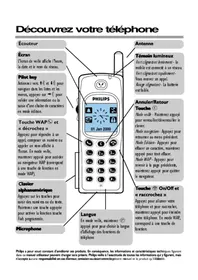
- LE PHILIPS SAVVY
- BIENVENUE
- À L'INTÉRIEUR
- AVANT DE COMMENCER
- POUR COMMENCER
- PLUS DE FONCTIONS
- SERVICES SUPPLÉMENTAIRES ORANGE
- UTILISER VOTRE TÉLÉPHONE À L'ÉTRANGER
- RÉFÉRENCE
- DÉPANNAGE ET INDEX
- INSÉREZ VOTRE CARTE SIM
- À PROPOS DE LA CARTE SIM
- NOTEZ LE NUMÉRO DE LA CARTE SIM
- RETIREZ LA CARTE SIM DE SON SUPPORT
- INSERTION DE LA CARTE SIM
- INSTALLEZ ET CHARGEZ LA BATTERIE DU TÉLÉPHONE
- INSTALLATION DE LA BATTERIE
- INSTALLATION DU CACHE DE LA BATTERIE
- CHARGEMENT DE LA BATTERIE
- RETRAIT DE LA BATTERIE
- ENREGISTREMENT AUPRÈS D'ORANGE
- NUMÉRO DE CARTE SIM
- NUMÉRO IMEI / NUMÉRO DE SÉRIE
- CLIENTS JUST TALK
- CLIENTS TALK PLAN, BOXED & READY, EVERYDAY
- VOTRE NUMÉRO DE TÉLÉPHONE ORANGE
- MISE À JOUR SIM
- L'ÉCRAN DU TÉLÉPHONE
- PASSER ET RECEVOIR DES APPELS
- ALLUMER
- RÉGLER L'HORLOGE
- PASSER UN APPEL
- TERMINER UN APPEL
- RÉPONDRE À UN APPEL
- OCCUPER UN APPEL
- AUGMENTER/DIMINUER LE VOLUME DE L'ÉCOUTEUR
- IDENTIFICATION DE L'APPELANT
- COMPRENDRE LES MENUS
- EXPLORER LE NIVEAU SUPÉRIEUR DES MENUS
- EXPLORER LES DEUXIÈME ET TROISIÈME NIVEAUX DE MENUS
- EXPLORER LA CARTE DES MENUS
- LES DEUX PREMIERS NIVEAUX DE LA CARTE DES MENUS
- ENREGISTRER UN NOM ET UN NUMÉRO
- ACCÉDER À VOTRE RÉPERTOIRE
- UTILISER VOTRE RÉPONDEUR
- ÉCOUTE DE VOS MESSAGES DU RÉPONDEUR
- PERSONNALISEZ LE MESSAGE D'ACCUEIL DE VOTRE RÉPONDEUR
- APPELER LE RÉPONDEUR DEPUIS UN AUTRE TÉLÉPHONE
- CONFIGURER LE CODE PIN DU RÉPONDEUR
- NUMÉROTATION VOCALE
- ENREGISTRER UN NOM ET UN NUMÉRO AVEC UNE ÉTIQUETTE VOCALE
- AJOUTER UNE ÉTIQUETTE VOCALE À UNE ENTRÉE EXISTANTE
- POUR SUPPRIMER UNE ÉTIQUETTE VOCALE
- AUTRES FONCTIONS ESSENTIELLES
- RAPPEL
- NUMÉRO PERSONNEL
- VERROUILLAGE DU CLAVIER
- POUR ALLER PLUS LOIN
- CONFIGURER LES CODES DE SÉCURITÉ
- PIN (NUMÉRO D'IDENTIFICATION PERSONNEL)
- POUR CHANGER LE CODE PIN
- POUR CONFIGURER VOTRE TÉLÉPHONE AFIN QUE LE CODE PIN SOIT DEMANDÉ À CHAQUE FOIS QUE VOUS L'UTILISEZ
- VOUS VERREZ CODE CORRECT
- CODES PUK (8 CHIFFRES)
- NUMÉROTATION ABRÉGÉE
- CONFIGURER UNE NUMÉROTATION ABRÉGÉE
- SUPPRIMER UNE NUMÉROTATION ABRÉGÉE
- ENVOYER UN MESSAGE TEXTE OU UNE IMAGE
- ENVOYER UN MESSAGE TEXTE
- CONFIRMER LA RÉCEPTION D'UN MESSAGE TEXTE ENVOYÉ
- ENVOYER, SUPPRIMER OU MODIFIER UN MESSAGE ENREGISTRÉ
- ENVOYER UN MESSAGE PRÉPROGRAMMÉ
- MESSAGES AVEC IMAGES - LES UTILISATEURS NON SAVVY PEUVENT LES RECEVOIR SOUS FORME DE CARACTÈRES TEXTE
- LIRE UN MESSAGE TEXTE OU AVEC IMAGE
- LIRE UN NOUVEAU MESSAGE TEXTE
- CONSULTER VOTRE RÉPERTOIRE
- MODIFIER OU SUPPRIMER UN NOM OU UN NUMÉRO
- OPTIONS EN COURS D'APPEL
- RECOMPOSITION AUTOMATIQUE
- ENREGISTRER UN NUMÉRO DANS LE BLOC-NOTES
- APPEL EN ATTENTE
- PERSONNALISER VOTRE TÉLÉPHONE
- RÉGLAGE DE L'HORLOGE
- VOUS POUVEZ UTILISER VOTRE TÉLÉPHONE COMME RÉVEIL
- DÉSACTIVATION DE L'ALARME
- RÉGLAGE DE L'ALARME SUR ARRÊT
- RÉGLAGE DU VOLUME DE LA SONNERIE / ALERTE VIBRANTE
- VOUS POUVEZ RÉGLER LE TÉLÉPHONE POUR QU'IL ÉMETTE UN SON À CHAQUE PRESSION SUR UNE TOUCHE
- ORGANISEZ VOS APPELS
- CONSULTEZ LES APPELS RÉCENTS
- LES ICÔNES INDIQUENT LE TYPE D'APPELS
- VÉRIFIER LA DURÉE DE VOS APPELS
- RENVOI D'APPEL
- ANNULER TOUS LES RENVOIS ET RECEVOIR LES APPELS
- POUR FIXER LES NOMS QUI PEUVENT ÊTRE APPELÉS
- POUR ACTIVER LE 'RÉPERTOIRE DE NOMS FIXES
- POUR DÉSACTIVER LE 'RÉPERTOIRE DE NOMS FIXES
- UTILISATION DE LA CALCULATRICE
- UTILISATION DU CHRONOMÈTRE
- UTILISATION DU JEU D'HOROSCOPE
- TONALITÉS (DTMF - DUAL TONE MULTI FREQUENCY)
- TIRER LE MEILLEUR PARTI D'ORANGE
- APPELER À L'ÉTRANGER DEPUIS LE ROYAUME-UNI
- POUR PASSER UN APPEL INTERNATIONAL
- ACCESSOIRES ORANGE
- SERVICES D'INFORMATION ORANGE
- PAR MESSAGES TEXTE
- PAR MESSAGES VOCAUX
- PAR SMS VIA UN MENU MIS À JOUR
- SPORT
- MODE DE VIE
- FINANCE
- ACTIVATION DE L'ITINÉRANCE
- LISTE DE CONTRÔLE AVANT DE VOYAGER
- SÉLECTION DU RÉSEAU
- PAIEMENT DE VOS APPELS ET MESSAGES TEXTE
- RÉCEPTION D'UN APPEL
- VOTRE FACTURE
- RÉDUCTION DES COÛTS D'APPEL
- UTILISEZ VOTRE TÉLÉPHONE EN TOUTE SÉCURITÉ
- UTILISATION QUOTIDIENNE DE VOTRE TÉLÉPHONE
- UTILISATION DE VOTRE TÉLÉPHONE ORANGE DANS UN VÉHICULE
- INSTALLATION DU KIT VOITURE
- RAYONNEMENT NON IONISANT
- APPELS D'URGENCE
- NUMÉROTATION D'URGENCE À UNE TOUCHE
- ENVIRONNEMENT D'UTILISATION
- STIMULATEURS CARDIAQUES
- PROTHÈSES AUDITIVES
- AUTRES ÉQUIPEMENTS MÉDICAUX
- SÉCURITÉ À BORD DES AVIONS
- MATÉRIAUX EXPLOSIFS
- ENTRETIEN DU TÉLÉPHONE ET DE LA BATTERIE
- PAPERASSE
- RETOUR DU TÉLÉPHONE SOUS 14 JOURS (NON DISPONIBLE AVEC JUST TALK) S'APPLIQUE UNIQUEMENT AUX NOUVEAUX TÉLÉPHONES ET EXCLUT LES MISES À NIVEAU ET LES TÉLÉPHONES RECONDITIONNÉS
- PROTECTION DES DONNÉES
- PRÉLÈVEMENT AUTOMATIQUE
- FORMULAIRE D'ACCÈS PERSONNEL / FORMULAIRE D'AUTORISATION DE MODIFICATION
- GUIDE DES PRIX
- CARE – ASSURANCE TÉLÉPHONE ET GARANTIE
- CARE COMPREND
- ASSURANCE TÉLÉPHONIQUE DE 12 MOIS
- REMPLACEMENT DU TÉLÉPHONE SOUS 24 HEURES
- GARANTIE DU FABRICANT
- CONDITIONS GÉNÉRALES DE CARE
- INTERPRÉTATION
- ASSURANCE - TÉLÉPHONES PERDUS, VOLÉS ET ENDOMMAGÉS
- GARANTIE - DÉFAUTS DE MATÉRIAUX OU DE FABRICATION
- CLIENTS TALK PLAN ET EVERYDAY
- DURÉE ET PAIEMENTS - FORFAITS DE SERVICE INCLUANT ORANGE CARE
- DURÉE ET PAIEMENTS - FORFAITS DE SERVICE FACTURÉS MENSUELLEMENT AVEC ORANGE CARE EN OPTION
- DURÉE ET PAIEMENTS - JUST TALK
- CHANGEMENT ENTRE FORFAITS MENSUELS
- ÉLIGIBILITÉ
- CARE
- EXCLUSIONS
- GENERAL
- TALK PLAN AND EVERYDAY 50 CUSTOMERS
- CONDITIONS GÉNÉRALES DE JUST TALK
- DÉFINITIONS
- ACCESSOIRES
- FRAIS
- CONNEXION
- DOCUMENTATION CLIENT
- BON JUST TALK
- RÉSEAU
- ORANGE
- TÉLÉPHONE
- ENREGISTREMENT
- SERVICES
- CARTE SIM
- SUSPENSION
- UTILISATEUR
- FOURNITURE DES SERVICES
- BONS JUST TALK
- NOTRE DROIT DE RÉSILIER VOS SERVICES
- VOS RESPONSABILITÉS
- INFORMATIONS FOURNIES PAR VOUS
- ANNUAIRE ET IDENTIFICATION DE L'APPELANT
- TÉLÉPHONES
- MODIFICATIONS
- CESSION ET CHANGEMENT DE PROPRIÉTAIRE DU TÉLÉPHONE
- RESPONSABILITÉ
- DISPOSITIONS GÉNÉRALES
- CONDITIONS GÉNÉRALES D'ORANGE
- COMPTE
- BLOCAGE
- CONTRAT
- DÉPÔT
- LIGNE UN ET LIGNE DEUX
- DURÉE MINIMALE
- TOUS LES CLIENTS ORANGE
- DATE DE FACTURATION MENSUELLE
- FORFAIT
- ITINÉRANCE
- SIM
- VOTRE CONTRAT ET LA DURÉE MINIMALE : VOTRE CONTRAT COURT SUR AU MOINS 12 MOIS
- CE QUI SE PASSE À LA FIN DE LA DURÉE MINIMALE
- FOURNITURE DES SERVICES : CE QUE NOUS VISONS À FOURNIR AU ROYAUME-UNI
- LES SERVICES PEUVENT PARFOIS ÊTRE AFFECTÉS PAR DES OPÉRATIONS DE MAINTENANCE ET DE MISE À NIVEAU
- SUSPENSION DES SERVICES EN CAS DE NON-RESPECT DU CONTRAT
- SUSPENSION DES SERVICES SUPPLÉMENTAIRES ORANGE
- SURVEILLANCE DES SERVICES QUE VOUS UTILISEZ
- SERVICES D'ITINÉRANCE HORS DU ROYAUME-UNI
- VOS DROITS DE RÉSILIER CE CONTRAT RÉSILIATION DU CONTRAT APRÈS LA DURÉE MINIMALE
- RÉSILIATION DU CONTRAT PENDANT LA DURÉE MINIMALE
- RÉSILIATION DE VOTRE CONTRAT PARCE QU'ORANGE A MODIFIÉ SES CONDITIONS
- RÉSILIATION DE VOTRE CONTRAT PAR ORANGE
- DÉCONNEXION DE VOTRE SERVICE PAR NOS SOINS SANS PRÉAVIS ÉCRIT
- RÉSILIATION PARCE QU'ORANGE N'EST PLUS EN MESURE DE FOURNIR L'ACCÈS À NOTRE RÉSEAU
- RÉSILIATION ET LIGNE DEUX
- APRÈS LA RÉSILIATION QUE FAIRE APRÈS LA RÉSILIATION DE VOTRE CONTRAT
- VOS RESPONSABILITÉS LORSQUE VOS PAIEMENTS SONT DUS
- PÉNALITÉS POUR RETARD DE PAIEMENT
- MÉTHODES DE PAIEMENT
- CHOSES QUE VOUS ACCEPTEZ DE FAIRE
- UTILISATEURS MULTIPLES
- LIGNE DEUX - LIMITATIONS D'UTILISATION SUSPENSION DES SERVICES
- MESSAGES TEXTE
- INFORMATIONS QUE VOUS FOURNISSEZ : LES DÉTAILS QUE VOUS NOUS DONNEZ DOIVENT ÊTRE CORRECTS
- QUE SE PASSE-T-IL SI NOUS SOUPÇONNONS QUE LES DÉTAILS QUE VOUS NOUS AVEZ FOURNIS NE SONT PAS CORRECTS
- ÉVALUATIONS DE CRÉDIT : VOTRE DEMANDE EST SOUMISE À UNE ÉVALUATION DE VOTRE SITUATION DE CRÉDIT
- CAUTION : LES CAUTIONS SONT CONSERVÉES PENDANT 12 MOIS
- CARTE SIM : IL EST DE VOTRE RESPONSABILITÉ DE GARDER VOTRE CARTE SIM EN SÉCURITÉ
- QUE FAIRE SI VOTRE CARTE SIM EST PERDUE, VOLÉE OU ENDOMMAGÉE
- VOTRE CARTE SIM ET LES AUTRES RÉSEAUX
- ANNUAIRE ET IDENTIFICATION DE L'APPELANT : QUE FAIRE SI VOUS SOUHAITEZ QUE VOTRE NUMÉRO RESTE PRIVÉ
- TÉLÉPHONES : VOTRE TÉLÉPHONE NE FAIT PAS PARTIE DE VOTRE CONTRAT
- MODIFICATIONS DE VOTRE CONTRAT : NOUS NOUS RÉSERVONS LE DROIT D'APPORTER DES MODIFICATIONS À VOTRE CONTRAT
- NOUVEAUX SERVICES
- DOCUMENTATION CLIENT : VEUILLEZ LIRE TOUTES LES INFORMATIONS QUE NOUS VOUS ENVOYONS
- CESSION DU CONTRAT ET CHANGEMENT DE PROPRIÉTAIRE DU TÉLÉPHONE. VOTRE CONTRAT EST PERSONNEL
- CIRCONSTANCES DANS LESQUELLES NI L'UNE NI L'AUTRE DES PARTIES N'ACCEPTE DE RESPONSABILITÉ
- RESPONSABILITÉ MAXIMALE D'ORANGE
- FACTEURS INDÉPENDANTS DE NOTRE VOLONTÉ
- VOTRE RESPONSABILITÉ MAXIMALE
- GÉNÉRALITÉS
- MODIFICATIONS DE VOTRE CONTRAT
- DIVULGATION D'INFORMATIONS À DES TIERS
- COMMUNICATION DES AVIS
- LITIGES ENTRE VOUS ET NOUS
- COORDONNÉES DE LA SOCIÉTÉ ORANGE
- DROIT APPLICABLE
- DÉPANNAGE
- IMPOSSIBLE DE PASSER DES APPELS
- VOTRE CARTE SIM EST-ELLE ENREGISTRÉE
- VOTRE TÉLÉPHONE EST-IL ALLUMÉ
- VOTRE BATTERIE EST-ELLE CHARGÉE
- VÉRIFIEZ LE NUMÉRO QUE VOUS APPELEZ
- ÊTES-VOUS DANS UNE ZONE DE COUVERTURE
- AVEZ-VOUS APPUYÉ SUR
- ENTENDEZ-VOUS TROIS TONALITÉS ASCENDANTES
- ENTENDEZ-VOUS DES BIPS RAPIDES
- ENTENDEZ-VOUS UNE TONALITÉ CONTINUE
- IMPOSSIBLE DE RECEVOIR DES APPELS
- AVEZ-VOUS TRANSFÉRÉ VOS APPELS
- QUAND JE REÇOIS UN APPEL, LE TÉLÉPHONE NE SONNE PAS
- BATTERIE
- COMBIEN DE TEMPS DOIS-JE CHARGER MA BATTERIE LA PREMIÈRE FOIS
- POURQUOI N'AI-JE PAS AUTANT D'AUTONOMIE DE BATTERIE QUE PRÉVU
- MON TÉLÉPHONE NE SEMBLE PAS SE CHARGER
- CODES DE SÉCURITÉ
- À QUOI SERVENT TOUS CES CODES
- MON CODE DE SÉCURITÉ ET/OU MON CODE PIN ONT CHANGÉ
- MON TÉLÉPHONE N'ACCEPTE PAS LES CODES
- MON TÉLÉPHONE EST BLOQUÉ
- JE N'ARRIVE PAS À CHANGER MON CODE PIN
- RÉPONDEUR
- QUE SIGNIFIE LE SYMBOLE O.O SUR MON ÉCRAN
- POURQUOI LE SYMBOLE DE LA BOBINE MET-IL SI LONGTEMPS À APPARAÎTRE POUR M'ALERTER D'UN NOUVEAU MESSAGE
- JE PENSAIS QUE LE RÉPONDEUR ÉTAIT GRATUIT MAIS IL Y A DES FRAIS SUR MA FACTURE
- JE NE PEUX PAS RÉCUPÉRER MES MESSAGES DEPUIS UN TÉLÉPHONE FIXE
- MON SYMBOLE DE BOBINE NE DISPARAÎT PAS
- MÉMOIRE
- PUIS-JE MASQUER MON IDENTIFICATION D'APPELANT LORSQUE JE PASSE DES APPELS
- RENVOIS D'APPELS
- JE NE VEUX PAS QUE LES APPELS SOIENT RENVOYÉS VERS MON RÉPONDEUR
- TÉLÉPHONE ET AFFICHAGE
- QUE SIGNIFIE LE SYMBOLE DU ROULEAU
- QUE SIGNIFIE LE SYMBOLE DE L'ENVELOPPE
- L'ENVELOPPE CLIGNOTE
- CARTE SIM BLOQUÉE
- INSÉRER LA CARTE SIM
- LE VOLUME DE L'ÉCOUTEUR EST TROP FAIBLE
- LA SONNERIE EST TROP FAIBLE
- INDEX
- A
- B
- C
- D
- E
- F
- P
- R
- S
- U
- V
- W
- USEFUL NUMBERS
- ORANGE PERSONAL COMMUNICATIONS SERVICES LTD
Marque : PHILIPS
Modèle : SAVVY
Catégorie : Téléphone mobile