
HBM 260 - Casque sans fil LG - Notice d'utilisation et mode d'emploi gratuit
Retrouvez gratuitement la notice de l'appareil HBM 260 LG au format PDF.

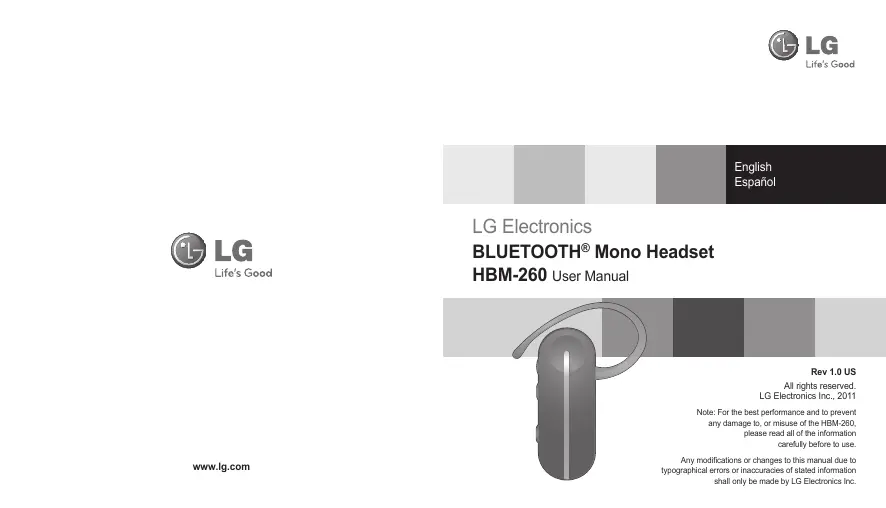


| Type de produit | Casque sans fil Bluetooth® mono |
| Marque | LG |
| Modèle | HBM 260 |
| Technologie Bluetooth | V3.0 (profils casque, mains-libres, A2DP) |
| Autonomie en communication | Jusqu'à 10 heures |
| Autonomie en veille | Jusqu'à 600 heures |
| Temps de charge | Moins de 2 heures |
| Type de batterie | Li-Polymère 3,7V, 125 mAh |
| Dimensions | 18,6 mm (L) x 48 mm (H) x 10,1 mm (P) |
| Poids | 9,2 g |
| Température de fonctionnement | -10°C à 60°C |
| Haut-parleur HD | Oui (voix HD et streaming audio HD) |
| Multipoint avancé | Connexion simultanée à deux appareils |
| Fonctions | Répondre/appeler, rejet d'appel, mise en attente, transfert d'appel, rappel du dernier numéro, composition vocale, sourdine micro, lecteur SMS (Android) |
| Indicateur LED | État de charge, appairage, connexion, batterie faible |
| Contenu de l'emballage | Casque, tour d'oreille, chargeur, manuel, carte de garantie |
| Entretien et nettoyage | Ne pas exposer à l'eau, alcool, benzène. Utiliser un chiffon sec. Ne pas démonter. |
| Sécurité | Respecter les consignes RF, ne pas utiliser dans des zones explosives, recycler la batterie. |
| Pièces détachées et réparabilité | Ne pas réparer soi-même. Contacter un centre agréé LG. Garantie limitée 1 an. |
| Informations générales | Conforme FCC et CE. Batterie Li-Polymère recyclable. |
FOIRE AUX QUESTIONS - HBM 260 LG
Questions des utilisateurs sur HBM 260 LG
0 question sur cet appareil. Repondez a celles que vous connaissez ou posez la votre.
Poser une nouvelle question sur cet appareil
Téléchargez la notice de votre Casque sans fil au format PDF gratuitement ! Retrouvez votre notice HBM 260 - LG et reprennez votre appareil électronique en main. Sur cette page sont publiés tous les documents nécessaires à l'utilisation de votre appareil HBM 260 de la marque LG.
MODE D'EMPLOI HBM 260 LG

LG
Life's Good
English
Espanol
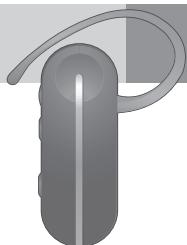
LG Electronics
BLUETOOTH® Mono Headset
HBM-260 User Manual
Rev 1.0 US
All rights reserved.
LG Electronics Inc., 2011
Note: For the best performance and to prevent
any damage to, or misuse of the HBM-260
please read all of the information
carefully before to use.
Any modifications or changes to this manual due to typographical errors or otherwise shall only be made by LG Electronics Inc.
Table of Contents
Introduction 3
-Included in Package 3
Description of parts 4
How to use 4
-
Change direction 4
-
Charging 5
-
Low battery 5
-
Battery status alert 5
-
Power on 5
-
Power off 5
-
Pairing 6
-
Auto-reconnect 7
-
Volume control 7
-
Calling 7
-
Answering a call 7
Making a call 7
Voice dialing 8
- Last number redial 8
Ending a call 8
Transferring a call 8
Call waiting 8
-
Call reject 8
-
Mic mute 8
-
Advanced multipoint 9
-
Audio streaming (A2DP) 10
-
HD speaker 10
-
SMS reader 10
Summary of button functions 11
LED indication 12
Troubleshooting 12
Specification 13
Precautions 13
Declaration of confirmation 14
Additional information 14
Limited warranty 17
Important safety information 17
Introduction
The LG Bluetooth® Headset HBM-260 is a light weight wireless headset that uses Bluetooth® technology.
This product can be used as an audio accessory for devices that support the headset or hands-free Bluetooth® profiles.
Included in the package
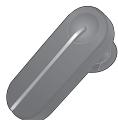
LG HBM-260
Bluetooth® Headset
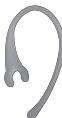
Ear loop
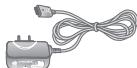
Charger
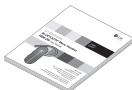
User manual
Warranty Card
Description of parts
Front
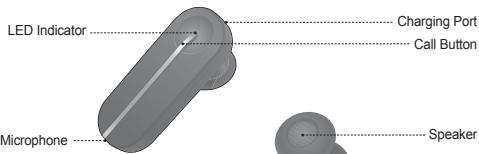
Back
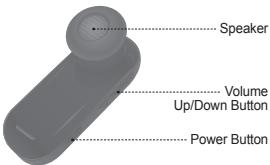
How to use
Change direction
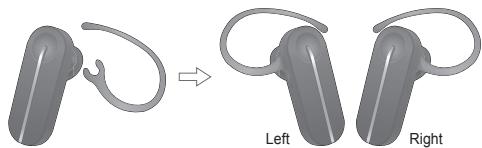
How to use
Charging
- When the charger is connected, with power on or off, the headset will turn off.
- While charging, the LED indicator will show a solid white light.
- The buttons will not function while the device is charging.
- It takes 2 hours to fully charge the headset.
- When charging is complete, the LED indicator will turn off.
Low battery
- An announcement will play once every 2 minutes.
- If the battery is not charged, the headset will turn off.
Battery status alert
-
By pressing and holding the VOLUME DOWN button for 3 seconds, you can check the battery status of the HBM-260. The audible battery status alert will inform you of the battery level. There are 3 levels of battery power:
-
Battery High
- Battery Medium
- Battery Low
Power on
- Press and hold the POWER button for 3 seconds.
The power will turn on and a startup tone will play. - The audible battery status alert will let you know the battery level.
Power off
- Press and hold the POWER button for 3 seconds.
- A shutdown tone will play, the Bluetooth link will disconnect and the power will turn off.
How to use
Pairing
- Before using the headset for the first time, it must be paired with a Bluetooth enabled device.
- There are 2 pairing modes with the HBM-260.
1) Easy Pairing
a) Press and hold the POWER button for 3 seconds to turn on the HBM-260.
b) The headset will enter auto-reconnect mode for 10 seconds. (If your headset has already been paired with a device, the headset will automatically reconnect to the device when the HBM-260 is powered on.)
c) After 10 seconds, the HBM-260 will automatically enter pairing mode.
d) When the headset enters pairing mode, the LED indicator will show a solid white light.
e) Using your handset, find the Bluetooth menu and "search for" or "add" new devices.
f) Select "LG HBM-260" from the list of devices to pair it with your device.
g) If you are asked for a passkey or PIN during pairing, please enter "0000" (4 zeros).
h) Once the devices are paired, you will hear "Headset paired".
i) After pairing has been completed, make sure you "connect" to the LG HBM-260.
j) If you want to pair with a different device in the future, the headset must be placed into pairing mode.
k) If the headset is in pairing mode for 3 minutes without being connected to a device, the HBM-260 will automatically turn off.
2) Manual Pairing
a) With the power off, press and hold the POWER button for 6 seconds.
b) Continue pairing process from letter e above.
Auto-reconnect
- If the HBM-260 is turned off (either accidentally or intentionally) while connected, the headset will disconnect form the device.
The headset and handset will automatically reconnect when the HBM-260 is turned back on (provided that both devices are within the required range of 33 feet (10 meters)).
Out of range
- When the connected device and the HBM-260 are separated by a range of 33 feet (10 meters) or more, the headset will alert the user with a beep, and the headset and device will disconnect.
When the device and the HBM-260 are within the required range again, the HBM-260 will automatically reconnect to the handset. - If the headset and device do not automatically reconnect when they are back within the required range, briefly press the CALL button on the HBM-260 to reconnect manually.
- While trying to reconnect, your headset will beep and the LED indicator will flicker twice every 5 seconds.
- If the headset does not reconnected within 60minutes, it will be turned off.
Volume control
- Press the VOLUME UP or VOLUME DOWN button to adjust the speaker volume.
- There are eight levels of speaker volume.
Calling
Answering a call
- When there is an incoming call, the headset will ring.
- Briefly press and release the CALL button to answer the incoming call.
Making a call
- If you make a call from the connected handset, the call will (depending on the phone settings) automatically transfer to the headset. If the call is not automatically transferred, you can manually transfer the call by briefly pressing the CALL button on the HBM-260 (handset and headset must be paired).
How to use
Voice dialing
- Briefly press the CALL button to activate "Voice dialing".
For best results, record the voice dialing tag through your headset.
NOTE: If your handset does not support voice dialing, this action may activate Last
Number Redial.
Last number radial
- Press and hold the CALL button for 1 second to activate "Last number radial".
The headset will beep and then call the last number dialed.
Ending a call
- Briefly press the CALL button.
Transferring a call
- While on a call on your handset, briefly press the CALL button to transfer the audio to the headset (the headset and handset must be paired).
- To transfer a call from the headset to handset, press and hold the VOLUME UP button for 3 seconds.
Call waiting
- Answer a second call without hanging up the first by pressing the CALL button for 1 second (You will hear a beep). Press the CALL button for 1 second to return to the original call.
- Briefly press the CALL button to end the active call or both calls at once. (subject to handset support)
Call reject
-
Activate call reject by pressing the CALL button for 1 second when the handset rings.
-
These functions may only be used if your handset supports them.
For further information about using these features, please consult your handset's user manual.
Mic mute
- Press and hold the VOLUME UP and VOLUME DOWN buttons simultaneously for 1 second to mute/unmute the mic during conversation.
Advanced multipoint
The HBM-260 is capable of having two devices connected to the headset at the same time. This will give you the freedom of using call waiting between calls on both of your connected phones.
Connection
- Pair the headset with one of your Bluetooth-enabled handsets. (per the pairing instructions on page 6).
- Turn off the headset.
- With the power off, press and hold the CALL button on the HBM-260 for 6 seconds to enter Manual Pairing mode.
- Now, pair and connect the headset with your other Bluetooth-enabled handset. (This will be your primary handset).
-
Once this handset is paired and connected, go back and connect the originally paired handset to the headset. (This will now be your secondary handset).
-
NOTE: When the HBM-260 is connected to two handsets at the same time(multipoint), the headset calling functions will work with the primary handset (or handset which made the last outgoing call).
Calling function
- Voice dialing and Last Number Redial features work with the primary handset (or handset which made the last outgoing call).
- The device which made the last outgoing call will always be set as the primary handset.
Call waiting
- While speaking on an active call, Press the call button for 1 second to switch to an incoming call.
- To switch between 2 active calls, Press the call button for 1 second.
- To end both calls briefly press the call button.
- If both handsets are receiving an incoming call, the headset will default to the primary device.
Audio streaming (A2DP)
The HBM-260 supports music streaming (A2DP).
When you play music from your Bluetooth Enabled Device, it will automatically transfer to your headset. Music will automatically pause when you have an incoming call. When the call is ended the music will start playing again.
A2DP allows streaming of all audio from your handset and running applications Including Music and GPS Navigation.
HD speaker
The HBM-260 supports high definition voice calling and audio streaming.
*Network must support HD Voice for higher quality calling.
SMS reader
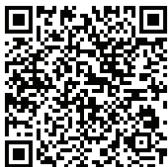
The HBM-260 Bluetooth Headset supports SMS reading on Android ^TM based devices.
In the Android™ Marketplace search for the LG 'BT Reader' application and install on your device to use this function.
- The 2D barcode shown below helps you download the 'BT Reader' application from Android MarketTM.
| Function | HBM-260 Status | Action |
| Power on | Power off | Press the POWER button for 3 seconds. |
| Power off | Power on | Press the POWER button for 3 seconds. |
| Volume up | Talking | Briefly press the VOLUME UP button. |
| Volume down | Talking | Briefly press the VOLUME DOWN button. |
| Transferring a call | Talking | - Headset to headset Briefly press the CALL button. (must be paired) - Headset to handset Press and hold the VOLUME UP button for 3 seconds. |
| Answering a call | Ringing | Briefly press the CALL button. |
| Ending a call | Talking | Briefly press the CALL button. |
| Call waiting | Talking | Press the CALL button for 1 second. |
| Last number radial | Idle | Press the CALL button for 1 second. |
| Voice dialing (handset must support) | Idle | Briefly press the CALL button. |
| Call reject | Ringing | Press the CALL button for 1 second. |
| Mic on/off | Talking | Press and hold VOLUME UP and VOLUME DOWN buttons simultaneously for 1 second. |
| Pairing mode (Manual) | Power off | Press the CALL button for 6 seconds. |
| Battery status check | Idle | Press the VOLUME DOWN button for 3 seconds. |
LED indication
| Function | HBM-260 Status | Action |
| Operating | Power on | The LED will flash 4 times. |
| Power off | The LED will flash 4 times and then turns off. | |
| Pairing mode | The LED stays on. | |
| Headset / Hands-Free / A2DP profile connected | The LED will flash twice every 5 seconds. | |
| Call connected | The LED will flash twice every 5 seconds. | |
| Out of range | For the first 15 minutes after the devices are disconnected the LED will flash twice every 5 seconds. After that it will flash once every 5 seconds. | |
| Charging | Charging | The LED stays on. |
| Charging complete | The LED turns off. |
Troubleshooting
| Issue | Possible problem | Resolution |
| Does not turn on | Check whether the battery of the HBM-260 is fully charged. | Charge the battery. |
| Unable to communicate with the LG HBM-260 | Check whether the device supports the headset or hands-free Bluetooth profiles. | Determine whether your device supports the Headset or Hands-free Bluetooth profiles. |
| Check whether the battery of the HBM-260 is low. | Charge the battery. | |
| Unable to pair the HBM-260 with Bluetooth® device | Check and make sure the Headset is on. | Press and hold the POWER button for at least 3 seconds to turn on the headset. |
| Check and make sure the Headset is placed in pairing mode. | With the power off, press and hold the POWER button for 6 seconds to manually place the headset in pairing mode. | |
| Low sound (speaker) | Check the speaker volume. | Increase the volume level. |
| Not to hear audio streaming | Check whether other device is streaming. | Stop other device streaming. |
Specification
| Item | Description |
| Bluetooth® specification | V3.0 (Headset / Hands-Free / A2DP Profiles) |
| Battery | 3.7V, Li-Polymer, 125mAh |
| Talk Time | Up to 10 Hrs |
| Stand by time | Up to 600 Hrs |
| Charging time | < 2 hours |
| Operation temperature | -10°C ~ 60°C |
| Dimension / weight | 18.6mm(W) x 48mm(L) x 10.1mm(H) / 9.2g |
Precautions
Do not drop the device.
Do not modify, repair, or disassemble.
Do not expose directly to water, alcohol, benzene, etc. for cleaning.
Do not expose directly to flammables.
Do not place or keep the device near flammables.
Keep the device away from humidity and dust.
Do not place heavy objects on the device.
Only use the headset with an original LG charger, otherwise it may be damaged.
- Changes or modifications not expressly approved by the party responsible for compliance could void the user's authority to operate the equipment.
- The earloop is made of a durable plastic. However, bending the earloop repeatedly is not recommended.
Declaration of Confirmation
FCC NOTICE TO USERS:
This device complies with part 15 of the FCC rules.
Operation is subject to the following two conditions:
(1) This device may not cause harmful interference and
(2) This device must accept any interference received, including interference that may cause undesired operation.
IMPORTANT NOTE:
To comply with the FCC RF exposure compliance requirements, no change to the antenna or the device is permitted. Any change to the antenna or the device could result in the device exceeding the RF exposure requirements and void user's authority to operate the device.
CE NOTICE TO USERS:
Hereby, LG Electronics Inc. declares that the HBM-260 is in compliance with the essential requirements and other relevant provisions of Directive 1999/5/EC.

Bluetooth
C∈1177
FCC ID:BEJHBM260
Additional Information
1. Radio frequency exposure
This Bluetooth® Headset HBM-260, is a radio transmitter and receiver. When in operation it communicates with a Bluetooth® equipped mobile device by receiving and transmitting radio frequency (RF) electromagnetic fields (microwaves) in the frequency range 2.4 to 2.4835 GHz. The output power of the radio transmitter is low (0.001 watts). Your Bluetooth® Headset is designed to operate in compliance with the RF exposure guidelines and limits set by national authorities and international health agencies when used with any compatible LG Electronics mobile phone.
Additional Information
2. Potentially explosive atmosphere
Turn off your electronic device when in any area with a potentially explosive atmosphere. Although this is uncommon, your electronic device could generate sparks. Sparks in such areas could cause an explosion or fire resulting in bodily injury or even death. Areas with a potentially explosive atmosphere are often, but not always, clearly marked.
3. Emergency calls
IMPORTANT!
This Bluetooth® headset and the electronic device connected to the headset operate using radio signals, mobile and landline networks as well as user - programmed functions, which cannot guarantee connection under all conditions. Therefore you should never rely solely upon any electronic device for essential communications (e.g. medical emergencies). Remember, in order to make or receive calls, the headset and the electronic device connected to the headset must be switched on and in a service area with adequate mobile signal strength. Emergency calls may not be possible on all mobile phone networks or when certain network services and/or phone features are in use. Check with your local service provider.
4. Battery information
A rechargeable battery has a long service life if treated properly. A new battery or one that has not been used for a long period of time could have reduced capacity the first few times it is used. Do not expose the battery to extreme temperatures, never above +60^(+140^) or under -20^(-4^) . For maximum battery capacity, use the battery at room temperature. If the battery is used in low temperatures, the battery capacity will be reduced. The battery can only be charged in temperatures between +10^(+50^) and +45^(+113^) . For your safety, do not remove the battery incorporated in the product. If you need to replace the battery, take it to the nearest authorized LG Electronics service point or dealer for assistance.
5. Recycling the battery in your Bluetooth® headset
The battery in your Bluetooth® Headset must be disposed of properly and should never be placed in municipal waste. The LG Electronics service partner who removes the battery will dispose of it according to local regulations.
Additional Information
6. Conditions
- The warranty is valid only if the original receipt issued to the original purchaser by the dealer, specifying the date of purchase and serial number, is presented with the product to be repaired or replaced. LG Electronics reserves the right to refuse warranty service if this information has been removed or changed after the original purchase of the product from the dealer.
- If LG Electronics repairs or replaces the product, the repaired or replaced product shall be warranted for the remaining time of the original warranty period or for ninety (90) days from the date of repair, whichever is longer. Repair or replacement may involve the use of functionally equivalent reconditioned units. Replaced parts or components will become the property of LG Electronics.
- This Warranty does not cover any failure of the product due to normal wear and tear, or due to misuse, including but not limited to use in other than the normal and customary manner, in accordance with instructions for use and maintenance of the product. Nor does this warranty cover any failure of the product due to accident, modification or adjustment, acts of God or damage resulting from liquid.
- This warranty does not cover product failures due to improper repair installations, modifications or service performed by a non-LG Electronics authorised person. Tampering with any of the seals on the product will void the warranty.
THERE ARE NO EXPRESS WARRANTYES, WHETHER WRITTEN OR ORAL,OTHER THAN THIS PRINTED INCLUDING WITHOUT LIMITATION THE IMPLIED WARRANTYES OF MERCHANTABILITY OR FITNESS FOR A PARTICULAR PURPOSE,ARE LIMITED TO THE DURATION OF THIS LIMITED WARRANTY. IN NO EVENT SHALL LC ELECTRONICS OR ITS VENDORS BE LIABLE FOR INCIDENTAL OR CONSEQUENTIAL DAMAGES OF ANY NATURE WHATESOEVER,INCLUDING BUT NOT LIMITED TO LOST PROFITS OR COMMERCIAL LOSS,TO THE FULL EXTENT THOSE DAMAGES CAN BE DISCLAIMED BY LAW. - Some countries/states do not allow the exclusion or limitation of incidental or consequential damages, or limitation of the duration of implied warranties, so the preceding limitations or exclusions may not apply to you. The warranty provided does not affect the consumer's statutory rights under applicable national legislation in force, nor the consumer's rights against the dealer arising from their sales/purchase contract.
Limited warranty
Subject to the conditions of this Limited Warranty, LG Electronics warrants this product to be free from defects in design, material and workmanship at the time of its original purchase by a consumer, and for a subsequent period of one (1) year. Should your product need warranty service, please return it to the dealer from whom it was purchased or contact your local LG Electronics contact centre to get further information.
Important safety information
Avoiding hearing damage
Permanent hearing loss may occur if you use your headset at a high volume. Set the volume to a safe level. Over time you can become accustomed to a higher volume that may sound normal but can be damaging to your hearing. If you experience ringing in your ears or muffled speech, stop listening and have your hearing checked. The louder the volume, the less time is required before your hearing could be affected.
Hearing experts suggest that to protect your hearing:
- Limit the amount of time you use the headset at high volume.
- Avoid turning up the volume to block out noisy surroundings.
- Turn the volume down if you can't hear people speaking near you.
Using Headsets safely
Use of headsets to listen to music while operating a vehicle is not recommended and is illegal in some areas. Be careful and attentive whilst driving. Stop using this device if you find it disruptive or distracting whilst operating any type of vehicle or performing any other activity that requires your full attention.
Espanol
English
LG Electronics
Auricular monoaural BLUETOOTH®
HBM-260 Manual del usuario
Rev. 1.0 ESP
Todoos los Derechos reservados.
LG Electronics Inc., 2011
Nota: para encontrar un rendimiento optimal yEAR.
quelquier dafio o uso Incorrecto del auricular HBM-260,lea
entallmente la informacion antes de utilizing el producto.
De existir erros tipograficos o imprecensiones en la formación de información y el design. En general, como有人说, Inc.poda realizar reservos o modifications.
Contedio
Introduccion 3
- Contenido del embalaje 3
Descripción de las partes 4
Modo de uso 4
- Cambio de direccion 4
-Carga 5
-Bateria baja 5
-
Alerta del estado de bateria 5
-
Encender 5
-Apagar 5
-Asociacion 6
-
Reconexión automática 7
-
Control del volumen 7
-
Llamadas 7
-
Responder una llamada 7
Realizar una llamada 7
Marcado por voz 8
Remarcado delultimate numero 8
Finalizar una llamada 8
- Transferir una llamada 8
·Llamada enespera 8
- Rechazar una llamada 8
Silenciar microfono 8
-
Conexión avanzada de varios+puntos 9
-
Transmisión de audio (A2DP) 10
-Altavoz de HD 10
- Lector de SMS 10
Resumen de las functions de los botones 11
Indicación del LED 12
SolutiOn de problemas 12
Especification 13
Precauciones 14
Aviso de conformidad 14
Información adicional 15
Garantía limitada 18
Informacion importante de seguridad 18
Introduccion
El auricular Bluetooth® HBM-260 de LG es un dispositivo inalábrico muy liviano que utilizes la Tecnología Bluetooth®.
Puede utiliser como accesario de audio en dispositivos que admitan profiles de auriculares o manos libres Bluetooth®.
Contenido del embalaje
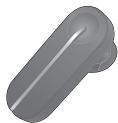
Auricular Bluetooth® HBM-260 de LG
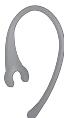
Patilla
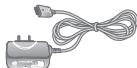
Cargador
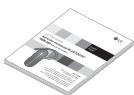
Manual del usuario
Documento de garantía
Descripción de las partes
Partefrontal
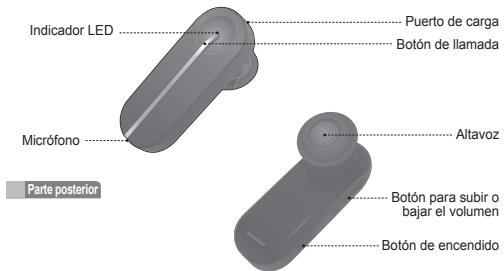
Modo de uso
Cambio de direccion
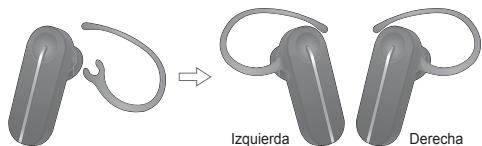
Modo de uso
Carga
Una vez連結 el cargador, con la unidad encendida o apagada, el auricular se encenderá.
- Mientras se esté cargando, el indicator LED做不到 una luz blanca.
- Mientras el dispositivo se está cargando, los botones no funciona arán.
- Lleva 2 horas cargar por completeness el auricular.
- Cuando la energia estáplete, elindicador LED se apagará.
Batería baja
- Se reproducirá un avis cada 2关键时刻.
- Si la batería no está cargada, el auricular se apagará.
Alerta del estado de bateria
-
Al Maintender presionado el boton para bajo el volumen durante 3 segundos, puede avercar el estado de la bateria del auricular HBM-260. La alerta audible del estado de bateria le informar el nivel de la bateria. Existen 3 niveles de energia de la bateria:
-
Nivel alto
- Nivel medio
- Nivel bajo
Encender
- Mantenga presionado el botón de encendido durante 3seguidos.
- La unidad se encenderá y se oirá un tono de inicio.
- La alerta audible del estado de batería le hará saber el nivel de la batería.
Apagar
- Mantenga presionado el botón de encendido durante 3seguidos.
- Se oira un tono de apagado, el enlace Bluetooth se desconectará y launities de apoptosis.
Asociación
- Antes de usar el auricular por primera vez, debe asociarlo a un téléphone con Bluetooth Habitatorio.
- Existen 2 modelos de assocacion con el auricular HBM-260.
1) Asociación fácil
a) Mantenga presionado el botón de encendido por 3 segundos para encender el auricular HBM-260.
b) El auricular ingresar en el modo de reconexión automatica durante 10 seguros.
(Si el auricular HBM-260 ya ha sido asociado con un dispositivo, cuandoonga en la auricular, se volverá a conectar automatistically al dispositivo).
c) Después de 10 segundos, el auricular HBM-260 ingresará automatistically al modo de asociación.
d) Cuando el auricular ingrese al modo de assocacion, elindicador LED做不到 una luz blanca.
e) Utilize el téléphone para巴斯car el menu Bluetooth y busque o agregue新品ospositivos.
f) SeLECTION "LG HBM-260" en la lista de dispositivos para asociarlo con su dispositivo.
g) Si se le solicita una clave de bajo PIN durante la asociación, introduzca "0000" (4 ceros).
h) Una vez que los dispositivos estén asociados, escurrchará "Auricular asociado".
i) Después de que la asociación haya finalizzato, asegúrese de connecter el auricular HBM-260 de LG.
j) Si DEA sa asociar el auricular con uno dispositivo, debe establecer el auricular en el modo de asociacion.
k) Si el auricular está en el modo de asociación durante tres Minutes sin conectarse a un dispositivo, se asignará automatistically.
2) Asociación manual
a) Mñana es auricular está apagado, mantenga presióndo el botón de encendido durante 6 seguros.
b) Continué el proceso de asociación desde la letra E de las instructiones anteriores.
Reconexión automática
- Si el auricular HBM-260 se apaga (ya sea intencional o accidentamente) cuando está condescerto, el auricular y el Telefono se desconectarán.
El auricular y el Telefono se volvær an conectar automatistically cuando se vuela a encender el auricular HBM-260 (siempre y cuando ambos dispositivos se encontrar 10 metros o 33 pies de distancia).
Fuera del radio de alcance
- Cuando el dispositivo asociado y el auricular HBM-260 se率达到 10 metros (33 pies) de distancia o más, el auricular le avisará al usuario mediante un sonido, y el auricular y el dispositivo se desconectarán.
Si el dispositivo y el auricular HBM-260 entran bajo el radio de alcance querqueado;nuevamente, este se voltera a connectar al Telefono en forma automatica. - Si no se vuela a conectar automatistically cuando vuelan a estar dentro del radio de alcance necessario, presione brevemente el botón de llamada del auricular HBM-260 para procerar una reconcciónmanual.
- Al intentar la Reconexión, el auricular emitirá un sonido y el indicador LED titilar 2 vezes cada 5 horas.
- Si el auricular no se vuye a conectar en 60 Minutes, se apagará.
Control del volumen
- Con los botones para subir y bajar el volumen, ajuste el volumen del altovoz.
- Existen 8 niveles de volumen para el altovoz.
Llamadas
Responder una llamada
- Cuando reciba una llamada entrada, el auricular comenzará a sonar.
- Presione brevemente el botón de llamada para contestar la llamada entrada.
Realizar una Ilamada
- Si realiza una llamada desde el Telefono asociado, esta (sujecta a la configuracion del Telefono) se transfiriere automatically al auricular. Si no se transfiere en forma automática,uede transfirirera manualmente al presionar brevemente el boton de llamada del auricular HBM-260 (el Telefono y el auricular deben estar asociados).
Modo de uso
Marcado por voz
- Presione brevamente el botón de llamada para activar el "Marcado por voz".
Para Obtener mejoras resultados, grabe la etiqueta de marcado por所提供 mediante el auricular.
NOTA: Si el Telefono no es compatible con el marcado por voz, es posible que, con estaccion, se active la referencia Remarcado delultimate numero.
Remarcado delultimate numero
- Mantegna presionado el botón de llamada por 1 segundo para activar el "Remarcado del número". El auricular emitirá un pido y, a continuación, llamará al número número.
Finalizar una llamada
- Presione brevamente el botón de llamada.
Transferir una llamada
- Durante una llama mediante el teléfon, presione brevemente el botón de llamada para transferir el audio al auricular. (El teléfon y el auricular deben estar asociados).
- Para Transferir una lamada del auricular al Telefono, mantegena presionado el botón para subir el volumen durante 3征求意见.
Llamada en espera
- Si presiona el botón de llamada durante 1 segundo, pueda responder la正宗a llamada sin cortar la prima (escuchará un pitido). Vuelva a presionar el botón de llamada durante 1 segundo yvoltara a la llamada original.
- Presione brevemente el botón de llamada para finalizarla la llamada activa o ambasllamadas a la vez (sujepto a la compatibiliad del Telefono).
Rechazar una llamada
- Para activar lamericana para rechazar una llamada, toque el boton de llamada por 1segundo cuando este sonado el Telefono.
*Estas functions se peuvent utiliser solamente si el Telefono las admite.
Para Obtener más información sobre estasuciones, consulte el manual del usuario del téléphone.
Silenciar micrófono
- Mantenga presionados los botones para subir y bajo el volumen simultanamente por 1 segundo para silenciar o anular el silencio del micrófondo durante la conversación.
Conexión avanzada de various punto
El auricular HBM-260 puede tener connectados dos dispositivos al mesmo tiempo. Esto le da la libertad de usar la función de llamada en espera entre las llamadas en los dostelefonos connectados.
Conexión
- Asocié le auricular con uno de sus Telefonos compatibles con Bluetooth (consulte las instruetiones de asociación en la頁a 6).
- Apague el auricular.
- Con el auricular apagado, mantegna presionado el botón de llamada del auricular HBM-260 durante 6这段时间 para pagar al modo de asociaciónmanual.
- Luego, proceda a asociar y conectar el auricular con el othero téléphone compatible con Bluetooth (este sera el Telefono principal).
-
Una vez asociado y connectado este Telefono, vuela a connectar el primer Telefono asociado en el auricular (esto sera el Telefono secundario).
-
NOTE: Cuando el auricular HBM-260 está connectado a dos Telefonos al mesmo tiempo (variosUNTOS), las sistemas de llamada del auricular seguirán las indications del Telefono principal (o Telefono con elrial se haya realizado la ultima llamada saliente).
Función de llamada
-Las/DDocado por voz y Remarcado del ultimate numero seguiar las indicaciones del Telefono principal (o Telefono con el cui se haya realizado la ultima lamada saliente).
- El disposito con que se haya realizado laULTima llamada saliente sempre estásteadecido comoeltelefonoprincipal.
Llamada en espera
- Mrientras se encontrar en una llama activa, presione el botón de llama por 1 segundo para responder una nuevo llama entrada.
- Para alternar entre las 2 clamadas activas, presione el botón de clamada por 1 segundo.
- Para finalizar ambas llamadas, presione brevemente el boton de llamada.
- Si ambos Telefonos reciben una llama entrante, el auricular respondera primero la llama del Telefono principal.
Modo de uso
Transmission de audio (A2DP)
El auricular HBM-260 admite la transmisión de música (A2DP).
Si reproduce música desde el dispositivo con Bluetooth hilabilitado, se transferirá automatísticamente al auricular. La reproduccion se paasará en forma automática cuandoonga una llamada entrada. La música se reproducirá;nuevamente cuando la llamada finalice.
A2DP permite la transmission de audio desde el téléphone y la ejaculation de aplicaciones, como aplicaciones de música y navigation por GPS.
Altavoz de HD
El auricular HBM-260 admite llamadas de voz y transmissions de audio de alta definccion.
- La redDebeadir la función de voz de HD para melhorar la calidad de las lllamadas.
Lector de SMS
El auricular Bluetooth HBM-260 admite la lecture de SMS en dispositivos basados en Android™.
En Android™ Marketplace, bajo la aplicación 'BT Reader' de LG e instálnea en su dispositivo para poder usar esta funciona.
- El SHORT de baras 2D que se mueira unaoothing aayada a descarga la aplicacion 'BT Reader' desde Andro MarketTM.

Resumen de las functions de los botones
| Función | Estado de HBM-260 | Acción |
| Encender | Apagado | Presione el botón de encendido durante 3seguidos. |
| Apagar | Encendido | Presione el botón de encendido durante 3seguidos. |
| Subir volumen | Hablando | Presione brevemente el botón para subir el volumen. |
| Bajar volumen | Hablando | Presione brevemente el botón para bajo el volumen. |
| Transferir una llamada | Hablando | - Del telófono al auricular Presione brevemente el botón de llamada (deben estar asociados). - Del auricular al telófono Mantenga presionado el botón para subir el volumen durante 3seguidos. |
| Responder una llamada | Sonando | Presione brevemente el botón de llamada. |
| Finalizar una llamada | Hablando | Presione brevemente el botón de llamada. |
| Llamada en espera | Hablando | Presione el botón de llamada durante 1segundo. |
| Volver a MARCAR elultimate número | Inactivo | Presione el botón de llamada durante 1segundo. |
| Marcado por voz (el Telefono deben admitir esta�能) | Inactivo | Presione brevemente el botón de llamada. |
| Rechazar una llamada | Sonando | Presione el botón de llamada durante 1segundo. |
| Encender/apagar el microfono | Hablando | Mantenga presionadoslos botones para subir y bajo el volumen en forma simulatabe durante 1segundo. |
| Modo de asociación (manual) | Apagado | Presione el botón de llamada durante 6seguidos. |
| Verficar el estado de la batería | Inactivo | Presione el botón para bajo el volumen durante 3seguidos. |
Indicación del LED
| Función | Estado de HBM-260 | Acción |
| En configuración | Encendido | El indicator LED titrará 4 veces. |
| Apagado | El indicator LED titrará 4 vezes y, a continuación, se apagará. | |
| Modo de asociación | El indicator LED permanecerá encendido. | |
| Perfil de auricular, manos libres, AZDP connectado | El indicator LED titrará 2 vezes cada 5seguidos. | |
| Llamada connectada | El indicator LED titrará 2 vezes cada 5seguidos. | |
| Fuera del radio de alcance | Descués de los primeros 15 Minutes de que sehayan desconnectado los dispositivos, el indicator LED titrará 2 vezes cada 5seguidos. Depues, titrará solo una vez cada 5seguidos. | |
| Cargar | Cargando | El indicator LED permanecerá encendido. |
| Carga completa | El indicator LED se apagará. |
SolutiOn de problema
| Problema | Problema possible | Resolución |
| El dispositivo no se enciende. | Compruebe si la bateria del auricular HBM-260 está totalmente cargada. | Cargue la bateria. |
| No es posible comunicarse con el auricular HBM-260 de LG | Compruebe si el dispositivo admite los perfilles de auriculares o manos libres Bluetooth. | Determine si el dispositivo admite los perfilles de auriculares o manos libres Bluetooth. |
| Compruebe si el nivel de carga de la bateria del auricular HBM-260 es bajo. | Cargue la bateria. |
SolutiOn de problemas
| Problema | Problema possible | Resolución |
| No se可以选择 ar auricular HBM-260 con el dispossessiono Bluetooth®. | Compruebe que el auricular esté encandido. | Mantenga presionado el botón de encandido, al menos, durante 3 seguidos, para encender el auricular. |
| Compruebe que el auricular se incluye en el modo de asociación. | Con el auricular apagado, mantenga presionado el botón de encandido durante 6 seguidos y el auricularEARÁA mal dojo de asociación. | |
| Sonido bajo (altavoz) | Verifique el volumen del altovoz. | Augmente el nivel de volumen. |
| No se可以选择 escharla la transmisión del audio | Compruebe siotiros dispositivos están transmitiendo sonidos. | Interrumpa la transmisión deotiros dispositivos. |
Especificaiones
| Elemento | Descripción |
| Especisiónal Bluetooth® | V 3.0 (perfilies manos libres/aúricular/A2DP) |
| Batería | 3,7 V, polymer de litro, 125 mAh |
| Duración en conversación | Hasta 10 horas |
| Duración en espéra | Hasta 600 horas |
| Tiempo dearga | < 2 horas |
| Temperatura operativa | De -10 °C a 60 °C |
| Dimensiones y peso | 18,6 mm (ancho) x 48 mm (largo) x 10,1 mm (alto) / 9,2 g |
Precauciones
No deja caer el disposittivo.
No lo modifique, repare ni desarme.
Para limiar el dispositivo, no lo mejo con agua, alcohol, bencina ni ellos liquidos.
No lo exponga directamente a materiales inflamables.
No lo cologne ni lo deja cercà de materiales inflamables.
Manténgalo lejos de la humedad y del polvo.
No colocque objetos pesados sobre el dispositivo.
Utilice this produitsolamente con un cargador original de LG. De lo contralto, e auricular podria dañarse.
-
Las改动aciones o losCambios que no estén expresamenteaprobados por la parte responsable del cumplimiento podrian anular la autoridad del usuario para usar el producto.
-
Las patellas estar hechas de plácico resistente. Sin embargo, no se recomienda做不到 la patilla posteradamente.
Aviso de conformidad
AVISO DE LA FCC PARA LOS USUARIOS
Este dispositivo cumple con la seccion 15 de la normativa de la FCC.
El funcionaamente está sujeto a las dos conditiones siguientes:
(1) Este dispositivo no pode causar interferencia nociva
(2) Este dispositivo de应在ce achar qualquier interferencia que reciba, inclida la que provoque un functonamento no sido.
Aviso de conformidad
NOTA IMPORTANTE
Para satisfacer los requisitos de exposación a la radiofrecuencia, estipulados por la FCC, no se permitte alteraciónalguna de la antenna o del dispositivo. Todo bajo realizado en la antenna o el dispositivo podra poderarvenir que el dispositivo supere los requisitos de exposación a RF; en consecución, se podra anular la autoridad del usuario para usar el producto.
AVISO DE LA CE PARA LOS USUARIOS:
Mediante el presente, LG Electronics Inc. declara que el auricular HBM-260 seswana en conformidad con los requisitos esenciales yoras cláusulas relevantes de la Directiva 1999/5/EC.

Bluetooth
€ 1177
FCC ID:BEJHBM260
Información adicional
1. Exposión a la radiofrecuencia
Este auricular Bluetooth®, Modelo HBM-260, es un transmisor y receptor de radio. Cuando está en configuracion, se Speakura con un dispositivo movable compatible con Bluetooth® mediante lareetinga y la transmisión de Campos electromagnéticos (microondas) de radiofrequency (RF) en el rango de 2,4 a 2,4835 GHz. La potencia de salute del Transmiter de radio es baja (0,001 vatio). El auricular Bluetooth® está designado para un configuracion conforme al los linearmientos y los limits de exposión a la radiofrecuencia establescidos por autoridades názonas y organismos internaciales de la salute Pública, cuando se lo usa en conjunction con cualquier Telefono movable compatible de LG Electronics.
2. Atmosferas potencialmente explosivas
Cuando se encontrar en una atmofśra potencialmente explosiva, apache el dispositivo electrónico. Aúnque es poco freciente, este dispositivo electrónico podrá tenerlas chiasp. En这些东西, las chiasp podrnan occasionar una explosión o un incenso y, como consecución, lesiones o incluso la muerte. Las zonas con
Información adicional
rioso de explosion suelen estar claramente SIGNALadas, except no es asi en todos los casos.
3. Llamadas de emergencia
Importante
Este auricular Bluetooth® y el dispositorio electrónico connectado a elFuncionan conseñas de radio, redes terrestres y móveis, además de functions programadas por el usuario, que no pueda garantizar la connexion en todas las situaciones. Por lo tanto, nuncadea dépenderunicamente de undispositivo electrónico para有条件 de communications esencias (por ej. emergencias Médicas). Recuerde que, para realizar o recibirlaslamas, el auricular y el dispositivo electrónico connectado a eldeferben estecendados y en un areada de serviceo con una signalmovil de buena potencia.Las llamadas de emergencia no puedecanherse en todas las redes de Telefonéal ciudad ni cuando esta enuso ciortos servicios de red omericanos del telfono.Solicitce asesoramente a su proveedor de servicios local.
4. Información de la bateria
Las bacterias recagrables tienen una vidaCTL prolongada si reciben el tratamento adequado. Las bacterias ynueos que no se hayan realizado por un lapso extenso podieran ver mermada su capacité las primeras vezes que se'utilizaron. No exponga la bateria a temperativas extremas, nunca supereñas a +60 SDgrC (+140 SDgrF) o—inferiores a-20 SDgrC (-4SDgrC) . Para Obtener la maxima capacité de la bateria, usela a temperatura ambiente. Si se usa la bateria en conditiones de temperativas bajas, la capacitiesa ve sera reducido. La bateria solo可以选择 cargarse en temperatas entre +10 SDgrC (+50 SDgrF) y +45 SDgrC (+113 SDgrF). Por su segundario, no extraja la bateria incorpORA a este producto. Si necessita replamplar la bateria, Solicite asesoramente al distribuidor o al centro de service tcnico autorizo de LG Electronics mas caerco a u domicilio.
5. Reciclado de la bateria del auricular Bluetooth®
La bateria del auricular Bluetooth® debe deseachaçé con el procedimiento adequado y nunca deaba arrojarde al basuero municipal. El asociado de servicios de LG Electronics que quite la bateria la desecharà según las regulaciones locales SCIBs. Condiezones
- La garantía tiene validé únicamente si, junto con el producto que se va a reparar o reemplazar, se presenta la factura original que el distribuidor le emitó
Información adicional
al comprador original. LG Electronics se reserve el derecho de denegar el service de garantía si no se presenta dicha información o si hubiera HBido modificaciones bajo de la compra original del producto al distribuidor.
-
Si LG Electronics repara o reemplaza el producto, el plazo de garantía del producto reemplazado o reparado equivalárdel tiempo restante del plazo de garantía original o noventa (90) días a partir de la Fecha de reparación, el periodo que sea mayor. La reparación o el reemplazo podrávil implicar el uso de unidades recondiciones con的功能es equivalentes. Los componentes o las piezas reemplazadasEARán ser propietadofLG Electronics.
-
La presente garantía no cubre falla alguna por desgaste natural ni uso indebido, entre或其他os casos, usos fuerada lo normal y acostumbrado, como la las instruciones de uso y mantenimiento del producto. La cobertura tampoco abarra fallas del producto que se deban a accidentes, modificaciones o ajustes, caso fortuito o daß producido por uno liquido.
-
La garantía no cube fallas del producto a causa de instalaciones, reparaciones o modificaciones Incorrectas(LLadas a cabo por personas que no estén autorizadas por LG Electronics. Todo indicio de Manipulación en cualesera de los sallos del producto anulará la garantía.
-
NO EXISTEN GARANTIAS EXPRESAS, N ORALES N ESCRITAS, SALVO LAS QUE CONSTAN EN EL PRESENTE DOCUMENTO, INCLUIDAS, PERO NO EN FORMA TAXATIVA, LAS GARANTIAS IMPLICITAS DE COMERCIALIZACION O IDONEADIA PARA UN FIN DETERMINADO. LA DURATIO DE CUALQUIER GARANTIA IMPLICITA SE LIMITAAL PLAZO DE LA PRESENTE GARANTIA LIMITADA. ASIMISMO, LG ELECTRONICS O SUS DISTRIBUTADOS NO SERAN RESPONSABLES, EN NINGUNA CIRCUNSTANCIA, DE DANOS FORTUITOS O CONSECUICCIAS DE INDOLE ALGUNA, ENTRE ELLOS, PERO NO EN FORMA TAXATIVA, PERIDIDES COMERCIALES O DE GANANCIAS, HASTA EL MAXIMO PERMITIDO POR LA LEY EN CUANTO AL DESCARGO DE RESPONSABILIDAD POR ESOS DANOS.
-
En algunos Estados y páises, no se permitte la exclusion o la limitación de daños fortuitos y sus consecuencias, ni la limitación del plazo de las garantías implicadas. Por lo tanto, las exclusiones o limitaciones de los párrafos anteriores podran no aplicarse en su caso. La garantía provista no afecta los derechos del consumidor establecidos por la legislación nacional pertinente en vigencia ni los derechos del consumidor en relacion con el redistribuctor que surjan del contrato de compra-venta.
Garantia limitada
Sujeta a las conditiones de la presente garantía limitada, LG Electronics garantiza que este producto no presente fallas de diseño, materiales ni nombre de obra en el momento en que el consumidor realiza la compra original, y que no las presentara por un periodo posterior de un (1) año. En caso de que el producto requiera技术服务的专业 de garantía, siriarseLvario al esteelacion del distribuidor que se lo vendido o comuniquee con el centro de contacto de LG Electronics en su region para tener 更新 informacion.
MEMO
Información importante de seguridad
Reducción de la capacité auditiva:
Si utilizes el auricular con un nivel de volumen alto, podria sufrir hipoacusia permanente.
Establezque el volumen en un nivel inoco. Con el tiempo, podra acostumbrarse a un volumen de sodido más alto que podrapearce normal, pero que quizas dae su capacities auditiva. Si le zumban los oidos o siente que los sonidos lelegalan medias apagados, no utilise el dispositivo y consultuante a un ortorinolaringologo. Conforme sube el volumen, se requiere menos tiempo antes de que el sentido del oido pueda quedar afectado.
Algunos expertos en auditorio sugieren que, para proteger el sentido del oido, se debe:
- Limitar el tiempo de uso del auricular a volumen alto.
- Evitar subir el volumen para contrarrestar excessos de ruido ambiente.
- Bajar el volumen si no oye a la gente que hablaerca de usted.
Uso seguro de los auriculares
No se recommenda utiliser auricular para esuchen música cuando conduc un vehiculo y, en algunos zonas, es ilegal hacer. SeaPRECAVIDO ycauto con conduc. No utilise el dispositivo si le resulte molesto o lo distraje cuando maneja该如何 tipo de vehiculo o realiza alguna other actividad que requires toda su atencion.
- LG
- English
- Espanol
- LG Electronics
- BLUETOOTH® Mono Headset
- HBM-260 User Manual
- Table of Contents
- Introduction
- Included in the package
- Description of parts
- Front
- Back
- How to use
- Change direction
- Charging
- Low battery
- Battery status alert
- Power on
- Power off
- Pairing
- 1) Easy Pairing
- 2) Manual Pairing
- Auto-reconnect
- Out of range
- Volume control
- Calling
- Answering a call
- Making a call
- Voice dialing
- Last number radial
- Ending a call
- Transferring a call
- Call waiting
- Call reject
- Mic mute
- Advanced multipoint
- Connection
- Calling function
- Audio streaming (A2DP)
- HD speaker
- SMS reader
- LED indication
- Troubleshooting
- Specification
- Precautions
- Declaration of Confirmation
- FCC NOTICE TO USERS:
- IMPORTANT NOTE:
- CE NOTICE TO USERS:
- Bluetooth
- C∈1177
- FCC ID:BEJHBM260
- Additional Information
- Radio frequency exposure
- Potentially explosive atmosphere
- Emergency calls
- IMPORTANT!
- Battery information
- Recycling the battery in your Bluetooth® headset
- Conditions
- Limited warranty
- Important safety information
- Avoiding hearing damage
- Using Headsets safely
- Auricular monoaural BLUETOOTH®
- HBM-260 Manual del usuario
- Contedio
- Introduccion
- Contenido del embalaje
- Descripción de las partes
- Partefrontal
- Modo de uso
- Cambio de direccion
- Carga
- Batería baja
- Alerta del estado de bateria
- Encender
- Apagar
- Asociación
- Reconexión automática
- Control del volumen
- Llamadas
- Marcado por voz
- Remarcado delultimate numero
- Finalizar una llamada
- Transferir una llamada
- Llamada en espera
- Rechazar una llamada
- Silenciar micrófono
- Conexión avanzada de various punto
- Conexión
- Función de llamada
- Transmission de audio (A2DP)
- Altavoz de HD
- Lector de SMS
- Resumen de las functions de los botones
- Indicación del LED
- SolutiOn de problemas
- Precauciones
- Aviso de conformidad
- AVISO DE LA FCC PARA LOS USUARIOS
- NOTA IMPORTANTE
- AVISO DE LA CE PARA LOS USUARIOS:
- € 1177
- Información adicional
- Exposión a la radiofrecuencia
- Atmosferas potencialmente explosivas
- Llamadas de emergencia
- Importante
- Información de la bateria
- Reciclado de la bateria del auricular Bluetooth®
- Garantia limitada
- Información importante de seguridad
- Reducción de la capacité auditiva:
- Uso seguro de los auriculares
Marque : LG
Modèle : HBM 260
Catégorie : Casque sans fil