HBM 260 - Wireless Headphones LG - Free user manual and instructions
Find the device manual for free HBM 260 LG in PDF.



| Product type | Bluetooth® mono wireless headset |
| Brand | LG |
| Model | HBM 260 |
| Bluetooth technology | V3.0 (headset, hands-free, A2DP profiles) |
| Talk time | Up to 10 hours |
| Standby time | Up to 600 hours |
| Charging time | Less than 2 hours |
| Battery type | Li-Polymer 3.7V, 125 mAh |
| Dimensions | 18.6 mm (W) x 48 mm (H) x 10.1 mm (D) |
| Weight | 9.2 g |
| Operating temperature | -10°C to 60°C |
| HD speaker | Yes (HD voice and HD audio streaming) |
| Advanced multipoint | Simultaneous connection to two devices |
| Functions | Answer/call, call reject, call hold, call transfer, last number redial, voice dial, microphone mute, SMS reader (Android) |
| LED indicator | Charging status, pairing, connection, low battery |
| Package contents | Headset, ear hook, charger, manual, warranty card |
| Care and cleaning | Do not expose to water, alcohol, benzene. Use a dry cloth. Do not disassemble. |
| Safety | Follow RF guidelines, do not use in explosive areas, recycle battery. |
| Spare parts and repairability | Do not repair yourself. Contact an LG authorized center. Limited 1-year warranty. |
| General information | FCC and CE compliant. Recyclable Li-Polymer battery. |
Frequently Asked Questions - HBM 260 LG
User questions about HBM 260 LG
0 question about this device. Answer the ones you know or ask your own.
Ask a new question about this device
Download the instructions for your Wireless Headphones in PDF format for free! Find your manual HBM 260 - LG and take your electronic device back in hand. On this page are published all the documents necessary for the use of your device. HBM 260 by LG.
USER MANUAL HBM 260 LG
All rights reserved.
LG Electronics Inc., 2011
Note: For the best performance and to prevent
any damage to, or misuse of the HBM-260
please read all of the information
carefully before to use.
Any modifications or changes to this manual due to typographical errors or otherwise shall only be made by LG Electronics Inc.
Table of Contents
Introduction 3
-Included in Package 3
Description of parts 4
How to use 4
-
Change direction 4
-
Charging 5
-
Low battery 5
-
Battery status alert 5
-
Power on 5
-
Power off 5
-
Pairing 6
-
Auto-reconnect 7
-
Volume control 7
-
Calling 7
-
Answering a call 7
Making a call 7
Voice dialing 8
- Last number redial 8
Ending a call 8
Transferring a call 8
Call waiting 8
-
Call reject 8
-
Mic mute 8
-
Advanced multipoint 9
-
Audio streaming (A2DP) 10
-
HD speaker 10
-
SMS reader 10
Summary of button functions 11
LED indication 12
Troubleshooting 12
Specification 13
Precautions 13
Declaration of confirmation 14
Additional information 14
Limited warranty 17
Important safety information 17
Introduction
The LG Bluetooth® Headset HBM-260 is a light weight wireless headset that uses Bluetooth® technology.
This product can be used as an audio accessory for devices that support the headset or hands-free Bluetooth® profiles.
Included in the package
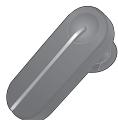
LG HBM-260
Bluetooth® Headset
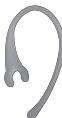
Ear loop
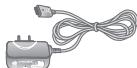
Charger
User manual
Warranty Card
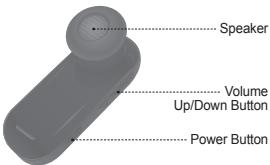
Description of parts
Front
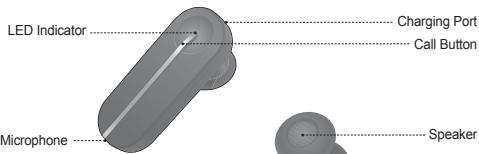
Back
How to use
Change direction
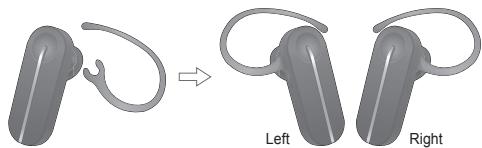
How to use
Charging
- When the charger is connected, with power on or off, the headset will turn off.
- While charging, the LED indicator will show a solid white light.
- The buttons will not function while the device is charging.
- It takes 2 hours to fully charge the headset.
- When charging is complete, the LED indicator will turn off.
Low battery
- An announcement will play once every 2 minutes.
- If the battery is not charged, the headset will turn off.
Battery status alert
-
By pressing and holding the VOLUME DOWN button for 3 seconds, you can check the battery status of the HBM-260. The audible battery status alert will inform you of the battery level. There are 3 levels of battery power:
-
Battery High
- Battery Medium
- Battery Low
Power on
- Press and hold the POWER button for 3 seconds.
The power will turn on and a startup tone will play. - The audible battery status alert will let you know the battery level.
Power off
- Press and hold the POWER button for 3 seconds.
- A shutdown tone will play, the Bluetooth link will disconnect and the power will turn off.
How to use
Pairing
- Before using the headset for the first time, it must be paired with a Bluetooth enabled device.
- There are 2 pairing modes with the HBM-260.
1) Easy Pairing
a) Press and hold the POWER button for 3 seconds to turn on the HBM-260.
b) The headset will enter auto-reconnect mode for 10 seconds. (If your headset has already been paired with a device, the headset will automatically reconnect to the device when the HBM-260 is powered on.)
c) After 10 seconds, the HBM-260 will automatically enter pairing mode.
d) When the headset enters pairing mode, the LED indicator will show a solid white light.
e) Using your handset, find the Bluetooth menu and "search for" or "add" new devices.
f) Select "LG HBM-260" from the list of devices to pair it with your device.
g) If you are asked for a passkey or PIN during pairing, please enter "0000" (4 zeros).
h) Once the devices are paired, you will hear "Headset paired".
i) After pairing has been completed, make sure you "connect" to the LG HBM-260.
j) If you want to pair with a different device in the future, the headset must be placed into pairing mode.
k) If the headset is in pairing mode for 3 minutes without being connected to a device, the HBM-260 will automatically turn off.
2) Manual Pairing
a) With the power off, press and hold the POWER button for 6 seconds.
b) Continue pairing process from letter e above.
Auto-reconnect
- If the HBM-260 is turned off (either accidentally or intentionally) while connected, the headset will disconnect form the device.
The headset and handset will automatically reconnect when the HBM-260 is turned back on (provided that both devices are within the required range of 33 feet (10 meters)).
Out of range
- When the connected device and the HBM-260 are separated by a range of 33 feet (10 meters) or more, the headset will alert the user with a beep, and the headset and device will disconnect.
When the device and the HBM-260 are within the required range again, the HBM-260 will automatically reconnect to the handset. - If the headset and device do not automatically reconnect when they are back within the required range, briefly press the CALL button on the HBM-260 to reconnect manually.
- While trying to reconnect, your headset will beep and the LED indicator will flicker twice every 5 seconds.
- If the headset does not reconnected within 60minutes, it will be turned off.
Volume control
- Press the VOLUME UP or VOLUME DOWN button to adjust the speaker volume.
- There are eight levels of speaker volume.
Calling
Answering a call
- When there is an incoming call, the headset will ring.
- Briefly press and release the CALL button to answer the incoming call.
Making a call
- If you make a call from the connected handset, the call will (depending on the phone settings) automatically transfer to the headset. If the call is not automatically transferred, you can manually transfer the call by briefly pressing the CALL button on the HBM-260 (handset and headset must be paired).
How to use
Voice dialing
- Briefly press the CALL button to activate "Voice dialing".
For best results, record the voice dialing tag through your headset.
NOTE: If your handset does not support voice dialing, this action may activate Last
Number Redial.
Last number radial
- Press and hold the CALL button for 1 second to activate "Last number radial".
The headset will beep and then call the last number dialed.
Ending a call
- Briefly press the CALL button.
Transferring a call
- While on a call on your handset, briefly press the CALL button to transfer the audio to the headset (the headset and handset must be paired).
- To transfer a call from the headset to handset, press and hold the VOLUME UP button for 3 seconds.
Call waiting
- Answer a second call without hanging up the first by pressing the CALL button for 1 second (You will hear a beep). Press the CALL button for 1 second to return to the original call.
- Briefly press the CALL button to end the active call or both calls at once. (subject to handset support)
Call reject
-
Activate call reject by pressing the CALL button for 1 second when the handset rings.
-
These functions may only be used if your handset supports them.
For further information about using these features, please consult your handset's user manual.
Mic mute
- Press and hold the VOLUME UP and VOLUME DOWN buttons simultaneously for 1 second to mute/unmute the mic during conversation.
Advanced multipoint
The HBM-260 is capable of having two devices connected to the headset at the same time. This will give you the freedom of using call waiting between calls on both of your connected phones.
Connection
- Pair the headset with one of your Bluetooth-enabled handsets. (per the pairing instructions on page 6).
- Turn off the headset.
- With the power off, press and hold the CALL button on the HBM-260 for 6 seconds to enter Manual Pairing mode.
- Now, pair and connect the headset with your other Bluetooth-enabled handset. (This will be your primary handset).
-
Once this handset is paired and connected, go back and connect the originally paired handset to the headset. (This will now be your secondary handset).
-
NOTE: When the HBM-260 is connected to two handsets at the same time(multipoint), the headset calling functions will work with the primary handset (or handset which made the last outgoing call).
Calling function
- Voice dialing and Last Number Redial features work with the primary handset (or handset which made the last outgoing call).
- The device which made the last outgoing call will always be set as the primary handset.
Call waiting
- While speaking on an active call, Press the call button for 1 second to switch to an incoming call.
- To switch between 2 active calls, Press the call button for 1 second.
- To end both calls briefly press the call button.
- If both handsets are receiving an incoming call, the headset will default to the primary device.
Audio streaming (A2DP)
The HBM-260 supports music streaming (A2DP).
When you play music from your Bluetooth Enabled Device, it will automatically transfer to your headset. Music will automatically pause when you have an incoming call. When the call is ended the music will start playing again.
A2DP allows streaming of all audio from your handset and running applications Including Music and GPS Navigation.
HD speaker
The HBM-260 supports high definition voice calling and audio streaming.
*Network must support HD Voice for higher quality calling.
SMS reader
The HBM-260 Bluetooth Headset supports SMS reading on Android ^TM based devices.
In the Android™ Marketplace search for the LG 'BT Reader' application and install on your device to use this function.
- The 2D barcode shown below helps you download the 'BT Reader' application from Android MarketTM.

| Function | HBM-260 Status | Action |
| Power on | Power off | Press the POWER button for 3 seconds. |
| Power off | Power on | Press the POWER button for 3 seconds. |
| Volume up | Talking | Briefly press the VOLUME UP button. |
| Volume down | Talking | Briefly press the VOLUME DOWN button. |
| Transferring a call | Talking | - Headset to headset Briefly press the CALL button. (must be paired) - Headset to handset Press and hold the VOLUME UP button for 3 seconds. |
| Answering a call | Ringing | Briefly press the CALL button. |
| Ending a call | Talking | Briefly press the CALL button. |
| Call waiting | Talking | Press the CALL button for 1 second. |
| Last number radial | Idle | Press the CALL button for 1 second. |
| Voice dialing (handset must support) | Idle | Briefly press the CALL button. |
| Call reject | Ringing | Press the CALL button for 1 second. |
| Mic on/off | Talking | Press and hold VOLUME UP and VOLUME DOWN buttons simultaneously for 1 second. |
| Pairing mode (Manual) | Power off | Press the CALL button for 6 seconds. |
| Battery status check | Idle | Press the VOLUME DOWN button for 3 seconds. |
LED indication
| Function | HBM-260 Status | Action |
| Operating | Power on | The LED will flash 4 times. |
| Power off | The LED will flash 4 times and then turns off. | |
| Pairing mode | The LED stays on. | |
| Headset / Hands-Free / A2DP profile connected | The LED will flash twice every 5 seconds. | |
| Call connected | The LED will flash twice every 5 seconds. | |
| Out of range | For the first 15 minutes after the devices are disconnected the LED will flash twice every 5 seconds. After that it will flash once every 5 seconds. | |
| Charging | Charging | The LED stays on. |
| Charging complete | The LED turns off. |
Troubleshooting
| Issue | Possible problem | Resolution |
| Does not turn on | Check whether the battery of the HBM-260 is fully charged. | Charge the battery. |
| Unable to communicate with the LG HBM-260 | Check whether the device supports the headset or hands-free Bluetooth profiles. | Determine whether your device supports the Headset or Hands-free Bluetooth profiles. |
| Check whether the battery of the HBM-260 is low. | Charge the battery. | |
| Unable to pair the HBM-260 with Bluetooth® device | Check and make sure the Headset is on. | Press and hold the POWER button for at least 3 seconds to turn on the headset. |
| Check and make sure the Headset is placed in pairing mode. | With the power off, press and hold the POWER button for 6 seconds to manually place the headset in pairing mode. | |
| Low sound (speaker) | Check the speaker volume. | Increase the volume level. |
| Not to hear audio streaming | Check whether other device is streaming. | Stop other device streaming. |
Specification
| Item | Description |
| Bluetooth® specification | V3.0 (Headset / Hands-Free / A2DP Profiles) |
| Battery | 3.7V, Li-Polymer, 125mAh |
| Talk Time | Up to 10 Hrs |
| Stand by time | Up to 600 Hrs |
| Charging time | < 2 hours |
| Operation temperature | -10°C ~ 60°C |
| Dimension / weight | 18.6mm(W) x 48mm(L) x 10.1mm(H) / 9.2g |
Precautions
Do not drop the device.
Do not modify, repair, or disassemble.
Do not expose directly to water, alcohol, benzene, etc. for cleaning.
Do not expose directly to flammables.
Do not place or keep the device near flammables.
Keep the device away from humidity and dust.
Do not place heavy objects on the device.
Only use the headset with an original LG charger, otherwise it may be damaged.
- Changes or modifications not expressly approved by the party responsible for compliance could void the user's authority to operate the equipment.
- The earloop is made of a durable plastic. However, bending the earloop repeatedly is not recommended.
Declaration of Confirmation
FCC NOTICE TO USERS:
This device complies with part 15 of the FCC rules.
Operation is subject to the following two conditions:
(1) This device may not cause harmful interference and
(2) This device must accept any interference received, including interference that may cause undesired operation.
IMPORTANT NOTE:
To comply with the FCC RF exposure compliance requirements, no change to the antenna or the device is permitted. Any change to the antenna or the device could result in the device exceeding the RF exposure requirements and void user's authority to operate the device.
CE NOTICE TO USERS:
Hereby, LG Electronics Inc. declares that the HBM-260 is in compliance with the essential requirements and other relevant provisions of Directive 1999/5/EC.

Bluetooth
C∈1177
FCC ID:BEJHBM260
Additional Information
1. Radio frequency exposure
This Bluetooth® Headset HBM-260, is a radio transmitter and receiver. When in operation it communicates with a Bluetooth® equipped mobile device by receiving and transmitting radio frequency (RF) electromagnetic fields (microwaves) in the frequency range 2.4 to 2.4835 GHz. The output power of the radio transmitter is low (0.001 watts). Your Bluetooth® Headset is designed to operate in compliance with the RF exposure guidelines and limits set by national authorities and international health agencies when used with any compatible LG Electronics mobile phone.
Additional Information
2. Potentially explosive atmosphere
Turn off your electronic device when in any area with a potentially explosive atmosphere. Although this is uncommon, your electronic device could generate sparks. Sparks in such areas could cause an explosion or fire resulting in bodily injury or even death. Areas with a potentially explosive atmosphere are often, but not always, clearly marked.
3. Emergency calls
IMPORTANT!
This Bluetooth® headset and the electronic device connected to the headset operate using radio signals, mobile and landline networks as well as user - programmed functions, which cannot guarantee connection under all conditions. Therefore you should never rely solely upon any electronic device for essential communications (e.g. medical emergencies). Remember, in order to make or receive calls, the headset and the electronic device connected to the headset must be switched on and in a service area with adequate mobile signal strength. Emergency calls may not be possible on all mobile phone networks or when certain network services and/or phone features are in use. Check with your local service provider.
4. Battery information
A rechargeable battery has a long service life if treated properly. A new battery or one that has not been used for a long period of time could have reduced capacity the first few times it is used. Do not expose the battery to extreme temperatures, never above +60^(+140^) or under -20^(-4^) . For maximum battery capacity, use the battery at room temperature. If the battery is used in low temperatures, the battery capacity will be reduced. The battery can only be charged in temperatures between +10^(+50^) and +45^(+113^) . For your safety, do not remove the battery incorporated in the product. If you need to replace the battery, take it to the nearest authorized LG Electronics service point or dealer for assistance.
5. Recycling the battery in your Bluetooth® headset
The battery in your Bluetooth® Headset must be disposed of properly and should never be placed in municipal waste. The LG Electronics service partner who removes the battery will dispose of it according to local regulations.
Additional Information
6. Conditions
- The warranty is valid only if the original receipt issued to the original purchaser by the dealer, specifying the date of purchase and serial number, is presented with the product to be repaired or replaced. LG Electronics reserves the right to refuse warranty service if this information has been removed or changed after the original purchase of the product from the dealer.
- If LG Electronics repairs or replaces the product, the repaired or replaced product shall be warranted for the remaining time of the original warranty period or for ninety (90) days from the date of repair, whichever is longer. Repair or replacement may involve the use of functionally equivalent reconditioned units. Replaced parts or components will become the property of LG Electronics.
- This Warranty does not cover any failure of the product due to normal wear and tear, or due to misuse, including but not limited to use in other than the normal and customary manner, in accordance with instructions for use and maintenance of the product. Nor does this warranty cover any failure of the product due to accident, modification or adjustment, acts of God or damage resulting from liquid.
- This warranty does not cover product failures due to improper repair installations, modifications or service performed by a non-LG Electronics authorised person. Tampering with any of the seals on the product will void the warranty.
THERE ARE NO EXPRESS WARRANTYES, WHETHER WRITTEN OR ORAL,OTHER THAN THIS PRINTED INCLUDING WITHOUT LIMITATION THE IMPLIED WARRANTYES OF MERCHANTABILITY OR FITNESS FOR A PARTICULAR PURPOSE,ARE LIMITED TO THE DURATION OF THIS LIMITED WARRANTY. IN NO EVENT SHALL LC ELECTRONICS OR ITS VENDORS BE LIABLE FOR INCIDENTAL OR CONSEQUENTIAL DAMAGES OF ANY NATURE WHATESOEVER,INCLUDING BUT NOT LIMITED TO LOST PROFITS OR COMMERCIAL LOSS,TO THE FULL EXTENT THOSE DAMAGES CAN BE DISCLAIMED BY LAW. - Some countries/states do not allow the exclusion or limitation of incidental or consequential damages, or limitation of the duration of implied warranties, so the preceding limitations or exclusions may not apply to you. The warranty provided does not affect the consumer's statutory rights under applicable national legislation in force, nor the consumer's rights against the dealer arising from their sales/purchase contract.
Limited warranty
Subject to the conditions of this Limited Warranty, LG Electronics warrants this product to be free from defects in design, material and workmanship at the time of its original purchase by a consumer, and for a subsequent period of one (1) year. Should your product need warranty service, please return it to the dealer from whom it was purchased or contact your local LG Electronics contact centre to get further information.
Important safety information
Avoiding hearing damage
Permanent hearing loss may occur if you use your headset at a high volume. Set the volume to a safe level. Over time you can become accustomed to a higher volume that may sound normal but can be damaging to your hearing. If you experience ringing in your ears or muffled speech, stop listening and have your hearing checked. The louder the volume, the less time is required before your hearing could be affected.
Hearing experts suggest that to protect your hearing:
- Limit the amount of time you use the headset at high volume.
- Avoid turning up the volume to block out noisy surroundings.
- Turn the volume down if you can't hear people speaking near you.
Using Headsets safely
Use of headsets to listen to music while operating a vehicle is not recommended and is illegal in some areas. Be careful and attentive whilst driving. Stop using this device if you find it disruptive or distracting whilst operating any type of vehicle or performing any other activity that requires your full attention.
Espanol
English
LG Electronics
Auricular monoaural BLUETOOTH®
LG Electronics Inc., 2011