
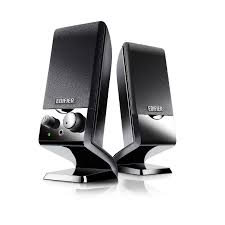
EDIFIER M1500 - Enceintes

M1500 - Enceintes EDIFIER - Notice d'utilisation et mode d'emploi gratuit

Retrouvez gratuitement la notice de l'appareil M1500 EDIFIER au format PDF.

📄 8 pages Français FR Télécharger 💬 Question IA 8 questions ⚙️ Specs
Notice EDIFIER M1500 - page 1
Voir la notice : Français FR English EN
Choisissez votre langue et indiquez votre email : nous vous enverrons une version traduite specifiquement.
Intitulé Valeur / Description
Type de produit Enceinte audio 2.0
Caractéristiques techniques principales Amplification numérique, haut-parleurs de 5 pouces, réponse en fréquence de 60 Hz à 20 kHz
Alimentation électrique AC 100-240V, 50/60Hz
Dimensions approximatives 230 x 150 x 180 mm
Poids 3.5 kg
Compatibilités Compatible avec PC, Mac, smartphones, tablettes via entrée AUX
Type de batterie Non applicable (fonctionne sur secteur)
Tension 100-240V
Puissance 20W RMS
Fonctions principales Contrôle du volume, entrée AUX, design compact
Entretien et nettoyage Nettoyer avec un chiffon doux, éviter les produits chimiques abrasifs
Pièces détachées et réparabilité Pas de pièces détachées disponibles, réparation limitée
Informations générales utiles Idéale pour une utilisation domestique ou de bureau, son de qualité pour un prix abordable

FOIRE AUX QUESTIONS - M1500 EDIFIER

Comment connecter mes enceintes EDIFIER M1500 à mon ordinateur ?
Pour connecter vos enceintes EDIFIER M1500 à votre ordinateur, utilisez un câble audio 3,5 mm. Branchez une extrémité dans la prise audio de l'ordinateur et l'autre dans l'entrée audio des enceintes.
Pourquoi le son est-il faible sur mes enceintes EDIFIER M1500 ?
Vérifiez d'abord le niveau de volume sur les enceintes et sur votre appareil source. Assurez-vous également que le câble audio est correctement branché et qu'il n'est pas endommagé.
Mes enceintes EDIFIER M1500 ne s'allument pas, que faire ?
Vérifiez si l'appareil est correctement branché à une prise de courant fonctionnelle. Assurez-vous que l'interrupteur d'alimentation est en position 'ON'. Si le problème persiste, essayez un autre câble d'alimentation.
Comment régler les basses sur les enceintes EDIFIER M1500 ?
Les enceintes EDIFIER M1500 disposent d'un contrôle des basses. Tournez le bouton des basses situé sur le panneau avant pour ajuster le niveau selon vos préférences.
Les enceintes EDIFIER M1500 émettent des bruits de fond, comment les éliminer ?
Les bruits de fond peuvent être causés par des interférences. Assurez-vous que les câbles sont éloignés des appareils électriques. Testez également l'enceinte avec un autre appareil pour déterminer si le problème persiste.
Puis-je utiliser les enceintes EDIFIER M1500 avec mon smartphone ?
Oui, vous pouvez utiliser un câble audio 3,5 mm pour connecter votre smartphone aux enceintes EDIFIER M1500. Assurez-vous que le volume de votre smartphone est suffisamment élevé.
Les enceintes EDIFIER M1500 sont-elles compatibles avec les télévisions ?
Oui, les enceintes EDIFIER M1500 peuvent être connectées à une télévision via un câble audio 3,5 mm ou avec un adaptateur approprié si votre télévision n'a pas cette sortie.
Où puis-je trouver le manuel d'utilisation des enceintes EDIFIER M1500 ?
Le manuel d'utilisation des enceintes EDIFIER M1500 est généralement disponible sur le site officiel d'EDIFIER dans la section 'Support' ou 'Téléchargements'.

Questions des utilisateurs sur M1500 EDIFIER

0 question sur cet appareil. Repondez a celles que vous connaissez ou posez la votre.

Poser une nouvelle question sur cet appareil

L'email reste privé : il sert seulement à vous prévenir si quelqu'un répond à votre question.

Aucune question pour l'instant. Soyez le premier à en poser une.

Téléchargez la notice de votre Enceintes au format PDF gratuitement ! Retrouvez votre notice M1500 - EDIFIER et reprennez votre appareil électronique en main. Sur cette page sont publiés tous les documents nécessaires à l'utilisation de votre appareil M1500 de la marque EDIFIER.

MODE D'EMPLOI M1500 EDIFIER
Edifier

THE AUDIO ARTIST

EDIFIER M1500 - Edifier - 1

MI500

Multimedia Speaker

User Manual

Please read this manual carefully before operating the Speaker System

Edifier

Introduction

Congratulations on the purchase of the Edifler M1500 speaker system. With the right care and attention, it will give you many years of trouble free operation.

Before operating the system, please read this manual fully to obtain the best results from your new product, and retain it carefully for future reference.

The lightning flash with arrowhead, within an equilateral triangle, is intended to alert the user to the presence of un-insulated dangerous voltage within the product's enclosure that may be of a sufficient magnitude to constitute a risk of electric shock to persons.

EDIFIER M1500 - Introduction - 1

EDIFIER M1500 - Introduction - 2

EDIFIER M1500 - Introduction - 3

CAUTION: TO PREVENT THE RISK OF ELECTRIC SHOCK, DO NOT REMOVE COVER (OR BACK). NO USER-SERVICEABLE PARTS INSIDE. REFER SERVICING TO QUALIFIED SERVICE PERSONNEL ONLY.

The exclamation point within an equilateral triangle is intended to alert the user to the presence of important operating and maintenance (servicing) instructions in the literature accompanying the product.

SAFETY INSTRUCTIONS

Please read all the instructions herein. Please retain this manual safely for future reference.

Please heed all safety warnings. Please Install in accordance with the Manufacturer's instructions.

Please adjust the volume control to a comfortable level to avoid damaging your hearing and the system.

WARNING:

TO REDUCE THE RISK OF ELECTRIC SHOCK:

Do not expose this apparatus to rain or moisture.

Do not use the speakers near water, and do not immerse them in any liquid or pour any liquid on them.

Do not block the openings in the speaker cabinets, never push objects into speaker vents or slots because of fire or electric shock hazards, and provide sufficient space around the speakers for proper ventilation.

Do not install near any heat sources such as radiators, heat registers, stoves, or other apparatus (including amplifiers) that produce heat.

Do not defeat the safety purpose of the polarized plug. A polarized plug has two blades with one wider than the other. The wider blade is provided for your safety. If the provided plug does not fit into your outlet, consult an electrician for replacement of the obsolete outlet. Protect the power cord from being walked on or pinched particularly at plugs, convenience receptacles, and the point where they exit from the apparatus.

For added protection during lightning storms, unplug the speakers from the electrical outlet and turn off the computer.

Unplug this apparatus when unused for long periods of time.

Heat--- Place the speakers away from all heat sources, such as heat registers, stoves, and direct sunlight.

Ventilation --- Do not block the openings in the speaker cabinets, never push objects into speaker vents or slots because of fire or electric shock hazards, and provide sufficient space around the speakers for proper ventilation.

Location --- Place the speakers in a stable location so that it will not fall causing damage to the speakers or bodily harm.

Cleaning --- Unplug the speakers from the computer and from the electrical outlet before cleaning them with a damp cloth.

Lightning ---For added protection during lightning storms, unplug the speakers from the electrical outlet and turn off the computer. Servicing is required when the apparatus has been damaged in any way, such as the power-supply cord or plug is damaged, liquid has been spilled or objects have fallen into the apparatus, the apparatus has been exposed to rain or moisture, does not operate normally, or has been dropped. Refer all servicing to qualified service personnel only.

Opening the packing

Please check the speaker Model number marked on the packing carton. Please contact the seller as soon as possible if you find the speaker is the incorrect model or has sustained shipping damage.

M1500 packing list:

  • 1 x Subwoofer Speaker
  • 5 × Satellite Speakers
  • 3 × 3.5 ~mm to 3.5 ~mm headphone plug audio cables
  • 3 × 3.5 ~mm headphone plug converts to 2 RCA plug audio cables
  • 1 x User Manual

EDIFIER M1500 - M1500 packing list: - 1

Editor

Diagram and Function Description

  1. VOLUME (System Volume Control) Control system Volume by adjusting to Volume knob.
  2. POWER INDICATOR

LED is on when power On.

  1. BASS (Bass Volume Control) Control bass Volume by adjusting the Bass Volume knob.
  2. LINE IN (Audio signal input sockets) 2 channel audio signal input from sockets FR/FL; 4 channel audio signal input from sockets FR/FL and SR/SL; 5.1 channel audio signal input from sockets FR/FL, SR/SL and C/SW
  3. SPEAKER OUTPUT (Audio signal output sockets)

FL: White socket, connect to front left satellite speaker

SL; Blue socket, connect to surround left satellite speaker

C: Yellow socket, connect to center satellite speaker

FR: Red socket, connect to front right satellite speaker

SR: Green socket, connect to surround right satellite speaker

  1. POWER

"I" POWER ON

" 心 POWER OFF

  1. POWER LINE

Connect to AC wall plug socket.

EDIFIER M1500 - Diagram and Function Description - 1
Front Panel

EDIFIER M1500 - Diagram and Function Description - 2
Back Panel

Editor

Speaker Connection Instructions

EDIFIER M1500 - Speaker Connection Instructions - 1

Editor

Specifications

Specifications:

Amplifier power output:

Satellite channel: RMS 2Wx 4 (THD=10%, fo=1KHz)

Center channel: RMS 8W (THD=10%, fo=1KHz)

Subwoofer: RMS12W (THD=10%, fo=80Hz)

Signal to noise ratio (Amplifier): ≥ 85dBA

Amplifier distortion: THD+N<0.5%

Input Impendence: 10K Ohm

Input Sensitivity: 300mV (+/-50mV)

Volume Control: Volume Control and Bass control on front panel

Bass Unit: 5 inch (131mm), Magnetically Shielded, 4Ohm.

Satellite Unit: 3 inch (73mm) full range, Magnetically Shielded, 4Ohm.

Dimension: Subwoofer:158(W)x194(H)x302(D) mm

Satellite:92(W)x148(H)x108(D)mm

Weight: approx.7.2kg

Power input: 100V - 120V 50 / 60Hz (for Model USA/Canada/Japan)

220V-240V\~, 50/60Hz (for Model European/China/Korea/South America, etc.)

Edifier One Year Limited Warranty

Edfier warrants to the end user that all of its computer speaker systems are free from defects in materials and workmanship in the course of normal and reasonable use for a term of one year from the date of purchase.

This warranty is the exclusive and only warranty in effect relative to Edifier multimedia speaker systems and any other warranties, either expressed or implied, are invalid. Neither Edifier nor any authorized Edifier reseller is responsible for any incidental or consequential damages incurred in the use of the speakers. (This limitation of incidental or consequential damage is not applicable where prohibited.)

Ediher's obligation under this warranty does not apply to any defect, malfunction or failure as a result of misuse, abuse, improper installation, use with faulty or improper equipment, or the use of the speaker systems with any equipment for which they were not intended.

The terms of this warranty apply only to speaker systems when such speakers are returned to the respective authorized Edifier reseller where they were purchased.

Under the terms of this warranty, the original consumer purchaser has certain legal rights and may have other rights, which vary worldwide.

Notice

Edifier and Edifier logo are owned by Edifier Enterprises Canada Inc. and may be registered. Other Brand names and trademarks are the property of their owners. Edifier assumes no responsibility for any errors that may appear in this manual. Information contained herein is subject to change without notice.

Editier

Trouble Shooting Guide

Sound from only one Speaker

Please ensure all speaker cable connections are correct. Please try an alternate sound source such as a CD player, MP3 or other player. If both speakers now work correctly, the original sound source is at fault. Please ensure the computer Soundcard is installed correctly.

- When playing CD from computer, only one Speaker has sound

Mostly this phenomenon tends to occur with a new computer - only one satellite works when playing an audio CD, but all work correctly when running a WAV file or playing a Game. The reason for this is the CD-ROM is not matched with the Soundcard, or one signal channel maybe shorted to a ground wire.

Also please refer to the CD-ROM user manual to adjust the jumpers.

No sound from any of the speakers

  1. Please ensure AC power is plugged in and the power outlet is switched On.
  2. Please ensure all speaker audio cable connections are correct.
  3. Please ensure sound source equipment output is working correctly.

- Speakers exhibit excessive noise

Edifier speakers are of a very low noise circuit design. Some source equipment may have a poor signal to noise ratio. Therefore, please unplug the input audio cable, and check if the noise is from the CD/DVD player or the Computer Soundcard etc.

- Magnetically Shielded Speakers

Edifier system subwoofer and satellite speakers are all of a magnetically shielded design. You can place the speakers near a TV or monitor. However, it is wise to allow a 0.2-1 m distance between the speakers and monitor to avoid possible magnetic field interference.

- Listening Tips:

All high quality speaker systems benefit from a running-in period on normal music sources to stabilize their intended properties.

To optimize the sound quality from your system:

Sit in a comfortable position at the computer desktop. Take time to test the listening environment by using music CDs with wide frequency content and spacious left-to-right imaging. The speaker driver used in the loudspeakers will change their characteristics subtly over the first two weeks of use as the suspension of the cones will loosen up slightly, producing a trace more warmth to the overall sound texture. Adjust the speaker placement for the most realistic imaging and tonal balance by listening to several different musical selections and game or computer sound effects.

For optimum acoustic performance, we recommend that you place your speakers at least 6 - 8^ from rear walls to reduce unwanted reflections that can muddy your sound. Bass frequencies may be enhanced or exaggerated by placing your speakers close to a wall or corner. Please feel free to experiment with the system's location to obtain the most pleasing effects.

Edifier couples incredible technology with an amplified loudspeaker system to generate smooth deep bass, crystal clear highs, and enough power to ensure that your personal listening experience allows you to hear what you have been missing!

- If you have any further questions or concerns regarding Edifier Products

please visit our website at: www.edifier.com ,

or email Edifier Support for further assistance at: main@edifier.com ,

If you prefer, you may contact us by phone Toll Free: 1-877-EDIFIER (334-3437).

Copyright © 2005

All Rights Reserved.

Manual Edition 1.1, Jun. 2005

Printed in CHINA

Editor

www.edifier.com

EDIFIER ENTERPRISES CANADA INC.

Made in China

Assistant notice
Powered by Anthropic
En attente de votre message
Informations produit

Marque : EDIFIER

Modèle : M1500

Catégorie : Enceintes