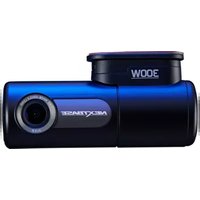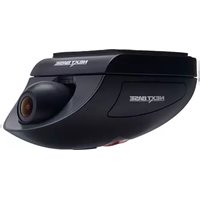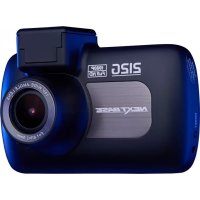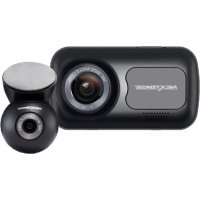
SDV285-SD - Caméra de surveillance NEXT BASE - Notice d'utilisation et mode d'emploi gratuit
Retrouvez gratuitement la notice de l'appareil SDV285-SD NEXT BASE au format PDF.


| Type de produit | Caméra de surveillance |
| Marque | NEXT BASE |
| Modèle | SDV285-SD |
| Résolution | 1080p Full HD (1920 x 1080) |
| Vision nocturne | Oui, jusqu'à 30 mètres avec LED IR |
| Angle de vue | 120° diagonale |
| Connectivité | Wi-Fi 2.4 GHz, Ethernet RJ45 |
| Stockage | Carte microSD jusqu'à 128 Go, cloud |
| Alimentation | DC 12V, adaptateur secteur inclus |
| Dimensions | 120 x 70 x 70 mm |
| Poids | 300 g |
| Certification IP | IP65 (résistant aux intempéries) |
| Détection de mouvement | Oui, notifications push |
| Audio bidirectionnel | Oui, microphone et haut-parleur intégrés |
| Fonctionnalités intelligentes | Détection de personnes, zones personnalisées |
| Garantie | 2 ans |
| Entretien et nettoyage | Nettoyer avec un chiffon doux et sec. Ne pas utiliser de solvants. |
| Sécurité | Cryptage AES 128 bits, authentification à deux facteurs |
| Pièces détachées et réparabilité | Support technique disponible, pièces sur demande |
FOIRE AUX QUESTIONS - SDV285-SD NEXT BASE
Questions des utilisateurs sur SDV285-SD NEXT BASE
0 question sur cet appareil. Repondez a celles que vous connaissez ou posez la votre.
Poser une nouvelle question sur cet appareil
Téléchargez la notice de votre Caméra de surveillance au format PDF gratuitement ! Retrouvez votre notice SDV285-SD - NEXT BASE et reprennez votre appareil électronique en main. Sur cette page sont publiés tous les documents nécessaires à l'utilisation de votre appareil SDV285-SD de la marque NEXT BASE.
MODE D'EMPLOI SDV285-SD NEXT BASE
MODEL NO.
SDV285-SD
OPERATINGINSTRUCTIONS
- Read these instructions.
- Keep these instructions.
- Heed all warnings.
- Follow all instructions.
- Do not use this apparatus near water.
- Clean only with dry cloth.
- Do not block any ventilation openings. Install in accordance with the manufacturer's instructions.
- Do not install near any heat sources such as radiators, heat registers, stoves, or other apparatus (Including amplifiers) that produce heat.
- Do not defeat the safety purpose of the polarized or grounding-type plug. A polarized plug has two blades with one wider than the other. A grounding type plug has two blades and a third grounding prong. The wide blade or the third prong are provided for your safety. If the provided plug does not fit into your outlet, consult an electrician for replacement of the obsolete outlet.
- Protect the power cord from being walked on or pinched particularly at plugs, convenience receptacles, and the point where they exit from the apparatus.
- Only use attachments/accessories specified by the manufacturer.
- Use only with the cart, stand, tripod, bracket, or table specified by the manufacturer, or sold with the apparatus. When a cart is used, use caution when moving the cart/apparatus combination to avoid injury from tip-over.

- Unplug this apparatus during lightning storms or when unused for long periods of time.
- Refer all servicing to qualified service personnel. Servicing is required when the apparatus has been damaged in any way, such as power-supply cord or plug is damaged, liquid has been spilled or objects have fallen into the apparatus, the apparatus has been exposed to rain or moisture, does not operate normally, or has been dropped.
- To reduce the risk of fire or electric shock, do not expose this appliance to rain or moisture.
- The Shock Hazard Marking and Associated Graphical Symbol is provided on the bottom panel of unit.
- Apparatus shall not be exposed to dripping or splashing and no objects filled with liquids, shall not be placed on the apparatus.
Thank you for purchasing this Portable DVD player. Please read this manual carefully before operating and reserve it for future reference. It will be helpful to you if you encounter any operational problem.
WARNING:
TO REDUCE THE RISK OF FIRE OR ELECTRIC SHOCK, DO NOT EXPOSE THIS APPLIANCE TO RAIN OR MOISTURE, DRIPPING OR SPLASHING AND THAT NO OBJECTS FILLED WITH LIQUIDS, SUCH AS VASES, SHALL BE PLACED ON THE APPARATUS. DANGEROUS HIGH VOLTAGES ARE PRESENT INSIDE THE ENCLOSURE. DO NOT OPEN THE CABINET. REFER SERVICING TO QUALIFIED PERSONNEL ONLY.
ATTENTION:
TO PREVENT ELECTRIC SHOCK, MATCH WIDE BLADE OF PLUG TO WIDE SLOT, FULLY INSERT.
LASER:
This Digital Video Disc player employs a Laser System. To ensure proper use of this product, please read this owner's manual carefully and retain for future reference. Should the unit require maintenance, contact an authorized service location - see service procedure.
Use of controls, adjustments or the performance of procedures other than those specified may result in hazardous radiation exposure.
To prevent direct exposure to laser beam, do not try to open the enclosure.
Visible and invisible laser radiation when open and interlocks defeated.
DO NOT STARE INTO BEAM
LASER
Type
Wave length
Output Power
Beam divergence
Semiconductor laser GaAlAs
650 nm/780nm
5mW
60degree
CLASS 1
LASER PRODUCT
| CAUTION:These servicing instructions are for use by qualified service personnel only. To reduce the risk of electric shock, do not perform any servicing other than that contained in the operating instructions unless you are qualified to do so. | |
| WARNING:To reduce the risk of fire or electric shock, do not expose this appliance to rain or moisture.CAUTION:Use of controls or adjustments or performance of procedures those specified may result in hazardous radiation exposure. | |
| CAUTIONRISK OF ELECTRIC SHOCK. DO NOT OPENTo reduce the risk of electric shock, do not remove cover (Or back).No user serviceable parts inside. Refer servicing to qualified service personnel. | |
| SA 1965DANGEROUSVOLTAGEINSTRUCTION | The lightning flash with arrowhead symbol,with in an equilateral triangle, is intended to alert user to the presence of uninsulated “dangerous voltage” within the product enclosure that may be of sufficient magnitude to constitute a risk of electric shock topersons.The exclamation point within an equilateral triangle is intended to alert the user to the presence of important operating and maintenance (Servicing) instruction in the literature accompanying the appliance. |
| SA 1966CAUTION:INVISIBLE LASER RADIATION WHEN OPEN ANDINTERLOCK Failed OR DEFEATED.AVOID DIRECT EXPOSURE TO LASER BEAM. | |
MACROVISION: This product incorporates copyright protection technology that is protected by U.S. patents and other intellectual property rights. Use of this copyright protection technology must be authorized by Macrovision, and is intended for home and other limited viewing uses only unless otherwise authorized by Macrovision. Reverse engineering or disassembly is prohibited.
FCC NOTICE: This device complies with part 15 of the FCC Rules. Operation is subject of the following two conditions: (1) This device may not cause harmful interference, and (2) This device must accept any interference received, including interference that may cause undesired operation.
DOLBY: Manufactured under license from Dolby Laboratories. "Dolby" and the double-D symbol are trademarks of Dolby Laboratories.
DivX: This device incorporates copyright protection technology that is protected by DivX, Inc.
DivX, DivX Certified and associated logos are trademarks of DivX, Inc. and used under license.
PRECAUTIONS
PRECAUTIONS. 1
TABLE OF CONTENTS
TABLE OF CONTENTS. 4
CAUTIONS ON USING THIS PLAYER
CAUTIONS ON USING THIS PLAYER. 6
DISCS PLAYABLE
TYPES OF DISCS PLAYABLE ON THIS PLAYER...8
PACKAGE CONTENTS
PACKAGE CONTENTS. 9
PARTS AND FUNCTIONS
LIQUID CRYSTAL DISPLAY. 10
MAIN UNIT CONTROL SECTION. 10
MAIN UNIT LEFT SIDE. 12
MAIN UNIT RIGHT PANEL. 12
MAIN UNIT REAR SIDE. 13
HOW TO STAND. 13
REMOTE CONTROL UNIT (FREQUENTLY USED BUTTONS). 14
REMOTE CONTROL UNIT (OTHER BUTTONS)......15
NOTES ON USING THE REMOTE CONTROL UNIT. 16
REPLACING THE BATTERY. 16
NAMES OF BATTERY PARTS AND THEIR FUNCTIONS. 17
PRECAUTIONS FOR
OPERATION OF THE BATTERY PACK. 18
BATTERY PACK OPERATION
STORAGE 18
SERVICE LIFE AND DISPOSAL. 18
CONNECTIONS
CONNECTING THE PLAYER TO A TV SET. 19
CONNECTING ADAPTER TO THE DC 12V IN SOCKET. 20
USING THE EARPHONE 20
CONNECTING THE PLAYER TO OTHER DEVICES
CONNECTING TO A DOLBY DIGITAL / DTS / MPEG
DECODER OR AN AMPLIFIER WITH BUILT-IN
DECODER 21
CONNECTING TO A DIGITAL AMPLIFIER THAT IS NOT DOLBY DIGITAL / DTS /MPEG COMPATIBLE....22
CONNECTING TO ACTIVE SPEAKER SYSTEMS.....23
USING THE BATTERY
RECHARGING THE BATTERY PACK. 24
NOTES FOR RECHARGING 25
ATTACHING THE BATTERY PACK TO THE PLAYER. 25
AC POWER OPERATION 26
REMOVING THE BATTERY PACK FROM THE PLAYER. 26
THE AV IN/OUT FUNCTION CHANGING FROM AV OUT TO AV IN. 27
BASIC OPERATIONS TURNING ON THE POWER. 28
TURNING OFF THE POWER 28
LOADING 29
PLAYBACK 30
STOP PLAYBACK. 30
PAUSE PLAYBACK. 30
PLAYING AT FAST SPEED 31
PLAYBACK IN SLOW MOTION 31
A-B/REPEAT PLAYBACK. 31
ZOOM FUNCTION 32
SEARCHING FOR A SPECIFIC SCENE. 32
SELECTING SUBTITLE 32
CHANGING THE ANGLE 32
CHANGING THE AUDIO LANGUAGE 32
USING THE ON-SCREEN DISPLAY 33
USING THE USB PORT 33
PLAYING A MP3 FORMAT DISC AND JPEG CD. 34
PLAYING DivX FILES 35
SETUP THE PLAYER GENERAL STEPS OF SETUP. 36
SYSTEM SETUP TV SYSTEM 37
SCREENSAVER 37
TV TYPE 38
Password 39
RATING 39
DEFAULT. 39
LANGUAGE SETUP OSD LANGUAGE 40
AUDIO LANGUAGE 40
SUBTITLE LANGUAGE 41
MENULANGUAGE. 41
AUDIO SETUP AUDIO OUT. 42
VIDEO SETUP BRIGHTNESS. 43
CONTRAST. 43
HUE 44
SATURATION 44
DIGITAL SETUP DYNAMIC RANGE. 45
DivX VOD. 46
OTHERS SIZE AND PARAMETER. 47
TROUBLESHOOTING 48
CAUTIONS ON USING THIS PLAYER
1. DO NOT MOVE THE PLAYER DURING PLAYBACK
During playback, the disc spins at high speed. So do not lift or move the player. Doing so may damage the disc.
2. TRANSPORTING THE PLAYER
Before transporting the player, be sure to remove the disc and turn off the power, then unplug the power cord.
3. PLACE OF INSTALLATION
Select a stable place near the TV or stereo system to which you are going to connect the player.
Do not place the player on top of a TV or color monitor.
Install the player away from cassette decks or other devices which are easily affected by magnetic forces.
4. DO NOT PLACE OBJECTS ON TOP OF THE PLAYER
Do not expose this apparatus to rain, moisture, dripping or splashing and no objects filled with liquids, such as vases, shall be placed on the apparatus.
5. TURN OFF THE POWER WHEN NOT USING THE PLAYER
If the player is connected to your TV but not in use, switch the power off. It can avoid interference to your normal TV picture.
Noise problems may also be experienced if used near a radio.
6. SPECIAL NOTE REGARDING USE OF PLAYER IN VEHICLES
We strongly advise against using the player while driving.
- Most countries and states have laws which prohibit or severely restrict the use of the player in vehicles while driving.
- Do not leave the player or the battery pack in places where the temperature is extremely low (About-10 c² or lower) or extremely high (About 60 c or higher), such as inside the passenger cabin or trunk in midsummer. Doing so may warp the outer case or reduce the performance or quality of the battery pack.
7. WHEN USING WITH CAR POWER CABLE IN CARS
Please turn on the engine and then connect with the car power cable for using.
8. WHEN PUSHING IN AND DRAGGING OUT THE TRAY
The pick up and tray of the player are precise components and are designed to be exposed outside. Please use more than one second to push in and drag out the tray in order to protect the loader from damage caused by crashing between precise components.
9. CLEANING THE PLAYER
Normally clean the player with a soft, dry cloth. For tough dirt, apply some neutral detergent diluted in 5 to 6 parts water to a soft cloth, wring out thoroughly. Wipe off the dirt, then wipe off the player with a dry cloth. Note that alcohol, thinner, benzene, insecticides, etc., may cause the print or coating to peel off. Also avoid leaving rubber or plastic products in contact with the player for long periods of time, as this may damage the cabinet. When using chemically treated cloths, read the cloth's instructions carefully. Always unplug the power cord from the power outlet before cleaning the player.
10. COPYRIGHTS
Unauthorized duplication, broadcast, public performance or rental of discs is prohibited by law.
TYPES OF DISCS PLAYABLE ON THIS PLAYER
The discs listed on the table below can be played on this player without an adapter.
- The marks shown on the table below are indicated on the disc's label, package or jacket.
Note: Do not support 8 cm discs.
| Types of playable discs and their marks | Diameter/Playable sides | Playback time | |
| DVD-Video disc DVD VIDEO | DVD video 12cm/single-sided 12cm/double-sided | 1 layer 2 layer 1 layer 2 layer | Playback time (MPEG 2 format) 133 minutes (4.7GB) 242 minutes (8.5GB) 266 minutes (9.4GB) 484 minutes (17GB) |
| CD COMPACT DISC DIGITAL AUDIO | CD 12 cm/single-sided | 74 minutes | |
Marks indicated on DVDs
DVD discs or packages include the marks shown below. These marks indicate the type of video or audio signals recorded on the disc and the functions that can be used.
| Mark | Meaning |
| ②) | Indicates the number of audio tracks. |
| 3 | Indicates the number of angles. |
| 16:9 LB | Indicates the selectable picture aspect ratio. |
| Indicates the playable region number. |
PACKAGE CONTENTS
After unpacking, first check the contents of your DVD player package as listed below:
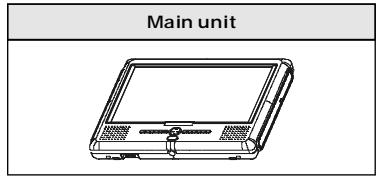
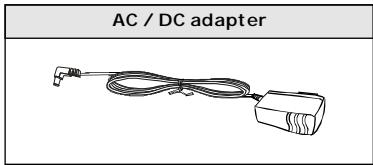
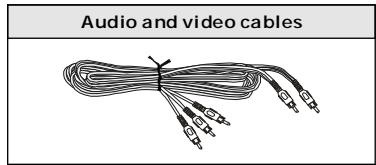
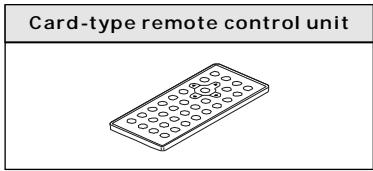
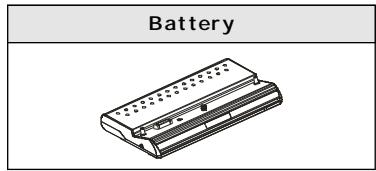

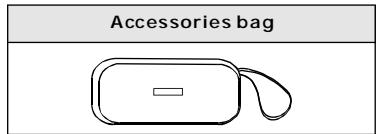
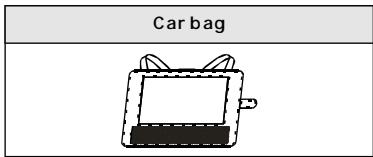
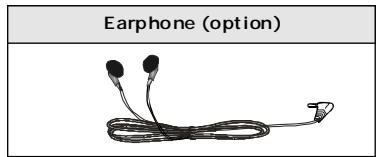
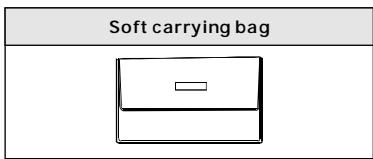
NOTES: Actual products' appearance might vary slightly from the pictures shown.
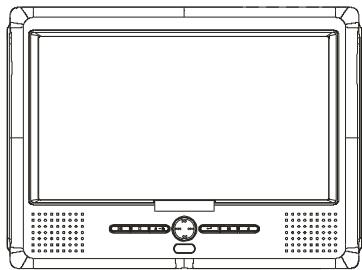
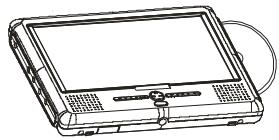
LIQUID CRYSTAL DISPLAY
The portable DVD player is equipped with a liquid crystal display.
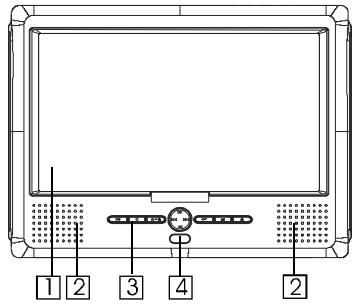
- Liquid crystal display
- Speakers
- Control section
Control buttons
- Remote control sensor
The remote control signals are received from here.
MAIN UNIT CONTROL SECTION

- Play / pause button
Press it to play. When pressing during playback mode, pause mode is set. Press it again to resume playback.
Keep pressing it for about 1.5 seconds to power on the unit.
- Stop / off button
Press it to stop playback.
Keep pressing it for about 1.5 seconds to turn off the unit (Standby status).
If you are using an optional TV Tuner BOX and scanning for TV program, press this button to stop the scanning.
- A-B / repeat button
Press it during playback to set point A & B to play from A to B repeatedly. Keep pressing it for about 1.5 seconds to play the whole track / chapter or whole titles / disc repeatedly.
4.Left /previous button
Press it to move left at MENU and SETUP status.
Press it to locate at the previous track or chapter when playing.
- Right / next button
Press it to move right at MENU and SETUP status.
Press it to locate at the next track or chapter when playing.
- UP/Forward button
Press it to move up at MENU and SETUP status.
Press it to forward the playing speed through X2, X4, X8, X20 when playing.
- Down / REV button
Press it to move down at MENU and SETUP status.
Press it to backward the playing speed of backward through X2, X4, X8, X20 when playing.
- Enter button
Press it to confirm the selection.
- Mode button
Press it to enter volume, brightness, color, TFT mode, view mode, and AV IN/OUT adjustment.
Press the button once to enter VOLUME mode. Use LEFT / RIGHT button to adjust among level 0 to level 16.
Press the button again to enter BRIGHTNESS mode. Use LEFT / RIGHT button to adjust among level 0 to level 8.
Press the button again to enter COLOR mode. Use LEFT / RIGHT button to adjust among level 0 to level 8.
Press the button again to enter TFT mode. Use LEFT / RIGHT button to switch between 16:9 and 4:3.
Press the button again to enter VIEW mode. Use LEFT /RIGHT button to switch between obverse picture and reverse picture.
Press the button again to enter AV IN / OUT adjustment. Use LEFT / RIGHT to adjust.
Keep pressing the button for about 1.5 seconds to turn off the TFT display and press any key to resume display.
- Eject button
Press it to eject the disc out.
- Menu button
Press it to display menu screen.
- Subtitle button
Press it to switch subtitle languages.
- Audio button
Press it to switch audio languages.
- OSD / Setup button
Press it to display disc information on screen; press it for 1.5 seconds to display SETUP screen.
MAIN UNIT LEFT SIDE
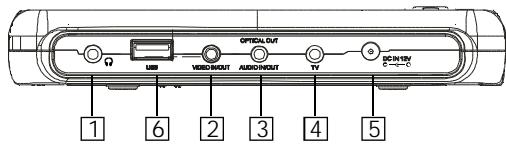
- Phone jack
For connecting a stereo earphone or an amplifier.
- Video in/out jack
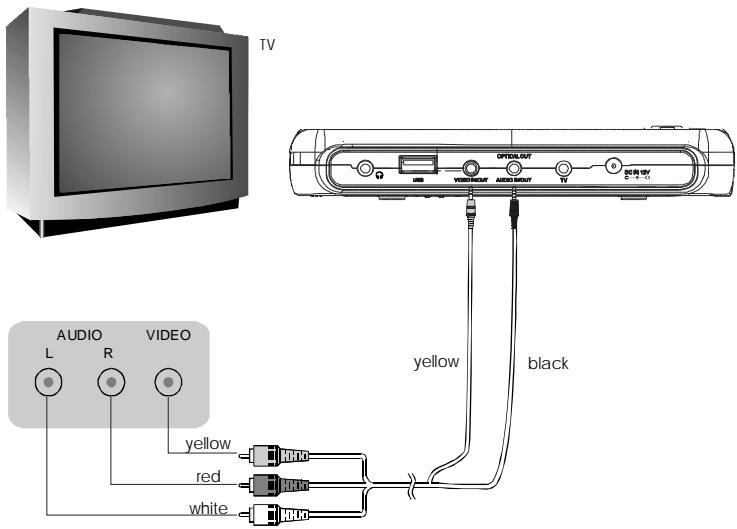
Input or output video signals to connected device by setting AV IN/OUT mode value. The included AV cable is connected here.
- Audio in/out and optical output jack
Input or output audio signals to connected device by setting AV IN/OUT mode value.
Output optical audio signals to connected device.
The included AV cable or optical digital cable is connected here.
- TV control jack
Only use for TV Tuner Box to control TV signal.
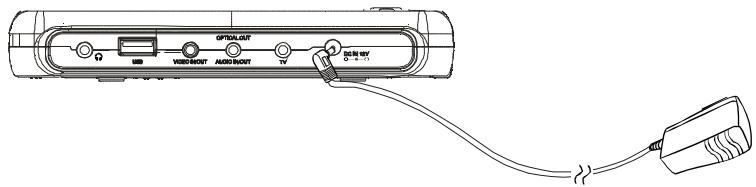
5.DC in
Connect the included AC/DC adapter here.
- USB port
Support USB 1.1
MAIN UNIT RIGHT PANEL
- Loader status indicator LED Indicate loader status.
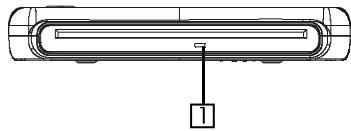
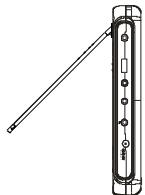
MAIN UNIT REAR SIDE
1. Support
The unit can stand with this device.
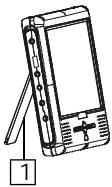
HOW TO STAND
- Pull out the support.
- Draw out the support to a proper position.
- Pull down the button to lock it.
1

2

UNLOCK
LOCK
3
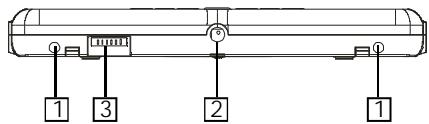
Main unit bottom side
- Hole for Battery Pack
- Nut for Battery Pack
- Battery connector
Note:
Remember to insert back the rubber cover to BATTERY CONNECTOR after using the battery pack.
REMOTE CONTROL UNIT (FREQUENTLY USED BUTTONS)
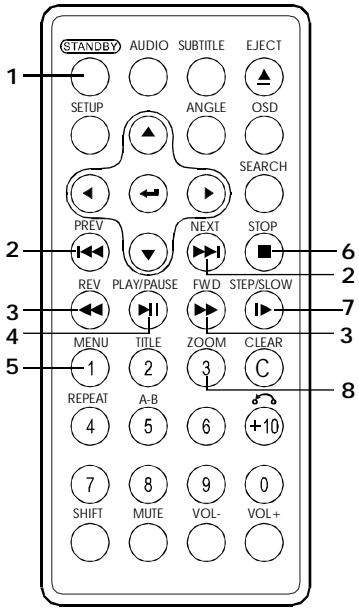
1. STANDBY button
Press this button to turn on or enter standby mode.
2. PREVIOUS/NEXT button
and
Use these buttons to search for the beginnings of tracks or chapters.
: Jump to previous
: Jump to next
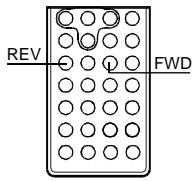
3. REV/FWD buttons (and)
Use these buttons to switch the playing speed of backward or forward.
Fast forward
: Fast backward
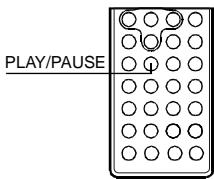
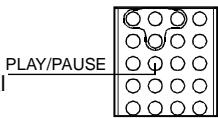
4. PLAY/PAUSE button(▶)
Use this button to play or pause playback.
5. MENU button
Press this button to display the DVD's menu screen.
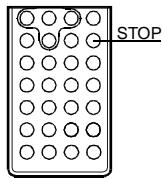
6. STOP button(■)
Press this button to stop playback.
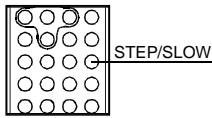
7. STEP/SLOW buttons(▶)
Press this button to slow playback at 1/2, 1/3, 1/4, 1/5, 1/6, 1/7 speed. If at pause status, press this button to play step-by-step.
8. ZOOM button
Zoom the picture on screen.
REMOTE CONTROL UNIT (OTHER BUTTONS)
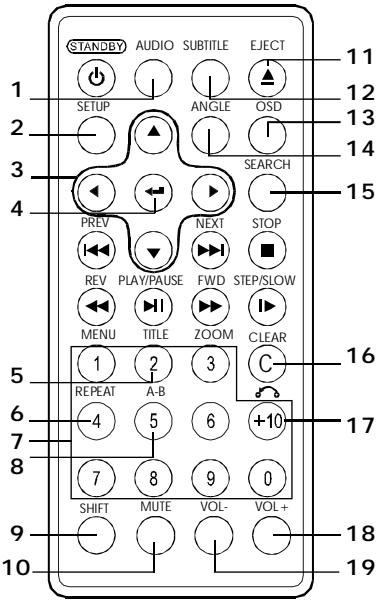
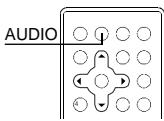
1. AUDIO button
Press this button to switch the audio language.
2. SETUP button
Press this button to display setup screen when at stop status.
3. Cursor buttons
Use these buttons to move the cursor up, down, left and right when selecting setting items.
4. ENTER button
Press it to enter/confirm selected item.
5. TITLE button
Press this button to display the DVD's title.
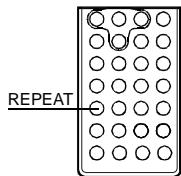
6. REPEAT button
For DVDs, use this button to play titles or chapters repeatedly. For CDs, use this
button to play tracks or the entire disc repeatedly.
7. Number buttons
Press these buttons to input numbers.
Pressing the SHIFT button to switch from function to number if necessary.
8. A-B REPEAT button
Press this button during playback to set two points and play the section between them repeatedly.
9. SHIFT button
Press the shift button to switch between number & function. (Default: function)
10.MUTE button
Press this button to mute the player.
11.EJECT button
Eject the disc out.
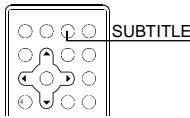
12.SUBTITLE button
Press it to switch the DVD's subtitle language.
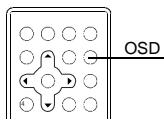
13.OSD button
Press this button to display the disc information.
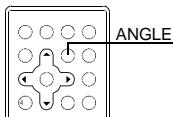
14.ANGLE button
Press it to switch angle.
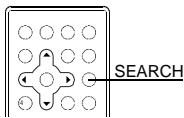
15.SEARCH button
Locate a title/ chapter/ time and play.
16.CLEAR button
Clear the numbers inputted before.
17. RETURN button
Press it to return back to menu screen. (For VCD, it functions only when PBC is on)
18.VOL + button
Press this button to increase the player's volume.
19.VOL - button
Press this button to decrease the player's volume.
NOTES ON USING THE REMOTE CONTROL UNIT
- Do not drop or step on the remote control unit or subject it to shocks.
Note that the remote control unit may not work if there are obstacles between it and the remote sensor. - Do not expose the remote sensor to strong light. Doing so may make operation impossible.
Use the remote control unit within the specified operating range.
REPLACING THE BATTERY
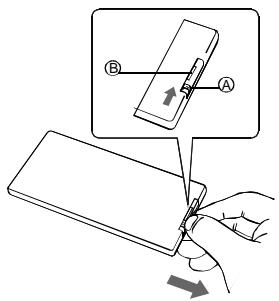
- Insert your finger nails into A and B on the diagram below, press A according to the direction, then pull out the battery holder.
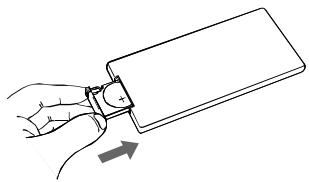
- Fit the battery holder back to its place.
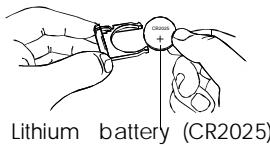
- Remove the old battery, then insert the new battery into the battery holder with the + side facing upwards.
NOTE:
To prevent leakage of fluid from the lithium battery, remove the battery when not using the remote control unit for long periods of time (One month or more). If the battery leaks fluid, carefully wipe it out of the battery case, then change to a new lithium battery.
Caution: The battery may present a risk of fire if mistreated. Do not recharge, disassemble, heat it above 100^ . Replace battery with the same type.
- Dispose of used battery properly, keep away from children and do not dispose of in fire.
NAMES OF BATTERY PARTS AND THEIR FUNCTIONS
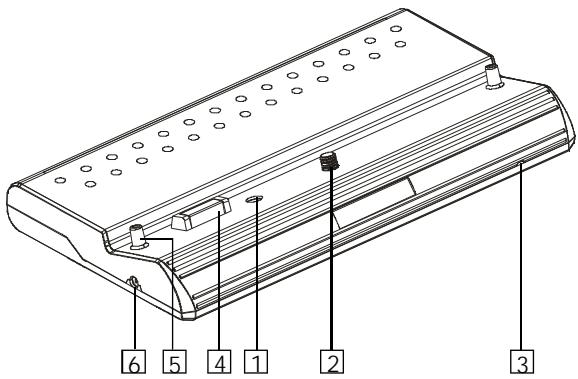
- DC IN connector
Connect the power adapter to recharge.
- Battery knob
Twist it to tighten/detach the battery pack.
- Battery indicator LED
When the battery is discharging, LED is off.
When recharging the battery, LED is red.
When the LED turns from red to off, it means finishing recharge.
- Player terminals
Supply power to the player.
CAUTION:
Do not short-circuit the terminals.
- Fix pole
Fix the battery to the player when installing it.
- DC OUT (Non-standard jack)
Output DC 7.4/7.2V, especially for supplying power to TV Tuner Box (Optional accessory).
OPERATION OF THE BATTERY PACK
Charge the battery pack fully before using it for the first time.
- When the surrounding temperature is high, the battery pack may sometimes be unusable due to activation of protection circuitry.
- When the portable DVD player is used with the battery pack and has no disc or stops for about 10 minutes with power on, it will turn off automatically. (Auto power off) The battery pack and the portable DVD player become hot during use. This is not malfunction.
- When the battery pack is not to be used for a long period, be sure to remove it from the portable DVD player. If the battery pack is left attached, continual flow of weak current renders it over discharged and eventually unusable even when you try to charge it later.
If the portable DVD player is switched on while the battery pack is not fully charged, the operation may sometimes be unstable. Be sure to charge the battery pack fully before use.
STORAGE
The battery pack should be stored under a surrounding temperature from 15 to 25^ . Avoid storing it under extremely low temperature, in a place with high temperature and high humidity or in a place subject to soot, etc.
- When the battery pack is stored for a long period, at least once a year it is recommended to discharge it fully on the portable DVD player, recharge it fully again and store it.
SERVICE LIFE AND DISPOSAL
- When the charging time or available operation time becomes extremely short, the battery may reach the end of its life. The battery pack can be used for about 300 cycles of recharging and operations.
- To dispose of a used battery pack, wrap a piece of tape around the terminal section and treat it in compliance with your local regulations.
Caution:
Danger of explosion may appear if battery is incorrectly replaced.
Replace only with the same or equivalent type.
CONNECTING THE PLAYER TO A TV SET
CONNECTING ADAPTER TO THE DC 12V IN SOCKET
USING THE EARPHONE
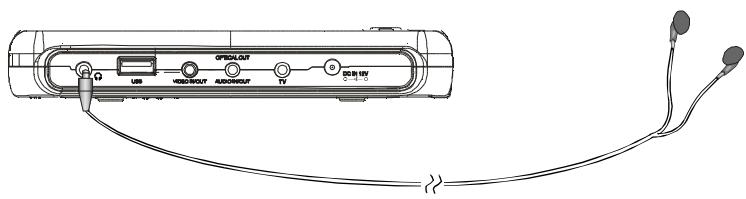
- Set the volume control to minimum sound level.
- Connect the plug of earphone to the player's " " jack.
- Adjust the volume control to the preferred sound level.
CONNECTING TO A DOLBY DIGITAL/DTS/MPEG DECODER OR AN AMPLIFIER WITH BUILT-IN DECODER
With this player, you can enjoy powerful Dolby Digital, DTS or MPEG sound. Output the digital signals from the player's digital output to a decoder or amplifier with built-in decoder.
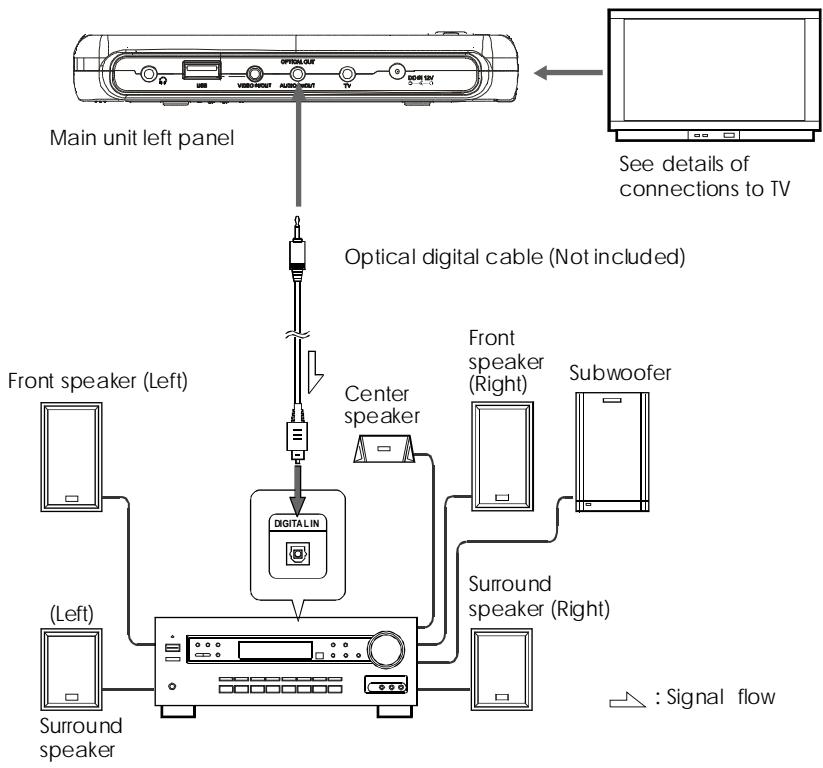
Hint:
For a compatible decoder or amplifier, 5 speakers (Front left/right, center and surround left/right) and a subwoofer are required to enjoy Dolby Digital /DTS 5.1-channel sound.
CONNECTING TO A DIGITAL AMPLIFIER THAT IS NOT DOLBY DIGITAL / DTS / MPEG COMPATIBLE
Output the digital signals from the player's digital output to a digital amplifier that is not Doby/DTS/MPEG compatible. For instructions of audio settings, refer to AUDIO OUT of AUDIO SETUP.
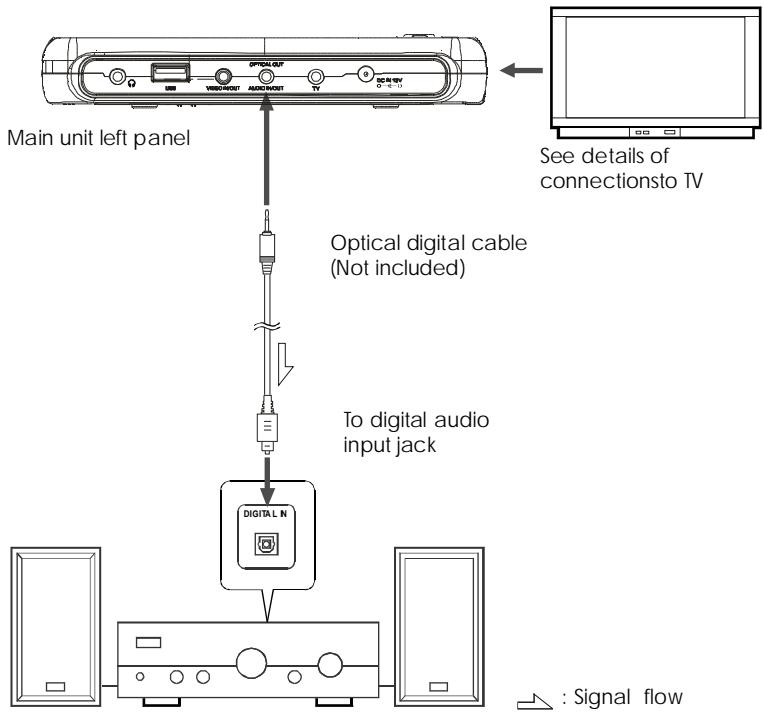
Notes:
- Carefully check the player's digital output settings before connecting the player to an amplifier equipped with a digital audio input jack which is not Dolby Digital / DTS / MPEG compatible.
Do not play DVDs when the audio settings are not correct. Or may cause strong noise and damage your speakers.
CONNECTING TO ACTIVE SPEAKER SYSTEMS
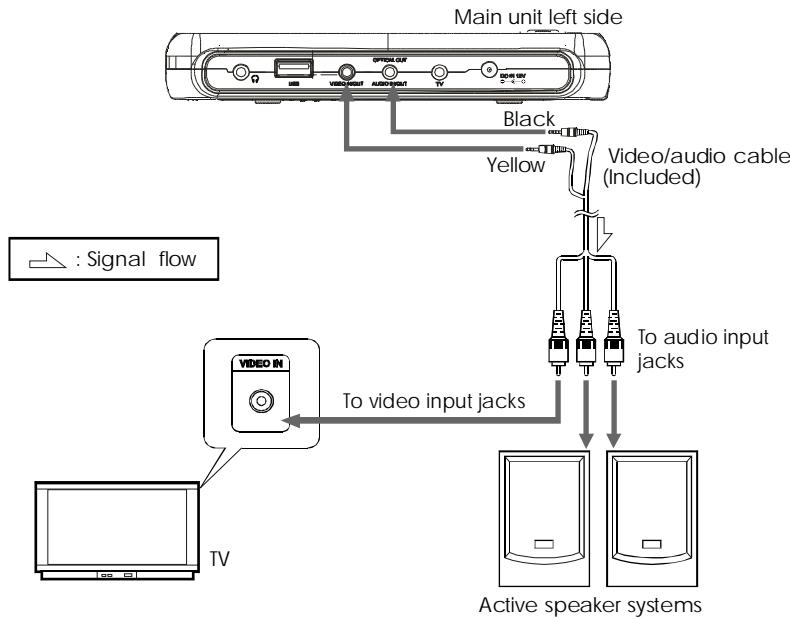
RECHARGING THE BATTERY PACK
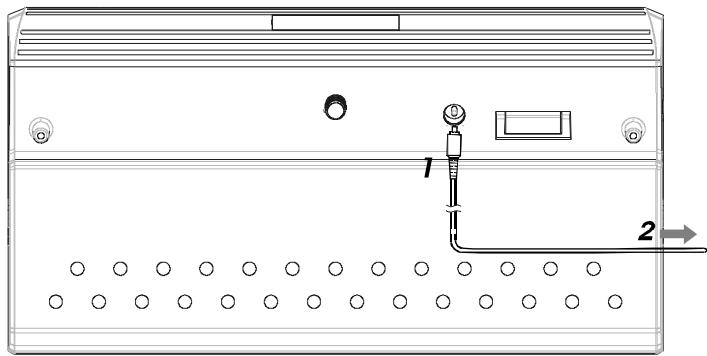
- Connect the output plug of AC/DC adapter to the battery pack.
- Connect the AC/DC adapter to the power outlet.
When recharging starts, the recharge LED lights is red.
The recharge LED turns off when recharging completes. Remove the power cord from battery pack.
Recharging usually completes in about 3.5~4.5 hours.
The battery pack can be used for about 300 cycles of recharging and operations, though this is variable depending on the operating conditions.
Charge the battery pack fully before using it for the first time.
CAUTION
- Place the battery pack and AC/DC adapter on a flat surface for recharging.
- Do not short-circuit the terminals of the battery pack and AC/DC adapter.
Notes:
The battery charger(AC/DC adapter) is compatible with supply voltage from 100V to 240V AC and can be used universally.
- When you want to use it on an overseas travel, be sure to prepare a power plug adapter matching the local power outlet.
NOTES FOR RECHARGING
- When the battery pack is hot, it may take longer time than usual for recharging or may sometimes be unable to be recharged. Wait for the battery pack to cool down before retrying recharging.
If the recharge LED can not be lit, check whether the AC adapter and battery pack are connected firmly to have perfect contact. - To protect the battery pack, do not recharge a fully charged battery pack repeatedly. Repeated overcharging may deteriorate the battery performance.
The battery pack becomes hot after recharging, but this is not malfunction. - The battery pack may not be recharged fully if recharging at a hot place.
Do not recharge it under very hot environment, it may cause explosion. - The surrounding temperature during recharging affects the recharge efficiency. Recharging is in the most efficient state from 10^ to 30^ . Recharge the batterypack at a place within this temperature range whenever possible.
ATTACHING THE BATTERY PACKTOTHE PLAYER
Attach the battery pack to the player as described below.
- Attach the battery pack to the unit.
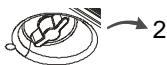
- Align the fix hole of the player with the fix pole on the battery pack. Turn the battery knob clockwise until the battery pack is tighten with the player.
- Now the player can be operated.
If the battery pack is fully recharged, the player can play DVDs continuously for over 3 hours.
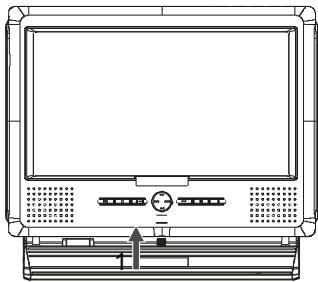
If the power is switched on while the battery pack is not fully charged, the player operation may sometimes become unstable. Be sure to charge the battery pack fully before using.
The battery pack is being recharged slowly while the player is playing with AC/DC adapter connected.
The battery pack is being recharged as it is recharged separately while the player is at STAND BY status with AC/DC adapter connected.
After connecting the battery pack and power on, press OSD button on remote control at PLAY PAUSE or STOP status to show symbol"" This symbol indicates the capability of the battery pack.
While the battery pack has lower capacity, "will be flashed to remind you.
AC POWER OPERATION
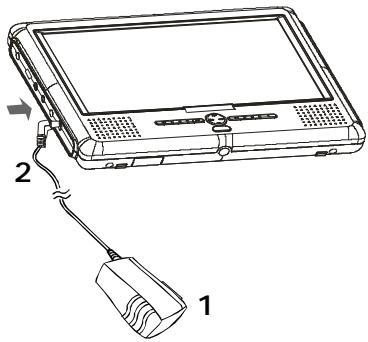
- Connect the DC output plug of the AC /DC adapter to the DC IN jack on the player.
- Connect the AC/DC adapter to a power outlet. Now the player can be operated.
CAUTION:
Be sure to use the AC/DC adapter provided with the player. Before inserting or removing the DC output plug of the AC/DC adapter, always be sure to turn off the power of the portable DVD player.
REMOVING THE BATTERY PACK FROM THE PLAYER
The battery pack can be removed from the player as described below.
- Turn off the power of the player.
- Turn the battery knob anti-clockwise to remove battery pack.
CHANGING FROM AV OUT TO AV IN
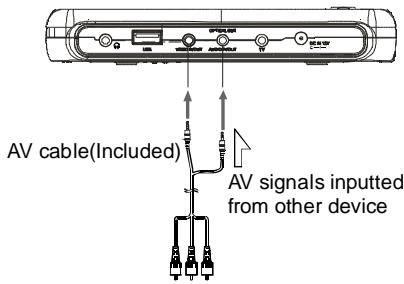
You can change the player from AV OUT(Output AV signal to TV, etc) to AV IN(Input AV signal from other device)and use the player as a TFT monitor. The default setting is AV OUT.
- Press MODE button on main unit and switch to AV IN/OUT mode.
- Press LEFT or RIGHT button to switch between AV OUT and AV IN.
Note:
Avoid to input AV signals from AV JACK when the player is set to AV OUT, or interference will be caused to affect current playback and lower down playing quality.
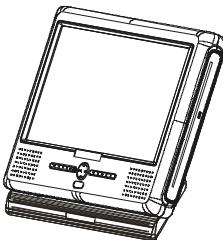
TURNING ON THE POWER
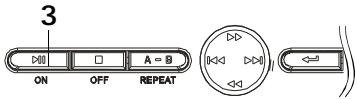
Main unit (Front panel)
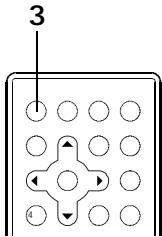
Remote control unit
- Connect the AC/DC adapter to power outlet.
- Connect the DC output plug of the adapter to the DC input jack on the main unit.
- Keep pressing the ON button on the main unit for about 1.5 seconds.
The player can be used now.
At standby mode, the player can be turned on by pressing the STANDBY button on the remote control unit.
Hint:
The included AC/DC adapter is compatible with voltage from 100V to 240V, you can use it on trips overseas.
Note that you need a converter plug (Available in stores) suited for the region in which you are travelling.
TURNING OFF THE POWER
- When the power is on, press OFF and hold it for about 1.5S.
The player can be changed to standby status by pressing the STANDBY button on the remote control unit.
- Unplug the power cord from the power outlet.
- Disconnect the AC/DC adapter from the player's DC input jack.
LOADING
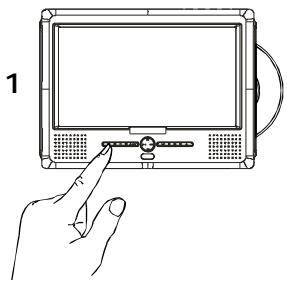
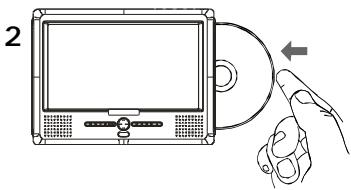
- Turn on the player.
- Push the disc into disc window and the disc will be slotted in automatically.
Notes:
- Set the disc securely. Failure to set it securely could result in damage.
- Do not use cracked or warped discs.
Doing so could result in damage. - Push single-sided DVDs or CDs in with the label (Printed) side facing upward.
For double-sided DVDs, check each side carefully, then push the disc in securely.
- For CDs or one-sided DVDs, you do not have to worry about touching the label (Printed) side of the disc with your fingers. Since two-sided DVDs have signals recorded on both sides, be careful not to scratch them when removing them from the player.
- The player starts loading.
PLAYBACK
- Turn on the power of the player.
- Insert a disc correctly.
- The player will load the disc and play automatically. If the disc cannot be played, push the (PLAY/PAUSE) button.
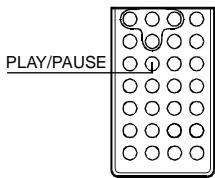
STOP PLAYBACK
- Press on the key board or STOP button on the remote control while playing
- The player remembers the stopping place.
- To resume playback from the point where it stopped just press key.
- To clear stopping mark, press again at stop status. The player will not play from the stopping place when pressing next time.
PAUSE PLAYBACK
- Press on the key board or PLAY/PAUSE button on the remote control during playback.
- Press again to resume normal playback.
PLAYING AT FAST SPEED
- Press or button on the key board or FWD/REV on the remote control during playback.
- The playback speed will be changed each time you pressing the or . The speed will be changed to 2X, 4X, 8X, 20X, 1X.
PLAYBACK IN SLOW MOTION
- Press the button on the remote control during playback. The playback speed becomes 1 / 2 , 1 / 3 , 1 / 4 , 1 / 5 , 1 / 6 or 1 / 7 of the normal speed each time you pressing the button.
- When pressing during pause status, the player will show still picture on the screen The picture will be changed one piece each time the button is pressed.
NOTE:
During fast playback or slow motion playback, the sound is muted except CD &MP3 disc playback. To resume normal playback, press
A-B/REPEAT PLAYBACK
- A-B playback
Press A-B button on the remote control during playback, A point would be located on the remote control and REPEAT A-appears on the screen.
Press A-B button again, B point would be located and the player would play from A point to B point repeatedly.
Press A-B button again. A-B playback would be cancelled and normal playback would be resumed.
- Repeat a Title, Chapter or Track
Press the REPEAT button on the remote control during playback.
The chapter or the title(For DVD)and the track or entire disc (For CD) will be played repeatedly.
The REPEAT mode will be changed each time the repeat button is pressed.
ZOOM FUNCTION
- Press ZOOM on the remote control during playback. The picture on the screen will be zoomed.
- The zooming rate will be changed each time the zoom button is pressed. The sequence is 2X, 3X, 4X, 1/2X, 1/3X, 1/4X, 1X.

SEARCHING FOR A SPECIFIC SCENE
- Press the SEARCH button on the remote control.
- Press the UP, DOWN and ENTER button to move to the desired section.
- Input valid number to choose specific time or title/chapter or track.
- press ENTER button to play the specific scene.
- Press SEARCH button to resume normal screen.
SELECTING SUBTITLE
You can select a preferred subtitle from those included on the DVD video disc by pressing SUBTITLE button on the remote control during playback.
CHANGING THE ANGLE
Press the ANGLE button on the remote control while playing a scene recorded with multiple angles. If your DVD disc is not recorded with multiple angles, pressing ANGLE button will not effect at all.
CHANGING THE AUDIO LANGUAGE
- Press the AUDIO button on the remote control during playback. You can select the preferred audio language included on the DVD video disc.
- For VCD or CD, you can choose the channel to play.
USING THE ON-SCREEN DISPLAY
- This DVD video player allows you to view the operational status and disc information on screen.
- Press OSD button on the remote control during playback. The disc information will be displayed on screen.
- Press OSD button again, the information will disappear.
USING THE USB PORT
- If there is only an USB device connected without any disc in before turning on the DVD player, the USB device will be read directly after power on and vice versa.
- If there are both a disc in and an USB device connected before the player's power on, there will be a prompt message shown on screen to ask to select media.
- If a disc is playing prior to the USB device connecting, you have to press "STOP" twice to get the prompt message to select USB reading and vice versa.
READ DISC
READ USB
NOTE:
- The player may not work properly if using USB connecting cable. Suggested not to use it.
- Support USB 1.1.
PLAYING A MP3 FORMAT DISC AND JPEG CD
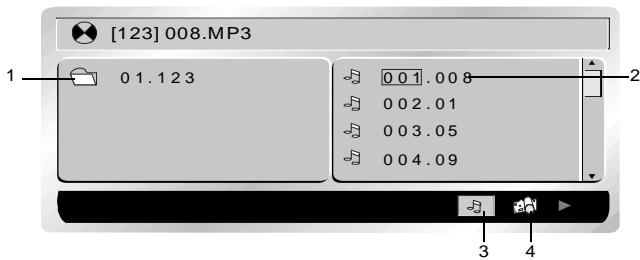
- Folder
- 00000001000000000000000000000000000000000000000000000000000000000000000000000000
- MP3 ICON
- JPEG ICON
Use / to move the cursor to a folder, a file, MP3 ICON or JPEG ICON.
In order to play Mp3 files, move the cursor to MP3 ICON and press ENTER button. In order to play JPEG files, move the cursor to JPEG ICON and press ENTER button.
Choose the desired file and press ENTER to play.
- Press A-B BUTTON to have A-B REPEAT function;press REPEAT button to switch repeat mode(REP1,REP CHAPTER, REP TITLE, REP OFF). REP1 means repeating the track; REP DIR means repeating the folder; REP ALL means repeating the whole disc.
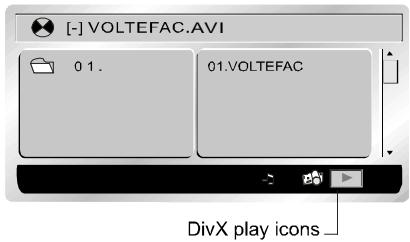
PLAYING DivX FILES
Your player is an Official DivX Certified product that plays DivX.5, DivX.4, DivX.3 and DivX.VOD video content, in compliance with DivX Certified technical requirements.
NOTE:
To guarantee playback of DivX files the audio must be MP3 format. Divx Certified devices can play any interleaved MP3 audio at any bitrate, both CBR and VBR. The audio must be sampled at standard frequencies, such as 32 kHz, 44.1 kHz and 48 kHz, and must conform to the AVI sile specification. Apart from MP3, the audio formats recognise by your player are MPEG layer 1/2 , AC3, DTS, PCM. Formats such as AAC and Ogg Vorbis are not supported by this player.
- Push the disc into disc window and the disc will be slotted in automatically.
- Place the disc with the printed side facing up.
- A menu appears on the screen. Select a folder using the and buttons on the remote control, then press to see the folder's contents.
NOTE:
When there are music, images and DivX files contained on one disc, press the button several times to access the play type at the bottom of the screen, then use the or button to select the DivX icon and press to confirm.
- Select a file using the and buttons on the remote control.
NOTE:
To go back to the folder list, press .
- Press to start playback.
- Press STOP to stop playback.
GENERAL STEPS OF SETUP
- Press the SETUP button on the remote control, the main setup menu appears.
- Press the LEFT and RIGHT buttons to highlight the icon of the desired page, then press the DOWN or UP button to activate that page.
- Press the DOWN button to highlight the desired option. Press ENTER or RIGHT to select, the choices of that option appear.
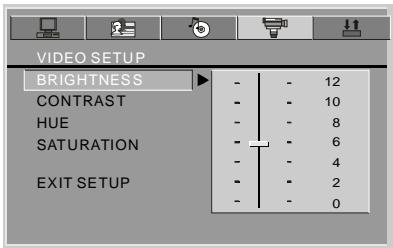
- Press LEFT/RIGHT/UP/DOWN buttons to highlight the EXIT SETUP option, then press ENTER or SETUP again to exit SETUP MENU.
NOTE:
Pressing the following buttons will turn off the setup menu, and the choices that have been changed will be saved: Subtitle, Title, Return, Stop, Play/Pause, Step, Next, Prev, Zoom, Program, Repeat, Angle, Mute.
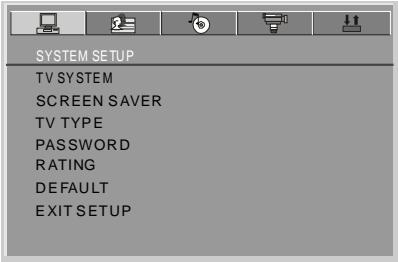
The system setup options are illustrated below:
TV SYSTEM
If you want to connect the player to a TV, please choose a correct TV system first.
AUTO: Choose this setting if your DVD player is connected to a multi-system TV.
- NTSC: Choose this setting if your DVD player is connected to a NTSC TV.
PAL: Choose this setting if your DVD player is connected to a PAL TV.
The default setting is NTSC.
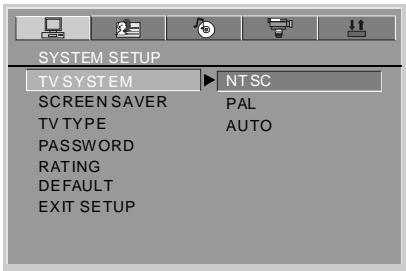
NOTE:
Setting with incorrect TV system will result in black and white picture on your TV screen.
SCREENSAVER
If the screen saver is on, when your DVD player is at STOP or NO DISC status, or there is a frame frozen for a little long time, the screen saver will be displayed. This feature can protect the screen from damage.
ON: Choose this setting to activate the screen saver.
OFF: Choose this setting to cancel the screen saver.
The default setting is ON.
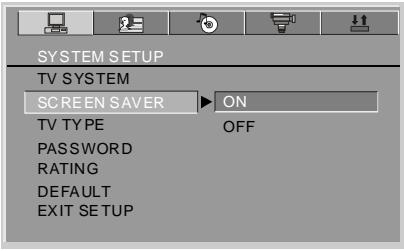
TV TYPE
16 : 9 (Wide Screen): Choose this setting if your DVD player is connected to a wide screen TV. If you choose this setting and you don't have a wide screen TV, the images on the screen may appear distorted due to vertical compression.
4 : 3 LB (Letter Box): Choose this setting if your DVD player is connected to a normal ratio TV. You'll see the movie in their original aspect ratio (Height-to-width ratio). You'll see the entire frame of the movie. The movie might appear with black bars at the top and bottom of the screen.
4:3 PS (Pan & Scan): Choose this setting if your DVD player is connected to a normal ratio TV. You can fill the movie to the entire screen of your TV. This might mean that parts of the picture (The left and right edges) won't be seen.
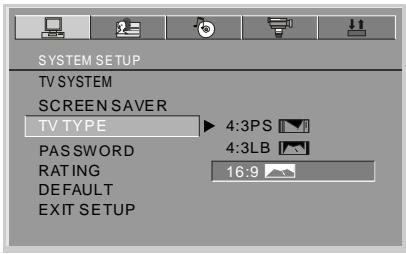
NOTES:
- The image display ratio is related to the recorded disc format. Some discs can not be displayed in the chosen aspect ratio.
If you play a disc recorded in 4:3 format on a wide screen TV, black bars will appear on the left and right side of the screen. - You must adjust the screen setting depending on the type of the TV.
Password
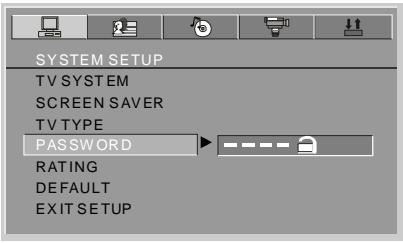
- The player is locked with a default password 0000 and you can not change the rating.
In order to change the rating, choose th password option and input the correct password to unlock the player.
- After the player is unlocked, you can choose the rating option and change it, then you can choose password option and change it to a new password with 4-digit numbers and press ENTER button to lock it again.
RATING
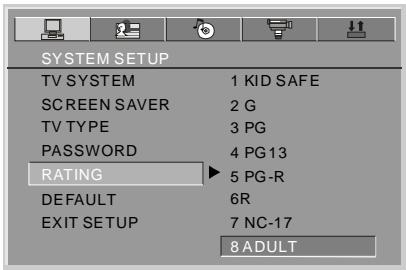
The Rating feature works with DVD discs that have been assigned a rating. This helps you to control the types of DVDs that the player can be watched.
There are eight limited rating options:
KID SAFE, G, PG, PG13, PG-R, R, NC-17, ADULT.
The default setting is ADULT.
NOTE:
If the password option is locked, you cannot change rating.
DEFAULT
Choose this option to resume factory settings.
The language setup options are illustrated below:
OSD LANGUAGE
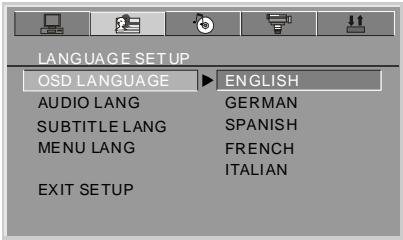
Highlight OSD LANGUAGE option, and press LEFT/RIGHT/UP/DOWN to choose the OSD language you prefer. Press ENTER to confirm, then the OSD will be displayed in that language. There are 5 optional OSD languages: English, German, Spanish, French and Italian.
AUDIO LANGUAGE
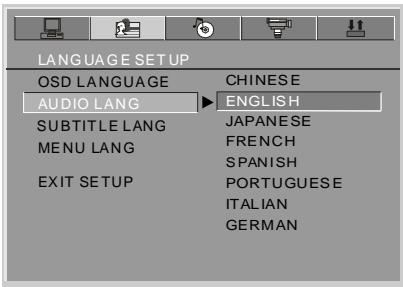
Highlight the AUDIO LANG option, and press LEFT/RIGHT/UP/DOWN to choose the audio language you prefer. Press ENTER button to confirm. If the disc you are playing has that language available, it will output audio in that language. There are 8 optional audio languages: Chinese, English, Japanese, French, Spanish, Portuguese, Italian and German.
SUBTITLE LANGUAGE
Highlight the SUBTITLE LANGUAGE option, and press LEFT/RIGHT/UP/DOWN to choose the subtitle language you prefer. Press ENTER to confirm. If the disc you are playing has that language available, it will displays subtitles in that language. There are 7 optional subtitle languages: Chinese, English, Japanese, French, Spanish, Italian and German.
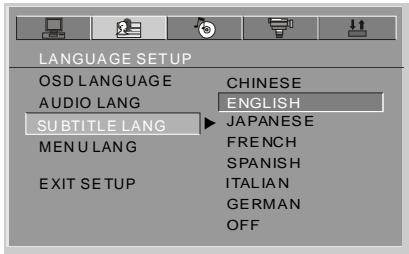
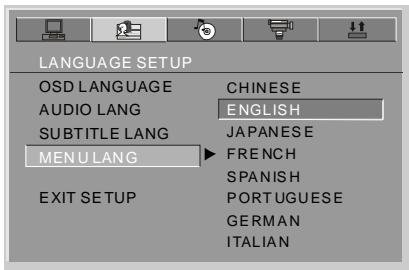
MENULANGUAGE
Highlight the MENU LANGUAGE option, and press LEFT/RIGHT/UP/DOWN to choose the menu language you prefer. Press ENTER to confirm. If the disc you are playing has that language available, it will displays menu in that language. There are 8 optional menu languages: Chinese, English, Japanese, French, Spanish, Portuguese, German and Italian.
NOTE:
If your preferred language isn't available, the disc's default language will be played. The default language of your DVD player is English.
AUDIO OUT
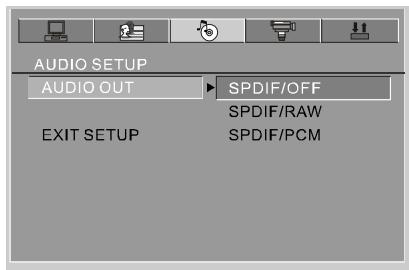
Highlight the AUDIO OUT option, and press LEFT/RIGHT/UP/DOWN to choose the audio output mode you prefer. Press ENTER to confirm:
There are 3 optional audio output modes: SPDIF/OFF, SPDIF / RAW and SPDIF/ PCM.
SPDIF/OFF: Choose this setting to output analog signal, and there will be no signal outputted from optical jack.
SPDIF/ RAW: Choose this setting if your DVD player is connected to a power amplifier with an optical cable. When playing a disc recorded with Dolby Digital, DTS and MPEG audio formats, the corresponding digital signals will be outputted from the Optical Output jack.
SPDIF / PCM: Choose this setting if your DVD player is connected to a 2-channel digital stereo amplifier. When playing a disc recorded with Dolby Digital and MPEG audio formats, audio signals will be modulated into a 2-channel PCM signal, and it will be outputted from the Optical Output jack.
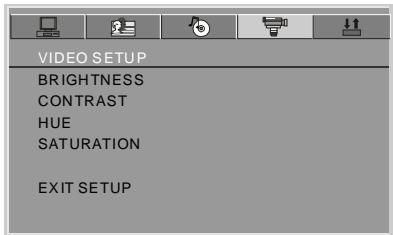
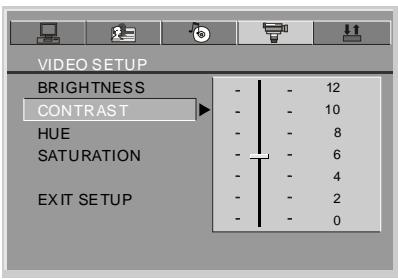
The video setup options are illustrated below:
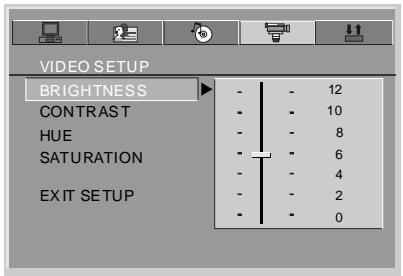
BRIGHTNESS
Use the UP and DOWN buttons to move the scroll and adjust the brightness.
CONTRAST
Use the UP and DOWN buttons to move the scroll and adjust the contrast.
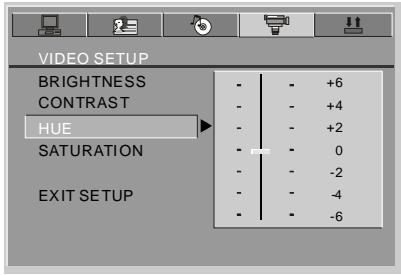
HUE
Use the UP and DOWN buttons to move the scroll and adjust the hue.
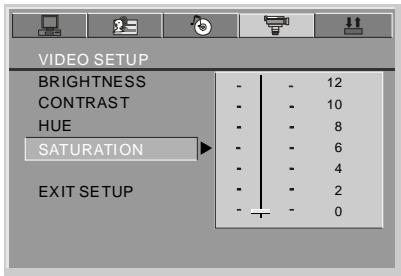
SATURATION
Use the UP and DOWN buttons to move the scroll and adjust the saturation.
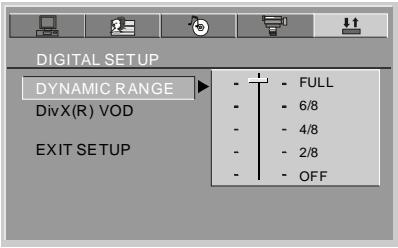
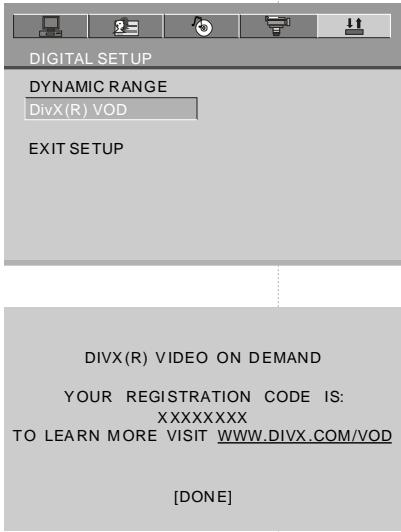
The digital setup options are illustrated below:
DYNAMIC RANGE
Choose this setting to adjust the line out compressing ratio and get different effects. If adjusting to FULL, the audio signal peak value will be compressed to be minimum; while adjusting to OFF, to be maximum.
DivX VOD
DivX VOD files are downloaded after paying a rental from certain commercial websites. Prior to downloading a VOD you need to input the registration number of your DVD player on the purchase form on the site. Write down the VOD 8-character registration number so that you can fill in the form on the website you purchase your DivX VOD files from.
Note: If you cannot play a DivX VOD file recorded on a CD-R disc after downloading it, the rental period allocated during purchasing from the website may have expired. It is also possible that the recorded file is not compatible with your player because of different versions or incorrect download parameters. The parameters used when copying to CD-R may be another reason for this.
Since it is not possible here to supply all the information, parameters and advice relating to the use of DivX VOD files, we recommend that you visit specialist websites such as www.divx.com/vod.
SIZE AND PARAMETER
Product name:
PORTABLE DVD player
Power:
DC12V
Consumption:
<10W
Audio out:
R/L 2ch, OPTICAL
Video out:
Composite
Size:
231X170X26mm
Weight:
730 g (W/O battery)
TROUBLESHOOTING
| Symptoms | Possible causes | Remedies |
| The disc does not play | Load the disc incorrectly. | Load the disc with the label side up, and firmly pressed into center. |
| Disc is dirty or scratched. | Make sure the disc is free from scratches or fingerprints. | |
| Wrong region disc. | Use right region disc. | |
| No display | AV cable is disconnected. | Connect the cable firmly. |
| Wrong setting or connection for the player or TV. | Setting or connecting correctly with your player or TV. | |
| No sound | AV cable is disconnected. | Connect the cable firmly. |
| Wrong setting or connection for the player or TV. | Setting or connecting correctly with your player or TV. |
Maintenance Clean the unit only as recommended in the Operational Instructions.
DAMAGE REQUIRING SERVICE
Have the unit serviced by a qualified service technician if:
The unit has been exposed to rain or water.
The unit does not seem to operate normally.
The unit exhibits a marked change in performance.
DO NOT ATTEMPT TO SERVICE THE UNIT BY YOURSELF!