DVB-T - Récepteur TNT NEXT BASE - Notice d'utilisation et mode d'emploi gratuit
Retrouvez gratuitement la notice de l'appareil DVB-T NEXT BASE au format PDF.


| Type de produit | Récepteur TNT portable |
| Marque | NEXT BASE |
| Modèle | DVB-T |
| Dimensions (L × l × h) | 136 × 84 × 20.8 mm |
| Poids net | 173 g |
| Alimentation | DC 12 V / 7.2 V via adaptateur secteur (non fourni) ou batterie externe |
| Consommation électrique | Environ 5 W (estimation) |
| Connectivité | Entrée antenne coaxiale, sortie vidéo composite (RCA), sortie audio stéréo (RCA), sortie DC 12 V pour lecteur DVD portable |
| Formats de sortie vidéo | PAL, NTSC, Automatique |
| Réception | DVB-T, bande UHF/VHF |
| Recherche des chaînes | Automatique et manuelle |
| Guide électronique des programmes (EPG) | Oui |
| Fonctions spéciales | Visualisation par aperçu (9 programmes), sélection audio, saut de chaîne, affichage des informations |
| Télécommande | Oui, avec pile lithium CR2025 |
| Langues du menu OSD | Français, Anglais, Allemand, Espagnol, Italien, Portugais, Néerlandais |
| Réglages régionaux | Europe, Asie, Océanie (plusieurs pays) |
| Entretien et nettoyage | Débrancher avant nettoyage ; utiliser un chiffon sec |
| Sécurité | Ne pas exposer à l'eau ou à l'humidité ; ne pas ouvrir ; tenir éloigné des sources de chaleur |
| Pièces détachées et réparabilité | Aucune pièce réparable par l'utilisateur ; contacter un technicien qualifié |
| Informations générales | Conçu pour être utilisé avec un lecteur DVD portable Apollo Electronics (séries SDV17/27/37-XXX et SDV185-XXX) |
FOIRE AUX QUESTIONS - DVB-T NEXT BASE
Questions des utilisateurs sur DVB-T NEXT BASE
0 question sur cet appareil. Repondez a celles que vous connaissez ou posez la votre.
Poser une nouvelle question sur cet appareil
Téléchargez la notice de votre Récepteur TNT au format PDF gratuitement ! Retrouvez votre notice DVB-T - NEXT BASE et reprennez votre appareil électronique en main. Sur cette page sont publiés tous les documents nécessaires à l'utilisation de votre appareil DVB-T de la marque NEXT BASE.
MODE D'EMPLOI DVB-T NEXT BASE
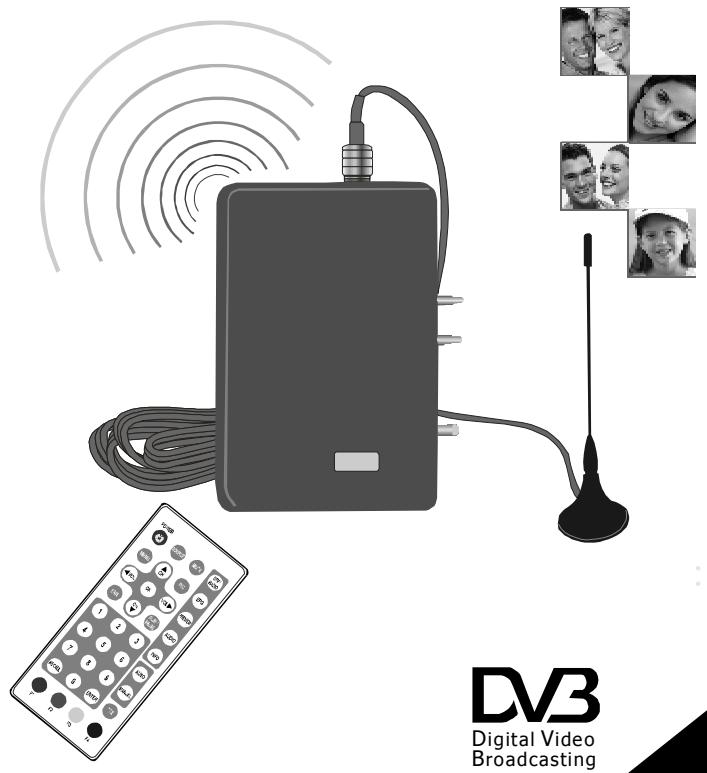
DVB-T RECEIVER BOX
ENG Operating Instructions
GER Bedienungsanleitung
FAR Mode d'Emploi
ITA Istruzioni per l'uso
SPA Instrucciones de uso
IMPORTANT SAFETY INSTRUCTIONS
Thank you for purchasing this product which has been designed to receive digital TV channels and especially for SDV17/27/37-XXX and SDV185-XXX series DVD players from Apollo Electronics Group. Please read this manual carefully before operating your DVB-T Box and keep it handy for future reference. It will be helpful to you if you encounter any operational problem.
IMPORTANT SAFETY INSTRUCTIONS
- Read these instructions.
- Keep these instructions.
- Heed all warnings.
- Follow all instructions.
5.Do not use this box near water. - Do not install the box near any heat sources such as radiators, heat registers, stoves, or other apparatus that produce heat.
- Position the cables well so that they cannot be walked on or pinched by items placed on or against them.
- Always unplug the box before cleaning and clean it only with dry cloth.
- Refer all servicing to qualified service personnel. Servicing is required when the apparatus has been damaged in any way.
WARNING:
Please note that this box may not receive TV signal so well if using in a moving vehicle.
Do not expose this appliance to rain or moisture, dripping or splashing and that no objects filled with liquids, such as vases, or naked flame sources, such as candles, shall be placed on the box.
CAUTION:
Do not take the box apart. No user serviceable parts inside. Do not perform any servicing other than contained in this operating instructions unless you are qualified to do so. These servicing instructions are for use by qualified service personnel only.
1-ENG
ENG
CONTENTS
IMPORTANT SAFETY INSTRUCTIONS 1
CONTENTS 2
PACKAGE CONTENTS. 3
PARTS IDENTIFICATION 4
MAIN UNIT. 4
REMOTE CONTROL 5
KEY DESCRIPTION OF REMOTE CONTROL 6
SPECIAL KEYS. 7
NOTES ON USING THE REMOTE CONTROL UNIT 9
REPLACING THE BATTERY. 9
CONNECTIONS 10
CONNECTING THE BOX TO THE DVD PLAYER. 10
TURNOFF THEBOXAND THEPLAYER 11
SYSTEM SETUP. 12
SCREEN INFO. 12
TV SYSTEM 12
REGIONAL SETTING. 13
TIME ZONE 13
OSD LANGUAGE 14
AUTOMATIC SEARCH. 14
RESET DEFAULT. 15
EXIT. 15
OTHERS. 16
DIMENSION AND PARAMETER 16
TROUBLESHOOTING. 17
2-ENG
PACKAGE CONTENTS
After unpacking, fist check the contents of your DVB-T RECEIVER BOX package as listed below:
RECEIVER BOX
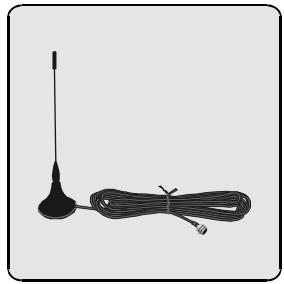
ANTENNA
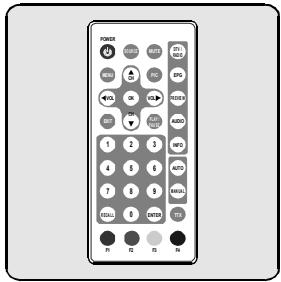
REMOTE CONTROL
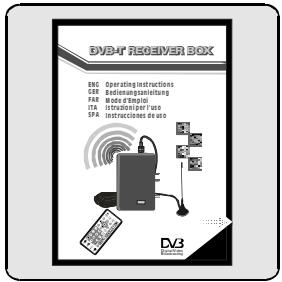
OPERATING MANUAL
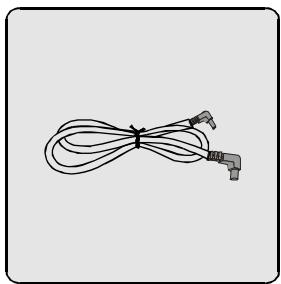
BATTERY POWER CABLE
NOTES:Actual products' appearance might vary slightly from the pictures shown.
3-ENG
ENG
ENG
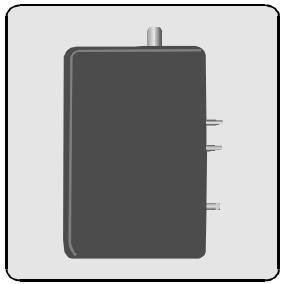
MAIN UNIT
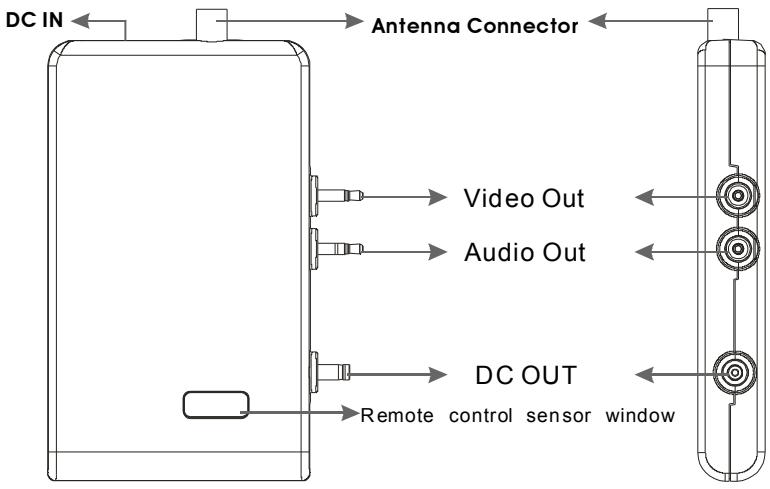
1. DC IN
Connect the AC/DC adapter or battery power cable to the receiver box to supply power.
2. Antenna connector
Connect the antenna and input TV signal from here.
3. Video out
Connect the Video jack of portable DVD players and output video signal.
4. Audio out
Connect the AUDIO jack of a portable DVD player and output audio signal.
5.DCOUT
Supply power for portable DVD player.
4-ENG

PARTS IDENTIFICATION
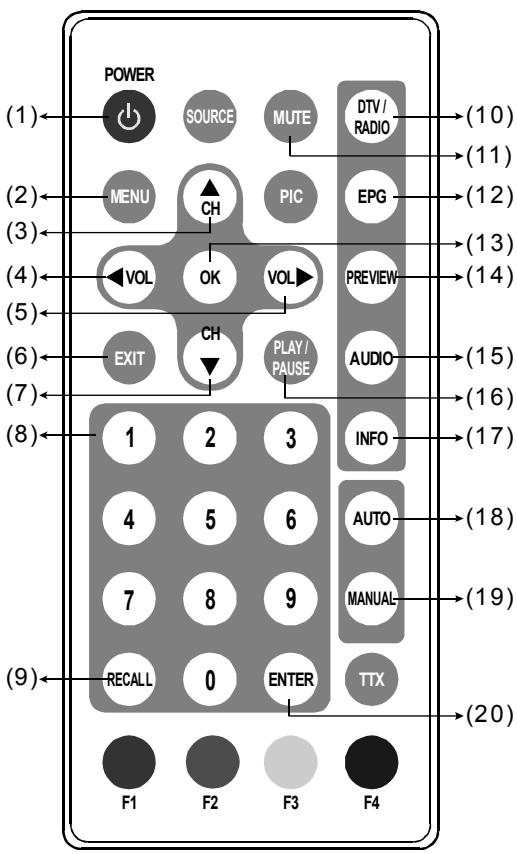
REMOTE CONTROL
ENG
5-ENG
PARTS IDENTIFICATION
KEY DESCRIPTION OF REMOTE CONTROL
ENG
1. POWER
Power on or standby mode.
2.MENU
Press it to show the menu.
3.CH+/UP
Press it to channel up or move the cursor up.
4.VOL-/LEFT
Press it to turn down the volume or move the cursor left.
5.VOL+/RIGHT
Press it to turn up the volume or move the ecursor right.
6.EXIT
Exit from the current item.
7.CH-/DOWN
Press it to channel down or move the cursor down.
8.DIGITS
Number keys.
9.RECALL
Jump back to the previous channel.
10.DTV/RADIO
Choose TV program or radio program.
11.MUTE
Audio mute on/off.
12.EPG
Electronic Program Guide.
13.OK
Confirm the selection action.
14.PREVIEW
Program snapshots.
15.AUDIO
Multi-track selection.
16.PLAY/PAUSE
Use this button to play/pause playback.
17.INFO
To display program information.
18.AUTO
Automatic search.
19.MANUAL
Manual search.
20. ENTER
Enter the selected item.
NOTE:
The "SOURCE, PIC, TTX, F1, F2, F3,F4" buttons do not have any function.
6-ENG
SPECIAL KEYS
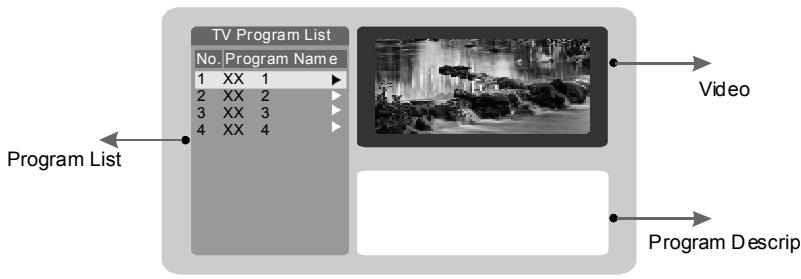
EPG (Electronic Program Guide)
A quick program guide that user can easily move up/down to view the brief description of the selected program.
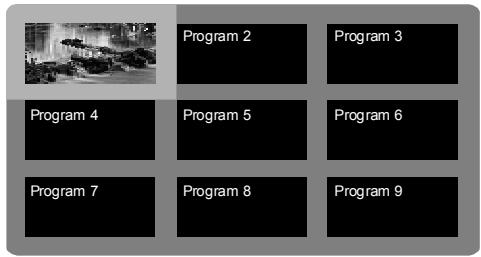
PREVIEW
Get the snapshots of 9 programs at the most simultaneously for the user to quickly browse between different programs.
7-ENG
ENG
PARTS IDENTIFICATION
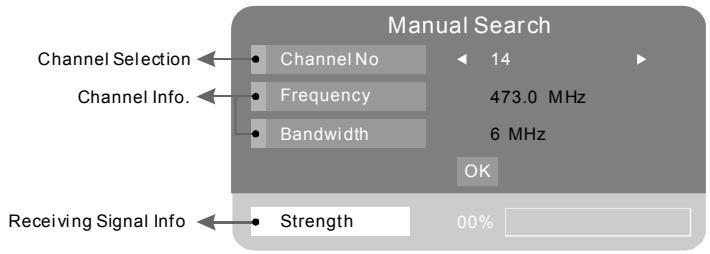
MANUAL
Perform program searching in the desired channel only. (Found programs will be appended to the program list.)
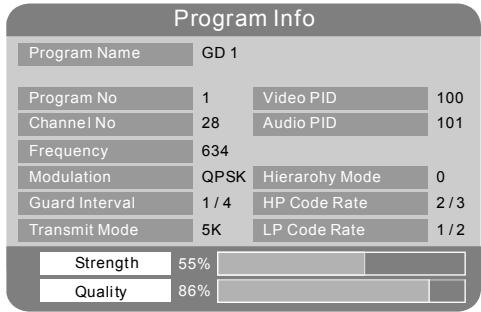
INFO
Press this button to bring forth the program information.
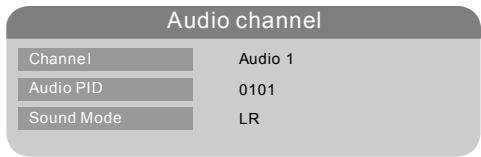
AUDIO
Audio channel information displays.
8-ENG
NOTES ON USING THE REMOTE CONTROL UNIT
- Do not drop or step on the remote control unit or subject it to shocks.
Note that the remote control unit may not work if there are obstacles between it and the remote sensor. - Do not expose the remote sensor to strong light. Doing so may make operation impossible.
Use the remote control unit within the specified operating range.
REPLACING THE BATTERY
Insert your finger nails into A and B on the diagram below. Press A according to the direction, then pull out the battery holder.
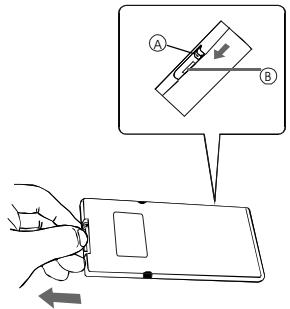
2 Remove the old battery, then insert the new battery into the battery holder with the + side facingupwards.
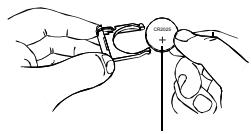
Lithium battery (CR2025)
3 Fit the battery holder back to its place.
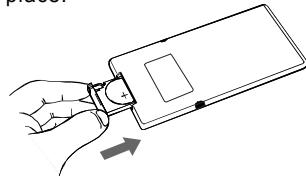
NOTE:
To prevent leakage of fluid from the lithium battery, remove the battery when not using the remote control unit for long periods of time (one month or more). If the battery leaks fluid, carefully wipe it out of the battery case, then change to a new lithium battery.
Caution: The battery may present a risk of fire if mistreated. Do not recharge, disassemble, heat above 100^ . Replace battery with same type.
- Dispose of used battery properly, keep away from children and do not dispose of in fire.
CONNECTING THE BOX TO THE DVD PLAYER
Connect the box to the player according to the corresponding plug actions below:
TURNING ON THE BOX AND THE PLAYER
- Connect the box to a DVD player.
- Connect the antenna to the box by twisting the antenna interface around the antenna connector firmly. And put the receiving antenna to a place with a good TV signal.
- Connect the AC / DC adapter to power socket.
- Connect the DC output plug of the adapter to the DC input jack on the box.
- Turn on the player first and then switch the player to AV IN status.
- Press "Menu" key on the remote control to bring up "Main Menu".
- Change the right TV system and regional setting to the location you reside.
- Change "OSD Language" to the language you are familiar with.
- Select "Automatic Searching" to scan the channels for broadcasted TV programs. (The searching time is about one minute).
- Enjoy watching high quality DVB-T programs.
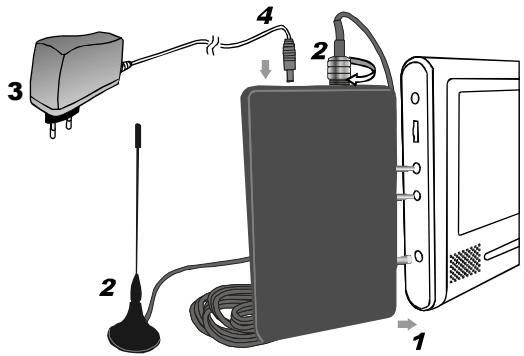
10-ENG
CONNECTIONS
NOTE:
If using a power station as power supply, please carry out operating actions as follows:
- Connect the power station and the receiver box to the player.
- Then connect the box and the power station with the battery power cable included in the accessories.
- Turn on the player and switch it to AV IN status.
Then operate the receiver box and the player as mentioned above as using the AC/DC adapter to supply power.
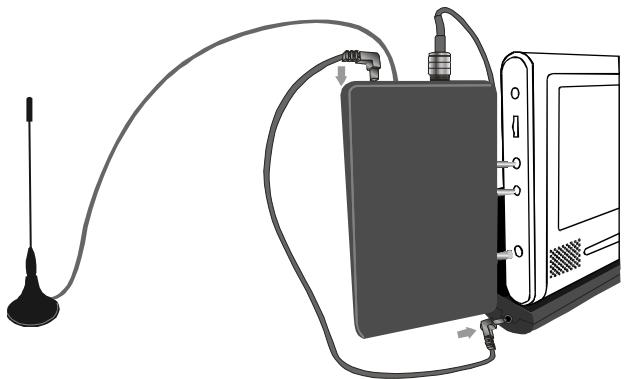
Caution:
- It is recommended that before connection, turn up the volume to the maximum status because after connection, this box will block the volume adjustment of some DVD models.
- Please note that the AC/DC adapter and the power station are not included in this DVB-T receiver box package.
TURN OFF THE BOX AND THE PLAYER
- When the box and the player are on, power off the box first.
- Turn off the player.
11-ENG
After connecting to a portable DVD player, operate the receiver box according to the instructions below:
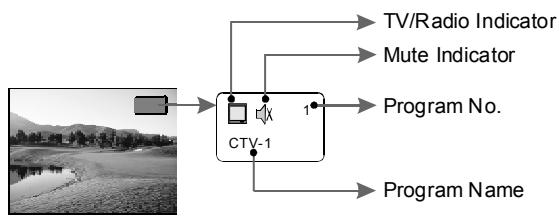
SCREEN INFO
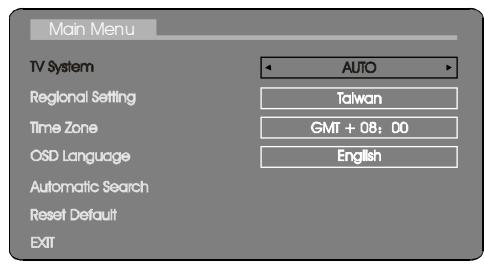
TV SYSTEM
Select the TV system. (Auto means the output signal format will be changed auto according to the received signal). Please use LEFT and RIGHT buttons to select the right TV system.
The default is AUTO.
PAL
NTSC
AUTO
12-ENG
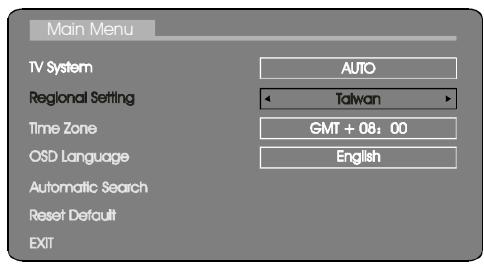
REGIONAL SETTING
Select the region according to the location you reside. It will affect the bandwidth of channels in program searching.
Please use LEFT and RIGHT buttons to select the right regional setting.
Taiwan
Australia
Scandinavia
Israel
Germany
England
Italy
France
Spain
Holland
China
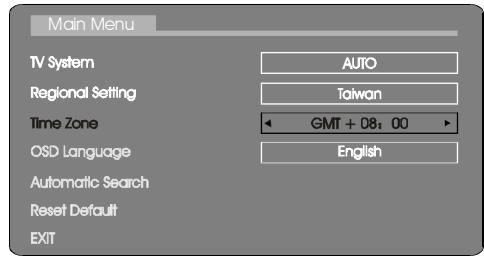
TIME ZONE
Set GMT (Greenwich Mean Time) time zone for system clock synchronization. Please use LEFT and RIGHT buttons to select the correct time zone.
OSD LANGUAGE
Select the language used in the OSD. Please use LEFT and RIGHT buttons to select the preferred OSD language.
English
Deutsch
Francais
Portugues
Espanol
Italiano
Nederlandss
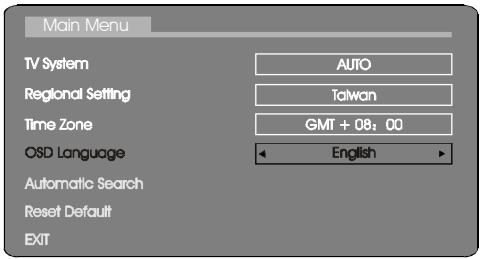
AUTOMATIC SEARCH
Scan all the available channels in the selected region for the broadcasted TV/Music programs.
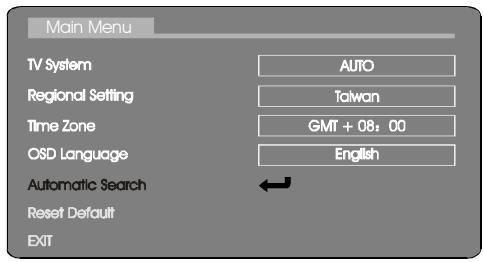

When press OK button, the following picture will appear:
Warning
Do you want to start Auto Search?
OK
Cancel
When the above picture appears, select OK option to start Auto Search. Then the following searching picture will appear on the screen. The found programs will be saved automatically.
Automatic search
Progress
21%
Channel No
27
Frequency
551.0 Mhz
TVList:
000
Music List:
000
Finishing AUTO Search, you can exit from the menu and enjoy th TV programs.
RESET DEFAULT
Reset all settings to the following default values.
TV System:
AUTO
Regional Setting:
Taiwan
Time Zone:
GMT+08:00
OSD Language:
English
EXIT
Exit the menu and return to the normal play screen.
OTHERS
DIMENSION AND PARAMETER
Product name:
DVB-TRABOX
Power supply:
DC 12V/7.2V
Dimension:
136 × 84 × 20.8 ~mm
Net weight:
173g
TROUBLESHOOTING
| Phenomenon | Solution |
| No sound | 1. Check that the box has been turned on. |
| 2. Please scan channels before watching. | |
| No picture | 1. Check that the box has been turned on. |
| 2. Please scan channels before watching. | |
| Bad image | 1. This phenomenon may appear when using in a moving vehicle. |
| 2. Please replace the antenna to another place with stronger signal. | |
| 3. Check that the setting of TV system is right. | |
| Low volume | 1. Position the volume setting of the DVD player and the box to a suitable situation. |
| No channel can be searched | 1. The antenna may be not connected well. |
| 2. Wrong regional setting. | |
| 3. Channels setting may be encrypted at your location. |
DAMAGE REQUIRING SERVICE
Have the unit serviced by a qualified service technician if:
The unit has been exposed to rain or water.
The unit does not seem to operate normally.
The unit exhibits a marked change in performance.
DO NOT ATTEMPT TO SERVICE THE UNIT BY YOURSELF!
17-ENG

Digital Video Broadcasting
DVB-TRA BOX
WWW.NEXT-BASE.COM
DVB-TRA-EGFIS-NB-B0