
A414 - Montre CITIZEN WATCH - Notice d'utilisation et mode d'emploi gratuit
Retrouvez gratuitement la notice de l'appareil A414 CITIZEN WATCH au format PDF.


| Type de produit | Montre analogique solaire à ondes radio |
| Calibre | A414 |
| Alimentation | Cellule solaire + batterie secondaire |
| Autonomie | Environ 9 mois (sans économie d'énergie), environ 8 ans (mode Power Save 2) |
| Précision | ±15 secondes par mois en moyenne (hors réception ondes radio) |
| Température de fonctionnement | -10°C à +60°C |
| Résistance à l'eau | Vérifier l'indication sur le cadran (3, 5, 10 ou 20 bars selon le modèle) |
| Fonctions principales | Réception ondes radio (automatique et manuelle), correction de fuseau horaire, économie d'énergie, avertissement de charge insuffisante, prévention de surcharge |
| Entretien | Nettoyer avec un chiffon doux ; éviter les solvants ; pour un bracelet métallique, laver à l'eau |
| Sécurité | Ne pas exposer à des champs magnétiques, à des températures extrêmes (>60°C) ou à des chocs violents |
| Pièces détachées et réparabilité | Batterie secondaire ne nécessite pas de remplacement périodique ; remplacement par un professionnel si nécessaire |
| Informations générales | Marque CITIZEN WATCH, modèle A414, fabrication analogique solaire |
FOIRE AUX QUESTIONS - A414 CITIZEN WATCH
Questions des utilisateurs sur A414 CITIZEN WATCH
0 question sur cet appareil. Repondez a celles que vous connaissez ou posez la votre.
Poser une nouvelle question sur cet appareil
Téléchargez la notice de votre Montre au format PDF gratuitement ! Retrouvez votre notice A414 - CITIZEN WATCH et reprennez votre appareil électronique en main. Sur cette page sont publiés tous les documents nécessaires à l'utilisation de votre appareil A414 de la marque CITIZEN WATCH.
MODE D'EMPLOI A414 CITIZEN WATCH
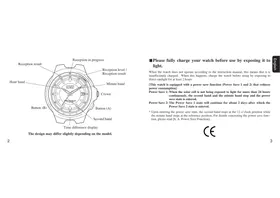
Affichage de la différence de temps. Le design peut varier légèrement selon le modèle.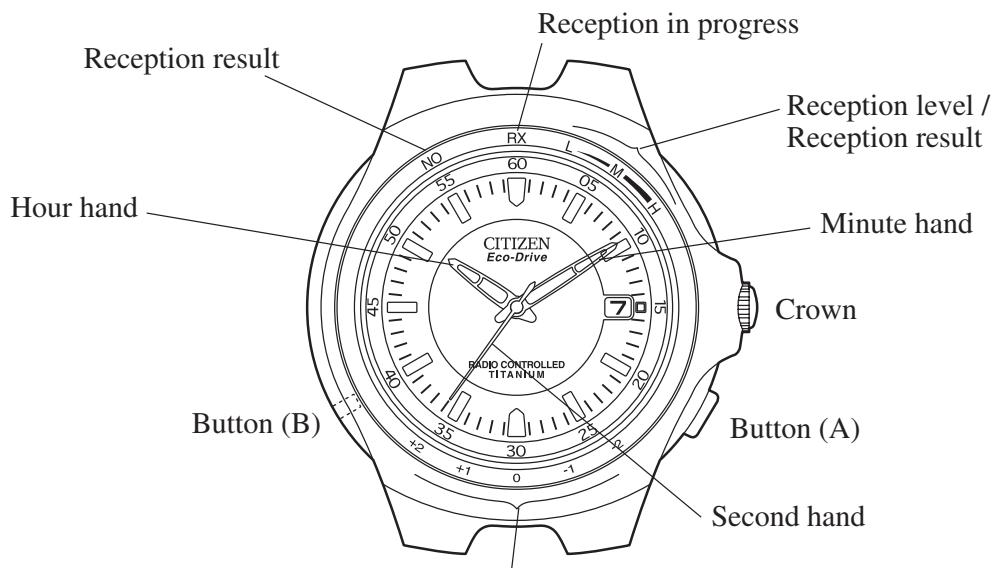
■Veuillez charger complètement votre montre avant utilisation en l'exposant à la lumière.
Lorsque la montre ne fonctionne pas conformément au manuel d'instructions, cela signifie qu'elle n'est pas suffisamment chargée. Dans ce cas, chargez la montre avant utilisation en l'exposant directement à la lumière du soleil pendant au moins 2 heures.
[Cette montre est équipée d'une fonction d'économie d'énergie (Power Save 1 et 2) qui réduit la consommation d'énergie]
Power Save 1 : Lorsque la cellule solaire n'est pas exposée à la lumière pendant plus de 24 heures consécutives, l'aiguille des secondes et l'aiguille des minutes s'arrêtent et l'état d'économie d'énergie est activé.
Power Save 2 : L'état Power Save 1 se poursuit pendant environ 2 jours, après quoi l'état Power Save 2 est activé.
- Lors de l'entrée dans l'état d'économie d'énergie, l'aiguille des secondes s'arrête à la position 12 heures tandis que l'aiguille des minutes s'arrête à la position de référence. Pour plus de détails concernant la fonction d'économie d'énergie, veuillez lire [6. A. Fonction d'économie d'énergie].
Cette montre est une montre à ondes radio qui corrige automatiquement l'heure et la date en recevant l'onde radio de l'heure standard (informations horaires) émise en Allemagne. De plus, cette montre fonctionne également comme une montre solaire analogique équipée d'une fonction de génération d'énergie photovoltaïque qui entraîne la montre en convertissant l'énergie lumineuse en énergie électrique. Elle est également équipée d'autres fonctions utiles, notamment une fonction d'économie d'énergie qui réduit la consommation d'énergie de la montre lorsque la cellule solaire n'est pas exposée à la lumière.
* Emplacements où la réception des ondes radio peut être difficile
- Il peut être difficile de recevoir les ondes radio dans certains endroits. L'heure et la date ne sont pas réglées correctement si les ondes radio ne peuvent pas être reçues.
- Il peut rarement arriver que l'heure et la date ne soient pas réglées correctement même si les ondes radio sont reçues.
Dans ce cas, lisez attentivement la section de la page 8 intitulée "Fonction de réception des ondes radio" puis essayez de répéter la procédure de réception des ondes radio (manuellement ou automatiquement).
Sommaire
1. Avant utilisation 8
A. Fonction de réception des ondes radio B. Fonction de génération d'énergie photovoltaïque
- Réception des ondes radio 15
- Réglage de l'heure et de la date par réception d'ondes radio 17
A. Réception des ondes radio (réception automatique régulière et réception libre) B. Indication du niveau de réception pendant la réception des ondes radio C. Indication du résultat de la réception des ondes radio
D. Réception automatique de retour E. Réception automatique de récupération
- Fonction de correction du décalage horaire 24
A. Procédure de réglage pour la correction du décalage horaire (1) B. Procédure de réglage pour la correction du décalage horaire (2)
- Réglage manuel de l'heure et de la date 33
A. Changement de l'affichage B. Correction des secondes et des minutes C. Correction des années écoulées et du mois
D. Correction des heures et de la date
- Fonctions uniques des montres solaires 42
A. Fonction d'économie d'énergie
B. Fonction d'avertissement de charge insuffisante C. Fonction d'avertissement de réglage de l'heure D. Fonction de prévention de surcharge
- Référence générale pour les temps de charge des montres solaires 50
- Précautions de manipulation des montres solaires 52
- Remplacement de la batterie secondaire 53
- Réglage de la position de référence 54
A. Vérification de la position de référence B. Réglage de la position de référence
- Réinitialisation complète 59
- Dépannage 61
- Précautions 62
- Spécifications 68
1. Avant utilisation
A. Fonction de réception des ondes radio
- Cette montre intègre une antenne pour recevoir les ondes radio à la position 12 heures à l'intérieur du boîtier. Pour une bonne réception, il est idéal que la position 12 heures de la montre soit orientée en direction de la station émettrice d'ondes radio.
- Essayez de recevoir les ondes radio en utilisant la fonction de niveau de réception tout en changeant l'orientation de la montre ou l'emplacement. Trouver l'emplacement et la direction où les ondes radio peuvent être reçues facilement permet une réception plus fiable. Pour obtenir une réception stable, ne bougez pas la montre pendant la réception.
- Les ondes radio peuvent être difficiles à recevoir en raison d'un blocage par un objet métallique ou de l'environnement. Lorsque vous êtes à l'intérieur d'un bâtiment, etc., la réception doit être effectuée aussi près que possible d'une fenêtre.
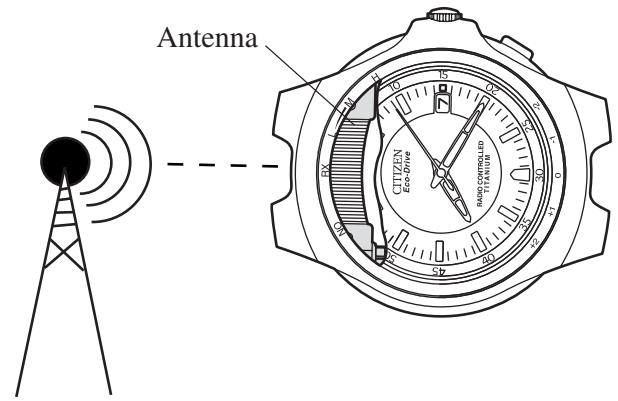
Les ondes radio peuvent ne pas être reçues à proximité immédiate de la station émettrice (à moins d'environ 10 km). De plus, les ondes radio peuvent ne pas être reçues correctement même si elles peuvent être reçues. Si cela se produit, changez l'orientation de l'antenne de la montre de 45 à 90 degrés par rapport à la station émettrice ou déplacez-vous vers un endroit plus éloigné de la station émettrice (à plus de 10 km environ), puis réessayez de recevoir les ondes radio.
Il peut ne pas être possible de recevoir correctement les ondes radio aux endroits suivants, sensibles à la génération de bruit radioélectrique, ou dans les conditions environnementales suivantes qui rendent la réception des ondes radio difficile.
(1) Endroits soumis à des températures extrêmement élevées ou basses (2) À l'intérieur d'un bâtiment en béton armé, entre des immeubles élevés, dans des vallées entre des montagnes ou sous terre (3) Dans une voiture, un train ou un avion (4) Près de lignes à haute tension (lignes électriques), de caténaires ferroviaires ou d'aéroports (installations de communication) (5) Près d'un téléphone cellulaire en cours d'utilisation (6) Près d'appareils électroménagers ou d'équipements de bureau tels que téléviseurs, réfrigérateurs, ordinateurs personnels, télécopieurs, etc.
- Les ondes radio ne peuvent pas être reçues correctement pendant la marche ou les déplacements en véhicule à moteur, etc.
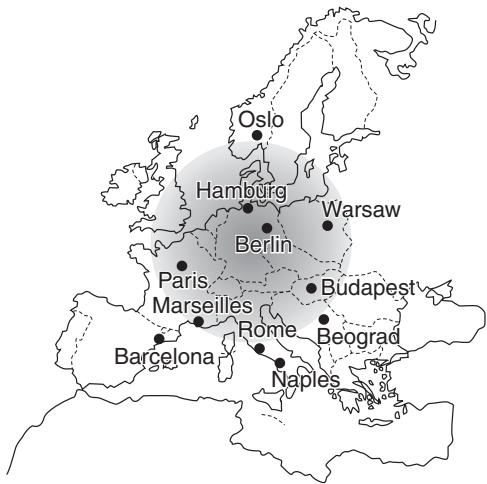
Une référence générale des zones où la montre peut recevoir les ondes radio de l'heure standard est la suivante. Cependant, ces zones peuvent varier en fonction du fuseau horaire, des variations saisonnières et des conditions météorologiques (présence d'éclairs, etc.). Comme cette carte ne fournit qu'une référence générale des zones de réception standard, elle peut ne pas s'appliquer dans certains endroits particuliers, même dans la plage indiquée sur la carte.
| Standard time radio wave transmitter station | Location of transmitter station | General reference for areas where radio waves can be received |
| DCF77 | Mainflingen, Germany (25 km southeast of Frankfurt) | Radius of about 900 km from radio wave transmitter station (radio waves may not be able to be received in the vicinity of Lake Leman) |
B. Fonction de génération d'énergie photoélectrique
Cette montre utilise une batterie secondaire pour stocker l'énergie électrique. Une fois complètement chargée, la montre continuera à indiquer l'heure correcte pendant environ 8 ans (dans l'état Power Save 2) sans recharge supplémentaire. De plus, elle continuera à indiquer l'heure correcte pendant environ 9 mois lorsque les modes Power Save ne sont pas activés.
Power Save : Lorsque la génération d'énergie s'arrête parce que la cellule solaire n'est pas exposée à la lumière, la fonction d'économie d'énergie est activée pour réduire la consommation d'énergie de la montre. (Pour plus de détails, veuillez vous référer à la section 6-A intitulée "Fonction d'économie d'énergie".)
Pour utiliser cette montre confortablement, essayez de la garder chargée en tout temps. Il n'y a aucun risque de surcharge, quelle que soit la fréquence de charge (fonction de protection contre la surcharge).
Exposez le cadran (cellule solaire) à la lumière lors de la charge.
- Si vous portez des manches longues, le tissu peut couvrir la montre et l'empêcher d'être exposée à la lumière, ce qui peut entraîner une charge insuffisante.
- Lorsque vous retirez la montre, essayez de la placer dans un endroit aussi lumineux que possible. Cela permettra à la montre de continuer à fonctionner correctement à tout moment.
2. Réception des ondes radio
Il existe deux façons de recevoir les ondes radio : la réception automatique (réception automatique régulière, réception automatique de retour et réception automatique de récupération) et la réception libre. Lorsque les ondes radio sont reçues correctement, l'heure (heures, minutes, secondes, heure d'été) et la date (mois, jour, année) sont corrigées automatiquement.
- Réception automatique régulière : Les ondes radio sont reçues automatiquement deux fois par jour, à 3h00 et 4h00 chaque jour.
- Réception libre : Les ondes radio peuvent être reçues à tout moment.
- Réception automatique de retour : Les ondes radio sont reçues lorsque la montre revient automatiquement à l'état de réception après l'annulation de l'état Power Save 2.
- Réception automatique de récupération : La montre passe à l'état de réception automatique de récupération et reçoit les ondes radio lorsqu'elle est suffisamment chargée après s'être arrêtée en raison d'une charge insuffisante.
[Données reçues de l'onde radio de l'heure normale allemande]
· Informations sur l'heure : heures, minutes, secondes, heure d'été - Informations sur la date : mois, jour, année
3. Réglage de l'heure et de la date par réception d'ondes radio
Il est recommandé d'essayer de recevoir les ondes radio en changeant la direction et la position de la montre pour trouver l'emplacement et la direction où la réception est la plus facile, en se référant au niveau de réception. Ne déplacez pas la montre lors de la réception des ondes radio.
A. Réception des ondes radio (réception automatique régulière et réception libre)
| Regular automatic reception | Free reception | |
| (1) Reception method | The second hand automatically moves to the RX (reception in progress) position (0 seconds position) twice a day at 3:00 AM and 4:00 AM each day, after which the watch begins to receive radio waves. | When button (A) is pressed after about 2 seconds, the second hand rapidly moves to the RX (reception is progress) position (0 seconds position), after which the watch begins to receive radio waves. Note: If button (A) is continuously depressed for 10 seconds or more, the watch changes to the “Reference Position (0 position/12:00 position) Check”. |
| (2) Hand location during reception | After the second hand has indicated that reception is in progress (RX), it moves to the reception level. The minute hand stops at the location corresponding to the second hand. |
| (3) Reception results | If reception is successful: The time (including daylight savings time) and date are corrected automatically based on the results of reception. If reception has failed: The watch returns to the time and date display stored in the watch prior to reception. |
| (4) Confirmation of reception result | When button (A) is pressed after receiving, the second hand rapidly moves to the reception result (reception level) and stops. · The watch automatically returns to the current time after 10 seconds. In addition, the watch can also be returned to the current time by pressing button (A). However, if button (A) is continuously depressed for 2 seconds or more, the second hand moves to the RX position indicating that reception is in progress and free reception begins. Note: Reception results cannot be confirmed even if button (A) is pressed while each hand is returning to the current time following completion of reception. Con-firm reception results by pressing button (A) only after each hand has returned to the current time. |
B. Indication du niveau de réception pendant la réception des ondes radio
Pendant la réception des ondes radio, l'aiguille des secondes attend à la position de réception correspondant à l'état de réception et indique le niveau de réception (degré de facilité de réception des ondes radio).
| Reception level | Symbol | Second hand reception level indication position |
| When radio wave reception level is high | H | 9 minute position |
| When radio wave reception is moderately high | M | 6 minute position |
| When radio wave reception is low | L | 3 minute position |
C. Indication du résultat de la réception des ondes radio
Le niveau de réception peut être confirmé après la réception des ondes radio.
- Lorsque le bouton (A) est enfoncé, l'aiguille des secondes se déplace rapidement vers la position correspondant au résultat de la réception et indique le niveau de réception pendant 10 secondes.
Remarque : la réception libre commence si le bouton (A) est enfoncé pendant 2 secondes ou plus.
- La montre revient automatiquement à l'heure actuelle après 10 secondes. De plus, la montre peut également revenir à l'heure actuelle en appuyant sur le bouton (A). Cependant, si le bouton (A) est maintenu enfoncé pendant 2 secondes ou plus, l'aiguille des secondes se déplace vers la position RX indiquant que la réception est en cours et la réception libre commence.
| Reception results | Symbol | Second hand reception level indication position |
| When reception was successful | ||
| · When radio waves were received at a high reception level | H | 9 minute position |
| · When radio waves were received at a moderate reception level | M | 6 minute position |
| · When radio waves were received at a low reception level | L | 3 minute position |
| When reception failed | NO | 55 minute position |
D. Réception automatique de retour
Lorsque l'état d'économie d'énergie 2 (pendant lequel l'aiguille des secondes et l'aiguille des minutes sont arrêtées) est annulé, la montre passe automatiquement à l'état de réception après être rapidement revenue à l'heure stockée en mémoire et commence à recevoir les ondes radio.
- Lorsque la réception a réussi : l'heure et la date sont corrigées automatiquement et la montre commence à fonctionner.
- Lorsque la réception a échoué : la montre revient à l'affichage de l'heure et de la date mémorisé avant la réception et commence à fonctionner.
E. Récupération automatique de la réception
Lorsque la montre est suffisamment rechargée après s'être arrêtée en raison d'une charge insuffisante, elle effectue automatiquement un cycle de récupération automatique de la réception.
- Lorsque la réception a réussi : l'heure et la date sont corrigées automatiquement et la montre commence à fonctionner. La montre peut être utilisée normalement à ce moment-là.
- Lorsque la réception a échoué : la fonction d'avertissement de réglage de l'heure (mouvement irrégulier à intervalle de 2 secondes) est activée. Dans ce cas, effectuez soit une réception libre, soit réglez l'heure et la date manuellement.
4. Fonction de correction du décalage horaire
Cette montre est équipée de deux types de fonctions de correction du décalage horaire.
- Le décalage horaire peut être réglé par unités d'une heure par rapport à l'heure standard allemande reçue par la montre.
- La plage de réglage est de -2 heures à +2 heures.
- Le décalage horaire peut être réglé à une heure arbitraire par unités d'une heure en corrigeant manuellement l'aiguille des heures.
- Le décalage horaire peut être réglé dans les zones où l'onde radio de l'heure standard allemande ne peut pas être reçue. Si l'onde radio de l'heure standard allemande a été reçue (par réception libre ou réception automatique régulière) après avoir réglé le décalage horaire à l'aide de la fonction de correction du décalage horaire (2), le décalage horaire est automatiquement corrigé à l'heure standard allemande.
A. Procédure de réglage pour la correction du décalage horaire (1)
L'état de correction change comme indiqué ci-dessous en fonction de l'utilisation de la couronne et des boutons.
Couronne remise en position normale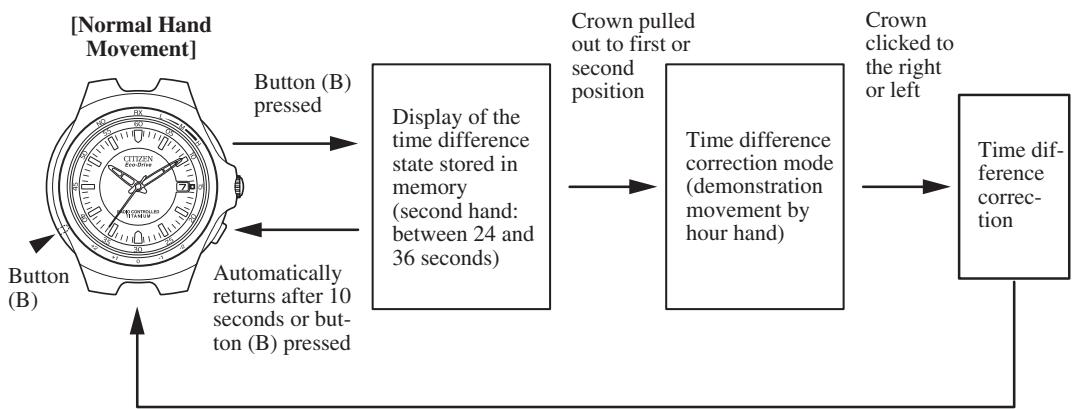
[Affichage du décalage horaire]
Plage dans laquelle le décalage horaire peut être réglé par rapport à l'heure normale allemande![CITIZEN WATCH A414 - [Affichage du décalage horaire] - 1](/content/2025/01/176714/images/fbdb974d5f2c3c9de12557c5d6650a0754f4cd88522289a9ca194edcfa211606.jpg)
(1) Lorsque le bouton (B) est enfoncé pendant un mouvement normal de la main, l'aiguille des secondes passe à l'affichage du décalage horaire et indique le décalage horaire mémorisé. (2) Lorsque la couronne est tirée en première ou deuxième position, l'aiguille des heures effectue un mouvement de démonstration après lequel elle indique l'heure actuelle et s'arrête. (3) Le décalage horaire est corrigé lorsque la couronne est tournée dans un sens ou dans l'autre. - L'aiguille des secondes avance de +1 heure (3 secondes) lorsque la couronne est tournée d'un cran vers la droite. Après le mouvement de l'aiguille des secondes (état d'affichage du décalage horaire), l'aiguille des heures avance d'une heure. - L'aiguille des secondes recule de -1 heure (3 secondes) lorsque la couronne est tournée d'un cran vers la gauche. Après le mouvement de l'aiguille des secondes, l'aiguille des heures recule d'une heure.
Remarques :
- Le décalage horaire n'est pas corrigé si la couronne est tournée pendant que les aiguilles sont en mouvement. Pour corriger le décalage horaire en continu, n'actionnez la couronne qu'après avoir confirmé que les aiguilles se sont arrêtées.
- Le décalage horaire n'est pas corrigé si la plage de réglage (-2 à +2 heures) est dépassée, même si la couronne est actionnée. (b) Remettez la couronne en position normale après avoir corrigé le décalage horaire.
[Décalages horaires des principaux pays par rapport à l'Allemagne]
| Countries having the same time difference as Germany | Use of daylight savings time | Time difference from Germany of -1 hour | Use of daylight savings time |
| Norway | Yes | Ireland | Yes |
| Sweden | Yes | Iceland | No |
| Denmark | Yes | England | Yes |
| Netherlands | Yes | Portugal | Yes |
| Czech | Yes | ||
| Slovakia | Yes | ||
| Belgium | Yes | ||
| France | Yes | ||
| Spain | Yes | ||
| Switzerland | Yes | ||
| Italy | Yes | ||
| Austria | Yes | ||
| Poland | Yes |
Remarque : étant donné que l'heure d'été est contenue dans l'onde radio de l'heure normale et est corrigée automatiquement, il n'est pas nécessaire de la corriger. Cependant, une correction est requise en cas d'utilisation dans des zones où l'heure d'été n'est pas utilisée.
| Time difference from Germany of +1 hour | Use of daylight savings time | Time difference of +2 hours from Germany | Use of daylight savings time |
| Finland | Yes | Iraq | Yes |
| Belarus | Yes | Kuwait | No |
| Ukraine | No | Saudi Arabia | No |
| Romania | Yes | Russia (Moscow) | Yes |
| Bulgaria | Yes | ||
| Greece | Yes | ||
| Turkey | Yes | ||
| Lebanon | Yes | ||
| Israel | Yes | ||
| Jordan | Yes |
B. Procédure de réglage pour la correction du décalage horaire (2)
Le décalage horaire peut être corrigé pendant 30 secondes après avoir appuyé sur le bouton (A) ou pendant 30 secondes après la fin du mouvement des aiguilles après avoir tiré la couronne en première position. La date change également en coordination avec l'aiguille des heures.
Retour automatique après 10 secondes ou appui sur le bouton (A)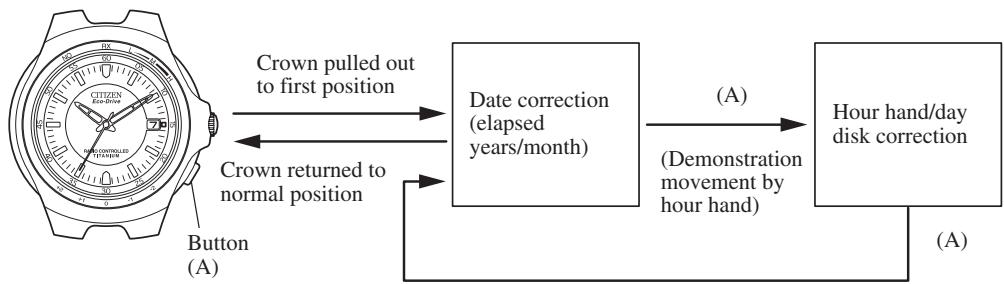
(1) Tirez la couronne en première position. - L'aiguille des secondes se déplace vers la position de l'année et du mois mémorisés puis s'arrête. (2) Lorsque le bouton (A) est enfoncé, l'aiguille des heures effectue un mouvement de démonstration après quoi la montre passe à l'état de correction du décalage horaire de l'heure et de la date. L'aiguille des secondes revient rapidement à l'heure actuelle et la montre commence à fonctionner. (3) Tournez la couronne pour régler l'heure de la région pour laquelle le décalage horaire doit être réglé. ① Si vous tournez vers la droite (d'un cran), l'aiguille des heures avance d'une heure (dans le sens des aiguilles d'une montre). ② Si vous tournez vers la gauche (d'un cran), l'aiguille des heures recule d'une heure (dans le sens inverse des aiguilles d'une montre). - Tourner la couronne en continu (de deux crans ou plus) fait avancer l'aiguille des heures en continu. - Le mouvement continu peut être interrompu en tournant la couronne d'un cran vers la gauche ou la droite.
Remarque : lors de la correction du décalage horaire, faites attention à AM et PM dans la région pour laquelle le décalage horaire doit être réglé. L'heure à laquelle la date change est AM. La date change entre 22h00 et 3h00.
(4) Remettez la couronne en position normale après avoir corrigé le décalage horaire.
5. Réglage manuel de l'heure et de la date
Cette montre permet également de régler l'heure et la date manuellement lorsque les ondes radio ne peuvent pas être reçues.
A. Changement de l'affichage
L'état de correction change de la manière indiquée ci-dessous en actionnant la couronne et les boutons.
[Mouvement normal des aiguilles]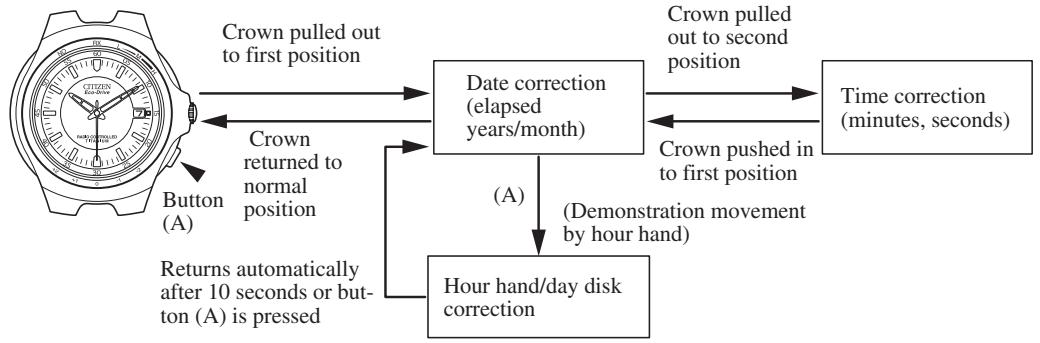
B. Correction des secondes et des minutes
(1) Lorsque la couronne est tirée en deuxième position, l'aiguille des secondes se déplace rapidement vers la position 0 seconde et s'arrête.
- Si l'aiguille des secondes ne s'arrête pas à la position 0 seconde, vérifiez la « Position de référence » et effectuez la procédure « Réglage de la position de référence ».
(2) Tournez la couronne pour régler les minutes.
① Lorsque la couronne est tournée vers la droite (d'un cran), l'aiguille des secondes fait un tour complet dans le sens horaire et l'aiguille des minutes avance d'une minute. ② Lorsque la couronne est tournée vers la gauche (d'un cran), l'aiguille des secondes fait un tour complet dans le sens antihoraire et l'aiguille des minutes recule d'une minute. - Tourner la couronne en continu (de deux crans ou plus) fait bouger les aiguilles des secondes et des minutes en continu. - Tournez la couronne d'un cran vers la gauche ou la droite pour interrompre le mouvement continu des aiguilles.
Remarques : Comme l'aiguille des heures se déplace en coordination avec l'aiguille des minutes, l'aiguille des heures peut être réglée par le mouvement continu des aiguilles des secondes et des minutes. De plus, la date change également en coordination avec l'aiguille des heures.
- La montre avance automatiquement au-delà des dates inexistantes telles que le 30 février ou le 31 avril. Pendant que la montre avance, l'aiguille des secondes et l'aiguille des minutes attendent à la position 12 heures, tandis que l'aiguille des heures se déplace automatiquement pour passer la date inexistante.
(3) Remettez la couronne en position normale en synchronisation avec un service téléphonique ou autre service horaire.
C. Correction des années et du mois écoulés
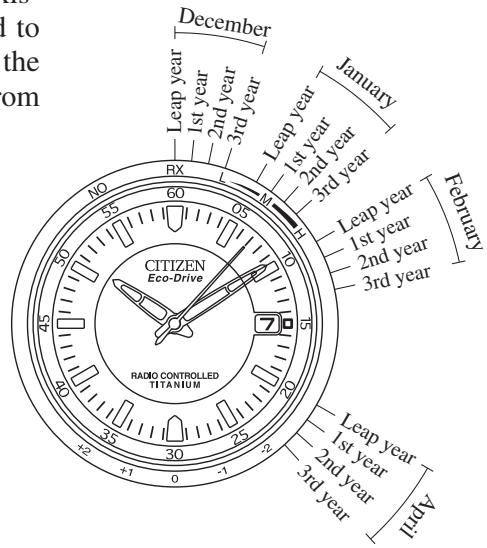
Lorsque la couronne est tirée en première position, la trotteuse indique le nombre d'années écoulées depuis la dernière année bissextile (années écoulées) et le mois.
(1) Lorsque la couronne est tirée en première position, la trotteuse se déplace vers l'année et le mois mémorisés et s'arrête.
(2) Tournez la couronne pour régler l'année et le mois.
① Tournez la couronne vers la droite (d'un cran) pour aligner la trotteuse sur la position correspondant au nombre d'années écoulées depuis la dernière année bissextile et au mois. ② Lorsque la couronne est tournée vers la gauche (d'un cran), la trotteuse recule. - Une rotation continue de la couronne (de deux crans ou plus) fait avancer la trotteuse en continu. - Tournez la couronne d'un cran vers la gauche ou la droite pour interrompre le mouvement continu de la trotteuse.
Remarque : lorsque la trotteuse fait deux tours complets en continu, elle revient rapidement à la position de l'année et du mois d'origine.
Exemples :
Cas de décembre d'une année bissextile : alignez la trotteuse sur la position 0 seconde.
Cas d'avril de la troisième année après la dernière année bissextile :
Alignez la trotteuse sur la position 23 secondes (entre 4:00 et 5:00).
(3) Après avoir corrigé l'année et le mois, remettez la couronne en position normale. La trotteuse revient à l'heure actuelle et la montre commence à fonctionner.
Si le mois a été changé après le réglage de la date, ce qui a entraîné le réglage de la date sur un jour inexistant, la date est automatiquement changée au premier jour du mois suivant lorsque la couronne est remise en position normale depuis la position de correction.
- Lecture du mois
Janvier : entre 1:00 et 2:00
Février : entre 2:00 et 3:00
Décembre : entre 12 h 00 et 13 h 00
- Lecture de l'année
Année bissextile : 1re graduation de chaque zone mensuelle
1re année après une année bissextile : 2e graduation de chaque zone mensuelle
2e année après une année bissextile : 3e graduation de chaque zone mensuelle
3e année après une année bissextile : 4e graduation de chaque zone mensuelle
| Year | Elapsed year | Year | Elapsed year |
| 2000 | Leap year | 2004 | Leap year |
| 2001 | 1st year | 2005 | 1st year |
| 2002 | 2nd year | 2006 | 2nd year |
| 2003 | 3rd year | 2007 | 3rd year |
D. Correction des heures et de la date
Étant donné que la date change en coordination avec l'aiguille des heures, elle ne peut pas être corrigée indépendamment. La date est modifiée en faisant avancer continuellement l'aiguille des heures. L'aiguille des heures et la date peuvent être corrigées pendant 30 secondes après avoir appuyé sur le bouton (A) ou pendant 30 secondes après que l'aiguille des heures s'est arrêtée de bouger.
(1) Tirez la couronne jusqu'au premier cran. - L'aiguille des secondes se déplace vers la position de l'année et du mois mémorisés et s'arrête. (2) Lorsque le bouton (A) est enfoncé une fois, l'aiguille des heures effectue un mouvement de démonstration puis passe à l'état de correction des heures et de la date. - L'aiguille des secondes revient rapidement à l'heure actuelle et commence à bouger. (3) Tournez la couronne en continu pour faire avancer continuellement l'aiguille des heures et régler la date. - La date change entre environ 22 h 00 et 3 h 00. - Dans le cas où le mois est réglé sur un mois de moins de 31 jours, une date inexistante est automatiquement dépassée et la montre indique le premier jour du mois suivant même si la date est changée du 30 au 31.
(4) Tournez la couronne pour régler les heures.
① Lorsque la couronne est tournée vers la droite (d'un cran), l'aiguille des heures avance (dans le sens horaire) d'une heure. ② Lorsque la couronne est tournée vers la gauche (d'un cran), l'aiguille des heures recule (dans le sens antihoraire) d'une heure.
- Tourner la couronne en continu (de deux crans ou plus) fait bouger l'aiguille des heures en continu.
- Tournez la couronne d'un cran vers la gauche ou la droite pour interrompre le mouvement continu de l'aiguille des heures.
Remarque : lors de la correction de l'heure, réglez l'heure en faisant attention à AM et PM. L'heure à laquelle la date change est AM.
(5) Après avoir corrigé l'heure, assurez-vous toujours de remettre la couronne en position normale.
6. Fonctions uniques des montres à énergie solaire
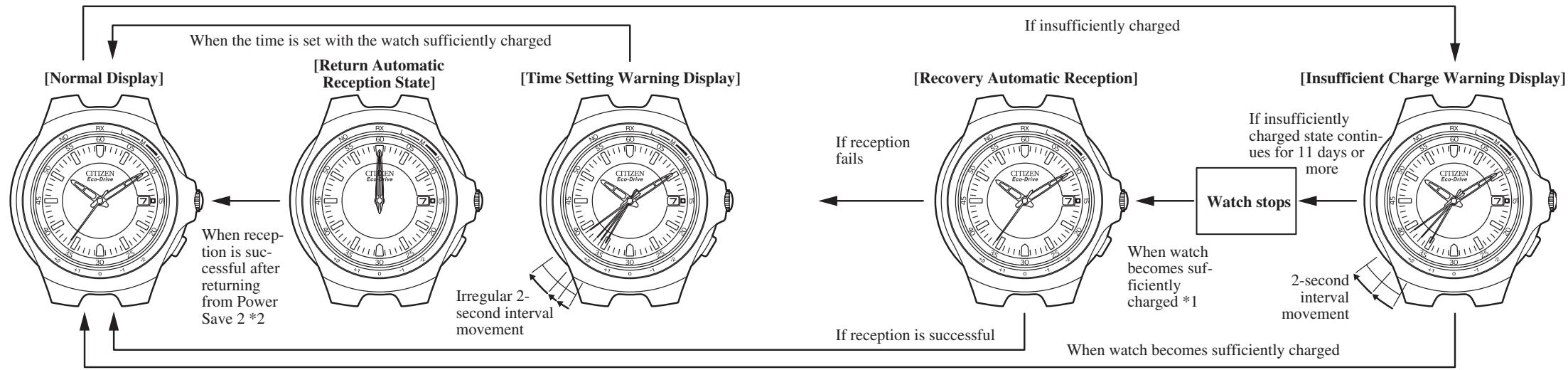
Lorsque la montre n'est pas suffisamment chargée, une fonction d'avertissement est activée et l'affichage change comme indiqué ci-dessous.
1 : Si la montre s'est arrêtée en raison d'une charge insuffisante, un minimum d'environ 30 secondes est nécessaire pour que la réception automatique de récupération soit effectuée, même si la montre est exposée à la lumière. 2 : Si la réception automatique a échoué, la montre revient à l'heure et à la date antérieures à la tentative de réception.
A. Fonction d'économie d'énergie
L'aiguille des secondes s'arrête pour économiser l'énergie lorsqu'elle atteint la position 0 seconde si la cellule solaire n'est pas exposée à la lumière et que l'énergie n'est pas générée pendant 24 heures consécutives.
L'aiguille des minutes s'arrête à la position correspondant à l'aiguille des secondes. - L'aiguille des heures et la date passent du mouvement normal (mouvement par intervalles de 3 minutes) à un mouvement par intervalles d'1 heure.
Remarque : La réception peut toujours être effectuée soit par réception automatique régulière, soit par réception libre. Cependant, dans le cas d'une réception libre, l'économie d'énergie 1 est annulée en raison de l'opération de commutation.
L'économie d'énergie 1 est annulée soit en reprenant la génération d'énergie en exposant la cellule solaire à la lumière, soit en actionnant la couronne ou les boutons.
- Lorsque l'économie d'énergie 1 est annulée, l'aiguille des secondes et l'aiguille des minutes reviennent rapidement à l'heure actuelle et commencent un mouvement par intervalles de 1 seconde. (Lorsque l'économie d'énergie 1 est annulée en appuyant sur le bouton (A), l'affichage revient à l'heure actuelle après avoir affiché les résultats de réception pendant environ 10 secondes.)
- Les aiguilles se déplacent dans le sens horaire ou antihoraire pour revenir rapidement à l'heure actuelle.
- Il faut au maximum environ 1 minute pour que les aiguilles reviennent à l'heure actuelle.
La montre passe automatiquement à l'état d'économie d'énergie 2 pour réduire davantage la consommation de courant si l'état d'économie d'énergie 1 se poursuit pendant environ 2 jours.
Chaque aiguille et la date continuent dans l'état Power Save 1.
Remarque : la réception automatique régulière n'est pas effectuée tous les jours. De plus, la réception libre ne peut pas non plus être effectuée.
Power Save 2 est annulé lorsque la génération d'énergie reprend en exposant la cellule solaire à la lumière.
- La réception automatique de récupération est effectuée après que l'aiguille des secondes et l'aiguille des minutes se déplacent rapidement vers l'heure actuelle. Le mouvement à intervalle de 1 seconde commence après la fin de la réception et la montre reprend son fonctionnement normal.
- Power Save 2 ne peut pas être annulé avec la couronne ou les boutons.
Remarques :
- La montre passe également en mode d'économie d'énergie à partir du mouvement à intervalle de 2 secondes (fonction d'avertissement de charge insuffisante) ou du mouvement à intervalle irrégulier de 2 secondes (fonction d'avertissement de réglage de l'heure).
- Pendant que la batterie secondaire est complètement chargée et que la fonction de prévention de surcharge est activée, la fonction d'économie d'énergie n'est pas activée même si l'énergie n'est pas générée parce que la cellule solaire n'est pas exposée à la lumière. De plus, la fonction d'économie d'énergie n'est pas non plus activée lorsque la batterie secondaire devient temporairement complètement chargée en raison de l'exposition de la cellule solaire à une lumière intense.
- Selon l'environnement dans lequel la montre est stockée, etc., la réception peut ne pas aboutir même si la réception automatique de récupération est effectuée après l'annulation de Power Save 2. Il est donc recommandé d'effectuer une réception libre avant d'utiliser la montre.
B. Fonction d'avertissement de charge insuffisante
Lorsque la capacité de la batterie secondaire devient faible parce que la cellule solaire n'est pas exposée à la lumière, l'aiguille des secondes passe à un mouvement à intervalle de 2 secondes (fonction d'avertissement de charge insuffisante) pour indiquer que la montre est insuffisamment chargée. Bien que la montre continue de fonctionner normalement à ce moment-là, après environ 11 jours depuis le début du mouvement à intervalle de 2 secondes, la montre finit par s'arrêter en raison d'une charge insuffisante. Rechargez suffisamment la montre en l'exposant à la lumière afin que l'aiguille des secondes revienne à son mouvement normal à intervalle de 1 seconde.
Remarques :
- L'heure et la date ne peuvent pas être corrigées manuellement pendant le mouvement à intervalle de 2 secondes.
- La réception automatique régulière et la réception libre ne sont pas non plus disponibles. Bien que la station de réception puisse être commutée, la station de réception n'est pas indiquée. La procédure de réinitialisation complète peut être effectuée.
C. Fonction d'avertissement de réglage de l'heure
La récupération automatique est effectuée lorsque la montre est exposée à la lumière et suffisamment rechargée après s'être arrêtée en raison d'une charge insuffisante.
- Si la réception a réussi, l'heure est corrigée et l'aiguille des secondes commence à se déplacer par intervalles de 1 seconde.
- Si la réception a échoué, l'aiguille des secondes se déplace par intervalles irréguliers de 2 secondes (fonction d'avertissement de réglage de l'heure) indiquant que l'heure est incorrecte. Réinitialisez l'heure et la date soit par réception libre, soit par réglage manuel.
- Le mouvement irrégulier par intervalles de 2 secondes continuera tant que l'heure n'est pas réinitialisée.
Remarque : Si la montre s'est arrêtée en raison d'une charge insuffisante, un minimum d'environ 30 minutes est nécessaire avant que la récupération automatique ne soit effectuée, même si la montre est suffisamment exposée à la lumière.
D. Fonction de prévention de surcharge
Lorsque la batterie secondaire est complètement chargée, la fonction de prévention de surcharge est activée pour empêcher toute charge supplémentaire.
7. Référence générale pour les temps de charge des montres solaires
Le temps nécessaire à la recharge varie selon le modèle de la montre (couleur du cadran, etc.). Les temps suivants ne sont donnés qu'à titre de référence.
- Le temps de recharge correspond à la durée pendant laquelle la montre est exposée en continu à la lumière.
| Illuminance (lx) | Environment | Charging time | ||
| Charging time for 1 day of operation | Charging time from the stopped state to recovery automatic reception | Charging time to fully charge | ||
| 500 | Interior lighting | 4 hours | 120 hours | ...... |
| 1,000 | 60-70 cm (24-28 in) under a fluorescent lamp (30 W) | 2 hours | 60 hours | ...... |
| 3,000 | 20 cm (8 in) under a fluorescent lamp (30 W) | 40 minutes | 20 hours | 200 hours |
| 10,000 | Outdoors, cloudy | 12 minutes | 6 hours | 60 hours |
| 100,000 | Outdoors, summer, under direct sunlight | 3 minutes | 1 hour 45 minutes | 15 hours |
Temps de charge pour une charge complète : Temps nécessaire pour recharger la montre de l'état arrêté (charge insuffisante) à pleine charge.
Temps de charge pour 1 jour de fonctionnement : Temps nécessaire pour recharger la montre afin qu'elle fonctionne pendant 1 jour.
Remarque :
Une fois complètement chargée, cette montre continuera à fonctionner sans recharge pendant environ 8 ans (en mode d'économie d'énergie 2). De plus, elle continuera à indiquer l'heure correcte pendant environ 9 mois si les modes d'économie d'énergie ne sont pas activés. Cependant, une fois qu'elle s'arrête en raison d'une charge insuffisante, un temps considérable est nécessaire pour la recharger afin qu'elle redémarre, comme indiqué dans le tableau. Essayez de recharger la montre quotidiennement dans la mesure du possible.
8. Précautions de manipulation des montres solaires
- Si vous portez des manches longues, le tissu peut recouvrir la montre et l'empêcher d'être exposée à la lumière, ce qui peut entraîner une charge insuffisante de la montre.
- Lorsque vous retirez la montre, essayez de la placer dans un endroit aussi lumineux que possible. Cela permettra à la montre de continuer à fonctionner correctement à tout moment.
ATTENTION : Précautions de charge
- Évitez de charger à des températures élevées (plus de 60 °C / 140 °F) car permettre à la montre d'atteindre une température élevée pendant la charge peut provoquer un dysfonctionnement.
Exemples : Charger en plaçant la montre trop près d'une source de lumière qui peut devenir chaude, comme une lampe à incandescence ou une lampe halogène, ou charger en plaçant la montre sur le tableau de bord d'une voiture qui peut facilement atteindre une température élevée.
- Lorsque vous chargez la montre avec une lampe à incandescence, assurez-vous toujours de placer la montre à au moins 50 cm (20 pouces) de la source de lumière pour éviter que la montre n'atteigne une température élevée.
9. Remplacement de la batterie secondaire
Contrairement aux piles ordinaires, la batterie secondaire utilisée dans cette montre n'a pas besoin d'être remplacée périodiquement car elle peut être chargée et déchargée à plusieurs reprises.
10. Réglage de la position de référence
Si la position de référence de la montre a changé en raison d'un choc violent ou de l'effet de l'électricité statique, vérifiez la position de référence (position 0 / position 12:00) qui sert de base au fonctionnement.
Si l'aiguille des secondes n'indique pas la bonne position, il est possible que la position de référence ait été décalée. Vérifiez la position de référence de chaque aiguille en suivant la procédure décrite ci-dessous.
A. Vérification de la position de référence
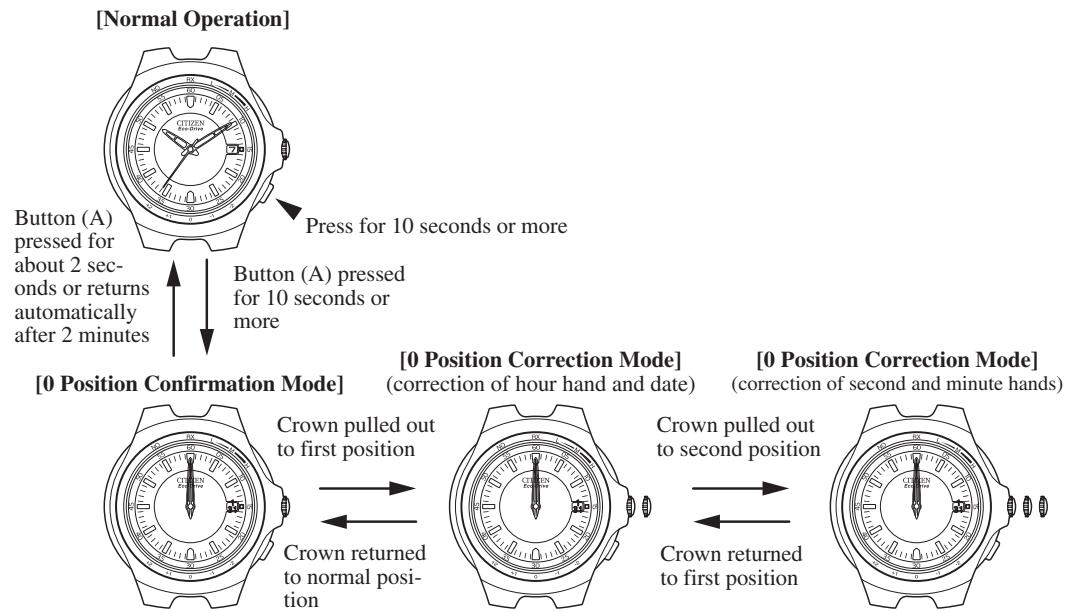
(1) Maintenez le bouton (A) enfoncé pendant au moins 10 secondes avec la couronne en position normale.
- Après que l'aiguille des secondes a indiqué le résultat de la réception précédente, l'aiguille des secondes se déplace vers la position RX (position 12:00), puis chaque aiguille se déplace rapidement vers la position de référence et s'arrête.
- La date change en coordination avec l'aiguille des heures et s'arrête entre 31 et 1.
(2) Lorsque le bouton (A) est enfoncé pendant environ 2 secondes, les aiguilles reviennent rapidement à l'heure actuelle. Sinon, la montre revient automatiquement à l'heure actuelle si les boutons ou la couronne ne sont pas actionnés pendant 2 minutes ou plus.
Remarque : Réglez la position de référence si l'une des aiguilles ou la date n'indique pas la position de référence.
B. Réglage de la position de référence
(1) Maintenez le bouton (A) enfoncé pendant 10 secondes ou plus. Après que l'aiguille des secondes a indiqué le résultat de la réception précédente, l'aiguille des secondes se déplace vers la position RX (position 12 heures), puis chaque aiguille se déplace rapidement vers la position de référence et s'arrête. (2) Tirez la couronne jusqu'au premier cran, réglez la date entre 31 et 1, et réglez l'aiguille des heures sur 12 heures. - Réglez la date en tournant continuellement la couronne pour faire avancer continuellement l'aiguille des heures. - Tournez la couronne pour régler les heures. (3) Tirez la couronne jusqu'au deuxième cran et réglez l'aiguille des secondes et l'aiguille des minutes sur 12 heures. - Tournez la couronne pour régler les secondes et les minutes.
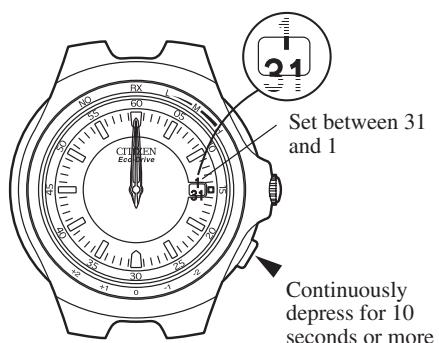
(4) Remettez la couronne en position normale et appuyez sur le bouton (A) pendant environ 2 secondes. Chaque aiguille et la date reviennent rapidement à l'heure actuelle.
Remarque :
- Après avoir réglé la position de référence, assurez-vous toujours d'effectuer une réception libre ou de corriger l'heure et la date manuellement avant d'utiliser la montre.
11. Réinitialisation complète
L'affichage de la montre peut devenir anormal en raison des effets de l'électricité statique ou d'un choc violent. Si cela se produit, réglez la position de référence.
(1) Tirez la couronne jusqu'au deuxième cran.
- L'aiguille des secondes se déplace rapidement vers la position de référence mémorisée et s'arrête.
(2) Appuyez simultanément sur les boutons (A) et (B).
- L'aiguille des secondes et l'aiguille des heures effectuent un mouvement de démonstration consistant à avancer, reculer, puis avancer à nouveau.
Ceci termine la procédure de réinitialisation complète. Assurez-vous toujours de régler la position de référence après avoir effectué la réinitialisation complète.
Précautions après la réinitialisation complète :
- Après avoir effectué la procédure de réinitialisation complète, il faut environ 1 seconde pour mémoriser la position de référence une fois celle-ci définie. Ne retirez pas la couronne immédiatement après avoir réglé la position de référence.
- Après avoir effectué la procédure de réinitialisation complète, l'aiguille des secondes restera arrêtée même si la couronne est remise en position normale, à moins que la position de référence ne soit réglée avec la couronne aux première et deuxième positions. Après la procédure de réinitialisation complète, l'heure affichée après le réglage de la position de référence est 12 h 00 (minuit). Lors du réglage manuel de l'heure, réglez à la fois l'heure et la date en faisant attention à AM et PM afin que l'heure soit correctement réglée.
12. Dépannage
| Problem | Check Items | Corrective Actions |
| Unable to receive radio waves (the watch cannot be switched to the receiving state) | Has button (A) been pressed until the second hand points to RX (12:00 position)? | Press button (A) for about 2 seconds, check that the second hand points to RX and then try receiving radio waves again. |
| Unable to receive radio waves (even within the receivable area) | Are there objects that block radio waves or generate noise nearby? | Refer to the sections entitled “For Good Reception” and “Locations where Reception may be Difficult” of this manual. Check if the reception environment has changed as a result of rearranging the room and so forth. |
| Current time incorrect even though radio waves ought to have been received | Has the reference position of any of the hands shifted? | Refer to section 10 of this manual entitled “Setting the Reference Position”. If the reference position has shifted, properly reset the reference position. |
13. Précautions
ATTENTION : Résistance à l'eau
Il existe plusieurs types de montres résistantes à l'eau, comme indiqué dans le tableau suivant.
L'unité « bar » équivaut approximativement à 1 atmosphère.
- WATER RESIST (ANT) xx bar peut également être indiqué comme W.R. xx bar.
| Indication | Specifications | |
| Dial | Case (Case back) | |
| WATER RESIST or no indication | WATER RESIST(ANT) | Water-resistant to 3 atmospheres |
| WR 50 or WATER RESIST 50 | WATER RESIST(ANT) 5 bar or WATER RESIST(ANT) | Water-resistant to 5 atmospheres |
| WR 100/200 or WATER RESIST 100/200 | WATER RESIST(ANT) 10 bar/20 bar or WATER RESIST(ANT) | Water-resistant to 10/20 atmospheres |
Pour une utilisation correcte dans les limites de conception de la montre, confirmez le niveau de résistance à l'eau de votre montre, comme indiqué sur le cadran et le boîtier, et consultez le tableau.
| Examples of use | ||||
| Minor exposure to water (washing face, rain, etc.) | Moderate exposure to water (washing, kitchen work, swimming, etc.) | Marine sports (skin diving) | Scuba diving (with air tank) | Operation of the crown or button with moisture visible |
| OK | NO | NO | NO | NO |
| OK | OK | NO | NO | NO |
| OK | OK | OK | NO | NO |
- Résistance à l'eau pour un usage quotidien (jusqu'à 3 atmosphères) : Ce type de montre résiste à une exposition mineure à l'eau. Par exemple, vous pouvez porter la montre en vous lavant le visage ; cependant, elle n'est pas conçue pour être utilisée sous l'eau.
- Résistance à l'eau améliorée pour un usage quotidien (jusqu'à 5 atmosphères) : Ce type de montre résiste à une exposition modérée à l'eau. Vous pouvez porter la montre en nageant ; cependant, elle n'est pas conçue pour la plongée libre.
- Résistance à l'eau améliorée pour un usage quotidien (jusqu'à 10/20 atmosphères) : Ce type de montre peut être utilisé pour la plongée libre ; cependant, elle n'est pas conçue pour la plongée sous-marine ou la plongée saturée utilisant de l'hélium.
ATTENTION :
- Veillez à utiliser la montre avec la couronne enfoncée (position normale). Si votre montre est dotée d'une couronne ou d'un bouton à vis, assurez-vous de bien serrer la couronne.
- N'actionnez PAS la couronne ou le bouton avec des doigts mouillés ou lorsque la montre est mouillée. De l'eau peut pénétrer dans la montre et compromettre son étanchéité.
- Si la montre est utilisée dans l'eau de mer, rincez-la à l'eau douce après utilisation et essuyez-la avec un chiffon sec.
- Si de l'humidité a pénétré dans la montre, ou si l'intérieur du verre est embué et ne redevient pas clair en un jour, apportez immédiatement la montre à votre revendeur ou au centre de service Citizen pour réparation.
Laisser la montre dans un tel état permettra la formation de corrosion à l'intérieur. - Si de l'eau de mer pénètre dans la montre, placez la montre dans une boîte ou un sac en plastique et apportez-la immédiatement pour réparation. Sinon, la pression à l'intérieur de la montre augmentera et des pièces (verre, couronne, boutons, etc.) pourraient se détacher.
ATTENTION : Gardez votre montre propre.
- Laisser la poussière et la saleté s'accumuler entre le boîtier et la couronne peut rendre difficile l'extraction de la couronne. Tournez la couronne en position normale de temps en temps pour déloger la poussière et la saleté, puis brossez-les.
- La poussière et la saleté ont tendance à se déposer dans les interstices du dos du boîtier ou du bracelet. La poussière et la saleté accumulées peuvent provoquer de la corrosion et tacher vos vêtements. Nettoyez la montre de temps en temps.
Nettoyage de la montre
- Utilisez un chiffon doux pour essuyer la saleté, la transpiration et l'eau du boîtier et du verre.
- Utilisez un chiffon doux et sec pour essuyer la transpiration et la saleté du bracelet en cuir.
- Pour nettoyer un bracelet en métal, en plastique ou en caoutchouc, lavez la saleté à l'eau. Utilisez une brosse douce pour enlever la poussière et la saleté coincées dans les interstices du bracelet en métal.
REMARQUE : Évitez d'utiliser des solvants (diluant, benzine, etc.), car ils peuvent ternir la finition.
ATTENTION : Environnement d'utilisation
- Utilisez la montre dans la plage de température de fonctionnement spécifiée dans le manuel d'instructions. L'utilisation de la montre à des températures en dehors de la plage spécifiée peut entraîner une détérioration des fonctions ou même l'arrêt de la montre.
- N'utilisez pas la montre dans des endroits où elle est exposée à une température élevée, comme dans un sauna.
Cela pourrait provoquer des brûlures.
- Ne laissez pas la montre dans un endroit exposé à une température élevée, comme la boîte à gants ou le tableau de bord d'une voiture.
Cela pourrait entraîner une détérioration de la montre, comme la déformation des pièces en plastique.
- Ne placez pas la montre à proximité d'un aimant. La précision du chronométrage sera altérée si vous placez la montre près d'équipements de santé magnétiques tels qu'un collier magnétique, une fermeture magnétique de porte de réfrigérateur, une fermeture de sac à main ou l'écouteur d'un téléphone portable. Si cela se produit, éloignez la montre de l'aimant et réglez à nouveau l'heure.
- Ne placez pas la montre à proximité d'appareils électroménagers qui génèrent de l'électricité statique.
Le chronométrage peut devenir imprécis si la montre est exposée à une forte électricité statique, comme celle émise par un écran de télévision.
- Ne soumettez pas la montre à un choc violent, comme la faire tomber sur un sol dur.
- Évitez d'utiliser la montre dans un environnement où elle pourrait être exposée à des produits chimiques ou à des gaz corrosifs.
Si des solvants, tels que le diluant et l'essence, ou des substances contenant de tels solvants entrent en contact avec la montre, une décoloration, une fusion, des fissures, etc. peuvent en résulter. Si la montre entre en contact avec le mercure utilisé dans les thermomètres, le boîtier, le bracelet ou d'autres pièces peuvent se décolorer.
Inspections périodiques
Votre montre nécessite une inspection tous les deux ou trois ans pour garantir sa sécurité et une longue durée de vie.
Pour maintenir l'étanchéité de votre montre, le joint doit être remplacé régulièrement.
Les autres pièces doivent être inspectées et remplacées si nécessaire.
Demandez des pièces d'origine Citizen lors du remplacement.
14. Spécifications
- Calibre n° : A414
- Type : montre analogique à énergie solaire
- Précision du garde-temps : ±15 secondes par mois en moyenne (en l'absence de réception des ondes radio) lorsqu'elle est portée à des températures normales de +5 °C à +35 °C / 41 °F à 95 °F
- Plage de température de fonctionnement : -10 °C à +60 °C / 14 °F à 140 °F
- Fonctions d'affichage : Heure : heures, minutes, secondes ; Date
- Fonctions supplémentaires :
- Fonction de réception des ondes radio (réception automatique, réception libre)
- Fonction de confirmation du résultat de réception
- Fonction d'indication du niveau de réception
- Fonction de correction du décalage horaire [Correction du décalage horaire (1), Correction du décalage horaire (2)]
- Fonction de génération d'énergie photovoltaïque
- Fonction d'économie d'énergie (Économie d'énergie 1, Économie d'énergie 2)
Fonction d'avertissement de charge insuffisante - Fonction d'avertissement de réglage de l'heure
- Durées de fonctionnement continu :
De la charge complète à l'arrêt sans recharge : environ 9 mois (lorsque les modes Économie d'énergie 1 et 2 ne sont pas activés) Environ 8 ans (lorsque le mode Économie d'énergie 2 est activé) De l'affichage de l'avertissement de charge insuffisante à l'arrêt : environ 11 jours
- Batterie secondaire : batterie secondaire, 1 pièce.
- Les spécifications sont sujettes à modification sans préavis.


- VEUILLEZ CHARGER COMPLÈTEMENT VOTRE MONTRE AVANT UTILISATION EN L'EXPOSANT À LA LUMIÈRE
- EMPLACEMENTS OÙ LA RÉCEPTION DES ONDES RADIO PEUT ÊTRE DIFFICILE
- SOMMAIRE
- AVANT UTILISATION
- FONCTION DE RÉCEPTION DES ONDES RADIO
- FONCTION DE GÉNÉRATION D'ÉNERGIE PHOTOÉLECTRIQUE
- RÉCEPTION DES ONDES RADIO
- [DONNÉES REÇUES DE L'ONDE RADIO DE L'HEURE NORMALE ALLEMANDE]
- RÉGLAGE DE L'HEURE ET DE LA DATE PAR RÉCEPTION D'ONDES RADIO
- RÉCEPTION DES ONDES RADIO (RÉCEPTION AUTOMATIQUE RÉGULIÈRE ET RÉCEPTION LIBRE)
- INDICATION DU NIVEAU DE RÉCEPTION PENDANT LA RÉCEPTION DES ONDES RADIO
- INDICATION DU RÉSULTAT DE LA RÉCEPTION DES ONDES RADIO
- RÉCEPTION AUTOMATIQUE DE RETOUR
- RÉCUPÉRATION AUTOMATIQUE DE LA RÉCEPTION
- FONCTION DE CORRECTION DU DÉCALAGE HORAIRE
- PROCÉDURE DE RÉGLAGE POUR LA CORRECTION DU DÉCALAGE HORAIRE (1)
- [AFFICHAGE DU DÉCALAGE HORAIRE]
- REMARQUES
- PROCÉDURE DE RÉGLAGE POUR LA CORRECTION DU DÉCALAGE HORAIRE (2)
- RÉGLAGE MANUEL DE L'HEURE ET DE LA DATE
- CHANGEMENT DE L'AFFICHAGE
- CORRECTION DES SECONDES ET DES MINUTES
- CORRECTION DES ANNÉES ET DU MOIS ÉCOULÉS
- EXEMPLES
- LECTURE DU MOIS
- LECTURE DE L'ANNÉE
- CORRECTION DES HEURES ET DE LA DATE
- FONCTIONS UNIQUES DES MONTRES À ÉNERGIE SOLAIRE
- FONCTION D'ÉCONOMIE D'ÉNERGIE
- FONCTION D'AVERTISSEMENT DE CHARGE INSUFFISANTE
- FONCTION D'AVERTISSEMENT DE RÉGLAGE DE L'HEURE
- FONCTION DE PRÉVENTION DE SURCHARGE
- RÉFÉRENCE GÉNÉRALE POUR LES TEMPS DE CHARGE DES MONTRES SOLAIRES
- REMARQUE
- PRÉCAUTIONS DE MANIPULATION DES MONTRES SOLAIRES
- ATTENTION : PRÉCAUTIONS DE CHARGE
- REMPLACEMENT DE LA BATTERIE SECONDAIRE
- RÉGLAGE DE LA POSITION DE RÉFÉRENCE
- VÉRIFICATION DE LA POSITION DE RÉFÉRENCE
- RÉINITIALISATION COMPLÈTE
- PRÉCAUTIONS APRÈS LA RÉINITIALISATION COMPLÈTE
- DÉPANNAGE
- PRÉCAUTIONS
- ATTENTION : RÉSISTANCE À L'EAU
- ATTENTION
- ATTENTION : GARDEZ VOTRE MONTRE PROPRE
- NETTOYAGE DE LA MONTRE
- ATTENTION : ENVIRONNEMENT D'UTILISATION
- INSPECTIONS PÉRIODIQUES
- SPÉCIFICATIONS
Marque : CITIZEN WATCH
Modèle : A414
Catégorie : Montre