
KH 31 - Appareil photo EBENCH - Notice d'utilisation et mode d'emploi gratuit
Retrouvez gratuitement la notice de l'appareil KH 31 EBENCH au format PDF.


| Type de produit | Appareil photo argentique 35 mm |
| Marque | EBENCH |
| Modèle | KH 31 |
| Format de film | 35 mm (135) |
| Objectif | 28 mm, focale fixe, f/5.6, mise au point fixe de 1,5 m à l'infini |
| Viseur | Viseur optique |
| Obturateur | 1/125 s |
| Flash intégré | Automatique, désactivation forcée, temps de recharge ~8 s, portée (ISO 100) : 1,5-3 m |
| Réduction des yeux rouges | LED rouge avant déclenchement |
| Alimentation | 2 piles AA (1,5 V) |
| Dimensions | 117 × 68 × 44 mm |
| Poids (approximatif) | 150 g (avec piles) |
| Température d'utilisation | -10 à +40 °C |
| Avancement du film | Motorisé, avance automatique et rembobinage |
| Compteur de vues | Mécanique, fenêtre de comptage |
| Contenu de la boîte | Appareil, étui, piles, film couleur |
| Entretien et nettoyage | Chiffon doux et sec, ne pas toucher l'objectif avec les doigts |
| Sécurité | Ne pas ouvrir le boîtier, ne pas déclencher le flash à moins de 1,5 m des yeux |
| Pièces détachées et réparabilité | Non spécifié, contacter le service client |
FOIRE AUX QUESTIONS - KH 31 EBENCH
Questions des utilisateurs sur KH 31 EBENCH
0 question sur cet appareil. Repondez a celles que vous connaissez ou posez la votre.
Poser une nouvelle question sur cet appareil
Téléchargez la notice de votre Appareil photo au format PDF gratuitement ! Retrouvez votre notice KH 31 - EBENCH et reprennez votre appareil électronique en main. Sur cette page sont publiés tous les documents nécessaires à l'utilisation de votre appareil KH 31 de la marque EBENCH.
MODE D'EMPLOI KH 31 EBENCH
Small picture camera Operating Manual

28 mm Fix-Fokus
KH31 small picture camera
Keep this manual for future reference and pass it on to any future users of the device!
Contents
- Intended Use 5
- Safety Instructions 5
- Technical Data 7
- Loading the batteries 7
- Loading the film 8
- Switching On / Off 8
- Taking photographs 9
- Taking the film out 10
- Cleaning 11
- Disposal 12
1. Intended Use
This appliance is intended for household use, and not for commercial or industrial applications.
2. Safety Instructions
Warning! Risk of injury!
This camera has a very powerful flash bulb. Do not set off the flash any closer than 1.5m to the eyes. Do not allow children to play with the camera unsupervised.
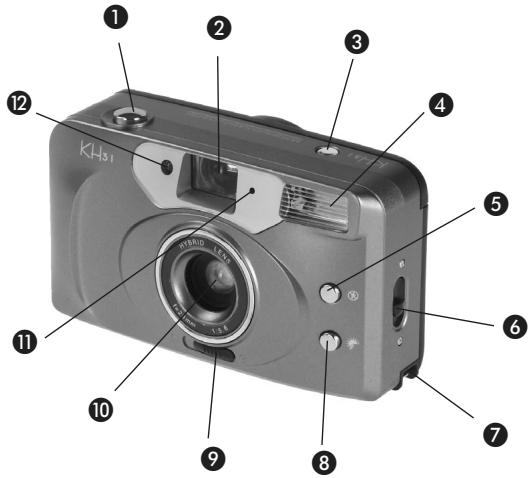
1 Release button (7)
2 Viewfinder (7)
Photograph counter (7)
Flash bulb (7)
Disable flash (7)
6 Open back panel (5,8)
7 Attachment for wrist strap
8 Force flash (7)
Switch on/off (6)
10 Lens (9)
1 Sensor for automatic flash
12 "Red eye" reduction (7)
Winder direction switch (5, 8)
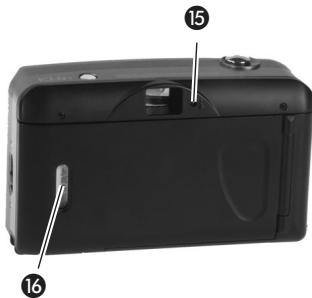
14 Battery compartment (4)
15 "Flash ready" indicator (7)
"Film loaded" window
3. Technical Data
Film type: 35 mm small picture
Film winding: motorized
Focal width: 28mm
Lens: plastic
Diaphragm: 5.6
Focus: 1.5m to infinity
Shutter speed: 1/125 sec.
Flash: about 8 sec. required for charging
Film speed/flash range:
ISO 100:1.5-3 m
ISO 200:1.5-3.6 m
ISO 400:1.5 - 4.2 m
Dimensions: 117 × 68 × 44 ~mm
Operating temperature: -10 to +40^
Power supply:
Batteries 2 × 1.5 V Size "AA"
存储器的地址和地址范围
Package contents: Camera, case, batteries, colour film
4. Loading the batteries
Danger: Do not expose the batteries to sources of heat or flames. Do not short-circuit them, or take them apart. This could cause them to explode and cause serious injury.
14 Open the battery compartment and insert two batteries, as shown.

Note: Old batteries should not be disposed of with the household waste. Take them to your dealer or to a suitable battery recycling center.
5. Loading the film
6 Open the back panel and load a film, as shown.
17 Make sure that the teeth on the winder wheel engage in the corresponding perforations in the film.
13 Make sure that the switch for the direction of winding is positioned as shown.
Otherwise, the new film is pulled back into the cartridge.
6. Switching On / Off
9 With the sliding switch on the front under the lens, switch the camera...
- On: The lens is opened.
- Off: The lens is closed.

7. Taking photographs
When you have a subject in focus on the viewfinder ...
1 press the release button. The film is wound on by the motor.
The window in the counter shows how may photos have already been taken.
Note: If a new film has been loaded, the counter is not yet positioned at number "1".
Press the release button as often as necessary till the counter shows the number "1".
a) "Red eye" reduction
Due to the intensity of the flash, the eyes of people in photographs often appear with a striking red colour. This is because the light from the flash is reflected on the inside of the eyes.
1 If you lightly press and hold the release button, ...
12 a red LED is lit on the front of the camera. This causes the pupils of the person being photographed to contract, so that the flash is not reflected so strongly.
1 Press the release button fully in only after about 1 or 2 seconds, so that the red LED can take effect.
b) Flash
The flash is switched on automatically, if the light conditions so require.
The green "flash ready" indicator lights up as soon as the flash is sufficiently charged. If a flash has just been set off, this can take up to 8 seconds.
c) Disabling / forcing the flash
If you do not want the flash to beset off automatically when you are
taking the photograph, press and hold the ...
"Disable flash" button, if you do not want the flash to go off;
"Force flash" button, if you want the flash to go off, even though there may be sufficient light.
8. Taking the film out
After the last photograph on the film has been used, no more photos can be taken:
9 Move the winder direction switch up to the cartridge symbol. The film is wound back into the cartridge.
6 Open the back panel and take out the film, once the film has
completely re-wound into the cartridge.
Note: After opening the back panel, check that the winding direction switch has returned automatically. If necessary, move it back to the normal film advance position (see Section 5).
Otherwise, the new film will be immediately wound back into the cartridge.
9. Cleaning
Danger: Never open the casing. There are no operating controls inside. If the casing is opened, there is a risk of severe injury from electric shock.
Never touch the lens with the fingers or hard objects. These can easily scratch the lens!
Only clean the device with a soft, dry cloth. Do not use cleaning agents or abrasive materials that could leave scratches on the casing, and especially on the viewing glass.
10. Disposal
If you are going to dispose of this appliance, first take out the batteries. Used batteries should not be disposed of with the household waste. Return these to your retailer or to an appropriate collection site for disposal.
Tip: Care for the environment. If you wish to dispose of this appliance, take it to a recycling center for electronic equipment
- Small picture camera Operating Manual
- mm Fix-Fokus
- KH31 small picture camera
- Contents
- Intended Use
- Safety Instructions
- Warning! Risk of injury!
- Technical Data
- Film speed/flash range:
- Loading the batteries
- Loading the film
- Switching On / Off
- Taking photographs
- a) "Red eye" reduction
- b) Flash
- c) Disabling / forcing the flash
- Taking the film out
- Cleaning
- Disposal
Marque : EBENCH
Modèle : KH 31
Catégorie : Appareil photo