
LAS ARCHIVE - Logiciel LEICA - Notice d'utilisation et mode d'emploi gratuit
Retrouvez gratuitement la notice de l'appareil LAS ARCHIVE LEICA au format PDF.


| Type de produit | Logiciel d'archivage pour microscopie numérique |
| Marque | Leica Microsystems |
| Modèle | LAS Archive |
| Éditions disponibles | Core, Basic, Standard |
| Fonctions principales | Acquisition d'images, gestion de base de données, création de rapports, archivage |
| Acquisition d'images | Intégration avec microscopes et caméras Leica, enregistrement automatique des paramètres (grossissement, filtre, etc.) |
| Gestion de base de données | Structure hiérarchique à plusieurs niveaux, champs personnalisables (texte, nombre, date, mots-clés), pièces jointes (audio, documents) |
| Vues de données | Formulaire, Image, Galerie, Tableau, Navigation (arborescence), Recherche |
| Création de rapports | Microsoft Word, PDF, HTML (édition Standard) ; modèles prédéfinis ou personnalisés |
| Calibration et mesures | Calibration manuelle/automatique, annotation de base (échelle, texte), module d'annotation étendu en option |
| Modules optionnels | Multitime (timelapse, vidéo), Image Overlay, Multistep (scan de platine, Mark and Find), Montage/Multifocus (Z-stack, Depthmap), Power Mosaic |
| Système d'exploitation | Windows avec connexion utilisateur, privilèges administrateur pour installation |
| Sauvegarde et restauration | Possible vers un support de stockage externe |
| Assistance | Aide en ligne contextuelle (touche F1) |
| Conformité | ISO 9001 (gestion qualité), ISO 14001 (gestion environnementale) |
| Service client | Réseau mondial de filiales et représentants dans plus de 100 pays |
FOIRE AUX QUESTIONS - LAS ARCHIVE LEICA
Questions des utilisateurs sur LAS ARCHIVE LEICA
0 question sur cet appareil. Repondez a celles que vous connaissez ou posez la votre.
Poser une nouvelle question sur cet appareil
Téléchargez la notice de votre Logiciel au format PDF gratuitement ! Retrouvez votre notice LAS ARCHIVE - LEICA et reprennez votre appareil électronique en main. Sur cette page sont publiés tous les documents nécessaires à l'utilisation de votre appareil LAS ARCHIVE de la marque LEICA.
MODE D'EMPLOI LAS ARCHIVE LEICA
Leica Application Suite
Archive
LAS archiving for digital microscopy
Le besoin de solutions professionnelles de gestion de données numériques spécifiques au client n'a jamais été aussi grand, en particulier avec l'utilisation croissante des microscopes et caméras numériques. Pour répondre à ces besoins, Leica présente LAS Archive, une application puissante conçue pour offrir un accès rapide et pratique aux images numériques. Entièrement intégrée à tous les microscopes et caméras numériques Leica, cette solution polyvalente de gestion de données améliore considérablement l'acquisition, le traitement, la mesure et le reporting des images. LAS Archive est un environnement modulaire et intelligent doté d'une interface de flux de travail Leica unique qui rend l'imagerie plus rapide, plus facile et plus logique que jamais.
Aperçu de la mise en œuvre
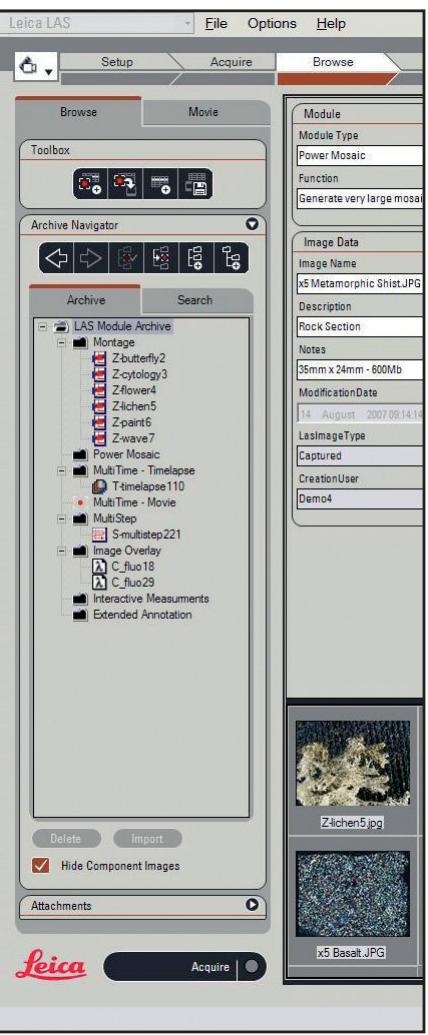
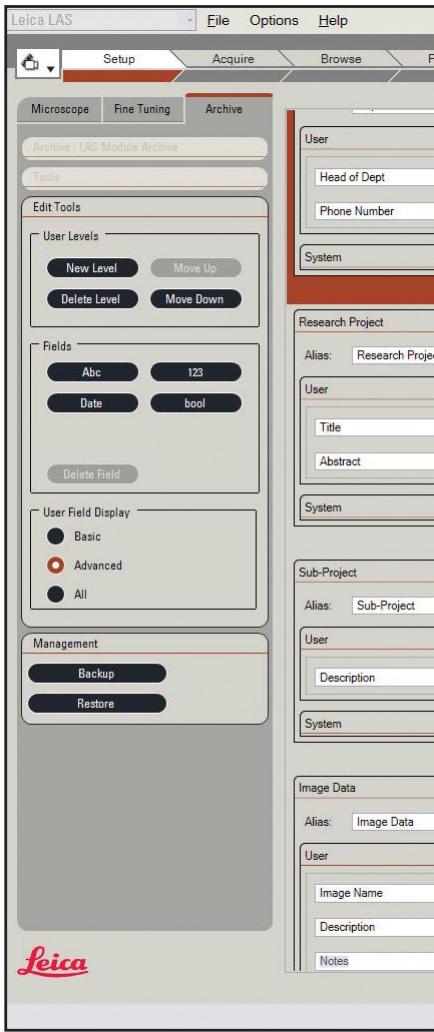
LAS Archive peut être utilisé pour combiner des images avec du texte, des données numériques, des informations sur le microscope et des paramètres de caméra dans des enregistrements individuels d'une base de données. Le contenu d'un enregistrement peut être facilement défini à l'aide de l'outil de conception d'archive dans la barre de flux de travail Configuration. En mettant l'accent sur la simplicité, le concepteur d'archive vous permet de définir des « niveaux » hiérarchiques selon lesquels les données sont regroupées (par exemple, nom du laboratoire, procédure, nom du client, expérience, numéro d'échantillon, résultat, etc.). Il n'y a pratiquement aucune limite au nombre de champs différents que vous pouvez spécifier ou au volume d'informations que vous pouvez stocker. Les vignettes d'images sont enregistrées dans la base de données pour un rappel rapide, tandis que les images haute résolution originales sont conservées en externe à la base de données. De plus, de nouveaux champs peuvent être ajoutés à une base de données existante ou des champs redondants peuvent être supprimés sans difficulté. Les informations système, y compris le nom de l'opérateur, la date et l'heure, sont ajoutées automatiquement, et les paramètres du microscope et de la caméra sont inclus par défaut.
Avantages
- LAS Archive est entièrement intégré à votre microscope et à votre caméra, garantissant un stockage rapide et précis des données.
- Le concept de flux de travail unique de l'interface utilisateur LAS optimise l'efficacité et la commodité et est conçu pour une prise en main rapide.
- L'affichage des images et des données peut être ajusté pour que la présentation corresponde à vos besoins spécifiques.
- Un outil de conception de base de données est intégré, permettant de personnaliser et de créer facilement des bases de données.
- Une hiérarchie de niveaux permet d'organiser commodément les données des enregistrements en catégories connexes.
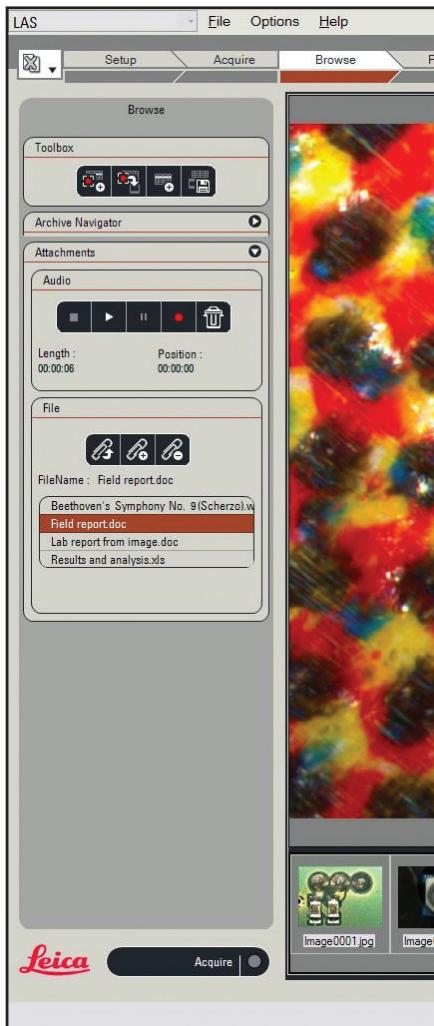
- Des enregistrements audio et de nombreux autres fichiers tels que des feuilles de calcul et des documents Microsoft Word peuvent être joints à un enregistrement pour fournir une collection complète d'informations sur le projet.
- Les séquences d'images multidimensionnelles peuvent être acquises et traitées aussi facilement que des images uniques.
- Générez des rapports à l'aide de modèles prédéfinis dans Microsoft Word ou concevez les vôtres en toute liberté.
Acquisition d'images
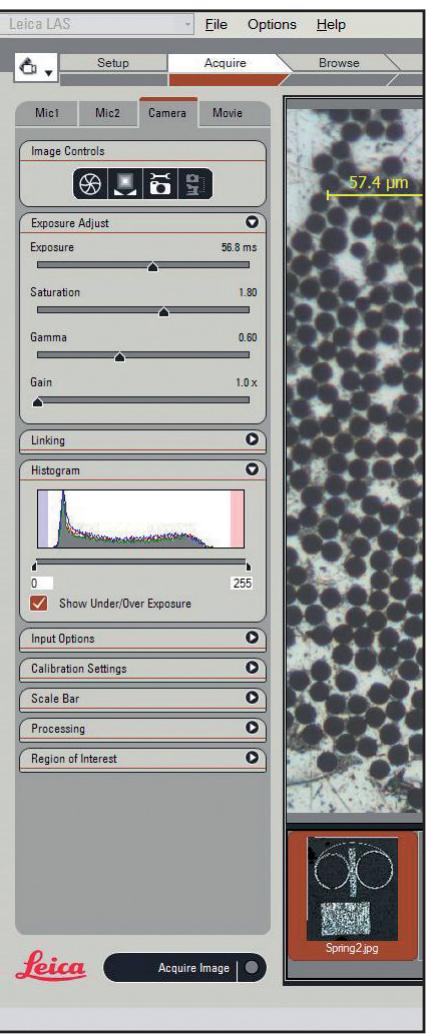
La capture de nouvelles images et l'ajout de nouveaux enregistrements sont facilités par le flux de travail structuré de LAS. Une image en direct peut être visualisée et capturée directement dans la base de données et dans un 'emplacement de capture' prédéfini. Vous pouvez également sélectionner un emplacement dans le navigateur de la vue Parcourir et capturer immédiatement l'image dans la zone désignée. Tous les réglages de la caméra et du microscope sont automatiquement enregistrés dans la base de données.
Vues de données
LAS affiche les informations de différentes manières sur l'espace de travail dans des 'vues de données'. Des boutons à simple clic permettent d'activer ou de désactiver les affichages de données selon les besoins. La région de l'écran occupée par chaque vue peut également être ajustée et sa position est mémorisée entre les sessions d'utilisation et pour chaque utilisateur.
Vue Formulaire
La vue Formulaire affiche les données associées à l'image sélectionnée. Ces données comprennent du texte, des mémos, des données numériques, des dates/heures, des booléens, des données de microscope, des données de caméra et bien plus encore. Des contrôles sont fournis pour sélectionner les champs de données les plus pertinents à afficher.
Vue Image
Cette vue affiche une seule image de l'enregistrement sélectionné et peut être zoomée, défilée ou affichée en plein écran selon les besoins.
Vue Galerie
La galerie sophistiquée affiche plusieurs vignettes, chacune associée à un enregistrement unique. En faisant défiler la galerie, vous pouvez sélectionner rapidement et facilement un ou plusieurs enregistrements d'intérêt. La taille des vignettes peut être ajustée en fonction de l'espace d'écran disponible et du niveau de détail souhaité.
Vue Tableau
La vue Tableau affiche une grille d'enregistrements textuels dans laquelle les colonnes de données correspondent aux champs sélectionnés dans la vue Formulaire. Ce format est similaire à une liste d'enregistrements de base de données conventionnelle contenant des données textuelles et numériques. Elle peut être utilisée comme une autre façon de parcourir les archives et de sélectionner des enregistrements. L'ordre des colonnes peut être librement modifié et les données peuvent être triées par colonne de manière logique et intuitive.
Vue Navigation
La base de données est composée d'une hiérarchie de niveaux qui permet d'organiser les données de manière pratique en catégories liées. Ces catégories peuvent être librement créées et nommées lors de l'acquisition d'images. La vue Navigation affiche les catégories sous forme d'arborescence, permettant de sélectionner et d'afficher instantanément tous les enregistrements.
Vue Recherche
Une fonction de recherche rapide est fournie afin que des données textuelles ou numériques puissent être simplement saisies et qu'une recherche soit effectuée sur l'ensemble de la base de données des champs désignés. Le navigateur de recherche indique alors où se trouvent les champs d'intérêt.
Éditions de LAS Archive
LAS Archive est disponible en plusieurs éditions qui s'appuient les unes sur les autres pour correspondre exactement à vos besoins. Les caractéristiques de ces éditions sont :
LAS Archive Core
- Acquisition, analyse et archivage d'images pour une station de travail mono-utilisateur
- Une structure de base de données prédéfinie avec un seul niveau
- Définir et nommer une catégorie pour collecter des images et des séquences afin de les localiser facilement. Des modules optionnels supplémentaires peuvent être utilisés et sous licence.
- Les autres fonctions de base incluent la configuration et le contrôle du microscope, le contrôle de la caméra numérique, la barre d'échelle sur l'image en direct, l'étalonnage calculé, la galerie d'images, le zoom et le panoramique de l'image sélectionnée, l'annotation et le traitement de base des images.
LAS Archive Basic
- Toutes les fonctions de LAS Core
- Les données du microscope et de la caméra sont stockées avec l'image. Options de recherche pour le texte dans des champs spécifiés. Sélection de champs à afficher dans la vue Formulaire.
- Fonctionnalités de pièces jointes aux documents
- Fonctionnalités d'enregistrement de fichiers audio
- Ajouter des champs de texte à la structure de la base de données.
LAS Archive Standard
- Toutes les fonctionnalités de LAS Core et Basic
- Une structure flexible et une interface utilisateur pour poste de travail unique
- Peut être adapté à vos besoins spécifiques
- Inclut un outil de conception d'archives pour créer une base de données à plusieurs niveaux
- Ajoutez plusieurs champs de données nommés à la base de données
- Sélectionnez la disposition des données affichées dans la vue Formulaire.
- Créez des rapports dans Microsoft Word incluant des images
- Exportez les rapports en fichiers PDF ou en HTML
LAS Archive - Fonctions principales
- Conception de base de données
- Acquisition d'images et de données
- Vues de données
- Navigation, recherche et tri
- Crée des rapports
- Administration de la base de données
Conception de base de données
- Créer de nouvelles bases de données ou utiliser des modèles existants
- Organiser les données en niveaux
- Définir le contenu de la base de données : champs de texte, nombres, date/heure, mots-clés
- Lier à des fichiers de données externes
Acquisition d'images et de données
- Ajouter des images et des séquences d'images
- Passer directement à la saisie des données après l'acquisition d'images
- Saisir les données utilisateur à partir du clavier
- Inclure automatiquement les données du microscope et de la caméra
- Faire des enregistrements audio pour un enregistrement
- Ajouter des annotations de base et une barre d'échelle
- Ajouter des mesures interactives et afficher les vues de données dans des mises en page personnalisées
Vues de données
- La vue image affiche l'image d'un enregistrement sélectionné
- La vue Formulaire permet la saisie des données associées à l'enregistrement sélectionné.
- La vue Galerie offre un aperçu rapide de toutes vos images.
La vue Tableau permet de comparer facilement les détails - La vue Navigation montre la structure des données - La vue Recherche affiche les résultats d'une recherche.
Navigation, recherche et tri
- Afficher les enregistrements individuellement
- Parcourir les enregistrements
- Sélectionner un enregistrement depuis la Galerie ou le Tableau
- Trier les données sur n'importe quel champ depuis la vue Tableau
- Recherche rapide de texte
Création de rapports
Exporter les enregistrements sélectionnés vers Microsoft Word - Les formats de sortie incluent PDF et HTML, définis par un modèle Microsoft Word - L'image et les données sélectionnées sont transférées - Les rapports Microsoft Word de LAS Archive peuvent être librement modifiés.
Administration de la base de données
LAS Archive fonctionne sur un PC local - Connexion utilisateur Windows - Les derniers paramètres utilisés sont enregistrés pour chaque utilisateur - Les données peuvent être importées depuis des versions antérieures de LAS - L'archive peut être sauvegardée sur un support de stockage et restaurée facilement - L'installation et la configuration sont réservées aux utilisateurs disposant de privilèges d'administrateur.
Données numériques efficaces
Périphériques d'entrée d'images et de données
LAS apporte efficacité et économie dans les domaines de la photographie scientifique et de la microscopie, ainsi que dans l'enregistrement et le traitement d'images industrielles. Les données numériques peuvent être analysées, modifiées, évaluées et intégrées dans des rapports rapidement et facilement.
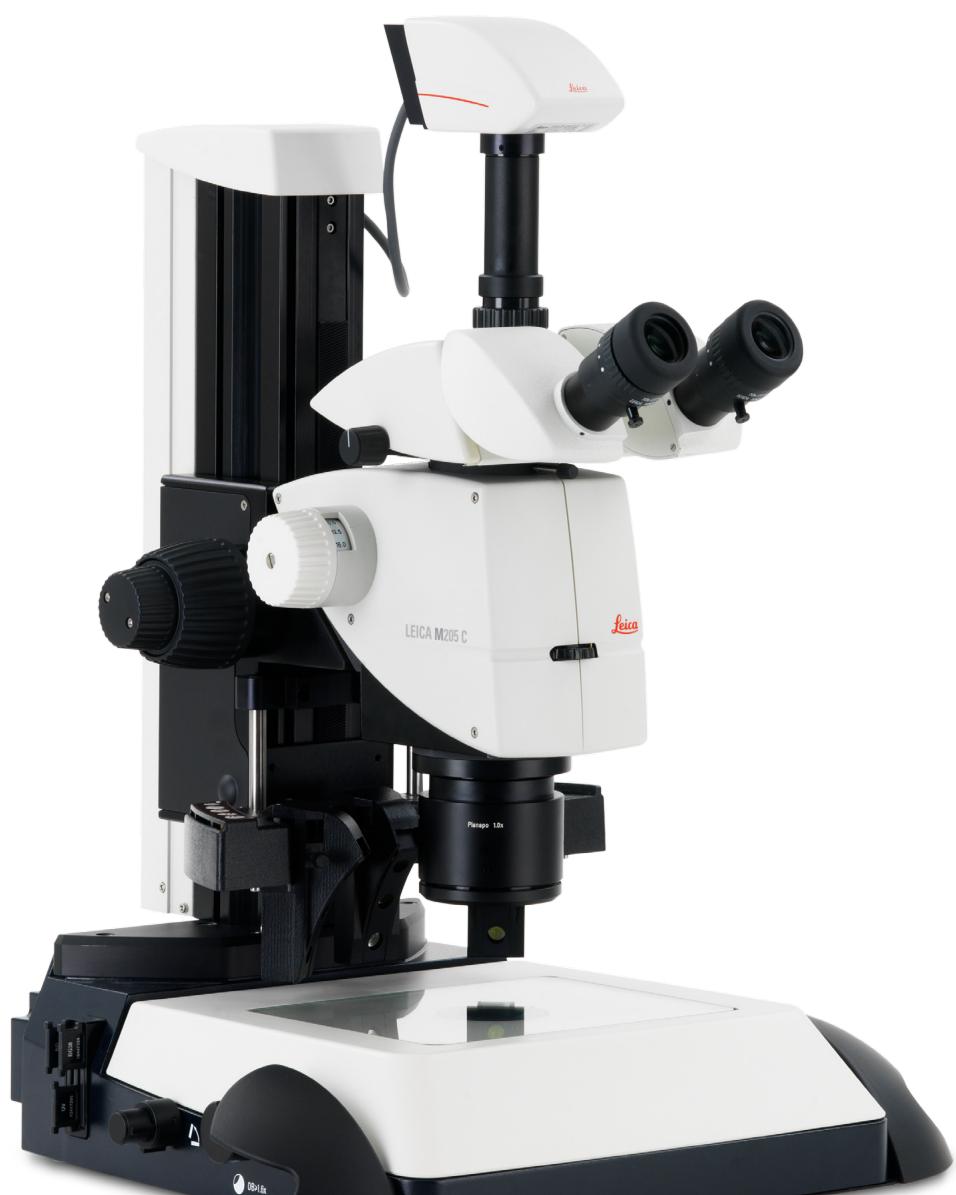
Caméras Leica DFC Digital Firewire
Conçue avec les dernières technologies numériques, la gamme de caméras Leica DFC se caractérise par ses performances et sa flexibilité, et répond aux exigences les plus strictes en matière de photographie numérique en microscopie. LAS prend en charge toutes les caméras de la gamme Leica, de la DFC290 à la Leica DFC500, en acquérant des images haute fidélité sans effort. Que vous utilisiez la CMOS DFC290 de 3 mégapixels ou une solution haut de gamme, avec jusqu'à 12 mégapixels et un temps d'exposition de 600 secondes, les caméras numériques Leica fournissent des images numériques de haute qualité et les métadonnées associées pour LAS Archive.
Les paramètres du microscope sont toujours lus
Les paramètres actuels d'un microscope Leica DM ou d'un stéréomicroscope Leica connecté sont toujours capturés avec l'image. Les valeurs des paramètres sont automatiquement stockées dans les champs système lors de l'enregistrement des images. Les champs sont assignés à l'image lors de la génération de la base de données et peuvent se référer à toutes les valeurs, telles que le grossissement, le filtre de fluorescence appliqué, la position de la platine X/Y et la position focale, etc. L'étalonnage est automatisé lors de la capture d'image, ce qui simplifie l'ensemble de l'opération et garantit un stockage précis des informations. Les valeurs enregistrées vous permettent d'enregistrer des images à partir de sources qui partagent des propriétés exactement reproductibles. Lors de la génération de rapports, les conditions d'enregistrement peuvent être imprimées facilement et sans erreur.
Option de mémorisation et de rappel
Pour tirer pleinement parti des paramètres de microscope stockés, cette option permet de rétablir ces paramètres sur demande. Cela garantit que les réglages exacts du microscope peuvent être reproduits de manière pratique.
Modules d'acquisition de séquences
Ces modules optionnels sont naturellement entièrement intégrés dans LAS Archive et sont activés et utilisés directement à partir de l'étape Acquire du flux de travail LAS. Une caractéristique de ces modules est que de nombreuses images sont associées en une séquence. LAS Archive rend cette association évidente en stockant la séquence d'images comme un « nœud » dans l'arbre de navigation de la base de données.
Des nœuds spécifiques avec des icônes d'identification sont créés pour :
- Séquences time-lapse de LAS Multitime – Films time-lapse enregistrés à partir de LAS Multitime - Movie
- Images de composants et composites de LAS Image Overlay
- Ensembles d'images de balayage de platine et Mark and Find de LAS Multistep
- Piles Z, Depthmap et images Montage de LAS Montage et LAS Multifocus
- Images mosaïques pour LAS Power Mosaic
Calibrage et
mesures
Calibrage, mesure et annotation (noyau)
Le calibrage d'image permet un calibrage manuel et automatique, et simplifie l'évaluation des objets en affichant une barre de référence en superposition sur l'image en direct. Pour chaque image, un calibrage peut être stocké dans l'archive.
Annotation de base (noyau)
Les images acquises par LAS peuvent être annotées avec la date, l'heure, le nom, une barre d'échelle et une ligne de distance. Cette annotation peut éventuellement être incrustée dans l'image.
Module d'annotation étendu (optionnel)
Le module d'annotation sophistiqué en option permet d'intégrer des annotations telles que des barres d'échelle, du texte, des images ou des flèches sur votre image. Celles-ci peuvent être utilisées soit en superposition, soit aplaties dans l'image, de sorte que l'image ne contienne qu'une seule couche. Les données produites par ce module sont gérées directement par l'archive, et sont rappelées lors de l'affichage de l'image et peuvent ensuite être modifiées.
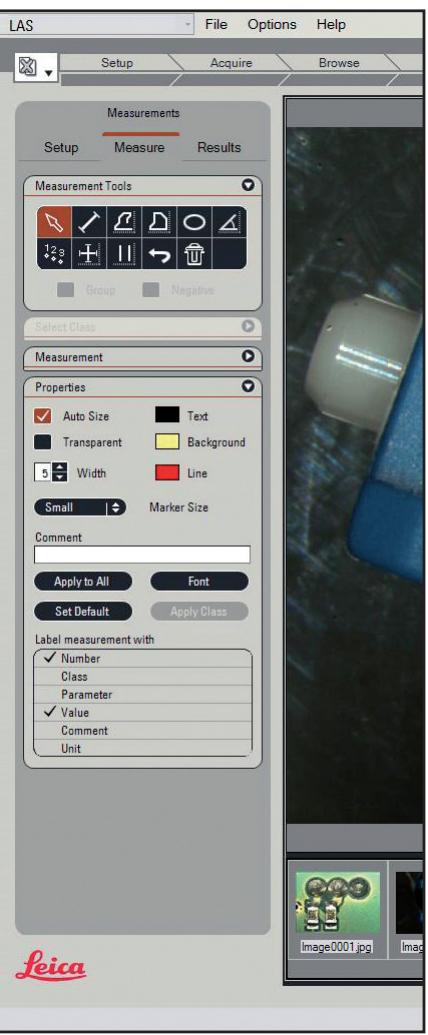
Module de mesure interactif (optionnel)
Les modules d'annotation LAS et de mesure interactive sont également intégrés à l'archive, et le module de mesure effectue des mesures interactives, des légendes et le marquage des images. Les données d'image ne sont pas modifiées, car les mesures et les textes sont saisis sur une couche séparée au-dessus de l'image. Un calibrage manuel ou calculé simplifie l'indexation précise. Les connexions pour les microscopes Leica permettent la lecture automatique de la taille réelle de l'échantillon. De plus amples informations sur les modules optionnels individuels sont disponibles sur www.stereomicopy.com/LAS.
Rapports d'archive LAS (édition standard uniquement)
La fonction de rapport Word intégrée permet la génération automatisée de rapports Microsoft Word 2000/XP pour les images et les données textuelles à l'aide des archives LAS. Les images et le texte associé des enregistrements sélectionnés peuvent être insérés dans le document texte directement ou en utilisant des modèles prédéfinis. Les images miniatures permettent une insertion efficace des images et, comme le rapport est généré dans un document Microsoft Word normal, vous disposez de toutes les fonctions habituelles pour une édition ultérieure avant l'impression.
Alternativement, le rapport peut être directement exporté en fichier PDF afin d'être immédiatement disponible. Un fichier HTML peut être créé comme une mise en page et un format d'image prêts pour le web. Dans ces cas, le format est basé sur un modèle Microsoft Word spécifié. Il n'est pas nécessaire d'avoir Microsoft Word installé sur le PC utilisé pour créer les rapports lorsque vous utilisez les modèles prédéfinis fournis. Cependant, si vous souhaitez créer et formater le rapport, vous aurez naturellement besoin de Microsoft Word installé.
Aide
Pour chaque fonctionnalité d'archive et chaque boîte de dialogue, il existe une description d'aide en ligne qui résume l'opération sous forme d'étapes. Le texte d'aide contextuel est accessible directement via la touche F1 familière.
Leica Microsystems - la marque
pour des produits exceptionnels
La mission de Leica Microsystems est d'être le premier choix mondial de solutions innovantes pour les besoins de nos clients en matière de vision, de mesure et d'analyse de microstructures.
Leica, la marque leader pour les microscopes et instruments scientifiques, est issue de cinq noms de marque, tous avec une longue tradition : Wild, Leitz, Reichert, Jung et Cambridge Instruments. Pourtant, Leica symbolise à la fois l'innovation et la tradition.
Leica Microsystems - une entreprise internationale avec un solide réseau de services clients
| Australia: | Gladesville | Tel. +61 2 9879 9700 | Fax +61 2 9817 6358 |
| Austria: | Vienna | Tel. +43 1 486 80 50 0 | Fax +43 1 486 80 50 30 |
| Canada: | Richmond Hill/Ontario | Tel. +1 905 762 2000 | Fax +1 905 762 2000 |
| Denmark: | Herlev | Tel. +45 4454 0101 | Fax +45 4454 0111 |
| France: | Rueil-Malmaison | Tel. +33 1 47 32 85 85 | Fax +33 1 47 32 85 85 |
| Germany: | Bensheim | Tel. +49 6251 136 0 | Fax +49 6251 136 155 |
| Italy: | Milan | Tel. +39 0257 486.1 | Fax +39 0257 40 3475 |
| Japan: | Tokyo | Tel. +81 3 5421 2800 | Fax +81 3 5421 2800 |
| Korea: | Seoul | Tel. +82 2 514 65 43 | Fax +82 2 514 65 43 |
| Netherlands: | Rijswijk | Tel. +31 70 4132 100 | Fax +31 70 4132 109 |
| People's Rep. of China: | Hong Kong | Tel. +852 2564 6899 | Fax +852 2564 4163 |
| Portugal: | Lisbon | Tel. +351 21 388 9112 | Fax +351 21 386 4688 |
| Singapore | Tel. +65 6779 7823 | Fax +65 6773 0628 | |
| Spain: | Barcelona | Tel. +34 93 494 95 30 | Fax +34 93 494 95 32 |
| Sweden: | Sollentunga | Tel. +46 8 625 45 45 | Fax +46 8 625 45 10 |
| Switzerland: | Glettbrugg | Tel. +41 44 809 34 34 | Fax +41 44 809 34 44 |
| United Kingdom: | Milton Keynes | Tel. +44 1908 246 246 | Fax +44 1908 609 992 |
| USA: | Bannockburn/llinois | Tel. +1 847 406 0123 | Fax +1 847 406 0164 |
et des représentants de Leica Microsystems dans plus de 100 pays.
Conformément au certificat ISO 9001, Leica Microsystems (Suisse) SA, Business Unit Stereo & Macroscope Systems, a mis en place un système de gestion qui répond aux exigences de la norme internationale pour le management de la qualité. De plus, la production répond aux exigences de la norme internationale ISO 14001 pour le management environnemental.
Les entreprises du groupe Leica Microsystems opèrent à l'international dans trois segments d'activité, où nous nous classons parmi les leaders du marché.
- Systèmes de microscopie
Notre expertise en microscopie est la base de toutes nos solutions pour la visualisation, la mesure et l'analyse de microstructures dans les sciences de la vie et l'industrie. Avec la technologie laser confocale et les systèmes d'analyse d'images, nous fournissons des installations de visualisation tridimensionnelle et offrons de nouvelles solutions pour la cytogénétique, la pathologie et les sciences des matériaux.
Préparation des échantillons
Nous fournissons des systèmes et services complets pour les applications d'histo- et cytopathologie clinique, la recherche biomédicale et l'assurance qualité industrielle. Notre gamme de produits comprend des instruments, des systèmes et des consommables pour l'infiltration et l'inclusion des tissus, des microtomes et des cryostats, ainsi que des colorateurs et des coverslippers automatisés.
Équipement médical
Les technologies innovantes de nos microscopes chirurgicaux offrent de nouvelles approches thérapeutiques en microchirurgie.


- LEICA APPLICATION SUITE
- LAS ARCHIVING FOR DIGITAL MICROSCOPY
- APERÇU DE LA MISE EN ŒUVRE
- AVANTAGES
- ACQUISITION D'IMAGES
- VUES DE DONNÉES
- VUE FORMULAIRE
- VUE IMAGE
- VUE GALERIE
- VUE TABLEAU
- VUE NAVIGATION
- VUE RECHERCHE
- ÉDITIONS DE LAS ARCHIVE
- LAS ARCHIVE CORE
- LAS ARCHIVE BASIC
- LAS ARCHIVE STANDARD
- LAS ARCHIVE - FONCTIONS PRINCIPALES
- CONCEPTION DE BASE DE DONNÉES
- ACQUISITION D'IMAGES ET DE DONNÉES
- NAVIGATION, RECHERCHE ET TRI
- CRÉATION DE RAPPORTS
- ADMINISTRATION DE LA BASE DE DONNÉES
- DONNÉES NUMÉRIQUES EFFICACES
- PÉRIPHÉRIQUES D'ENTRÉE D'IMAGES ET DE DONNÉES
- CAMÉRAS LEICA DFC DIGITAL FIREWIRE
- LES PARAMÈTRES DU MICROSCOPE SONT TOUJOURS LUS
- OPTION DE MÉMORISATION ET DE RAPPEL
- MODULES D'ACQUISITION DE SÉQUENCES
- CALIBRAGE ET
- MESURES
- CALIBRAGE, MESURE ET ANNOTATION (NOYAU)
- ANNOTATION DE BASE (NOYAU)
- MODULE D'ANNOTATION ÉTENDU (OPTIONNEL)
- MODULE DE MESURE INTERACTIF (OPTIONNEL)
- RAPPORTS D'ARCHIVE LAS (ÉDITION STANDARD UNIQUEMENT)
- AIDE
- LEICA MICROSYSTEMS - LA MARQUE
- POUR DES PRODUITS EXCEPTIONNELS
- LEICA MICROSYSTEMS - UNE ENTREPRISE INTERNATIONALE AVEC UN SOLIDE RÉSEAU DE SERVICES CLIENTS
- SYSTÈMES DE MICROSCOPIE
- PRÉPARATION DES ÉCHANTILLONS
- ÉQUIPEMENT MÉDICAL
Marque : LEICA
Modèle : LAS ARCHIVE
Catégorie : Logiciel