
LAS ARCHIVE - Software LEICA - Free user manual and instructions
Find the device manual for free LAS ARCHIVE LEICA in PDF.


| Product Type | Archiving software for digital microscopy |
| Brand | Leica Microsystems |
| Model | LAS Archive |
| Available Editions | Core, Basic, Standard |
| Main Functions | Image acquisition, database management, report creation, archiving |
| Image Acquisition | Integration with Leica microscopes and cameras, automatic recording of parameters (magnification, filter, etc.) |
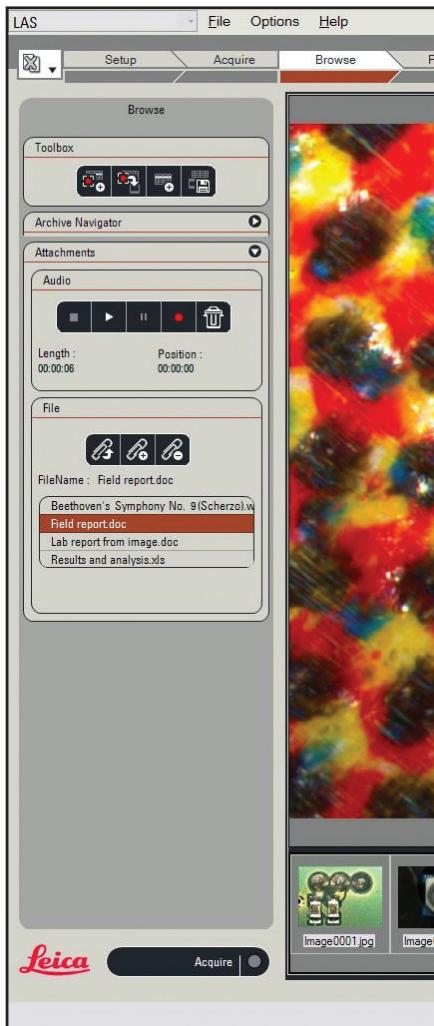
| Database Management | Multi-level hierarchical structure, customizable fields (text, number, date, keywords), attachments (audio, documents) |
| Data Views | Form, Image, Gallery, Table, Navigation (tree), Search |
| Report Creation | Microsoft Word, PDF, HTML (Standard edition); predefined or custom templates |
| Calibration and Measurements | Manual/automatic calibration, basic annotation (scale, text), optional extended annotation module |
| Optional Modules | Multitime (timelapse, video), Image Overlay, Multistep (stage scan, Mark and Find), Montage/Multifocus (Z-stack, Depthmap), Power Mosaic |
| Operating System | Windows with user login, administrator privileges for installation |
| Backup and Restore | Possible to external storage media |
| Support | Context-sensitive online help (F1 key) |
| Compliance | ISO 9001 (quality management), ISO 14001 (environmental management) |
| Customer Service | Global network of subsidiaries and representatives in over 100 countries |
Frequently Asked Questions - LAS ARCHIVE LEICA
User questions about LAS ARCHIVE LEICA
0 question about this device. Answer the ones you know or ask your own.
Ask a new question about this device
Download the instructions for your Software in PDF format for free! Find your manual LAS ARCHIVE - LEICA and take your electronic device back in hand. On this page are published all the documents necessary for the use of your device. LAS ARCHIVE by LEICA.
USER MANUAL LAS ARCHIVE LEICA
Leica Application Suite
Archive
LAS archiving for digital microscopy
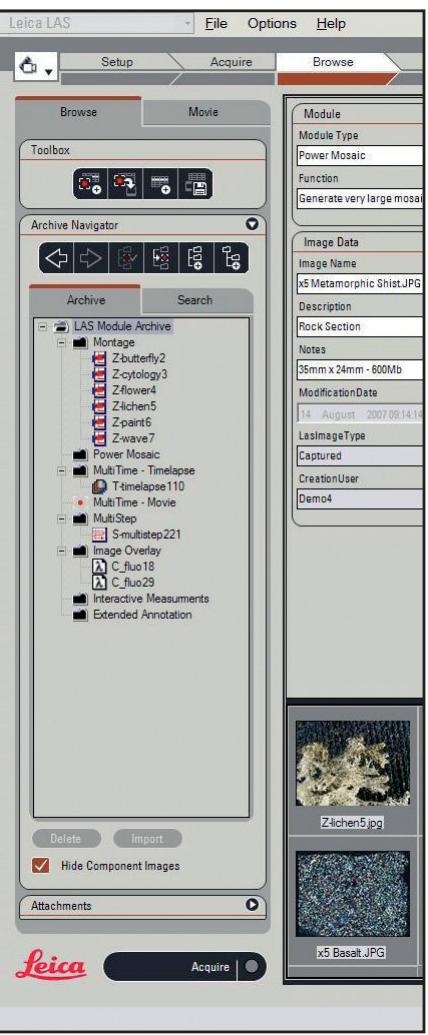
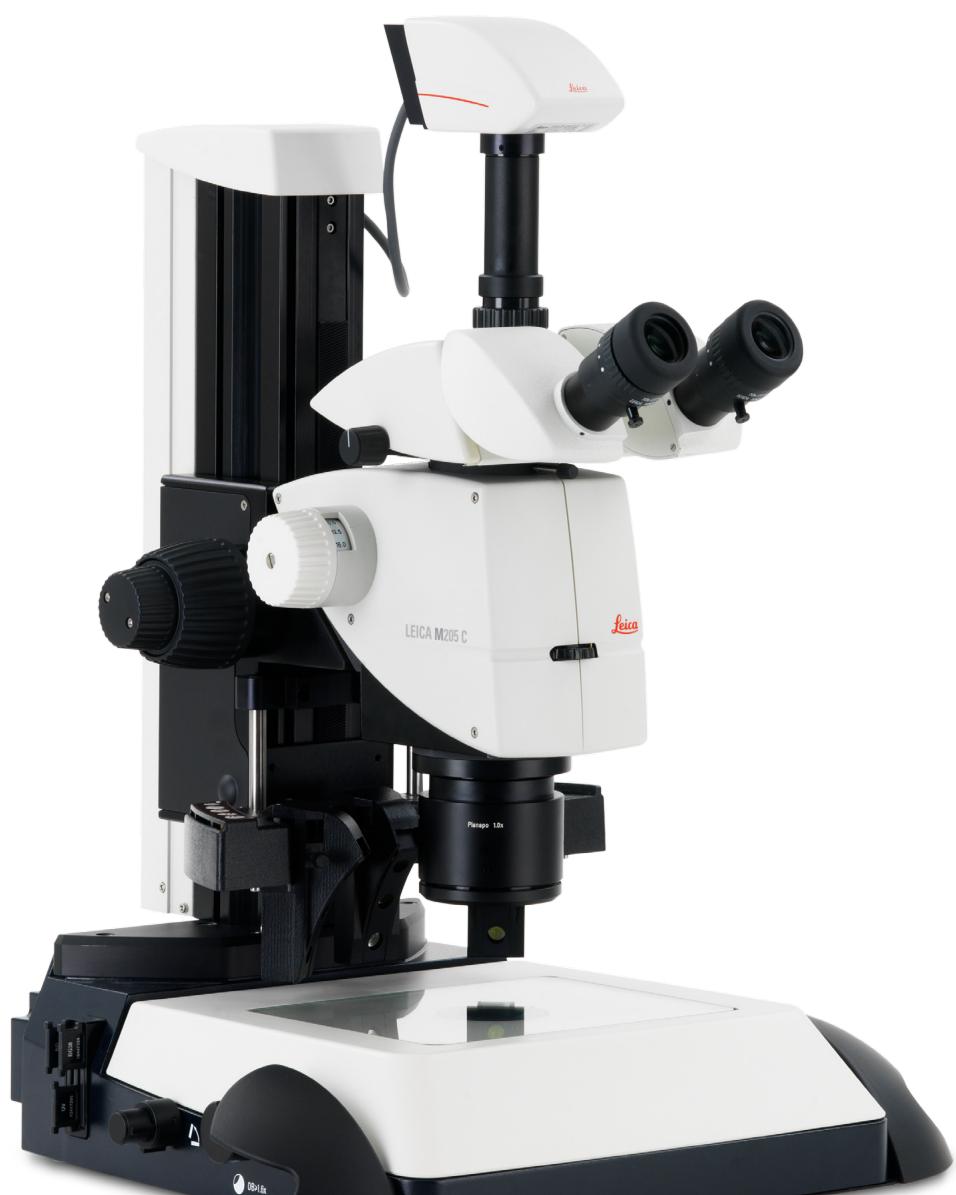
The need for professional, customer-specific digital data management solutions has never been greater, particularly in view of the increasing use of digital microscopes and cameras. To meet these needs, Leica introduces LAS Archive, a powerful application designed to give rapid and convenient access to digital images. Fully integrated with all Leica microscopes and digital cameras this versatile data management solution vastly improves the acquisition, processing, measurement and reporting of images. LAS Archive is a modular and intelligent environment with a unique Leica workflow interface that makes imaging quicker, easier and more logical than ever before.
Implementation Overview
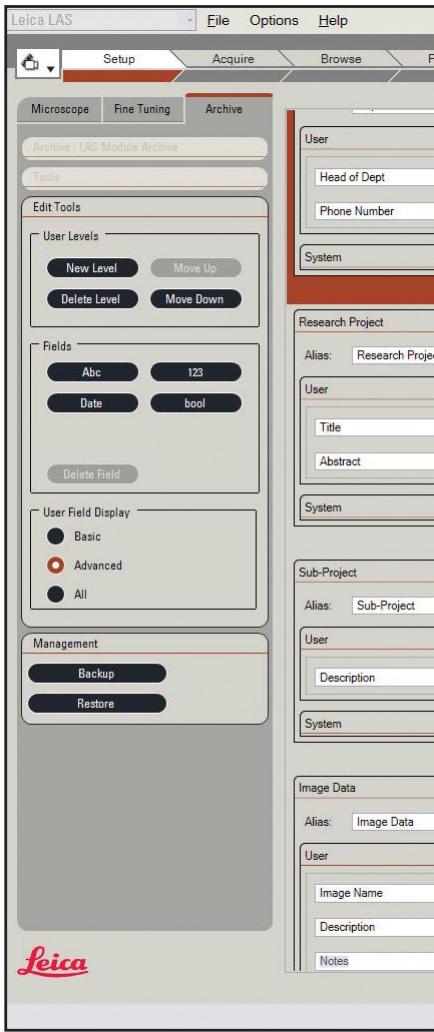
LAS Archive can be used to combine images with text, numeric data, microscope information and camera parameters in individual records of a database. The content of a record can be easily defined by use of the Archive Design tool on the Setup workflow bar. With a focus on simplicity, the Archive Designer allows you to define hierarchical 'levels' by which data is grouped (e.g. Lab Name, Procedure, Customer Name, Experiment, Specimen Number, Result etc.). There is virtually no limit to the number of different fields you can specify or the volume of information you can store. Image thumbnails are saved in the database for rapid recall, while the original high-resolution images are held externally to the database. Additionally, new fields can be added to an existing database or redundant fields removed without any difficulty. System information, including operator name, date and time are added automatically, and microscope and camera parameters are included by default.
Advantages
- LAS Archive is fully integrated with your microscope and camera ensuring that data is stored quickly and accurately
- The unique LAS user interface workflow concept optimises efficiency and convenience and is designed for rapid familiarity
- Image and data display can be adjusted so that the presentation suits your specific needs
- A database design tool is incorporated allowing databases to be customised and created easily
- A hierarchy of levels allows the record data to be conveniently organised into related categories
- Audio recordings and a multiple of other files such as spreadsheets and Microsoft Word documents can be attached to a record to provide a complete collection of project information
- Sequences from multi-dimensional images may be acquired and handled as conveniently as single images
- Generate reports using predefined templates in Microsoft Word or design your own with complete freedom
Acquiring Images
Capturing new images and adding new records couldn't be easier thanks to the structured workflow of LAS. A live image can be viewed and captured directly into the database and into a pre-specified 'capture location'. Alternatively you can select a location in the Browse view navigator and immediately capture the image into the designated area. All camera and microscope settings are automatically entered into the database.
Data Views
LAS displays information in a variety of ways on the workspace in "data views". Single click buttons are provided to turn the data displays on and off as required. The region of the screen occupied by each view can also be adjusted and its position remembered between sessions of operation and for each user.
Form View
The Form View displays data associated with the selected image. This data includes text, memos, numeric, date/time, Boolean, microscope data, camera data and much more. Controls are provided to select the most relevant data fields for display.
Image View
This shows a single image of the selected record and can be Zoomed and scrolled or shown in full screen as required.
Gallery View
The sophisticated gallery shows multiple thumbnail images, each associated with a single record. By scrolling through the gallery, either single or multiple records of interest can be selected quickly and easily. The size of the thumbnails can be adjusted to suit the available screen space and amount of detail desired.
Table View
The Table View displays a grid of text records in which the data columns correspond to the fields selected in the Form View. This has a similar format to a conventional database record list containing text and numeric data. It can be used as an alternative way of scrolling through the archive and selecting records. The column order can be freely modified and data sorted by column in a logical and intuitive way.
Navigation View
The database consists of a hierarchy of levels that allows data to be conveniently organised into related categories. These categories can be freely created and named during the acquisition of images. The Navigator View shows categories as a tree structure, allowing all records to be instantly selected and shown.
Search View
A quick search facility is provided so that text or numeric data can be simply entered and a search made of the entire database of nominated fields. The Search Navigator then shows where the fields of interest are located.
LAS Archive Editions
LAS Archive is available in a number of Editions that build on each other to exactly match your needs. The features of these Editions are:
LAS Archive Core
- Image acquisition, analysis and archiving for a single-user workstation
- A predefined database structure with a single level
- Define and name a category to collect images and sequences for easy location
Additional optional modules can be used and licensed - Other core features include microscope configuration and control, digital camera control, scale bar on live image, calculated calibration, gallery of images, zoom and pan of selected image, basic image annotation and processing.
LAS Archive Basic
- All features of LAS Core
- Microscope and camera data is stored with the image
Search options for text in specified fields
Field selection to show on Form View - Document attachment capabilities
- Audio file recording capabilities
- Add text fields to the structure of database.
LAS Archive Standard
- All features of LAS Core and Basic
- A flexible structure and user interface for single workstation
- Can be tailored to your specific needs
- Includes an archive design tool to create a database with multiple levels
- Add multiple named data fields to the database
- Select the layout of the data shown in the Form View.
- Create reports in Microsoft Word that include images
- Export reports to pdf files or to html
LAS Archive - Main Functions
- Database Design
- Image and Data Acquisition
- Data Views
- Navigation, Searching and Sorting
- Creates Reports
- Database Administration
Database Design
- Create new or use existing database templates
- Organise data into levels
- Define the database contents
Fields of text, numbers, date/time, keywords - Link to external data files
Image and Data Acquisition
- Add images and image sequences
- Go to data entry immediately after image acquisition
- Input user data from keyboard
- Include microscope and camera data automatically
- Make audio recordings for a record
- Add basic annotations and scale bar
- Add interactive measurements
Show data views in customised layouts
Data Views
- Image view shows the image of a selected record
- Form view allows the entry of associated data with the selected record
- Gallery view provides a rapid overview of all your images
Table view allows details to be easily compared
- Navigation view shows the structure of data
Search view shows the results of a search
Navigation, Searching and Sorting
- Show records individually
- Step through records
- Select record from Gallery or Table
- Sort data on any field from table view
- Quick search for any text
Creating Reports
Output selected records to Microsoft Word
Output formats include pdf and html that are defined by a Microsoft Word template
- Image and selected data is transferred
- Microsoft Word reports from LAS Archive can be freely edited
Database Administration
LAS Archive is operated on a local PC
- Windows user log-in
- Last used settings are saved for individual users
Data can be imported from earlier versions of LAS
- Archive can be backed up to storage media and restored easily
- Installation and configuration is restricted to users with administrator privileges
Efficient Digital Data
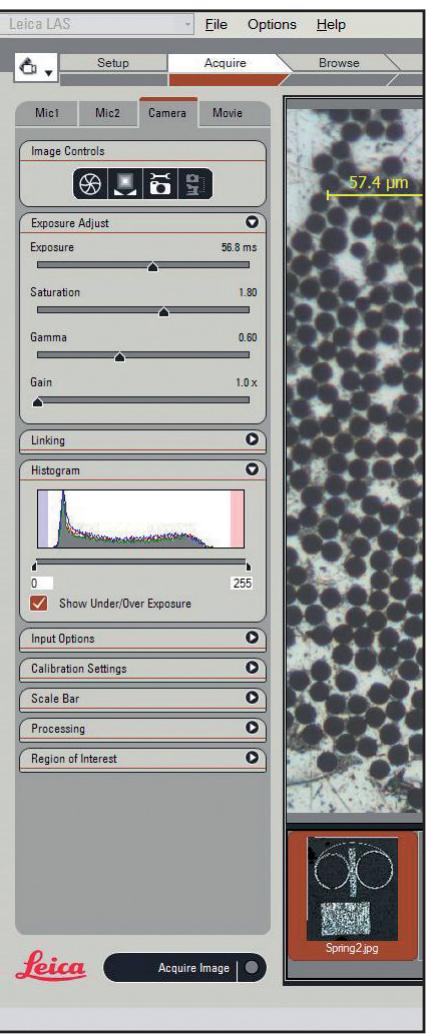
Image & Data Input Devices
LAS brings efficiency and economy to the fields of scientific photography and microscopy as well as to industrial image recording and processing. Digital data can be analysed, modified, evaluated and integrated into reports quickly and easily.
Leica DFC Digital Firewire Cameras
Designed using the latest digital technology, the Leica DFC camera line is characterized by performance and flexibility and meets even the toughest demands on digital photography in the field of microscopy. LAS supports all cameras in the Leica range from DFC290 to Leica DFC500, acquiring high fidelity images with the minimum of fuss. Whether you are using the 3 megapixel CMOS DFC290 or a high-end solution, with up to 12 megapixels and 600 seconds exposure time, Leica digital cameras provide high quality digital images and accompanying meta-data for LAS Archive.
Microscope Settings are Always Read
The current parameters of a connected Leica DM series microscope or Leica stereomicroscope are always captured along with the image. The parameter values are automatically stored in system fields while images are being recorded. The fields are assigned to the image when generating the database and may refer to any values, such as magnification, applied fluorescence filter, X/Y stage and focal position, etc. Calibration is automated during image capture, simplifying the entire operation and ensuring the accurate storage of information. The saved values allow you to record images from sources that share exactly reproducible properties. When generating reports, the recording conditions can be printed easily and without error.
Store and Recall Option
To take full advantage of the stored microscope parameters, this option allows these parameters to be re-established on request. This ensures that the exact settings of the microscope can be conveniently reproduced.
Sequence Acquisition Modules
These optional modules are naturally fully integrated into the LAS Archive and are activated and used directly from the LAS workflow Acquire step. A characteristic of these modules is that many images are associated as a sequence. LAS Archive makes this association obvious by storing the sequence of images as a 'node' on the database navigator tree.
Specific nodes with identifying icons are created for:
- Time-lapse sequences from LAS Multitime – Time Lapse
Movies recorded from LAS Multitime - Movie - Component and composite images from LAS Image Overlay
- Stage scan and Mark and Find images sets from LAS Multistep
- Z stacks, Depthmap and Montage images from LAS Montage and LAS Multifocus
- Mosaic images for LAS Power Mosaic
Calibration and
Measurements
Calibration, Measurement & Annotation (Core)
Image Calibration allows both manual and automatic calibration and simplifies object evaluation by displaying an overlay reference bar on the live image. For each image, a calibration can be stored in the archive.
Basic Annotation (Core)
Images acquired by LAS can be annotated with data, time, name, scale bar and distance line. This annotation can optionally be burnt into the image.
Extended Annotation Module (Optional)
The sophisticated Annotation Module option allows you to integrate annotations such as scale-bar, text, images or arrows on to your image. These can be used as either an overlay, or flattened within the image, so that the image contains only one layer. The data produced by this module is managed directly by the archive, and is recalled when the image is displayed and can subsequently be edited.
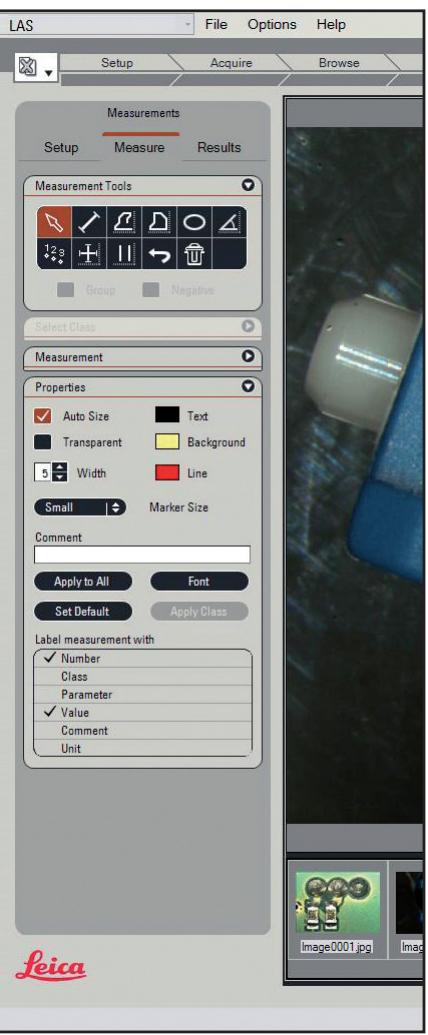
Interactive Measurement Module (Optional)
LAS Annotation and Interactive Measurement modules are also integrated with the archive and the Measurement Module performs interactive, captioning and marking of images. The image data is not altered, as measurements and texts are entered on a separate layer on top of the image. Manual or calculated calibration simplifies accurate indexing. Connections for the Leica microscopes allow the automatic readout of actual specimen size. Further information on individual optional modules is available at www. steromicopy.com/LAS
LAS Archive Reporting (Standard Edition Only)
The integrated Word Report feature allows automated Microsoft Word 2000/XP report generation for image and text data using LAS archives. Images and related text from the selected records can be inserted into the text document either directly or by using pre-defined templates. Thumbsail images enable the efficient insertion of images and as the report is generated in a normal Microsoft Word document, you have all the familiar facilities you expect for further editing before printing.
Alternatively, the report can be outputted directly as a pdf file so that it is immediately available. An html file can be created as a web ready image layout and format. In these cases the format is based on a specified Microsoft Word template. It is not necessary to have Microsoft Word installed on the PC being used to create the reports when using the pre-defined templates that are provided. However if you wish to create and format the report, naturally you will need Microsoft Word to be installed.
Help
For each archive feature and dialog box there is an on-line help description that summarises the operation in a step-by-step format. The context sensitive Help text is accessed directly from the familiar F1.
Leica Microsystems - the brand
for outstanding products
Leica Microsystems' mission is to be the world's first-choice provider of innovative solutions to our customers' needs for vision, measurement and analysis of micro-structures.
Leica, the leading brand for microscopes and scientific instruments, developed from five brand names, all with a long tradition: Wild, Leitz, Reichert, Jung and Cambridge Instruments. Yet Leica symbolizes innovation as well as tradition.
Leica Microsystems - an international company with a strong network of customer services
| Australia: | Gladesville | Tel. +61 2 9879 9700 | Fax +61 2 9817 6358 |
| Austria: | Vienna | Tel. +43 1 486 80 50 0 | Fax +43 1 486 80 50 30 |
| Canada: | Richmond Hill/Ontario | Tel. +1 905 762 2000 | Fax +1 905 762 2000 |
| Denmark: | Herlev | Tel. +45 4454 0101 | Fax +45 4454 0111 |
| France: | Rueil-Malmaison | Tel. +33 1 47 32 85 85 | Fax +33 1 47 32 85 85 |
| Germany: | Bensheim | Tel. +49 6251 136 0 | Fax +49 6251 136 155 |
| Italy: | Milan | Tel. +39 0257 486.1 | Fax +39 0257 40 3475 |
| Japan: | Tokyo | Tel. +81 3 5421 2800 | Fax +81 3 5421 2800 |
| Korea: | Seoul | Tel. +82 2 514 65 43 | Fax +82 2 514 65 43 |
| Netherlands: | Rijswijk | Tel. +31 70 4132 100 | Fax +31 70 4132 109 |
| People's Rep. of China: | Hong Kong | Tel. +852 2564 6899 | Fax +852 2564 4163 |
| Portugal: | Lisbon | Tel. +351 21 388 9112 | Fax +351 21 386 4688 |
| Singapore | Tel. +65 6779 7823 | Fax +65 6773 0628 | |
| Spain: | Barcelona | Tel. +34 93 494 95 30 | Fax +34 93 494 95 32 |
| Sweden: | Sollentunga | Tel. +46 8 625 45 45 | Fax +46 8 625 45 10 |
| Switzerland: | Glettbrugg | Tel. +41 44 809 34 34 | Fax +41 44 809 34 44 |
| United Kingdom: | Milton Keynes | Tel. +44 1908 246 246 | Fax +44 1908 609 992 |
| USA: | Bannockburn/llinois | Tel. +1 847 406 0123 | Fax +1 847 406 0164 |
and representatives of Leica Microsystems in more than 100 countries.
In accordance with the ISO 9001 certificate, Leica Microsystems (Switzerland) Ltd, Business Unit Stereo & Macroscope Systems has set its disposal a management system that meets the requirements of the international standard for quality management. In addition, production meets the requirements of the international standard ISO 14001 for environmental management.
The companies of the Leica Microsystems Group operate internationally in three business segments, where we rank with the market leaders.
- Microscopy Systems
Our expertise in microscopy is the basis for all our solutions for visualization, measurement and analysis of microstructures in life sciences and industry. With confocal laser technology and image analysis systems, we provide three-dimensional viewing facilities and offer new solutions for cytogenetics, pathology and materials sciences.
Specimen Preparation
We provide comprehensive systems and services for clinical histo- and cytopathology applications, biomedical research and industrial quality assurance. Our product range includes instruments, systems and consumables for tissue infiltration and embedding, microtomes and cryostats as well as automated stainers and coverslippers.
Medical Equipment
Innovative technologies in our surgical microscopes offer new therapeutic approaches in microsurgery.
Winner 2005
Ierreeeepre eae
- Leica Application Suite
- LAS archiving for digital microscopy
- Implementation Overview
- Advantages
- Acquiring Images
- Data Views
- Form View
- Image View
- Gallery View
- Table View
- Navigation View
- Search View
- LAS Archive Editions
- LAS Archive Core
- LAS Archive Basic
- LAS Archive Standard
- LAS Archive - Main Functions
- Database Design
- Image and Data Acquisition
- Navigation, Searching and Sorting
- Creating Reports
- Database Administration
- Efficient Digital Data
- Image & Data Input Devices
- Leica DFC Digital Firewire Cameras
- Microscope Settings are Always Read
- Store and Recall Option
- Sequence Acquisition Modules
- Calibration and
- Measurements
- Calibration, Measurement & Annotation (Core)
- Basic Annotation (Core)
- Extended Annotation Module (Optional)
- Interactive Measurement Module (Optional)
- LAS Archive Reporting (Standard Edition Only)
- Help
- Leica Microsystems - the brand
- for outstanding products
- Leica Microsystems - an international company with a strong network of customer services
- - Microscopy Systems
- Specimen Preparation
- Medical Equipment
Brand : LEICA
Model : LAS ARCHIVE
Category : Software