SL210 - Compteur électrique OREGON - Notice d'utilisation et mode d'emploi gratuit
Retrouvez gratuitement la notice de l'appareil SL210 OREGON au format PDF.


| Type de produit | Compteur électrique (chronomètre numérique avec mémoire) |
| Marque | OREGON |
| Modèle | SL210 |
| Dimensions (L x l x H) | 60 x 23 x 70 mm |
| Poids | 50 g |
| Alimentation | 1 pile bouton CR2032 |
| Affichage | LCD |
| Fonctions principales | Horloge (12/24 h), chronomètre, mémoire de tours (jusqu'à 30 tours), alarme, temps de fractionnement |
| Capacité mémoire | 30 tours |
| Précision | 1/100e de seconde (estimation) |
| Matériau | Plastique |
| Entretien et nettoyage | Nettoyer avec un chiffon doux et sec. Ne pas immerger dans l'eau. |
| Sécurité | Tenir hors de portée des jeunes enfants. Ne pas exposer à des températures extrêmes ou à l'humidité. |
| Pièces détachées et réparabilité | Pile CR2032 remplaçable. Aucune autre pièce détachée disponible. |
| Informations générales | Chronomètre digital avec fonction mémoire. Permet d'enregistrer et de consulter les temps de tours. |
FOIRE AUX QUESTIONS - SL210 OREGON
Questions des utilisateurs sur SL210 OREGON
0 question sur cet appareil. Repondez a celles que vous connaissez ou posez la votre.
Poser une nouvelle question sur cet appareil
Téléchargez la notice de votre Compteur électrique au format PDF gratuitement ! Retrouvez votre notice SL210 - OREGON et reprennez votre appareil électronique en main. Sur cette page sont publiés tous les documents nécessaires à l'utilisation de votre appareil SL210 de la marque OREGON.
MODE D'EMPLOI SL210 OREGON
Oregon
SCIENTILEC
SI 210
FIG. 1
text_image
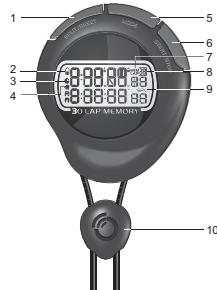
1 2 3 4 5 6 7 8 9 10BACK VIEW (FIG. 2)
. Battery compartment
GETTING STARTED
Press and hold MODE to activate the stopwatch.
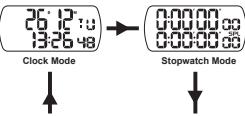
MODE SEQUENCE
Press MODE to navigate between modes

Alarm Mode
Lap Memory Mode
To set time and date:
1. Navigate to clock mode.
2. Press and hold MODE until first setting flashes. Press START / STOP to increase and SPLIT / RESET to decrease values.
3. Press MODE to move to the next setting. The setting sequence is: 12 / 24 hr display mode / hour / minute / second / year / day and month display / month / day. Day of the week is automatically calculated.
4. Press and hold MODE to confirm.
To set time and date:
1. Navigate to clock mode
2. Press and hold MODE until first setting flashes. Press START / STOP to increase and SPLIT / RESET to decrease values.
3. Press MODE to move to the next setting. The setting sequence is: 12 / 24 hr display mode / hour / minute / second / year / day and month display / month / day. Day of the week is automatically calculated.
4. Press and hold MODE to confirm.
STOPWATCH MODE
FIG. 3
- Navigate to stopwatch mode.
- Press START / STOP to start and stop timer.
- Press SPLIT / RESET to save laps while timer is running and to reset timer if it is paused.
- Press START / STOP to start and stop timer.
- Press SPLIT / RESET to save laps while timer is running and to reset timer if it is paused.
STOPWATCH WITH MEMORY Model: SL210
USER MANUEL
The Ground Truth image displays a single, solid horizontal line. According to Rule 2 (UNDERSCORE & LINE RULES), this is a stylistic or background line, not a placeholder underscore. Therefore, the OCR result must ignore it and output nothing or only meaningful text. The provided OCR content is "____", which consists of four underscores. This is an incorrect interpretation of the line as a placeholder, violating the rule that stylistic lines must be ignored. The OCR has hallucinated underscores where none should exist based on the GT's visual context. Hence, the OCR result is inconsistent with the Ground Truth.
EN
INTRODUCTION
Thank you for selecting this Oregon Scientific™ Stopwatch (SL210). Please keep this manual for instructions and information you should know about.
CLOCK OVERVIEW
FRONT VIEW (FIG. 1
-
SPLIT / RESET: Save laps; decrease (-) values; reset stopwatch
-
Low battery icon
- Stopwatch icon
- Alarm icon
-
MODE: Toggle between options; confirm settings
-
START / STOP: Increase (+) values; start / pause
Stephatch
. Memory icon
Lap quantity
Split time icon - Ground
- START / STOP: Increase (+) values; start / pause
Stephenson - Memory Icon
- Lap quantity
9 Split time icon - Clustal
BACK VIEW (FIG. 2)
(二)
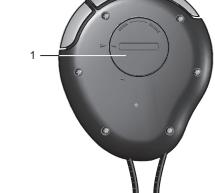
- Battery compartment
GETTING STARTED
To insert batteries
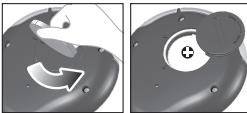
Remove the battery compartment and insert batteries, matching polarities (see FIG. 3).
To activate Stopwatch:
To insert batteries
Remove the battery compartment and insert batteries, matching polarities (see FIG. 3).
To activate Stopwatch:
Press and hold MODE to activate the stopwatch.
MODE SEQUENCE
Press MODE to navigate between modes
(2612:0)→(999999999)
13:26 48
Clock Make
0:00:00:00
Clock Mode
Stopwatch Mode

Alarm Mode
Lap Memory Mode
appear until you have
NOTE Lap memory mode will not appear until you have saved at least 1 lap into the stopwatch.
CLOCK MODE
NOTE Lap m
saved at least 1 lap into the stopwatch.
CLOCK MODE
[Non-Text]
The following table
NOTE If timer
will be erased.
NOTE Up to 30 laps can be stored in the stopwatch's memory.
STOPWATCH MODE
To function stopwatch
1 Navigate to stopwatch mode
NOTE If timer
will be erased.
NOTE Up to 30 laps can be stored in the stopwatch's memory.
LAB MEMORY MODE
The Ground Truth image displays a single, solid horizontal line. According to Rule 2 (UNDERSCORE & LINE RULES), this is a stylistic or background line, not a placeholder underscore. Therefore, the OCR result must ignore it and output nothing or only meaningful text. The provided OCR content is "____", which consists of four underscores. This is an incorrect interpretation of the line as a placeholder, violating the rule that stylistic lines must be ignored. The OCR has hallucinated underscores where none should exist based on the GT's visual context. Hence, the OCR result is inconsistent with the Ground Truth.
To view lap memory:
-
Navigate to lap memory mode.
-
Press START / STOP to scroll up lap memory and SPLIT / RESET scroll down lap memory.
To erase lap memory.
- Press MODE for 2 seconds to access erase memory menu.
- Press START / STOP or SPLIT / RESET to select between YES and NO to erase memory.
- Press MODE to confirm.
NOTE If user
not appear until another lap has been saved.
NOTE Memo
paused.
[Non-Text]
[Non-Text]
[Non-Text]
ALARM MODE
T. 107-12
10 set alanin.
1. Navigate to alarm mode.
2. Press and hold MODE to select hour / minute.
3. Press START / STOP to increase and SPLIT /
decrease values.
4. Press MODE to confirm.
CRONOMETRO DIGITALE
CON MEMORIA
Modello: SL210
MANUALE PER L'UTENTE
The Ground Truth image displays a single, solid horizontal line. According to Rule 2 (UNDERSCORE & LINE RULES), this is a stylistic or background line, not a placeholder underscore. Therefore, the OCR result must ignore it and output nothing or only meaningful text. The provided OCR content is "____", which consists of four underscores. This is an incorrect interpretation of the line as a placeholder, violating the rule that stylistic lines must be ignored. The OCR has hallucinated underscores where none should exist based on the GT's visual context. Hence, the OCR result is inconsistent with the Ground Truth.
11
INTRODUZIONE
Grazie per av
(SL210) di O
manuale, poic
necessario con
[Non-Text]
PANORAMICA DEL PRODOTTO
VISTA ANTERIORE (FIG. 1)
1 SPLIT / R
diminuire (
-
Icona batt
-
100%
-
Icona del
-
icona della
-
MODE: co
le imposta
6 START / S
-
START TO ayviare/am
-
Incentive
-
Icona della
-
Numero di
-
Icona temp
-
Formacord
10.1.2.2023
m = 311
VISTA POSTI
-
-
-
-
-
-
-
-
-
-
-
-
-
-
-
-
-
-
-
-
-
-
-
-
-
-
-
-
-
-
-
-
-
-
-
-
-
-
-
-
-
-
-
-
-
-
-
-
-
-
-
-
-
-
-
-
-
-
-
-
-
-
-
-
-
-
-
-
-
-
-
-
-
-
-
-
-
-
-
-
-
-
-
-
-
-
-
-
-
-
-
-
-
-
-
-
-
- 99.
-
-
-
-
-
-
-
-
-
-
-
-
-
-
-
-
-
-
-
-
-
-
-
-
-
-
-
-
-
-
-
-
-
-
-
-
-
-
-
-
-
-
-
-
-
-
-
-
-
-
-
-
-
-
-
-
-
-
-
-
-
-
-
-
-
-
-
-
-
-
-
-
-
-
-
-
-
-
-
-
-
-
-
-
-
-
-
-
-
-
-
-
-
-
-
-
-
vano Batte
m = 311
OPERAZION
Per inserire le batterie:
Aprire il vano
polarità indicat
[Non-Text]
Per attivare il cronometro:
Per attivare il
secondi.
The Ground Truth image displays a single, solid horizontal line. According to Rule 2 (UNDERSCORE & LINE RULES), this is a stylistic or background line, not a placeholder underscore. Therefore, the OCR result must ignore it and output nothing or only meaningful text. The provided OCR content is "____", which consists of four underscores. This is an incorrect interpretation of the line as a placeholder, violating the rule that stylistic lines must be ignored. The OCR has hallucinated placeholder underscores where none exist in the GT. Hence, the result is inconsistent with the Ground Truth.
SEQUENZA DELLE MODALITA
Premere MOD
1
/
1.8
1
10.4.2
Modalita
1
m = 311
1
T
0.05
8:85
The
60
M-1-1762
Modanta
[Non-Text]
NOTA La m
finché nel cro
rilevazione.
[Non-Text]
MODALITÀ C
MOBAENA
Per impostare
1 Accedere
-
T
-
teniere pr
non lampe
e SPLIT 7
- Premere M
L'ordine de
12-24 ore
giomo e fi
viene calc
- Tenere pre
The Ground Truth image displays a single, solid horizontal line. According to Rule 2 (UNDERSCORE & LINE RULES), if the GT contains lines used for stylistic emphasis or as background (like ruled paper), the OCR result must ignore them. The line in the GT is clearly a stylistic or background line, not a placeholder for text. Therefore, the OCR should not have output any underscores. Outputting `____` constitutes an error under Rule 2, as it hallucinates placeholder symbols where none are semantically intended. Hence, the OCR result is inconsistent with the Ground Truth.
MODALITA CRONOMETRO
Per attivare il
- Accedere
- Promero \$
- Nomile 6
- Premere S
if there in
[Non-Text]
[Non-Text]
[Non-Text]
[Non-Text]
[Non-Text]
[Non-Text]
[Non-Text]
[Non-Text]
[Non-Text]
[Non-Text]
[Non-Text]
[Non-Text]
[Non-Text]
[Non-Text]
[Non-Text]
[Non-Text]
[Non-Text]
[Non-Text]
[Non-Text]
[Non-Text]
[Non-Text]
[Non-Text]
[Non-Text]
SPECIFICHE
(No text)
TIPO
Lx|xh
Roso
Pass
Orologio
Formato ora
Calendario
Display LCD
Memoris
Memona
Alimentazione
The Ground Truth image displays a single, solid horizontal line. According to Rule 2 (UNDERSCORE & LINE RULES), if the GT contains lines used for stylistic emphasis or as background elements (like a ruled line on paper), the OCR result must ignore them. The line in the GT is clearly a stylistic or background line, not a placeholder for text. Therefore, the OCR should not have output any underscores. Outputting `____` constitutes an error under Rule 2, as it hallucinates placeholder symbols where none are semantically intended. Hence, the OCR result is inconsistent with the Ground Truth.
INFORMAZIC
D
Per avere mag Scientific visits
Scientific Visita days, pobrei tav
cove potaritro
Per ricerche di
www2.oregons
[Non-Text]
DICHIARAZIO
2.1.1 陈家荣 王学民
Con la preser
Cronometro a
conforme alla
e datata della
nchiesta, tramil
[Non-Text]
[Non-Text]
[Non-Text]
[Non-Text]
[Non-Text]
[Non-Text]
[Non-Text]
[Non-Text]
[Non-Text]
[Non-Text]
[Non-Text]
[Non-Text]
[Non-Text]
[Non-Text]
[Non-Text]
[Non-Text]
[Non-Text]
[Non-Text]
[Non-Text]
[Non-Text]
[Non-Text]
[Non-Text]
[Non-Text]
[Non-Text]
[Non-Text]
[Non-Text]
[Non-Text]
[Non-Text]
[Non-Text]
[Non-Text]
[Non-Text]
CRONÓMETRO CON MEMORIA
Modelo: SL210
MANUAL DE USUARIO

INTRODUCCIÓN
Gracias por elegir este cronómetro con memoria (SL210) de Oregon Scientific™ Sírvase guardar este manual para disponer de las instrucciones y la información que debería conocer.
RESUMEN SOBRE EL RELOJ
VISTA FRONTAL (FIG. 1)
-
SPLIT / RESET: Guardar vueltas, reducir (-) valores, reiniciar cronómetro Icono de pila gastada
-
Icono de cronómetro Icono de la alarma
-
MODE: Alternar entre opciones / confirmación
-
START / STOP: Incrementar (+) valores; Iniciar / detener cronómetro
-
Icono de memoria
-
Cantidad de vueltas
-
Icono de tiempo de intervalo
-
Orificio para la correa
VISTA TRASERA (FIG. 2)
- Compartimiento para las pilas
PARA EMPEZAR
Para introducir las pilas:
Retire la tapa del compartimiento para pilas e introduzo
pillas respetando la polaridad (vea FIG. 3).
Para activar el cronómetro:
Pulse MODE y manténgalo pulsado durante 2 segundos para activar el cronómetro.
SECUENCIA DE MODO
Pulse MODO para pasar de un modo a otro



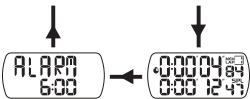


NOTA El modo de memoria de vuelta no aparecerá hasta que haya guardado al menos 1 vuelta en el cronómetro.
MODO RELOJ
Para ajustar fecha y hora:
-
Acceda al modo de reloj.
-
Pulse MODE y manténgalo pulsado hasta que el primer ajuste parpadee. Pulse START / STOP para incrementar los valores y SPLIT / RESET para reducirlos.
-
Pulse MODE para pasar al siguiente ajuste. La secuencia de configuración es: Formato de 12 ó 24 horas, hora, minuto, segundo, año, formato día / mes, mes y día. El día de la semana se calcula automáticamente.
-
Pulse MODE y manténgalo pulsado para confirmar.
MODO DE CRONÓMETRO
Para operar el cronómetro:
-
Acceda al modo cronómetro.
-
Pulse START / STOP para poner en marcha el cronómetro y detenerlo.
-
Pulse SPLIT / RESET para guardar vueltas mientras el cronómetro corra y para reiniciar el temporizador si está en pausa.
NOTA Si el temporizador se reinicia y vuelve a ponerse en marcha se borrarán todas las vueltas grabadas.
NOTA Se pueden guardar hasta 30 vueltas en la memoria del cronómetro.
MODO DE MEMORIA DE VUELTA
GL210_M_EU_OP.indd 2
SOBRE OREGON SCIENTIFIC
[Non-Text]
-
[Non-Text]
:
[Non-Text]
[Non-Text]
[Non-Text]
-
[Non-Text]
requisitos ese su disposición
[Non-Text]
The Ground Truth image displays a single, solid horizontal line. According to Rule 2 (UNDERSCORE & LINE RULES), this is a stylistic or background line, not a placeholder underscore. Therefore, the OCR result must ignore it and output nothing or only meaningful text. The provided OCR content is "\_\_\_\_", which consists of four underscores. This is an incorrect interpretation of the line as a placeholder, violating the rule that stylistic lines must be ignored. The OCR has hallucinated underscores where none should exist based on the GT's visual context. Hence, the OCR result is inconsistent with the Ground Truth.
[Non-Text]
[Non-Text]
[Non-Text]
[Non-Text]
[Non-Text]
[Non-Text]
[Non-Text]
[Non-Text]
[Non-Text]
[Non-Text]
[Non-Text]
[Non-Text]
[Non-Text]
[Non-Text]
[Non-Text]
[Non-Text]
[Non-Text]
[Non-Text]
[Non-Text]
[Non-Text]
[Non-Text]
[Non-Text]
[Non-Text]
[Non-Text]
[Non-Text]
[Non-Text]
[Non-Text]
[Non-Text]
[Non-Text]
[Non-Text]
[Non-Text]
[Non-Text]
[Non-Text]
[Non-Text]
[Non-Text]
[Non-Text]
[Non-Text]
[Non-Text]
[Non-Text]
[Non-Text]
FICHA TÉCNICA

LX
m = 311
Pes
Rel
For
Cal
Par
Me
Alin
[Non-Text]
SOBRE OREGON SCIENTIFIC
Visi
con
Dep
ore
853
Si
nue visit
The image is too blurry to recognize any text content.
Par
dres
EU - DECLARACIÓN DE CONFORMIDAD
Por
Cro
reqi su
de
Clie
[Non-Text]
[Non-Text]
[Non-Text]
[Non-Text]
[Non-Text]
[Non-Text]
[Non-Text]
[Non-Text]
[Non-Text]
[Non-Text]
[Non-Text]
[Non-Text]
[Non-Text]
[Non-Text]
[Non-Text]
[Non-Text]
[Non-Text]
[Non-Text]
[Non-Text]
[Non-Text]
[Non-Text]
[Non-Text]
[Non-Text]
[Non-Text]
[Non-Text]
[Non-Text]
[Non-Text]
[Non-Text]
[Non-Text]
[Non-Text]
[Non-Text]
[Non-Text]
[Non-Text]
[Non-Text]
[Non-Text]
[Non-Text]
[Non-Text]
[Non-Text]
[Non-Text]
[Non-Text]
[Non-Text]
[Non-Text]
[Non-Text]
[Non-Text]
[Non-Text]
[Non-Text]
[Non-Text]
[Non-Text]
[Non-Text]
[Non-Text]
[Non-Text]
[Non-Text]
[Non-Text]
[Non-Text]
[Non-Text]
[Non-Text]
[Non-Text]
[Non-Text]
[Non-Text]
[Non-Text]
[Non-Text]
[Non-Text]
[Non-Text]
CRONÔMETRO COM MEMÓRIA
Modelo: SL21
MANUAL DO USUÁRIO

INTRODUÇÃO
Agradecemos pela escolha do Cronômetro com memória
(SL210) da Oregon Scientific™. Guarde este manual para
10.5
VISÃO GERAL DO RELÓGIO
VISÃO DIANTEIRA (FIG. 1)
- SPLIT / RESET: salva as voltas; diminui (-) valores;
[Non-Text]
-
Icone de bateria fraca
-
Icone de cronômetro
-
Icone de alarme
-
MODE: alterna entre as opções; confirma os ajustes
-
START / STOP: aumenta (+) os valores; inicia / pausa
[Non-Text]
-
Icone de memória
-
Quantidade de vol
-
Ícone de tempo fracionado
-
Fixador da correia
VISÃO TRASEIRA (FIG. 2)
1. Compartimento de baterias
(1) 2017年1月1日
PRIMEIROS PASSOS
Para inserir as baterias:
Remova a tampa do compartimento de baterias e insira-as,
lazendo a correspondencia das polanidades (veja a FIG. 3).
Para ativar o cronômetro:
Pressione e segure MODE por 2 segundos para ativar o
crol
SEQUÊNCIA DE MODOS
Pressione MODE para navegar entre os modos

co ic :u
13:26:00 0:00:00:00
1920
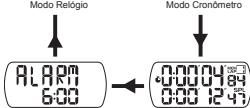
Modo Alarme
Modo Memória de Voltas
NOTA
que você tenha salvo pelo menos 1 volta no cronômetro.
MODO RELÓGIO
Para ajustar a hora e data:
-
Navegue até o modo Relógio.
-
Pressione e segure MODE até que o primeiro ajuste
pisque. Pressione START / STOP para aumentar e
SPLIT / RESET para diminuir os valores.
- Pressione MODE para ir para o próximo ajuste.
A sequência de ajuste e. modo de exibição de 12 / 24 horas / hora / minuto / segundo / ano / modo de
exibição de dia e mês / mês / dia. O dia da semana é
automaticamente calculado.
- Pressione e segure MODE para confirmar
MODO CRONÔMETRO
Para operar o cronômetro:
-
Navegue até o modo Cronômetro.
-
Pressione START / STOP para iniciar e parar o
temporizador.
- Pressione SPLIT / RESET para salvar as voltas
enquanto o temporizador estiver em execução e para
teinicial o temporizador quando em pausa
NOTA
todas as memórias de voltas serão apagadas.
[Non-Text]
[Non-Text]
[Non-Text]
[Non-Text]
[Non-Text]
[Non-Text]
ESPECIFICAÇÕES
TIP
TIPO DESCRÍCAO
C x L x A 60 x 23 x 70 mm
Peso 50 g
Relógio
Formato de
Calendário
LOR
LCD
Memória de
Alimentação
The Ground Truth image displays a single, solid horizontal line. According to Rule 2 (UNDERSCORE & LINE RULES), if the GT contains lines used for stylistic emphasis or as background (like ruled paper), the OCR result must ignore them. The OCR content provided is "____", which represents four underscores. This is incorrect because underscores are not equivalent to a solid line and are not permitted under the “Stylistic/Background Lines (Ignore)” rule. The OCR has hallucinated text (underscores) where none should exist, violating the rule to ignore stylistic lines. Therefore, the OCR result is inconsistent with the Ground Truth.
SOBRE A
15.34
visite huest conocer má
está en EE.
Departamer
oregonscier