
DAZZLE TV MOBILE - Carte d'acquisition vidéo PINNACLE - Notice d'utilisation et mode d'emploi gratuit
Retrouvez gratuitement la notice de l'appareil DAZZLE TV MOBILE PINNACLE au format PDF.


| Type de produit | Carte d'acquisition vidéo TV USB |
| Marque | PINNACLE |
| Modèle | DAZZLE TV MOBILE |
| Interface | USB 2.0 |
| Entrée antenne | 75 Ohm, connecteur F ou IEC |
| Entrée vidéo | Composite (cinch), S-Video (mini-DIN) |
| Entrée audio | Stéréo (prise jack 3,5 mm) |
| Tuner TV | Microtune MT2050 |
| Normes TV supportées | PAL B/G/D/K/I/SECAM ou NTSC, PAL M/N selon version |
| Résolution maximale | 720 x 576 pixels |
| Formats vidéo | PAL, NTSC, SECAM |
| Processeur minimum | Pentium IV 2,0 GHz / Pentium M 1,3 GHz / AMD Athlon XP |
| Mémoire minimale | 256 Mo RAM |
| Espace disque minimum | 5 Go |
| Carte graphique | Compatible DirectX 8 |
| Carte son | Compatible DirectX 9 |
| Système d'exploitation | Windows XP SP2 (Home, Pro, Media Center 2005) |
| Alimentation | Par port USB |
| Accessoires fournis | Câble USB, notice d'utilisation |
| Entretien | Nettoyer avec un chiffon sec et non pelucheux |
| Sécurité | Ne pas exposer à l'humidité ni aux températures extrêmes |
| Réparabilité | Non réparable par l'utilisateur. Contacter le SAV |
| Pièces détachées | Non disponibles séparément |
FOIRE AUX QUESTIONS - DAZZLE TV MOBILE PINNACLE
Questions des utilisateurs sur DAZZLE TV MOBILE PINNACLE
0 question sur cet appareil. Repondez a celles que vous connaissez ou posez la votre.
Poser une nouvelle question sur cet appareil
Téléchargez la notice de votre Carte d'acquisition vidéo au format PDF gratuitement ! Retrouvez votre notice DAZZLE TV MOBILE - PINNACLE et reprennez votre appareil électronique en main. Sur cette page sont publiés tous les documents nécessaires à l'utilisation de votre appareil DAZZLE TV MOBILE de la marque PINNACLE.
MODE D'EMPLOI DAZZLE TV MOBILE PINNACLE
Dazzle*TV mobile Hardware
Dazzle\*TV mobile Hardware
GB 03/2006
© Pinnacle Systems GmbH 2006
All rights reserved.
No part of this manual may be reproduced or transferred to other media without explicit written permission from Pinnacle Systems GmbH, Braunschweig, Germany.
All brand or product names are trademarks or registered trademarks of their respective holders.
Pinnacle Systems hereby declares that this TV reception equipment complies with the fundamental requirements and other relevant terms and conditions of EC directive number 89/336/EEC.
The EC and FCC declarations of conformity and identical construction can be downloaded from http://www.pinnaclesys.com/compliance.
Pinnacle Systems GmbH has written this manual to the best of its knowledge, but does not guarantee that the programs/systems will fulfill the users' intended applications.
No warranty is made as to the specifications of features.
Pinnacle Systems GmbH retains the right to make alterations to the content of the manual without obligation to inform third parties.
All quotes, sales, supply and manufacturing contracts from Pinnacle Systems GmbH, including consulting, installation and other contractual services are subject exclusively to the General Sales and Delivery Terms of Pinnacle Systems GmbH.


Disposal and Recycling
Do not dispose of electric components in the garbage. Either return defective or unwanted devices to the retailer or take them to an appropriate recycling station!
Your system must satisfy the following requirements in order for Dazzle*TV mobile to function without problems:
Computer hardware
Processor
Minimum: Pentium IV 2.0 GHz, Pentium M 1.3 GHz or equivalent AMD Athlon XP processor
Recommended: Pentium IV 2.5 GHz, Pentium M 1.5 GHz or equivalent AMD Athlon 64 processor
Memory
Minimum: 256 MB RAM
Recommended: 512 MB RAM
Hard disk
Minimum: IDE hard disk with master mode drivers and 5 GB free disk space
Recommended: U-DMA hard disk with 20 GB free disk space
Graphics card
Minimum: DirectX 8-compatible graphics card
Recommended: DirectX 9-compatible (or higher) graphics card
Sound card
Minimum: DirectX 9-compatible sound card
USB port
USB 2.0 port (high speed compatible)
CD-ROM / DVD-ROM drive or recorder
Minimum: CD-ROM or DVD-ROM drive
Recommended: CD or DVD recorder
Computer software
Windows XP (Home Edition, Professional Edition or Media Center Edition 2005) with the latest Service Pack
Antenna connection
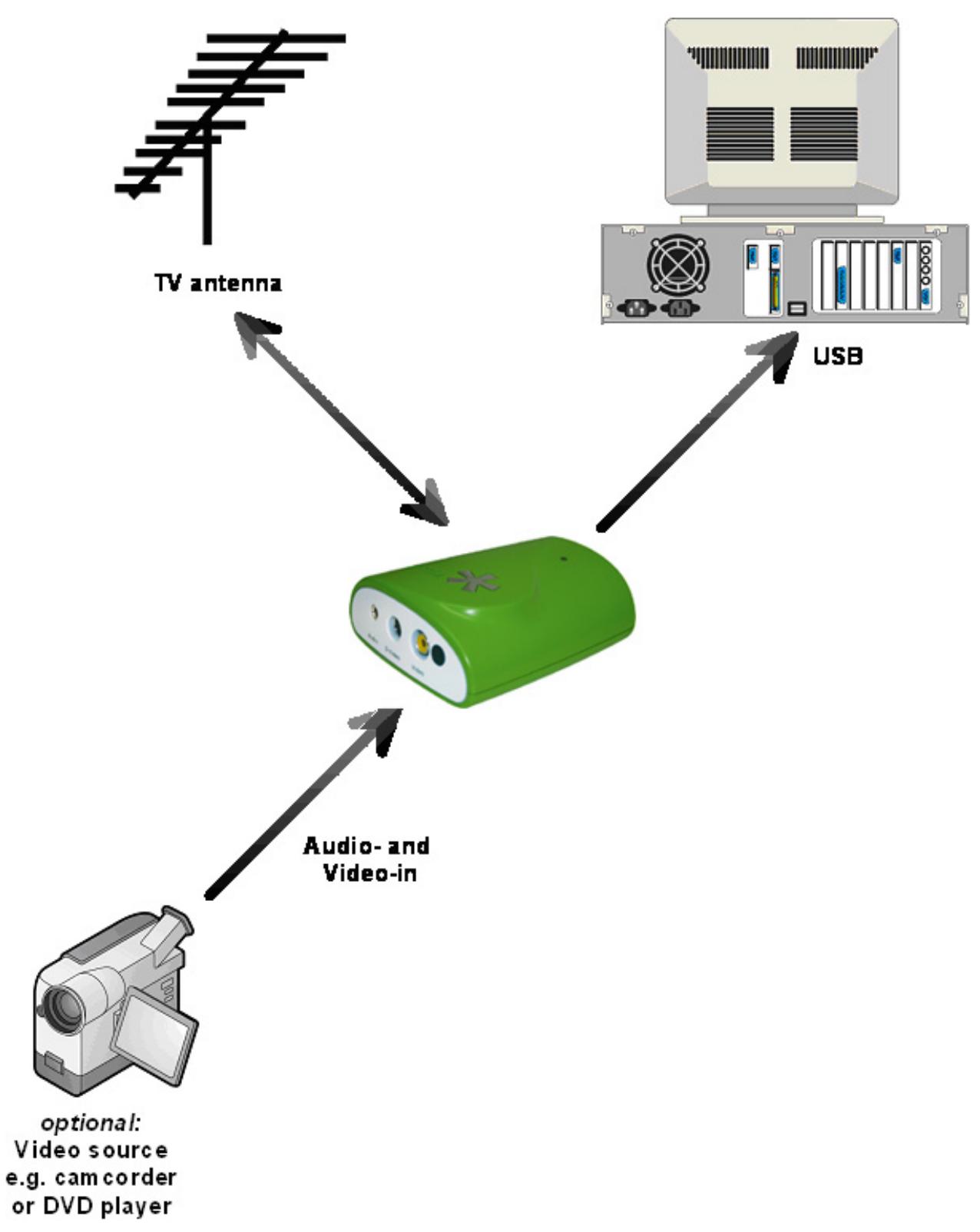
- Hook up the antenna input of Dazzle*TV mobile to your house antenna (coaxial connection) or to your cable connection.

To connect the antenna, you need the corresponding cable. Note that the quality of the cable has a great influence on the quality of the reception.
PC connection
- Insert the USB connector of Dazzle*TV mobile into your PC.

Use only the USB cable included in the delivery.
Video device connection
- Connect your video source (for example, a camcorder, video recorder or DVD player) to the audio input and to the corresponding video input of Dazzle*TV mobile. You can use any video device that delivers an S-video signal or a composite video signal in PAL, NTSC or SECAM (for example, a video recorder, camcorder or DVD player). This is independent of the video system used (for example, VHS, S-VHS, Hi8 or Video 8).

Note that, depending on the product variant, not all video standards (PAL, NTSC or SECAM) are available.

If your video source has a S-video output, connect this and not the composite video output to ensure better output quality.
Sample configuration
Bus system
USB 2.0
Antenna input
75 Ohm, F-connector or IEC
Video input
S-video input (mini-DIN), composite video input (cinch)
Audio input
Stereo audio input (3.5 mm jack plug)
TV tuner
Microtune MT2050
The tuner supports the following depending on it circuitry:
PAL B/G/D/K/I/SECAM
or
NTSC, PAL M/N
- Dazzle*TV mobile Hardware
- Dazzle\*TV mobile Hardware
- Disposal and Recycling
- Computer hardware
- Processor
- Memory
- Hard disk
- Graphics card
- Sound card
- USB port
- CD-ROM / DVD-ROM drive or recorder
- Computer software
- Antenna connection
- PC connection
- Video device connection
- Sample configuration
- Bus system
- Antenna input
- Video input
- Audio input
- TV tuner
Marque : PINNACLE
Modèle : DAZZLE TV MOBILE
Catégorie : Carte d'acquisition vidéo