MODE D'EMPLOI HK 980 HARMAN KARDON
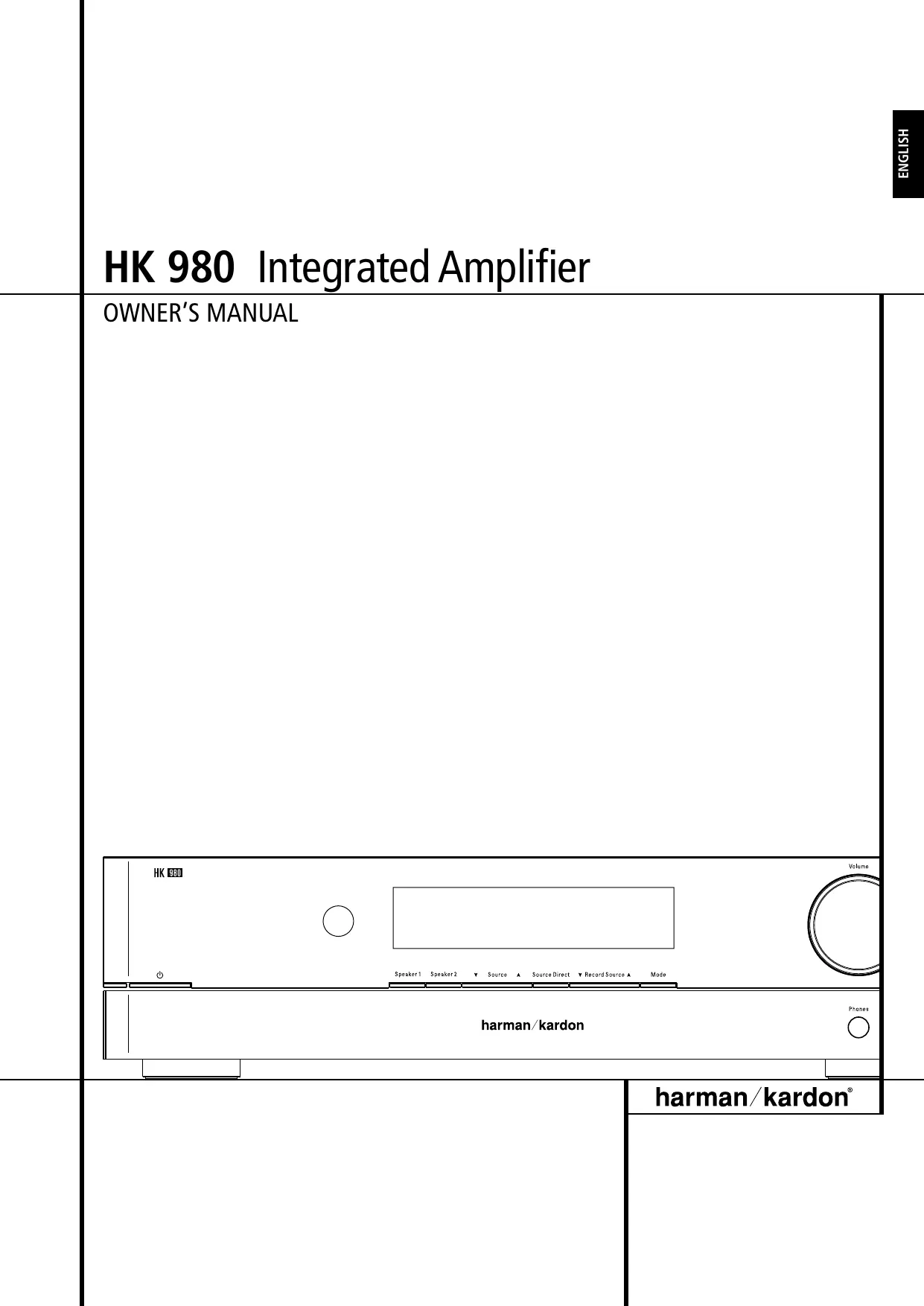
HK 980 Integrated Amplifier
OWNER'S MANUAL
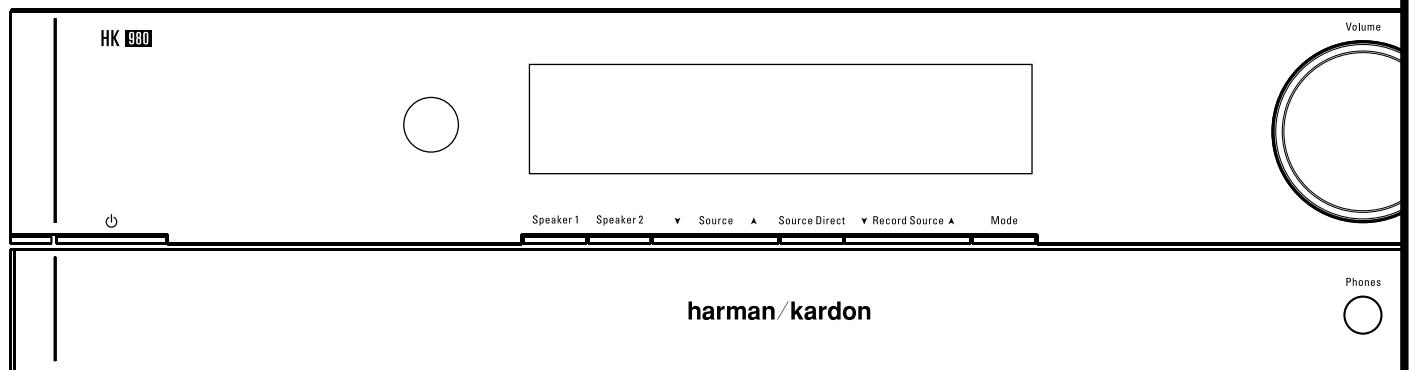
Table of Contents
3 Introduction
4 Connections
5 Controls and Functions
6 Remote Control
7 Operating Instructions
7 Troubleshooting
8 Specifications
DECLARATION OF CONFORMITY

We, Harman Consumer Group International
2, route de Tours
F-72500 Château-du-Loir
France
declare in own responsibility, that the
product described in this owners manual is
in compliance with technical standards:
EN 55013:2001 + A1:2003
EN 55020:2002 + A1:2003
EN 61000-3-2:2000
EN 61000-3-3:1995 + A1:2001
EN 60065:2002
Jurjen Amsterdam
Harman Consumer Group International
12/07
Congratulations on your choice of the Harman Kardon HK 980 Integrated Amplifier.
In order to obtain the best performance from this integrated amplifier, please be sure to read this owner's manual and use your integrated amplifier only in accordance with its instructions.
The special features of this unit include:
HCC
(High Instantaneous Current Capability)
The amplifier sections react rapidly to musical transients, providing the instantaneous current necessary to precisely drive and control nearly any loudspeaker system.
Ultrawide Bandwidth
The bandwidth of this unit is exceptionally wide and is independent of negative feedback. This improves transient accuracy and phase linearity.
Low Negative Feedback
This unit has been designed to have low distortion and wide bandwidth without high negative feedback. This further improves its dynamic accuracy.
Discrete Component Circuitry
In order to achieve the above goals, all discrete electronic circuitry has been employed. No available integrated circuits could provide this high level of performance.
Sophisticated Electronic
Protection Circuitry
Harman Kardon's unique protection circuitry guards the amplifier from short circuit or damaged speakers and wires, without impairing sound quality by the use of current limiting or output relays.
General instructions
Always Use at 230V AC
This unit is designed for operation with 230V AC. Use only domestic AC outlets. Connecting the unit to an outlet supplying a higher voltage may create a fire hazard.
Handle the Power Cord Gently
Do not disconnect the plug from the AC outlet by pulling the cord; always pull the plug itself. Pulling the cord may damage it. If you do not intend to use your unit for any considerable length of time, turn the unit off completely by taking the power cord out of the AC wall outlet. Do not place furniture or other heavy objects on the cord, and try to avoid dropping heavy objects on it. Also do not tie a knot in the power cord. Not only may the cord be damaged, it can also cause a short circuit with a consequent fire hazard.
Place of installation
Place the unit on a firm and level surface. Avoid installing your unit under the following conditions:
Moist or humid places.
Places exposed to direct sunlight or close to heating equipment.
Extremely cold locations.
Places subject to excessive vibration or dust.
Poorly ventilated places.
Provide sufficient ventilation, do not block ventilation openings.
Do not obstruct the ventilation slots on the top surface of the unit by placing objects on them. Otherwise, the temperature inside the unit may rise, possibly affecting its long-term reliability.
To ensure sufficient ventilation, the product should be placed in an open area with free air flow.
Do not place a CD player or other equipment on top of the amplifier.
Do not expose the amplifier to dripping or splashing. Do not place objects filled with liquids, such as vases, on or near the amplifier.
Moving the Unit
Before moving the unit, be sure to pull out the power cord from the AC outlet and disconnect the interconnection cords with other units.
Do Not Open the Cabinet
To prevent shock hazard, do not tamper with internal components for inspection or maintenance. Harman Kardon does not guarantee against performance degradation resulting from any modification. If water, a hairpin or wire accidentally enters the unit, immediately pull the plug from the AC outlet to prevent shock and consult an authorized Harman Kardon service station. If you use the unit under this condition, it may cause a fire shock hazard.
Cleaning
If the unit gets dirty, wipe it with a soft dry cloth. If necessary, wipe it with a soft cloth dampened with mild soapy water and then with a dry cloth. Never use benzene, thinner, alcohol or other volatile agents, and avoid spraying an insecticide near the unit.
Warning Signs
If you detect an abnormal smell or smoke, immediately turn the amplifier off and unplug the power cord. Contact your dealer or nearest Harman Kardon service center.
Packaging
Save all packing material. It is essential for shipping, should you move, or in the event the unit ever needs repair.
CAUTION
RISK OF ELECTRIC SHOCK DO NOT OPEN

CAUTION: TO REDUCE THE RISK OF ELECTRIC SHOCK, DO NOT REMOVE COVER (OR BACK). NO USER-SERVICEABLE PARTS INSIDE. REFER SERVICING TO QUALIFIED SERVICE PERSONNEL.
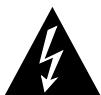
The lightning flash with arrowhead symbol, within an equilateral triangle, is intended to alert the user to the presence of uninsulated "dangerous voltage" within the product's enclosure that may be of sufficient magnitude to constitute a risk of electric shock to persons.

The exclamation point within an equilateral triangle is intended to alert the user to the presence of important operating and maintenance (servicing) instructions in the literature accompanying the appliance.
WARNING: TO REDUCE THE RISK OF FIRE OR ELECTRIC SHOCK, DO NOT EXPOSE THIS APPLIANCE TO RAIN OR MOISTURE.
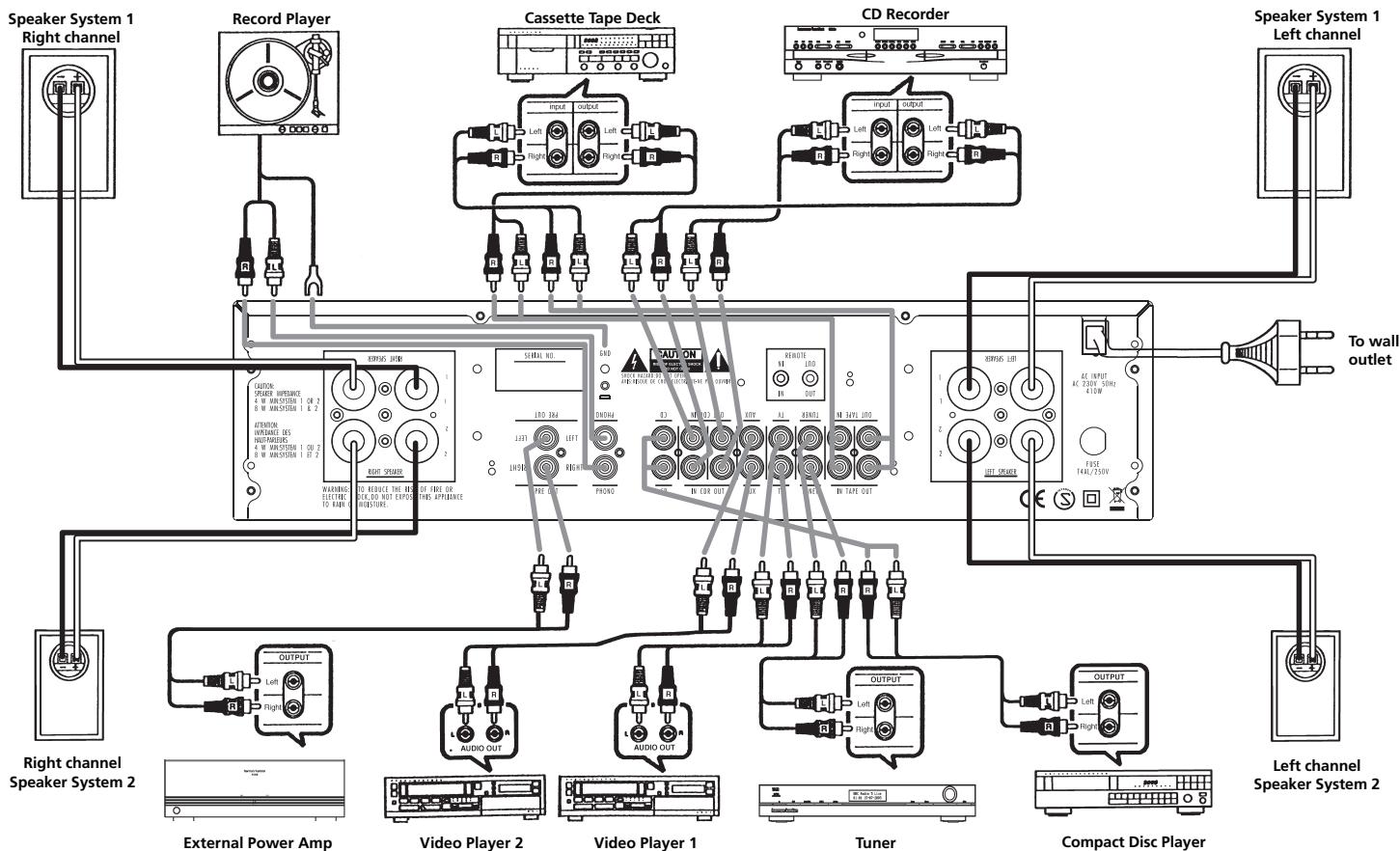
Connecting Other Components
- Make sure your amplifier and other components are turned off.
- Connect each component's Output/Play jacks to the corresponding Input jacks on the back of your amplifier and, if available, the component's Input/Record jacks to the Output jacks of the HK 980. Use the white, black or gray plugs to connect Left channel jacks; use the red plugs for Right channel jacks.
- A record player with MM cartridge must be connected to the Phono Input jacks and a separate ground wire to the ground terminal screw above.
Wired Remote Control
To control your amplifier with an external infrared remote sensor, connect the wire from the remote sensor to the REMOTE IN jack on the back panel. Or, if another stereo component has a built-in infrared remote sensor and a Remote Output jack, it may be possible to connect this jack to the REMOTE IN jack of your amplifier. All Harman Kardon products with «Remote In« and «Remote Out« jacks are compatible with one another, except for the Citation 22, 24 and 25. Other manufacturers' remote sensors and components may not be compatible, but it will not hurt to experiment. A second wire may be used to connect your amplifier's REMOTE OUT jack to the Remote Input of another stereo component.
Continue this process to include additional components (if compatible).
Connecting Speakers
- For best performance, use high quality speaker cables. However, ordinary copper wire can be used if the gauge meets the following requirements:
Wire
Length
Up to 2.5 meter
Up to 4 meter
Up to 6 meter
Above 6 meter
Min.
Diameter
1 mm
1.25 mm
1.6 mm
2-2.5 mm
- Avoid rolling excess wire with or near signal interconnects.
External Power Amplifiers
For applications where higher power is desired, connect the Pre-Out Jacks to the Main In Jacks of an external power amplifier.
IMPORTANT: When connecting two pairs of speakers, determine the impedance of each pair by looking on the back of the speakers, in your owner's manual, or by contacting your dealer or manufacturer.
You can listen to two pairs of speakers at the same time ONLY if the impedance of EACH speaker is NOT LESS THAN 8 Ohms.
WARNING: Do not play sets of speakers simultaneously except as recommended above. Amplifier may overheat.
AC Power
Plug the cord into a 230 VAC wall socket.
Power indicator will light up to indicate power ON. To completely disconnect the power input, the main plug must be disconnected from the mains.
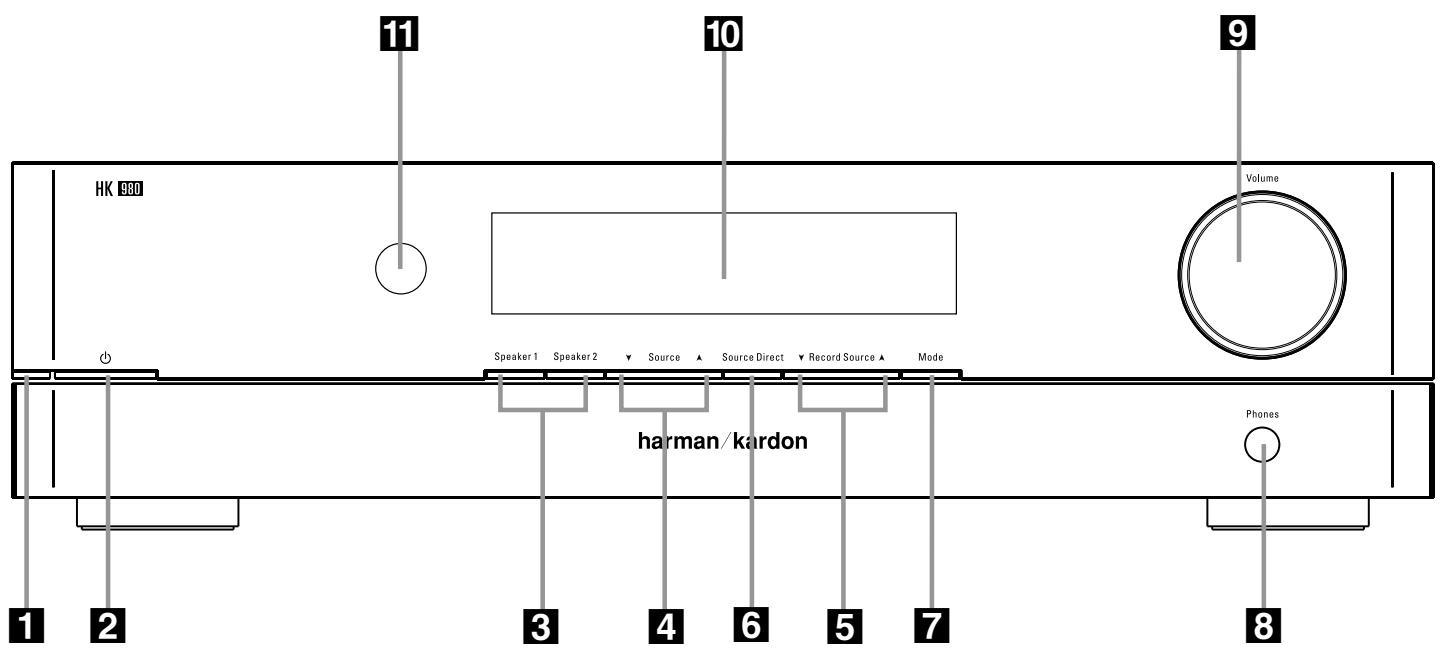
1 Power Indicator: This LED will illuminate in amber when the unit is in the Standby mode to signal that the unit is ready to be turned on. When the unit is in operation, the indicator will turn blue.
2 System Power Control: Press this button to turn on the HK 980; press it again to turn the unit off (to Standby). Note that the Power Indicator 1 next to the switch will turn blue when the unit is on.
3 Speaker 1/2 Selectors: Press to select speaker pair 1 or 2, or both, or neither (headphone output only).
4 Input Source Selector: Select desired input source for listening by press-ing the "Input Source" button repeatedly (on the left will select downwards, right upwards) until the display for the desired source is illuminated.
Record Source Selector: Select desired source for recording to device connected to the rear panel Tape and CDR Out sockets by pressing the "Record Source" button repeatedly until the display for the desired source is illuminated.
Source Direct: Press to bypass tone control circuitry.
7 Mode Button: Press this button to make changes to the bass, treble and balance settings.
8 Headphone Jack: Plug in headphones if desired. With both "Speaker 1" and "2" selectors in the Off position, output is supplied only to headphones.
9 Volume Control: Turn to raise or lower output volume.
10 Main Information Display: This display delivers messages and status indications to help you operate the receiver.
Remote Sensor Window: The sensor behind this window receives infrared signals from the remote control. Aim the remote at this area and do not block or cover it unless an external remote sensor is installed.
Independent Remote Control
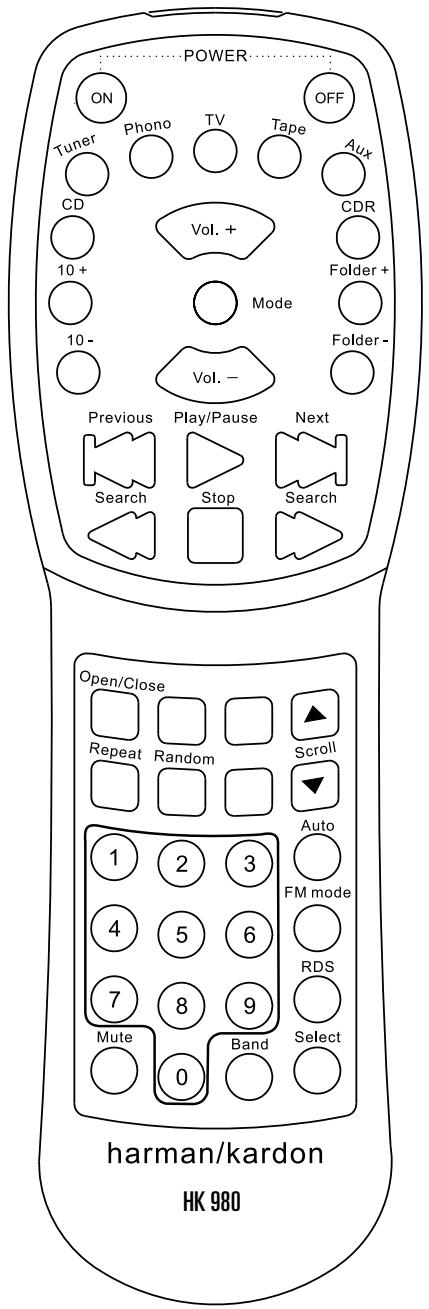
The system remote of the HK 980 can control the amplifier and compatible Tuners, CD Players and CD Recorders. The remote In jack of units without an integrated IR receiver must be connected to the amplifier's remote control output jack so that the system remote control can operate them.
The Function Table below will show all functions of the HK 980 and external devices that can be controlled by the HK 980 remote.
Important Notes:
- To remote control a tuner, CD Recorder or CD Player, the appropriate input ("TUNER", "CDR" or "CD") must have been selected with the source buttons of the remote control (selecting on the front panel is not sufficient).
- Note that DVD players or tape decks cannot be controlled by the remote.
- To control a compatible CD Recorder "CDR" must be selected as input and the drive to be controlled (CDP or CDR) must be selected appropriately with the "CDP SELECT" or "CDR SELECT" buttons.
Operating Conditions
The control unit operates effectively within a distance of 7 meters and an angle of 30° from the amplifier. Using the control near fluorescent lights may shorten this range, as will any dust or dirt that accumulates on the front of the remote control or the remote sensor area of the amplifier. Also avoid blocking the line of sight between amplifier and remote.
The control unit is powered by two AA batteries, included with your amplifier. When you replace weak batteries, replace both at the same time. When the remote is to be unused for an extended period, remove the batteries to prevent damage from corrosion.
Remote button functions
| Button | HK 980 | CD Player | Tuner |
| ON | Power On | - | - |
| OFF | Power Off | Power Off | Power Off |
| Tuner | Select Tuner | - | Power On |
| Phono | Select Phono | - | - |
| TV | Select TV | - | - |
| Tape | Select Tape | - | - |
| Aux | Select Aux | - | - |
| CD | Select CD | Power On | - |
| Volume + | Volume Up | - | - |
| CDR | Select CDR | - | - |
| 10+ | - | Current Track +10 | - |
| Mode | Select Mode | - | - |
| Folder + | - | Next Folder | - |
| 10- | - | Current Track -10 | - |
| Volume - | Volume Down | - | - |
| Folder - | - | Previous Folder | - |
| Previous▶▶ | - | Skip Previous | - |
| ▶Play/Pause | - | Play/Pause | - |
| Next▶▶ | - | Skip Next | - |
| Search▶▶ | - | Fast Reverse | - |
| ■Stop | - | Stop | - |
| Search▶▶ | - | Fast Forward | - |
| Open/Close | - | Open/Close | - |
| Scroll + | - | - | Tuning Up |
| Repeat | - | Repeat Play | - |
| Random | - | Random Play | - |
| Scroll - | - | - | Tuning Down |
| 0 ~ 9 (Numeric Keys) | - | Track Select | Preset Select |
| Auto | - | - | Auto Tune |
| FM Mode | - | - | FM Mode Select |
| RDS | - | - | RDS Display Select |
| Mute | Mute Sound | - | - |
| Band | - | - | Band Select |
| Select | - | - | Tune Mode Select |
Listening to your CD player, tape deck, tuner or other source
- Turn Volume control to minimum level and press the flat Power switch to turn on the amplifier. The power indicator lights blue and the protection circuitry checks for short circuit or other problems for a few seconds before sound output.
- Press "Speaker 1" to hear loudspeakers connected to the rear Speakers 1 terminals. Press "Speaker 2" to hear loudspeakers connected to the rear Speakers 2 terminals. Press both to hear both speaker pairs at once. To listen to headphones only, press to turn off any active speaker pair.
- Select desired source for listening by pressing the front panel Source up or down repeatedly until the name of the source is shown in the Main Information Display or by pressing the desired Source button on the remote control.
- Begin playing the desired source.
-
Adjust the Volume control to the desired level.
-
Adjust Bass, Treble and Balance controls as desired (the Source Direct function must be turned off). To adjust the bass level, press the Mode Button twice so that the Main Information Display shows BASS 0dB. By turning the Volume Button to the right, the bass level will increase, turning the Volume Button left will decrease the bass level.
Once the desired bass level has been set, press the Mode Button to set the requested level for the treble. The Main Information Display will show TREBLE 0dB. By turning the Volume Button to the right, the treble level will increase, turning the Volume Button left will decrease the treble level.
Once the desired treble level has been set, press the Mode Button to set the requested level for the balance. The Main Information Display will show BALANCE 0. By turning the Volume Button to the right, the balance will move to the right speaker, turning the Volume Button left will move the balance to the left speaker.
Press the Mode Button again to return the the normal volume indication.
- Press "Source Direct" until the Main Information Display shows DIRECT ON to bypass the tone control to ensure purest
sound performance. Press again to turn the bypass function off and to make the tone and balance controls function again.
Making a recording
You may record any source to tape or to CD-R or to both simultaneously. You may also connect a second tape deck to the CDR inputs and outputs to record from tape to tape (in either direction).
To select the desired source for recording (this can be a different source than the one being listened to), press the Record Source Selector up or down button on the front panel repeatedly until the indicator for the name of the source to be recorded is shown in the Main Information Display.
NOTE: The record output signal is taken directly from the program source and is unaffected by the Volume, Bass, Treble or Balance controls.
Important Notes:
- The functions "Source Direct" and "Record Source" can be selected on the front panel only, not from the remote control.
- 3-head cassette decks with monitoring function can be connected to "Tape" or "CDR" connectors too, but their monitoring function cannot be used.
Troubleshooting
This unit is designed for trouble-free operation; most problems users encounter are due to operating errors. So if you have a problem, first check this list for a possible solution. If the problem persists, consult your authorized Harman Kardon service center.
If the problem is...
No lights illuminate when power cord is plugged into AC outlet.
Make sure that...
- The unit is plugged into a live outlet.
No sound is heard.
- Speaker switches corresponding to the desired speakers are pressed.
- Correct source button has been pressed.
Volume is turned up.
- Speaker wires are connected properly.
- Hook-up wires to source component are connected properly.
Sound is not heard from the speaker system on one side.
- The speaker wires and connection wires are connected correctly.
- Set the balance setting to 0
When listening to stereo sound, the left and right sounds are reversed.
- The speaker wires are connected correctly.
- The wires between components are connected correctly.
Intermittent or continuous buzzing or hissing.
- The unit is away from fluorescent lights, TV, motors and other electrical appliances.
The remote control and front panel controls don't appear to work.
- Disconnect the AC line cord from the wall socket, wait 5 minutes and then re-connect it.
Humming noise when listening to LP
- Ground wire from record player has been connected to ground terminal on amplifier.
- Cable from record player is away from power cords and speaker cables.
- Record player is not to close to speakers.
- Record player is on stable surface.
- Cable from record player is connected to the Phono jacks.
- The phono cartridge is MM, not MC.
| | NOMINAL |
| Continuous Average Power Per Channel (FTC) | 8 Ohms: | 80 Watts@<0.09%THD |
| 20 Hz – 20 kHz, both channels driven | 4 Ohms: | 120 Watts@<0.3%THD |
| Dynamic Power (IHF, 1 kHz Tone Burst) | 8 Ohms: | 115 Watts |
| 4 Ohms: | 200 Watts |
| 2 Ohms: | 295 Watts |
| 1 Ohms: | 380 Watts |
| High instantaneous current capability (HCC) | | ±80 Amps |
| Power Bandwidth @ Half-Rated output, 8 | | <10 Hz - 150 kHz |
| Frequency response @ 1W (+0/-3dB) | | 5 Hz - 150 kHz |
| Damping factor (20Hz-20k Hz) | | >125 |
| Signal-to-noise Ratio (Reference rated power output, A-WTD) | Tuner/CD | 95 dB |
| Phono (MM): | 75 dB |
| Input sensitivity/Impedance | Tuner/CD | 270mV/43k Ohms |
| Phono (MM): | 4.0mV/47k Ohms |
| Overload: | Tuner/CD | 4V |
| Phono (MM): | 90 mV |
| Tone control range, Bass @ 50 Hz/Treble @ 10 kHz | | ±10 dB/±10 dB |
| Power supply: | | AC 230V, 50 Hz |
| Power consumption: | | 410 W |
| Dimensions (Width x Height x Depth): | | 440 x 116 x 392 mm |
| Weight: | | 12.7 kg |